

Page 1
Micro Clock MkIII | User Manual
Page 2

TABLE OF CONTENTS
Introduction ..........................................................................................................3
Features .................................................................................................................3
Specications ........................................................................................................3
Package Contents .................................................................................................4
Front .......................................................................................................................4
Back .......................................................................................................................4
Connection Diagrams ...........................................................................................5
Repair .....................................................................................................................6
Warranty ................................................................................................................6
Disclaimer ..............................................................................................................6
Copyright ...............................................................................................................7
Micro Clock MkIII | User Manual 2
Page 3

INTRODUCTION
The Micro Clock MkIII is a signicant redesign of its predecessor, the Micro Clock MkII. Core
technological improvements include lower-jitter crystal oscillators, higher-quality galvanic
transformer isolation in the signal path, dedicated output drivers with better isolation,
higher-precision signal division, and much heavier noise ltration throughout the circuit.
All of this results in a more robust, lower-jitter clock signal than the Micro Clock MkII, with
even more desirable harmonics in the clock’s spectral band that impart an undeniable
musical quality to the conversion process. The feature set has expanded to include an LED
frequency display, six BNC outputs capable of up to 384kHz, AES and RCA S/PDIF outputs
capable of up to 192kHz, and an optical S/PDIF output capable of up to 96kHz.
The Micro Clock MkIII is the culmination of almost 10 years of research involving jitterreducing, harmonic-enhancing design techniques not found in any other master word
clocks on the market. It not only can sync all of your digital audio gear together, but can
signicantly improve the sound quality as well. It may be the most signicant single
upgrade you can make to your digital audio setup. Get ready to hear what you’ve been
missing!
FEATURES
• Ultra-low jitter, harmonically-enhanced
word clock signal generation
• Dimmable frequency display
• 8 selectable sample rates (44.1kHz,
48kHz, 88.2kHz, 96kHz, 176.4kHz,
192kHz, 352.8kHz, and 384kHz)
• 6 BNC outputs with dedicated output
drivers for maximum isolation
• RCA S/PDIF output
• Optical S/PDIF output
• AES output
• Full & 1/2 rack removable rack ears
• Locking frequency selector knob
SPECIFICATIONS
Jitter: 1.92pS RMS (BNC outputs)
Outputs: 6 BNC, 1 XLR AES, 1 RCA S/PDIF, 1 Optical S/PDIF (recommended max. cable
length = 1,000ft of high quality, 75Ω coaxial cable)
• BNC: 75 Ω, 5V unterminated
• RCA S/PDIF: 75 Ω, unbalanced
• AES XLR: 110 Ω, balanced
Clock Frequencies
• BNC (kHz) - 44.1, 48, 88.2, 96, 176.4, 192, 352.8, 384
• RCA S/PDIF & AES (kHz) - 44.1, 48, 88.2, 96, 176.4, 192
• Optical S/PDIF (kHz) – 44.1, 48, 88.2, 96
Power: 9VDC (6W power consumption)
Power connector: 2.1mm barrel connector with 5.5mm outer diameter (center pin positive)
Micro Clock MkIII | User Manual 3
Page 4
Weight: 2.2lbs
Dimensions: 6.5”L x 6”W x 1.75”H (without rack ears installed)
Shipping weight: 4lbs
Shipping dimensions: 13”L x 11”W x 5”H
PACKAGE CONTENTS
• Micro Clock MkIII
• Power Supply
• Full & 1/2 Rack Ears with Hardware
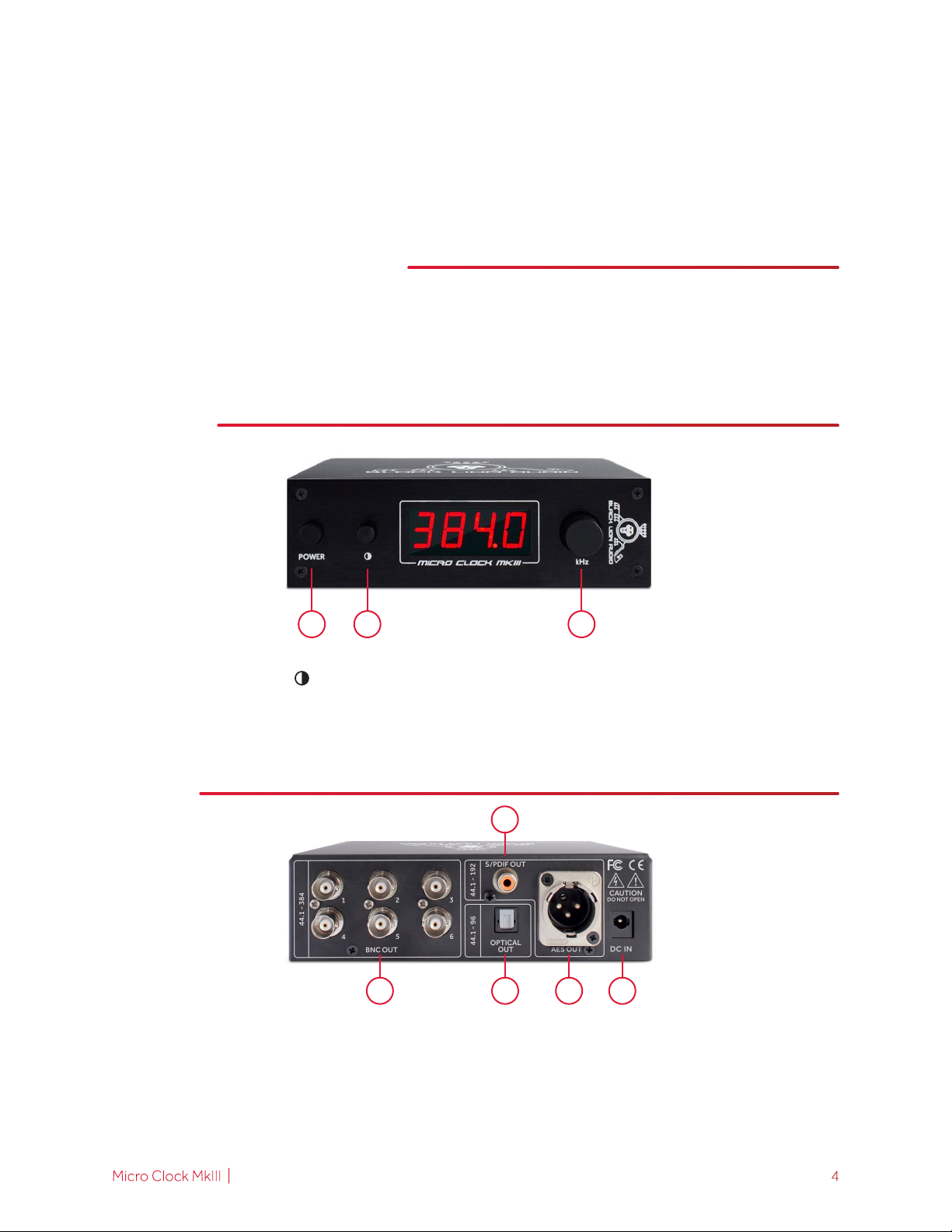
FRONT
1
1. POWER: engage to turn unit on, disengage to turn unit o
2. DISPLAY CONTRAST ( ): engage to dim display, disengage to brighten display
3. FREQUENCY (kHz): rotate three clicks at a moderate speed to unlock and cycle through output
frequencies as indicated on the display
2 3
BACK
2
1 3 4 5
1. BNC Out: 5V, 75Ω output; termination is optional (44.1kHz – 384kHz)
2. S/PDIF Out: unbalanced RCA output (44.1kHz – 192kHz)
3. Optical Out: optical S/PDIF output; does not support ADAT (44.1kHz – 96kHz)
4. AES Out: balanced XLR output (44.1kHz – 192kHz)
5. DC In: 9VDC center pin positive, input jack (only use a BLA-specied power supply)
Micro Clock MkIII | User Manual 4
Page 5
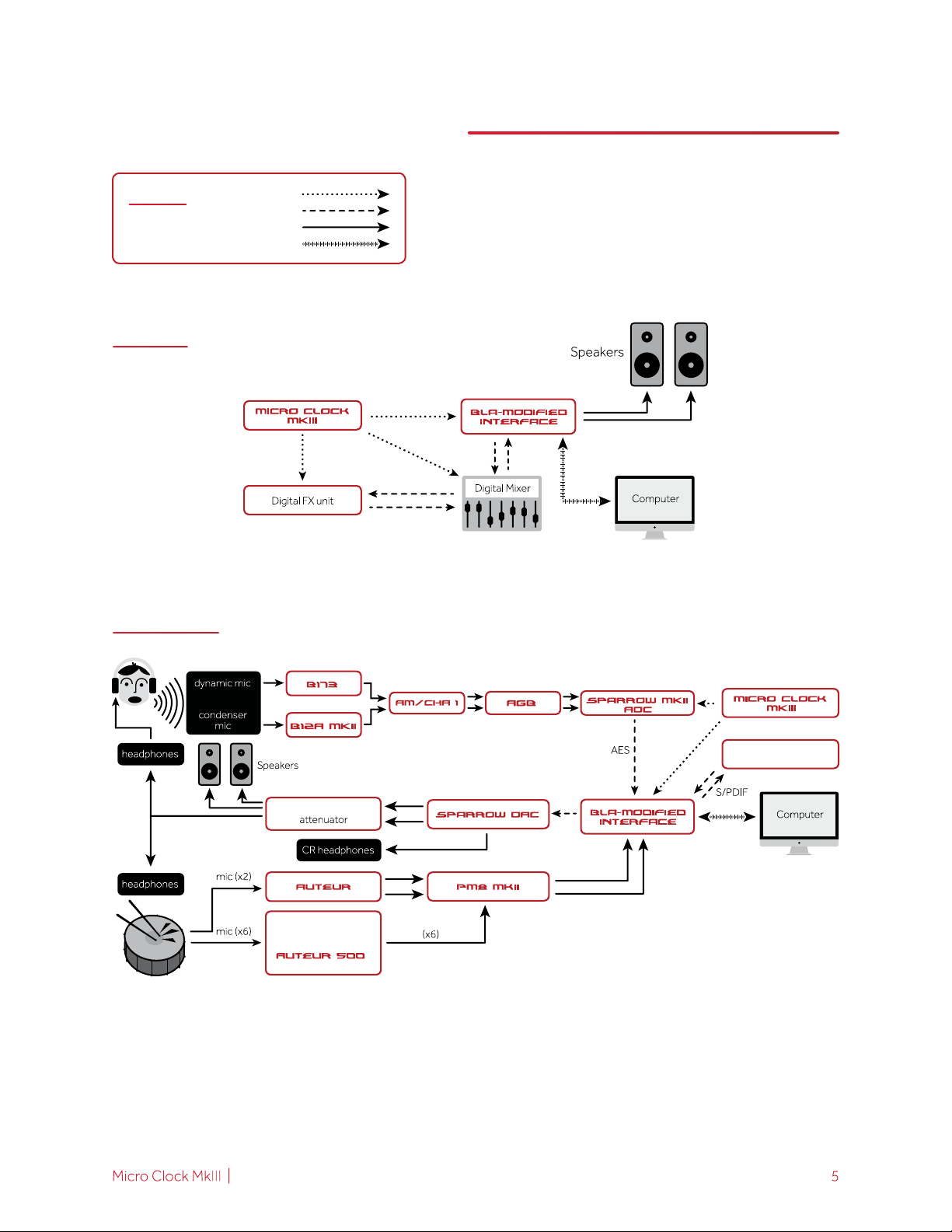
CONNECTION DIAGRAMS
LEGEND
MIXING
TRACKING
Word Clock
Digital Audio
Analog Audio
Data
Multi FX unit
Monitor controller/
500 series lunchbox
w/6 channels of
Micro Clock MkIII | User Manual 5
Page 6
REPAIR
should not attempt to repair the device
Please contact Black Lion Audio if you need assistance.
WARRANTY
We extend a three-year warranty on defects in materials and workmanship for all Black Lion
Audio products from the date of purchase. This does not cover user error, wear, tear, or
abuse. Should your B.L.A. product experience any problems or failures during the warranty
period, immediately contact us, and we will gladly correct the issue at no charge (excluding
shipping).
DISCLAIMER
For your safety, please read the following!
Grounding: For your safety, do not defeat the grounding connection. Use the device only
when it is properly grounded.
Liquids, water, and moisture: The device should not be used near water, or when it is wet.
Care should be taken so that it remains dry. Be sure to keep the device away from rain or
other moisture.
Power: The device should be connected to a power supply only of the type described in the
user manual and/or as marked on the rear panel.
Power cables: Power supply cables should not be routed under carpets, or where they are
likely to be walked on or pinched by items placed upon or against them. Do not use power
supply cables that have become worn or frayed.
Multiple-input voltage:
plug, cable, or both, depending on the available power connection in your area.
User Manual
Page 7
1801 W. BELLE PLAINE AVE., SUITE 105
CHICAGO, IL 60613
BLACKLIONAUDIO.COM
Copyright © 2016 Black Lion Audio, Inc. All rights reserved. This manual and any associated
artwork, product designs, and design concepts are subject to copyright protection. No part of
this document may be reproduced in any form without prior written permission of Black Lion
Audio, Inc.
 Loading...