

Page 1
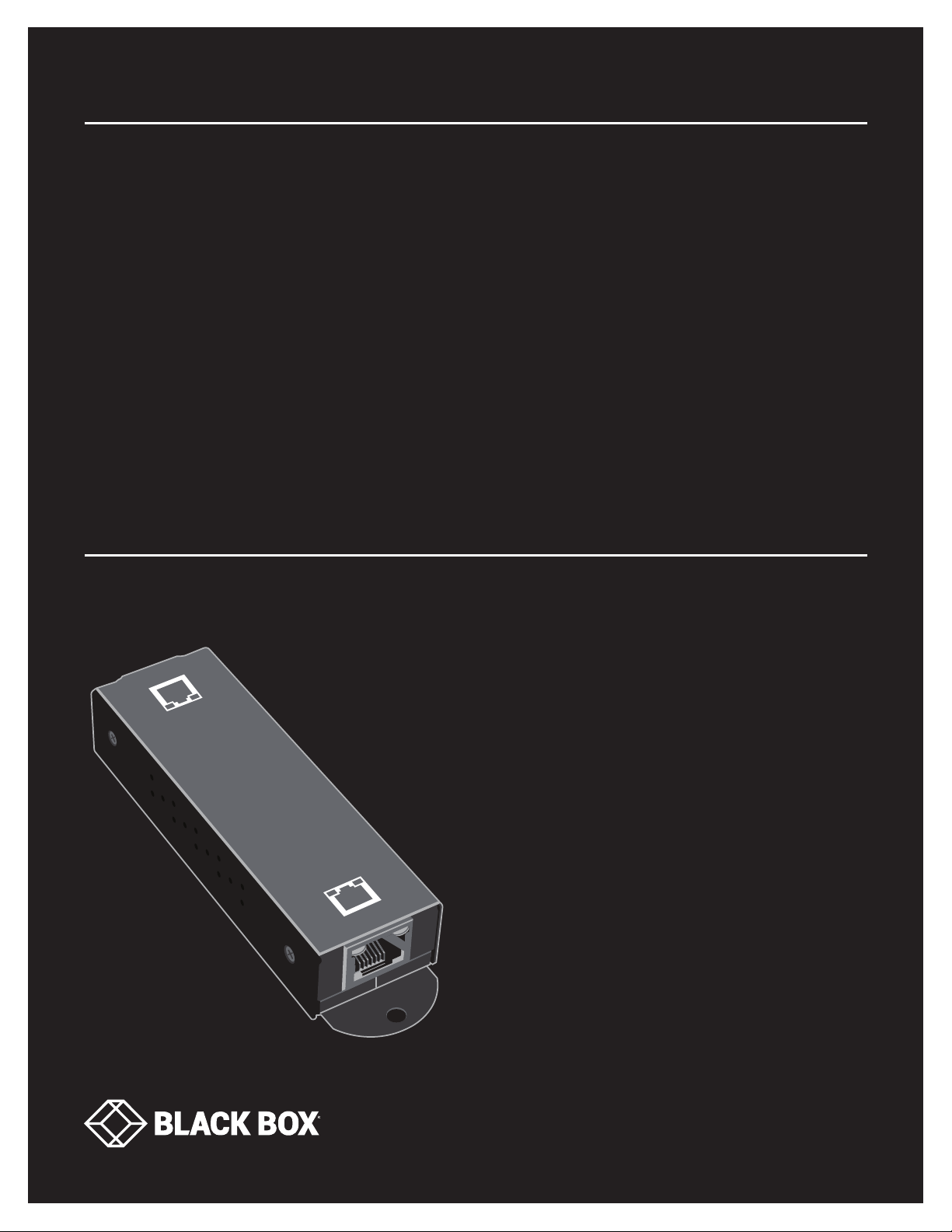
USER MANUAL
L P R1111
GIGABIT POE+
EXTENDER,
2-PORT
24/7 TECHNICAL SUPPORT AT 1.877.877.2269 OR VISIT BLACKBOX.COM
PoE Out
PoE In
Page 2

NEED HELP?
LEAV E TH E TEC H TO US
LIVE 24/7
TABLE OF CONTENTS
TECHNICAL
SUPPORT
1. 8 7 7. 8 7 7. 2 2 69
1. SPECIFICATIONS ........................................................................................................................................................................... 3
2. OVERVIE W ...................................................................................................................................................................................... 4
2.1 Introduction ...............................................................................................................................................................................................4
2.2 Features .................................................................................................................................................................................................... 4
2.3 What’s Included ........................................................................................................................................................................................4
2.4 Hardware Description ..............................................................................................................................................................................5
3. CONNECTIONS .............................................................................................................................................................................. 6
3.1 PSE/PD to 2-Port PoE Extender .............................................................................................................................................................. 6
3.2 Power and Extend Distance ....................................................................................................................................................................6
4. OPERATION .................................................................................................................................................................................... 7
Front-Panel LED Indicators ............................................................................................................................................................................7
APPENDIX A. REGULATORY INFORMATION .................................................................................................................................. 8
A.1 FCC Class B Statement ........................................................................................................................................................................... 8
A.2 NOM Statement ....................................................................................................................................................................................... 9
APPENDIX B. DISCLAIMER/TRADEMARKS ................................................................................................................................. 10
B.1 Disclaimer ............................................................................................................................................................................................... 10
B.2 Trademarks Used in this Manual ............................................................................................................ ..............................................10
2
1. 8 7 7. 8 7 7. 2 2 6 9 BL ACK BOX .COM
Page 3

CHAPTER 1: SPECIFICATIONS
TABLE 1-1. SPECIFICATIONS
SPECIFICATION DESCRIPTION
Standards
Filtering/Forwarding Rates
Mounting Wallmount
Transmission Method Store-and-Forward
Transmission Media CAT5e/6 UTP/STP
Connectors
Indicators Per Port: (1) Data LED, (1) PoE LED
Environmental
Power Input Powered by PSE with IEEE 802.3af/at PoE/PoE+
Supporting PSE Mode Mode A and Mode B
Max. System Power Consumption 2 W
Dimensions 0.8" H x 1.3" W x 4.8" D (2.0 x 3.2 x 12.3 cm)
Weight 0.2 lb. (0.1 kg)
Certifications CE, FCC Class B, VCCI
IEEE 802.3at, IEEE 802.3 10BASE-T, IEEE 802.3u 100BASE-TX, IEEE 802.3ab 1000BASE-T,
IEEE 802.3x Flow control
1000 Mbps: 1,488,000 pps,
100 Mbps: 148,800 pps,
10 Mbps: 14,880 pps
(1) RJ-45 PoE In (Data + Power in),
(1) RJ-45 PoE Out (Data + Power out)
Operating Temperature: 23 to 113° F (-5 to 45° C);
Storage Temperature: -4 to +185° F (-20 to +85° C);
Relative Humidity: 10 to 90%, noncondensing;
NEED HELP?
LEAV E TH E TEC H TO US
LIVE 24/7
TECHNICAL
SUPPORT
1. 8 7 7. 8 7 7. 2 2 69
1. 8 7 7. 8 7 7. 2 2 6 9 BL ACK BOX .COM
3
Page 4

NEED HELP?
LEAV E TH E TEC H TO US
LIVE 24/7
CHAPTER 2: OVERVIEW
2.1 INTRODUCTION
The Gigabit PoE+ Extender (1) PD In, (1) PoE Out extends the distance of your PoE+ link another 328 feet (100 meters) per extender.
You can cover longer distances by cascading multiple PoE+ Extenders together on a network. The extender does not need any
additional power supply and the PoE device (such as an IP camera) is powered by a PoE switch or PoE injector.
No special networking cable is required. By adding PoE devices, you can use an existing standard CAT5e or CAT6 Ethernet cable
without a new electrical outlet for both power and data. It helps you reduce installation time and cost.
This PoE+ extender has one 10/100/1000M PD input port and one 10/100/1000M PSE output port with electric power that
complies with the IEEE 802.3at standard. It can extend the distance via CAT5e/6 cable without any special equipment.
The PD port can be connected via CAT5e/6 cable to another PSE/PoE and get power from the other PSE port through CAT5e/6
cable.
The PSE/PoE port can be connected to another PD via CAT5e/6 cable and extend the distance another 328 feet (100 meters)
through this device.
It is designed for easy installation and high performance in an environment where the traffic is on the network and the number
of users is increased continuously.
TECHNICAL
SUPPORT
1. 8 7 7. 8 7 7. 2 2 69
2.2 FEATURES
Has one 10/100/1000M PoE In (Data + Power in) port and one 10/100/1000M PoE Out (Data + Power out) port
Complies with IEEE 802 10BASE-T, IEEE 802.3u 100BASE-TX, IEEE 802.3ab 1000BASE-T, and IEEE 802.3at PoE
The Powered Device (PD) connected to the Data + Power in port gets power from a Power Souring Equipment (PSE)
The Power Souring Equipment (PSE) provides power to a PD
Supports dedicated full-duplex 2000 Mbps bandwidth
Smart plug-and-play
2.3 WHAT’S INCLUDED
Before you install this extender, verify that your package contains the following items:
(1) Gigabit PoE+ Extender (1) PoE In, (1) PoE Out
(2) screw sets for wallmounting
NOTE: If any of these items are missing or damaged, contact Black Box Technical Support at 877-877-2269 or [email protected]
4
1. 8 7 7. 8 7 7. 2 2 6 9 BL ACK BOX .COM
Page 5

CHAPTER 2: OVERVIEW
2.4 HARDWARE DESCRIPTION
Figure 2-1 shows the LPR1111. Table 2-1 describes its components.
NEED HELP?
LEAV E TH E TEC H TO US
LIVE 24/7
TECHNICAL
SUPPORT
1. 8 7 7. 8 7 7. 2 2 69
2
4
3
3
4
1
FI G UR E 2-1. L P R1111
TABLE 2-1. LPR1111 COMPONENTS
NUMBER IN FIGURE 2-1 COMPONENT DESCRIPTION
1 (1) RJ-45 port PoE In
2 (1) RJ-45 port PoE Out
3 (1) PoE LED PoE function On or Off (see Table 4-1)
4 (1) Data LED
Port connected, No connection, or Data is transmitting
or receiving (see Table 4-1)
1. 8 7 7. 8 7 7. 2 2 6 9 BL ACK BOX .COM
5
Page 6
NEED HELP?
LEAV E TH E TEC H TO US
LIVE 24/7
CHAPTER 3: CONNECTIONS
TECHNICAL
SUPPORT
1. 8 7 7. 8 7 7. 2 2 69
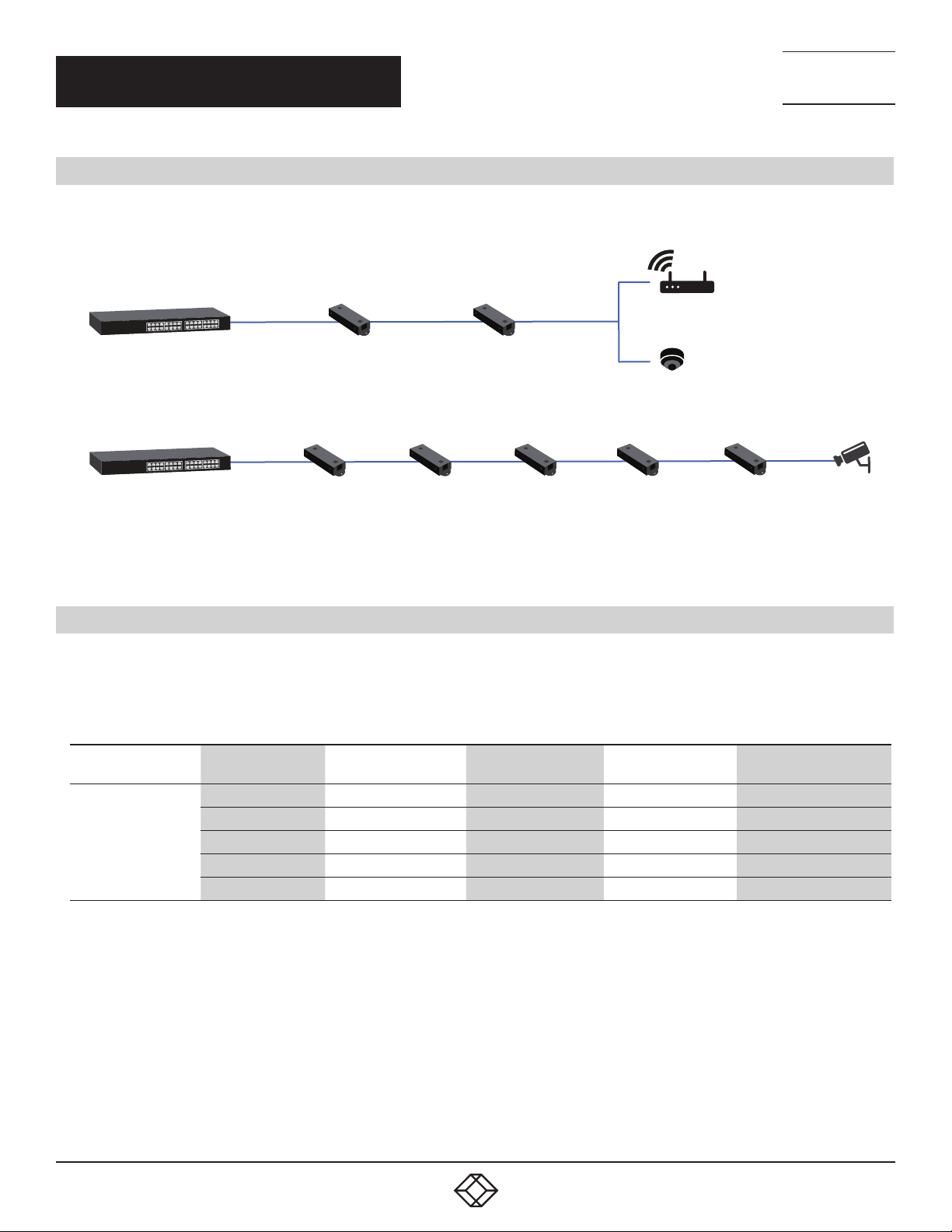
3.1 PSE/PD TO 2-PORT POE EXTENDER
This PoE extender provides automatic crossover detection functionality. Via a twisted pair cable pinned straight-through, this PoE
extender can be connected to another PSE/PD.
Wireless AP
PoE switch
PoE switch
328 ft . (100 m)
328 ft . (100 m)
PoE Ex tender
(L PR1111)
PoE Ex tender
(L PR1111)
328 ft . (100 m)
328 ft . (100 m)
PoE Ex tender
(L PR1111)
PoE Ex tender
(L PR1111)
328 ft . (100 m)
328 ft . (100 m)328 ft . (100 m)
PoE Ex tender
(L PR1111)
PoE Ex tender
(L PR1111)
IP Camera
328 ft . (100 m)
328 ft . (100 m)
PoE Ex tender
(L PR1111)
IP Camera
FIGURE 3-1. POE EXTENSION
3.2 POWER AND EXTEND DISTANCE
Power is supplied through CAT5e/6 cable from another PSE and extends the distance to another 328 feet (100 meters) through
this device. See the table below for your reference.
TABLE 1-2. POE POWER AVAILABLE WITH MULTIPLE LPR1111 UNITS
POE SOURCE
802.3at POE Switch
NUMBER OF
LP R 1111 U N I TS
DISTANCE (F T./M ) PD CURRENT (A) PD VOLTAGE (V) PD MA X. POWER (W)
1 328 (200) 0.58 42.4 24.592
2 658 (300) 0.53 38 17.9
3 1,312 (400) 0.48 33.7 16.176
4 1,640 (500) 0.4 31.4 12.5 6
5 1,96 8 (60 0) 0.28 30.8 8.624
NOTE: All the values listed here are the maximum values from tests based on a PoE switch with 56 V output performed in an ideal
lab environment. The actual value may be different due to network environments and the quality of your cable.
6
1. 8 7 7. 8 7 7. 2 2 6 9 BL ACK BOX .COM
Page 7

CHAPTER 4: OPERATION
FRONT-PANEL LED INDICATORS
Table 4-1 describes the LEDs on the LPR1111.
TABLE 4-1. LPR1111 LED INDICATORS
LED STAT U S DESCRIPTION
PoE
Data
ON PoE function ON
OFF PoE function OFF or no connection
ON Port is connected
OFF No connection
Flashing Data is transmitting or receiving
NEED HELP?
LEAV E TH E TEC H TO US
LIVE 24/7
TECHNICAL
SUPPORT
1. 8 7 7. 8 7 7. 2 2 69
1. 8 7 7. 8 7 7. 2 2 6 9 BL ACK BOX .COM
7
Page 8

NEED HELP?
LEAV E TH E TEC H TO US
LIVE 24/7
APPENDIX A: REGULATORY INFORMATION
TECHNICAL
SUPPORT
1. 8 7 7. 8 7 7. 2 2 69
A.1 FCC CL ASS B STATEMENT
Class B Digital Device. This equipment has been tested and found to comply with the limits for a Class B computing device
pursuant to Part 15 of the FCC Rules. These limits are designed to provide reasonable protection against harmful interference
in a residential installation. However, there is no guarantee that interference will not occur in a particular installation. This
equipment generates, uses, and can radiate radio frequency energy, and, if not installed and used in accordance with the
instructions, may cause harmful interference to radio communications. If this equipment does cause harmful interference
to radio or telephone reception, which can be determined by turning the equipment off and on, the user is encouraged to try
to correct the interference by one of the following measures:
Reorient or relocate the receiving antenna.
Increase the separation between the equipment and receiver.
Connect the equipment into an outlet on a circuit different from that to which the receiver is connected.
Consult an experienced radio/TV technician for help.
CAUTION: Changes or modifications not expressly approved by the party responsible for compliance could void the user’s authority
to operate the equipment.
To meet FCC requirements, shielded cables and power cords are required to connect this device to a personal computer or other
Class B certified device.
This digital apparatus does not exceed the Class B limits for radio noise emission from digital apparatus set out in the Radio
Interference Regulation of Industry Canada.
Le présent appareil numérique n’émet pas de bruits radioélectriques dépassant les limites applicables aux appareils numériques
de classe B prescrites dans le Règlement sur le brouillage radioélectrique publié par Industrie Canada.
8
1. 8 7 7. 8 7 7. 2 2 6 9 BL ACK BOX .COM
Page 9

NEED HELP?
LEAV E TH E TEC H TO US
LIVE 24/7
APPENDIX A: REGULATORY INFORMATION
TECHNICAL
SUPPORT
1. 8 7 7. 8 7 7. 2 2 69
A.2 NOM STATEMENT
1. Todas las instrucciones de seguridad y operación deberán ser leídas antes de que el aparato eléctrico sea operado.
2. Las instrucciones de seguridad y operación deberán ser guardadas para referencia futura.
3. Todas las advertencias en el aparato eléctrico y en sus instrucciones de operación deben ser respetadas.
4. Todas las instrucciones de operación y uso deben ser seguidas.
5. El aparato eléctrico no deberá ser usado cerca del agua—por ejemplo, cerca de la tina de baño, lavabo, sótano mojado o cerca
de una alberca, etc.
6. El aparato eléctrico debe ser usado únicamente con carritos o pedestales que sean recomendados por el fabricante.
7. El aparato eléctrico debe ser montado a la pared o al techo sólo como sea recomendado por el fabricante.
8. Servicio—El usuario no debe intentar dar servicio al equipo eléctrico más allá a lo descrito en las instrucciones de operación.
Todo otro servicio deberá ser referido a personal de servicio calificado.
9. El aparato eléctrico debe ser situado de tal manera que su posición no interfiera su uso. La colocación del aparato eléctrico
sobre una cama, sofá, alfombra o superficie similar puede bloquea la ventilación, no se debe colocar en libreros o gabinetes que
impidan el flujo de aire por los orificios de ventilación.
10. El equipo eléctrico deber ser situado fuera del alcance de fuentes de calor como radiadores, registros de calor, estufas u otros
aparatos (incluyendo amplificadores) que producen calor.
11. El aparato eléctrico deberá ser connectado a una fuente de poder sólo del tipo descrito en el instructivo de operación, o como
se indique en el aparato.
12. Precaución debe ser tomada de tal manera que la tierra fisica y la polarización del equipo no sea eliminada.
13. Los cables de la fuente de poder deben ser guiados de tal manera que no sean pisados ni pellizcados por objetos colocados
sobre o contra ellos, poniendo particular atención a los contactos y receptáculos donde salen del aparato.
14. El equipo eléctrico debe ser limpiado únicamente de acuerdo a las recomendaciones del fabricante.
15. En caso de existir, una antena externa deberá ser localizada lejos de las lineas de energia.
16. El cable de corriente deberá ser desconectado del cuando el equipo no sea usado por un largo periodo de tiempo.
17. Cuidado debe ser tomado de tal manera que objectos liquidos no sean derramados sobre la cubierta u orificios de ventilación.
18. Servicio por personal calificado deberá ser provisto cuando:
A: El cable de poder o el contacto ha sido dañado; u
B: Objectos han caído o líquido ha sido derramado dentro del aparato;o
C: El aparato ha sido expuesto a la lluvia; o
D: El aparato parece no operar normalmente o muestra un cambio en su desempeño; o
E: El aparato ha sido tirado o su cubierta ha sido dañada.
1. 8 7 7. 8 7 7. 2 2 6 9 BL ACK BOX .COM
9
Page 10

NEED HELP?
LEAV E TH E TEC H TO US
LIVE 24/7
APPENDIX B: DISCLAIMER/TRADEMARKS
TECHNICAL
SUPPORT
1. 8 7 7. 8 7 7. 2 2 69
B.1 DISCLAIMER
Black Box Corporation shall not be liable for damages of any kind, including, but not limited to, punitive, consequential or cost of cover
damages, resulting from any errors in the product information or specifications set forth in this document and Black Box Corporation
may revise this document at any time without notice.
B.2 TRADEMARKS USED IN THIS MANUAL
Black Box and the Black Box logo type and mark are registered trademarks of Black Box Corporation.
Any other trademarks mentioned in this manual are acknowledged to be the property of the trademark owners.
10
1. 8 7 7. 8 7 7. 2 2 6 9 BL ACK BOX .COM
Page 11

NOTES
__________________________________________________________________________________________________
__________________________________________________________________________________________________
__________________________________________________________________________________________________
__________________________________________________________________________________________________
__________________________________________________________________________________________________
__________________________________________________________________________________________________
NEED HELP?
LEAV E TH E TEC H TO US
LIVE 24/7
TECHNICAL
SUPPORT
1. 8 7 7. 8 7 7. 2 2 69
__________________________________________________________________________________________________
_
_________________________________________________________________________________________________
__________________________________________________________________________________________________
__________________________________________________________________________________________________\
__________________________________________________________________________________________________
__________________________________________________________________________________________________
__________________________________________________________________________________________________
__________________________________________________________________________________________________
_________________________________________________________________________________________________
__________________________________________________________________________________________________
__________________________________________________________________________________________________
1. 8 7 7. 8 7 7. 2 2 6 9 BL ACK BOX .COM
11
Page 12

NEED HELP?
LEAVE THE TECH TO US
LIVE 24/7
TECHNICAL
SUPPORT
1.877.87 7.2269
© COPYRIGHT 2019. BLACK BOX CORPORATION. ALL RIGHTS RESERVED.
LP R1111_ US ER _R EV 1.P DF
 Loading...