

Page 1
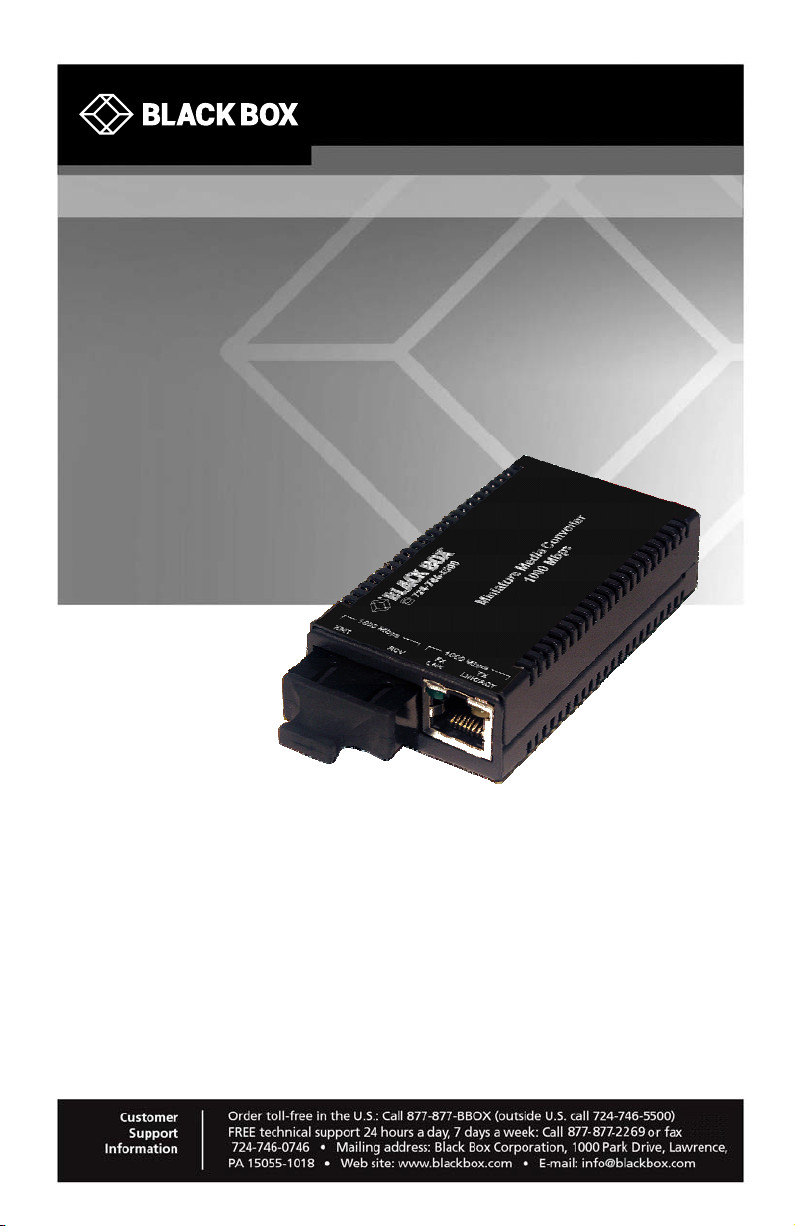
LGC010A-R2 LGC014A-R2
LGC011A-R2 LGC015A-R2
LGC012A-R2 LGC016A-R2
LGC013A-R2 LGC017A-R2
Gigabit Miniature Media Converters
Connect Gigabit Ethernet copper ports
to fiber optic cable.
Page 2

FCC and IC RFI Statements
FCC and Industry Canada RF Interference Statements
Class A Digital Device. This equipment has been tested and found to comply with
the limits for a Class A computing device pursuant to Part 15 of the FCC Rules.
These limits are designed to provide reasonable protection against harmful
interference in a residential installation. However, there is no guarantee that
interference will not occur in a particular installation. This equipment generates,
uses, and can radiate radio frequency energy, and, if not installed and used in
accordance with the instructions, may cause harmful interference to radio
communications. If this equipment does cause harmful interference to radio or
telephone reception, which can be determined by turning the equipment off and on,
the user is encouraged to try to correct the interference by one of the following
measures:
• Reorient or relocate the receiving antenna.
• Increase the separation between the equipment and receiver.
• Connect the equipment into an outlet on a circuit different from that to which the
receiver is connected.
• Consult an experienced radio/TV technician for help.
CAUTION
Changes or modifications not expressly approved by the party responsible for
compliance could void the user’s authority to operate the equipment.
To meet FCC requirements, shielded cables and power cords are required to
connect this device to a personal computer or other Class A certified device.
This digital apparatus does not exceed the Class A limits for radio noise
emission from digital apparatus set out in the Radio Interference Regulation of
Industry Canada.
Page 2 877-877-2269 | blackbox.com LGC010A-R2
Page 3
Certifications
Certifications
Class 1 Laser product, Luokan 1 Laserlaite,
Laser Klasse 1, Appareil A’Laser de Classe
European Directive 2002/96/EC (WEEE) requires that any equipment that
bears this symbol on product or packaging must not be disposed of with
unsorted municipal waste. This symbol indicates that the equipment should be
disposed of separately from regular household waste. It is the consumer’s
responsibility to dispose of this and all equipment so marked through
designated collection facilities appointed by government or local authorities.
Following these steps through proper disposal and recycling will help prevent
potential negative consequences to the environment and human health. For
more detailed information about proper disposal, please contact local
authorities, waste disposal services, or the point of purchase for this equipment.
LGC010A-R2 877-877-2269 | blackbox.com Page 3
Page 4

Table of Contents
Table of Contents
Part Numbers ......................................................................................................5
1. Specifications .........................................................................................6
2. Overview: About the Gigabit Miniature Media Converters ....................7
3. Install the Gigabit Miniature Media Converters ...................................... 8
4. Operation................................................................................................ 9
4.1 LED Operation........................................................................................ 9
5. Contacting Black Box ........................................................................... 10
6. Fiber Optic Cleaning Guidelines ..........................................................11
7. Electrostatic Discharge Precautions .................................................... 11
Page 4 877-877-2269 | blackbox.com LGC010A-R2
Page 5
Part Numbers
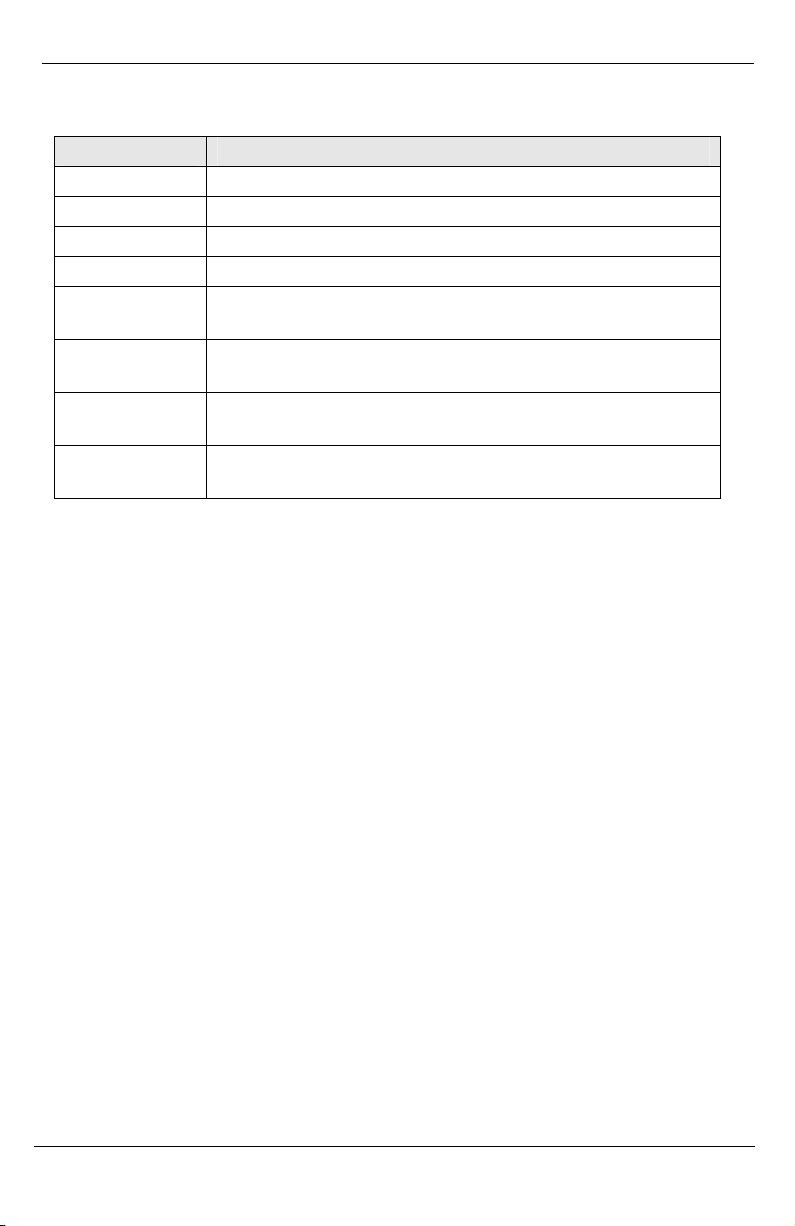
Part Number Description
LGC010A-R2 TX/SX-MM850-SC
LGC011A-R2 TX/LX-SM1310-SC
LGC012A-R2 TX/LX-SM1310/PLUS-SC
LGC013A-R2 TX/LX-SM1550/LONG-SC
LGC014A-R2 TX/SSLX-SM1310-SC (1310xmt/1550rcv)
Single-Strand Fiber
LGC015A-R2 TX/SSLX-SM1550-SC (1550xmt/1310rcv)
Single-Strand Fiber
LGC016A-R2 TX/SSLX-SM1310/PLUS-SC (1310xmt/1550rcv)
Single-Strand Fiber
LGC017A-R2 TX/SSLX-SM1550/PLUS-SC (1550xmt/1310rcv)
Single-Strand Fiber
Part Numbers
LGC010A-R2 877-877-2269 | blackbox.com Page 5
Page 6
Chapter 1: Specifications
1. Specifications
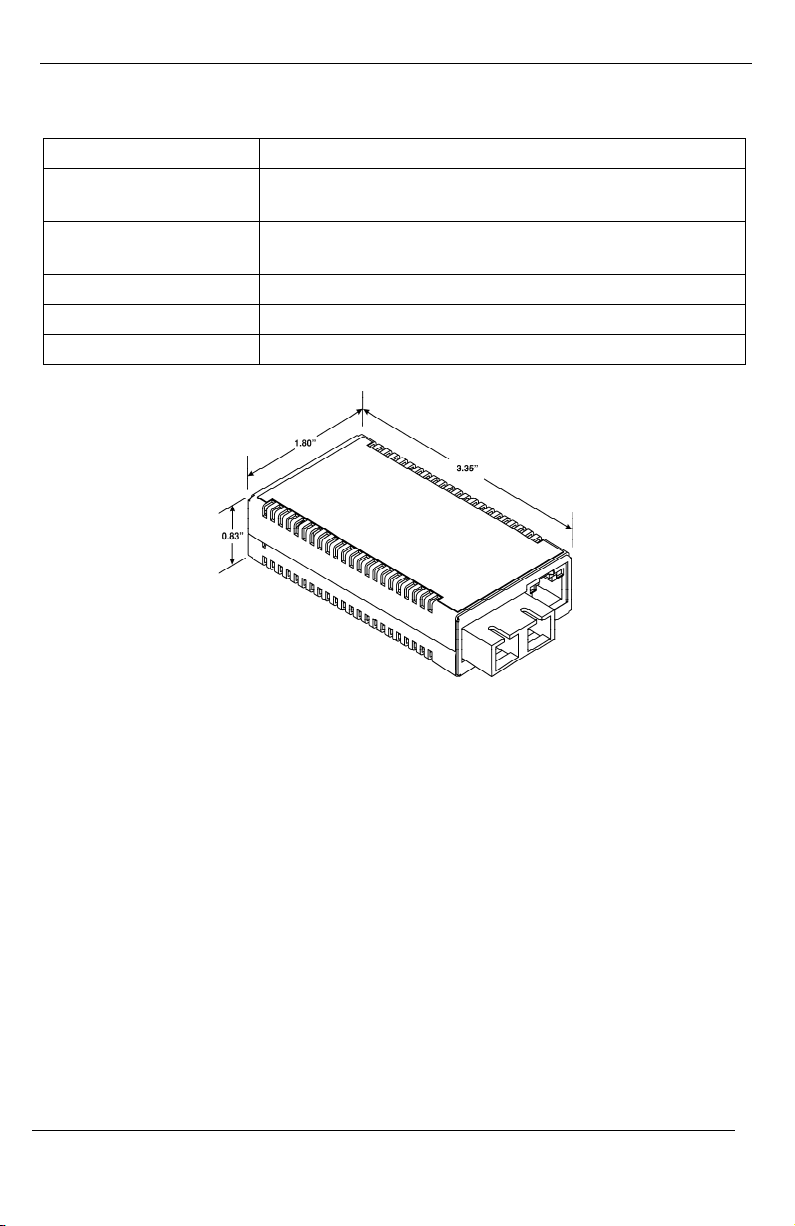
AC Wall Adapter 100 to 240 ±10% VAC input, 5 VDC output, 2A max.
Power Consumption
(Typical)
Operating
Temperature
Storage Temperature -4°C to +158°F (-20°C to +70°C)
Humidity 5% to 90% (non-condensing); 0 to 10,000 ft. altitude
Dimensions 0.83”H x 1.80”W x 3.35”D (2.1cm x 4.6cm x 8.5cm)
600 mA @ 5V
+32°F to +122°F (0°C to +50°C)
Page 6 877-877-2269 | blackbox.com LGC010A-R2
Page 7

Chapter 2: Overview
2. Overview: About the Gigabit Miniature Media Converters
The Gigabit Miniature Media Converters are Gigabit Ethernet, miniature media
converters. These devices convert 1000Base-SX (multi-mode) or LX (singlemode) fiber to 1000Base-T copper, and always operate at Full-Duplex. Single
strand fiber versions are also available.
The Gigabit Miniature Media Converters offer plug-and-play operation,
including the AutoCross feature which automatically selects between a
crossover workstation or straight-through repeater hub connection depending
on the connected device.
LGC010A-R2 877-877-2269 | blackbox.com Page 7
Page 8
Chapter 3: Install the Gigabit Miniature Media Converters
3. Install the Gigabit Miniature Media Converters
The Gigabit Miniature Media Converters install in a Black Box PowerTray 18Slot DC or can be used as standalone media converters. As standalones, the
Gigabit Miniature Media Converters use a universal external switching power
cube with 100 to 240 ±10% VAC input and 5VDC output.
INSTALLATION TIP
Several models of the Gigabit Miniature Media Converters support single-strand fiber
for operation. Since single-strand fiber products use optics that transmit and receive
on two different wavelengths, single-strand fiber products must be deployed in pairs.
For example, connect Gigabit Miniature Media Converter TX/SSLX-SM1310-SC, which
transmits at 1310 nm and receives at 1550 nm, to a High Density Media Converter
System II TX/SSLX-SM1550-SC, which transmits at 1550 nm and receives at 1310
nm. The two connected products must also have the same speed and distance
capabilities (i.e. both are single-mode [15 Km] or both are single-mode/PLUS [40 km]).
NOTE
Use only the supplied Black Box power supply. Using a non-Black Box power source
will void the warranty.
Page 8 877-877-2269 | blackbox.com LGC010A-R2
Page 9

Chapter 4: Operation
4. Operation
4.1 LED Operation
Gigabit Miniature Media Converters include two LEDs, located on the RJ-45
connector. LED functions are as follows:
FX LNK Glows green when a link is established on the fiber port.
TX LNK/ACT Glows amber when a link is established on the copper port;
blinks amber when activity is detected on the copper port.
LGC010A-R2 877-877-2269 | blackbox.com Page 9
Page 10

Chapter 5: Contacting Black Box
5. Contacting Black Box
Black Box Customer Service
Order toll-free in the U.S.: Call 877-877-BBOX
(outside U.S. call 724-746-5500)
Free technical support, 24 hours a day, 7 days a week.
Call: 88877-877-2269 or Fax: 724-746-0746
Mail order: Black Box Corporation
1000 Park Drive, Lawrence, PA 15055-1018
Web site: www.blackbox.com
E-mail: [email protected]
Page 10 877-877-2269 | blackbox.com LGC010A-R2
Page 11

Chapter 6 & Chapter 7: Fiber Optic Cleaning Guidelines & Electrostatic
Discharge Precautions
6. Fiber Optic Cleaning Guidelines
Fiber Optic transmitters and receivers are extremely susceptible to
contamination by particles of dirt or dust, which can obstruct the optic path and
cause performance degradation. Good system performance requires clean
optics and connector ferrules.
1. Use fiber patch cords (or connectors, if you terminate your own fiber) only from a
reputable supplier; low-quality components can cause many hard-to-diagnose
problems in an installation.
2. Dust caps are installed at Black Box to ensure factory-clean optical devices.
These protective caps should not be removed until the moment of connecting the
fiber cable to the device. If you need to disconnect the fiber device, reinstall the
protective dust caps.
3. Store spare caps in a dust-free environment such as a sealed plastic bag or box
so that when reinstalled they do not introduce any contamination to the optics.
4. If you suspect that the optics have been contaminated, alternate between
blasting with clean, dry, compressed air and flushing with methanol to remove
particles of dirt.
7. Electrostatic Discharge Precautions
Electrostatic discharge (ESD) can cause damage to any product, add-in
modules or stand alone units, containing electronic components. Always
observe the following precautions when installing or handling these kinds of
products.
1. Do not remove unit from its protective packaging until ready to install.
2. Wear an ESD wrist grounding strap before handling any module or component.
If the wrist strap is not available, maintain grounded contact with the system unit
throughout any procedure requiring ESD protection.
3. Hold the units by the edges; do not touch the electronic components or gold
connectors.
4. After removal, always place the boards on a grounded, static-free surface, ESD
pad or in a proper ESD bag. Do not slide the modules or stand alone units over
any surface.
WARNING! Integrated circuits and fiber optic components
are extremely susceptible to electrostatic discharge damage.
Do not handle these components directly unless you are a
qualified service technician and use tools and techniques that
conform to accepted industry practices.
LGC010A-R2 877-877-2269 | blackbox.com Page 11
Page 12
LGC010A-R2 Rev. 1 55-80730BB-00 Rev. B1
 Loading...