

Page 1
Chapter
LGB408A-R2
8-Port Gigabit Unmanaged Switch
Provides (8) 10-/100-/1000-Mbps RJ-45
ports.
Customer
Support
Information
Order toll-free in the U.S.: Call 877-877-BBOX (outside
U.S. call 724-746-5500) • FREE technical support
24 hours a day, 7 days a week: Call 877-877-2269 or fax
724-746-0746 • www.blackbox.
com •
Page 2

Trademarks Used in this Manual
Trademarks Used in this Manual
Black Box and the Double Diamond logo are registered
trademarks of BB Technologies, Inc.
Mac is a regis tered trademark of Apple Computer, Inc.
Any other trademarks mentioned in this manual are
acknowledged to be the property of the trademark owners.
Page 2
877-877-2269 | blackbox.com
Page 3

FCC and IC RFI Statements
FEDERAL COMMUNICATIONS COMMISSION
AND INDUSTRY CANADA RADIO FREQUENCY
INTERFERENCE STATEMENTS
This equipment generates, uses, and can radiate radiofrequenc y energy, and if not installed and used pro perly, that
is, in strict accordance with the manufacturer’s instructions, may
cause inter ference to radio communication. It has been tested
and found to comply with the limits for a Class A computing
device in accordance with the specifications in Subpart B of
Part 15 of FCC rules, which are designed to provide reasonable
protection against such interference when the equipment
is operated in a commercial environment. Operation of this
equipment in a residential area is likely to cause interference,
in which case the user at his own expense will be required
to take whatever measures may be necessary to correct
the interference.
Changes or modifications not expressly approved by the par ty
responsible for compliance could void the user’s authority to
operate the equipment.
This digital apparatus does not excee d the Class A limits for
radio noise emis sion from digital apparatus set out in the Radio
Interference Regulation of Indus try Canada.
Le présent appareil numé rique n’émet pas de bruits
radioélectriques dépassant les limites applicables aux appareils
numériques de classe A prescrites dans le Règlement sur le
brouillage radioélectrique publié par Industrie Canada.
877-877-2269 | blackbox.com
Page 3
Page 4

NOM Statement
Normas Oficiales Mexicanas (NOM)
Electrical Safety Statement
INSTRUCCIONES DE SEGURIDAD
1. Todas las instrucciones de s eguridad y operación deberán
ser leídas antes de que el aparato eléc trico sea operado.
2. L as instrucciones de seguridad y operación deberán ser
guardadas para referencia futura.
3. Todas las advertencias en el aparato eléctrico y en sus
instrucciones de operación deben ser respetadas.
4. Todas las instrucciones de operación y uso deben ser
seguidas.
5. El aparato elé ctrico no deberá ser usado cerca del agua—
por ejemplo, cerca de la tina de baño, lavabo, sótano
mojado o cerca de una alberca, etc.
6. El aparato elé ctrico debe ser usado únicamente con
carritos o pedestales que sean recomendados por el
fabricante.
7. El aparato elé ctrico debe ser mont ado a la pared o al
techo sólo como sea recomendado por el fabricante.
8. Servicio— El usuario no debe intentar dar servicio al
equipo eléctrico más allá a lo descrito en las instrucciones
de operación. Todo otro ser vicio deberá ser referido a
personal de servicio calificado.
Page 4
877-877-2269 | blackbox.com
Page 5

NOM Statement
9. El aparato elé ctrico debe ser situado de tal manera que su
posición no interfiera su uso. La colocación del aparato
eléctrico sobre una cama, sofá, alfombra o superficie
similar puede bloquea la ventilación, no se debe colocar
en libreros o gabinetes que impidan el flujo de aire por los
orificios de ventilación.
10. El equipo eléc trico deber ser situado fuera del alcance de
fuentes de calor como radiadores, registros de calor,
estufas u otros aparatos (incluyendo amplificadores) que
producen calor.
11. El aparato eléctrico deberá ser connectado a una fuente
de poder sólo del tipo descrito en el instructivo de
operación, o como se indique en el aparato.
12. Precaución d ebe ser tomada de tal manera que la tierra
fisica y la polarización del equipo no sea eliminada.
13. Los cables de la fuente de poder deben ser guiados de tal
manera que no sean pisados ni pellizcados por objetos
colocados sobre o contra ellos, poniendo particular
atención a los contactos y receptáculos donde salen del
aparato.
14. El equipo eléc trico debe ser limpiado únicamente de
acuerdo a las recomendaciones del fabricante.
15. En caso de existir, una antena externa deberá ser
localizada lejos de las lineas de energia.
16. El cable de corriente deberá ser desconectad o del cuando
el equipo no sea usado por un largo periodo de tiempo.
17. Cuidado debe ser tomado de tal manera que objectos
liquidos no sean derramados sobre la cubierta u orificios
de ventilación.
877-877-2269 | blackbox.com
Page 5
Page 6

NOM Statement
18. Servicio por personal calificado deberá ser provisto
cuando:
A: El cable de poder o el contacto ha sido dañado ; u
B: Objectos han caído o líquido ha sido derramado dentro
del aparato ; o
C: El aparato ha sido expuesto a la lluvia; o
D: El aparato parece no operar normalmente o muestra un
cambio en su desempeño; o
E: El aparato ha sido tirado o su cubierta ha sido dañada.
Page 6
877-877-2269 | blackbox.com
Page 7

Table of Contents
Table of Contents
1. Specifications ........................................................................ 8
2. O verview ............................................................................. 9
2.1 Introduction ................................................................. 9
2.2 Features ........................................................................ 9
2.3 What ’s Included ......................................................... 10
2.4 Hardware Description ................................................ 10
2.4.1 Front Panel ........................................................ 10
2.4.2 Back Panel ......................................................... 12
3. Installation ........................................................................... 13
3.1 Connecting the Switch to PCs, Servers, and Other
Network Devices ........................................................ 13
3.2 Connec ting the Switch to a Switch or Hub ................ 13
3.3 Application Diagram .................................................. 14
4. Operation ........................................................................... 16
Appendix. Troubleshooting ..................................................... 17
A.1 Contacting Black Box ................................................. 17
A.2 Shipping and Packaging ............................................. 17
877-877-2269 | blackbox.com
Page 7
Page 8

Chapter 1: Specifications
1. Specifications
Approvals — FCC Class A, CE
Buffer Memor y — RAM : 3.5 MB per device
Filtering/ Forwarding Rate — 10-Mbps por ts: 14,880 pps,
100-Mbps ports: 148,80 0 pps,
1000-Mbps ports: 1,488,000 pps
Flow Control — Full-duplex mode: IEEE 802.3x;
Half-duplex mode: Backpressure
JUMBO Frames — Supports 9 KB
MAC Address — 8K MAC addresses
Network Transmission Media — 10BASE-T CAT3, 4,
or 5 UTP/STP; 100BASE-TX CAT5 UTP/STP;
1000BASE-T CAT5 UTP/STP
Standards Compliance — IEEE 802.3 10BASE-T; IEEE 802.3u
100BASE-TX and IEEE 802.3ab 1000BA SE-T copper
over Ethernet
Connectors — (8) integrated RJ-45 ports (10- /100 -/
1000-Mbps)
Indicators — (17) LEDs: (1) Power, (8) 100 0M, (8) Link /Act.
Temperature Tolerance — Operating: 32 to 104° F
(0 to 40° C);
Storage: -4 to +194° F (-20 to +90° C)
Relative Humidity — 10–90%, noncondensing
Power — Input: 100 –240 VAC, 50– 60 Hz;
Consumption: 15 W (max.)
Size — 1.7"H x 4.8"W x 8.9"D (4.4 x 12.3 x 22.8 cm)
Weight — 2 lb. (0.9 kg)
Page 8
877-877-2269 | blackbox.com
Page 9

Chapter 2: Overview
2. Overview
2.1 Introduction
The Switch provides eight 10-/100- /1000 -Mbps RJ- 45 ports. It
was designed for easy installation and high per formance in an
environment where traffic on the network and the number of
users increase continuously. With it s Gigabit chip set, the 9"
Gigabit Ethernet Switch c an fully support the highest speed even
when fully loaded and running in full- duplex mode.
The switch also provides automatic crossover detection functionality on each port. I t’s easy to uplink to another s witch without
crossover cable.
This quiet s witch operates without a fan.
The compact rigid desktop size was specifically designed for
Remote Of fice and Branch Office (ROBO ) and medium to large
workgroups. You can install the switch where space is limited. It
provides smooth net work migration and easy upgrades to
network capacit y. The 9" size can be rackmounted on a 10” or
19” c abi net.
2.2 Features
• Complies with the IEEE 802.3 Ethernet, IEEE 802.3u Fast
Ethernet and IEEE 802.3ab Gigabit Ethernet standards.
• Provides eight 10- /100-/100 0-Mbps Gigabit switching ports.
• Performs full wire-speed switching with H ead of Line ( HOL)
blocking prevention.
• Provides non-blocking and non-head-of-line blocking full
wire-speed forwarding.
• Supports store-and-forward operation.
• Has embedded 3.5 MB SR AM for packet buffer.
• Supports 9 KB JUMBO frames.
• Provides 8sK MAC address entry.
877-877-2269 | blackbox.com
Page 9
Page 10
Chapter 2: Overview
• Supports broadcast storm filtering.
• All port s provide Auto-N egotiation and Auto-MDI /MDI-X
functions.
• Support s flow control: backpressure for half-duplex and IEEE
802.3x for full-duplex mode
• Includes (17) LEDs: (1) Power, (8) 1000M, and (8) Link/ Act.
• Configurable to 10 -Mbps full-/half-duplex, 100-Mbps full- /
half-duplex and 1000-Mbps full- /half-duplex for each port.
• 9” inch compac t size, rackmountable to 10" and 19" with
bracket.
2.3 What’s Included
Your package should contain the following items. If anything is
missing or damaged, contact Black Box Technical Support at
724-746-5500 or [email protected].
• (1) 8-Por t Gigabit Unmanaged Switch
• (1) AC power cord
• (2) 19" rackmounting brackets
• This user’s manual
2.4 Hardware Description
2.4.1 Front Panel
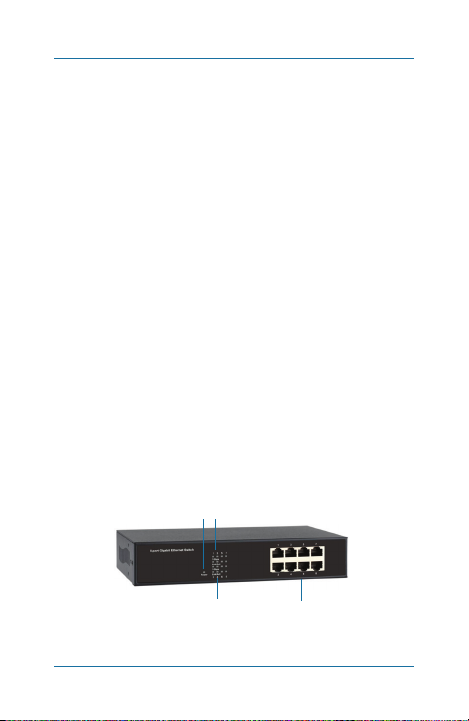
Figure 2-1 shows the front panel of the switch. Table 2-1
describes its components.
142
3
Page 10
Figure 2-1. Front panel.
877-877-2269 | blackbox.com
Page 11

Chapter 2: Overview
Table 2-1. Front panel components.
Number Name Description
1
2
3
4
NOTE: For more information about the LED indicators, go to
Chapter 4, Operation.
Power LED
(8) 1000M
LEDs
(8) L ink/ Act.
LEDs
(8) R J- 45
switching
ports
Lights when power to
the unit is on.
On when port is
operating at 1000
Mbps. Off when port
is operating at 10 or
100 M bps .
On when there is a
valid link to the
corresponding port.
Flashing when data is
activating.
Link to 10BASE-T,
100BASE-TX, and
1000BASE-T devices.
Automatically sense
10/ 100 /10 00 M sp eed
and negotiate full- /
half-duplex mode.
877-877-2269 | blackbox.com
Page 11
Page 12
Chapter 2: Overview
2.4.2 Back Panel
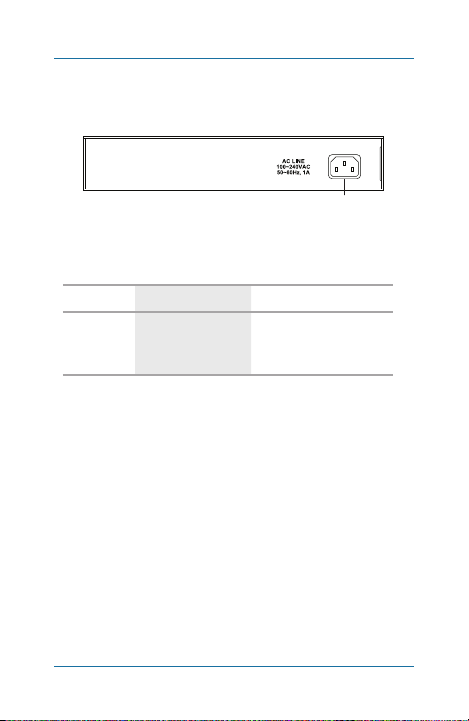
Figure 2-2 shows the back panel of the switch. Table 2-2
describes its components.
5
Figure 2-2. Back panel.
Table 2-2. Back panel components.
Number Name Description
5
3-prong
receptacle
Insert 90 –240-VAC,
50-/60-Hz power
supply cord here.
Page 12
877-877-2269 | blackbox.com
Page 13
Chapter 3: Installation
3. Installation
3.1 Connecting the Switch to PCs, Servers, and
Other Network Devices
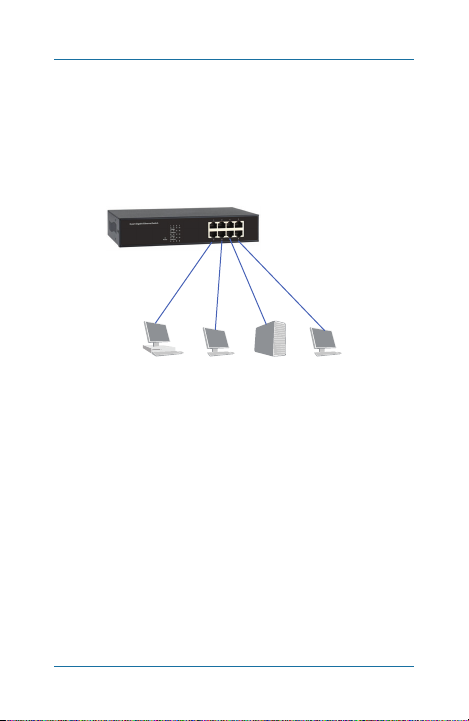
Use straight-through twisted-pair cable (CAT5) to connect the
Switch to PCs, servers, and other network devices. See Figure
3-1.
8-Port Gigabit
Unmanaged Switch
(LGB408A-R2)
PC Mac® Server Workstation
Figure 3-1. Connecting to PCs, ser vers, and
other network devices.
877-877-2269 | blackbox.com
Page 13
Page 14
Chapter 3: Installation
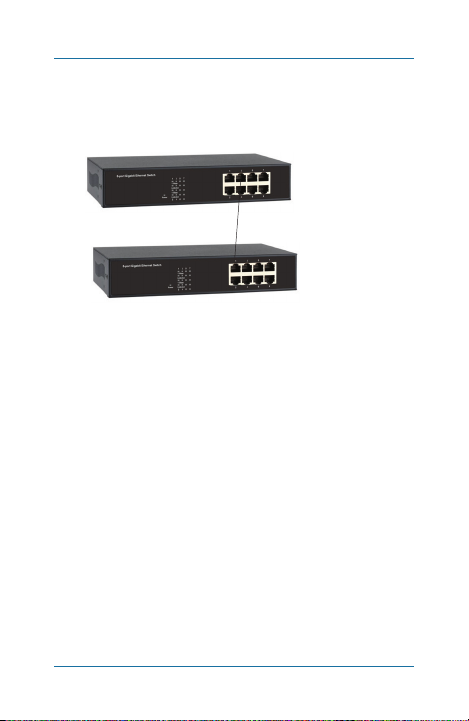
3.2 Connecting the Switch to a Switch or a Hub
Use the straight-through twisted-pair cable to connect the
switch to another switch or hub on the uplink port.
CATx c ab le
Figure 3-2. Connecting the s witch to a switch or hub.
Page 14
877-877-2269 | blackbox.com
Connected to Port 2
on switch #1
Connected to Port 1,
uplink por t on switch #2
Page 15
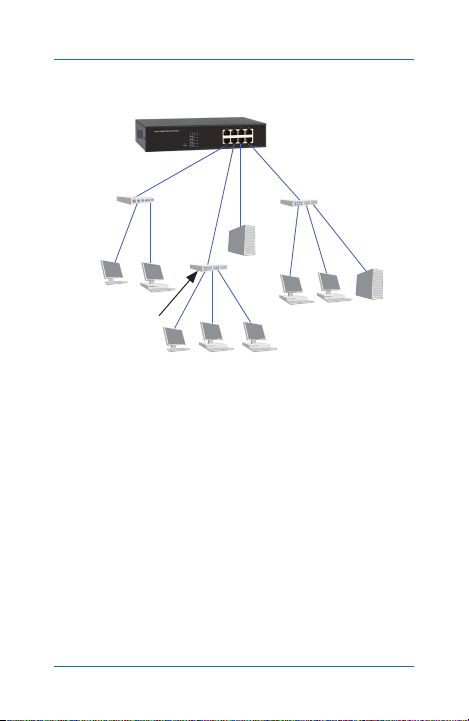
3.3 Application Diagram
Dual-Speed
Hub
Chapter 3: Installations
8-Port Gigabit
Unmanaged Switch
(LGB408A)
Gigabit
Ethernet
Switch
Server
Mac PC
Fast Ethernet
Switch
Workstation PC PC
Figure 3-3. Typical application.
877-877-2269 | blackbox.com
PC PC Ser ver
Page 15
Page 16
Chapter 4: Operation
4. Operation
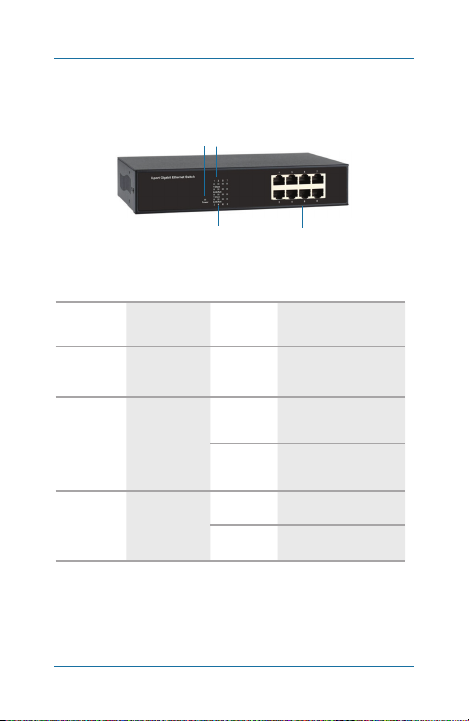
Figure 4-1 shows the LEDs on the switch’s front panel. Table 4-1
describes their functions.
Figure 4-1. LEDs on front panel of switch.
142
3
Table 4-1. Front panel indicators.
Number LEDs Status Description
1
2
3
(1) Power
LED
8 (1–8 )
1000-Mbps
LEDs
8 (1–8 )
Link/Act.
ON Power is on
ON
OFF
Link is running at
1000 Mbps.
Link is running at
10/ 100 M bps .
ON Link is established.
Flashing Data is activating.
Page 16
877-877-2269 | blackbox.com
Page 17

Appendix: Troubleshooting
Appendix. Troubleshooting
A.1 Contacting Black Box
If you determine that your 8-Por t Gigabit Unmanaged Switch is
malfunctioning, do not attempt to alter or repair the unit. It
contains no user-serviceable parts. Contact Black Box Technical
Support at 724-746-5500 or info@ blackbox.com.
Before you do, make a record of the history of the problem. We
will be able to provide more efficient and accurate assistance if
you have a complete description, including:
• the nature and duration of the problem.
• when the problem occur s.
• the components involved in the problem.
• any particular application that, when used, appears to create
the problem or make it worse.
A.2 Shipping and Packaging
If you need to transport or ship your 8 -Port Gigabit Unmanaged
Switch:
• Package it carefully. We recommend that you use the original
container.
• If you are returning the unit, make sure you include every thing
you received with it. Before you ship for return or repair,
contact Black Box to get a Return Authorization ( RA) number.
877-877-2269 | blackbox.com
Page 17
Page 18

NOTES
Page 18
877-877-2269 | blackbox.com
Page 19

NOTES
877-877-2269 | blackbox.com
Page 19
Page 20
Chapter
Black Box Tech Support: FREE! Live. 24/7.
Tech support the
way it should be.
Great tech support is just 60 seconds away
at 724-746-5500 or blackbox.com.
About Black Box
Black Box provides an extensive range of net working and
infrastructure products. You’ll find every thing from cabinet s and racks
and power and surge prote ction products to media converters and
Ethernet s witches all suppor ted by free, live 24/7 Tech support available
in 60 seconds or less.
© Copyright 2021. Black Box Co rporation. A ll rights res erved.
LGB40 8A-R3 User Ma nual, ver sion 2
Page 900
877-877-2269 | blackbox.com
 Loading...