

Page 1

IC832A & IC833A - 1008 page 1/x p/n 8024 Rev 001
A
A
9 Connect RS-485 Devices to your USB Port
9 Perfect for Field Service Applications
9 Small – Fits easily into any laptop bag
9 USB Port Powered
9 USB 2.0 (12 Mbps) Compatible
9 RS-485 Data rates up to 921.6 Kbps
9 Removable Terminal Block for Easy Wiring
9 High Retention USB Connector
9 Supports Windows 98, ME, 2000, XP, & Vista
Universal Serial Bus (USB) has become the
connectivity workhorse of today’s PCs, replacing the
familiar serial ports. However, many commercial
and industrial devices still use the RS-485 interface.
To connect these devices to modern PCs, you need
a simple and reliable conversion solution. The
IC832A and IC833A offer this solution in a space
saving, USB Port powered package. Simply plug
the converter into an available USB port on your
computer or USB hub and install the drivers
supplied on CD ROM. The device will show up as
an additional COM port in the Windows Device
Manager which is fully compatible with your
Windows applications. A one meter USB cable is
included.
IC832
USB to RS-485 Mini-Converter
Black Box Corporation - 1000 Park Drive - Lawrence, PA 15055-1018
Tech Support and Ordering: 724-746-5500 - Fax: 724-746-0746
To contact us about Black Box products or services: [email protected]
& IC833
Specifications
Serial Technology
RS-485 2-Wire Data A(-), Data B(+), Ground
RS-485 4-Wire TDA(-), TDB(+), RDA(-), RDB(+), Ground
Connector Removable Terminal Block (28 to 16 AWG)
Data Rate Up to 460.8 Kbps
USB Technology
Connector USB Type B Female (High Retention)
Standard 2.0 (Backward Compatible)
Data Rate 12 Mbps
Power
Source USB Port
Input Voltage 5 VDC
Consumption ~ 0.5 W (Low power device, draws less than
100 mA)
Software
Driver CD Windows 98, ME, 2000, XP, Vista
Mechanical
Dimensions 2.6 x 1.3 x .6 in (6.5 x 3.2 x 1.6 cm)
Enclosure In-line mounted, plastic
Weight 0.23 lbs (104.3 g) with USB Cable
Environmental
Operating Temp 32 to 158°F (0 to70 °C)
Storage Temp -40 to 185 °F (-40 to 85 °C)
Op Humidity 0 to 95 % (Non-condensing)
MTBF 1869313 hours
MTBF Method Parts Count Reliability Prediction
Regulatory
Approvals FCC, CE
Ordering Information
IC832A USB to RS-485 Mini-Converter
IC833A USB to RS-485 Mini-Converter
Page 2

IC832A & IC833A - 1008 page 2/x p/n 8024 Rev 001
•
•
•
Package Contents
• IC832A or IC833A USB to RS-485 Mini-Converter
• 3ft (1m) USB Cable
• Datasheet
• CD with Drivers for Windows 98, ME, 2000, XP and
Vista
Terminal Block
Position Signal
A(-) Data A (-)
B(+) Data B (+)
A(-) Data A (-)
B(+) Data B (+)
GND Ground
TDA(-) Transmit Data A (-)
TDB(+) Transmit Data B (+)
RDA(-) Receive Data A (-)
RDB(+) Receive Data B (+)
GND Ground
Driver Installation
Screen shots are from Windows XP
THE FOUND NEW HARDWARE WIZARD WILL
RUN TWICE. ONCE TO INSTALL THE USB
DEVICE AND ONCE TO INSTALL THE SERIAL
COM PORT.
• Connect the converter to your PCs USB port with
the supplied cable.
• The Found New Hardware wizard will start.
• When prompted to connect to Windows Update
to search for the driver, select “No, not at this
time” and click on Next >
IC832A
IC833A
Select Install the software automatically and click
Next>
A warning concerning Windows logo testing will
be displayed. Click on Continue Anyway >
The Completing the Found New Hardware Wizard
will be displayed. Click on Finish >
THE FOUND NEW HARDWARE WIZARD WILL
RUN TWICE. ONCE TO INSTALL THE USB
DEVICE AND ONCE TO INSTALL THE SERIAL
COM PORT.
Black Box Corporation - 1000 Park Drive - Lawrence, PA 15055-1018
Tech Support and Ordering: 724-746-5500 - Fax: 724-746-0746
To contact us about Black Box products or services: [email protected]
Page 3
IC832A & IC833A - 1008 page 3/x p/n 8024 Rev 001
•
•
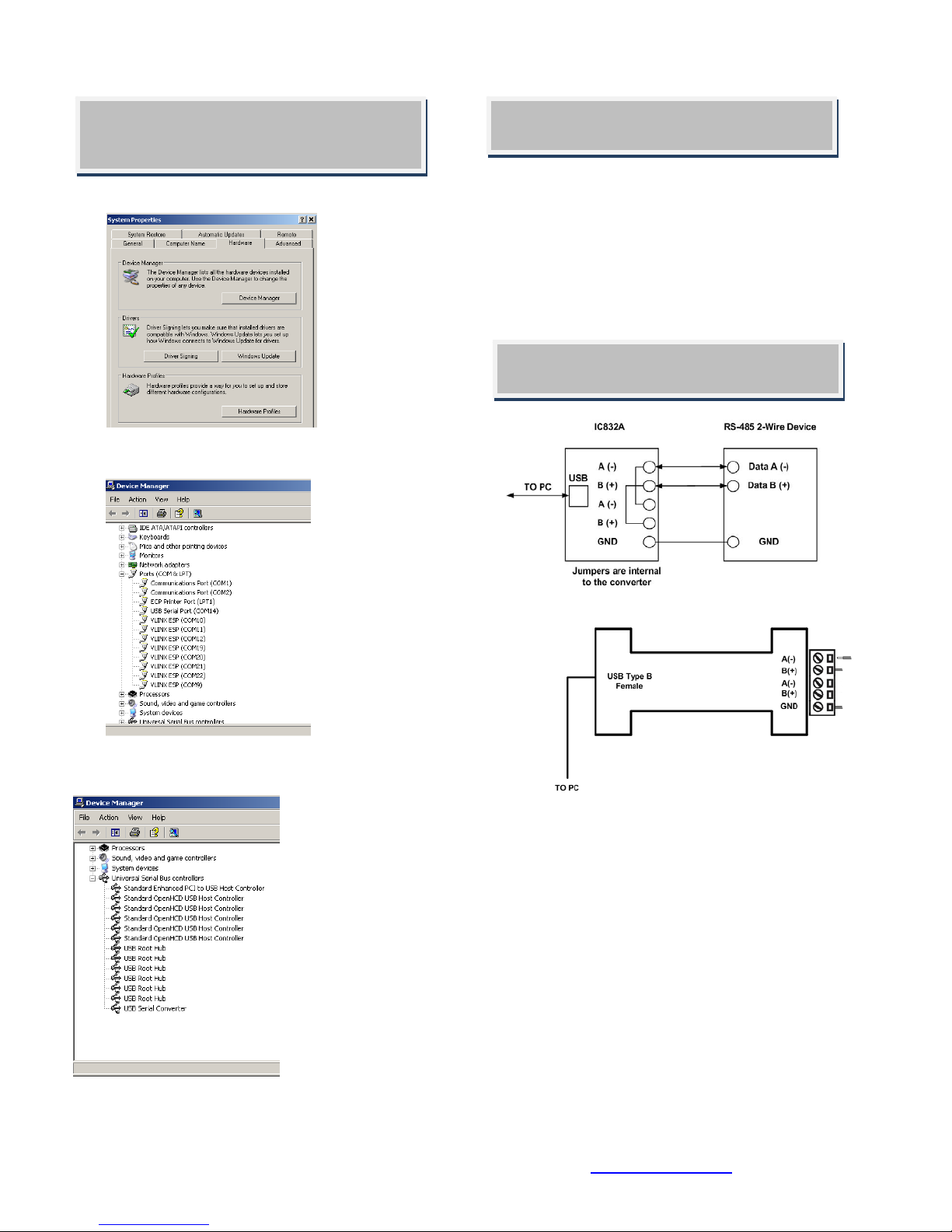
• Right click on My Computer. Select the Hardware
• Expand the Ports (COM & LPT) tree. The USB
• Expand the USB Controllers tree. The USB Serial
Converter will be listed.
Check Drivers
Screen shots are from Windows XP
tab.
Serial Port will be listed as the next available
COM Port.
• Instructions for uninstalling the driver are located on the
Installation Notes
When the driver is installed, the converter is associated
to that PC. If you plug in a different converter, the driver
must be installed again. Another COM port will also be
created with the driver installation.
CD ROM.
IC832A Wiring
This converter is used for RS-485 2-Wire Systems.
• Loosen the screws to open the Terminal Block lead
clamps for the A(-), B(+), and GND terminals.
• Insert the RS-485 2-Wire signal leads in accordance
with the diagram above. The TB will accept 28 to 16
AWG wire.
• Tighten the screws to close the TB lead clamps. Ensure
the clamps hold the leads securely. However, do not
over tighten.
• Bias is provided by 4.7KΩ pull-up and pull-down
resistors.
• If termination is required, it must be installed externally.
In most cases, termination is not required.
• During operation, the receiver toggles with the transmit
data.
Black Box Corporation - 1000 Park Drive - Lawrence, PA 15055-1018
Tech Support and Ordering: 724-746-5500 - Fax: 724-746-0746
To contact us about Black Box products or services: [email protected]
Page 4
IC832A & IC833A - 1008 page 4/x p/n 8024 Rev 001
•
•
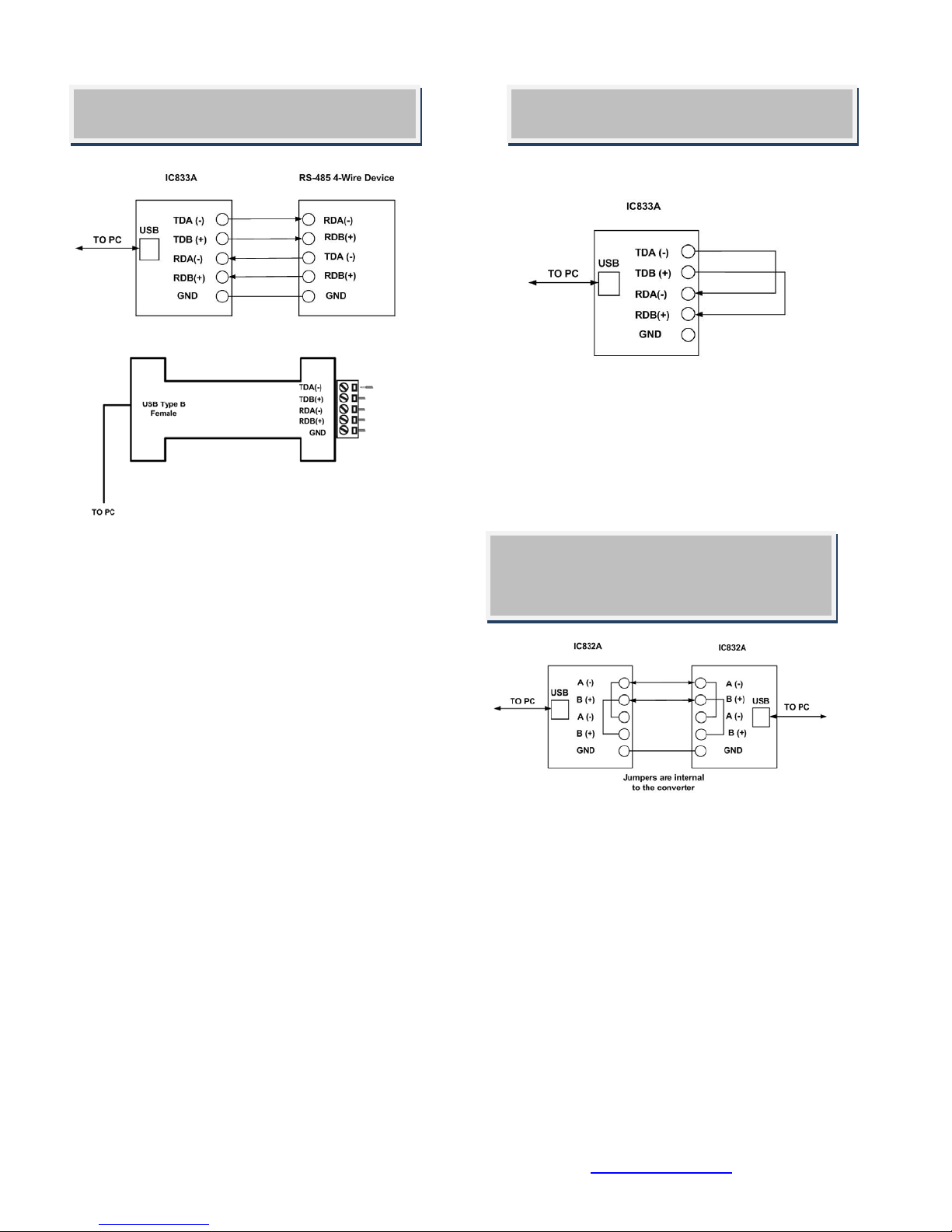
485USBTB-4W Wiring IC832A Loop Back Test
• This converter is used for RS-485 4-Wire Systems.
• Loosen the screws to open the Terminal Block lead
clamps for the TDA(-), TDB(+), RDA(-), RDB(+), and
GND terminals.
• Insert the RS-485 2-Wire signal leads in accordance
with the diagram above. The TB will accept 28 to 16
AWG wire.
• Tighten the screws to close the TB lead clamps. Ensure
the clamps hold the leads securely. However, do not
over tighten.
• Bias is provided by 4.7KΩ pull-up and pull-down
resistors.
• If termination is required, it must be installed externally.
In most cases, termination is not required.
• During operation, the receiver is always active.
Loopback TDA(-) to RDA(-) and TDB(+) to
RDB(+) as shown in the diagram above.
• Using Hyper Terminal or similar program,
connect to the appropriate COM port. Set the
desired baud rate. Ensure Hyper Terminal local
echo is OFF.
• Transmit data. If the same character string is
returned, the test is good.
IC832A Back to Back
Test
Black Box Corporation - 1000 Park Drive - Lawrence, PA 15055-1018
Tech Support and Ordering: 724-746-5500 - Fax: 724-746-0746
To contact us about Black Box products or services: [email protected]
Due to the circuit configuration, a loop back test
is not possible with this model. However, two
converters can be used in a back to back
configuration.
• Wire the converters as shown above.
• Using Hyper Terminal or similar program,
connect to the appropriate COM ports. Set the
desired baud rate.
• Transmit data. If the same string is received on
the distant end, the test is good.
 Loading...