

Page 1
AUGUST 2003
IC447A
IC449A
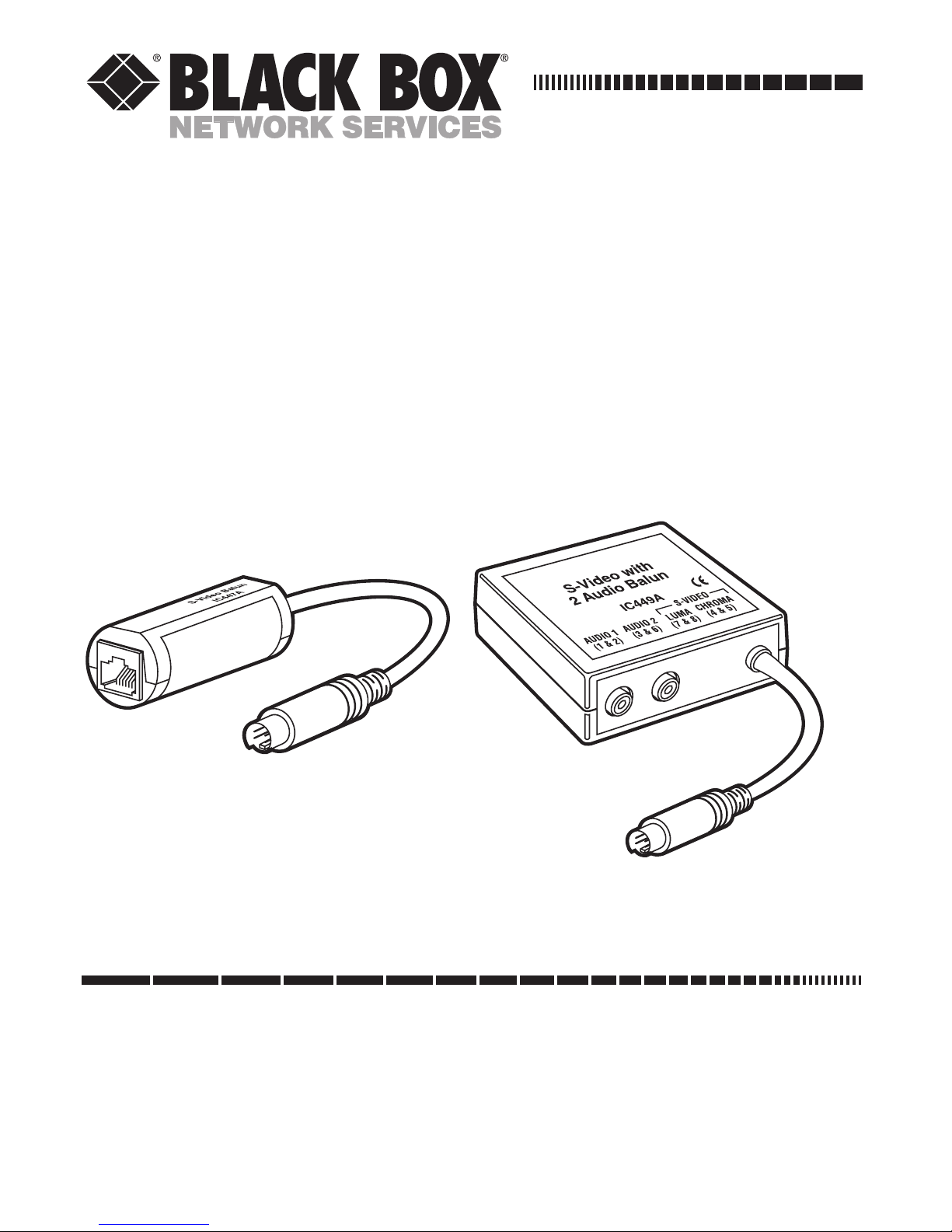
S-Video Balun
S-Video with Dual-Audio Balun
CUSTOMER SUPPORT INFORMATION
Order toll-free in the U.S.: Call 877-877-BBOX (outside U.S. call 724-746-5500)
FREE technical support 24 hours a day, 7 days a week: Call 724-746-5500 or fax 724-746-0746
Mailing address: Black Box Corporation, 1000 Park Drive, Lawrence, PA 15055-1018
Web site: www.blackbox.com • E-mail: [email protected]
Page 2

1
FCC AND IC RFI STATEMENTS
FEDERAL COMMUNICATIONS COMMISSION
AND INDUSTRY CANADA
RADIO-FREQUENCY INTERFERENCE STATEMENTS
Class B Digital Device. This equipment has been tested
and found to comply with the limits for a Class B
computing device pursuant to Part 15 of the FCC Rules.
These limits are designed to provide reasonable
protection against harmful interference in a residential
installation. This equipment generates, uses, and can
radiate radio frequency energy and, if not installed and
used in accordance with the instructions, may cause
harmful interference to radio communications.
However, there is no guarantee that interference will
not occur in a particular installation. If this equipment
does cause harmful interference to radio or telephone
reception, which can be determined by turning the
equipment off and on, the user is encouraged to try to
correct the interference by one of the following
measures:
• Reorient or relocate the receiving antenna.
• Increase the separation between the equipment
and receiver.
Page 3

2
S-VIDEO BALUN AND S-VIDEO WITH DUAL-AUDIO BALUN
• Connect the equipment into an outlet on a circuit
different from that to which the receiver is
connected.
• Consult an experienced radio/TV technician for
help.
Caution: Changes or modifications not expressly
approved by the party responsible for compliance could
void the user’s authority to operate the equipment.
To meet FCC requirements, shielded cables are
required to connect this device to other Class B certified
devices.
This digital apparatus does not exceed the Class B limits for
radio noise emission from digital apparatus set out in the Radio
Interference Regulation of Industry Canada.
Le présent appareil numérique n’émet pas de bruits
radioélectriques dépassant les limites applicables aux appareils
numériques de classe B prescrites dans le Règlement sur le
brouillage radioélectrique publié par Industrie Canada.
Page 4

3
TRADEMARKS
TRADEMARKS USED IN THIS MANUAL
Any trademarks mentioned in this manual are acknowledged
to be the property of the trademark owners.
Page 5

4
S-VIDEO BALUN AND S-VIDEO WITH DUAL-AUDIO BALUN
1. Specifications
Environment: S-Video equipment
Devices: DVD, VCR, monitors, LCD projectors, CCD
cameras, video switchers, sequencers, multiplexors, and
other S-Video equipment
Transmission: Transparent to the user
Bandwidth: Video: DC to 6 MHz;
Audio: 100 Hz to 16 kHz
Impedance: S-Video: 75 ohms;
Audio 600 ohms minimum
Maximum Input (Audio or Video): 1.1 Vp-p
Insertion Loss (S-Video): Less than 2 dB per pair over
the frequency range
Return Loss: Better than 15 dB over the frequency
range
Common Mode Rejection: Greater than 40 dB over the
frequency range
Page 6

5
CHAPTER 1: Specifications
Maximum Distance: 1000 ft. (30.5 m) over CAT5 twistedpair cable
Cable Required: 24 AWG or lower solid copper twistedpair wire
(UTP);
Impedance: 100 ohms at 1 MHz;
Maximum Capacitance: 20 pF/ft.;
Attenuation: 6.6 dB/1000 ft. at 1 MHz;
Note that up to 12 feet (3.7 m) of audio cable
(not included) may be used with this balun
Connectors: IC447A: (1) 4-pin mini-DIN, (1) RJ-45;
IC449A: (1) 4-pin mini-DIN, (2) RCA audio jacks,
(1) RJ-45
Pin Configuration: Reverse polarity sensitive;
S-Video Luma: Pins 7 & 8;
S-Video Chroma: Pins 4 & 5;
(IC449A only) Audio 1: Pins 1 & 2;
(IC449A only) Audio 2: Pins 3 & 6
Enclosure: Fire-retardant plastic
Page 7

6
S-VIDEO BALUN AND S-VIDEO WITH DUAL-AUDIO BALUN
Temperature Tolerance:
Operating: 32 to 131°F (0 to 55°C);
Storage: -4 to +185°F (-20 to +85°C)
Humidity Tolerance: Up to 95% noncondensing
Size: IC447A: 1"H x 1"W x 1.9"D (2.5 x 2.5 x 4.8 cm),
with a nondetachable 5" (12.7-cm) S-Video cord;
IC449A: 2.4"H x 2.25"W x 1"D (6.1 x 5.7 x 2.5 cm),
with a nondetachable 5" (12.7-cm) S-Video cord
Page 8

7
CHAPTER 2: Introduction
2. Introduction
With pairs of S-Video with Dual-Audio Baluns or S-Video
Baluns, you can transmit a single S-Video signal point-topoint across Category 5 unshielded twisted-pair (UTP)
cable, which is already wired into most commercial sites.
The balun near the video source takes a single S-Video
signal from the source, converts it, and transmits it over
UTP cable to the other balun, which outputs it to its
destination. This lets you place or move your S-Video
equipment anywhere you have a modular wall outlet.
These baluns are designed for use with modular
equipment and flexible configurations. Compatible
devices include S-Video video cameras and monitors,
DVD and videocassette players and recorders, video and
LCD projectors, CCD cameras, video switchers,
sequencers, multiplexors, and other S-Video equipment.
Applications include classroom video distribution,
overhead projector systems, computer-training systems,
and tradeshow computer-demo systems. The baluns also
work in conjunction with the Video CCTV-A/V Hub
(IC445A) to allow S-Video programming to be
distributed via UTP.
These baluns must be used in pairs.
Page 9

8
S-VIDEO BALUN AND S-VIDEO WITH DUAL-AUDIO BALUN
3. Installation
To install a pair of S-Video Baluns or S-Video with DualAudio Baluns, follow the steps below.
CAUTION!
Do not attempt to open the baluns’ housings. There are no
user-serviceable parts inside.
1. Make sure that the video-destination device is not
too far away from the video-source device (refer to
the Maximum Distance specification in Chapter
1). If the destination device is beyond the reach of
the source balun, the video signal the device
receives will be weak or nonexistent.
2. Follow the manufacturer’s instructions for turning
off power to the video equipment you will be
attaching, and for disconnecting that equipment
from AC power and from all other devices.
3. Make certain that the modular outlets and crossconnects to which you will connect the baluns are
configured properly and are labeled so that the
circuit can be identified.
Page 10

9
CHAPTER 3: Installation
CAUTION!
Do not connect the balun to a telecommunication outlet
wired to unrelated equipment. Making such a connection
may damage the equipment and/or the balun. Make sure
that all wiring is straight-through-pinned.
4. Verify that the twisted-pair circuit you want to use
is not already being used for other LAN or
telephone equipment.
5. Connect the balun to the S-Video port on the
equipment you are attaching it to. If you’re
installing the S-Video with Dual-Audio Balun,
connect the audio connectors to the audio source
via RCA audio/video jumper cables.
CAUTION!
Do not mount the balun over equipment ventilation
openings. Covering the openings may cause the equipment
to overheat.
6. Connect a 4-pair CAT5 cable from the balun’s RJ45 8-position modular jack to the building’s
twisted-pair cabling. The IC447A requires two
pairs; the IC449A requires four pairs if both SVideo and stereo audio are used.
7. At the destination point, connect another balun to
the S-Video monitor and projector.
Page 11
10
S-VIDEO BALUN AND S-VIDEO WITH DUAL-AUDIO BALUN
8. Connect a 4-pair CAT5 cable from the balun’s RJ45 connector to the appropriate modular wall
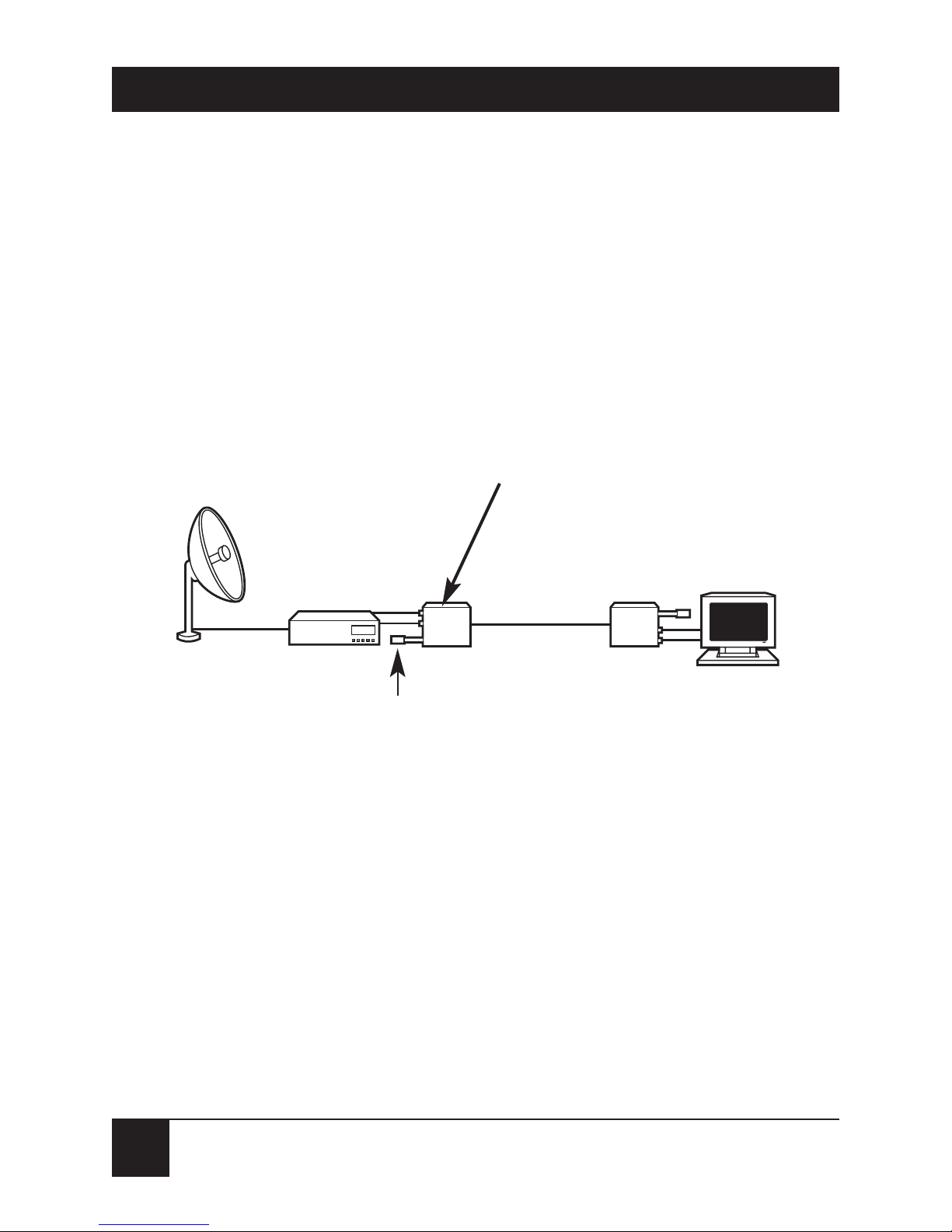
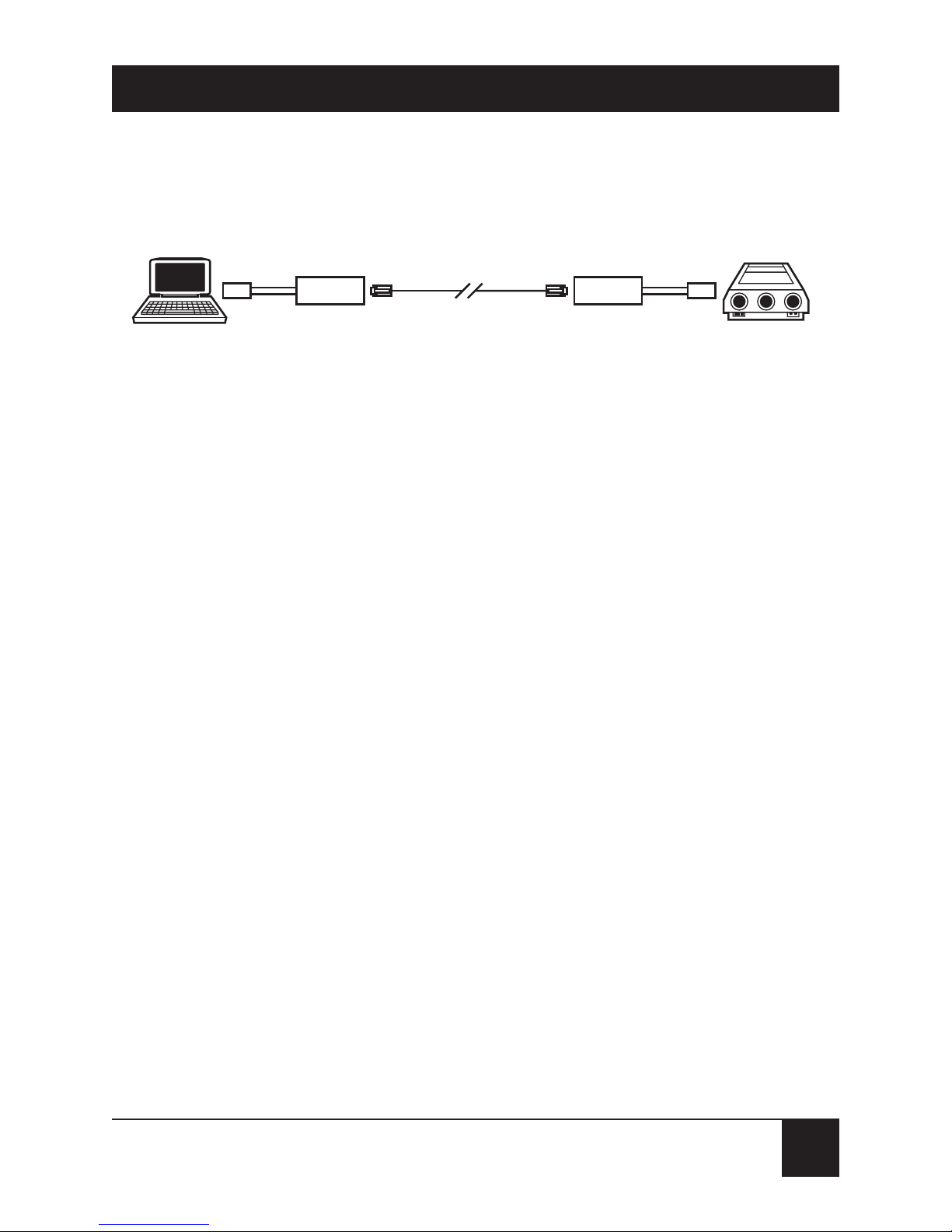
outlet. See the typical applications in Figures 3-1
and 3-2. If the S-Video with Dual-Audio Balun is
being installed, connect the audio connectors to
the audio inputs (for example, loudspeakers) via
RCA audio/video jumper cables.
Figure 3-1. S-Video with Dual-Audio Balun
satellite S-Video and audio application.
Receiver
S-Video with
Dual-Audio Balun
Satellite dish
S-Video and
audio monitor
CAT5 4-Pair UTP
RCA audio
cables
Broadband
Page 12
11
CHAPTER 3: Installation
Figure 3-2. Two S-Video Baluns cabled together.
9. Reconnect and power up the video equipment.
Adjust the image and audio settings of any
attached monitor or projector as necessary.
Your balun system should be ready for continuous
operation.
Category 5 UTP
S-Video Balun
Instructor’s
laptop computer
with S-Video output
Auditorium
video projector
with S-Video input
S-Video Balun
Page 13

12
S-VIDEO BALUN AND S-VIDEO WITH DUAL-AUDIO BALUN
4. Troubleshooting
4.1 Things To Try If Problems Occur
If at any time your S-Video Balun or S-Video with DualAudio Balun system does not seem to be working
properly, take these steps:
1. Following the manufacturer’s instructions,
perform diagnostics on your video equipment.
2. If this doesn’t solve the problem, check all cable
connections and the integrity and pinning of your
site wiring. Check for reverse polarity; the baluns
do not autosense or autocorrect polarity.
3. You might be trying to transmit the video signals
across too great a length of cable. The maximum
distance over which the baluns can transmit and
receive video signals depends on your cable and
your video equipment; refer to the Maximum
Distance specification in Chapter 1.
4. Make sure that the patch cord you are running
between the balun and your site’s wiring system
is the correct cable type and is properly pinned
(see the Cable Required specification in
Chapter 1).
Page 14

13
CHAPTER 4: Troubleshooting
5. If possible, replace the baluns involved in the
problem with baluns that are known to be
working, one at a time. If at any point the problem
goes away, there is probably a defect in the balun
you just replaced.
6. If you still cannot diagnose the problem, call Black
Box for technical support as described in the next
section.
4.2 Calling Black Box
If you determine that your balun is malfunctioning, do
not attempt to alter or repair the unit. It contains no
user-serviceable parts. Contact Black Box at 724-746-
5500.
Before you do, make a record of the history of the
problem. We will be able to provide more efficient and
accurate assistance if you have a complete description,
including:
• the nature and duration of the problem.
• when the problem occurs.
• the components involved in the problem.
Page 15

14
S-VIDEO BALUN AND S-VIDEO WITH DUAL-AUDIO BALUN
• any particular application that, when used,
appears to create the problem or make it worse.
4.3 Shipping and Packaging
If you need to transport or ship your balun:
• Package it carefully. We recommend that you use
the original container.
• If you are shipping the balun for repair, make sure
you include everything that came in the original
package. Before you ship, contact Black Box to get
a Return Authorization (RA) number.
Page 16

1000 Park Drive • Lawrence, PA 15055-1018 • 724-746-5500 • Fax 724-746-0746
© Copyright 2003. Black Box Corporation. All rights reserved.
 Loading...