

Page 1

June 2010
February 2010
MT1000A-85-R4
4-Port Fiber Optic USB 2.0 Extenders Quick Start Guide
Break the 16-foot (5-m) USB distance barrier.
This local transmitter/remote receiver pair extends
USB over a duplex fiber link.
IC404A extends USB over a multimode LC fiber link up to 1600 feet (500 m).
IC406A extends USB over a single-mode LC fiber link up to 6 miles (10 km).
IC404A
IC406A
Before you get started, make sure that all the drivers required for your USB device(s) are installed.
1. Place the units where you want them and connect the fiber cabling to the Link ports on the local and remote units.
IC404A or IC406A
local unit
LC-LC crossover duplex cable (not included)
Maximum 500 m multimode fiber
for IC404A; maximum 10 km single-mode
fiber for IC406A
IC404A or IC406A
remote unit
Customer
Support
Information
Order toll-free in the U.S.: Call 877-877-BBOX (outside U.S. call 724-746-5500)
FREE technical support 24 hours a day, 7 days a week: Call 724-746-5500 or fax 724-746-0746
Mailing address: Black Box Corporation, 1000 Park Drive, Lawrence, PA 15055-1018
Web site: w ww.blackbox.com • E-mail : [email protected]
Page 2
Trademarks Used in this Manual
Black Box and the Double Diamond logo are registered trademarks of BB Technologies, Inc.
Any other trademarks mentioned in this manual are acknowledged to be the property of the trademark owners
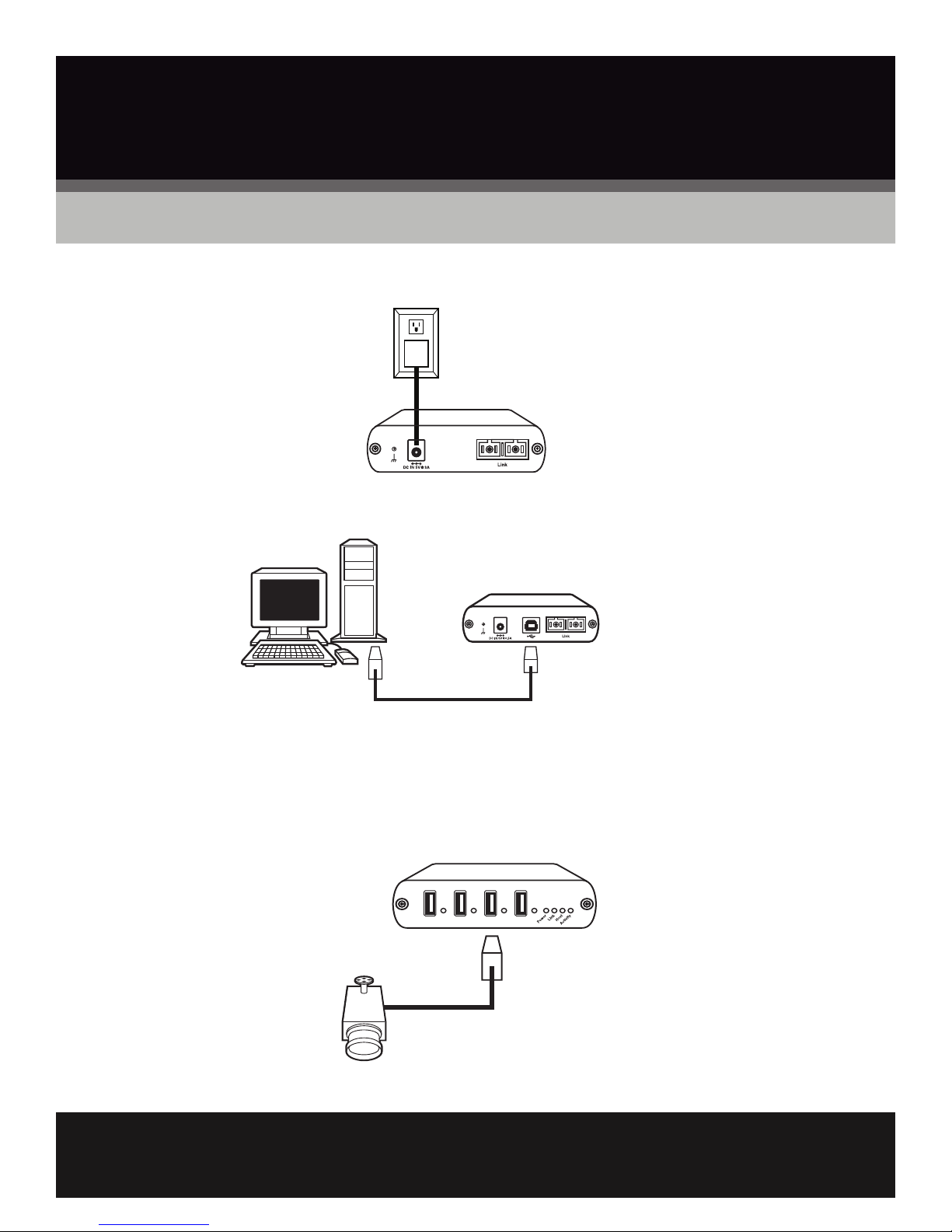
2. Connect the remote unit to the AC adapter.
AC adapter
IC404A or IC406A
remote
3. Connect the local unit to the computer.
IC404A or IC406A local unit
PC
NOTE: The power adapter is not required at the local unit for normal operation.
4. Attach the USB device(s) to the remote unit.
IC404A or IC406A remote unit
USB device
FREE, live, 24/7 Tech Support is just 20 seconds away.
©
Copyright 2010. All rights reserved.
724-746-5500 | blackbox.com
 Loading...