

Page 1
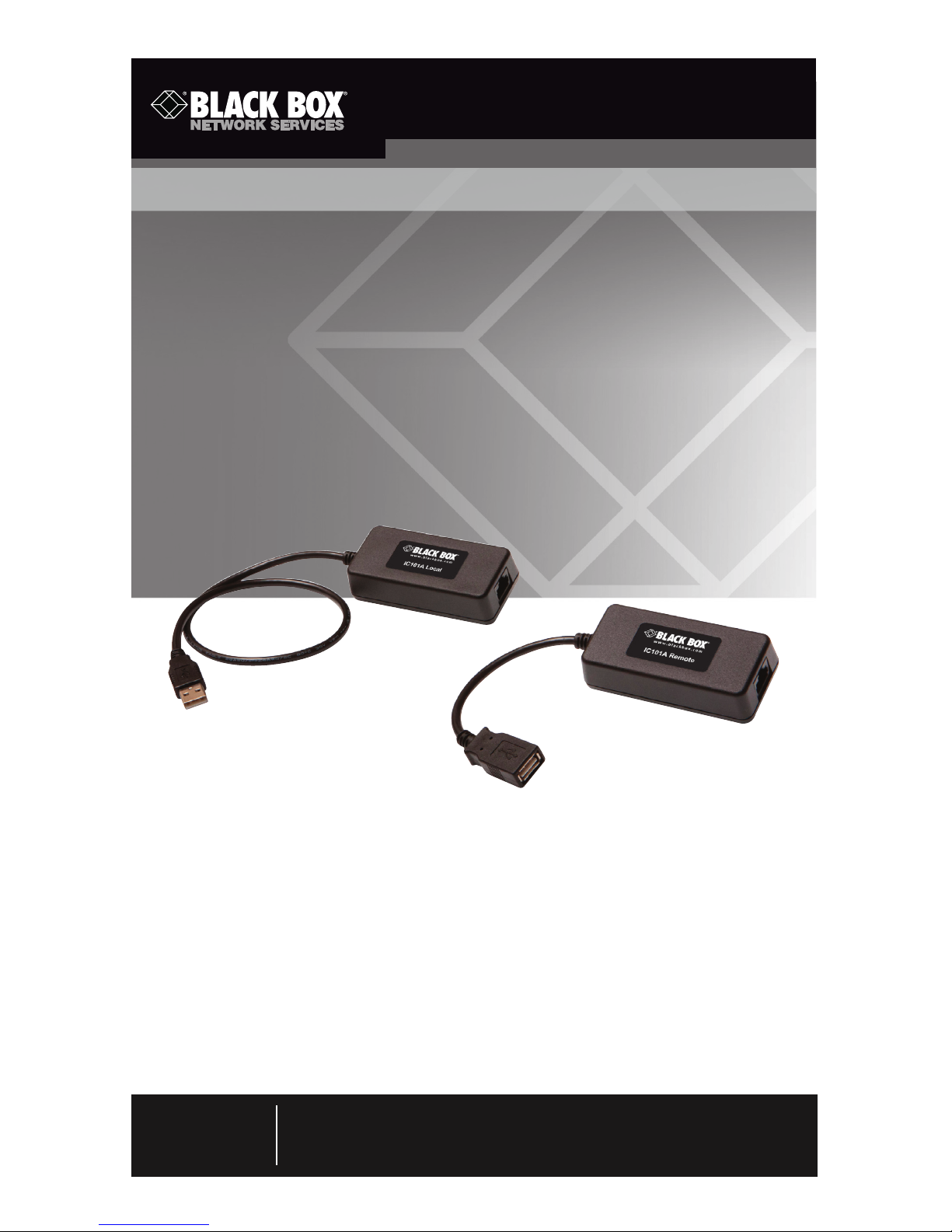
Extend USB devices up to 40 meters (131 feet).
CAT5 USB 1.1 Single-Port Extender
Order toll-free in the U.S.: Call 877-877-BBOX (outside U.S. call 724-746-5500)
FREE technical support 24 hours a day, 7 days a week: Call 724-746-5500 or fax
724-746-0746 • Mailing address: Black Box Corporation, 1000 Park Drive, Lawrence,
PA 15055-1018 • Web site: ww w.blackbox.com • E-mail: info@ blackbox.com
Customer
Support
Information
IC101A
Page 2

Page 2
724-746-5500 | blackbox.com
Trademarks Used in this Manual
Trademarks Used in this Manual
Black Box and the Double Diamond logo are registered trademarks of
BB Technologies, Inc.
Any other trademarks mentioned in this manual are acknowledged to be
the property of the trademark owners.
Page 3

Page 3
724-746-5500 | blackbox.com
FCC and IC RFI Statements/NOM Statement
FEDERAL COMMUNICATIONS COMMISSION AND
INDUSTRY CANADA RADIO FREQUENCY INTERFERENCE STATEMENTS
This equipment generates, uses, and can radiate radio-frequency energy,
and if not installed and used properly, that is, in strict accordance with the
manufacturer’s instructions, may cause inter ference to radio communication.
It has been tested and found to comply with the limits for a Class A computing
device in accordance with the specifications in Subpart B of Part 15 of FCC rules,
which are designed to provide reasonable protection against such interference
when the equipment is operated in a commercial environment. Operation of
this equipment in a residential area is likely to cause interference, in which case
the user at his own expense will be required to take whatever measures may be
necessary to correct the interference.
Changes or modifications not expressly approved by the party responsible
for compliance could void the user’s authority to operate the equipment.
This digital apparatus does not exceed the Class A limits for radio noise
emis sion from digital apparatus set out in the Radio Interference Regulation
of Industry Canada.
Le présent appareil numérique n’émet pas de bruits radioélectriques dépassant les
limites applicables aux appareils numériques de la classe A prescrites dans le
Règlement sur le brouillage radioélectrique publié par Industrie Canada.
Normas Oficiales Mexicanas (NOM)
Electrical Safety Statement
INSTRUCCIONES DE SEGURIDAD
1. Todas las instrucciones de seguridad y operación deberán ser leídas antes
de que el aparato eléctrico sea operado.
2. Las instrucciones de seguridad y operación deberán ser guardadas para
referencia futura.
3. Todas las advertencias en el aparato eléctrico y en sus instrucciones de
operación deben ser respetadas.
4. Todas las instrucciones de operación y uso deben ser seguidas.
Page 4

Page 4
724-746-5500 | blackbox.com
NOM Statement
4. Todas las instrucciones de operación y uso deben ser seguidas.
5. El aparato eléctrico no deberá ser usado cerca del agua—por ejemplo,
cerca de la tina de baño, lavabo, sótano mojado o cerca de una alberca,
etc..
6. El aparato eléctrico debe ser usado únicamente con carritos o pedestales
que sean recomendados por el fabricante.
7. El aparato eléctrico debe ser montado a la pared o al techo sólo como sea
recomendado por el fabricante.
8. Servicio—El usuario no debe intentar dar servicio al equipo eléctrico más allá
lo descrito en las instrucciones de operación. Todo otro servicio deberá ser
referido a personal de servicio calificado.
9. El aparato eléctrico debe ser situado de tal manera que su posición no
interfiera su uso. La colocación del aparato eléctrico sobre una cama, sofá,
alfombra o superficie similar puede bloquea la ventilación, no se debe
colocar en libreros o gabinetes que impidan el flujo de aire por los orificios
de ventilación.
10. El equipo eléctrico deber ser situado fuera del alcance de fuentes de calor
como radiadores, registros de calor, estufas u otros aparatos (incluyendo
amplificadores) que producen calor.
11. El aparato eléctrico deberá ser connectado a una fuente de poder sólo del
tipo descrito en el instructivo de operación, o como se indique en el
aparato.
12. Precaución debe ser tomada de tal manera que la tierra fisica y la
polarización del equipo no sea eliminada.
13. Los cables de la fuente de poder deben ser guiados de tal manera que no
sean pisados ni pellizcados por objetos colocados sobre o contra ellos,
poniendo particular atención a los contactos y receptáculos donde salen
del aparato.
14. El equipo eléctrico debe ser limpiado únicamente de acuerdo a las
recomendaciones del fabricante.
15. En caso de existir, una antena externa deberá ser localizada lejos de las
lineas de energia.
Page 5

Page 5
724-746-5500 | blackbox.com
NOM Statement
16. El cable de corriente deberá ser desconectado del cuando el equipo no sea
usado por un largo periodo de tiempo.
17. Cuidado debe ser tomado de tal manera que objectos liquidos no sean
derramados sobre la cubierta u orificios de ventilación.
18. Servicio por personal calificado deberá ser provisto cuando:
A: El cable de poder o el contacto ha sido dañado; u
B: Objectos han caído o líquido ha sido derramado dentro del aparato; o
C: El aparato ha sido expuesto a la lluvia; o
D: El aparato parece no operar normalmente o muestra un cambio en su
desempeño; o
E: El aparato ha sido tirado o su cubierta ha sido dañada.
Page 6

Page 6
724-746-5500 | blackbox.com
Table of Contents
Table of Contents
1. Specifications ..........................................................................................7
2. Overview .................................................................................................8
2.1 Introduction ...................................................................................8
2.2 What’s Included .............................................................................8
2.3 Additional Items You Will Need .....................................................8
2.4 Hardware Description ....................................................................9
2.4.1 Local Extender ....................................................................9
2.4.2 Remote Extender ..............................................................10
3. Installation ......................................................................................... 11
3.1 Installing the Local Extender Unit .................................................11
3.2 Installing the Remote Extender Unit ............................................. 11
3.3 Connecting the Local Extender to the Remote Extender .............12
3.3.1 With Surface Cabling ........................................................12
3.3.2 With Premise Cabling .......................................................12
3.4 Connecting a USB Device ............................................................12
3.5 Checking the Installation ..............................................................12
4. Troubleshooting ....................................................................................13
4.1 Problems/Solutions ......................................................................13
4.2 Contacting Black Box ...................................................................14
4.3 Shipping and Packaging ...............................................................14
5. Technical Glossary .................................................................................15
Page 7

Page 7
724-746-5500 | blackbox.com
Chapter 1: Specifications
1. Specifications
Approvals FCC Part 15 Class A,
CE Class A,
CES-003 Class A,
ESD (EN61000) Criteria A,
EFT (EN61000) Criteria A
Current Maximum current available to USB device at remote extender
unit: 400 mA when Remote Extender is supplied with 600 mA
Distance 131 ft. (40 m) over solid-core CAT5e (or better) cable
NOTE: Up to 278 ft. (85 m) may be achieved with low-speed
HIDs such as keyboard and mouse.
Environmental Operating Temperature:
32 to 122° F (0 to 50° C);
Storage Temperature:
-4 to +158° F (-20 to +70° C);
Operating Humidity:
20 to 80% relative humidity, noncondensing;
Storage Humidity:
10 to 90% relative humidity, noncondensing
USB Support USB device:
High-speed devices (USB 2.0) at full-speed (USB 1.1) rates,
Full-speed devices (USB 2.0 and 1.1),
Low-speed devices (USB 2.0 and 1.1);
USB hub:
Any single chain can include up to 3 USB hubs, depending
on which USB devices are being extended. Extension
distance will be reduced with each hub added to the system.;
USB host: EHCI (USB 2.0) and OHCI/UHCI (USB 1.1)
Connectors Local Extender:
(1) USB Type A,
(1) RJ-45;
Remote Extender:
(1) USB Type A,
(1) RJ-45
Dimensions Each unit (local or remote): 0.98"H x 3.34"W x 1.57"D
(2.5 x 8.5 x 4 cm)
Weight 0.292 lb. (0.109 kg)
Page 8

Page 8
724-746-5500 | blackbox.com
Chapter 2: Overview
2. Overview
2.1 Introduction
The CAT5 USB 1.1 Single-Port Extender enables users to extend USB devices up to
131 feet (40 meters). Extension distances up to 278 feet (85 meters) may be
achievable with low-speed HID devices such as keyboards and mice.
2.2 What’s Included
• Local Extender
• Remote Extender
• This user’s manual
2.3 Additional Items You Will Need
To complete the installation, you will also require the following items that are not
included with the product:
• USB 1.1 or 2.0 compatible computer (host computer) with a USB compliant
operating system
• USB 1.1 or 2.0 compatible device(s)
• CAT5 Unshielded Twisted Pair (UTP) cable with two RJ-45 connectors (if using
surface cabling),
OR
CAT5 cabling with two information outlets and two CAT5 patch cords with
RJ-45 connectors (if using premise cabling)
NOTE: All references to CAT5 cable in this document refer to solid-core and
represent the minimum requirement.
Page 9
Page 9
724-746-5500 | blackbox.com
Chapter 2: Overview
2.4 Hardware Description
2.4.1 Local Extender
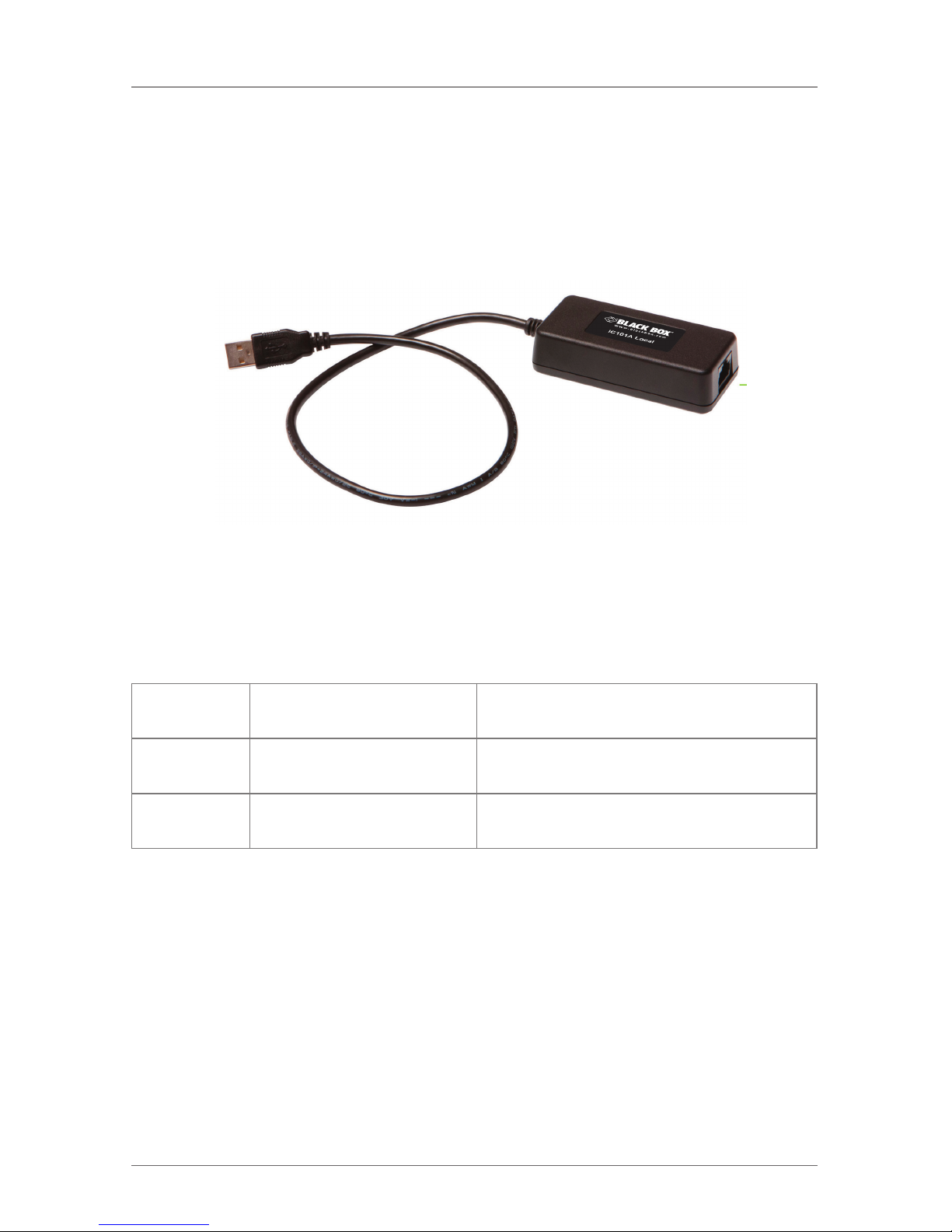
The Local Extender connects to the computer using the upstream USB Type A
connector.
1
2
Figure 2-1. Local extender.
Table 2-1. Local Extender components.
Number in
Figure 2-1
Type Description
1 Link port (RJ-45) Accepts RJ-45 connector for CAT5
(or better) cabling.
2 Device port (USB Type A) Used to connect the Local Extender unit
to the host computer.
Page 10
Page 10
724-746-5500 | blackbox.com
Chapter 2: Overview
2.4.2 Remote Extender
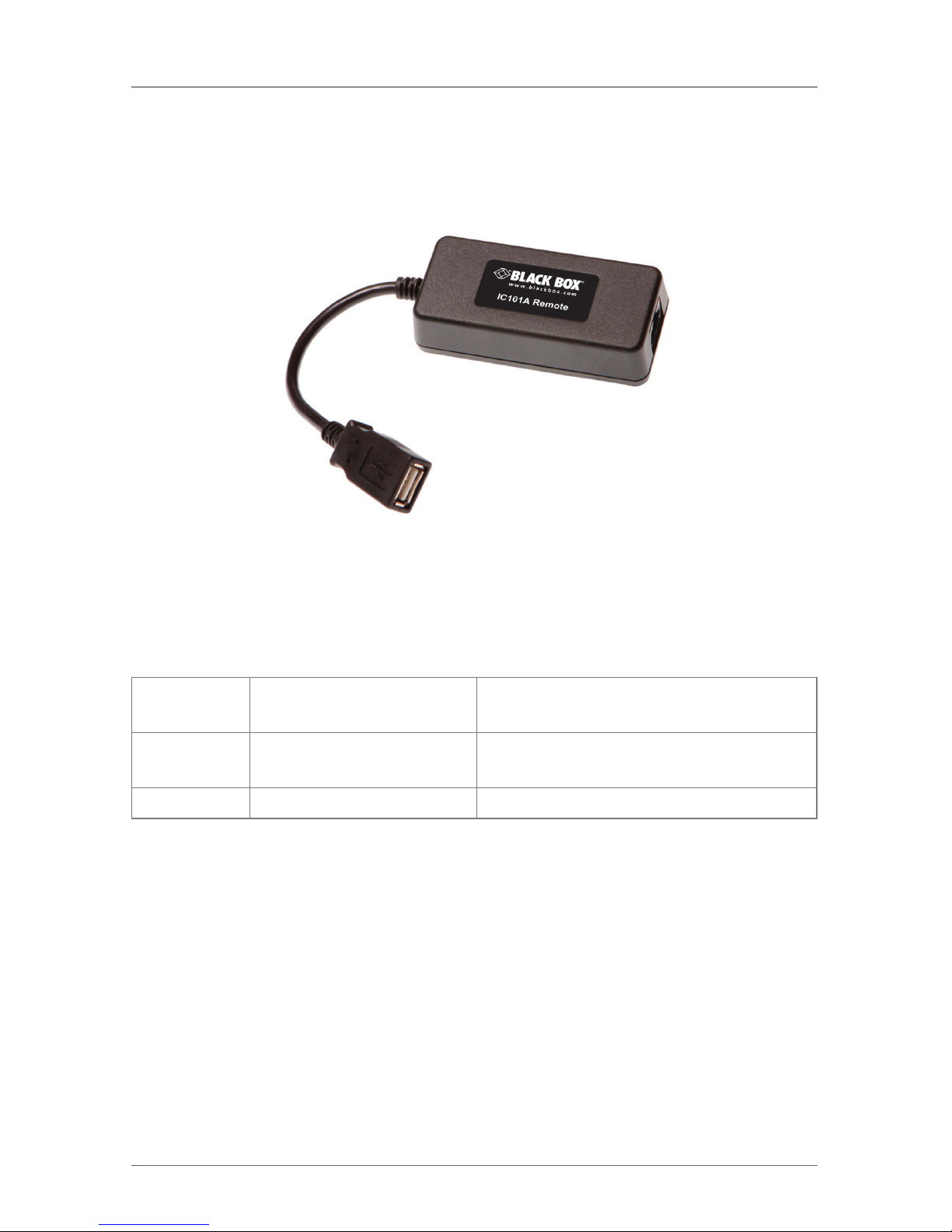
The Remote Extender provides one downstream USB Type A port for a standard
USB device. Additional devices may be connected by attaching USB hubs.
1
2
Figure 2-2. Remote extender.
Table 2-2. Remote Extender components.
Number in
Figure 2-2
Type Description
1 Link port (RJ-45) Accepts RJ-45 connector for CAT5
(or better) cabling.
2 Device port (USB Type A) Accepts USB device(s).
Page 11
Page 11
724-746-5500 | blackbox.com
Chapter 3: Installation
3. Installation
Before you can install the product, you need to prepare your site:
1. Determine where the computer is to be located and set up the computer.
2. Determine where you want to locate the remote USB device(s).
3. If you are using surface cabling, the product supports a maximum distance of
131 feet (40 m).
OR
If you are using premise cabling, ensure CAT5 cabling is installed between the
two locations, with CAT5 information outlets located near both the computer
and the USB device(s), and the total length, including patch cords, is no more
than 131 feet (40 m).
Remote
Extender
USB 1.1,
up to 131 ft. (40 m)
(CAT5/CAT6)
Local
Extender
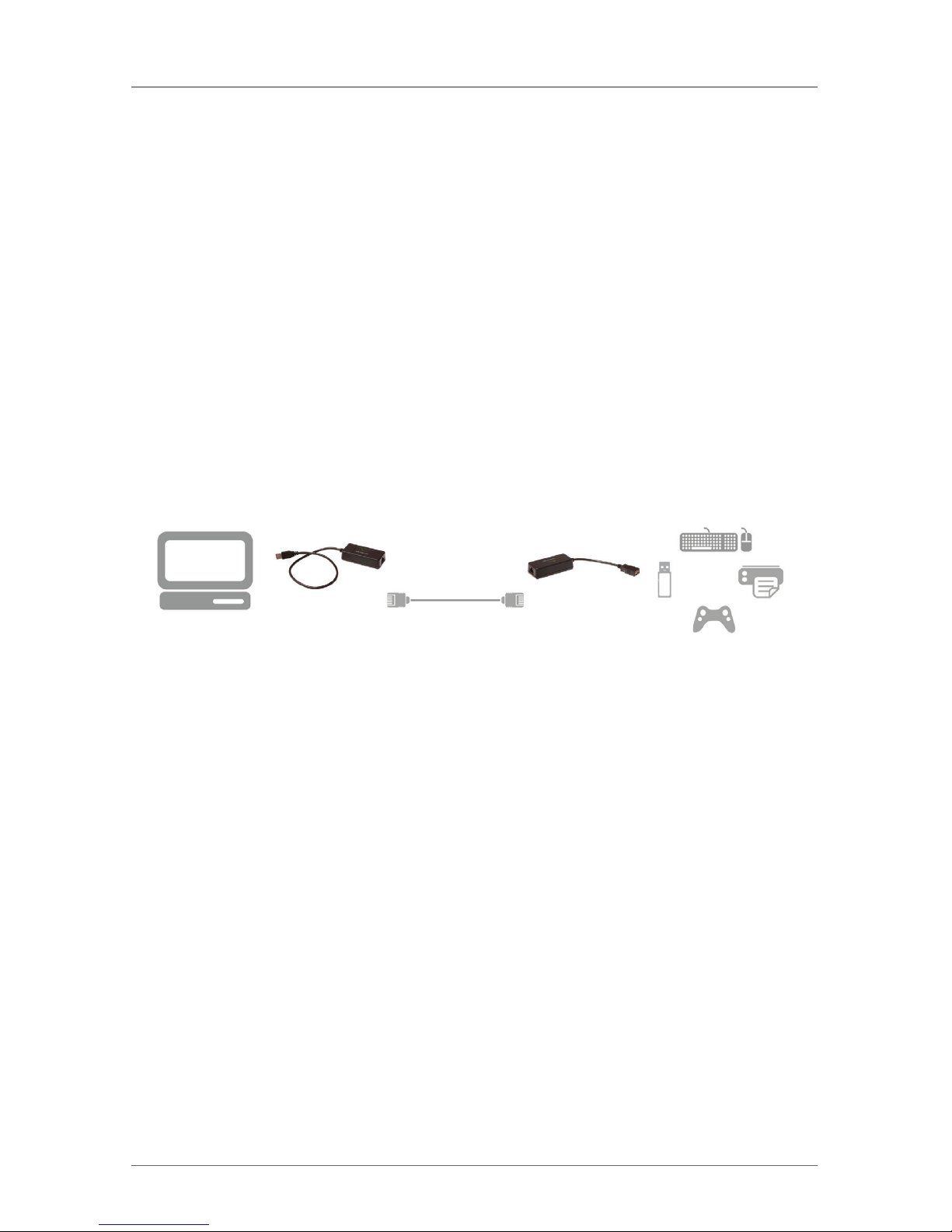
Figure 3-1. Typical installation.
3.1 Installing the Local Extender Unit
1. Place the Local Extender unit near the computer.
2. Plug the USB cable from the Local Extender into an available USB 2.0/1.1
Type A Port on the computer.
3.2 Installing the Remote Extender Unit
1. Place the Remote Extender unit near the USB device(s) in the desired remote
location.
2. Plug in your USB Device.
Page 12

Page 12
724-746-5500 | blackbox.com
Chapter 3: Installation
3.3 Connecting the Local Extender to the Remote Extender
NOTE: Extension length is reduced for each USB hub added to the system. There
is a 43.3-foot (13.2-meter) reduction in extension distance for each USB
hub added to the system. This includes hubs added on the Local Extender
or Remote Extender side.
NOTE: The Extender cannot be daisychained together. A system can have only one
Local Extender and one Remote Extender.
3.3.1 With Surface Cabling
1. Plug one end of the CAT5 cabling (not included) into the Link port (RJ-45) on
the Local Extender unit.
2. Plug the other end of the CAT5 cabling into the Link port (RJ-45) on the
Remote Extender unit.
3.3.2 With Premise Cabling
1. Plug one end of a CAT5 patch cord (not included) into the Link port (RJ-45) on
the Local Extender unit.
2. Plug the other end of the patch cord into the CAT5 information outlet near the
host computer.
3. Plug one end of the second CAT5 patch cord (not included) into the Link port
(RJ-45) on the Remote Extender unit.
4. Plug the other end of the second patch cord into the CAT5 information outlet
near the USB device.
3.4 Connecting a USB Device
1. Install any software required to operate the USB device. Refer to the
documentation for the USB device, as required.
2. Connect the USB device to the device port on the Remote Extender unit.
3.5 Checking the Installation
NOTE: Check if the USB device is detected by your operating system.
To open System Profiler in OS X: Open Finder, select “Applications,” then open
the “Utilities” folder and double-click on the “System Profiler” icon.
To open Device Manager in Windows 2000 or XP: Right click “My Computer,”
then select: “Properties >> Hardware tab >> Device Manager.”
To open Device Manager in Windows Vista or Windows 7: Open the “Start”
menu, right click on “Computer” then select: “Manage >> Device Manager.”
Page 13

Page 13
724-746-5500 | blackbox.com
Chapter 4: Troubleshooting
4. Troubleshooting
4.1 Problems/Solutions
This section provides troubleshooting tips. The topics are arranged in the order in
which they should be executed, in most situations. If you are unable to resolve the
problem after following these instructions, please contact Technical Support for
further assistance.
Problem: The USB device does not operate correctly.
Possible Cause:
• The USB device is malfunctioning.
• The computer does not recognize the USB device.
• The application software for the device is not operating.
• The Extender is malfunctioning.
Solution:
1. Un-install and re-install the driver for the USB device.
2. Update the driver for the USB device.
3. Directly connect the USB device to the Host to verify the USB device operates
correctly.
4. Contact Technical Support.
Problem: The USB device is detected as an “Unknown Device” in the Operating
System.
Possible Cause:
• The USB device’s timing is outside of the USB 1.1 specification.
• The Extender is malfunctioning.
Solution:
1. Connect the Remote Extender to the Local Extender using a patch cable.
2. Unplug the Local Extender from the host and wait 15 seconds. Then plug the
Local Extender back into the host.
3. Contact Technical Support.
Page 14

Page 14
724-746-5500 | blackbox.com
Chapter 4: Troubleshooting
Problem:
The USB device is detected as using too much power in the Operating System.
Possible Cause:
• The USB device needs more power then the Extender can support.
• The Host is not providing enough power to the Extender.
Solution:
1. Connect the Local Extender to a different USB port on the Host.
2. Connect a self-powered USB hub between the Remote Extender and the USB
device.
4.2 Contacting Black Box
If you determine that your CAT5 USB 1.1 Single-Port Extender is malfunctioning,
do not attempt to alter or repair the unit. It contains no user-serviceable parts.
Contact Black Box Technical Support at 724-746-5500 or [email protected].
Before you do, make a record of the history of the problem. We will be able to
provide more efficient and accurate assistance if you have a complete description,
including:
• the nature and duration of the problem.
• when the problem occurs.
• the components involved in the problem.
• any particular application that, when used, appears to create the problem or
make it worse.
4.3 Shipping and Packaging
If you need to transport or ship your CAT5 USB 1.1 Single-Port Extender:
• Package it carefully. We recommend that you use the original container.
• If you are returning the unit, make sure you include everything you received
with it. Before you ship for return or repair, contact Black Box to get a Return
Authorization (RA) number.
Page 15
Page 15
724-746-5500 | blackbox.com
Chapter 5: Technical Glossary
5. Technical Glossary
Category 5 (CAT5) Network Cabling — Category 5 cable is commonly also
referred to as CAT5. This cabling is available in either solid or stranded twisted pair
copper wire variants and as UTP (Unshielded Twisted Pair) or STP (Shielded
Twisted Pair). UTP cables are not surrounded by any shielding, making them more
susceptible to electromagnetic interference (EMI). STP cables include shielding
over each individual pair of copper wires that provides better protection against
EMI. Category 5 has been superseded by CAT5e cabling, which includes improved
data integrity to support high-speed communications.
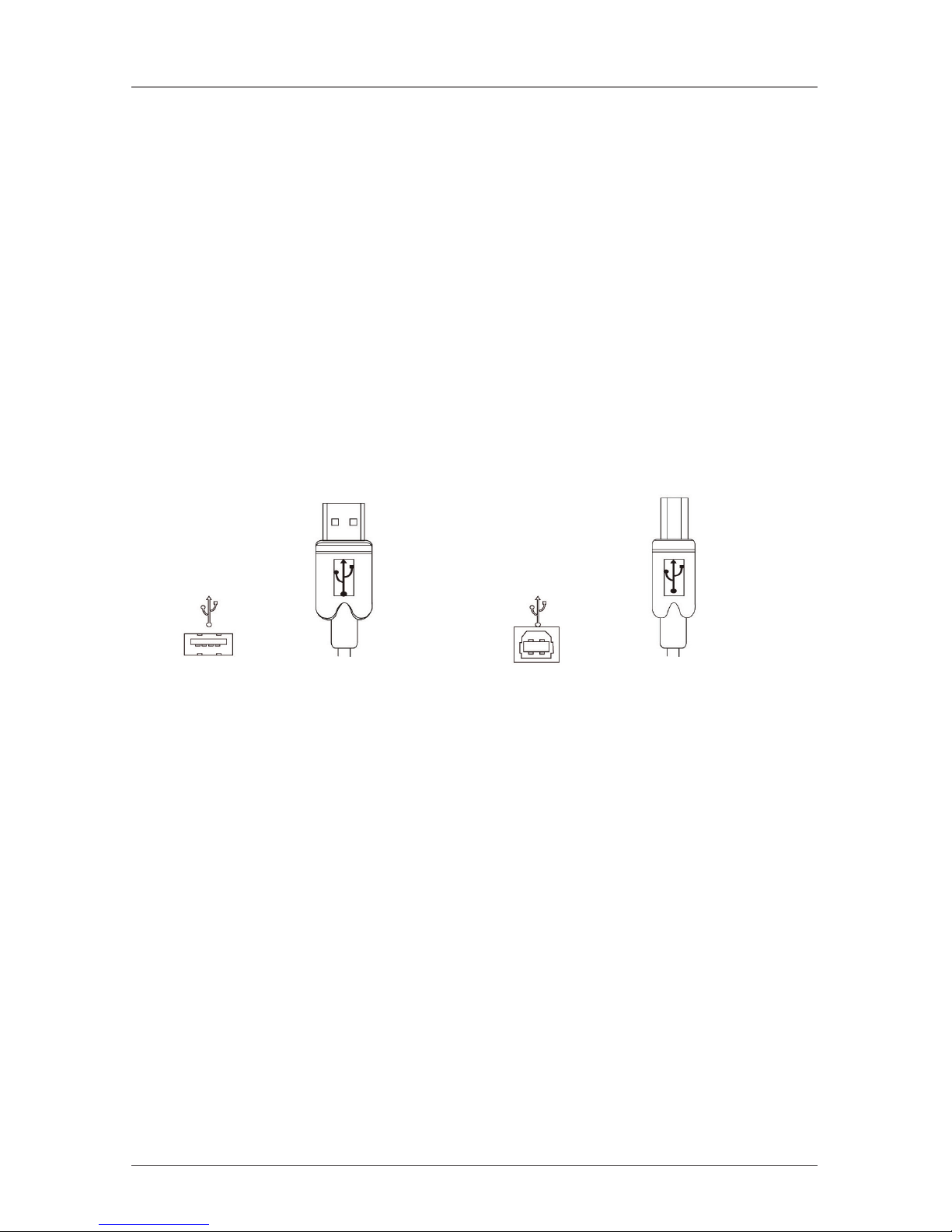
USB Cables — USB cables have two distinct connectors. The Type A connector is
used to connect the cable from a USB device to the Type A port on a computer or
hub. The Type B connector is used to attach the USB cable to a USB device.
USB Type A USB Type A USB Type B USB Type B
port connector port connector
Figure 5-1. USB cables.
Page 16
Page 16
724-746-5500 | blackbox.com
Chapter 5: Technical Glossary
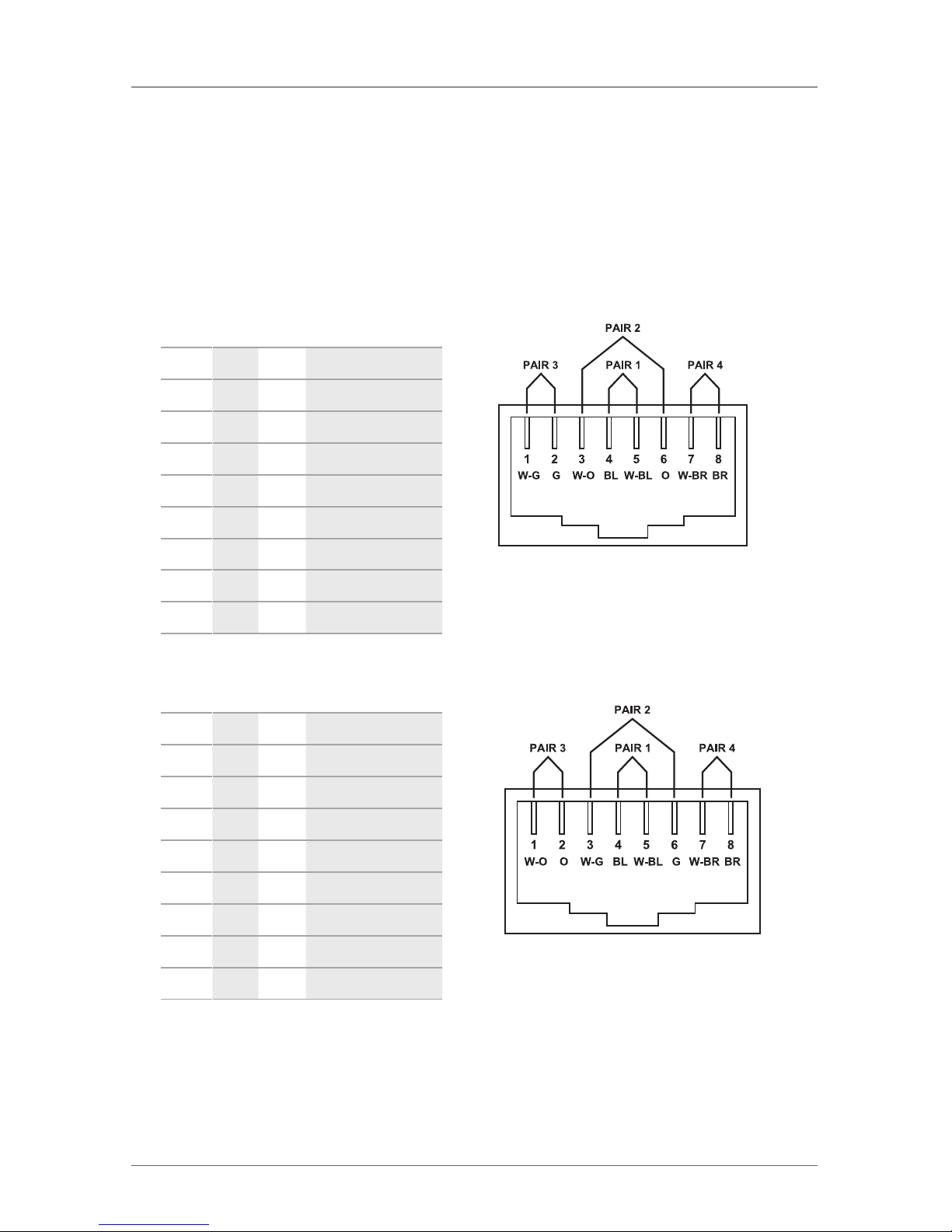
RJ-45 — The Registered Jack (RJ) physical interface is what connects the network
cabling (CAT5) to the local extender and remote extender. You may use either the
T568A scheme (Table 5-1) or the T568B scheme (Table 5-2) for cable termination
because the extender uses all four pairs of the cable. RJ-45 connectors are
sometimes also referred to as 8P8C connectors.
RJ-45 Pin Positioning —
Table 5-1. T568A wiring.
Pin Pair Wire Cable Color
1 3 1 White/Green
2 3 2 Green
3 2 1 White/Orange
4 1 2 Blue
5 1 1 White/Blue
6 2 2 Orange
7 4 1 White/ Brown
8 4 2 Brown
Table 5-2. T568B wiring.
Pin Pair Wire Cable Color
1 2 1 White/Orange
2 2 2 Orange
3 3 1 White/Green
4 1 2 Blue
5 1 1 White/Blue
6 3 2 Green
7 4 1 White/ Brown
8 4 2 Brown
Figure 5-2. T568A connector pinout.
Figure 5-3. T568B connector pinout.
Page 17

Page 17
724-746-5500 | blackbox.com
NOTES
Page 18

Page 18
724-746-5500 | blackbox.com
NOTES
Page 19

Page 19
724-746-5500 | blackbox.com
NOTES
Page 20
Black Box Tech Support: FREE! Live. 24/7.
Tech support the
way it should be.
Great tech support is just 30 seconds away at
724-746-5500 or blackbox.com.
724-746-5500 | blackbox.com
IC101A, version 1
About Black Box
Black Box provides an extensive range of networking and infrastructure products.
You’ll find everything from cabinets and racks and power and surge protection
products to media converters and Ethernet switches all supported by free, live 24/7
Tech support available in 30 seconds or less.
© Copyright 2013. Black Box Corporation. All rights reserved. Black Box® and the Double Diamond logo
are registered trademarks of BB Technologies, Inc. Any third-party trademarks appearing in this manual
are acknowledged to be the property of their respective owners.
 Loading...