

Page 1
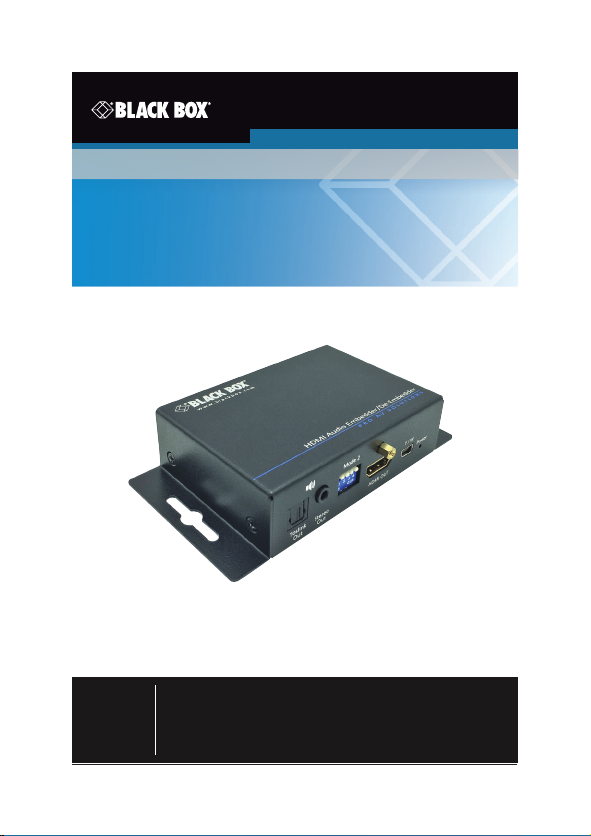
AEMEX-HDMI -R2
Audio Embedder/De-embedder - HDMI 2.0
Extract audio from an HDMI stream or embed
a separate audio signal to an HDMI stream.
Contact
Information
Order to ll-free in the U.S. or for FREE 24 /7 Technical Suppor t:
Call 877- 877-BBOX (out side U.S. call 724-746-5500 )
www.blackbox.com • E-mail: [email protected]
Page 2

Trademarks Used in this Manual
Trademarks Used in this Manual
Black Box and the Double Diamond log o are registered trademarks of
BB Technologies, Inc.
HDMI is a registered trademark of H DMI Licensing LLC.
Any other trademarks mentioned in this manual are acknowledged to be
the property of the trademark owners.
Page 2
877-877-2269 | blackbox.com
Page 3

FCC and IC RFI Statements/NOM Statement
FEDERAL COMMUNICATIONS COMMISSION AND INDUSTRY
CANADA RADIO FREQUENCY INTERFERENCE STATEMENTS
This equipment generates, uses, and can radiate radio-frequency energy, and if
not installed and used properly, that is, in stric t accordance with the manufacturer’s instructions, may cause inter ference to radio communication.
It has been tested and found to comply with the limit s for a Class A computing
device in accordance with the specifications in Subpart B of Part 15 of FCC rules,
which are designed to provide reasonable protection against such
interference when the equipment is operated in a commercial environment.
Operation of this equipment in a resid ential area is likely to cause interference, in
which case the user at his own expense will be required to take whatever measures may be necessar y to correc t the inter ference.
Changes or modifications not expressly approved by the party responsible
for compliance could void the user’s authority to operate the equipment.
This digital apparatus does not exceed the Class A limits for radio noise emis sion
from digital apparatus set out in the Radio Interference Regulation of Industry
Canada.
Le présent appareil numérique n’émet pas de bruits radioélec triques dépassant
les limites applicables aux appareils numériques de classe A prescrites dans le
Règlement sur le brouillage radioélectrique publié par Industrie Canada.
Normas Oficiales Mexicanas (NOM)
Electrical Safety Statement
INSTRUCCIONES DE SEGURIDAD
1. Todas las instrucciones de seguridad y operación deberán ser leídas antes
de que el aparato eléctrico sea operado.
2. L as instrucciones de seguridad y operación deberán ser guardadas para
referencia futura.
3. Todas las advertencias en el aparato eléctrico y en sus instrucciones de
operación deben ser respetadas.
4. Todas las instrucciones de operación y uso deben s er seguidas.
877-877-2269 | blackbox.com Page 3
Page 4

NOM Statement
5. El aparato elé ctrico no deberá ser usado cerca del agua — por ejemplo,
cerca
de la tina de baño, lavabo, sótano mojado o cerca de una alb erca, etc.
6. El aparato elé ctrico debe ser usado únicamente con carritos o pedestales
que sean recomendados por el fabricante.
7. El aparato elé ctrico debe ser montado a la pared o al techo sólo como sea
recomendado por el fabricante.
8. Servicio— El usuario no debe intentar dar ser vicio al equipo eléc trico más
allá a lo descrito en las instrucciones de operación. Todo otro servicio
deberá ser referido a personal de servicio calificado.
9. El aparato elé ctrico debe ser situado de tal manera que su posición no
interfiera su uso. La colocación del aparato eléctrico sobre una cama, sofá,
alfombra o sup erficie similar puede bloquea la ventilación, no se debe
colocar en libreros o gabinetes que impidan el flujo de aire por los orificios
de ventilación.
10. El equipo eléc trico deber ser situado fuera del alcance de fuentes de calor
como radiad ores, registros de calor, estufas u otros aparatos (incluyendo
amplificadores) que producen calor.
11. El aparato eléctrico deberá ser connec tado a una fuente de poder sólo
del tipo descrito en el instructivo de operación, o como s e indique en el
aparato.
12. Precaución debe ser tomada de tal manera que la tierra fisica y la
polarización del equipo no sea eliminada.
13. Los cables de la fuente de poder deben ser guiados de tal manera que no
sean pisados ni pellizcados por objetos colocados sobre o contra ellos,
poniendo particular atención a los contac tos y recept áculos donde salen
del aparato.
14. El equipo eléc trico debe ser limpiado únicamente de acuerdo a las
recomendaciones del fabricante.
15. En caso de exis tir, una antena externa deberá ser localizada lejos de las
lineas de energia.
16. El cable de corriente deberá ser desconectado del cuando el equipo no
sea usado por un largo periodo de tiempo.
Page 4
877-877-2269 | blackbox.com
Page 5

NOM Statement/Safety Notice
17. Cuidado debe ser tomado de tal manera que objectos liquidos no sean
derramados sobre la cubierta u orificios de ventilación.
18. Servicio por personal calificado deberá ser provisto cuando:
A: El cable de poder o el contacto ha sido dañado; u
B: Objectos han caído o líquido ha sido derramado dentro del aparato; o
C: El aparato ha sido expuesto a la lluvia; o
D: El aparato parece no operar normalmente o muestra un c ambio en su
desempeño; o
E: El aparato ha sido tirado o su cubier ta ha sido dañada.
Safety Notice
Please read and follow the safety instructions to protect yourself from possible
injury and to minimize the risk of damage to the unit.
• Follow all instructions and warnings marked on the unit.
• Do not attempt to service the unit yourself, except where explained in this
manual.
• Provide proper ventilation and air circulation and do not use near water.
• Keep objec ts that might damage the device away from it, and place the unit
on stable surfaces.
• Only use the power adapter, power cords, and connection cables d esigned for
the unit.
• Do not use liquid or aerosol cleaners to clean this unit. Always unplug the
power to the device before cleaning.
877-877-2269 | blackbox.com Page 5
Page 6

Table of Contents
Table of Contents
1. Specifications .........................................................................................7
2. Overview ................................................................................................9
2.1 Introduction ..................................................................................9
2.2 Features .........................................................................................9
2.3 What ’s Included ............................................................................9
2.4 Hardware Description .................................................................10
DIP Switch Settings .....................................................................12
3. Connection Diagrams ..........................................................................13
4. Contacting Black Box ........................................................................... 15
Page 6
877-877-2269 | blackbox.com
Page 7

Chapter 1: Specifications
1. Specifications
Approvals HDMI 2.0, HDCP, CE, FCC, RoHS2, WEEE, UL
Audio Support Supports HDMI, 3.5-mm analog audio, TOSLINK
Video Bandwidth Single-link 594 MHz (18 Gbps)
Video Support Up to 4K @ 60 Hz 4 :4: 4 8 bits or 4K @ 60 4:2: 0
CEC Channel Bypass
ESD Protection Human body model: ±19 kV (air-gap discharge)
Enclosure Metal
Firmware Update via USB MIni B Port
PCB Stackup
Connectors Input:
User Controls (1) 2-position DIP switch;
optical audio inputs and outputs;
Embeds audio from either 3.5-mm or optical
source to an HDMI or DVI -D signal
10 bits (HDR)
and 12 kV (contac t discharge);
Core chipset: ±2 kV
4-layer board (impedance control—
differential 100 ohms, single 50 ohms)
(1) HDMI (19-pin female) ,
(1) 3.5-mm analog audio,
(1) TOSLink digital optical audio;
Output:
(1) HDMI (19-pin female) ,
(1) 3.5-mm analog audio,
(1) TOSLink digital optical audio;
For power and Firmware Updates:
(1) USB Mini B
(1) 4-position DIP switch
877-877-2269 | blackbox.com Page 7
Page 8

Chapter 1: Specifications
1. Specifications (continued)
Environment Temperature Tolerance:
Power Power supply (wallwart style):
Dimensions 1.03"H x 3.74"W x 2.61"D
Weight 0.57 lb. (0.26 kg)
Operating: 32 to 104° F (0 to 40° C);
Storage: - 4 to +140° F (-20 to + 60° C)
Relative Humidity: 20–90%, noncondensing;
Maximum Altitude: 10,000 feet (3125 m)
Input: 100 to 240 VAC, 50/ 60 Hz, 0.58 A ;
Output: 5-VDC, 4 -A locking barrel plug
(2.61 x 9.49 x 6.62 cm)
Page 8
877-877-2269 | blackbox.com
Page 9

Chapter 2: Overview
2. Overview
2.1 Introduction
The Audio Embedder /De -Embedder - HDMI 2.0 (AEMEX-HDMI- R2) is
compatible with HDMI 2.0. It embeds audio from either an 3.5 -mm or optical
source to an HDMI or DVI -D source or camera. It also de-embeds (extracts)
audio from an H DMI signal and outputs it to 3.5- mm analog and/or digital
optical sound systems.
2.2 Features
• Support s HDMI, 3.5-mm analog audio, TOSLINK o ptical audio inputs and
outputs.
• Using HDMI 2.0, the unit supp orts a maximum resolution of 4K @ 60 Hz
4:4:4 8 bits or 4K @ 60 4:2:0 10 bits ( HDR).
• Embeds audio from either a 3.5-mm or an optical source to an HDMI or DVI- D
signal.
• Creates an audio channel where one did not exist, such as in a DV I-D source
or camera system.
• De-embeds (extract s) audio from HDMI signal and outputs it to 3.5 -mm
analog and /or digital optical sound systems. Audio is output to analog,
optical, and HDMI at the same time.
• Requires no HDMI video output to extrac t audio.
• Supports embedding and de -embedding at the same time.
• Supports HDCP 2.2 for content protection.
• Power through either a wallmount power supply or USB connector.
• Easy to configure via DIP switches.
2.3 What’s Included
• Audio Embedder/ De- Embedder - HDMI 2.0 ( AEMEX-HDMI-R 2)
• 5-VDC, 4-A power supply with adapter clips
To download this user manual from the Black Box web site:
1. Go to w ww.blackbox.com
2. Enter the par t number (A EMEX- HDMI -R2) in the search box.
3. Click on the product in the “Product Results” page.
4. Click on the “Support” tab on the product page, and select the document
you wish to download.
877-877-2269 | blackbox.com Page 9
Page 10
Chapter 2: Overview
If you have any trouble accessing the Black Box site to download the manual,
you can contact our Technic al Suppor t at 877-877-2269 or info @blackbox.com.
2.4 Hardware Description
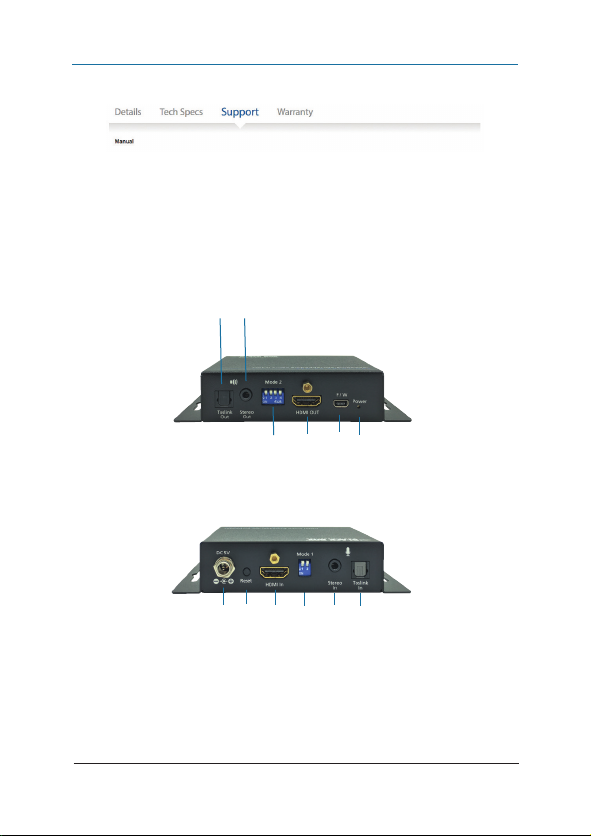
Figures 2-1 and 2-2 show the front and back panels of the unit. Table 2-1
describes its components.
1 2
3 4 5 6
Figure 2-1. Front panel.
7 8 9 10 11 12
Figure 2-2. Back panel.
Page 10
877-877-2269 | blackbox.com
Page 11

Chapter 2: Overview
Table 2-1. AEMEX-HDMI-R2 components in Figures 2-1 and 2-2.
Number Component Description
1
(1) TOSLINK
Audio OUT
connector
2 (1) 3.5-mm
connector
3
4
5
6
7
8 (1) Pushbutton For factory reset.
9
10 (1) 2-position
11
12
(1) 4-position
DIP switch
(1) HDM I
female
connector
(1) mini-USB
connector
(1) Power LED Light s when power is ON.
(1) Barrel
connector
(1) HDM I
female
connector
DIP switch
(1) 3.5-mm
connector
(1) TOSLINK
Audio IN
Connects to digital S /P DIF audio output.
Stereo O UT
See Table 2-3.
HDMI OUT
• Used for firmware update
• Connects to 5 VDC power supply unit
+5 V power
HDMI IN
See Table 2-2.
Stereo I N
Connects to audio source.
877-877-2269 | blackbox.com Page 11
Page 12
Chapter 2: Overview
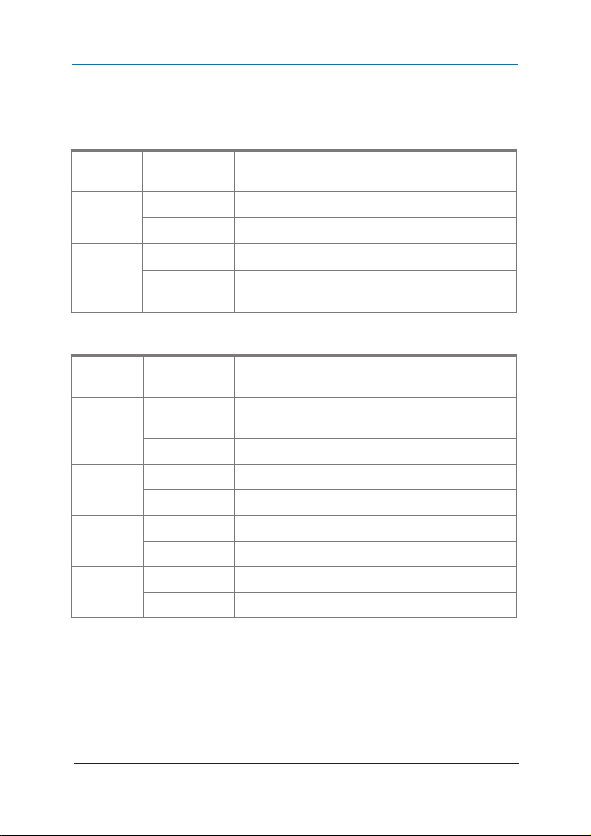
DIP Switch Settings
Table 2-2. 2-Position D IP switch (shown in Figure 2-2).
Switch
Number
1
2 ON (DOWN)
Switch
Number
1 ON (DOWN) Enable Audio Extractor function via S/ PDI F and
2 ON (DOWN) Enable ARC function.
3 ON (DOWN) Reserved for future use.
4 ON (DOWN) Firmware update mode.
Position Description
ON (DOWN) Enable Audio Embedder function.
OFF (UP)
OFF (UP)
Table 2-3. 4-Position DIP switch (shown in Figure 2-1).
Position Description
OFF (U P) Disable Audio Extractor function.
OFF (U P) Disable ARC function.
OFF (U P) Reserved for future use.
OFF (U P) Normal mode.
Disable Audio Embedder function.
S/ PDIF connector selected on Audio Embedder.
3.5-mm connector selected on Audio
Embedder.
3.5-mm connectors.
NOTES:
1. ARC audio extraction is always via S/ PDIF TOSLink output.
2. The audio will only extract via 3.5-mm stereo if you enable the ARC
function.
Page 12
877-877-2269 | blackbox.com
Page 13
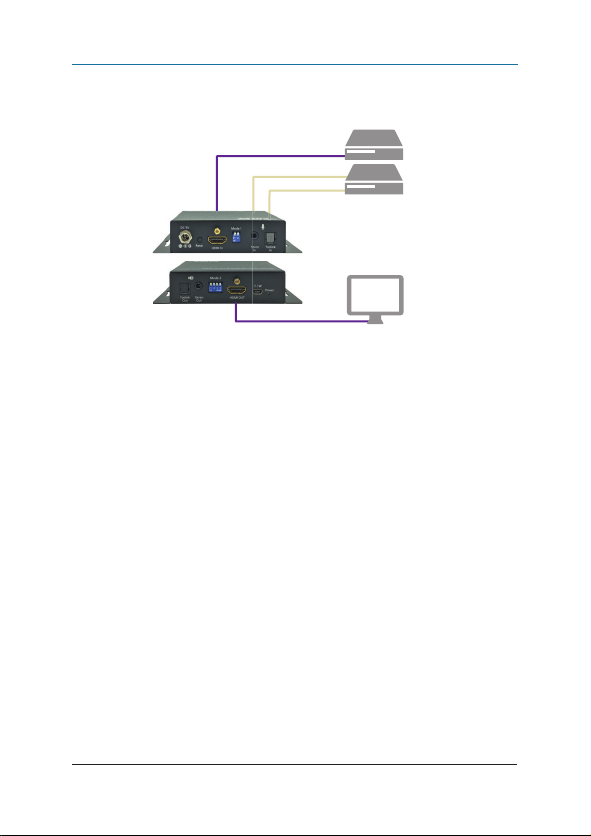
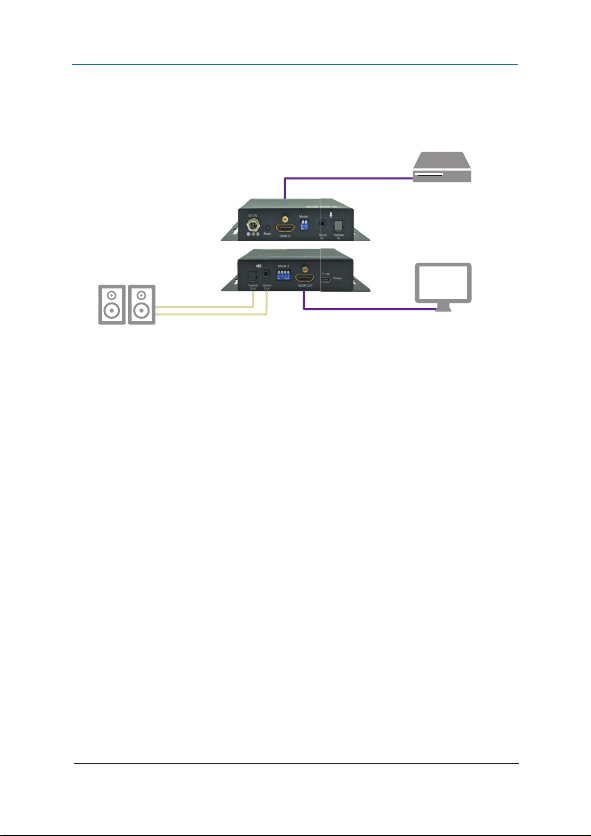
3. Connection Diagrams
Chapter 3: Connection Diagrams
HDMI
cable
Audio IN
Back
Front
Blu-ray
player
HDMI
Audio
Audio Embedder/
De-Embedder -
HDMI 2.0
(AEMEX-HDMI-R2)
Figur e 3 -1.
Flat-panel display
with HDM I
877-877-2269 | blackbox.com Page 13
Page 14
Chapter 3: Connection Diagrams
Audio OUT
(Extraction)
Back
Front
HDMI
Audio
Figure 3-2.
HDMI
cable
Blu-ray player
Audio Embedder/
De-Embedder -
HDMI 2.0
(AEMEX-HDMI-R2)
cable
Flat-panel
display
HDMI
Page 14
877-877-2269 | blackbox.com
Page 15

Chapter 4: Contacting Black Box
4. Contacting Black Box
If you determine that your Audio Embedder/ De- Embedder - HDMI 2.0
(AEME X-HDMI-R2) is malfunctioning, do not attempt to alter or repair the unit.
It contains no user-ser viceable parts. Contact Black Box Technical Support at
877-877-2269 or info@ blackbox.com.
Before you do, make a record of the history of the problem. We will be able
to provide more efficient and accurate assistance if you have a complete
description, including:
• the nature and duration of the problem.
• when the problem occur s.
• the components involved in the problem.
• any particular application that, when used, appears to create the problem or
make it worse.
Shipping and Packaging
If you need to transpor t or ship your Audio Embedder/ De-Embedder - HDMI 2.0
(AEMEX-HDMI-R2):
• Package it carefully. We recommend that you use the original container.
• If you are returning the unit, make sure you include every thing you received
with it. Before you ship for return or repair, contact Black Box to get a Return
Authorization (RA) number.
877-877-2269 | blackbox.com Page 15
Page 16
Chapter
Black Box Tech Support: FREE! Live. 24/7.
Tech support the
way it should be.
Great tech support is just 60 seconds away
at 877-877-2269 or blackbox.com.
About Black Box
Black Box provides an ex tensive range of networking and infrastructure
products. You’ll find ever ything from cabinets and rack s and power and surge
protection produc ts to media converters and Ethernet switches all supported
by free, live 24 /7 Tech support available in 60 se conds or less.
© Copyright 2016. Bla ck Box Corporat ion. All rig hts reser ved.
aemex-hdmi-r2_user_rev3_a6.pdf
877-877-2269 | blackbox.com
 Loading...