

Page 1

Guía de inicio rápido
B8601
Por favor lea antes de continuar
Page 2
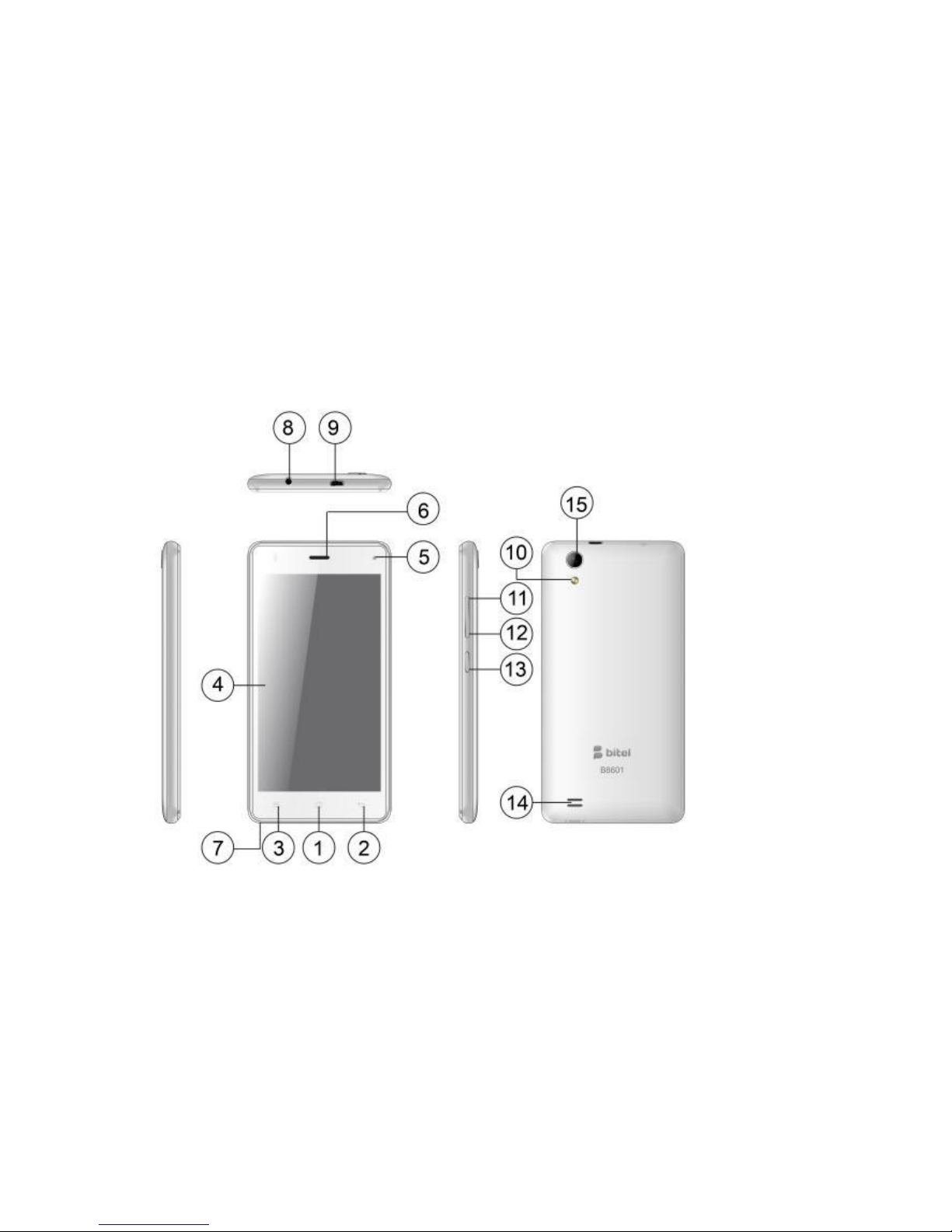
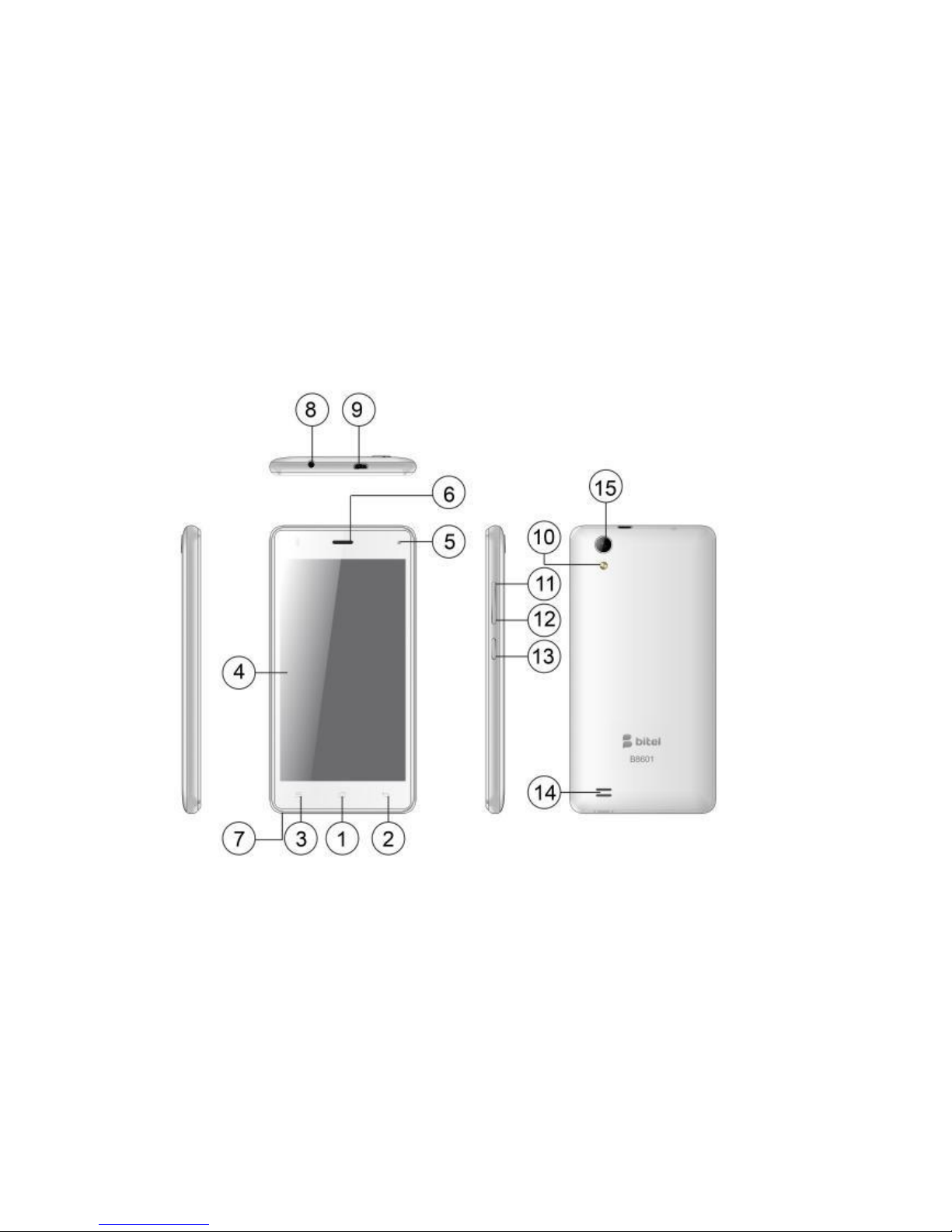
1. Componentes del teléfono
Page 3
1
Tecla inicio
9
Conector USB
2
Tecla atrás
10
Flash
3
Tecla menú
11
Control de Volumen +
4
Panel táctil
12
Control de Volumen -
5
Lente de cámara frontal
13
Encendido
6
Receptor
14
Altavoz
7
Micrófono
15
Lente de cámara
8
Conector de Auriculares
16
Page 4
2. CAJA DE EMBALAJE DEL TELÉFONO
La caja de embalaje del teléfono deberá contener los siguientes ítems y accesorios:
Teléfono, batería, adaptador de corriente, Guía de inicio rápido, cable auricular estéreo, cable
USB.
3. INSTALACIÓN DE LA TARJETA SIM Y TARJETA DE MEMORIA
Asegúrese siempre desconectar la Corriente o el cargador antes de instalar o sustituir la tarjeta
SIM y la tarjeta de memoria. La tapa trasera se debe quitar antes de poner la tarjeta SIM, la
batería o la tarjeta de memoria. No sugerimos realizar llamadas cuando la batería este
expuesta sin su cubierta.
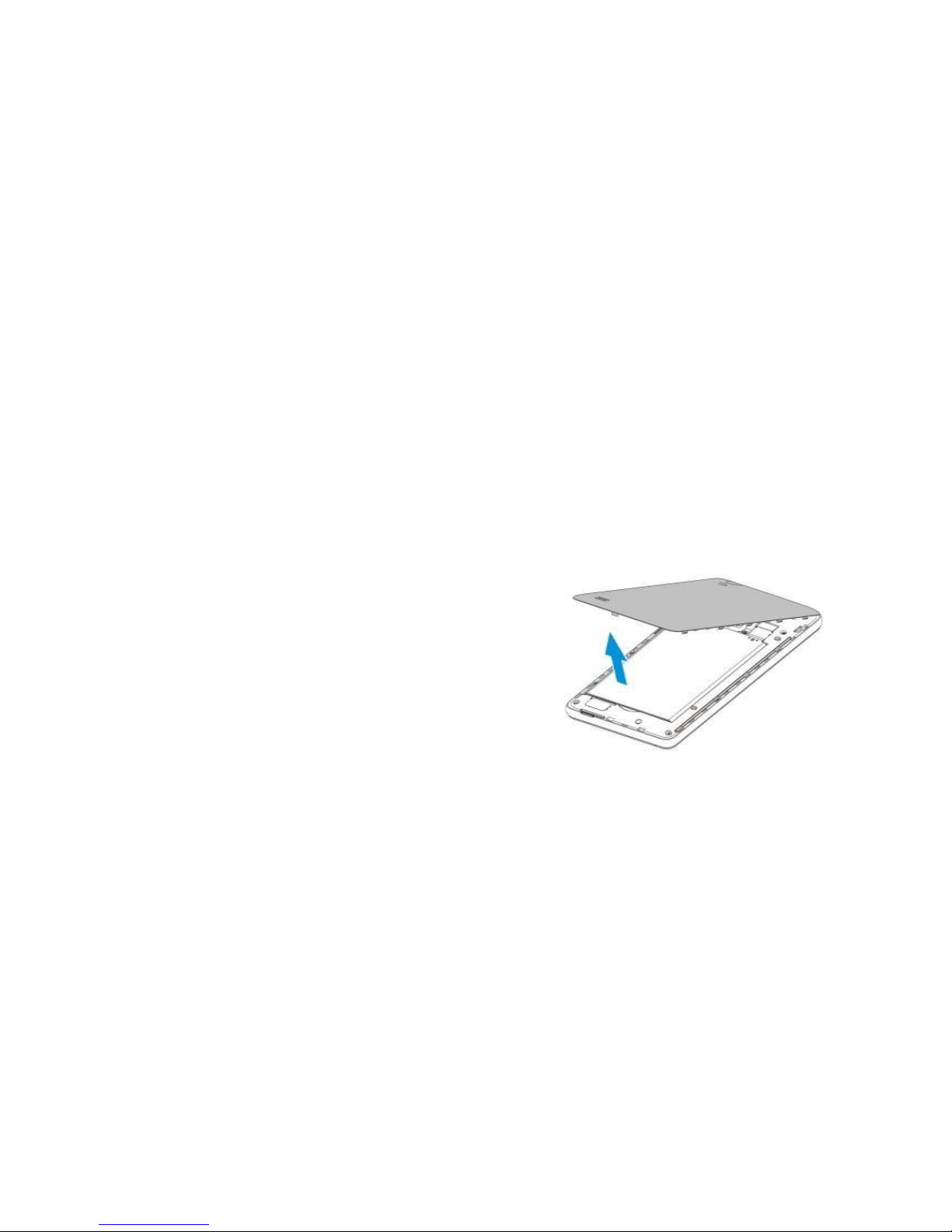
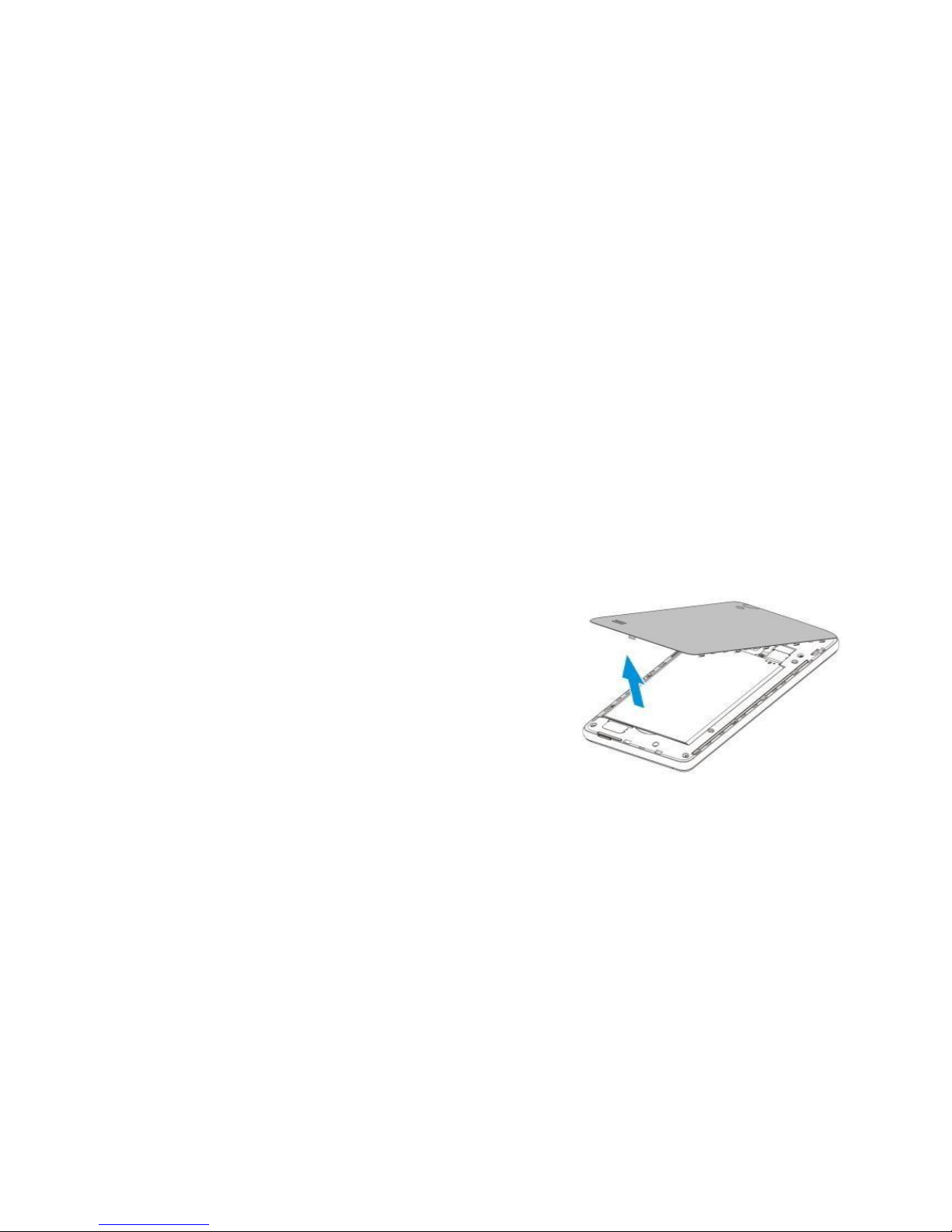
3.1 Para quitar la tapa de la batería
Asegúrese de que el dispositivo este apagado.
Sujete el dispositivo con cuidado con el panel
frontal hacia abajo
Tire de la mitad inferior de la tapa trasera con el
dedo el pulgar y retire la abertura.
3.2 Tarjeta SIM
La tarjeta SIM contiene su número de teléfono, detalles del servicio, la memoria, mensajes y
directorio.
Page 5
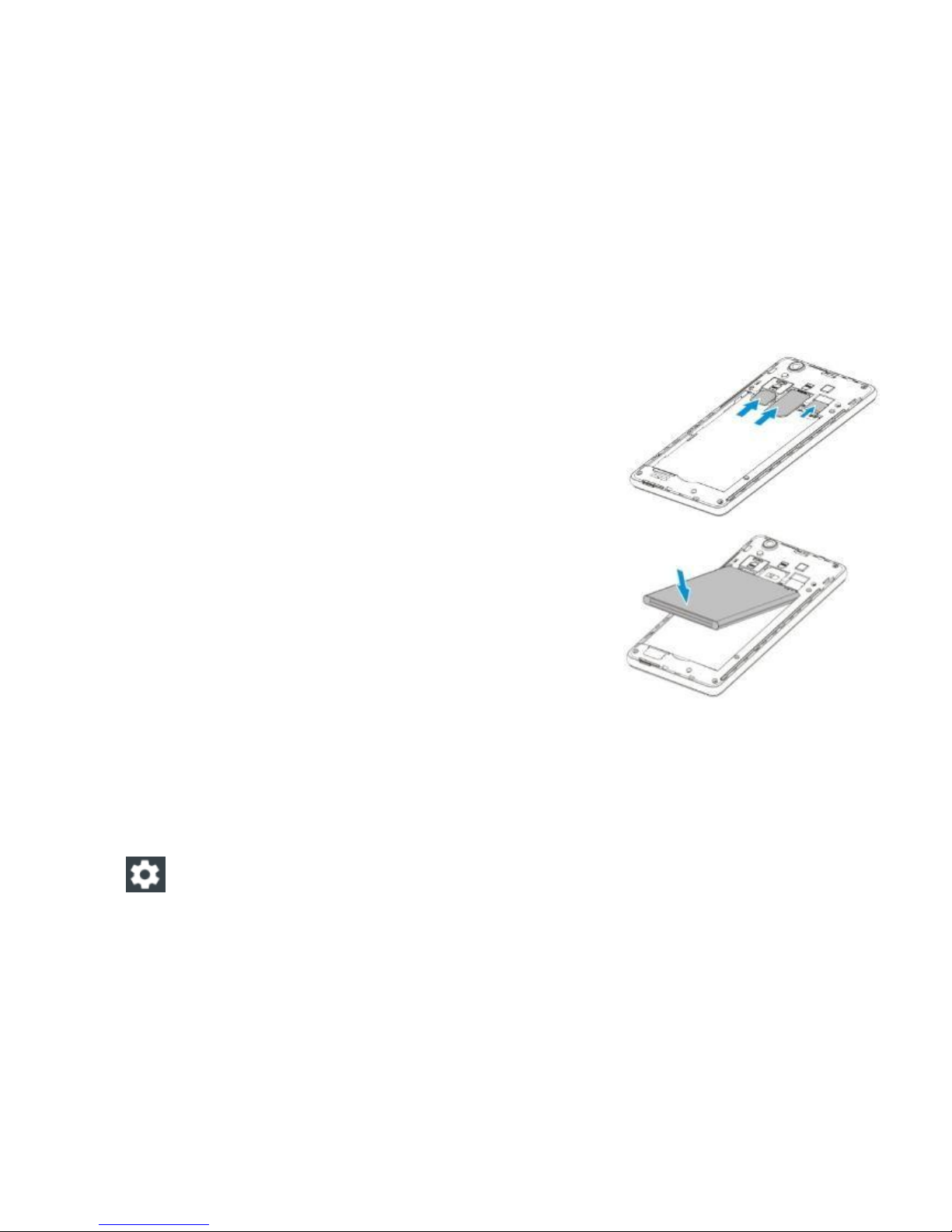
3.3 Instalación de la tarjeta SIM
Asegúrese de que el teléfono este apagado.
Inserte la tarjeta SIM en la ranura para tarjetas SIM
con contactos dorados hacia abajo y la esquina
recortada hacia fuera.
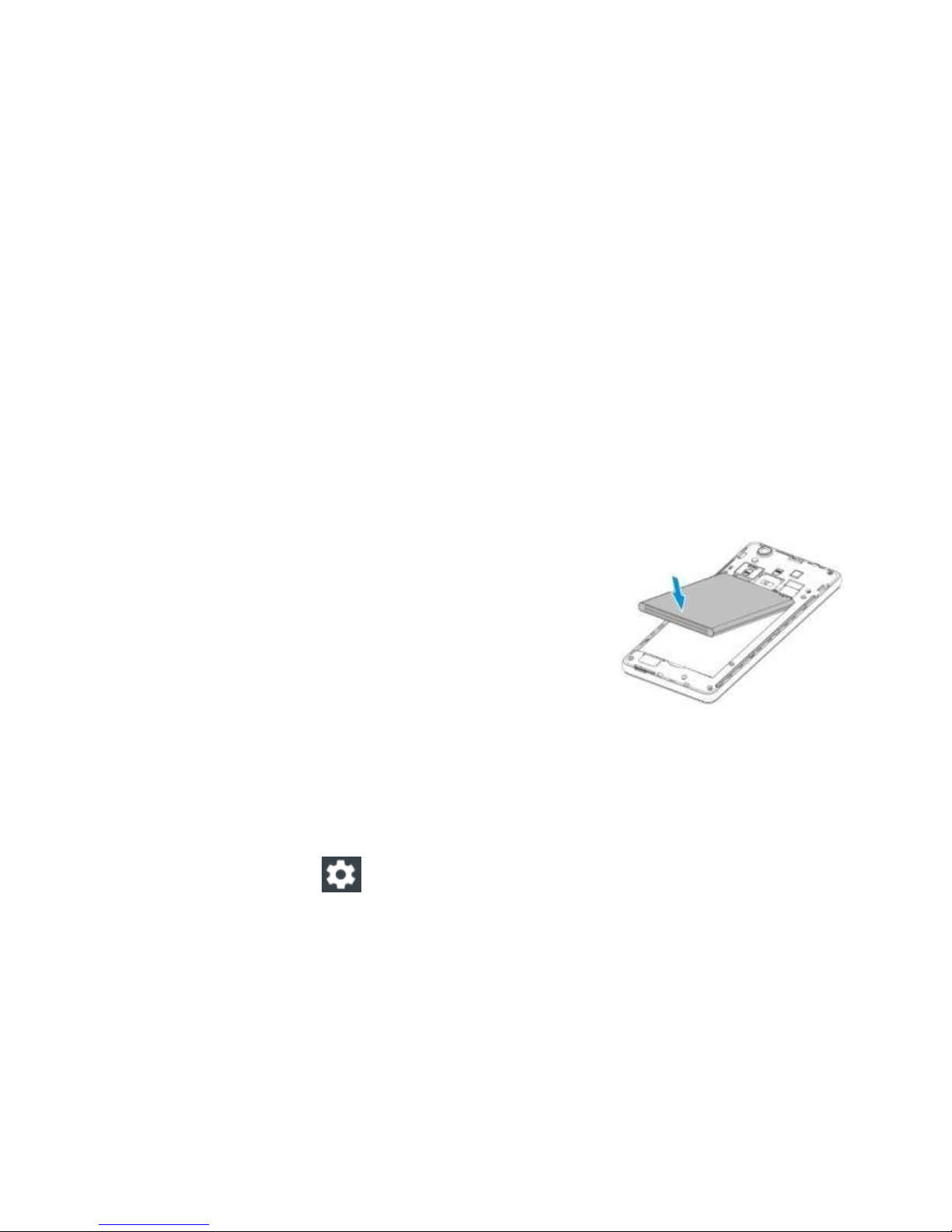
3.4 Batería integrada
Alinie los contactos de dorados externos de la batería
con los conectores de la batería situados en el
compartimento de la batería.
Inserte primero el lado inferior de la batería y luego
empuje suavemente la batería en su lugar
Coloque la tapa trasera.
4. CONEXIÓN A INTERNET
Capacidades de red del dispositivo le permiten acceder a Internet a través de WI-FI, GPRS/3G
o EDGE.
4.1 Para activar Wi-Fi y conectarse a una red Wi-Fi
Toque en la pantalla de inicio> Deslice hacia abajo la barra de notificaciones 02 veces >
Elija el ícono de Ajustes
Page 6

Toque en la casilla de verificación Wi-Fi para encenderlo. Luego el teléfono detecta redes
inalámbricas disponibles.
Toque configuración de Wi-Fi y se mostrarán las redes Wi-Fi detectadas.
Toque la red Wi-Fi a la que desea conectarse. Si seleccionó una red abierta (no segura),
se conectará automáticamente a la red. Si seleccionó una red segura, debe introducir la
clave de seguridad para conectarse a la red.
NOTA:
La próxima vez que utilice su dispositivo para detectar redes Wi-Fi, no se le pedirá que
introduzca la clave de la red Wi-Fi accedido anteriormente (a menos que realice un
restablecimiento de su teléfono, que eliminaría toda configuración personalizada del
dispositivo).
Las redes Wi-Fi se reconocen automáticamente, lo que significa que no se requiere ningún
paso adicional para que su dispositivo se conecte a una red Wi-Fi. Puede ser necesario
proporcionar un nombre de usuario y contraseña para ciertas redes inalámbricas cerradas.
4.2 Para comprobar el estado de la red inalámbrica
Puede comprobar el estado de la conexión inalámbrica actual de la siguiente manera:
Barra de estado
Cuando el teléfono está conectado a una red inalámbrica, se mostrará el icono de Wi-Fi en la
barra de estado junto con el icono de intensidad de la señal.
Page 7

Si la notificación de red está activada en la configuración de Wi-Fi, aparecerá el icono en la
barra de estado cuando el teléfono ha detectado automáticamente una red inalámbrica
disponible.
Wi-Fi
Seleccione redes > Configuración de Wi-Fi inalámbrica. Luego toque la red a la que está
conectado actualmente.
Uso del navegador Web
Inicie el navegador para navegar por Internet. El navegador ha sido optimizado para hacer su
uso de Internet fácil y agradable.
NOTA: Sólo se puede acceder a Internet, ya sea con la conexión de 3G, GPRS o Wi-Fi.
4.3 Abrir el navegador web
Toque en > luego elija navegador.
4.4 Abrir una página web
Introduzca una URL en la ventana del navegador.
A medida que escribe, se mostrarán automáticamente las direcciones posibles. Puede
tocar una dirección para ir directamente a esa página Web o continúe escribiendo en la
barra de direcciones.
5. SAR
Datos sobre el coeficiente de absorción específica (SAR)
ESTE MODELO DE DISPOSITIVO INALÁMBRICO CUMPLE CON LOS REQUISITOS
GUBERNAMENTALES DE EXPOSICIÓN A LAS ONDAS DE RADIO CUANDO SE
Page 8
UTILIZA CONFORME A LO INDICADO EN ESTA SECCIÓN.
Antes que un modelo de dispositivo inalámbrico esté disponible para su venta al público, debe
ser probado y certificado ante la FCC para verificar que no supera el límite establecido por los
requisitos adoptados por el gobierno para una exposición segura. Las pruebas se realizan en
posiciones y ubicaciones (por ejemplo, en la oreja o llevándolo en el cuerpo) según los
requisitos de la FCC para cada modelo.
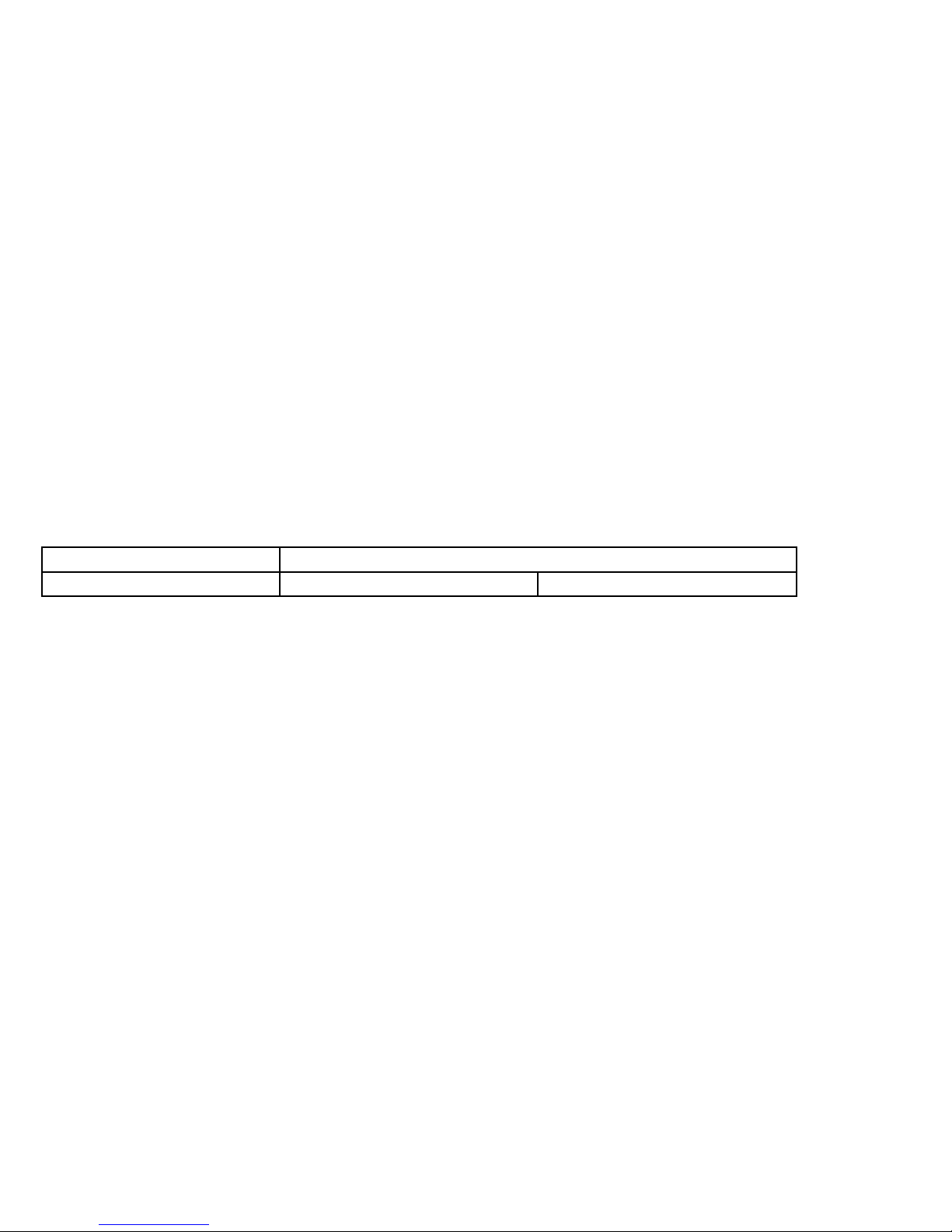
El valor más alto independiente de SAR para su modelo de dispositivo Bitel probado para su
uso en el oído/cabeza se resume de la siguiente maneQuadra:
Dispositivo
SAR (W/kg) en 1 g
Bitel B8601
UMTS 900 : 0.331
UMTS 1900 : 0.414
6. Especificaciones técnicas
· One SIM
· UMTS: 900/1900 MHz
· Pantalla: 5.0” HD (1280*720)
· OS: Android 5.0
· Procesador: 1.3 GHz Quad core
Page 9

· Memoria: 8GB ROM + 1GB RAM
· Cámara: Cámara trasera 8 MPx
Cámara delantera 2 MPx
· Capacidad de la batería: 2400mAh Li-ion
7. Advertencias sobre el uso de la batería y el cargador
Solo usar el cargador original para cargar la batería.
El cargador de viaje de este teléfono cumple con los requisitos de seguridad aplicables de la
UL. Siga las instrucciones de seguridad que se detallan a continuación según las directrices de
UL:
No seguir las instrucciones indicadas puede dar lugar a lesiones personales graves y daños a
la propiedad.Instrucciones de sequridad importantes – conserve estas instrucciones.
Peligro – para reducir el riesgo de incendios y descargas eléctricas, siga cuidadosamente estas
instrucciones.
Para la conexión a la corriente eléctrica, tenga en cuenta la configuración adecuada de la toma
de Corriente:
- Tensión de entrada: 140-240 VAC, 50 Hz,
corriente de entrada: 200 mA.
Page 10
- Tensión de salida: 5VDC, corriente de salida:
600 mA
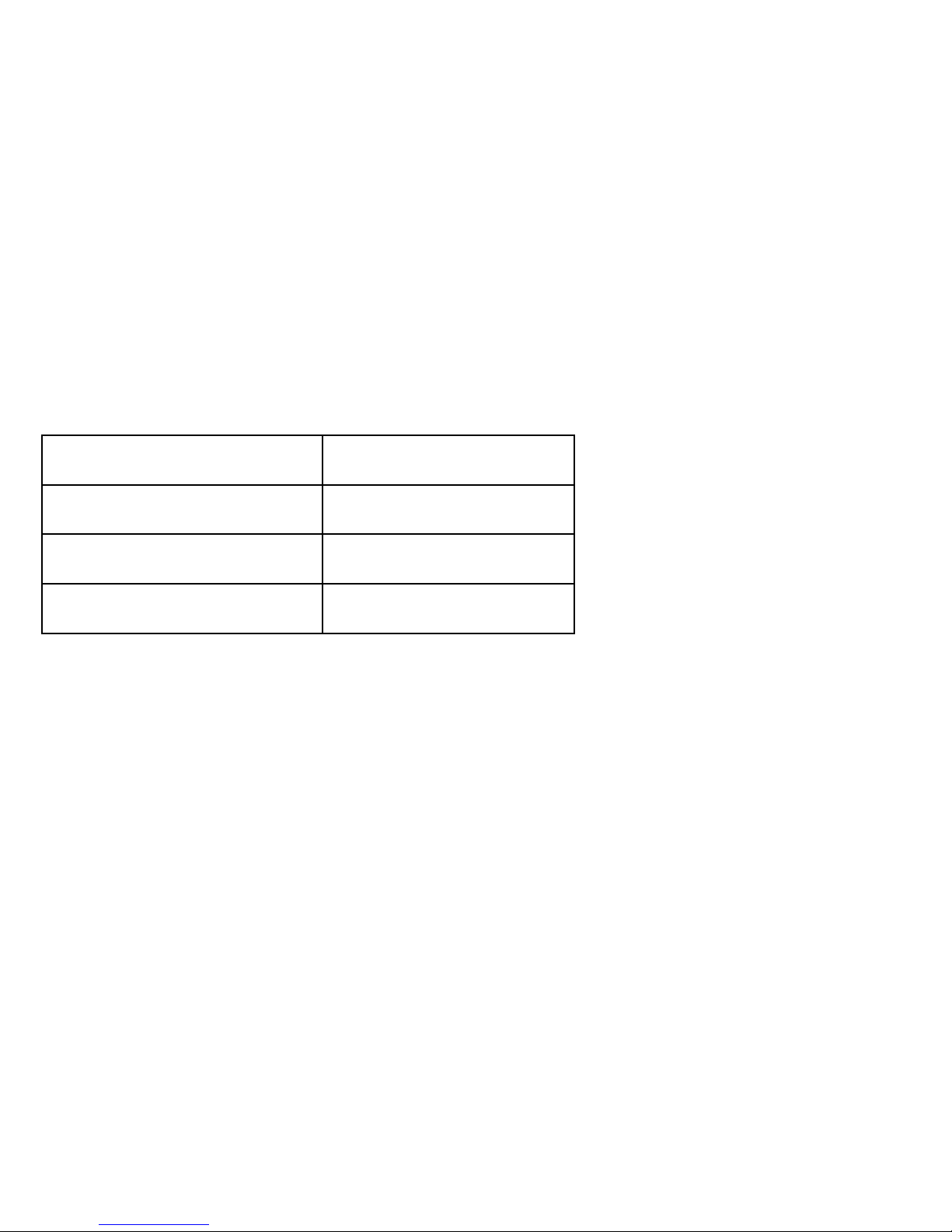
8. Almacenamiento
Temperatura de
funcionamiento
0 oC ~ 55 oC
Humedad de
funcionamiento
20 % ~ 95 %
Temperatura de
almacenamiento
-10 oC ~ 70 oC
Humedad de
almacenamiento
10 % ~ 95 %
El uso o almacenamiento del dispositivo Bitel o de los accesorios del dispositivo Bitel fuera
del rango de temperatura recomendado podría causar daños al dispositivo Bitel, a los
accesorios del dispositivo Bitel.
Mantenga el dispositivo Bitel y los accesorios del dispositivo Bitel alejados de cualquier
fuente de calor, como radiadores, rejillas de aire caliente, estufas u otros aparatos (incluyendo
amplificadores) que produzcan calor.
9. Información de seguridad
Page 11
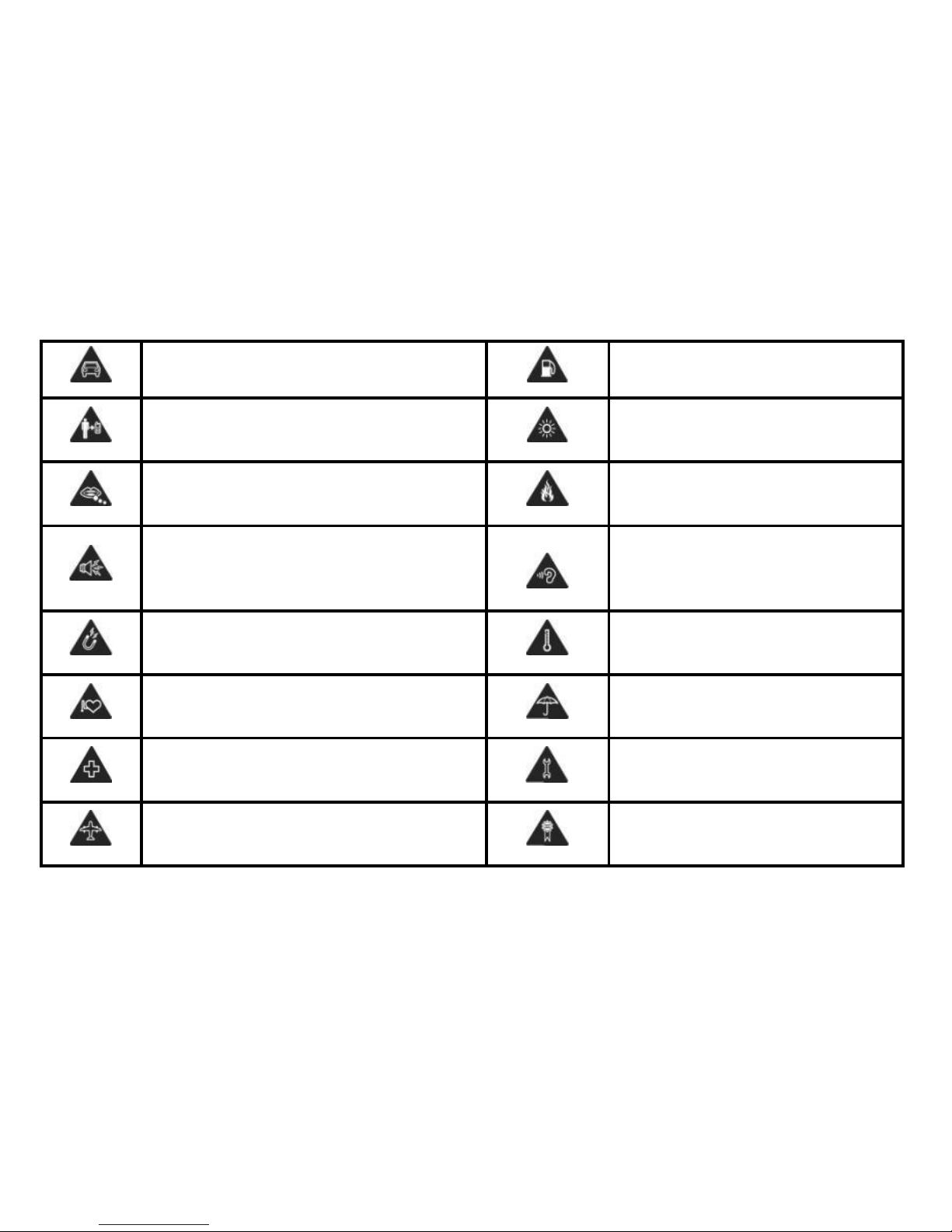
No use el móvil al conducir
No use al llenar el tanque con gasolina
Mantenga una distancia de 15mm a las partes
corrosivas
El dispositivo puede generar luz o
luces intermitentes
Las piezas pequeñas puede causar peligros
como asfixia de las vías respiratorias
No acerque al fuego
El dispositivo puede generar sonido potente
Para evitar daños a la capacidad de
audición, no escuche durante un largo
tiempo o en volumen alto
Evite el contacto con los dispositivos
magnéticos
Evite las altas temperaturas
Mantenga alejado de los marcapasos cardiaco
y otros dispositivos médicos personales
Evite el contacto con líquido,
mantenga en lugar seco
Apague cuando se requiere en los hospitales
y centros médicos
No trate de desmontar los
componentes
Apague el móvil en el aeropuerto o en el
avión
Use solo accesorios originales
Page 12
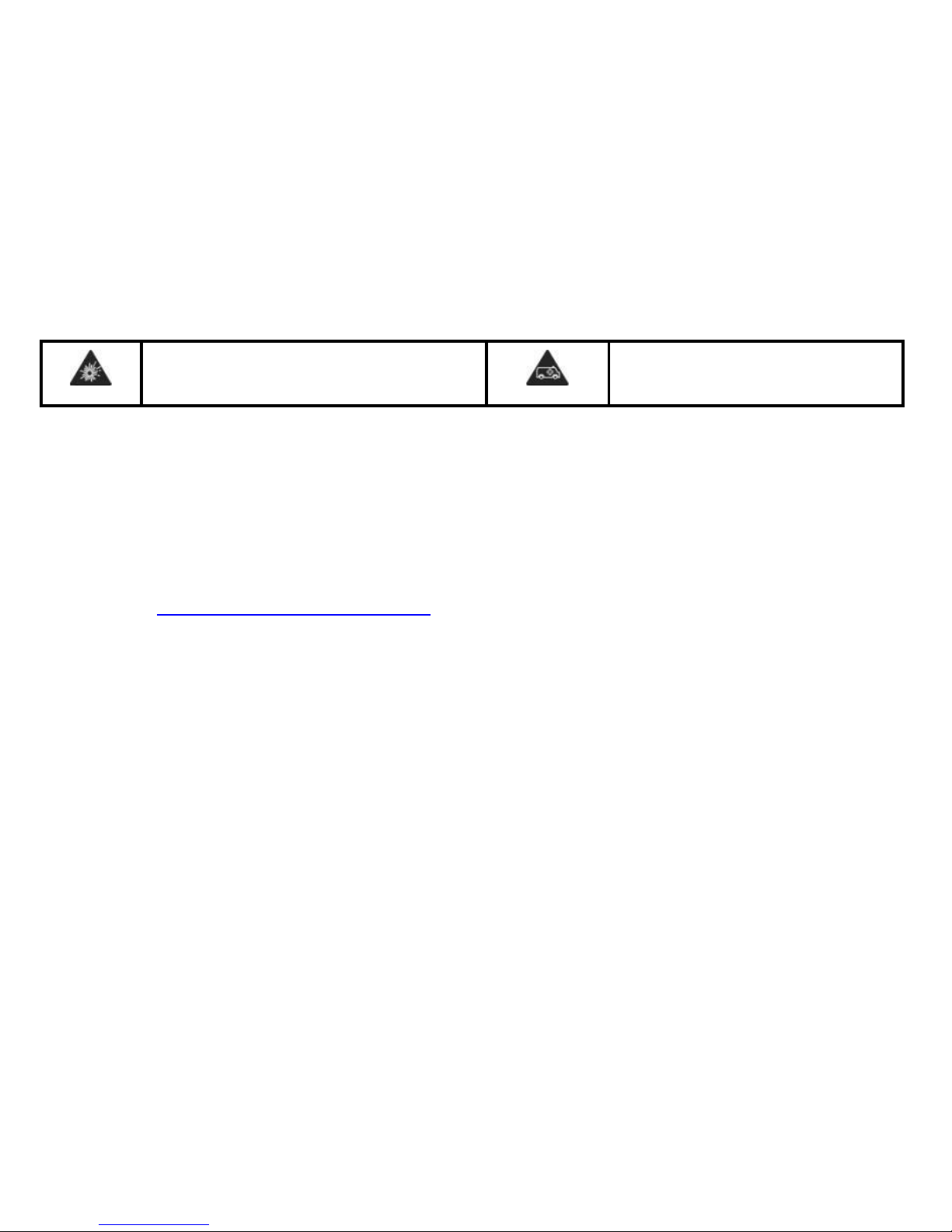
Apague el móvil en entornos potencialmente
explosivos
En caso de emergencia, no dependa de
este dispositivo
Información del fabricante
CK TELECOM LIMITED
Dirección: Kejiu road, high-Tech Development Zone, Heyuan, Guangdong Province,
P.R China
Teléfono: +86-762-3600988
Página web: http://www.ck-telecom.com
Page 13

Quick Start Guide
B8601
Please Read Before Proceeding
Page 14
Phone Components
Page 15
1
HOME Key
9
USB Jack
2
BACK Key
10
Flash
3
MENU Key
11
Volume up key
4
Touch Screen
12
Volume down key
5
Camera 2 megapixel
13
Power key
6
Earpiece
14
Speaker
7
Microphone
15
Camera 8 megapixel
8
Earphone Jack
16
Page 16
I. PHONE PACKING BOX
The phone packing box should contain the follow - ing items and accessories:
Phone, Battery, Power Adapter, Quick Start Guide, Wired Stereo Headset USB-Cable.
II.INSTALLING SIM CARD, BATTERY AND MEMORY CARD
Make sure to always turn off the power before installing or replacing the SIM card and battery.
The back cover needs to be removed before putting in the SIM card, battery, or memory card.
To remove the back cover
1. Make sure your device is turned off.
2. Hold the device carefully with the front panel facing
down.
3. Pull lower half of back cover with your thumb or
fingers. Remove it from the opening.
SIM Card
The SIM Card contains your phone number,
service details and the phone-book/message memory.
Page 17
Install SIM Card and Memory card
1. Make sure the phone is turned off.
2. Insert the SIM Card and Memory Card into the SIM Card,
Memory card slot with gold contacts facing down and
cut-off corner facing out.
Insert Battery
1. Align the battery’s exposed copper contacts with the
battery connectors inside the battery compartment.
2. Insert the contact’s side of the battery first and then
gently push the battery into place.
3. Close the back cover.
III. INTERNET CONNECTION
Your device’s networking capabilities allow you to access the Internet through WI-FI,
GPRS/3G or EDGE.
Turn Wi-Fi on and connect to a Wi-Fi Network
Network
1. In home screen > Swipe down the Notification bar twice > Choose Setting
icon
Page 18

2. Tap the check box for Wi-Fi to turn it on. Then your phone will detect available wireless
networks.
3. Tap Wi-Fi, then detected Wi-Fi networks will be listed.
4. Tap the Wi-Fi network you want to connect to. If you selected a secured network, enter the
security key to connect to network.
NOTICE:
Next time you use your device to detect Wi-Fi networks, you will not be prompted to enter the
network key of the previously accessed Wi-Fi network (unless you perform a hard reset which
will erase custom settings on your device).
To check Wireless network status
You can check the current wireless connection status as follows:
Status bar
When your phone is connected to a wireless
network, the Wi-Fi icon will be displayed in the status bar along with the signal strength icon.
If the network notification is enabled within Wi-Fi settings, the icon will be displayed in the
status bar when your phone has automatically detected an available wireless network.
Wi-Fi
In Select wireless networks>Wi-Fi.
Then tap the network to which you are currently connected.
Page 19

Using web browser
Start browser to surf the internet. The browser has been optimized for making your internet
usage easy and enjoyable.
NOTICE: You can only access the internet with either 3G, GPRS or Wi-Fi connection.
Opening the Browser
Tap > Then choose browser.
4.4 Opening a webpage
1. Enter an URL in the browser window.
2. As you type, automatically possible addresses will be displayed. You can tap an address to
go directly to that webpage or continue typing in the address line.
5. SAR
Specific absorption rate data (SAR data)
THIS WIRELESS DEVICE MODEL MEETS GOVERNMENT REQUIREMENTS FOR
EXPOSURE TO RADIO WAVES WHEN USED AS DIRECTED IN THIS SECTION.
Before a wireless device model is available for sale to the public, it must be tested and
certified to the FCC that it does not exceed the limit established by the government-adopted
requirement for safe exposure. The tests are performed in positions and locations (for example,
at the ear and worn on the body) as required by the FCC for each model.
The highest standalone SAR value for your Bitel device model when tested for use at the
ear/head is outlined as follows:
Page 20
Device
SAR (W/kg) for 1 g
Bitel B8601
UMTS 900 : 0.331
UMTS 1900 : 0.414
6. Technical Specifications
· One SIM
· UMTS: 900/1900 MHz
· Display: 5.0” HD (1280*720)
· OS: Android 5.0
· Processor: 1.3GHz Quad core
· Memory: 8GB ROM + 1GB RAM
· Camera: Back camera 8.0 MPx
Front camera 2.0 MPx
· Battery Capacity: 2400mAh Li-ion
Page 21
7. Warning and usage for battery and charger
Use specified charger only when recharging.
The Travel Charger for this phone has met applicable UL safety requirements. Please adhere
to the following safety instructions per UL guidelines:
Failure to follow the instructions outlined may lead to serious personal injury and possible
property damage.
Important safety instructions – save these instructions.
Danger – to reduce the risk of fire or electric shock, carefully follow these instructions.
For connection to a supply, please consider the proper configuration outlet as below:
Input voltage: 140-240VAC 50Hz, input current:200 mA.
Output voltage: 5VDC, output current: 600mA
8. Ways of storage
Operation Temperature
0oC ~ 55 oC
Operation Humidity
20% ~ 95%
Storage Temperature
-10 oC ~ 70 oC
Page 22
Storage Humidity
10% ~ 95%
Use or storage of your Bitel device or Bitel device accessories outside of the recommended
temperature ranges could cause damage to your Bitel device, Bitel device accessories, or
battery.
Keep your Bitel device or Bitel device accessories away from heat sources, such as radiators,
heat registers, stoves, or other apparatus (including amplifiers) that produce heat.
9. Product Safety Information
Do not use hand-held while driving
Do not use while re-fuelling
For body-worn operation maintain a
separation of 15 mm
This device may produce a bright or
flashing light
Small parts may cause a choking hazard
Do not dispose of it in a fire
This device may produce a loud sound
To prevent possible hearing damage,
do not listen at high volume levels for
long periods.
Page 23
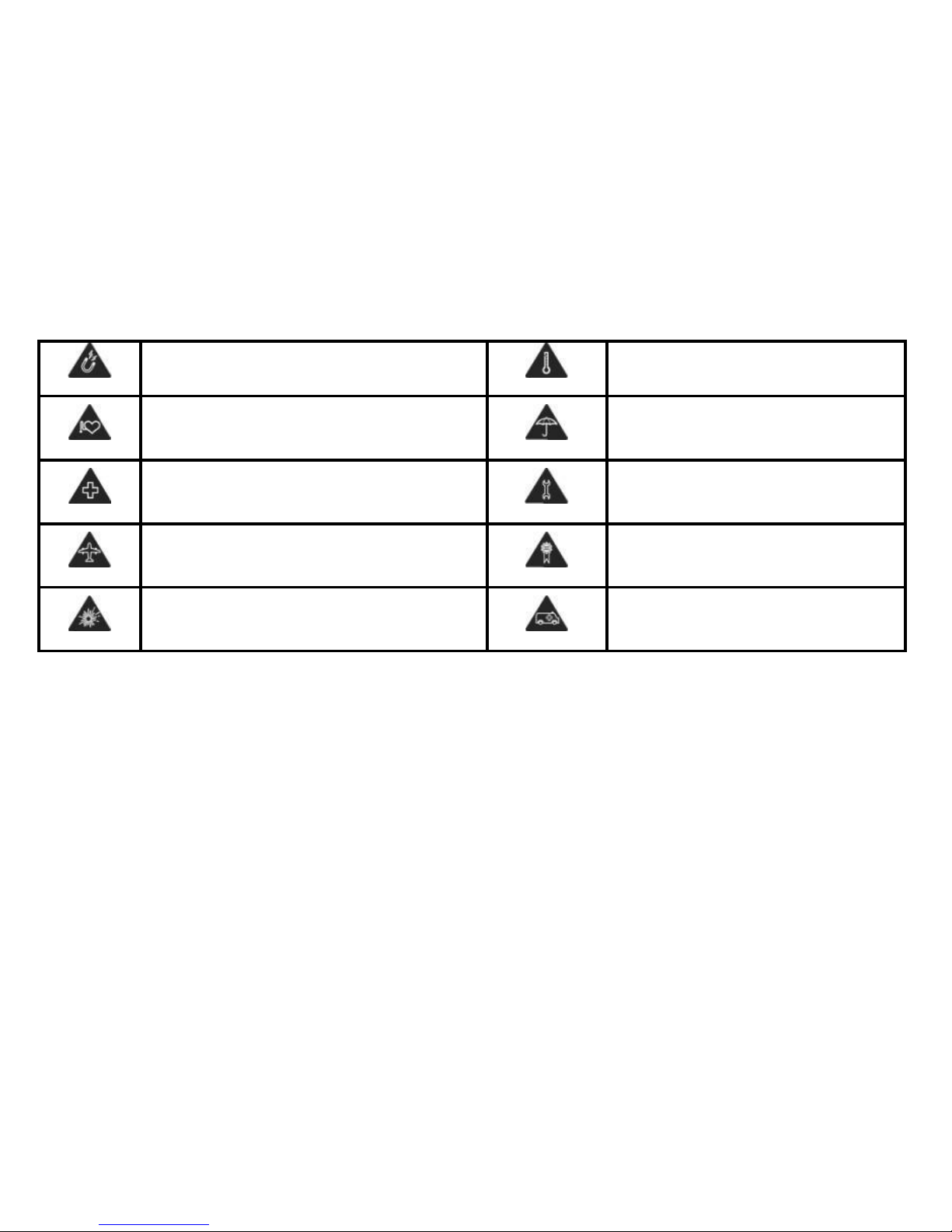
Avoid contact with magnetic media
Avoid Extreme Temperatures
Keep away from pacemakers and other
personal medical devices
Avoid any contact with liquid, keep it
dry
Switch off when instructed in hospitals and
medical facilities
Do not attempt to disassemble
Switch off when instructed in aircrafts and
airports
Only use approved accessories
Switch off in explosive environments
Do not rely on this device for
emergency communications
Page 24

Fabricant Information
CK TELECOM LIMITED
Address: Kejiu road, high-Tech Development Zone, Heyuan, Guangdong
Province, P.R China
Telephone: +86-762-3600988
Webpage: http://www.ck-telecom.com
 Loading...