

Page 1

Ring
FB R.A1
User Guide
Page 2

2 RingEnglish
English
This is the user guide for the Ring device
from Bitbrain.
This guide contains all essential
information for you to make full use of
your product.
Page 3

Contents
3User gu ide English
04
06
07
08
09
10
11
14
15
Safety information
Conditions of use
Disclaimer
Ring
Technical specications
Power-up
Placement
Signal acquisition
Maintenance
Page 4

4 RingEnglish
Safety information
Please, read carefully the safety infor mation, the conditions of use
and the instructions before using the device. Failure to co mply with
the reco mmendations of use will entail the guarantee can cellati on.
Careful use and handling
• Do not ha ndle th e device with
damp ha nds, as this could
cause a short-circuit.
• Do not us e the device for
other a pplications than its
intended purpose.
• Do not hi t, throw, bite, o pen or
burn the device.
• Keep th e device in a dr y place,
between the temperatures
of 5ºC and 40ºC.
Prolo nged exposu re to high
tempe ratures can af fect the
stabi lity of the battery.
• Disco nnect the charger
once th e device battery is
comp letely cha rged to avoid a
decrease in ba tter y life cycle.
• Use the provided cabl e or
other similar connected
direc tly to a USB 5V outp ut to
charg e the dev ice (the power
supply must be covere d by
the UNE -EN6 0950-1:2007
normative). Using other kind
of power s upply may damage
the device.
Page 5
Safety information
5User gu ide English
Precautions
• DO NOT use the device
while i t is charging.
• DO NOT op en the device.
Conta ct the supp ort team at
Bitbrain if your device does
not work.
• DO NOT place this devic e
close to l ife support
electronic and electrical
equipment.
• If you notice that the device
emits s trang e smells or
noises or its tem perature
is exces sive, l eave it in a
secluded place and call the
support tea m at Bitb rain.
Confo rmanc e and CE markin g
This device complies with the
EU safety requirements (UNEEN 60950-1: 2007, EN55 032
and EN55024). The CE mar k
indic ates complia nce with the
correspon ding di rectives of
the EU Counci l, which includes
EMC Directive 2004 /108/EC.
Dispo sal of the device
Do not throw electr ic or
electronic devic es in the trash!
According to the European
Directive 2012/19/UE on
waste electrical an d elec troni c
equipment, computer
and telecommunication
equip ment must be disposed
of separately for ecologic al
recycling.
Page 6

6 RingEnglish
Conditions of use
• Read the “safety information” sectio n carefully and keep the
user gu ide for future refere nce.
• Read caref ully th e “Terms & C onditions of Sale for Bitbrain
Produ cts”, this docu ment can be fou nd in thi s Link.
Page 7

Disclaimer
The Hardware devices included in the Products (EEG, biosensors,
indoor GPS, eye-t racking, etc) are not medical devices, th ey have
not bee n designed or manufactured to provide hea lth ser vices,
neith er are th ey intended fo r medical diagnosis, cure, mitigation,
treatm ent, advice or preve ntion of disease, but for research
purposes.
Read our “Terms & C onditions of S ale for Bitbrain Prod ucts”
before buying, for a complete understanding, in this li nk Link.
7User gu ide English
Page 8

8 RingEnglish
Ring
A wearable and wireless device that measures, with high reliabilit y,
skin conductivity (ele ctrodermal activity), blood pulse volume
(cardiovascular activity), and movement.
These physiological signals provide information on th e emotional
intensity and impact generated by different stimuli, which are
utilized i n publicity, branding, product tes ting, pa ckaging, UX, CX
studies.
A. Electrodermal
response
sensors
Micro U SB char ging port
B. Cardiovascular
activ ity se nsor
MicroSD
LED
Battery indicator LED
Power LED
Bluetooth connection LED
Power bu tton
MicroSD
slot
Page 9

Technical specifications
Nominal voltage 3.7V
Nominal power 260mW
Autonomy >10h (online mo de)
Charging time 3 hours (with USB 2 .0 or sup erio r)
Sampling frequency 32Hz
Wireless technology Bluetooth 2 .1 + EDR
Data backup Yes (Removable MicroSD m emor y card)
Dimensions 71x43x32mm
Weight 60g
Charging connection Micro USB type B (Included)
Certications EN 60950, EN 55 032, E N 55024
9User gu ide English
Page 10

10 RingEnglish
Power-up
1
Turn the device on by pressing
the power button ( ) for a few
seconds, un til the light blinks.
The wireless conne ction LED
will ash until the conne ction is
established with the software.
The LE D will then be ste ady on.
When the batte ry device is l ow,
the bat tery indicator LED ( )
will turn on.
IMPOR TANT: Do not use t he
device while ch argin g. It is
not rec ommen ded to st art a
recor ding with low bat tery.
This ca n affect the qu ality of
the recorded signal.
Pairing
Be sure the computer has
a Bluetooth adapter. It is
necessar y to carr y out a
pairi ng procedure with th e
computer before usi ng it for
the rs t time. T his procedure
can be accomp lishe d from the
Windows Control Panel.
The name of the de vice
correspon ds to its se rial
number, indicated
Page 11
Placement
Follow the steps described below to set u p the device.
11Use r guide English
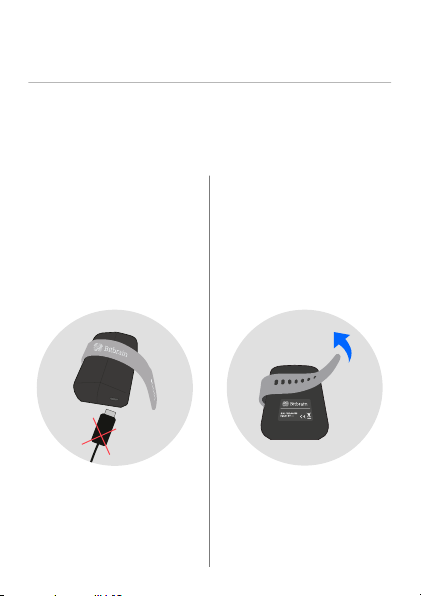
2
Disco nnect the charging cable
from the devic e.
3
Unfasten the ba nd at the b ack
of the dev ice.
Page 12
12 RingEnglish
Placement
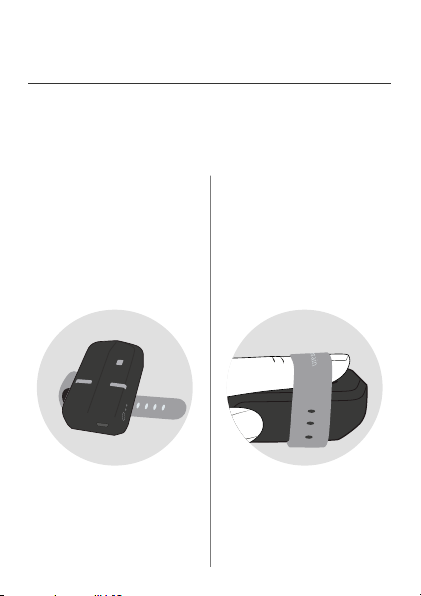
4
Place the device upwards, so
that the sensors face up, as
shown in the pic ture.
5
Place th e index nger tip on the
cardi ovascu lar activit y senso r
(B), com plete ly covering it .
Page 13
Placement
13User g uide English
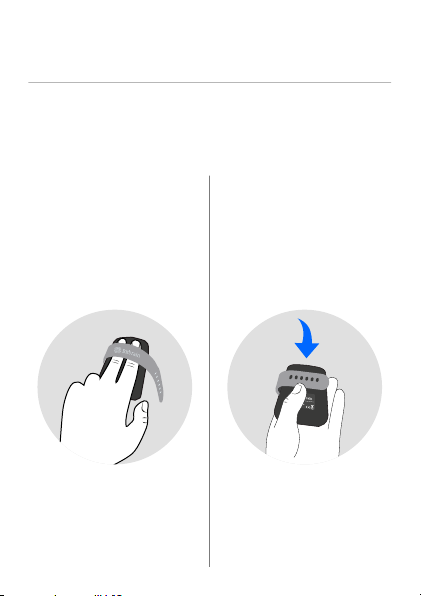
6
Place the inde x and middle
ngers on the d evice . Ensure
that the ngers touch the
electrodermal activity
senso rs (A).
Make sur e that the ngers
are apart fro m each other, as
shown in the pic ture.
7
Fasten the band . The device
must be c omfortably faste ned
to the use r’s ngers.
Page 14
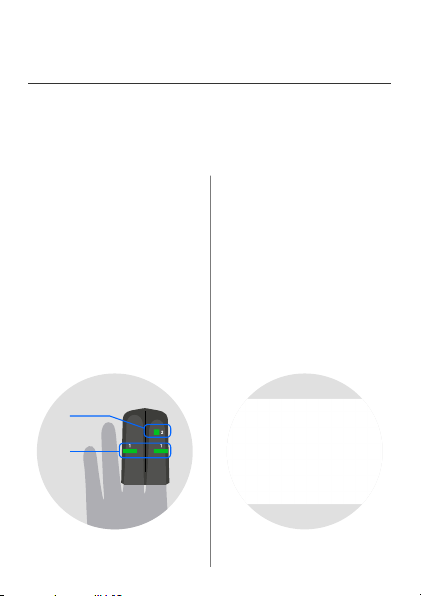
14 RingEnglish
(B)
(A)
Signal acquisition
8
The sof tware screen depi cts
the physiological signal
acqui red by the devic e in real
time.
The color of the sensors
indic ates the quality of the
conta ct with the skin. Qual ity
depends directly o n the
placement.
Page 15

Maintenance
Please remember to clean the device af ter each use.
15User g uide English
Cleaning the device
• Clean a nd dry the device
frequently, especially the
sensors.
• We recom mend to dampe n
a cloth with water or a small
amou nt of alcoho l, and gentl y
wipe th e devic e.
Very important
• Do not us e stron g or abrasive
disinfectants to clean the
product.
• Read carefully the
instr uctions on the use of a
disinfectant solu tion. W hen
selecting a cleaning product,
conrm its ef fectiveness
and compatibility with the
material.
Conservation
• Keep the produ ct in its
original packaging while not
in use.
• If you are s toring the dev ice
for lon g period of time
(several months or weeks),
it is rec ommended th at the
batte ry is not 100% charged.
This can degr ade the b atter y
and result in ca pacity loss,
which causes a decrease in
the autonomy of the device.
V- FBR- 0319
Page 16

More information at
www.bitbrain.com
+34 976 743 126
Paseo de Sa gasta 19. Entlo., D cha.
50008 Zaragoza, Spain
 Loading...