

Page 1
Series 2479
Page 2
Welcome to BISSELL
Page 3
Page 4
Safety Instructions
WARNING:
TO REDUCE THE RISK OF FIRE,
ELECTRIC SHOCK, OR INJURY:
Use indoors only
Do not use for any purpose other than described
in this user’s guide.
Use only Manufacturer’s recommended
accessories.
Do not use with damaged cord or plug.
If appliance is not working as it should, or has
been dropped, damaged, left outdoors, or
dropped into water, have it repaired at an
authorized service center.
Do not move or carry by cord, use cord as a
handle, close a door on cord, or pull cord around
sharp corners. Keep cord away from heated
surfaces
Do not run cord under carpeting. Do not cover
cord with throw rugs, runners or similar coverings. Arrange cord away from trac areas so it
will not be tripped over
Do not unplug by pulling cord. To unplug, grasp
the plug, not the cord.
Do not handle plug or appliance with wet hands.
Do not put any object into openings. Do not use
with any opening blocked; keep openings free
of dust, lint, hair and anything that may reduce
airflow.
Keep hair, loose clothing and fingers away from
openings.
Turn o device controls before unplugging the
appliance.
Do not use appliance in an enclosed space filled
with vapors given o by oil based paint, paint
thinner, moth proofing substances, flammable
dust or other explosive or toxic vapors.
Keep appliance on a level surface.
Do not immerse the unit in waters or other
liquids, do not pour liquids into or around the
unit or openings.
Do not use the appliance near water or in a damp
or wet location
This appliance has a polarized plug (one blade
is wider than the other). To reduce the risk of
electric shock, this plug is intended to fit in a
polarized outlet only one way. If the plug does
not fit fully in the outlet, reverse the plug. If it still
does not fit, contact a qualified electrician. Do
not attempt to defeat this safety feature.
Do not use the appliance with any dimmer switch
or solid state speed control device.
Read & Save These Instructions
WARNING
This model is for household use only.
Plastic film can be dangerous. To avoid danger of suocation, keep away from children.
Do not plug in your air purifier UNTIL you are familiar with all instructions and operating procedures.
To reduce the risk of electrical shock, turn power switch o and disconnect polarized
plug from electrical outlet BEFORE performing maintenance or troubleshooting checks.
3
Page 5
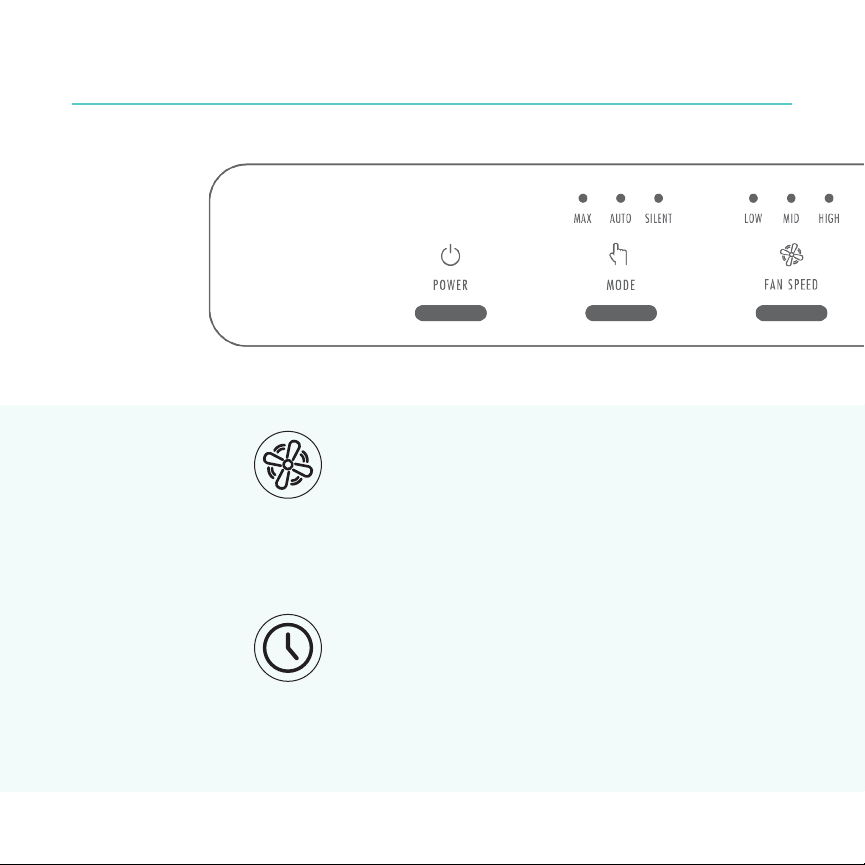
Control Panel
Fan Speed Settings
Press Fan Speed button to select desired fan speed.
• Press once to select LOW fan speed.
• Press twice to select MEDIUM fan speed.
• Press three times to select HIGH speed fan.
Timer Settings
Press Timer button to select desired timer option.
• Press once to select 1 hour.
• Press twice for 4 hours.
• Press three times to select 8 hours.
4
Page 6
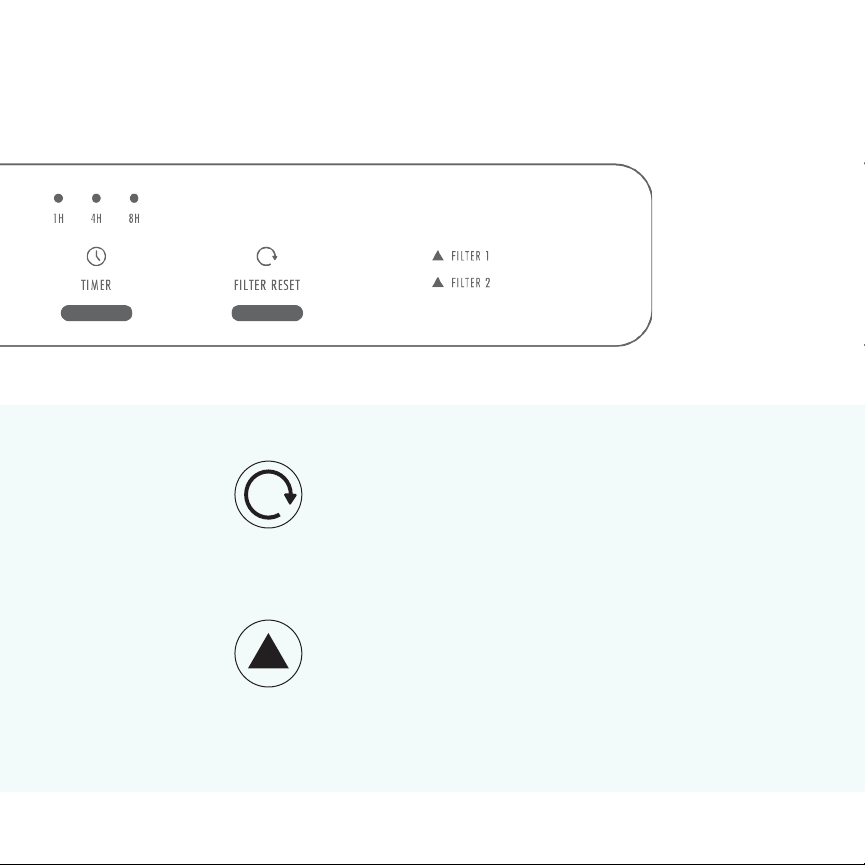
Filter Reset Settings
After replacing either filter, press and hold the
filter reset button for 3 seconds.
Filter Change Indicators
1 - Activated Carbon filter
2 - HEPA + Pre filter
Page 7
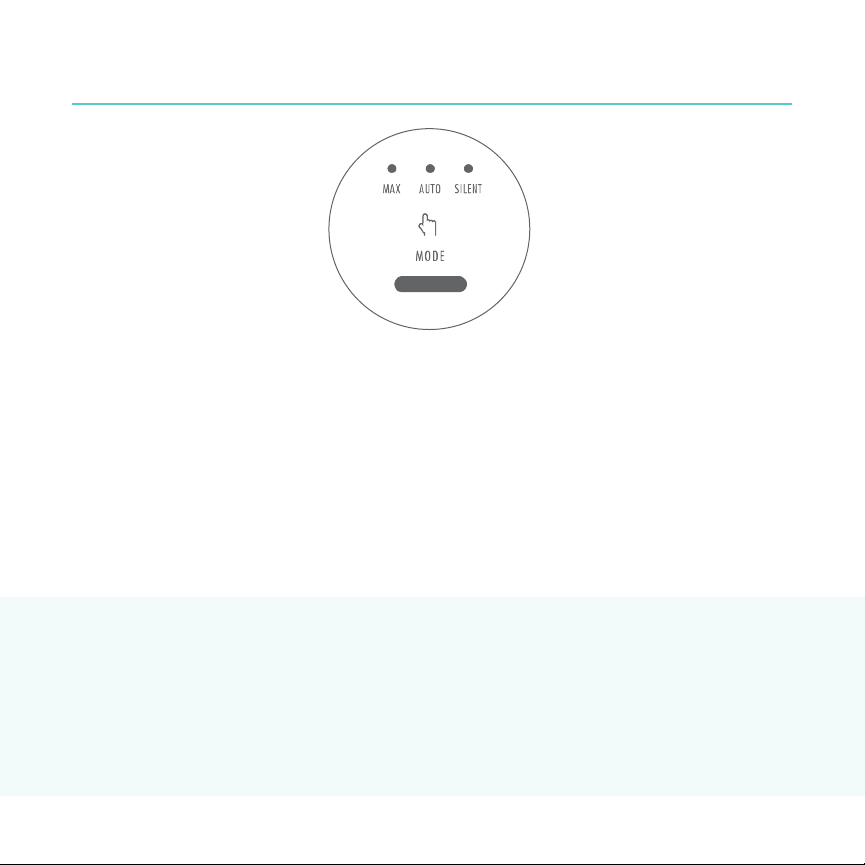
Mode Descriptions
Max Auto Silent
In Max mode, the air purifier
operates at its maximum
speed. This mode is best for
quick cleaning.
Night mode is activated by a light sensor. As less light saturates a room, both the white
Night
lights on the control panel and the air quality feedback display will turn o. The color
Mode
wheel will dim. This contributes to a peaceful sleeping environment.
When powered on, the
BISSELL air400 will default to
auto mode. This mode prompts
the air purifier to adjust to an
ideal filtration level based on
the quality of your indoor air
as detected by the CirQulate™
System.
In Silent mode, air purification
is delivered at Library Quiet
sound levels, oering a
peaceful and calm room
setting. This mode is most
ideal for sleeping environments.
NOTE: When the air purifier goes into night mode, it will remain in which ever mode or fan
speed it was set to before going into night mode.
5
Page 8
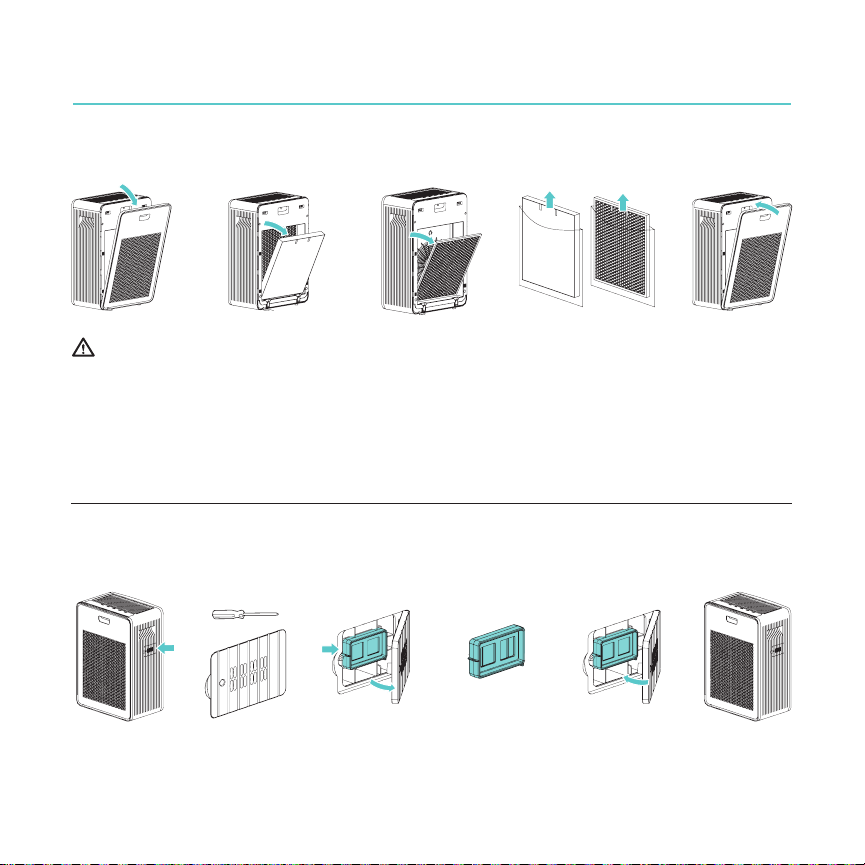
Maintenance & Care
Filter Replacement
1
For your safety, always turn o and unplug your air purifier before replacing filters.
Each filter has blue easy pull tabs. The tabs should face outward. Insert activated carbon filter before
inserting HEPA + pre-filter. The pre-filter attached to the HEPA filter should face outward.
NOTE: Filter life varies based on runtime and existing air conditions. It is recommended to replace both
the HEPA + pre-filter and activated carbon filter once every six months.
2
3
4
5
Particulate Sensor Cleaning
1
For accurate air quality display readings, the blue sensor screen should be gently cleaned with a cotton
swab once every two weeks.
2
3
4
6
Page 9
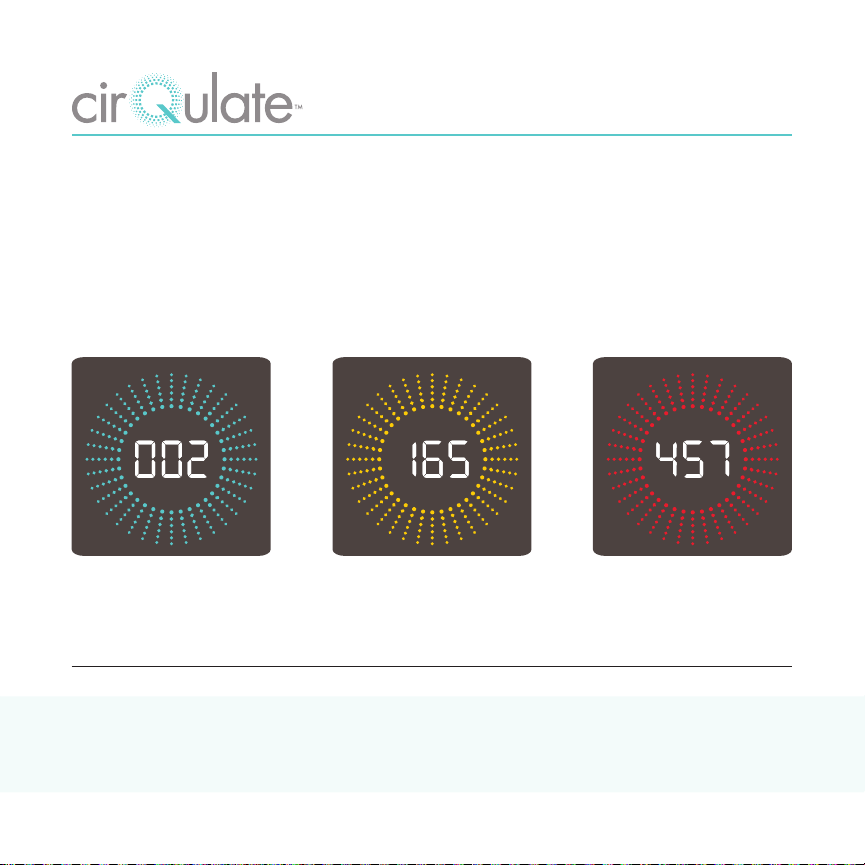
System
When set to Auto Mode, the BISSELL air400 uses its CirQulate™ System to provide optimum filtration
based on the air quality in your home.
CirQulate™ uses the air400’s PM 2.5 sensor to measure microscopic particles down to .3 microns, like
dust, pollen, and even smoke.
Then, CirQulate’s™ air quality feedback display identifies the air quality of your home in real-time,
making your once invisible concerns visible.
PM 2.5
Air Quality
PM 2.5
Air Quality
PM 2.5
Air Quality
Good Air Quality Moderate Air Quality Poor Air Quality
Need Some Help?
For more support and information, please visit BISSELLair.com
7
Page 10

Warranty
This warranty gives you specific legal rights, and
you may also have other rights which may vary
from state to state. If you need additional
instructions regarding this warranty or have
questions regarding what it may cover, please
contact BISSELL Consumer Care by E-mail,
telephone, or regular mail as described below.
Limited Two-Year Warranty
Subject to the *EXCEPTIONS AND EXCLUSIONS
identified below, upon receipt of the product
BISSELL will repair or replace (with new or
remanufactured components or products), at
BISSELL’s option, free of charge from the date of
purchase by the original purchaser, for two years
any defective or malfunctioning part.
See information below on “If your BISSELL
product should require service”.
This warranty applies to product used for
personal, and not commercial or rental service.
This warranty does not apply to fans or
routine maintenance components such as filters.
Damage or malfunction caused by negligence,
abuse, neglect, unauthorized repair, or any other
use not in accordance with the User’s Guide is
not covered.
NOTE: Please keep your original sales receipt. It provides proof of date of purchase in the event of a
warranty claim.
BISSELL IS NOT LIABLE FOR INCIDENTAL OR
CONSEQUENTIAL DAMAGES OF ANY NATURE
ASSOCIATED WITH THE USE OF THIS PRODUCT.
BISSELL’S LIABILITY WILL NOT EXCEED THE
PURCHASE PRICE OF THE PRODUCT.
Some states do not allow the exclusion or
limitation of incidental or consequential
damages, so the above limitation or exclusion
may not apply to you.
*EXCEPTIONS AND EXCLUSIONS FROM THE
TERMS OF THE LIMITED WARRANTY
THIS WARRANTY IS EXCLUSIVE AND IN LIEU
OF ANY OTHER WARRANTIES EITHER ORAL
OR WRITTEN. ANY IMPLIED WARRANTIES
WHICH MAY ARISE BY OPERATION OF LAW,
INCLUDING THE IMPLIED WARRANTIES OF
MERCHANTABILITY AND FITNESS FOR A
PARTICULAR PURPOSE, ARE LIMITED TO THE
TWO YEAR DURATION FROM THE DATE OF
PURCHASE AS DESCRIBED ABOVE.
Some states do not allow limitations on how long
an implied warranty lasts so the above limitation
may not apply to you.
8
Page 11

Service
If your BISSELL product should require service:
If you need information about repairs or replacement parts, or if you have any questions about your
warranty, contact BISSELL Consumer Care.
Website:
www.BISSELL.com
Email:
www.BISSELL.com/email-us
Call:
BISSELL Consumer Care
1.800.237.7691
M-F 8am-10pm ET
Sat 9am-8pm ET
Sun 10am-7pm ET
Please do not return this product to the store.
For any questions or concerns, BISSELL is happy to be of service. Contact us directly at 1.800.237.7691.
9
Page 12
Page 13

Registration
Registering is quick, easy and oers you benefits over the lifetime of your product.
You’ll Receive:
• BISSELL Rewards Points
Automatically earn points for discounts and free shipping on future purchases.
• Faster Service
Supplying your information now saves you time should you need to contact us with
questions regarding your product.
• Product Support Reminders and Alerts
We’ll contact you with any important product maintenance reminders and alerts.
• Special Promotions
Optional: Register your email to receive notice of oers, contests, cleaning tips and more!
Visit www.BISSELL.com/product-registration
11
Page 14
Visit the BISSELL website: www.BISSELL.com
When contacting BISSELL, have model number of air purifier available.
Please record your Model Number:_____________________
Please record your Purchase Date:_____________________
Note: Please keep your original sales receipt. It provides proof of purchase date
in the event of a warranty claim. See the Warranty page for details.
Parts & Supplies
For Parts and Supplies, go to www.BISSELL.com/parts and enter your model number in the search field.
We can’t wait to hear from you!
Rate this product and let us (and millions of your closest friends) know what you think!
www.BISSELLair.com
©2018 BISSELL Homecare, Inc
Grand Rapids, Michigan
All rights reserved. Printed in China
Part Number 161-7362 08/18
Visit our website at: www.BISSELLair.com
please recycle
 Loading...