

Page 1

WT3 Electronic Thermometer
User’s Manual
Guangdong Biolight Meditech Co., Ltd.
Page 2

Product Information
Product Model: WT3
Product Name: Electronic Thermometer
Manufacturer Name: Guangdong Biolight Meditech Co.,Ltd.
After Service Contact Information:
Address: No.2 Innovation First Road, Technical Innovation Coast, Hi-tech
Zone, Zhuhai, P.R. China
Fax: +86-756-3399919
Post code: 519085
Toll-free consultation hot line: +86-400-8818-233
Revision History
This manual has a revision number. This revision number changes whenever the
manual is updated due to software or technical specification change. Contents of this
manual are subject to change without prior notice.
Document No.: J/ WT3CE -A-008
Revision number: V1.0
Release time: April, 2017
Copyright © 2017 Guangdong Biolight Meditech Co., Ltd. All rights reserved.
CE mark
EC Representative Name:
Shanghai International Holding Corp. GmbH Europe)
EC Representative Address:
Eiffestrasse 80, 20537 Hamburg Germany
1
Page 3

Statement
Manufacturer holds the copyright of this manual, and we are also entitled to deal
with this manual as confidential files. This manual is only used for operation,
maintenance and service of product, someone else can not publish the manual.
This manual contains exclusive information protected by copyright laws and we
reserve its copyright. Without written approval of manufacturer no parts of this
manual shall be photocopied, Xeroxed or translated into other languages.
The contents contained in this manual are subject to amendments without
notification.
Manufacturer's Responsibility
Only under the following circumstances will manufacturer be responsible for the
safety, reliability and performance of the instrument:
All the installation, expansion, readjustment, renovation or repairs are conducted
by the personnel certified by manufacturer.
The storage condition, operation condition and electrical status of the instrument
conform to the product specification.
The instrument is used in accordance with the user’s manual.
About this manual
This manual contains the instructions necessary to operate the product safely and
in accordance with its function and intended use. Observance of this manual is a
prerequisite for proper product performance and correct operation.
This manual is based on the maximum configuration and therefore some contents
may not apply to your product. If you have any question, please contact us.
This manual is an integral part of the product. It should always be kept close to the
equipment so that it can be obtained conveniently when needed.
Illustrations are for reference only. They may be not in conformity with your
products.
2
Page 4

Signs in this manual:
Warning: Indicates a potential hazard or unsafe practice that, if
not avoided, will result in death or serious injury.
Caution: Indicates a potential hazard or unsafe practice that, if not
avoided, could result in minor personal injury or product/property
damage.
Note: Provides application tips or other useful information to ensure that you
get the most from your product.
3
Page 5

Contents
1. Intended Use ............................................................................................................................. 1
2. Application ................................................................................................................................ 1
3. Contraindication ........................................................................................................................ 1
4. Product Component ................................................................................................................... 1
5. Safety Information .................................................................................................................... 1
6. Appearance ............................................................................................................................... 4
7. Download and Install The Software .......................................................................................... 4
8. Operation Instructions ............................................................................................................... 5
9. Normal Body Temperature ........................................................................................................ 8
10. Maintenance and Cleaning .................................................................................................... 9
11. Accessory and Specifications .............................................................................................. 10
12. Troubleshooting .................................................................................................................. 11
13. Equipment Symbols ............................................................................................................ 12
Appendix A Guidance and Manufacturer’s Declaration of EMC ................................................... 13
I
Page 6

1. Intended Use
The device is intended to be used for measuring and monitoring human temperature
continuously. It can store and manage the temperature data. It can be used to measure
armpit temperature for the adult and pediatric people.
2. Application
The device is intended for measuring human temperature. It can be used in
hospital and at home.
3. Contraindication
People whose armpit skin are damaged or have inflammation of the skin are
forbidden.
4. Product Component
The product is composed of main unit and temperature patch, mobile terminal
and PC terminal software.
5. Safety Information
Warning:
Any form of modification to this device is forbidden;
Don’t used the device together with MRI or CT equipment;
Explosion danger: don’t use the device in flammable anesthetic gas;
Don’t squeeze the device. If the housing is broken, please stop using the
device.
1
Page 7

Caution:
Please check device regularly to make sure that it contacts skin tightly;
otherwise the data may be inaccurate.
The device is for indoor use only;
Please pay attention to the operation temperature and humidity. Using the
device in a condition that does not satisfy the requirement may lead
measurement error;
The effective wireless transmission distance is no less than10m. If more than
this distance, the product might not work. Please use this product within
effective wireless transmission distance;
After measuring temperature, please take the temperature patch off the
main unit to avoid the main unit keep starting up all the time and reduce the
electric quantity.
Muscle and fat affect wireless transmission, so the transmission range would
be weaken when adult or obese child use the device.
Magnetic and electrical fields are capable of interfering with the proper
performance of the device. For this reason make sure that all external
equipments operated in the vicinity of the device comply with the relevant
EMC requirements. Mobile phone, X-ray equipment or MRI devices are a
possible source of interference as they may emit higher levels of
electromagnetic radiation.
Caution:
This device complies with Part 15 of the FCC Rules. Operation is subject to the
following two conditions:
(1) This device may not cause harmful interference;
(2) This device must accept any interference received, including interference
that may cause undesired operation.
The user is cautioned that changes or modifications not expressly approved by
the party responsible for compliance could void the user's authority to operate
the equipment
FCC STATEMENT:
This equipment has been tested and found to comply with the limits for a
2
Page 8

Class B digital device, pursuant to Part 15 of the FCC Rules. These limits are
designed to provide reasonable protection against harmful interference in a
residential installation. This equipment generates, uses and can radiate radio
frequency energy and, if not installed and used in accordance with the
instructions, may cause harmful interference to radio communications.
However, there is no guarantee that interference will not occur in a
particular installation.
If this equipment does cause harmful interference to radio or television
reception, which can be determined by turning the equipment off and on, the
user is encouraged to try to correct the interference by one or more of the
following measures:
-- Reorient or relocate the receiving antenna.
-- Increase the separation between the equipment and receiver.
-- Connect the equipment into an outlet on a circuit different from that to
which the receiver is connected.
-- Consult the dealer or an experienced radio/TV technician for help.
FCC RADIATION EXPOSURE STATEMENT:
This equipment complies with FCC radiation exposure limits set forth for an
uncontrolled environment.
This transmitter must not be co-located or operating in conjunction with any
other antenna or transmitter.
Note:
The device is not sterile;
This product has been calibrated. No other routine maintenance and
calibration is needed;
If the system upgrade, please update the program;
Doctor should make diagnosis on clinical manifestation and symptoms, only
with using the device as subsidiary;
It is impossible that the application is incompatible with other application on
your receiver. Please contact us if you meet this kind of matters;
If you have questions concerning setting up, using, maintaining of the device
or any unexpected events, please contact manufacturer or its representatives.
When the patient is the operator, please use and maintain the device
3
Page 9
according to this manual.
Sensor
The thermometer starts up and shuts down automatically. When you install
the main unit in the temperature patch, it will start up automatically.
Likewise, when you take the main unit out from temperature patch, it will
shut down automatically;
When the thermometer doesn’t connect to the mobile application, the
indicator light will flash twice periodically. And when the thermometer syncs
with the mobile application, the indicator light will flash once periodically;
This product has overrun prompted function, and users can set the alarm
limit themselves.
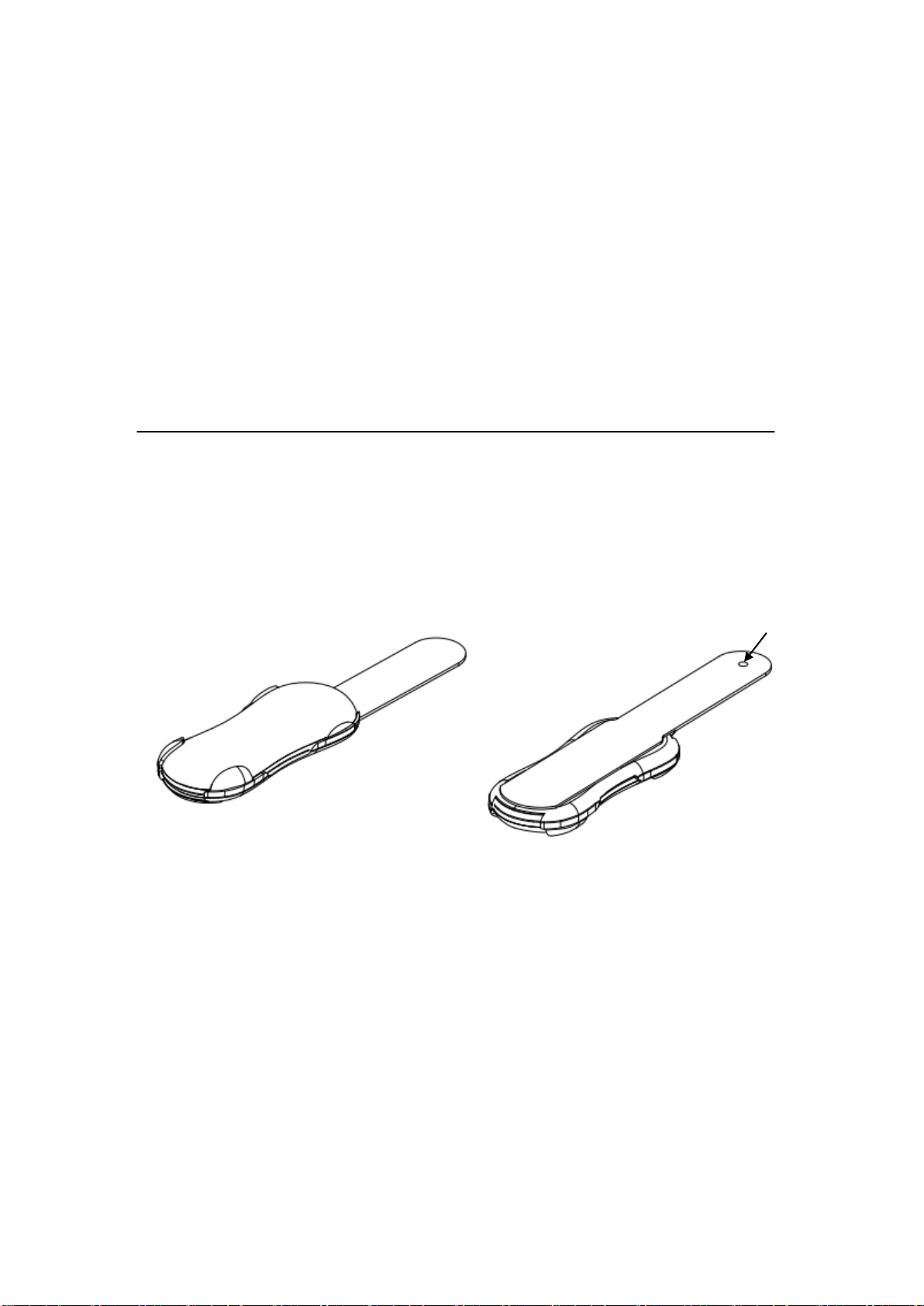
6. Appearance
Front View: Rear View:
7. Download and Install The Software
1. Software download methods:
Users who use the iOS system device can enter App Store, search “Biolight” and
you can find an app called “Temp Sitter” in the searching results. Or scan the QR
code of iOS on the packing box to download.
Users who use the Android system device can enter Google play, search
“Biolight” and you can find an app called “Temp Sitter” in the searching results for
download. Or scan the QR code of Android on the packing box to download.
4
Page 10
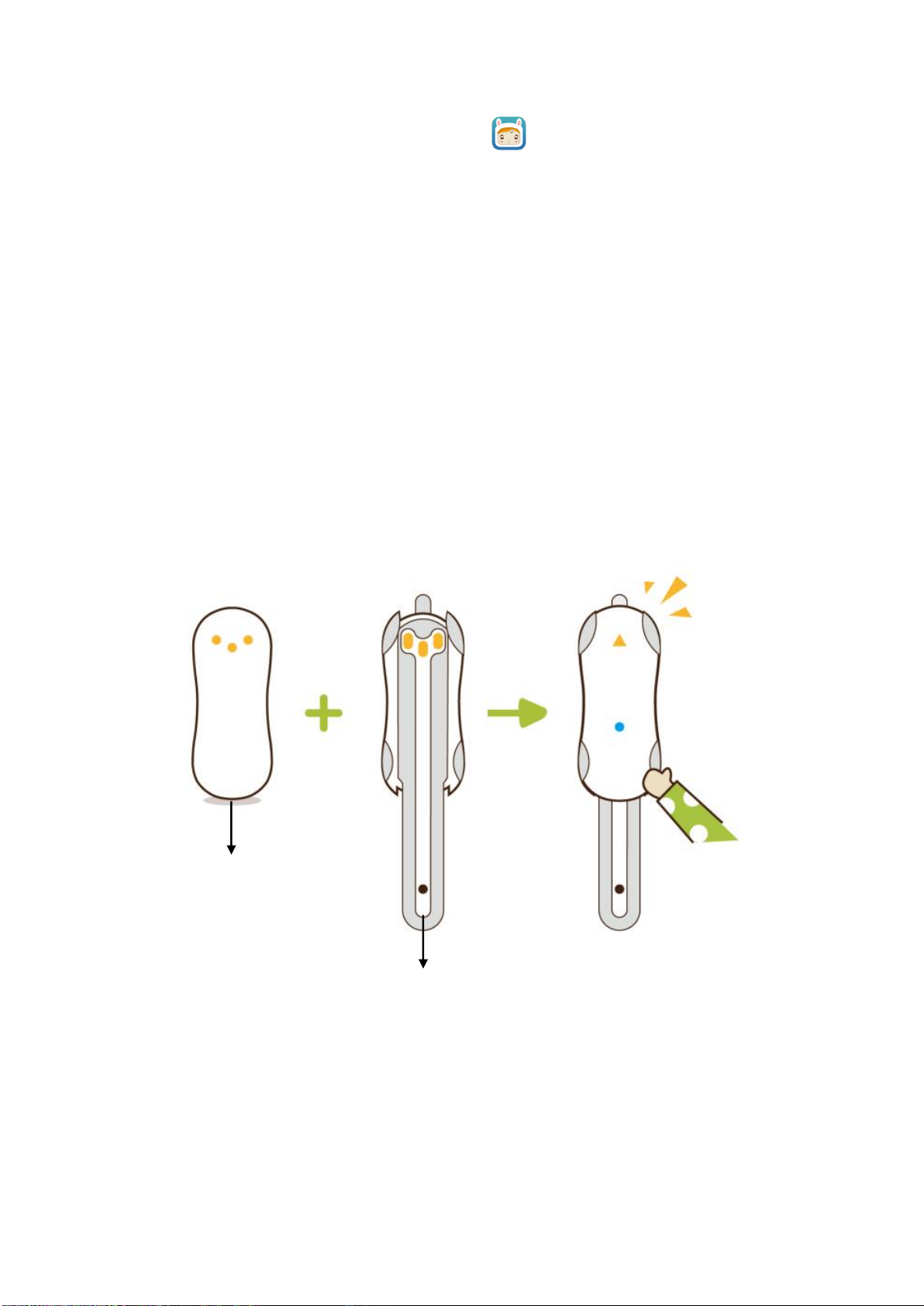
2. Download the software of “Temp Sitter” , click installation button for free
Main unit
Temperature patch
installation.
3. You will need to register your email at initial mobile application installation.
4. For more information and FAQ go to the Settings section in the mobile app under
the FAQ section.
8. Operation Instructions
1) Open the app and Bluetooth on your smartphone.
2) Take out the thermometer from packing box. Install main unit on the
temperature patch, It will start up automatically. The indicator light flashes fast.
3) Enable the software. The device will connect automatically. When it connects
successfully, it will display the message “Connects successfully”.
4) To wear the thermometer. Here are the steps to follows:
Step 1:
When the thermometer connects to mobile application successfully, the Bluetooth
indicator light will flash.
5
Page 11
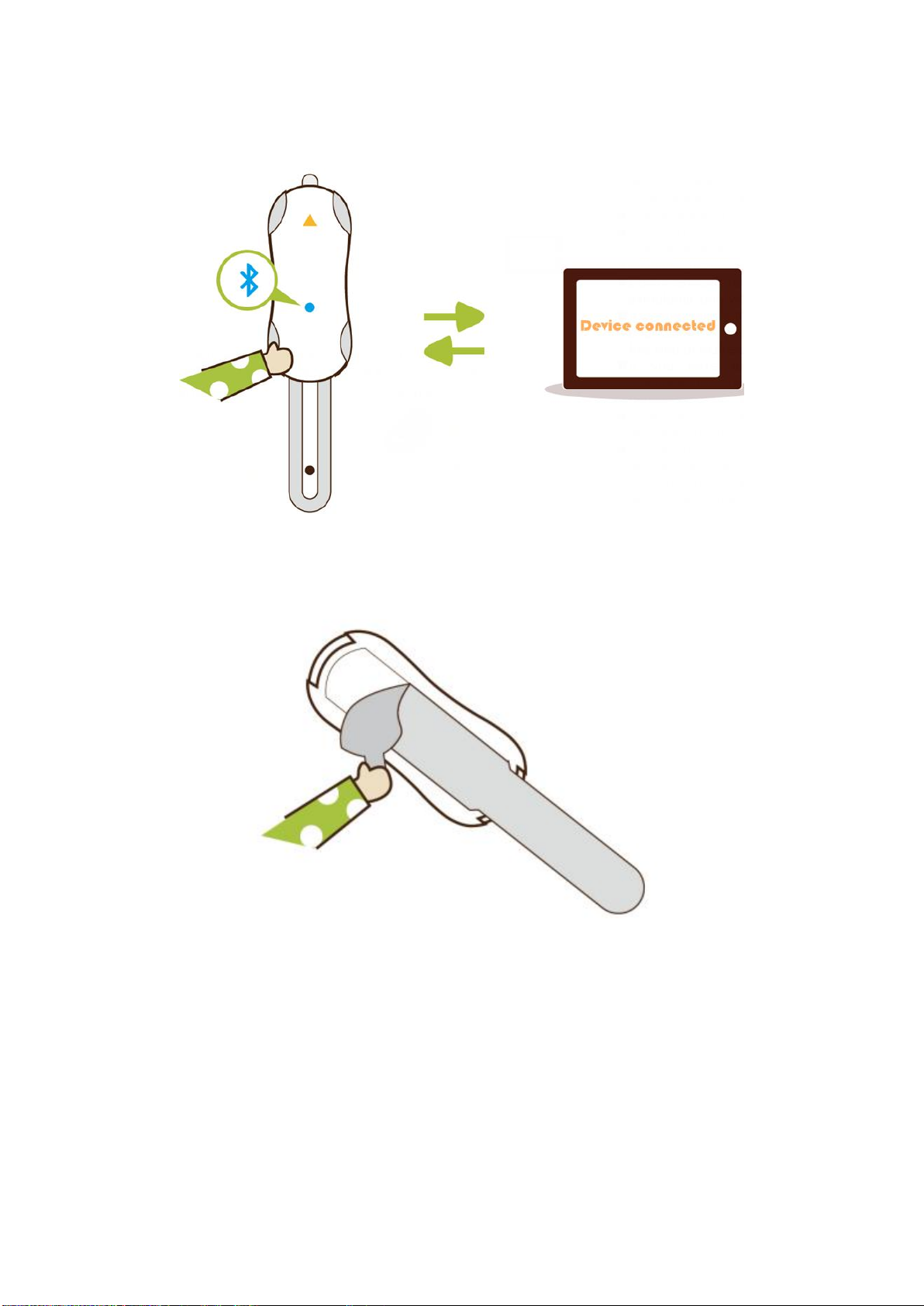
Step 2:
Step 3:
Remove the backing from the temperature patch and stick the thermometer onto right
above underarm point.
6
Page 12
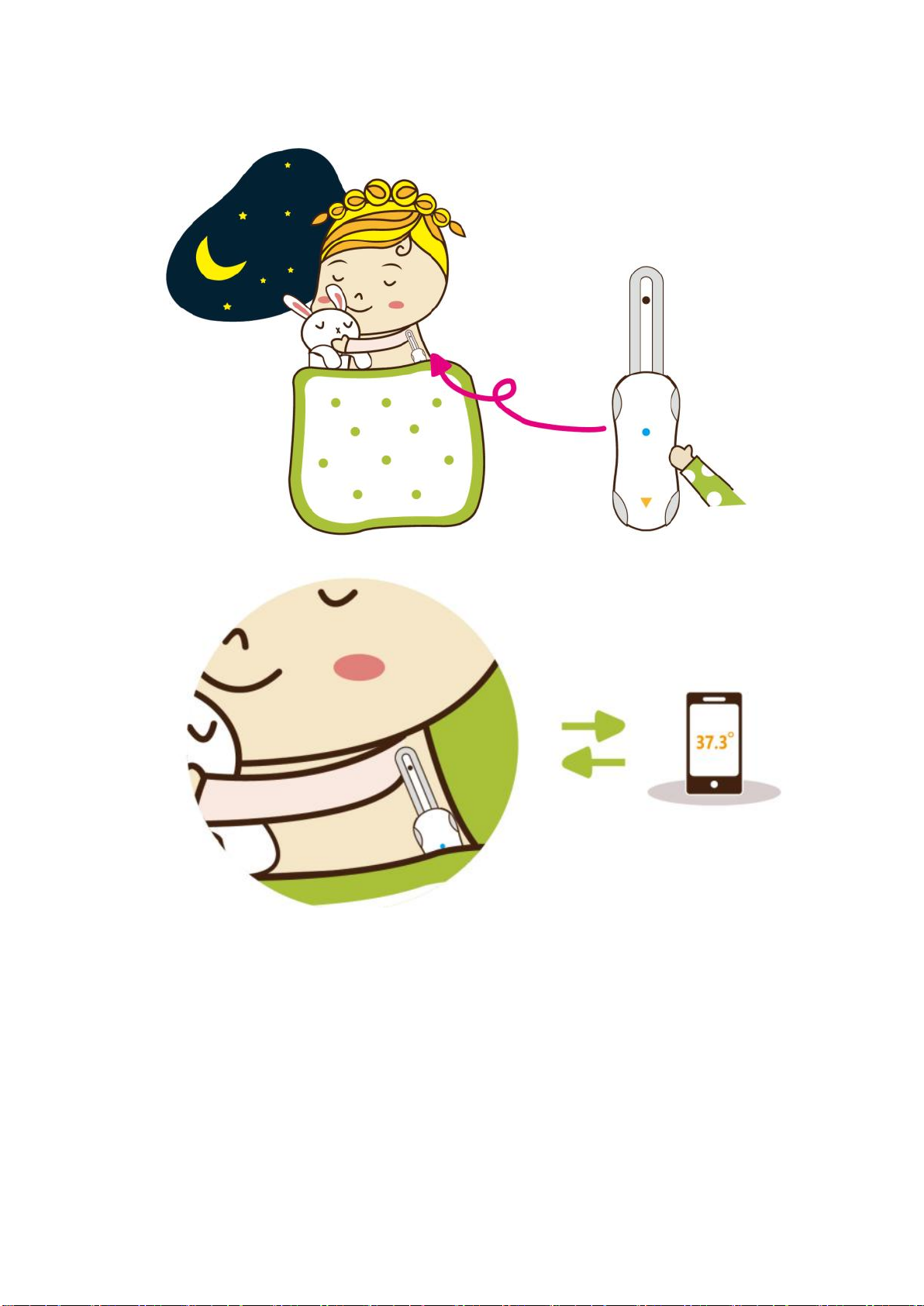
Step 4:
Step 5:
Clamp armpit for 5~8 minutes. The measuring result will be transmitted to mobile
terminal application software immediately via wireless signal transmission. Then take
the main unit off the temperature patch and dispose the temperature patch
appropriately.
Adult should help child to wear and operate the device.
Please note it takes at least for 5~8 minutes to get exact temperature.
After you finish taking the temperature, place the thermometer back into its
storage case to avoid consuming battery power.
7
Page 13

Age/year
Normal body temperature scope
Celsius temperature/℃
Fahrenheit temperature/℉
2
34.7~37.2
94.5~99.1
3~10
35.9~36.7
96.6~98.0
11~65
35.2~36.9
95.3~98.4
>65
35.6~36.3
96.0~97.4
Caution:
We recommend the users to use the original manufactured temperature
patch. You’d better wear the device in a cool environment to get better
wearing experience. If you feel unwell (uncomfortable or allergic) when use
the temperature patch, please replace other temperature patch as doctor’s
advice;
When measuring for a long time, please check whether there is skin allergy
phenomenon at site. If there is allergy, you should immediately stop using it;
Please do not re-paste the temperature patch if it appears fold, a new
temperature patch is required;
Skin preparation in advance is required when worn by adult. Please make
sure that skin is clean and dry;
Please clean the surface of the device with 75% concentrated medical alcohol
before and after use it. You should clean the skin contacted the device with
medicinal alcohol after taking off the device. The material that contacts skin
is nontoxic, nonirritating and will not cause allergy or any other side effect.
To avoid the disruption from an incoming call or text message during the
measurement, we recommend to switch your IOS device (if with 3G card) to
flight mode and turn on Bluetooth.
That pet or pest touches the device may cause the user’s allergy or any other
side effect. Please clean the surface of the device with 75% concentrated
medical alcohol before use it.
That children play the device may damage the temperature measuring probe
and affect the measure accuracy.
9. Normal Body Temperature
8
Page 14

The normal temperature can vary by:
a) Age;
b) Person;
c) Time of day(often highest in the evening);
Where on body the temperature was taken, body temperature can be raised by:
a) Being active;
b) Eating;
c) Feeling strong emotions;
d) Menstruating (women);
e) Taking certain medicines;
f) Being in a high temperature or high humidity;
g) Teething (in a young child – but no higher than 37.8℃);
h) Wearing heavy clothing.
Note:Different measure size and different measure methods may lead to
different temperature value.
10. Maintenance and Cleaning
1. Clean the surface of the device with 75% concentrated medical alcohol before and
after use it;
2. Please stop using the device when the low battery indication appears, otherwise it
will not work correctly;
3. Working 8 hours per day, the product can be used at least 6 months. The treatment
of the device and battery at the end of their life should be compliance with local
laws and regulations;
4. The temperature patch is single use, do not reuse it.
Warning:
Do not sterilize or autoclave the device;
If you notice any deterioration or damage to temperature patch, stop from
using the temperature patch immediately;
Other use of cleaning agents and disinfectants beside alcohol may damage
the device and shorten product lifetime or cause safety hazards.
9
Page 15
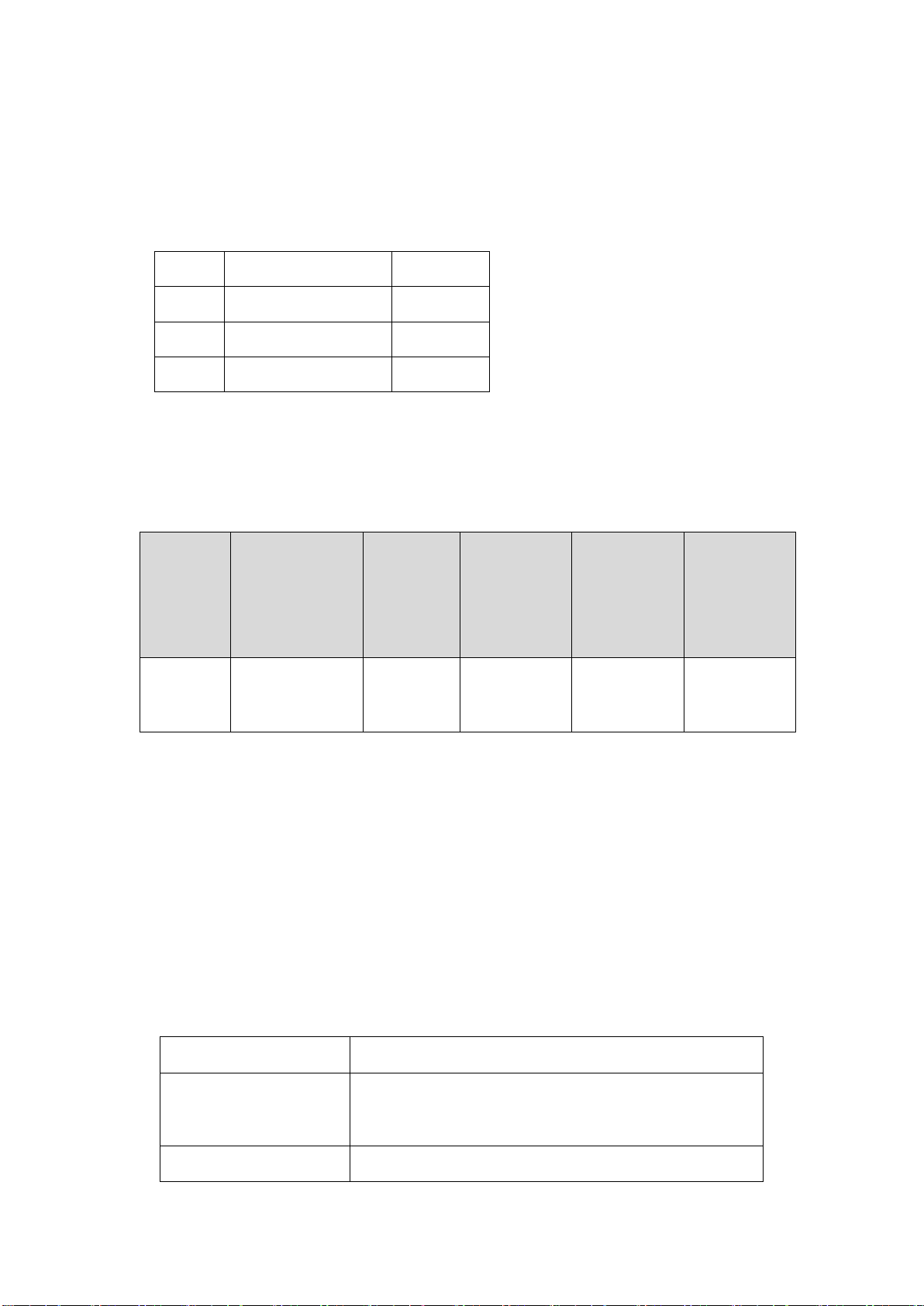
11. Accessory and Specifications
Parts
Classification of
protection
against electric
shock
Degree of
protection
against
electric
shock
Degree of
protection
against
ingress of
liquid
Degree of
protection
against
hazards of
explosion
Mode of
operation
Mainframe
Internally
CF
IP22
Not suitable
Continuous
Production model
WT3
Size
Main unit : 52.4mm×20.8mm×5.6mm
Temperature patch:
91.3mm×23.5mm×7.2mm
Weight
6.4g
Number
Items
Quantity
1
Main unit
One
2
Temperature patch
Four 3 User manual
One
11.1 Accessory
11.2 Safety Specification
According to the MDD 93/42/EEC, the electronic thermometer is Type Ⅱa
equipment. Classified according to the IEC60601-1 is as follows:
Note:
Internally:Internally powered equipment
CF:Type CF applied part
Not suitable:Equipment is not suitable for use in the presence of flammable
IP22:The device can prevent the solid foreign matter whose diameter is not less than
10.3 Technical Specifications
anesthetic mixture with air or with oxygen or nitrous oxide.
12.5mm into the equipment shell, and prevent the effects on the
equipment after dropping of water in the tilt angle of 15°.
10
Page 16
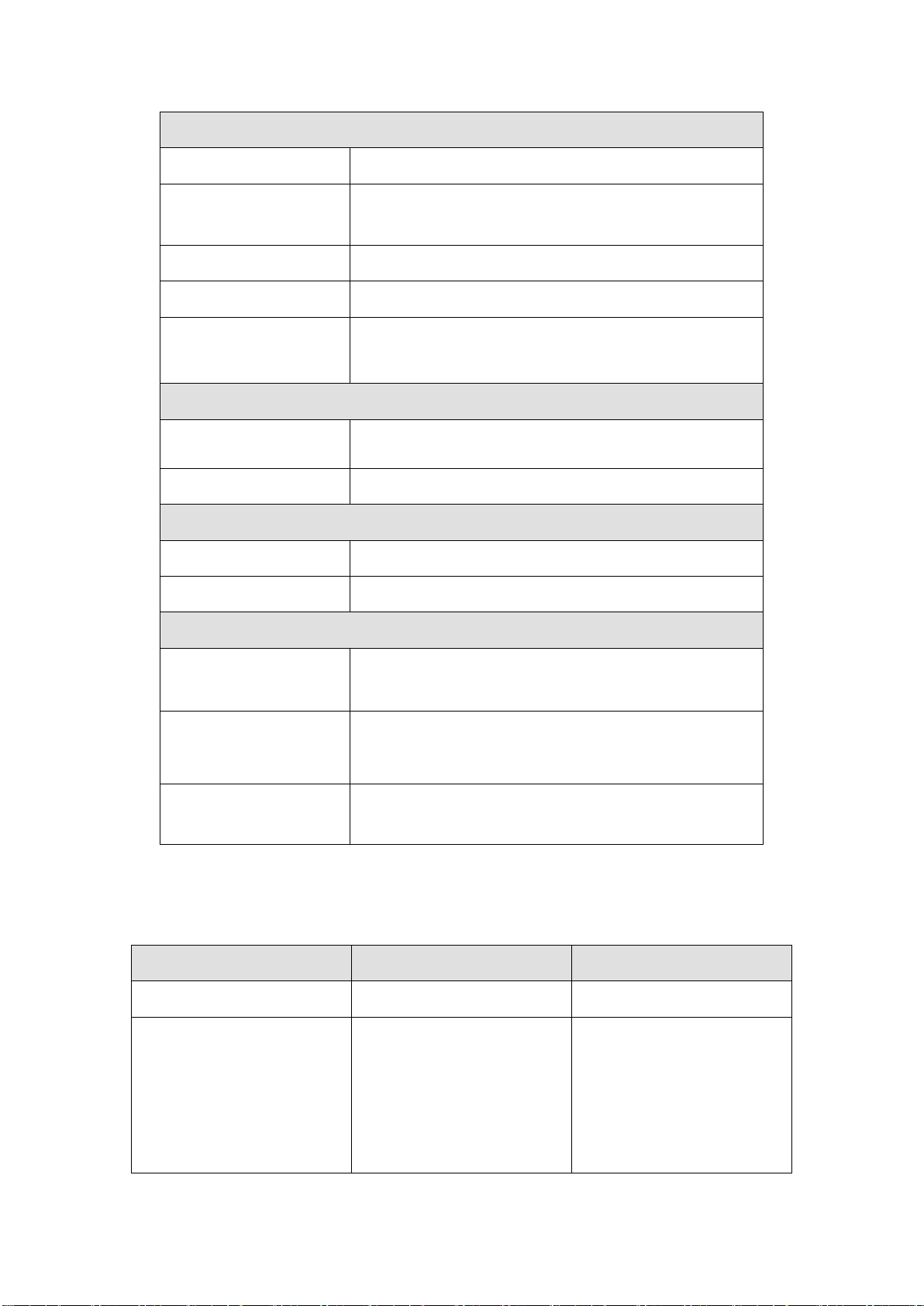
Measure specifications
Measure scope
25.00℃~45.00℃
Measure accuracy
±0.05℃ (35.00℃~38.50℃)
±0.1℃ (25.00℃~34.99℃ and 38.51℃~45.00℃)
Temperature unit
“℃”or“℉”
Update time
3s~30s
Bluetooth indicator light
Not connected: flash twice continuously.
Connected: flash once.
App software platform
IOS system
iPhone4s,iPhone5,iPhone5s,iPhone6(s)/6P(s),iPad3+,iPad
mini
Android (4.3+) system
Mobile phone, Palmtop
Battery
Type
CR1620, 3V/80mAH button battery
Work time
≥6 months (8 hours per day)
Environment specifications
Temperature
Operating: 5℃~+40℃;
Transportation and storage: -20℃~+55℃.
Humidity
Operating: 25%~95%(non condensing);
Transportation and storage: 25% ~ 95% (non
condensing).
Atmospheric pressure
Operating: 700hPa~1060hPa;
Transportation and storage: 500hPa~1060hPa.
Symptom
Possible Reason
Solution
No warning voice
System voice is closed
Set the system voice properly
Cannot turn on device
1. Main unit does not install in
the temperature patch properly.
2. The battery power might be
at shortage or no electricity;
3. The device itself might be
1. Install main unit in the
temperature patch again to
make sure electric contactor
connected well.
2. Restart the device;
12. Troubleshooting
11
Page 17
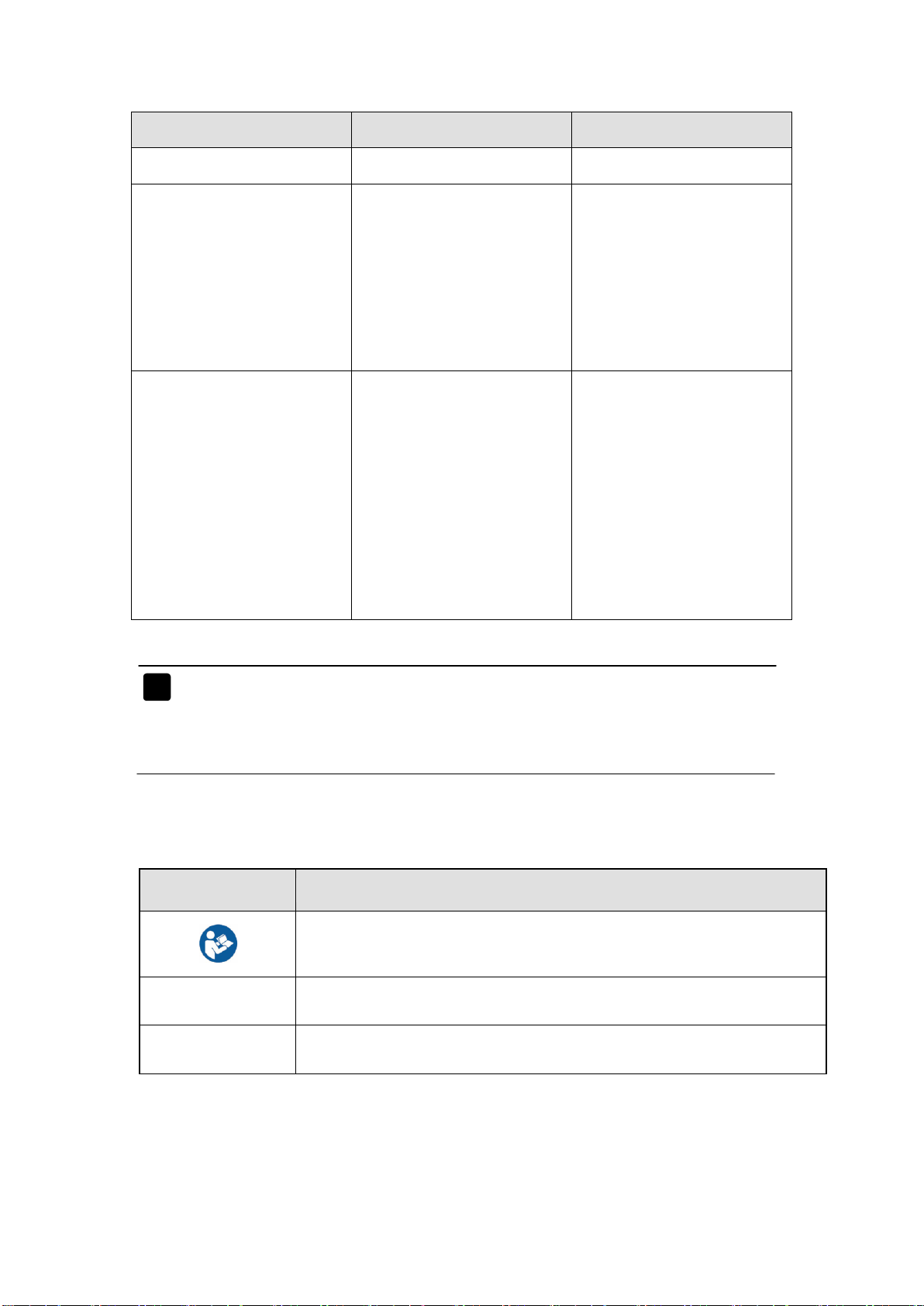
Symptom
Possible Reason
Solution
damaged.
3. Contact customer service.
Temperature data cannot be
displayed properly
1. The device itself might be
damaged.
2. Device does not place in
right position.
3. Do not clamp armpit when
using the device.
1. Contact customer service.
2. Stick the thermometer onto
armpit area again.
3. Clamp armpit for 5~8
minutes.
Cannot make connection
between device and receiver
1. Bluetooth does not be open
on receiver;
2. The version of Android in
the receiver device isn’t 4.3 or
4.3+.
3. The version of Bluetooth is
not 4.0;
4. Out of connection range.
1. Open Bluetooth;
2. Upgrade the Android system
to version 4.3 or 4.3+.
3. Use the receiver device with
Bluetooth 4.0;
4. Close to receiver or adjust
the position of receiver.
Symbol
Symbol Note
Refer to this user’s manual.
SN
Serial number
IP22
Enclosure degree of ingress protection.
Note:Electrical schematic diagram and component list are only provided to
repair station or personnel which have been confirmed qualified by the
manufacturer.
13. Equipment Symbols
12
Page 18
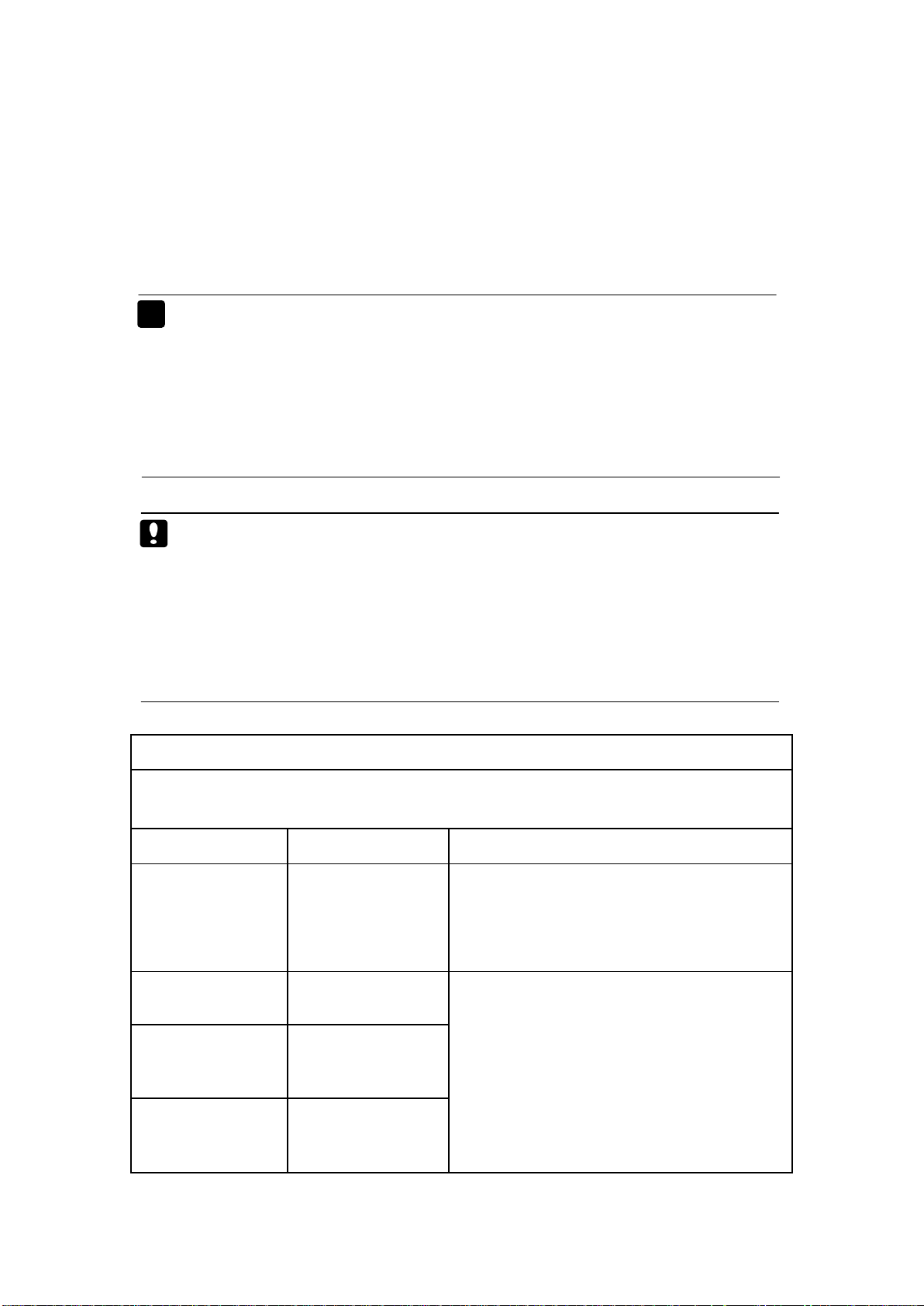
Appendix A Guidance and Manufacturer’s
Guidance and manufacture’s declaration – electromagnetic emission
The device is intended for use in the electromagnetic environment specified below. The customer
of the user of the device should assure that it is used in such an environment.
Emission test
Compliance
Electromagnetic environment – guidance
RF emissions
CISPR 11
Group 1
The device use RF energy only for its internal
function. Therefore, its RF emissions are very
low and are not likely to cause any interference in
nearby electronic equipment.
RF emission
CISPR 11
Class B
The device is suitable for use in all
establishments, including domestic
establishments and those directly connected to
the public low-voltage power supply network that
supplies buildings used for domestic purposes.
Harmonic emissions
IEC 61000-3-2
Not applicable
(Battery operated
device)
Voltage fluctuations/
flicker emissions
IEC 61000-3-3
Not applicable
(Battery operated
device)
Declaration of EMC
Note:
This product needs special precautions regarding EMC and needs to be installed and
put into service according to the EMC information provided, and this unit can be
affected by portable and mobile RF communications equipment.
Do not use a mobile phone or other devices that emit electromagnetic fields, near the
unit. This may result in incorrect operation of the unit.
Caution:
This unit has been thoroughly tested and inspected to assure proper performance and
operation.
This machine should not be used adjacent to or stacked with other equipment and that
if adjacent or stacked use is necessary, this machine should be observed to verify
normal operation in the configuration in which it will be used.
13
Page 19

Guidance and manufacture’s declaration – electromagnetic immunity
The device is intended for use in the electromagnetic environment specified below. The customer or the user of
device should assure that it is used in such an environment.
Immunity test
IEC 60601 test level
Compliance level
Electromagnetic environment -
guidance
Electrostatic
discharge (ESD)
IEC 61000-4-2
±6 kV contact
±8 kV air
±6 kV contact
±8 kV air
Floors should be wood, concrete or
ceramic tile. If floor are covered
with synthetic material, the relative
humidity should be at least 30%.
Electrical fast
transient/burst
IEC 61000-4-4
±2 kV for power supply
lines
±1 kV for input/output
lines
Not applicable
(Battery operated
device)
Mains power quality should be that
of a typical commercial or hospital
environment.
Surge
IEC 61000-4-5
± 1 kV line(s) to line(s)
± 2 kV line(s) to earth
Not applicable
(Battery operated
device)
Mains power quality should be that
of a typical commercial or hospital
environment.
Voltage dips, short
interruptions and
voltage variations on
power supply input
lines
IEC 61000-4-11
<5% UT
(>95% dip in UT)
for 0.5 cycle
40% UT
(60% dip in UT)
for 5 cycles
70% UT
(30% dip in UT)
for 25 cycles
<5% UT
(>95% dip in UT)
for 5 sec
Not applicable
(Battery operated
device)
Mains power quality should be that
of a typical commercial or hospital
environment. If the user of the
device requires continued operation
during power mains interruptions,
it is recommended that the device
be powered from an uninterruptible
power supply or a battery.
Power frequency
(50Hz/60Hz)
magnetic field IEC
61000-4-8
3 A/m
3 A/m
Power frequency magnetic fields
should be at levels characteristic of
a typical location in a typical
commercial or hospital
environment.
NOTE UT is the a.c. mains voltage prior to application of the test level.
14
Page 20
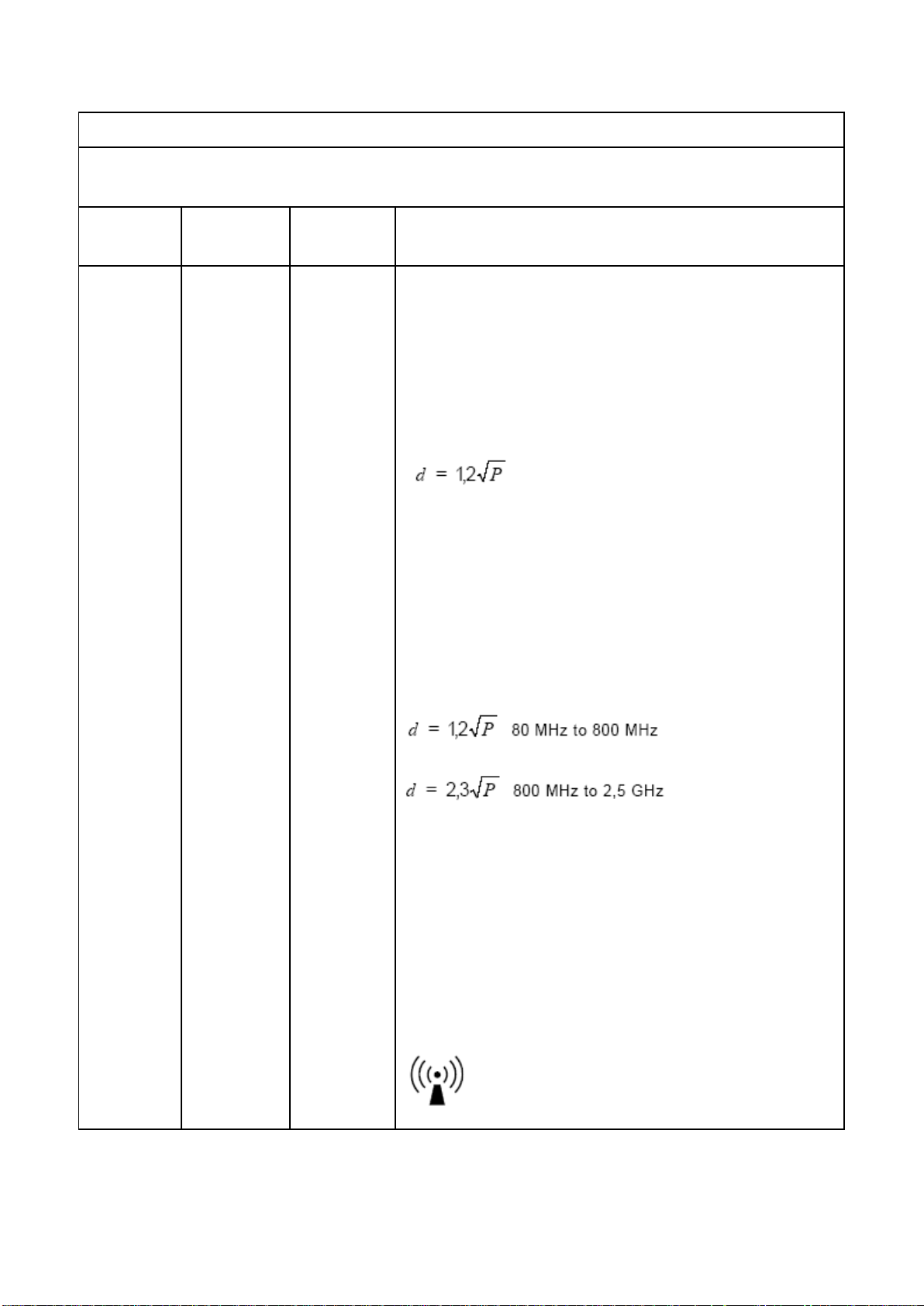
Guidance and manufacture’s declaration – electromagnetic immunity
The device is intended for use in the electromagnetic environment specified below. The customer or the user of
the device should assure that it is used in such an environment.
Immunity
test
IEC 60601
test level
Compliance
level
Electromagnetic environment - guidance
Conducted
RF
IEC
61000-4-6
3 V
rms
150 kHz to
80 MHz
Not
applicable
(Battery
operated
device)
Portable and mobile RF communications equipment should be
used no closer to any part of the device, including cables, than the
recommended separation distance calculated from the equation
applicable to the frequency of the transmitter.
Recommended separation distance
Where P is the maximum output power rating of the transmitter in
watts (W) according to the transmitter manufacturer and d is the
recommended separation distance in metres (m).
Field strengths from fixed RF transmitters, as determined by an
electromagnetic site survey,a should be less than the compliance
level in each frequency range.b
Interference may occur in the vicinity of equipment marked with
the following symbol:
Radiated RF
IEC
61000-4-3
3 V/m
80 MHz to
2.5 GHz
3 V/m
15
Page 21

NOTE 1 At 80 MHz and 800 MHz, the higher frequency range applies.
NOTE 2 These guidelines may not apply in all situations. Electromagnetic propagation is affected by
absorption and reflection from structures, objects and people.
a Field strengths from fixed transmitters, such as base stations for radio (cellular/cordless) telephones and
land mobile radios, amateur radio, AM and FM radio broadcast and TV broadcast cannot be predicted
theoretically with accuracy. To assess the electromagnetic environment due to fixed RF transmitters, an
electromagnetic site survey should be considered. If the measured field strength in the location in which the device
is used exceeds the applicable RF compliance level above, the device should be observed to verify normal
operation. If abnormal performance is observed, additional measures may be necessary, such as re-orienting or
relocating the device.
b Over the frequency range 150 kHz to 80 MHz, field strengths should be less than 3 V/m.
16
Page 22
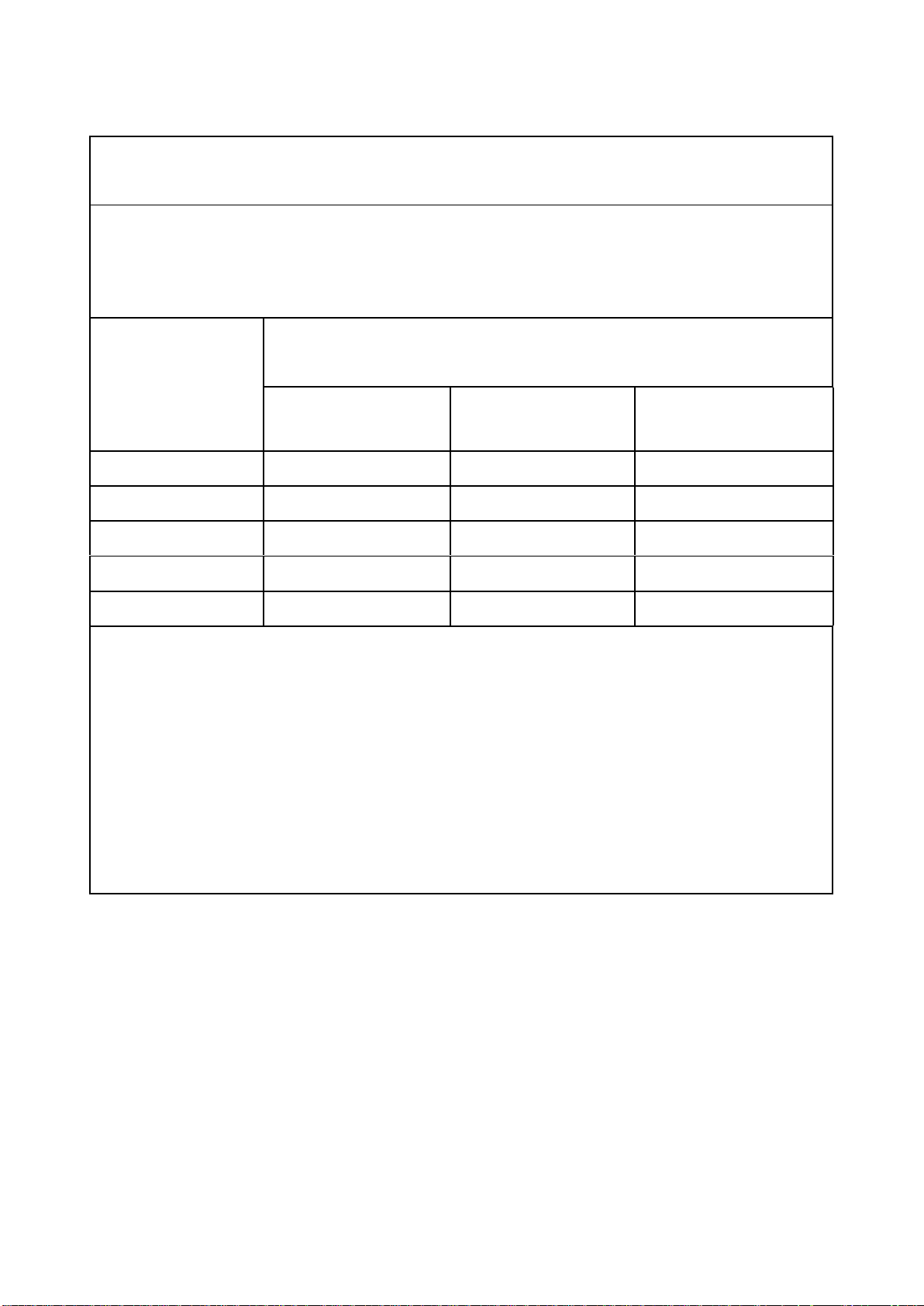
Recommended separation distances between
portable and mobile RF communications equipment and the device .
The device is intended for use in an electromagnetic environment in which radiated RF disturbances are
controlled. The customer or the user of the device can help prevent electromagnetic interference by maintaining
a minimum distance between portable and mobile RF communications equipment (transmitters) and the device
as recommended below, according to the maximum output power of the communications equipment.
Rated maximum
output power of
transmitter
(W)
Separation distance according to frequency of transmitter
(m)
150 KHz to 80 MHz
80 MHz to 800 MHz
800 MHz to 2.5 GHz
0.01
0.12
0.12
0.23
0.1
0.38
0.38
0.73
1
1.2
1.2
2.3
10
3.8
3.8
7.3
100
12
12
23
For transmitters rated at a maximum output power not listed above, the recommended separation distance d in
metres (m) can be estimated using the equation applicable to the frequency of the transmitter, where P is the
maximum output power rating of the transmitter in watts (W) according to the transmitter manufacturer.
NOTE 1 At 80 MHz and 800 MHz, the separation distance for the higher frequency range applies.
NOTE 2 These guidelines may not apply in all situations. Electromagnetic propagation is affected by
absorption and
reflection from structures, objects and people.
17
 Loading...