

Page 1
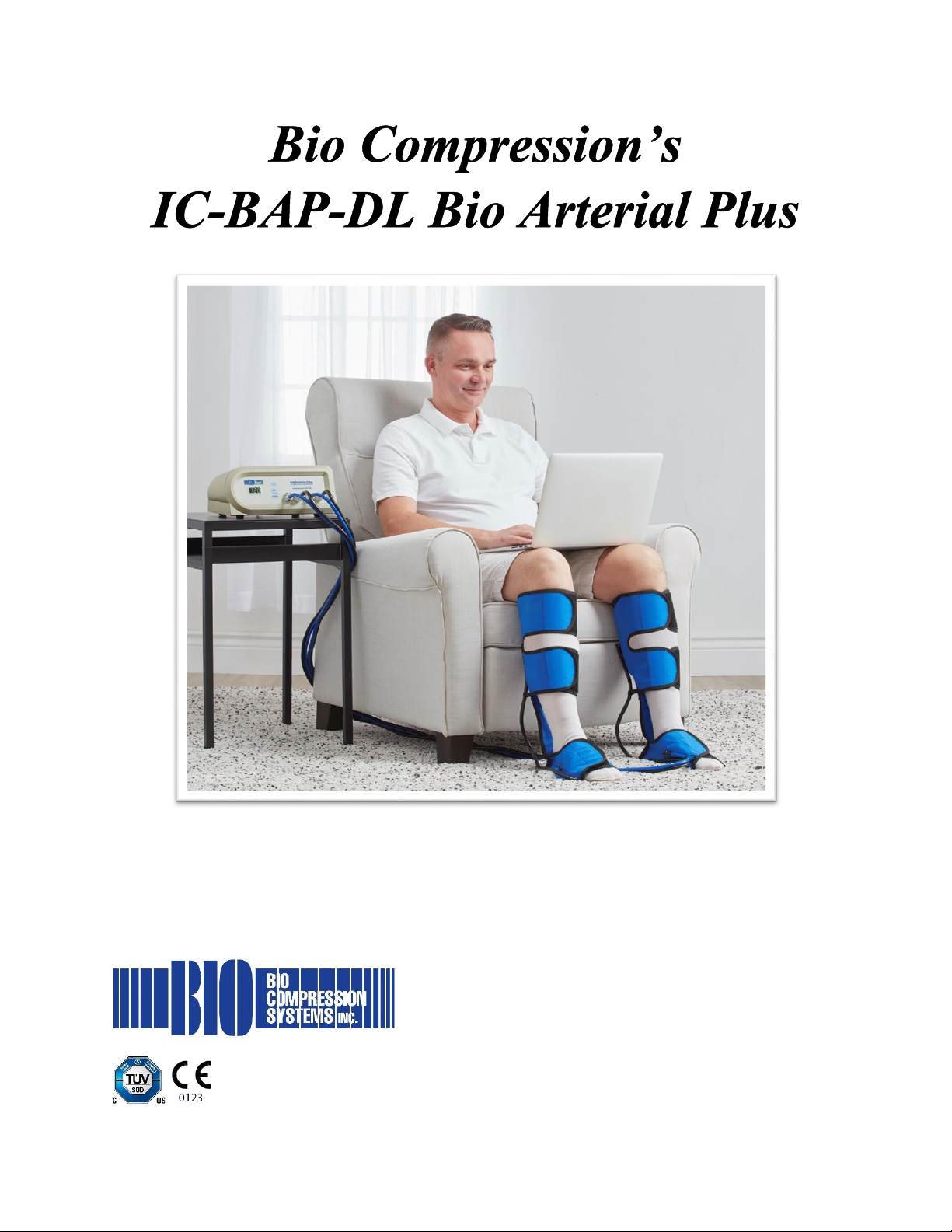
Arterial Blood Flow Enhancement System
Operating Instructions
Quality Medical Products Since 1983
Page 2

2
Page 3

3
Table of Contents
Introduction ................................................................................................................... 4
Intended Use .................................................................................................................. 4
Device Description and Operating Principle ............................................................... 4
Warnings and Precautions ........................................................................................... 6
Operating Instructions .................................................................................................. 7
Accessories ................................................................................................................. 10
Product Specifications ............................................................................................... 11
Environmental Specifications .................................................................................... 11
Symbol Glossary ......................................................................................................... 14
Information for Distributors and Healthcare Providers ........................................... 15
Page 4

4
Introduction
Congratulations on the purchase of your Bio Compression Systems model IC-BAP-DL
Bio Arterial Plus Arterial Blood Flow Enhancement System and garments.
Package Contents
• IC-BAP-DL Bio Arterial Plus pump
• Instructions for use
• Garments
Intended Use
The Bio Arterial Plus Arterial Blood Flow Enhancement System is intended as an
adjunct therapy for patients with ischemic disease of the lower extremities, due to one
or more of the following causes: amputations (minor), angioplasty/stent failure,
arteriopathic wounds, graft failure, intermittent claudication, ischemia, night pain, rest
pain, small vessel disease, ulcers
Contraindications
Use of this device is contraindicated for patients with any of the following conditions:
• Infections in the limb, including cellulitis, without appropriate antibiotic coverage
• Suspicion or confirmation of the presence of Deep Vein Thrombosis (DVT)
• Inflammatory phlebitis or episodes of pulmonary embolism
• Congestive Heart Failure (CHF)
• Undesirable venous and lymphatic return
• Sepsis in the limb or limbs
• Immediately following skin grafts in or around treatment sites
• Pulmonary edema
• Acute thrombophlebitis
Device Description and Operating Principle
The Bio Arterial Plus is an intermittent pneumatic compression system that sequentially
compresses both the foot and calf in patients suffering primarily from diabetic foot ulcers
or intermittent claudication (leg pain primarily from decreased arterial circulation).
The device consists of a compression garment connected to a pneumatic compression
pump. Pressure to the foot and calf is delivered via the pump’s cyclical inflation and
deflation of the garment. The movement of the garment compresses the blood vessels
in the foot and calf, expelling blood from the leg, overcoming blood stasis and
circulation.
Page 5
5
Pneumatic compression devices are proven to reduce pain and help close up chronic
ulcers.
Guidelines for Treatment
A physician is required to prescribe these settings, but general guidelines are listed
below:
• It is ultimately the physician’s responsibility to prescribe the setting and it should be
written on the prescription upon referral. Every patient is unique and
communication with the physician is important when setting the pressure.
• Typical treatment is for a duration of up to 1 hour, 2 to 3 times daily
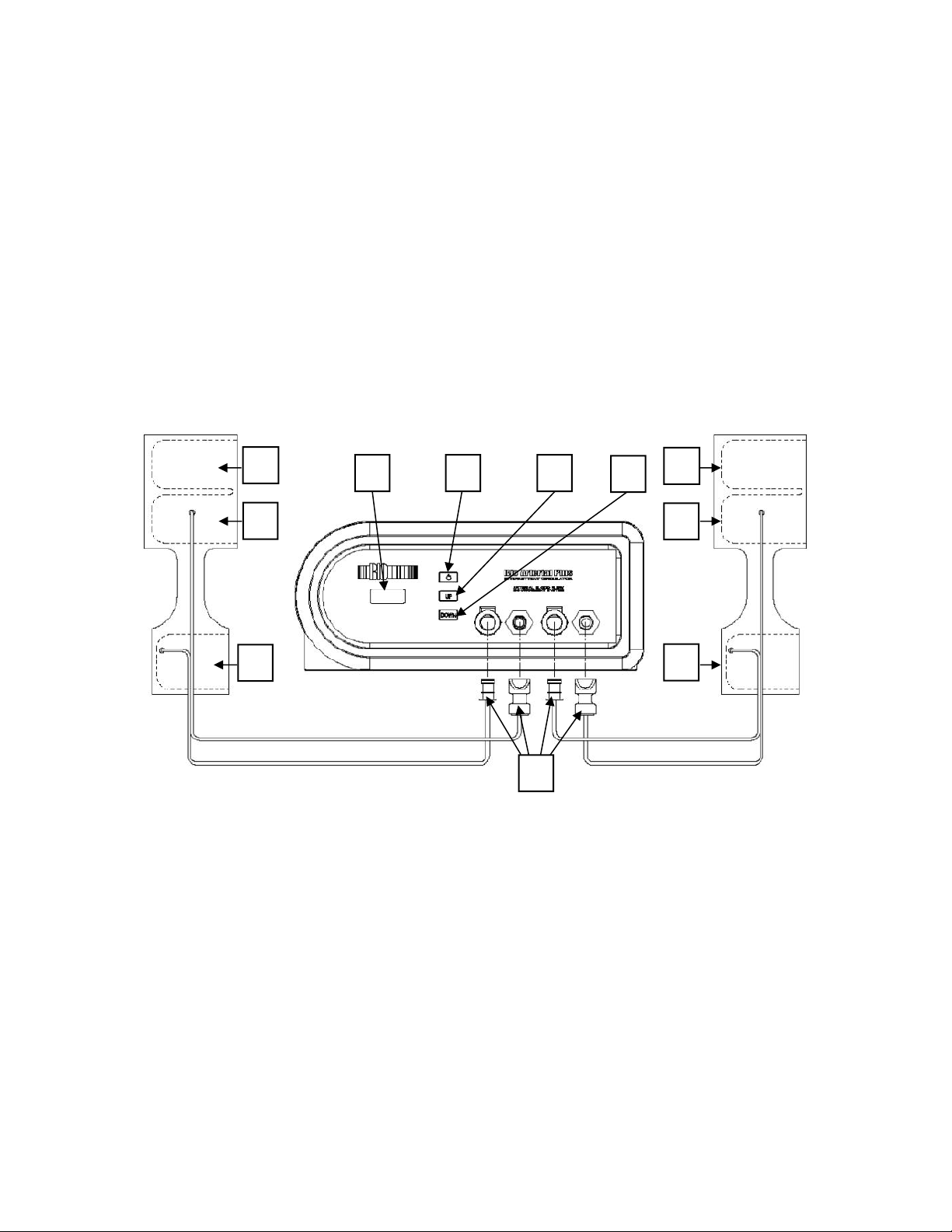
Front Panel and Key Features
Key Functions
1. Garment foot tabs
2. Garment middle tabs
3. Garment upper tabs
4. Connectors
5. Digital display
6. Power On/Off button
7. UP button
8. DOWN button
3
2 1 3
2
1
4
5 6 7
8
Page 6

6
Warnings and Precautions
US federal law restricts this device to sale by or on the order of a
physician.
Electrical Medical Equipment
• To avoid the risk of electric shock, burns, fire, injury, or improper treatment, read
the entire instruction manual before operating this device
• Use of accessories or a power cord not specified or provided by Bio Compression
Systems could result in increased electromagnetic emissions or decreased
electromagnetic immunity of this equipment and result in improper operation
• Portable RF communications equipment (including cell phones and peripherals
such as antenna cables and external antennas) should be used no closer than 12"
(30 cm) to any part of the device including the power cord - otherwise, degradation
of the performance of this equipment could result
• Use of this equipment adjacent to or stacked with other equipment should be
avoided because it could result in improper operation
Do Not Use
• For any contraindicated condition
• If the pump, accessories, or power cord are damaged or have been immersed in
water
• With any accessories or power cord not specified or provided by Bio Compression
Systems
• In the presence of flammable anesthetics or in an oxygen rich environment
• In an MRI environment
• Near water, in a wet environment, or where aerosols are being sprayed
• While sleeping
• For any use not described in this manual
Ask A Doctor Before Use If You Have
• Insensitive, irritated, injured skin, or skin conditions in/around treatment sites
When Using This Product
• Examine the device, accessories, and power cord for damage before using or
cleaning
• Handle garments with care - do not fold or crease, use near a heat source, handle
with sharp objects, clean with abrasive materials, or place in a washing machine or
dryer
• Do not stand or walk while wearing garments as this can cause a fall
Page 7

7
• Always wear clothing, bandages, or stockings underneath garments for hygienic
reasons and to avoid irritation
• Never share garments or use someone else’s garments - single-patient use only
• Avoid folding, pinching, or kinking tubing as this can obstruct air flow
• Do not wrap tubing around limb as this can restrict blood flow
• Do not operate pump on a soft surface, under a blanket or covering, or near a heat
source
• Never adjust pump settings unless directed by a physician
• Do not carry or suspend the device using tubing, valves, or the power cord as
handles
• Do not submerge the device or allow liquids to enter the device
• Never attempt to open, repair, or modify the device - no modification of this
equipment is allowed
Stop Use And Ask A Doctor If
• Changes in skin appearance occur such as color changes, blisters, welts, or
increased swelling
• You feel burning, itching, increased pain, numbness, or tingling
In the event the pump stops working (e.g., power failure), release pressure by
disconnecting the garment.
Any serious incident that has occurred in relation to the device must be reported
to Bio Compression Systems. In the European Union (EU), incidents should also be
reported to the competent authority of the Member State in which the user and / or
patient is established.
Keep out of reach of children and pets.
Operating Instructions
The patient is the intended user and can safely use all functions.
Preparing the Device for Use
• Remove garments and cardboard underneath from box
• Lift pump out of box and remove protective end caps – save packaging for
transport and storage
• Place pump on a flat sturdy surface – pump must be close enough for the controls
to be reached during use
• Plug power cord into outlet
• Remove garments from plastic bag, unroll, and spread flat
Page 8

8
Connecting the Garments
• Locate the connector at the end of garment tubing
• Attach connector to the pump by firmly pushing inwards – you will hear a “click”
when connected
Putting the Garments On
• Place heel portion of garment on floor and place heel in
• While pressing down on foam with arch, snuggly close by pulling left tab across
followed by right tab
• Pull up gently and snuggly close upper tabs just under the knee
• Ensure valve on back is centered
• Snuggly close middle tabs
Operating the Device
• Press “Power On/Off” button to turn on
• Current setting will briefly appear (“1Hr” for 1-hour operation or “CON” for
continuous)
• Current pressure will briefly appear
• The device will start (in some cases, a 20 second countdown will appear while
internal valve re-orientates)
• Upon the completion of treatment or to stop treatment, press “Power On/Off”
button to turn off
To change mode
• Begin with device turned off
• Press and hold DOWN button and momentarily press power button
• Release DOWN button after mode changes
• Device will start running
To change pressure
• Begin with device turned off
• Press and hold UP and DOWN buttons and momentarily press “Power On/Off”
button
• When display shows “---”, pressure can be adjusted using UP or DOWN button
• Startup will begin in 10 seconds or after pressing “Power On/Off” button
Reading the Usage Meter
• Begin with device turned off
• Press and hold UP button and momentarily press power button
Page 9

9
• A letter representing the first digit will appear in the Digital Display – A is 0, B is 1,
C is 2, D is 3, E is 4, and F is 5
• Release DOWN button after letter appears
• The remaining three digits will be displayed
• Device will start running
For example, if the Digital Display shows “D” followed by 013, that represents 3013
hours of use.
Cleaning
The pump, garment, and tubing can be wiped down using a damp (not wet) soft cloth
while unplugged – if more thorough pump cleaning or garment disinfection is desired,
use the following directions.
Pump and tubing cleaning
• Unplug and wipe down using a damp (not wet) soft cloth with mild antibacterial
soap as needed
• Do not use bleach
Garment Disinfection
• Disconnect from pump and open to expose all sides
• Prepare a solution of 1/3 cup of laundry detergent per 1 gallon of warm water (20
mL laundry detergent per 1 L water) in a sink or container large enough to hold the
garment
• Place garment in solution but do not submerge or place connectors in water as this
will damage the device
• Soak for 30 minutes with mild agitation every 5-10 minutes - hard to remove soil
may require hand washing using a soft clean cloth while garment is in solution
• Rinse with warm water and allow to air dry
• Repeat previous steps using a solution of 1 cup of bleach per 1 gallon of warm
water (60 mL bleach per 1 L warm water)
Storing and Transporting
• Keep and reuse packaging for transporting the device
• Store in a dry location away from a source of heat and free of pests
Servicing and Repairs
• Contact Bio Compression Systems for servicing – there are no user serviceable
parts
• Tampering, modifying, or dismantling this device in any way voids the warranty
• When contacting Bio Compression Systems, please have your model number and
serial number ready
Page 10

10
Troubleshooting
Pump does not turn on:
1. Check to see if the pump is plugged in
2. Unplug and examine power cord for damaged - if damaged, contact Bio Compression
Systems
3. Check circuit breaker to make sure outlet has power
4. Contact Bio Compression Systems
Garment does not deflate:
1. Check garment connection to pump
2. Check garment hose for damage, kinks, or twists
3. Check garment for damage
4. Contact Bio Compression Systems
Pressure seems low:
1. Check garment connection to pump
2. Check garment hose for damage, kinks, or twists
3. Check garment for damage
4. Contact Bio Compression Systems
Device is loud or making strange noises:
1. Make sure pump is on a stable surface
2. Assure stable surface is free and clear of any loose object
3. Contact Bio Compression Systems
Accessories
REF
Description
APG-3045-FC
Arterial Foot and Calf Sleeve - Standard
APGN-3045-FC
Arterial Foot and Calf Sleeve - Narrow
APGW-3045-FC
Arterial Foot and Calf Sleeve - Wide
Page 11

11
Product Specifications
Models: IC-BAP-DL, IC-BAP-DL-230
Electrical Rating: 120 VAC, 60 Hz, 0.5 A or 230 VAC, 50 Hz, 0.5 A
Electrical Classification: Class II
Type Applied Part: Type BF
Ingress Protection: IP21
Mains Isolation: Unplug
Mode of Operation: Continuous
Essential Performance: The pump’s cyclical inflation and deflation of the garment(s)
Cycle Time: 20 ± 4 seconds (compression 5 seconds, non-compression
15 seconds, 1 second delay between foot and calf)
Pressure Range: 10-150 mmHg
Precision: 1 mmHg
Accuracy: ± 20%
Features: Compliance/Usage Meter
Warranty: Pump 3 years, garment 1 year
Expected Service Life: 5 years
Software Safety Class: A
Regulatory Classification: AU IIa, CA 2, BR II, EU IIa, US 2
Weight: 7.5 lbs. (3.4 kg)
Dimensions: 5.5” x 12” x 8” (140 mm x 305 mm x 203 mm)
Environmental Specifications
Consumables and Natural Resources Used During Care and Use
• Electrical energy for operation
• 70 mL laundry detergent and 250 mL bleach per 7.6 liters water for garment
cleaning - only as needed
Emissions During Normal Use
• Compressed air
• Minimal acoustic energy - nearly silent
• Minimal electromagnetic emissions - see manufacturer’s declaration and related
information below
Instructions for Minimizing Environmental Impact
• Unplug the pump after charging - unplugging electronic devices when they are not
being used saves electricity
• Unplug the pump when not in use - unplugging electronic devices when they are
not being used saves electricity
• Do not clean garment soiled - this minimizes the consumables used
• Reuse packaging for storing and transporting device
Page 12

12
Operation Environment
• Intended for use in a healthcare or home environment
• Not intended of use in the presence of flammable anesthetics, an oxygen rich
environment, or an MRI environment
• Altitude up to 6561 feet (2000 m)
• Temperature 50°F – 100°F (10°C – 38°C)
• Humidity 30-75% RH
• Atmospheric pressure 700-1060 hPa
Transportation and Storage Environment
• Temperature -20°F – 110°F (-29°C – 43°C)
• Humidity 30-75% RH
• Atmospheric pressure 700-1060 hPa
End of Life Management
• There are no components which contain stored electrical energy after the device
has been shut off
• Does not contain hazardous substances requiring special handling and treatment
• Dispose of in an environmentally responsible manner in accordance with regional
requirements
• Contact Bio Compression Systems if you have questions or concerns regarding
disassembly and disposal
Page 13

13
Manufacturer’s EMC Declaration
Electromagnetic Emissions
Emissions
Compliance
Electromagnetic Environment - Guidance
RF emissions
CISPR 11
Group 1
The device uses RF energy only for its internal functions. Therefore, its RF
emissions are very low and are not likely to cause any interference in nearby
electronic equipment.
RF emissions
CISPR 11
Class B
The device is suitable for use in all establishments, including domestic
establishments and those directly connected to the public low voltage power supply
network that supplies building used for domestic purposes.
Harmonic emissions
IEC 61000-3-2
Not
applicable
Voltage fluctuations/
flicker emissions
IEC 61000-3-3
Not
applicable
Electromagnetic Immunity
Immunity Test
Immunity Test Level
IEC 61000-4-2 Electrostatic Discharge Immunity
±8kV contact, ±2, 4, 8kV air discharge
IEC 61000-4-3 Radiated RF Field Immunity
80MHz – 2.7GHz, 10V/m, AM 80% at 1kHz
IEC 61000-4-3 Proximity Fields from RF Wireless
Communications Equipment
IEC 60601-1-2, Section 8.10, Table 9
IEC 61000-4-4 Electrical Fast Transients
±2kV/100kHz power, ±1kV/100kHz signal
IEC 61000-4-5 Surge Immunity
±0.5, 1kV line to line, ±0.5, 1, 2kV line to ground
IEC 61000-4-6 Conducted RF Immunity
150kHz - 80MHz, 3V
RMS
in whole range, 6V
RMS
in amateur radio and
ISM, AM 80% at 1kHz
IEC 61000-4-8 Magnetic Field Immunity
30A/m, 50 or 60Hz
IEC 61000-4-11 Voltage Dips
0% UT per 0.5 cycles, 0% UT per 1.0 cycle, 70% UT per 25/30
cycles
IEC 61000-4-11 Voltage Interruptions
0% UT per 250/300 cycles
Page 14
14
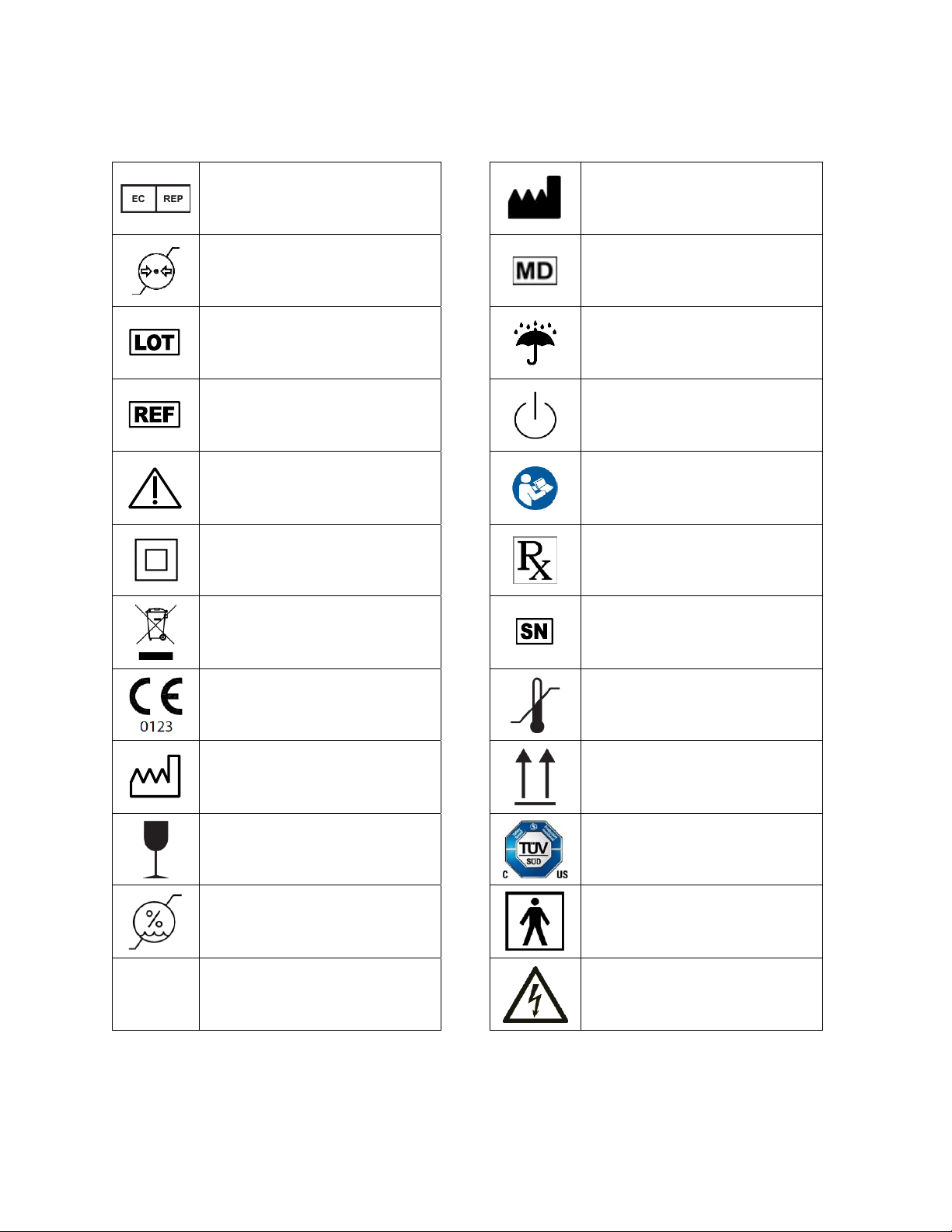
Symbol Glossary
Authorized Representative in
the European Community
Manufacturer
Atmospheric pressure limitation
Medical Device
Batch code (lot number)
Keep dry
Catalog number
Power on/off (stand-by)
Caution
Refer to instruction manual/
booklet
Class II equipment (protection
against electric shock)
Restricted to sale by or on the
order of a physician
Complies with the Waste
Electrical and Electronic
Equipment Directive
(WEEE Directive)
Serial number
Complies the European Medical
Device Regulation
Temperature Limit
Date of manufacture
This way up
Fragile, handle with care
TÜV SÜD Certification Mark
(safety tested and production
monitored)
Humidity limitations
Type BF Applied Part
IP21
Ingress protection (against
solids up to 12.5 mm and
dripping water)
Warning: Electricity
Page 15

15
Information for Distributors and Healthcare Providers
Resetting the Pump
The pump remembers user settings and therefore it is important to reset the pump to its
original factory settings when placing the device on a new patient. To reset the usage
meter and return the pump to factory settings:
• Begin with pump running
• Press and hold the DOWN button then press and hold the POWER button - both
buttons must be held down together for five seconds
• Digital Display will show “rES” - release buttons
• “rES’ will be displayed for three seconds then usage meter will be reset.
 Loading...