

Page 1

Access Control
bintec Dm752-I
Copyright© Version 11.06 bintec elmeg
bintec elmeg
Manual
Access Control 1
Page 2

Legal Notice
Warranty
This publication is subject to change.
bintec offers no warranty whatsoever for information contained in this manual.
bintec is not liable for any direct, indirect, collateral, consequential or any other damage connected to the delivery,
supply or use of this manual.
Manual bintec elmeg
2 Access Control
Page 3

Table of Contents
I Related Documents. . . . . . . . . . . . . . . . . . . . . . . . . . . . . . . . . 1
Chapter 1 Introduction . . . . . . . . . . . . . . . . . . . . . . . . . . . . . . . . . . . . . 2
1.1 Access Control Lists . . . . . . . . . . . . . . . . . . . . . . . . . . . . . . . . . . 2
Chapter 2 Configuration . . . . . . . . . . . . . . . . . . . . . . . . . . . . . . . . . . . . 3
2.1 Introduction . . . . . . . . . . . . . . . . . . . . . . . . . . . . . . . . . . . . . . 3
2.2 Accessing the Configuration . . . . . . . . . . . . . . . . . . . . . . . . . . . . . . . 3
2.3 Main Configuration Menu . . . . . . . . . . . . . . . . . . . . . . . . . . . . . . . . 4
2.3.1 ? (HELP) . . . . . . . . . . . . . . . . . . . . . . . . . . . . . . . . . . . . . . . 5
2.3.2 ACCESS-LIST . . . . . . . . . . . . . . . . . . . . . . . . . . . . . . . . . . . . . 5
2.3.3 LIST . . . . . . . . . . . . . . . . . . . . . . . . . . . . . . . . . . . . . . . . . 6
2.3.4 NO . . . . . . . . . . . . . . . . . . . . . . . . . . . . . . . . . . . . . . . . . . 7
2.3.5 EXIT . . . . . . . . . . . . . . . . . . . . . . . . . . . . . . . . . . . . . . . . . 7
2.4 Standard Access Lists. . . . . . . . . . . . . . . . . . . . . . . . . . . . . . . . . . 7
2.4.1 ? (HELP) . . . . . . . . . . . . . . . . . . . . . . . . . . . . . . . . . . . . . . . 7
2.4.2 ENTRY . . . . . . . . . . . . . . . . . . . . . . . . . . . . . . . . . . . . . . . . 8
2.4.3 LIST . . . . . . . . . . . . . . . . . . . . . . . . . . . . . . . . . . . . . . . . 10
2.4.4 MOVE-ENTRY . . . . . . . . . . . . . . . . . . . . . . . . . . . . . . . . . . . . 11
2.4.5 DESCRIPTION . . . . . . . . . . . . . . . . . . . . . . . . . . . . . . . . . . . . 11
2.4.6 NO . . . . . . . . . . . . . . . . . . . . . . . . . . . . . . . . . . . . . . . . . 12
2.4.7 EXIT . . . . . . . . . . . . . . . . . . . . . . . . . . . . . . . . . . . . . . . . 12
2.5 Extended Access Lists . . . . . . . . . . . . . . . . . . . . . . . . . . . . . . . . 12
2.5.1 ? (HELP) . . . . . . . . . . . . . . . . . . . . . . . . . . . . . . . . . . . . . . 13
2.5.2 ENTRY . . . . . . . . . . . . . . . . . . . . . . . . . . . . . . . . . . . . . . . 13
2.5.3 LIST . . . . . . . . . . . . . . . . . . . . . . . . . . . . . . . . . . . . . . . . 20
2.5.4 MOVE-ENTRY . . . . . . . . . . . . . . . . . . . . . . . . . . . . . . . . . . . . 21
2.5.5 DESCRIPTION . . . . . . . . . . . . . . . . . . . . . . . . . . . . . . . . . . . . 21
2.5.6 NO . . . . . . . . . . . . . . . . . . . . . . . . . . . . . . . . . . . . . . . . . 21
2.5.7 EXIT . . . . . . . . . . . . . . . . . . . . . . . . . . . . . . . . . . . . . . . . 22
2.6 Stateful Access Lists . . . . . . . . . . . . . . . . . . . . . . . . . . . . . . . . . 22
2.6.1 ¿? (HELP) . . . . . . . . . . . . . . . . . . . . . . . . . . . . . . . . . . . . . . 23
2.6.2 DESCRIPTION . . . . . . . . . . . . . . . . . . . . . . . . . . . . . . . . . . . . 23
2.6.3 ENTRY . . . . . . . . . . . . . . . . . . . . . . . . . . . . . . . . . . . . . . . 23
2.6.4 NO . . . . . . . . . . . . . . . . . . . . . . . . . . . . . . . . . . . . . . . . . 35
2.7 Show Config . . . . . . . . . . . . . . . . . . . . . . . . . . . . . . . . . . . . . 35
2.8 Practical Example . . . . . . . . . . . . . . . . . . . . . . . . . . . . . . . . . . 36
2.8.1 Creating the access control lists . . . . . . . . . . . . . . . . . . . . . . . . . . . . 36
2.8.2 Associating the access List to the IPSec Protocol . . . . . . . . . . . . . . . . . . . . . 37
Chapter 3 Monitoring. . . . . . . . . . . . . . . . . . . . . . . . . . . . . . . . . . . . . 38
3.1 Monitoring Commands . . . . . . . . . . . . . . . . . . . . . . . . . . . . . . . . 38
bintec elmeg
Table of Contents
Access Control i
Page 4

3.1.1 ? (HELP) . . . . . . . . . . . . . . . . . . . . . . . . . . . . . . . . . . . . . . 38
3.1.2 LIST . . . . . . . . . . . . . . . . . . . . . . . . . . . . . . . . . . . . . . . . 38
3.1.3 CLEAR-CACHE . . . . . . . . . . . . . . . . . . . . . . . . . . . . . . . . . . . 43
3.1.4 SET-CACHE-SIZE . . . . . . . . . . . . . . . . . . . . . . . . . . . . . . . . . . 43
3.1.5 SHOW-HANDLES . . . . . . . . . . . . . . . . . . . . . . . . . . . . . . . . . . 43
3.1.6 HIDE-HANDLES . . . . . . . . . . . . . . . . . . . . . . . . . . . . . . . . . . . 43
Chapter 4 Appendix . . . . . . . . . . . . . . . . . . . . . . . . . . . . . . . . . . . . . 44
4.1 Reserved Ports. . . . . . . . . . . . . . . . . . . . . . . . . . . . . . . . . . . . 44
4.2 Reserved Protocols . . . . . . . . . . . . . . . . . . . . . . . . . . . . . . . . . . 44
4.3 Protocol Values in “Stateful” Lists . . . . . . . . . . . . . . . . . . . . . . . . . . . . 47
Table of Contents bintec elmeg
ii Access Control
Page 5

I Related Documents
bintec Dm745-I Policy Routing
bintec Dm764-I Route Mapping
bintec Dm780-I Prefix Lists
bintec Dm786-I AFS
bintec Dm788-I New NAT Protocol
bintec Dm795-I Policy-Map Class-Map
bintec elmeg
Related Documents
Access Control 1
Page 6
Chapter 1 Introduction
1.1 Access Control Lists
Routers use Access Control Lists (ACL) to identify traffic passing through them.
Access lists can filter the packet or route flow passing through the router interfaces.
An IP access list is a sequential list of permission or negation conditions applied to source or destination IP addresses, source or destination ports or to higher layer IP protocols (such as IP, TCP etc.).
These can separate the traffic into different queues, according to priority.
Types of access lists:
Standard (1 – 99): checks the source addresses of those packets requesting
routing.
Extended (100 – 1999): checks both the source and destination addresses of
each packet. This kind of list can also verify specific protocols, number of ports
and other parameters.
Stateful (5000-9999): checks both the source and destination address for the
packet, as well as the state and the type of session. To configure stateful lists,
the AFS feature must be enabled (please see manual bintec Dm786-I AFS).
Access lists can be applied at both input (to avoid router overload) and output.
Access Control Lists themselves cannot limit the packet flow in the router. To do this, they must be associated to protocols that allow traffic filters to be established. Certain protocols allow for Access Control List management and incorporate a series of commands that associate the protocol to said lists. The following are some of the most common
protocols managing Access Control Lists: BRS, IPSec, Policy Routing, RIP.
Routing protocols, such as RIP, OSPF and BGP, are particularly interesting. They use Access Control Lists, either
directly or through Route Maps (please see manual bintec Dm764-I Route Mapping), to control the routes installed
in the routing table or the ones distributed to other devices. Other tools, such as Prefix Lists, are very similar to Access Lists and have been specifically designed for route filtering (see manual bintec Dm780-I Prefix Lists).
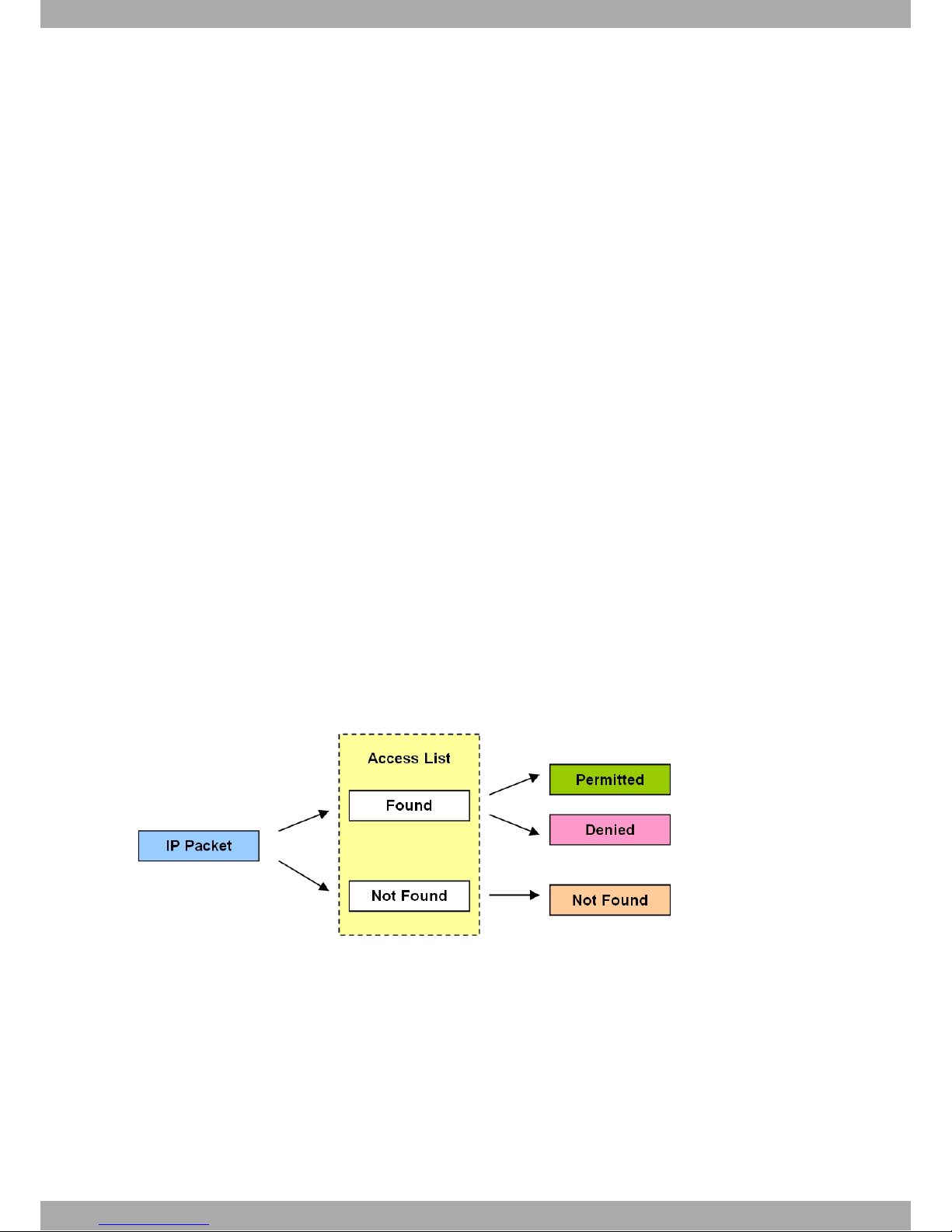
Access Control Lists indicate the entry search results to the associated protocol. The reception search result for a
packet can be:
The associated protocol determines what should happen to the IP packet in accordance with the Access List application result.
1 Introduction bintec elmeg
2 Access Control
Page 7
Chapter 2 Configuration
2.1 Introduction
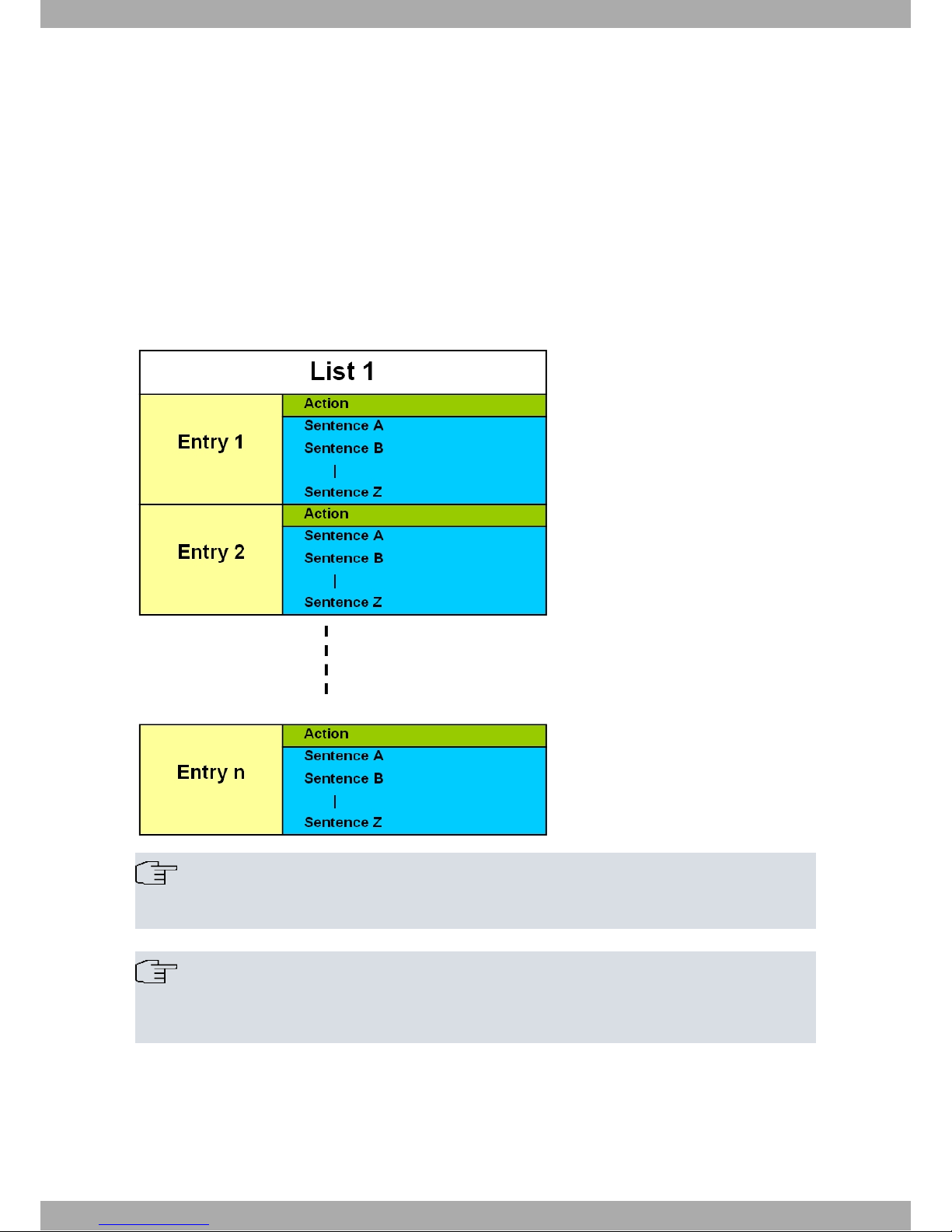
Each entry in the list is a block of sentences and an action, and is identified by a unique number (the entry identifier
or ID field). The sentence block is made up of a source IP address (or range of addresses), a destination IP address
(or range of destination IP addresses), a protocol (or range of protocols), source and destination ports (or range of
ports), IP service byte values and the connection identifier for the interfaces the packet goes through. You only have
to specify those required. The action represents the process assigned to the packets that match the associated block
of sentences: PERMIT or DENY.
A Standard, Extended or Stateful Access Control List is made up of a series of entries (which define the properties
that a packet must have in order to belong to this entry and, consequently, to this list). This Access Control List is
then assigned to a protocol.
Note
Access Control Lists themselves cannot limit the packet flow in the router. To do this, they must be associated to a protocol.
Note
Access Control Lists provide the associated protocol with the entry search results. The latter can have
the following values: Not Found, Permit or Deny. The associated protocol determines what to do with a
packet according to the result given by the Access Control List.
2.2 Accessing the Configuration
Operations to create, modify or eliminate access lists are executed from a specific menu. There, you can also view
the lists that have been created.
In the router configuration structure, Access Controls are organized as a feature (FEATURE). To view the features
bintec elmeg
2 Configuration
Access Control 3
Page 8

that allow you to configure the router, enter the feature command followed by a question mark (?).
Example:
Config>feature ?
access-lists Access generic access lists configuration
environment
bandwidth-reservation Bandwidth-Reservation configuration environment
control-access Control-access configuration environment
dns DNS configuration environment
frame-relay-switch Frame Relay Switch configuration environment
ip-discovery TIDP configuration environment
ldap LDAP configuration environment
mac-filtering Mac-filtering configuration environment
nsla Network Service Level Advisor configuration
nsm Network Service Monitor configuration environment
ntp NTP configuration environment
prefix-lists Access generic prefix lists configuration
environment
radius RADIUS protocol configuration environment
route-map Route-map configuration environment
scada-forwarder SCADA Forwarder configuration environment
sniffer Sniffer configuration environment
stun Stun facility configuration environment
syslog Syslog configuration environment
tms TMS configuration environment
vlan IEEE 802.1Q switch configuration environment
vrf VRF configuration environment
wrr-backup-wan WRR configuration environment
wrs-backup-wan WRS configuration environment
Config>
To access the Access Controls configuration menu, enter, from the configuration root menu (PROCESS 4), the word
feature, followed by access-lists.
Example:
Config>feature access-lists
-- Access Lists user configuration -Access Lists config>
You will then access the main Access Controls functionality configuration menu. Here you can create, eliminate and
view the access lists.
Each Access Control List is made up of entries, where you can indicate criteria and the parameters that grant or
deny access.
There are three types of Access Control Lists: Standard, Extended and Stateful.
Very few parameters are used in the Standard lists to define the characteristics of each Access Control entry. Extended lists, however, allow you to define a larger number of selection parameters.
With Stateful lists, users can also specify the connection status (established, new, etc.) and type of connection (rtp,
peer to peer, etc.).
There are three submenus within the main Access Lists menu, one for each type of list. Each submenu is accessed
when editing a specific list, depending on whether the type selected is Extended, Standard, or Stateful.
2.3 Main Configuration Menu
Creates and deletes lists from the main Access Control configuration menu. You can also view the configuration of
the lists that have been created.
An access list is made up of a series of entries. Each entry in the list is a block of sentences and an action, and is
identified by a unique number (the entry identifier or ID field). The sentence block is made up of a source IP address
(or range of addresses), a destination IP address (or range of destination IP addresses), a protocol (or range of protocols), source and destination ports (or range of ports) and the connection identifier for all interfaces the packet
goes through. The action sets forth the criteria that must be applied to the IP packets meeting the requirements
defined by the sentences. The action can be one of two types: permit or deny.
2 Configuration bintec elmeg
4 Access Control
Page 9
You can configure 9999 access lists in the router. Access lists whose identifiers take a value between 1 and 99 are
Standard Access Lists. Extended Access Lists take a value between 100 and 1999 and those between 5000 and
9999 are Stateful Access Lists.
The 9999 access lists are empty by default. An access list is considered empty when it does not contain any entries.
Depending on the type of list created (Standard/Extended/Stateful), entry configurations are carried out in a submenu
containing the same parameters for all entries of the same type. The following sections describe the configuration
mode for all parameters contained in these submenus.
Non-configured entry parameters or options in the Access Control Lists will not be taken into account when checking
the access.
Note
The order of the entries in the Access Control List is very important if the information the sentences
refer to stretches over different entries.
You must bear in mind that the order in which the entries in a list are dealt with is not defined by the
entry identifier number, but by the order in which they have been introduced. This order can be seen
through the list command and modified with the move-entry command. When moving through the list,
beginning with the first listed element or entry, if an element is found that matches the search criteria,
no further search is carried out and the action indicated by said entry is executed.
Please note that the search order among the entries on an Access Control List DIFFERS from that
used in a Prefix List (please see manual bintec Dm780-I Prefix Lists). In the latter case, this order is
given by the value of the identifier.
The following commands are available in the main Access Control menu:
Command Function
? (HELP) Lists the available commands or their options.
ACCESS-LIST Configures an access list.
LIST Displays the configuration of the access lists.
NO Negates a command or sets the default value.
2.3.1 ? (HELP)
Lists the valid commands at the level where the router is programmed. You can also use this command after a specific command to list the available options.
Syntax:
Access Lists config>?
Example:
Access Lists config>?
access-list Configure an access-list
list Display access-lists configuration
no Negates a command or sets its defaults
exit
Access Lists config>
2.3.2 ACCESS-LIST
Accesses the submenu that allows you to configure entries in an access list. Access lists are identified by a numerical value that can take values between 1 and 9999 (i.e. the router allows you to configure 9999 access lists). Access
lists whose identifiers take a value between 1 and 99 are Standard Access Lists. Extended Access Lists take a value
between 100 and 1999, while those taking a value between 5000 and 9999 are Stateful Access Lists.
Once you have entered this command, followed by an identifier, you access a submenu where you can configure an
access list for said identifier. The type of access list and its identifier will appear in the new prompt.
Syntax:
Access Lists config>access-list ?
<1..99> Standard Access List number (1-99)
<100..1999> Extended Access List number (100-1999)
bintec elmeg
2 Configuration
Access Control 5
Page 10

<5000..10000> Stateful access-list
Example:
Access Lists config>access-list 101
Extended Access List 101>
2.3.3 LIST
Displays configuration information on the Access Control Lists feature. Stateful Access Lists cannot be listed. To see
the content, execute show config.
Syntax:
Access Lists config>list ?
all-access-lists Display all access-lists configuration
standard-access-lists Display standard access-lists configuration
extended-access-lists Display extended access-lists configuration
2.3.3.1 LIST ALL-ACCESS-LISTS
Displays ALL the configuration information on the Access Control Lists, except for the Stateful Access Control Lists.
Syntax:
Access Lists config>list all-access-lists
Example:
Access Lists config>list all-access-lists
Standard Access List 1, assigned to no protocol
1 PERMIT SRC=192.60.1.24/32
2 PERMIT SRC=0.0.0.0/0
Extended Access List 100, assigned to no protocol
1 PERMIT SRC=172.34.53.23/32 DES=0.0.0.0/0 Conn:0
PROT=10-255
2 DENY SRC=0.0.0.0/0 DES=0.0.0.0/0 Conn:0
Access Lists config>
2.3.3.2 LIST STANDARD-ACCESS-LISTS
Displays the configured Standard Access Control Lists.
Syntax:
Access Lists config>list standard-access-lists
Example:
Access Lists config>list standard-access-lists
Standard Access List 1, assigned to no protocol
1 PERMIT SRC=192.60.1.24/32
2 PERMIT SRC=0.0.0.0/0
Access Lists config>
2.3.3.3 LIST EXTENDED-ACCESS-LISTS
Displays the configured Extended Access Control Lists.
Syntax:
Access Lists config>list extended-access-lists
Example:
Access Lists config>list extended-access-lists
Extended Access List 100, assigned to no protocol
1 PERMIT SRC=172.34.53.23/32 DES=0.0.0.0/0 Conn:0
2 Configuration bintec elmeg
6 Access Control
Page 11

PROT=10-255
2 DENY SRC=0.0.0.0/0 DES=0.0.0.0/0 Conn:0
Access Lists config>
2.3.4 NO
Disables functions or sets the default values in some parameters.
Syntax:
Access Lists config>no ?
access-list Configure an access-list
2.3.4.1 NO ACCESS-LIST
Eliminates the contents of an Access Control List.
Syntax:
Access Lists config>no access-list <ID>
Example:
Access Lists config>no access-list 100
Access Lists config>
2.3.5 EXIT
Exits the Access Controls feature configuration environment and returns to the general configuration prompt.
Syntax:
Access Lists config>exit
Example:
Access Lists config>exit
Config>
2.4 Standard Access Lists
Edits an Access Control List whose identifier is within the 1-99 value range (i.e. a Standard List).
The new submenu prompt, together with its identifier, shows it is a Standard List.
Example:
Access Lists config>access-list 1
Standard Access List 1>
The Standard Access Control Lists submenu allows the use of the following subcommands:
Command Function
? (HELP) Lists the available commands or their options.
ENTRY Configures an entry for this access list.
LIST Displays the access lists configuration.
DESCRIPTION Inserts a textual description of an Access Control List.
MOVE-ENTRY Changes the order of the entries.
NO Negates a command or sets its default value.
2.4.1 ? (HELP)
Lists the valid commands at the level where the router is programmed. You can also use this command after a specific command to list the available options.
Syntax:
Standard Access List #>?
bintec elmeg
2 Configuration
Access Control 7
Page 12

Example:
Standard Access List 1>?
entry Configure an entry for this access-list
list Display this access-list configuration
move-entry move an entry within an access-list
description Configure a description for this access-list
no Negates a command or sets its defaults
exit
Standard Access List 1>
2.4.2 ENTRY
Creates and modifies an entry or element in an Access Control List.
This command must always be entered followed by the register number identifier and a sentence.
A new entry is created every time you introduce this command, followed by an identifier that is not in the list. Entering
an identifier that already exists means that the value of the parameter introduced will be modified.
Syntax:
Standard Access List #>entry <id> <sentence> [value]
The configuration options for a global entry are as follows:
Standard Access List #>entry <id> ?
default Sets default values to an existing or a new entry
permit Configures type of entry or access control as permit
deny Configures type of entry or access control as deny
source Source menu: subnet or port
description Sets a description for the current entry
2.4.2.1 ENTRY <id> DEFAULT
Sets all parameters for a Standard entry to their default values.
These are:
• PERMIT
• ADDRESS: 0.0.0.0/0
Syntax:
Standard Access List #>entry <id> default
Example:
Standard Access List 1>entry 3 default
Standard Access List 1>
2.4.2.2 ENTRY <id> PERMIT
Identifies the entry as permit. Therefore, all traffic that meets the register selection parameters can pass through the
access list. Since this command is an action indicator, it determines the function of the entry sentences
(inclusive/exclusive)
Syntax:
Standard Access List #>entry <id> permit
Example:
Standard Access List 1>entry 3 permit
Standard Access List 1>
2.4.2.3 ENTRY <id> DENY
Identifies the entry as deny. Therefore, all traffic that meets the register selection parameters will NOT pass through
the access list. Since this command is an action indicator, it determines the function of the entry sentences
(inclusive/exclusive).
2 Configuration bintec elmeg
8 Access Control
Page 13

Syntax:
Standard Access List #>entry <id> deny
Example:
Standard Access List 1>entry 3 deny
Standard Access List 1>
2.4.2.4 ENTRY <id> SOURCE
Establishes the IP parameters sentence in the message ‘source’ addressing.
Syntax:
Standard Access List #>entry <id> source <parameter> [options]
The following options can be introduced in the IP source sentence.
Standard Access List #>entry <id> source ?
address IP address and mask of the source subnet
2.4.2.4.1 ENTRY <id> SOURCE ADDRESS
Establishes the source IP address sentence. A mask is used to indicate the selected range of addresses. This address may not be numbered, meaning you can enter an address associated to an interface that is unknown when
configuring the device (assigned by a different mechanism, such as PPP).
In cases where you want to specify a range of addresses you can, for practical reasons, take two types of masks into
consideration:
Standard subset mask: This corresponds to the masks normally used to define subnets. E.g. 255.255.255.0 (which is
equivalent to a /24 subnet).
Wildcard mask: This can be considered as a generalization of the previous type. Through a wildcard mask you can
delimit, more specifically, the address groups checked with the entry. To do this, the active bits in the wildcard mask
indicate the exact position of the address bit that must be checked by the entry. Please check the double examples
in the following table to better understand these concepts.
Address Wildcard mask Matching entry
172.24.0.127 255.255.0.255 Matches source addresses 172.24.x.127 regardless of the value of x.
(E.g. 172.24.12.127)
0.0.0.67 0.0.0.255 Matches source addresses x.x.x.67, regardless of the x values. (E.g.
10.150.130.67)
0.0.130.0 0.0.254.0 Matches source addresses x.x.130.x and x.x.131.x, regardless of the
x values. (E.g. 18.102.130.2, 192.168.131.125)
192.0.125.0 255.0.253.0 Matches source addresses 192.x.125.x and 192.x.127.x, regardless
of the x values. (E.g. 192.142.125.8, 192.3.127.135)
192.0.125.0 254.0.253.0 Matches source addresses 192.x.125.x, 193.x.125.x, 192.x.127.x
and 193.x.127.x, regardless of the x values. (E.g. 192.222.125.44,
193.111.127.201)
So the user better understands the concepts associated to wildcard configuration, the positions of the mask bits
whose values are 0, must also be 0 in the address. Otherwise, the device will issue an error message and suggest
an address that adapts to the mask provided. The user must check whether this address matches the required configuration.
For example, if you try to enter address 172.24.155.130 in the command with mask 255.255.254.255, the device will
issue an error message. This is because the last bit in the mask's third octet (254) does not match the one in the address (155). In this case, the device will suggest address 172.24.154.130.
When configuring an IP address, you must enter the IP address and the mask. When configuring an interface, you
must enter its number.
Syntax:
a) IP Address
Standard Access List #>entry <id> source address <address> <mask>
b) Interface
bintec elmeg
2 Configuration
Access Control 9
Page 14

Standard Access List #>entry <id> source address <interface>
Example:
a) IP Address
Standard Access List 1>entry 3 source address 192.168.4.5 255.255.255.255
Standard Access List 1>
Standard Access List 1>entry 4 source address 192.0.0.17 255.0.0.255
Standard Access List 1>
b) Interface
Standard Access List 1>entry 3 source address serial0/0
Standard Access List 1>
Caution
An interface should only be configured as source in those access lists that are going to be associated
to IPSec. Since this option is currently not applied to the rest of protocols and features, it should not be
configured.
2.4.2.5 ENTRY <id> DESCRIPTION
Adds a text description to an entry to better understand its purpose (or for later use).
Syntax:
Standard Access List 1>entry <id> description ?
<1..64 chars> Description text
Example:
Standard Access List 1>entry 1 description “first entry”
Standard Access List 1>
2.4.3 LIST
Displays the information on the Access Control List configuration that is being edited (i.e. information relative to the
identifier that appears at the menu prompt).
Syntax:
Standard Access List #>list ?
all-entries Display any entry of this access-list
address-filter-entries Display the entries that match an ip address
entry Display one entry of this access-list
2.4.3.1 LIST ALL-ENTRIES
Displays all the Access Control List configuration entries (i.e. the whole configuration).
Syntax:
Standard Access List #>list all-entries
Example:
Standard Access List 1>list all-entries
Standard Access List 1, assigned to no protocol
1 DESCRIPTION: first entry
1 PERMIT SRC=192.60.1.24/32
2 PERMIT SRC=0.0.0.0/0
Standard Access List 1>
2.4.3.2 LIST ADDRESS-FILTER-ENTRIES
Displays the Access Control List configuration entries containing a specific IP address.
Syntax:
2 Configuration bintec elmeg
10 Access Control
Page 15

Standard Access List #>list address-filter-entries <address> <subnet>
Example:
Standard Access List 1>list address-filter-entries 192.60.1.24 255.255.255.255
Standard Access List 1, assigned to no protocol
1 DESCRIPTION: first entry
1 PERMIT SRC=192.60.1.24/32
Standard Access List 1>
2.4.3.3 LIST ENTRY
Displays a configuration entry for the Access Control List identified after the command.
Syntax:
Standard Access List #>list entry <id>
Example:
Standard Access List 1>list entry 1
Standard Access List 1, assigned to no protocol
1 DESCRIPTION: first entry
1 PERMIT SRC=192.60.1.24/32
Standard Access List 1>
2.4.4 MOVE-ENTRY
Modifies the priority of an entry. This option allows you to place a specific entry in front of another within the Access
Control List.
This command must be entered followed by the identifier of the entry you wish to modify. You must then enter the
identifier for the position in front of which you wish to place the entry. When you wish to place an entry at the end of
the list (lowest priority), you need to specify the end option.
Syntax:
Standard Access List #>move-entry <entry_to_move> {<entry_destination> | end}
Example:
Standard Access List 1>list all-entries
Standard Access List 1, assigned to no protocol
1 DENY SRC=0.0.0.0/0
2 PERMIT SRC=234.233.44.33/32
3 PERMIT SRC=192.23.0.22/255.255.0.255
Standard Access List 1>move-entry 1 end
Standard Access List 1>list all-entries
Standard Access List 1, assigned to no protocol
2 PERMIT SRC=234.233.44.33/32
3 PERMIT SRC=192.23.0.22/255.255.0.255
1 DENY SRC=0.0.0.0/0
Standard Access List 1>
2.4.5 DESCRIPTION
Adds a text description to an access list to better understand its purpose (or for later use).
Syntax:
Standard Access List #>description ?
<1..64 chars> Description text
Example:
Standard Access List 1>description “lista para ipsec”
Standard Access List 1>list all
Standard Access List 1, assigned to no protocol
Description: lista para ipsec
1 DESCRIPTION: first entry
1 PERMIT SRC=1.1.1.1/32
bintec elmeg
2 Configuration
Access Control 11
Page 16

2.4.6 NO
Disables functionalities or sets default values in some parameters.
Syntax:
Standard Access List #>no ?
entry Configure an entry for this access-list
description Configure a description for this access-list
2.4.6.1 NO ENTRY
Deletes an entry from the Access Control List. Simply enter the identifier from the list you wish to eliminate.
Syntax:
Standard Access List #>no entry <id>
Example:
Standard Access List 1>no entry 3
Standard Access List 1>
2.4.6.2 NO DESCRIPTION
Deletes the textual description associated to the Access Control List.
Syntax:
Standard Access List #>no description
Example:
Standard Access List 1>no description
Standard Access List 1>
2.4.7 EXIT
Exits the Standard Access Control list configuration environment and returns to the main Access Control menu
prompt.
Syntax:
Standard Access List #>exit
Example:
Standard Access List 1>exit
Access Lists config>
2.5 Extended Access Lists
Edits an Access Control List whose identifier is within the 100-1999 value range (i.e. an Extended List).
The new submenu prompt, together with its identifier, shows it is an Extended List.
Example:
Access Lists config>access-list 100
Extended Access List 100>
The Extended Access Control Lists allows the use of the following subcommands:
Command Function
? (HELP) Lists the available commands or their options.
ENTRY Configures an entry for this access list.
LIST Displays the access lists configuration.
MOVE-ENTRY Changes the order of the entries.
DESCRIPTION Inserts a textual description of an Access Control List.
2 Configuration bintec elmeg
12 Access Control
Page 17

NO Negates a command or sets its default value.
2.5.1 ? (HELP)
This command is used to list the valid commands at the level the router is programmed. You can also use this command after a specific command to list the available options.
Syntax:
Extended Access List #>?
Example:
Extended Access List 100>?
entry Configures an entry for this access-list
list Displays this access-list configuration
move-entry Moves an entry within an access-list
description Configures a description for this access-list
no Negates a command or sets its defaults
exit
Extended Access List 100>
2.5.2 ENTRY
Creates and modifies an entry or element in an Access Control List.
This command must always be entered followed by the register number identifier and a sentence.
A new entry is created every time you enter this command followed by an identifier that is not in the list. Entering an
identifier that already exists means that the value of the parameter introduced will be modified.
Syntax:
Extended Access List #>entry <id> <parameter> [value]
The configuration options for an Extended entry are as follows:
Extended Access List 100>entry 1 ?
default Sets default values to an existing or a new entry
permit Configures type of entry or access control as permit
deny Configures type of entry or access control as deny
source Source menu: subnet or port
destination Destination menu: subnet or port
protocol Protocol
protocol-range Protocol range
connection IP connection identifier (rule)
description Sets a description for the current entry
ds-field DSCP in IP packets
precedence Precedence in IP packets
tcp-specific Tcp specific filtering
tos-octet TOS octet value in IP packets
no Negates a command or sets its defaults
2.5.2.1 ENTRY <id> DEFAULT
Sets all parameters for an Extended entry to its default values.
These are:
• PERMIT
• SOURCE: 0.0.0.0/0
• DESTINATION 0.0.0.0/0
• NO PROTOCOL-RANGE
• NO TOS-OCTET
• NO CONNECTION
• NO TCP-SPECIFIC
Syntax:
bintec elmeg
2 Configuration
Access Control 13
Page 18

Extended Access List #>entry <id> default
Example:
Extended Access List 100>entry 3 default
Extended Access List 100>
2.5.2.2 ENTRY <id> PERMIT
Identifies the entry as permit. Therefore, all traffic that meets the register selection parameters can pass through the
access list. Since this command is an action indicator, it determines the function of the entry sentences.
Syntax:
Extended Access List #>entry <id> permit
Example:
Extended Access List 100>entry 3 permit
Extended Access List 100>
2.5.2.3 ENTRY <id> DENY
Identifies the entry as deny. Therefore, all traffic that meets the register selection parameters will NOT pass through
the access list. Since this command is an action indicator, it determines the function of the entry sentences.
Syntax:
Extended Access List #>entry <id> deny
Example:
Extended Access List 100>entry 3 deny
Extended Access List 100>
2.5.2.4 ENTRY <id> SOURCE
Establishes the IP parameters sentence in the message source addressing.
Syntax:
Extended Access List #>entry <id> source <parameter> [options]
The following options can be introduced in the IP source sentence.
Extended Access List #>entry <id> source ?
address IP address and mask of the source subnet
port-range source port range
2.5.2.4.1 ENTRY <id> SOURCE ADDRESS
Establishes the source IP address sentence. A mask is used to indicate the selected range of addresses. This address may not be numbered, meaning you can enter an address associated to an interface that is unknown when
configuring the device (assigned by a different mechanism, such as PPP).
In cases where you want to specify a range of addresses you can, for practical reasons, take two types of masks into
consideration:
Standard subset mask: This corresponds to the masks normally used to define subnets. E.g. 255.255.255.0 (which is
equivalent to a /24 subnet).
Wildcard mask: This can be considered as a generalization of the previous type. Through a wildcard mask you can
delimit, more specifically, the address groups checked with the entry. To do this, the active bits in the wildcard mask
indicate the exact position of the address bit that must be checked by the entry. Please check the double examples
in the following table to better understand these concepts:
Address Wildcard mask Matching entry
172.24.0.127 255.255.0.255 Matches source addresses 172.24.x.127 regardless of the value of x.
(E.g. 172.24.12.127)
0.0.0.67 0.0.0.255 Matches source addresses x.x.x.67, regardless of the x values. (E.g.
10.150.130.67)
0.0.130.0 0.0.254.0 Matches source addresses x.x.130.x and x.x.131.x, regardless of the
2 Configuration bintec elmeg
14 Access Control
Page 19

x values. (E.g. 18.102.130.2, 192.168.131.125)
192.0.125.0 255.0.253.0 Matches source addresses 192.x.125.x and 192.x.127.x, regardless
of the x values. (E.g. 192.142.125.8, 192.3.127.135)
192.0.125.0 254.0.253.0 Matches source addresses 192.x.125.x, 193.x.125.x, 192.x.127.x
and 193.x.127.x, regardless of the x values. (E.g. 192.222.125.44,
193.111.127.201)
So that the user better understands the concepts associated to wildcard configuration, the positions of the mask bits
whose values are 0, must also be 0 in the address. Otherwise, the device will issue an error message and suggest
an address that adapts to the mask provided. The user must check whether this address matches the required configuration.
For example, if you try to enter address 172.24.155.130 in the command with mask 255.255.254.255, the device will
issue an error message. This is because the last bit in the mask's third octet (254) does not match the one in the address (155). In this case, the device will suggest address 172.24.154.130.
When configuring an IP address, you must enter the IP address and the mask. When configuring an interface, you
must enter its number.
Syntax:
a) IP Address
Extended Access List #>entry <id> source address <address> <mask>
b) Interface
Extended Access List #>entry <id> source address interface <interface>
Example:
a) IP Address
Extended Access List 100>entry 3 source address 192.168.4.5 255.255.255.255
Extended Access List 100>
Extended Access List 100>entry 4 source address 192.0.0.17 255.0.0.255
Extended Access List 100>
b) Interface
Extended Access List 100>entry 3 source address interface serial0/0
Extended Access List 100>
Caution
An interface should only be configured as source in those access lists that are going to be associated
to IPSec. Since this option is currently not applied to the rest of protocols and features, it should not be
configured.
2.5.2.4.2 ENTRY <id> SOURCE PORT-RANGE
The meaning of this command depends on the type of protocol used in the packet that’s being filtered.
• If the packet corresponds to TCP or UDP, this command establishes the sentence for the packet source port and
must be followed by two numbers. The first indicates the port identifier in the lower port range and the second is
the identifier in the higher port range. If you do not want a range, simply enter two equal values. Both port identifiers can take values between 0 and 65535.
In this case, the aim of this command is to grant or deny access to various TCP or UDP source ports.
• If the packet corresponds to the ICMP protocol and the entry is configured to carry out filtering over this protocol
(using command entry <id> protocol icmp), this command establishes the sentence for the ICMP packet code.
This must be followed by two numbers used to specify a range. The first indicates the type of ICMP message used
as the lower range limit, while the second indicates the higher range limit. If you don’t want to establish a range,
simply enter two equal values
In this case, the aim of this command is to grant or deny certain ICMP messages or a set of types.
Please note that ICMP in the entry can only be configured using the entry <id> protocol icmp command.
• If this command is configured, then a packet is only a match if it complies with all of the above.
bintec elmeg
2 Configuration
Access Control 15
Page 20
Syntax:
Extended Access List #>entry <id> source port-range <lower_port> <higher_port>
Example 1:
Extended Access List 100>entry 3 source port-range 2 4
Extended Access List 100>
This entry matches all TCP or UDP packets whose source port is between 2 and 4 (included).
Example 2:
Extended Access List 100>entry 3 protocol icmp
Extended Access List 100>entry 3 source port-range 3 3
Extended Access List 100>
This entry matches all type 3 ICMP packets (destination unreachable), regardless of the code.
2.5.2.5 ENTRY <id> DESTINATION
Establishes the IP parameters sentence under destination addressing.
Syntax:
Extended Access List #>entry <id> destination <parameter> [options]
The following options can be introduced in the IP destination sentence:
Extended Access List #>entry <id> destination ?
address IP address and mask of the source subnet
port-range source port range
2.5.2.5.1 ENTRY <id> DESTINATION ADDRESS
Establishes the destination IP address sentence. A mask is used to indicate the selected range of addresses. This
address may not be numbered, meaning you can enter an address associated to an interface that is unknown when
configuring the device. In cases where you want to specify a range of addresses you can, for practical reasons, take
two types of masks into consideration:
Standard subset mask: This corresponds to the masks normally used to define subnets. E.g. 255.255.255.0 (which is
equivalent to a /24 subnet).
Wildcard mask: This can be considered as a generalization of the previous type. Through a wildcard mask you can
delimit, more specifically, the address groups checked with the entry. To do this, the active bits in the wildcard mask
indicate the exact position of the address bit that must be checked by the entry. Please check the double examples
in the following table to better understand these concepts:
Address Wildcard mask Matching entry
172.24.0.127 255.255.0.255 Matches destination addresses 172.24.x.127 regardless of the value
of x. (E.g. 172.24.12.127)
0.0.0.67 0.0.0.255 Matches destination addresses x.x.x.67, regardless of the x values.
(E.g. 10.150.130.67)
0.0.130.0 0.0.254.0 Matches destination addresses x.x.130.x and x.x.131.x, regardless
of the x values. (E.g. 18.102.130.2, 192.168.131.125)
192.0.125.0 255.0.253.0 Matches destination addresses 192.x.125.x and 192.x.127.x, regardless of the x values. (E.g. 192.142.125.8, 192.3.127.135)
192.0.125.0 254.0.253.0 Matches destination addresses 192.x.125.x, 193.x.125.x,
192.x.127.x and 193.x.127.x, regardless of the x values. (E.g.
192.222.125.44, 193.111.127.201)
So that the user better understands the concepts associated to wildcard configuration, the positions of the mask bits
whose values are 0, must also be 0 in the address. Otherwise, the device will issue an error message and suggest
an address that adapts to the mask provided. The user must check whether this address matches the required configuration.
For example, if you try to enter address 172.24.155.130 in the command with mask 255.255.254.255, the device will
issue an error message. This is because the last bit in the mask's third octet (254) does not match the one in the address (155). In this case, the device will suggest address 172.24.154.130.
When configuring an IP address, you must enter the IP address and the mask. When configuring an interface, you
2 Configuration bintec elmeg
16 Access Control
Page 21

must enter its number.
Syntax:
a) IP Address
Extended Access List #>entry <id> destination address <address> <mask>
b) Interface
Extended Access List #>entry <id> destination address interface <interface>
Example:
a) IP Address
Extended Access List 100>entry 3 destination address 192.168.4.5 255.255.255.255
Extended Access List 100>
Extended Access List 100>entry 4 destination address 192.0.0.17 255.0.0.255
Extended Access List 100>
b) Interface
Extended Access List 100>entry 3 destination address interface serial0/0
Extended Access List 100>
Caution
Since configuring an interface as destination is currently not an option for the rest of protocols and features, it should not be done.
2.5.2.5.2 ENTRY <id> DESTINATION PORT-RANGE
The meaning of this command depends on the type of protocol used in the packet that’s being filtered.
• If the packet corresponds to TCP or UDP, this command establishes the sentence for the packet destination port. It
must be followed by two numbers. The first indicates the port identifier in the lower port range and the second is
the identifier in the higher port range. If you do not want a range, simply enter two equal values. Both port identifiers can take values between 0 and 65535.
In this case, the aim of this command is to grant or deny access to various TCP or UDP destination ports.
• If the packet corresponds to the ICMP protocol and the entry is configured to carry out filtering over this protocol
(using command entry <id> protocol icmp), this command establishes the sentence for the ICMP packet code.
This must be followed by two numbers used to specify a range. The first indicates the type of ICMP message used
as the lower range limit, while the second indicates the higher range limit. If you don’t want to establish a range,
simply enter two equal values.
In this case, the aim of this command is to grant or deny a code for ICMP messages or a set of codes. When used
together with the entry <id> source port-range <limit_inf> > <limit_sup> command, specifying the type and code
of ICMP messages you want to filter becomes possible.
Please note that ICMP in the entry can only be configured using the entry <id> protocol icmp command.
• If this command is configured, then a packet is only a match if it complies with all of the above.
Syntax:
Extended Access List #>entry <id> destination port-range <lower_port> <higher_port>
Example 1:
Extended Access List 100>entry 3 destination port-range 2 4
Extended Access List 100>
This entry matches all TCP or UDP packets whose destination port is between 2 and 4 (included).
Example 2:
Extended Access List 100>entry 3 protocol icmp
Extended Access List 100>entry 3 source port-range 3 3
Extended Access List 100>entry 3 destination port-range 1 5
Extended Access List 100>
bintec elmeg
2 Configuration
Access Control 17
Page 22

This entry matches all type 3 ICMP packets (destination unreachable) with a code between 1 and 5 (included).
2.5.2.6 ENTRY <id> PROTOCOL
Establishes the IP packet protocol sentence. This command must be followed by the protocol number (value
between 0 and 255) or name. If you specify IP protocol, any protocol is admitted.
This command grants or denies access to certain protocols.
Syntax:
Extended Access List #>entry <id> protocol ?
<0..255> An IP protocol number
esp Encapsulation Security Payload
gre Generic Routing Encapsulation
icmp Internet Control Message Protocol
igmp Internet Gateway Message Protocol
ip Any Internet Protocol
ospf OSPF routing protocol
pim Protocol Independent Multicast
tcp Transmission Control Protocol
udp User Datagram Protocol
Example:
Extended Access List 100>entry 3 protocol icmp
Extended Access List 100>
2.5.2.7 ENTRY <id> PROTOCOL-RANGE
Establishes the protocol sentence or the range of protocols for the IP packet. This command must be followed by two
numbers. The first indicates the protocol identifier in the lower range and the second is the identifier in the higher
range. If you do not want to set a range, simply enter two equal values. Both protocol identifiers can take values
between 0 and 255.
The purpose of this command is to grant or deny access to various protocols.
Syntax:
Extended Access List #>entry <id> protocol-range <lower_port> <higher_port>
Example:
Extended Access List 100>entry 3 protocol-range 21 44
Extended Access List 100>
2.5.2.8 ENTRY <id> DS-FIELD
Establishes the Access Control sentence based on the value of the dscp field for the IP packet Type of Service byte.
This can take values between 0 and 63.
Syntax:
Extended Access List #>entry <id> ds-field <value>
Example:
Extended Access List 100>entry 3 ds-field 12
Extended Access List 100>
2.5.2.9 ENTRY <id> LABEL
Establishes the IP packet label sentence. The label is an internal parameter associated to each packet. It is made up
of a number between 0 and 99 that can be used to select, classify and filter IP traffic.
By default, all IP packets have an associated label value equal to 0. This value may be changed through Policy Routing (please see manual bintec Dm745-I Policy Routing ), using a duly configured Route Map (bintec Dm764-I Route
Mapping). Traffic marked with a label can be subsequently selected in an access list through the entry <id> label
command.
Syntax:
2 Configuration bintec elmeg
18 Access Control
Page 23

Extended Access List #>entry <id> label <value>
Example:
Extended Access List 100>entry 3 label 12
Extended Access List 100>
2.5.2.10 ENTRY <id> PRECEDENCE
Establishes the Access Control sentence based on the value of the precedence field for the IP packet Type of Service byte. This can take values between 0 and 7.
Syntax:
Extended Access List #>entry <id> precedence <value>
Example:
Extended Access List 100>entry 3 precedence 3
Extended Access List 100>
2.5.2.11 ENTRY <id> TCP-SPECIFIC ESTABLISHED
Sets the Access Control sentence for the TCP packets based on whether the TCP session had been previously established or not. To find out if a TCP session is already established, check that the ACK or the RST bit in the TCP
packet header is present. If one of the two is there, then the session is considered established.
Syntax:
Extended Access List #>entry <id> tcp-specific established-state
Example:
The following configuration shows an access list where all the TCP sessions established in entry 1 match.
entry 1 default
entry 1 permit
entry 1 protocol tcp
entry 1 tcp-specific established-state
2.5.2.12 ENTRY <id> TOS-OCTET
Establishes the Access Control sentence based on the value of the IP packet Type of Service byte. This can take
values between 0 and 255. You can also specify a bits mask that determines the Type of Service byte bits you wish
to mark. The mask value can be between 1 and 255.
Syntax:
Extended Access List #>entry <id> tos-octet <value> [mask <mask>]
Example:
Extended Access List 100>entry 3 tos-octet 240 mask 254
Extended Access List 100>
2.5.2.13 ENTRY <id> CONNECTION
Associates the connection identifier between interfaces to an entry in the Access Control List. This connection identifies the logical interface through which the packet is routed (configured in the IP rules). On establishing this relation,
you can also associate the traffic (not just through the packet source or destination address etc., but also through the
specific interface connection).
Leaving the connection unspecified (or setting a zero connection) means that the connection will not consider this
parameter when executing Access Control.
A question mark will appear next to the connection (e.g. Conn:?) if this does not exist when you list the entry.
Syntax:
Extended Access List #>entry <id> connection <value>
Example:
Supposing we have the following rule defined in IP:
bintec elmeg
2 Configuration
Access Control 19
Page 24

ID Local Address --> Remote Address Timeout Firewall NAPT
1 172.24.70.1 --> 172.24.70.2 0 NO NO
This identifies a specific connection between a router’s local address and a remote one (the rest of the parameters
are not considered). We will now define an entry in the Access Control List using the identifier for this connection ( 1)
as a sentence:
Extended Access List 100>entry 10 connection 1
2.5.2.14 ENTRY <id> DESCRIPTION
Adds a text description to an entry to better understand its purpose (or for later use).
Syntax:
Extended Access List 1>entry <id> description ?
<1..64 chars> Description text
Example:
Extended Access List 100>entry 1 description “first entry”
Extended Access List 100>
2.5.3 LIST
Displays the information on the Access Control List configuration that is being edited (i.e. the list whose identifier appears at the menu prompt).
Syntax:
Extended Access List #>list ?
all-entries Display any entry of this access-list
address-filter-entries Display the entries that match an ip address
entry Display one entry of this access-list
2.5.3.1 LIST ALL-ENTRIES
Displays all the Access Control List configurations entries (i.e. the whole configuration).
Syntax:
Extended Access List #>list all-entries
Example:
Extended Access List 100>list all-entries
Extended Access List 100, assigned to no protocol
1 PERMIT SRC=172.25.54.33/32 DES=192.34.0.0/16 Conn:0
PROT=21
2 DENY SRC=0.0.0.0/0 DES=0.0.0.0/0 Conn:0
Extended Access List 100>
2.5.3.2 LIST ADDRESS-FILTER-ENTRIES
Displays the Access Control List configuration entries that contain a specific IP address.
Syntax:
Extended Access List #>list address-filter-entries <address> <subnet>
Example:
Extended Access List 100>list address-filter-entries 172.25.54.33 255.255.255.255
Extended Access List 100, assigned to no protocol
1 PERMIT SRC=172.25.54.33/32 DES=192.34.0.0/16 Conn:0
PROT=21
Extended Access List 100>
2.5.3.3 LIST ENTRY
Displays a configuration entry for the Access Control List identified after the command.
2 Configuration bintec elmeg
20 Access Control
Page 25

Syntax:
Extended Access List #>list entry <id>
Example:
Extended Access List 100>list entry 1
Extended Access List 100, assigned to no protocol
1 PERMIT SRC=172.25.54.33/32 DES=192.34.0.0/16 Conn:0 Label=22
PROT=21
Extended Access List 100>
2.5.4 MOVE-ENTRY
Modifies the priority of an entry. This option allows you to place a specific entry in front of another within the Access
Control List.
This command must be entered followed by the identifier of the entry you wish to modify. You must then enter the
identifier for the position in front of which you wish to place the entry. When you wish to place an entry at the end of
the list (lowest priority), you need to specify the end option.
Syntax:
Extended Access List #>move-entry <entry_to_move> {<entry_destination> | end}
Example:
Extended Access List 100>list all-entries
Extended Access List 100, assigned to no protocol
1 PERMIT SRC=172.32.55.33/32 DES=172.33.44.32/32 Conn:0
DPORT=1024-65535
2 PERMIT SRC=192.233.33.11/32 DES=0.0.0.0/0 Conn:0
PROT=33-102
3 DENY SRC=0.0.0.0/0 DES=0.0.0.0/0 Conn:0
Extended Access List 100>move-entry 1 end
Extended Access List 100>list all-entries
Extended Access List 100, assigned to no protocol
2 PERMIT SRC=192.233.33.11/32 DES=0.0.0.0/0 Conn:0
PROT=33-102
3 DENY SRC=0.0.0.0/0 DES=0.0.0.0/0 Conn:0
1 PERMIT SRC=172.32.55.33/32 DES=172.33.44.32/32 Conn:0
DPORT=1024-65535
Extended Access List 100>
2.5.5 DESCRIPTION
Adds a text description to an access list to better understand its purpose (or for later use).
Syntax:
Extended Access List #>description ?
<1..64 chars> Description text
Example:
Extended Access List 1>description “lista para ipsec”
Extended Access List 1>list all
Extended Access List 100, assigned to no protocol
Description: lista para ipsec
2 PERMIT SRC=192.233.33.11/32 DES=0.0.0.0/0 Conn:0
PROT=33-102
3 DENY SRC=0.0.0.0/0 DES=0.0.0.0/0 Conn:0
1 PERMIT SRC=172.32.55.33/32 DES=172.33.44.32/32 Conn:0
DPORT=1024-65535
2.5.6 NO
Disables functions or sets the default values in some parameters.
Syntax:
bintec elmeg
2 Configuration
Access Control 21
Page 26

Extended Access List #>no ?
entry Configure an entry for this access-list
2.5.6.1 NO ENTRY
Deletes an entry from the Access Control List. Simply enter the identifier from the list you wish to eliminate.
Syntax:
Extended Access List #>no entry <id>
Example:
Extended Access List 100>no entry 3
Extended Access List 100>
2.5.6.2 NO DESCRIPTION
Deletes the textual description associated to the Access Control List.
Syntax:
Extended Access List #>no description
Example:
Extended Access List 100>no description
Extended Access List 100>
2.5.7 EXIT
Exits the configuration environment of a General Access Control list and returns to the main Access Control menu
prompt.
Syntax:
Standard Access List #>exit
Example:
Extended Access List 100>exit
Access Lists config>
2.6 Stateful Access Lists
Edits an Access Control List whose identifier is within the 5000 - 9999 value range (i.e. a Stateful List).
The new submenu prompt, together with its identifier, shows it is a Stateful Access List.
Example:
Access Lists config>access-list 5001
Stateful Access List 5001>
As previously mentioned, the AFS feature must be enabled to configure these access lists. You must also bear in
mind that, if you execute any dynamic changes while the session is active, and these changes do not activate, you
must end the session. To do this, disable and enable the AFS feature by entering the no enable and enable commands (from the AFS configuration menu). For further information, please see manual bintec Dm786-I AFS.
The following subcommands can be found in the Stateful Access Control Lists:
Command Function
? (HELP) Lists the available commands or their options.
DESCRIPTION Configures a description for this access list.
ENTRY Configures an entry for this access list.
NO Negates a command or sets its default value.
2 Configuration bintec elmeg
22 Access Control
Page 27
2.6.1 ¿? (HELP)
Lists the valid commands at the level where the router is programmed. You can also use this command after a specific command to list the available options.
Syntax:
Stateful Access List #>?
Example:
Stateful Access List 5001>?
description Access list description
entry Configure an entry for this access-list
no Negate a command or set its defaults
exit
Stateful Access List 5001>
2.6.2 DESCRIPTION
Adds a text description to an access list to better understand its purpose (or for later use).
Syntax:
Stateful Access List #>description ?
<word> Text
Example:
Stateful Access List 5001>description "List for LAN PBR"
Stateful Access List 5001>show menu
; Showing Menu Configuration for access-level 15 ...
; Warning: static configuration is not saved!
description "List for LAN PBR"
Stateful Access List 5001>
Command history:
Version Modification
11.00.06,
11.01.02
This command was introduced as of version 11.1.2
2.6.3 ENTRY
Creates and modifies an entry or element in an Access Control List.
This command must always be entered followed by the register number identifier and a sentence.
A new entry is created whenever this command is entered followed by an identifier that is not in the list. Entering an
identifier that already exists results in the modification of the value of the parameter entered.
Note
Unlike what happens with generic/extended access control lists, it’s possible to configure more than
one selection criterion in the same entry (bearing in mind that they must simultaneously fulfill ALL the
selection criteria specified in the entry for the packet to match).
This can be very useful when you want to match packets that do not simultaneously fulfill various criteria, as shown
in the following example. Here, you don’t want the destination address and the destination UDP port to be any of
those indicated:
entry 15 default
entry 15 deny
entry 15 description "RemoteToIP"
entry 15 source address 172.24.100.160 mask 255.255.255.224
entry 15 no destination udp port 50001
bintec elmeg
2 Configuration
Access Control 23
Page 28

entry 15 no destination udp port 1967
entry 15 no destination address 172.24.0.25
entry 15 no destination address 172.24.0.201
entry 15 no destination address 172.24.0.202
entry 15 no destination address 172.25.0.0 mask 255.255.0.0
entry 15 no destination udp port 41000 41010
entry 15 no rtp
entry 15 no destination tcp port 6890 6899
entry 15 no source tcp port 6890 6899
Syntax:
Stateful Access List #>entry <id> <parameter> [value]
The configuration options for a Stateful entry are as follows:
Stateful Access List 100>entry 1 ?
app-detect Match on app-detect information
app-id Match on session app-id
default Set default values
deny Deny this entry
description Entry description
destination Destination match criterion
hex-string Search an specific hexadecimal string
in-interface Match an incoming interface
ipsec IPSEC match criterion
label Label for classification
length-interval Define a datagram length interval to match to
no Negate the following match criterion
out-interface Match an outgoing interface
permit Permit this entry
protocol IP protocol matching options
protocol-range Specify a protocol range
peer2peer Match peer to peer traffic
rate-limit Match an specific rate limit in kbps
conn-limit Match an specific connection limit
tcp-flags Match an specific tcp flag
rtp Match any RTP packet flow
session Define a session control match
session-mark Mark the session with an specific tag
source Source match criterion
string Search an specific string
subscriber-status Match a subscriber status
http-filter Filter urls/contents contained in http
webstr Filter urls/hosts in http sessions
weburl Filter urls in http sessions
2.6.3.1 ENTRY <id> APP-DETECT HOST
Matches the session host drawn by AFS' app-detect feature against the regular expression given. Any session detected host: HTTP Host, Referer (host-only) or SSL Host is tried for a match. AFS' app-detect feature must be configured for the command to be operative. If no session host is detected when app-detect is configured, there is no
match.
Syntax:
Stateful Access List #>entry <id> app-detect host <1..150 chars>
Example:
Stateful Access List 5000> entry 1 app-detect host "googlevideo\.com"
Command history:
Version Modification
11.1.1 This command was introduced as of version 11.1.2
2 Configuration bintec elmeg
24 Access Control
Page 29

2.6.3.2 ENTRY <id> APP-DETECT HTTP-HOST
Matches the HTTP Host session drawn by AFS' app-detect feature against the regular expression given. AFS' appdetect feature must be configured for the command to be operative. If no HTTP Host session is detected when appdetect is configured, there is no match.
Syntax:
Stateful Access List #>entry <id> app-detect http-host <1..150 chars>
Example:
Stateful Access List 5000> entry 1 app-detect http-host "ebay\.com"
Command history:
Version Modification
11.1.1 This command was introduced as of version 11.1.2
2.6.3.3 ENTRY <id> APP-DETECT HTTP-REFERER
Matches the HTTP Referer session drawn by AFS' app-detect feature against the regular expression given. AFS'
app-detect feature must be configured for the command to be operative. If no HTTP Referer session is detected
when app-detect is configured, there is no match.
Syntax:
Stateful Access List #>entry <id> app-detect http-referer <1..150 chars>
Example:
Stateful Access List 5000> entry 1 app-detect http-referer "ebay\.com"
Command history:
Version Modification
11.1.1 This command was introduced as of version 11.1.2
2.6.3.4 ENTRY <id> APP-DETECT HTTP-URL
Matches the HTTP URL session drawn by AFS' app-detect feature against the regular expression given. AFS' appdetect feature must be configured for the command to be operative. If no HTTP URL session is detected when appdetect is configured, there is no match.
Syntax:
Stateful Access List #>entry <id> app-detect http-url <1..150 chars>
Example:
Stateful Access List 5000> entry 1 app-detect http-url "motors"
Command history:
Version Modification
11.1.1 This command was introduced as of version 11.1.2
2.6.3.5 ENTRY <id> APP-DETECT HTTP-USER-AGENT
Matches the HTTP User-agent session drawn by AFS' app-detect feature against the regular expression given. AFS'
app-detect feature must be configured for the command to be operative. If no HTTP User-agent session is detected
when app-detect is configured, there is no match.
Syntax:
Stateful Access List #>entry <id> app-detect http-user-agent <1..150 chars>
Example:
Stateful Access List 5000> entry 1 app-detect http-user-agent "Chrome"
Command history:
bintec elmeg
2 Configuration
Access Control 25
Page 30

Version Modification
11.1.1 This command was introduced as of version 11.1.2
2.6.3.6 ENTRY <id> APP-DETECT SSL-HOST
Matches the SSL server hostname session drawn by AFS' app-detect feature against the regular expression given.
AFS' app-detect feature must be configured for the command to be operative. If no SSL hostname session is detected when app-detect feature is configured, there is no match.
Syntax:
Stateful Access List #>entry <id> app-detect ssl-host <1..150 chars>
Example:
Stateful Access List 5000> entry 1 app-detect ssl-host "googlevideo\.com"
Command history:
Version Modification
11.1.1 This command was introduced as of version 11.1.2
2.6.3.7 ENTRY <id> APP-DETECT SSL
Matches the SSL sessions detected by AFS' app-detect feature. AFS' app-detec feature must be configured for the
command to be operative. If no SSL session is detected when said app-detect is configured, there is no match.
Syntax:
Stateful Access List #>entry <id> app-detect ssl
Example:
Stateful Access List 5000> entry 1 app-detect ssl
Command history:
Version Modification
11.1.1 This command was introduced as of version 11.1.2
2.6.3.8 ENTRY <id> APP-ID
Matches the AppId of the AFS session.
Syntax:
Stateful Access List #>entry <id> app-id ?
l3 protocol-number <0..255> Match on layer 3 (protocol) l4 port-number <0..65535> Match on layer 4 (port)
custom id <0..65535> Match on custom app-id
Example:
Stateful Access List 5000> entry 1 app-id l4 port-number 80
Command history:
Version Modification
11.1.1 This command was introduced as of version 11.1.2
2.6.3.9 ENTRY <id> DEFAULT
Sets all parameters for a Stateful entry to their default values.
These are:
• PERMIT
• ADDRESS: 0.0.0.0/0
Syntax:
Stateful Access List #>entry <id> deny
2 Configuration bintec elmeg
26 Access Control
Page 31

Example:
Stateful Access List 5000>entry 3 deny
Stateful Access List 5000>
2.6.3.10 ENTRY <id> DENY
Identifies the entry as deny. Therefore, all traffic that meets the register selection parameters will NOT pass through
the access list. Since this command is an action indicator, it determines the function of the entry sentences.
Syntax:
Stateful Access List #>entry <id> deny
Example:
Stateful Access List 5000>entry 3 deny
Stateful Access List 5000>
2.6.3.11 ENTRY <id> DESCRIPTION
Adds a text description on an entry to better understand its purpose (or for later use).
Syntax:
Stateful Access List #>entry <id> description <description>
Example:
Stateful Access List 5000>entry 1 description “Access list number 5000”
Stateful Access List 5000>
2.6.3.12 ENTRY <id> DESTINATION ADDRESS
Selects a packet depending on its destination IP. You can specify an IP or a network (mask is optional). If you don’t
specify the mask, this is assumed to be the host mask. This also allows you to select the destination address through
range.
Syntax:
Stateful Access List #>entry <id> destination address <ip> [mask <mask>]
Stateful Access List #>entry <id> destination address [range] <iplow> <iphigh>
Example:
Stateful Access List 5000>entry 1 destination address 1.1.1.0 mask 255.255.255.0
Stateful Access List 5000>
2.6.3.13 ENTRY <id> DESTINATION TCP PORT
Specifies a port or a range of TCP destination ports. The packet must be TCP to match this criterion.
Syntax:
Stateful Access List #>entry <id> destination tcp port <low-port> <high-port>
Example:
Stateful Access List 5000>entry 1 destination address tcp port 20000 21000
Stateful Access List 5000>
2.6.3.14 ENTRY <id> DESTINATION UDP PORT
Specifies a port or a range of UDP destination ports. The packet must be UDP to match this criterion.
Syntax:
Stateful Access List #>entry <id> destination udp port <low-port> <high-port>
Example:
Stateful Access List 5000>entry 1 destination address udp port 20000 21000
Stateful Access List 5000>
bintec elmeg
2 Configuration
Access Control 27
Page 32

2.6.3.15 ENTRY <id> HEX-STRING
Specifies a hexadecimal string. The AFS system looks for this string in the packet. When found, the packet is considered as matching.
Syntax:
Stateful Access List #>entry <id> hex-string <string>
Example:
Stateful Access List 5000>entry 1 hex-string AABBCC
Stateful Access List 5000>
2.6.3.16 ENTRY <id> IN-INTERFACE
Specifies an in-interface.
Syntax:
Stateful Access List #>entry <id> in-interface <interface>
Example:
Stateful Access List 5000>entry 1 in-interface ethernet0/0
Stateful Access List 5000>
2.6.3.17 ENTRY <id> IPSEC
Selects only the packets that have been encapsulated or decapsulated by IPSEC.
Syntax:
Stateful Access List #>entry <id> ipsec [encapsulated|decapsulated]
Example:
Stateful Access List 5000>entry 1 ipsec encapsulated
Stateful Access List 5000>
2.6.3.18 ENTRY <id> LABEL
The selection criterion is the IP packet label. The label is an internal parameter associated to each packet. It is made
up of a number that can be used to select, classify and filter IP traffic.
By default, all IP packets have an associated label value equal to 0. This value may be changed through Service
Policy (please see manual bintec Dm795-I Policy-Map Class-Map) and Policy Routing (bintec Dm745-I Policy Rout-
ing). Traffic marked with a label can be subsequently selected in an access list through the entry <id> label com-
mand.
Syntax:
Stateful Access List #>entry <id> label <label-value> [mask <label-mask>]
The values to configure are as follows:
id The entry identifier to be configured.
label-value Value the packet label must take.
label-mask Mask specifying what packet label bits are going to be checked.
Example:
Stateful Access List 5000>entry 3 label 1
Stateful Access List 5000>
2.6.3.19 ENTRY <id> LENGTH INTERVAL
Specifies a length interval for a packet. If the packet length is within this interval, then it is considered as matching.
Syntax:
Stateful Access List #>entry <id> length-interval <low> <high>
2 Configuration bintec elmeg
28 Access Control
Page 33

Example:
Stateful Access List 5000>entry 1 length-interval 1000 1500
Stateful Access List 5000>
2.6.3.20 ENTRY <id> NO
If you select the no option in front of the selection criterion, a packet is considered as matching if it DOESN’T fulfill
the selection criterion that follows the particle no.
Syntax:
Stateful Access List #>entry <id> no <criterion>
Example:
Stateful Access List 5000> entry 1 no length-interval 1000 1500
Stateful Access List 5000>
2.6.3.21 ENTRY <id> PROTOCOL
Selects a packet depending on the protocol encapsulated in IP.
The list of protocols supported in this command appears in Annex 3 hereto.
Syntax:
Stateful Access List #>entry <id> protocol <protocol>
Example:
Stateful Access List 5000> entry 1 protocol tcp
Stateful Access List 5000>
Some of the selected protocols allow for sub-options such as peer2peer.
Stateful Access List 5000$entry 1 protocol peer2peer ?
all All peer to peer traffic
apple AppleJuice traffic
ares Ares AresLite traffic
bit-torrent BitTorrent traffic
dc Direct Connect traffic
e-mule E-mule E-donkey traffic
gnutella Gnutella traffic
kazaa Kazaa traffic
mute Mute traffic
soul SoulSeek traffic
waste Waste traffic
winmx WinMx traffic
xdcc XDCC traffic
Example:
Stateful Access List 5000> entry 1 protocol peer2peer all
Stateful Access List 5000>
2.6.3.22 ENTRY <id> PROTOCOL-RANGE
Lets you to select a packet on the basis of a range of IP protocols. The range is specified with the protocols’ numerical values.
Syntax:
Stateful Access List #>entry <id> protocol-range <limit1> <limit2>
Example:
Stateful Access List 5000> entry 1 protocol-range 1 17
Stateful Access List 5000>
bintec elmeg
2 Configuration
Access Control 29
Page 34

2.6.3.23 ENTRY <id> PEER2PEER
Selects traffic considered peer-to-peer from the e-mule, kazaa and bittorrent protocols. Since these protocols change
constantly, their automatic classification is difficult and is not always 100 % effective.
Syntax:
Stateful Access List #>entry <id> peer2peer
Example:
Stateful Access List 5000>entry 1 peer2peer
Stateful Access List 5000>
2.6.3.24 ENTRY <id> PERMIT
Identifies the entry as permit. Therefore, all traffic that meets the register selection parameters can pass through the
access list. Since this command is an action indicator, it determines the function of the entry sentences.
Syntax:
Stateful Access List #>entry <id> permit
Example:
Stateful Access List 5000>entry 3 permit
Stateful Access List 5000>
2.6.3.25 ENTRY <id> RATE-LIMIT
Specifies a limit in kilobits per second. When this is surpassed, the packet is considered as matching this criterion.
Syntax:
Stateful Access List #>entry <id> rate-limit <limit> <burst>
Example:
Stateful Access List 5000>entry 1 rate-limit 100
Stateful Access List 5000>
2.6.3.26 ENTRY <ID> CONN-LIMIT
Specifies a limit of connections for a determined IP address or mask. When this is surpassed, the packet is considered as matching this criterion.
Syntax:
Stateful Access List #>entry <id> conn-limit <limit> <mask>
Example:
Stateful Access List 5000>entry 1 conn-limit 3 32
2.6.3.27 ENTRY <id> TCP-FLAGS
Selects a packet based on its TCP flag values. A value (or an OR for them) and a mask (set of them) are specified.
The following table summarizes the TCP flag values:
U, URG. 0x20 Urgent pointer valid flag.
A, ACK. 0x10 Acknowledgment number valid flag.
P, PSH. 0x08 Push flag.
R, RST. 0x04 Reset connection flag.
S, SYN. 0x02 Synchronize sequence numbers flag.
F, FIN. 0x01 End of data flag.
Syntax:
Stateful Access List #>entry <id> tcp-flags <flags> <mask>
Example:
2 Configuration bintec elmeg
30 Access Control
Page 35

Stateful Access List #>entry <id> tcp-flags 2 2
Stateful Access List 5000>
2.6.3.28 ENTRY <id> SOURCE ADDRESS
Selects a packet based on its source IP. You can specify an IP, a network or a range. If you don’t specify a mask,
this is assumed to be the host mask.
Syntax:
Stateful Access List #>entry <id> source address <ip> [mask <mask>]
Stateful Access List #>entry <id> source address [range] <iplow> <iphigh>
Example:
Stateful Access List 5000>entry 1 source address 2.2.2.0 mask 255.255.255.0
Stateful Access List 5000>
Example:
Stateful Access List 5000>entry 1 source address range 2.2.2.1 2.2.2.100
Stateful Access List 5000>
2.6.3.29 ENTRY <id> SOURCE TCP PORT
Specifies a port or a range of TCP source ports. The packet must be TCP to match this criterion.
Syntax:
Stateful Access List #>entry <id> source tcp port <low-port> <high-port>
Example:
Stateful Access List 5000>entry 1 source tcp port 10000 12000
Stateful Access List 5000>
2.6.3.30 ENTRY <id> SOURCE UDP PORT
Specifies a port or a range of UDP source ports. The packet must be UDP to match this criterion.
Syntax:
Stateful Access List #>entry <id> source udp port <low-port> <high-port>
Example:
Stateful Access List 5000>entry 1 source udp port 10000 12000
Stateful Access List 5000>
2.6.3.31 ENTRY <id> STRING
Specifies a text string. The AFS system looks for this string in the packet. When found, the packet is considered as
matching. By default, the comparison is not case sensitive (but if the case-sensitive option is enabled, the comparison will take this into account).
You may also specify an initial search point and an end point.
Syntax:
Stateful Access List #>entry <id> string <s> [case-sensitive] [from <fm>] [to <to>]
Example:
Stateful Access List 5000>entry 1 string “www.teldat.com”
Stateful Access List 5000>
2.6.3.32 ENTRY <id> STUN
Filters packets transporting the STUN protocol, both TCP and UDP.
The STUN protocol is defined in RFC 5389 Session Traversal Utilities for NAT (STUN).
Syntax:
bintec elmeg
2 Configuration
Access Control 31
Page 36

Stateful Access List #>entry <id> stun
Example:
Stateful Access List 5000> entry 1 stun
Stateful Access List 5000>
2.6.3.33 ENTRY <id> RTP
UDP flows are automatically searched for RTP traffic. A packet will match this criterion if it belongs to a flow classified as RTP. You can also filter through type of traffic transported by RTP: audio, video, or by payload-type defined.
Syntax:
Stateful Access List #>entry <id> rtp <audio | video | payload-type <type>>
Example:
Stateful Access List 5000> entry 1 rtp
Stateful Access List 5000>
2.6.3.34 ENTRY <id> SESSION EXPIRE
The selection criterion is the lifetime the session has left. This command specifies a time interval.
Syntax:
Stateful Access List #>entry <id> session expire <seconds>
Example:
Stateful Access List 5000>entry 3 session expire 500
Stateful Access List 5000>
2.6.3.35 ENTRY <id> SESSION STATE
The session state becomes a selection criterion (i.e. if it is new, already established, if it’s executing source or destination NAT).
Syntax:
Stateful Access List #>entry <id> session state <state>
The possible states for a session are as follows:
invalid The session is in an invalid state, ready to be deleted.
new The session is new, this is the first packet for this session.
established The session is established.
awaited The session is expected by an ALG.
untrack The IP packet doesn’t have a session. It couldn’t be created.
source-nat NAT is applied at session source.
destination-nat NAT is applied at session destination.
app-detecting Application detection is in progress for the session.
Example:
Stateful Access List 5000>entry 3 session expire established
Stateful Access List 5000>
2.6.3.36 ENTRY <id> SESSION-MARK
The session-mark becomes a selection criterion. Sessions are initially created with a 0 value mark. Use this command to select the sessions whose mark matches the one given. You may also define a mask to specify the mask
bits that are going to be checked.
For instance, this criterion helps to mark the sessions that access a determined URL though Policy Routing. It also
allows you to select them in BRS by means of said mark (so they can be duly prioritized).
Syntax:
Stateful Access List #>entry <id> session-mark <mark-value> [mask <mask-value>]
2 Configuration bintec elmeg
32 Access Control
Page 37

The following values must be configured:
id Identifier for the entry to be configured.
mark-value Value the session mark must take.
mask-value Mask that specifies what session mark bits are going to be checked.
Example:
Stateful Access List 5000>entry 3 session-mark 1
Stateful Access List 5000>
2.6.3.37 ENTRY <id> SUBSCRIBER-STATUS
Adds a match criterion based on the status of the subscriber that is the source of the traffic. A subscriber is a concept
used in functions that need to have a session context associated to a physical device. This has to be authorized on
the application layer to receive some service.
Syntax:
Stateful Access List #>entry <id> subscriber-status unauthenticated
Command history:
Release Modification
11.00.03 This command was introduced.
2.6.3.38 ENTRY <id> HTTP-FILTER
Executes Web page filtering, which denies access to pages with unwanted contents. This unwanted content, or the
url addresses themselves, must be specified in a configuration file detailed below. The device downloads the indicated configuration file through the tftp protocol.
Use this command to specify the tftp server IP address the file has and the name of the configuration file:
Syntax:
Stateful Access List #>entry <id> http-filter <server-ip> <file-name>
The values to configure are as follows:
id Entry identifier to configure.
server-ip TFTP server IP address.
file-name Name of the file to receive with the configuration.
Example:
Stateful Access List 5000>entry 3 http-filter 192.168.212.19 example
Stateful Access List 5000>
The console below shows how the configuration file must look like (format-wise):
Example:
[<config>]
refresh-interval = 3600
[<template>]
<html>
<head>
<title>teldat Filtering Access denied</title>
<meta http-equiv="content-type" content="text/html; charset=utf-8">
</head>
<body bgcolor=#FFFFFF>
<center>
<table border=0 cellspacing=0 cellpadding=2 height=540 width=700>
<tr>
<td colspan=2 bgcolor=#FEA700 height=100 align=center>
<font face=arial,helvetica size=6>
<b>Access denied!</b>
</td>
bintec elmeg
2 Configuration
Access Control 33
Page 38

</tr>
tr>
<td colspan=2 bgcolor=#FFFACD height=30 align=right>
<font face=arial,helvetica size=3 color=black>
</td>
</tr>
<tr>
<td width=550 bgcolor=#FFFFFF align=center valign=center>
<font face=arial,helvetica color=black>
<font size=4>
El acceso a la pagina web ha sido denegado
<br><br>
<br><br><br><br>
Usted esta viendo este mensaje de error porque la pagina a la que<br>
intenta acceder contiene, o esta clasificada como conteniendo,<br>
material que se considera inapropiado.
<br><br>
Si tiene preguntas, por favor pongase en contacto <BR>con el Administrador de Sistemas o el
Administrador de la Red.
<br><br><br><br>
<font size=1>
</td>
</tr>
</table>
</body>
</html>
[<urls>]
www.marca.com
www.sport.es
198.66.198.103
198.66.198.55
[<words>]
sexo
[<white-urls>]
www.elpais.es
(1) Firstly, if you wish to, you can configure the file updating interval (i.e. the time period that must pass before the
device can ask the server for the file again). To do this, enter the [<config>] tag and, in the following line, the
value required for the updating period. In this example, the device requests the file every hour (3600 seconds).
If you don’t specify any value, the default updating interval is 1 day.
(2) Subsequently, you can enter the http error page that you want to be displayed in cases where there has been
an attempt to enter an unwanted page. To do this, enter the error page after the [<template>] tag.
(3) Lastly, you need to enter the configuration to execute Web page filtering (whether through content or through its
url address). To do this you can enter:
- the list of url addresses (or IP addresses) belonging to pages considered to
have unwanted contents, after the [<urls>] tag.
- the list of words considered as unwanted content, after the [<words>] tag.
- the list of url addresses belonging to pages that are considered safe (i.e. those
that are not going to be searched through to see if they contain unwanted
words), after the [<white-urls>] tag
Note
Keep in mind that, for content filtering to work, the content of the requested page cannot be encoded.
To ensure that this doesn’t happen, use the NAT http force-identity-encoding command (please see
manual bintec Dm788-I New NAT Protocola).
2.6.3.39 ENTRY <id> WEBSTR
Filters packets through content in the host or URL.
Syntax:
Stateful Access List #>entry <id> webstr [host|url] <1..150 chars>
2 Configuration bintec elmeg
34 Access Control
Page 39

Example:
Stateful Access List 5000> entry 1 webstr
2.6.3.40 ENTRY <id> WEBURL
Filters packets based on their content. This searches for regular text or expressions in the packets.
Syntax:
Stateful Access List #>entry <id> weburl [regex|text] <1..150 chars>
Example:
Stateful Access List 5000> entry 1 weburl regex “textIwouldliketosearchfor*”
2.6.4 NO
Disables features or sets the default values in some parameters.
Syntax:
Stateful Access List #>no ?
entry Configure an entry for this access-list
2.6.4.1 NO ENTRY
Deletes an entry from the Access Control List. Simply enter the identifier from the list you wish to eliminate.
Syntax:
Stateful Access List #>no entry <id>
Example:
Stateful Access List 5000>no entry 3
Stateful Access List 50000>
2.7 Show Config
Show Config is a configuration console tool (PROCESS 4) that allows you to list the commands required to configure a router from an empty configuration (no conf).
The command can be used to copy configurations, to list them or simply to view them.
The Show Config tool only shows the commands that differ from the internally-defined configuration set by default.
Show Config can incorporate comments, which are placed after a semi-colon (‘;’)
The command can be executed from any menu, displaying the configuration entered in all the submenus linked to
the current one.
Example:
Access Lists config>show conf
; Showing Menu and Submenus Configuration ...
; C3G IPSec Router 1 29 Version 10.1.xPA
access-list 1
;
entry 1 default
entry 1 permit
entry 1 source address 192.60.1.24 255.255.255.255
;
entry 2 default
entry 2 permit
;
exit
;
access-list 100
;
entry 1 default
bintec elmeg
2 Configuration
Access Control 35
Page 40
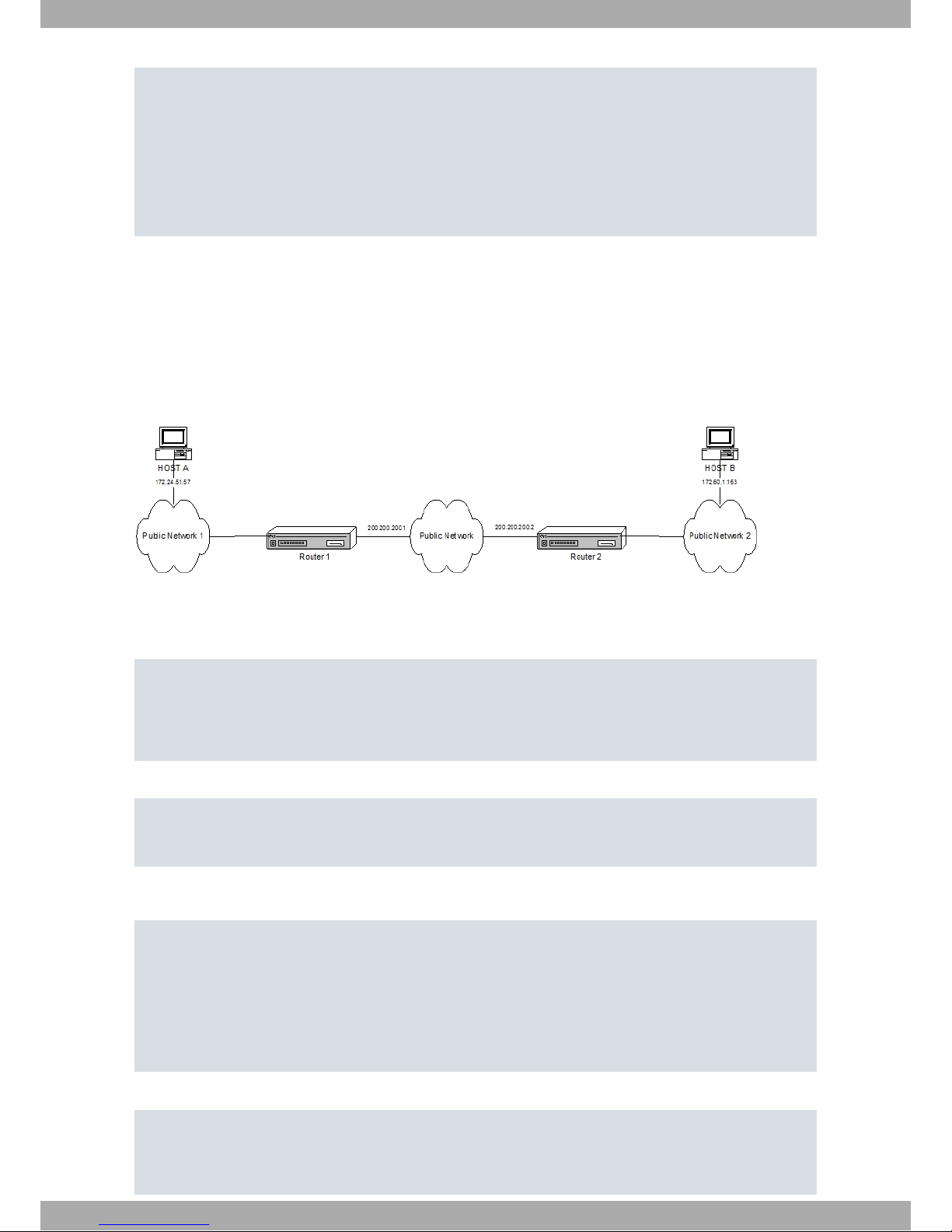
entry 1 permit
entry 1 source address 172.34.53.23 255.255.255.255
entry 1 protocol-range 10 255
;
entry 2 default
entry 2 deny
;
exit
;
Access Lists config>
You can copy, edit and modify the commands list obtained in Show Config so it can be used as a basis for subsequent configurations.
2.8 Practical Example
The aim here is to create a new virtual private network (VPN) between Host A and Host B. The rest of the traffic
between the private networks will pass normally. We are going to create an IPSec Tunnel between both Hosts.
To do this, we first need to create the Access Control List that the IPSec will use as a traffic filter. This example only
shows how to create the Access Lists configuration and how to link an IPSec Tunnel to it.
2.8.1 Creating the access control lists
The configuration to be entered in Router 1 is as follows:
Config>feature access-lists
-- Access Lists user configuration -Access Lists config>access-list 101
Extended Access List 101>entry 1 source address 172.24.51.57 255.255.255.255
Extended Access List 101>entry 1 destination address 172.60.1.163 255.255.255.255
Extended Access List 101>
The configured access list will have the following aspect:
Extended Access List 101>list all-entries
Extended Access List 101, assigned to no protocol
1 PERMIT SRC=172.24.51.57/32 DES=172.60.1.163/32 Conn:0
Extended Access List 101>
The configuration can be displayed, using the show config command, and reused later on (simply by copying this in
the console):
Extended Access List 101>show conf
; Showing Menu and Submenus Configuration ...
; C3G IPSec Router 1 29 Version 10.1.xPA
entry 1 default
entry 1 permit
entry 1 source address 172.24.51.57 255.255.255.255
entry 1 destination address 172.60.1.163 255.255.255.255
;
Extended Access List 101>
The configuration to be entered in Router 2 is as follows:
Config>feature access-lists
-- Access Lists user configuration -Access Lists config>access-list 101
Extended Access List 101>entry 1 source address 172.60.1.163 255.255.255.255
Extended Access List 101>entry 1 destination address 172.24.51.57 255.255.255.255
2 Configuration bintec elmeg
36 Access Control
Page 41

Extended Access List 101>
The configured access list will look like this:
Extended Access List 101>list all-entries
Extended Access List 101, assigned to no protocol
1 PERMIT SRC=172.60.1.163/32 DES=172.24.51.57/32 Conn:0
Extended Access List 101>
The configuration can be displayed, using the show config command, and reused later on (simply by copying this in
the console):
Extended Access List 101>show conf
; Showing Menu and Submenus Configuration ...
; C3G IPSec Router 1 29 Version 10.1.xPA
entry 1 default
entry 1 permit
entry 1 source address 172.60.1.163 255.255.255.255
entry 1 destination address 172.24.51.57 255.255.255.255
;
Extended Access List 101>
2.8.2 Associating the access List to the IPSec Protocol
To complete the IPSec Security policies databases (SPD), you need to map the Access Control List elements to the
selected Templates.
In this case, since the Access Control list has been placed in both routers with the same identifier (101), the operation is the same.
Config>protocol ip
-- Internet protocol user configuration -IP config>ipsec
-- IPSec user configuration -IPSec config>assign-access-list 101
IPSec config>template 2 manual esp des md5
IPSec config>map-template 101 2
IPSec config>
The configuration can be displayed (show config) and reused later on (simply by copying this in the console):
IPSec config>show config
; Showing Menu and Submenus Configuration ...
; C3G IPSec Router 1 29 Version 10.1.xPA
assign-access-list 101
;
template 2 manual esp des md5
;
map-template 101 2
IPSec config>
bintec elmeg
2 Configuration
Access Control 37
Page 42

Chapter 3 Monitoring
3.1 Monitoring Commands
This section focuses on the commands that allow you to use the monitoring tools for the Access Control Lists feature. To enter these commands, access the Access Lists feature monitoring prompt.
To access the Access Lists feature monitoring environment, enter feature access-lists at the general monitoring
prompt (+).
Example:
+ feature access-lists
-- Access Lists user console -Access Lists>
To minimize the search period within the access list, the router has a cache that keeps the latest addresses found.
The lists include the entries for each List included in the cache.
The following commands are available within the Access Control List feature monitoring environment:
Command Function
? (HELP) Lists the available commands or their options.
LIST Displays the access lists configuration.
CLEAR-CACHE Deletes all the entries in the Access Lists cache.
SET-CACHE-SIZE Configures the available number of cache entries.
SHOW-HANDLES When listing, the associated handles appear.
HIDE-HANDLES When listing, the associated handles disappear.
3.1.1 ? (HELP)
Lists the valid commands at the level where the router is programmed. You can also use it after a specific command
to list the available options.
Syntax:
Access Lists>?
Example:
Access Lists>?
list Displays the access lists configuration
clear-cache Deletes all the entries in an access lists cache
set-cache-size Configures the available number of cache entries
show-handles Makes the associated handles to be shown when listing
hide-handles Makes the associated handles to stay hidden when listing
exit Exit to parent menu
Access Lists>
3.1.2 LIST
Displays the configuration information on the Access Control List that is active. Being an information statistic, it
shows the number of occurrences in an entry i.e. the number of times a packet matches the entry sentences (Hits).
To minimize the search period within the access list, the router has a cache that keeps the latest addresses found.
Some lists include the entries for each List included in the cache.
Syntax:
Access Lists>list ?
all Displays the whole access lists configuration and entries information
cache Displays only access lists entry cache information
entries Displays only the active access lists entries configuration
3 Monitoring bintec elmeg
38 Access Control
Page 43

3.1.2.1 LIST ALL
Displays all the Access Control List configuration entries (i.e. the whole configuration). The configured entries are
presented together with those that are in the cache. This command should be followed by other commands that specify the information to be displayed in further detail. Stateful Access Lists cannot be listed and, therefore, do not appear when executing this command.
Syntax:
Access Lists>list all ?
all-access-lists Displays information for all active access lists
address-filter-access-lists Displays information for access lists that
match an address search pattern
access-list Displays information for a specified access list
3.1.2.1.1 LIST ALL ALL-ACCESS-LISTS
Displays all the Access Control Lists for the active configuration. Configured entries and those in the cache are both
presented.
Example:
Access Lists>list all all-access-lists
Standard Access List 1, assigned to no protocol
ACCESS LIST ENTRIES
3 PERMIT SRC=234.233.44.33/32
Hits: 0
1 DENY SRC=192.23.0.22/255.255.0.255
Hits: 0
Extended Access List 100, assigned to no protocol
ACCESS LIST CACHE. Hits = 0, Miss = 0
Cache size: 32 entries, Promotion zone: 6 entries
ACCESS LIST ENTRIES
1 PERMIT SRC=172.25.54.33/32 DES=192.34.0.0/16 Conn:0
PROT=21
Hits: 0
2 DENY SRC=0.0.0.0/0 DES=0.0.0.0/0 Conn:0
Hits: 0
3 PERMIT SRC=0.0.0.0/0 DES=0.0.0.0/0 Conn:33
PROT=21-44 SPORT=34-56 DPORT=2-4
Hits: 0
Extended Access List 101, assigned to IPSec
ACCESS LIST CACHE. Hits = 0, Miss = 0
Cache size: 32 entries, Promotion zone: 6 entries
ACCESS LIST ENTRIES
1 PERMIT SRC=172.24.51.57/32 DES=172.60.1.163/32 Conn:0 Label=22
Hits: 0
2 PERMIT SRC=0.0.0.0/0 DES=0.0.0.0/0 Conn:0
Hits: 0
Extended Access List 103, assigned to no protocol
ACCESS LIST CACHE. Hits = 0, Miss = 0
Cache size: 32 entries, Promotion zone: 6 entries
ACCESS LIST ENTRIES
1 PERMIT SRC=1.0.0.0/8 DES=2.0.0.0/8 Conn:0
PROT=23-43 SPORT=23-45 DPORT=23-43
TOS OCTET=0
Hits: 0
Access Lists>
3.1.2.1.2 LIST ALL ADDRESS-FILTER-ACCESS-LISTS
Displays all the Access Control List entries that contain the subnet IP address and mask included in the search pattern entered after the command. The available lists are also presented. The configured entries, together with those in
the cache, are also shown. If the IP address and mask entered are 0.0.0.0, all Access Lists are indexed.
Syntax:
Access Lists>list all address-filter-access-lists <IPaddress> <subnet>
bintec elmeg
3 Monitoring
Access Control 39
Page 44

Example:
Access Lists>list all address-filter-access-lists 172.24.51.57 255.255.255.255
Standard Access List 1, assigned to no protocol
ACCESS LIST ENTRIES
Extended Access List 100, assigned to no protocol
ACCESS LIST CACHE. Hits = 0, Miss = 0
Cache size: 32 entries, Promotion zone: 6 entries
ACCESS LIST ENTRIES
Extended Access List 101, assigned to IPSec
ACCESS LIST CACHE. Hits = 0, Miss = 0
Cache size: 32 entries, Promotion zone: 6 entries
ACCESS LIST ENTRIES
1 PERMIT SRC=172.24.51.57/32 DES=172.60.1.163/32 Conn:0
Hits: 0
Extended Access List 103, assigned to no protocol
ACCESS LIST CACHE. Hits = 0, Miss = 0
Cache size: 32 entries, Promotion zone: 6 entries
ACCESS LIST ENTRIES
Access Lists>
3.1.2.1.3 LIST ALL ACCESS-LIST
Displays all the entries from an Access Control List.
Syntax:
Access Lists>list all access-list <id>
Example:
Access Lists>list all access-list 100
Extended Access List 100, assigned to no protocol
ACCESS LIST CACHE. Hits = 0, Miss = 0
Cache size: 32 entries, Promotion zone: 6 entries
ACCESS LIST ENTRIES
1 PERMIT SRC=172.25.54.33/32 DES=192.34.0.0/16 Conn:0
PROT=21
Hits: 0
2 DENY SRC=0.0.0.0/0 DES=0.0.0.0/0 Conn:0
Hits: 0
3 PERMIT SRC=0.0.0.0/0 DES=0.0.0.0/0 Conn:33?
PROT=21-44 SPORT=34-56 DPORT=2-4
Hits: 0
Access Lists>
3.1.2.2 LIST CACHE
Displays all the configured Access Control Lists and the entries in the cache for each of them. This command should
be followed by other commands that specify the information to be displayed in further detail. This command only
provides information on the entries in the cache.
Syntax:
Access Lists>list cache ?
all-access-lists Displays information for all active access lists
address-filter-access-lists Displays information for access lists that match an address search pattern
access-list Displays information for a specified access list
3.1.2.2.1 LIST CACHE ALL-ACCESS-LISTS
Displays all the Access Control List entries in the cache.
Example:
Access Lists>list cache all-access-lists
Standard Access List 1, assigned to no protocol
Extended Access List 100, assigned to IPSec
ACCESS LIST CACHE. Hits = 1, Miss = 0
3 Monitoring bintec elmeg
40 Access Control
Page 45

Cache size: 32 entries, Promotion zone: 6 entries
1 PERMIT SRC=172.24.51.57/32 DES=172.60.1.163/32 Conn:0
Hits: 1
Extended Access List 101, assigned to IPSec
ACCESS LIST CACHE. Hits = 0, Miss = 0
Cache size: 32 entries, Promotion zone: 6 entries
Extended Access List 103, assigned to no protocol
ACCESS LIST CACHE. Hits = 0, Miss = 0
Cache size: 32 entries, Promotion zone: 6 entries
Access Lists>
3.1.2.2.2 LIST CACHE ADDRESS-FILTER-ACCESS-LISTS
Displays all the configured Access Control Lists and, for each, the entries in the cache that contain the subnet IP address and mask included in the search pattern entered after the command. This command should be followed by other commands that specify the access lists to be displayed in further detail. If the IP address and mask entered are
0.0.0.0, all Access Lists are indexed.
Syntax:
Access Lists>list cache address-filter-access-lists <IPaddress> <subnet>
Example:
Access Lists>list cache address-filter-access-lists 172.24.51.57 255.255.255.255
Standard Access List 1, assigned to no protocol
Extended Access List 100, assigned to no protocol
ACCESS LIST CACHE. Hits = 2, Miss = 0
Cache size: 32 entries, Promotion zone: 6 entries
1 PERMIT SRC=172.25.54.33/32 DES=192.34.0.0/16 Conn:0
PROT=21
Hits: 2
Extended Access List 101, assigned to IPSec
ACCESS LIST CACHE. Hits = 0, Miss = 0
Cache size: 32 entries, Promotion zone: 6 entries
Extended Access List 103, assigned to no protocol
ACCESS LIST CACHE. Hits = 0, Miss = 0
Cache size: 32 entries, Promotion zone: 6 entries
Access Lists>
3.1.2.2.3 LIST CACHE ACCESS-LIST
Displays all the entries in the cache belonging to one Access Control List.
Syntax:
Access Lists>list cache access-list <id>
Example:
Access Lists>list cache access-list 100
Extended Access List 100, assigned to no protocol
ACCESS LIST CACHE. Hits = 0, Miss = 0
Cache size: 32 entries, Promotion zone: 6 entries
1 PERMIT SRC=172.25.54.33/32 DES=192.34.0.0/16 Conn:0
PROT=21
Hits: 2
Access Lists>
3.1.2.3 LIST ENTRIES
Displays Access Control Lists entries located in the active configuration. This command should be followed by other
commands that specify the information to be displayed in further detail. This command does not provide information
on the entries in the cache.
Syntax:
bintec elmeg
3 Monitoring
Access Control 41
Page 46

Access Lists>list entries ?
all-access-lists Displays information for all active access
lists
address-filter-access-lists Displays information for access lists that
match an address search pattern
access-list Displays information for a specified access
list
3.1.2.3.1 LIST ENTRIES ALL-ACCESS-LISTS
Displays all the active configuration entries in Access Control Lists.
Example:
Access Lists>list entries all-access-lists
Standard Access List 1, assigned to no protocol
ACCESS LIST ENTRIES
3 PERMIT SRC=234.233.44.33/32
Hits: 0
1 DENY SRC=192.23.0.22/255.255.0.255
Hits: 0
Extended Access List 100, assigned to no protocol
ACCESS LIST ENTRIES
1 PERMIT SRC=172.25.54.33/32 DES=192.34.0.0/16 Conn:0
PROT=21
Hits: 0
2 DENY SRC=0.0.0.0/0 DES=0.0.0.0/0 Conn:0
Hits: 0
3 PERMIT SRC=0.0.0.0/0 DES=0.0.0.0/0 Conn:33?
PROT=21-44 SPORT=34-56 DPORT=2-4
Hits: 0
Extended Access List 101, assigned to IPSec
ACCESS LIST ENTRIES
1 PERMIT SRC=172.24.51.57/32 DES=172.60.1.163/32 Conn:0
Hits: 0
2 PERMIT SRC=0.0.0.0/0 DES=0.0.0.0/0 Conn:0
Hits: 0
Extended Access List 103, assigned to no protocol
ACCESS LIST ENTRIES
1 PERMIT SRC=1.0.0.0/8 DES=2.0.0.0/8 Conn:0
PROT=23-43 SPORT=23-45 DPORT=23-43
TOS OCTET=0
Hits: 0
Access Lists>
3.1.2.3.2 LIST ENTRIES ADDRESS-FILTER-ACCESS-LISTS
Displays all the active configuration entries in Access Control Lists that contain the subnet IP address and mask included in the search pattern entered after the command. If the IP address and mask introduced are 0.0.0.0, all Access Lists are indexed.
Syntax:
Access Lists>list entries address-filter-access-lists <IPaddress> <subnet>
Example:
Access Lists>list entries address-filter-access-lists 172.24.51.57 255.255.255.255
Standard Access List 1, assigned to no protocol
ACCESS LIST ENTRIES
Extended Access List 100, assigned to no protocol
ACCESS LIST ENTRIES
Extended Access List 101, assigned to IPSec
ACCESS LIST ENTRIES
1 PERMIT SRC=172.24.51.57/32 DES=172.60.1.163/32 Conn:0
Hits: 0
Extended Access List 103, assigned to no protocol
ACCESS LIST ENTRIES
3 Monitoring bintec elmeg
42 Access Control
Page 47

Access Lists>
3.1.2.3.3 LIST ENTRIES ACCESS-LIST
Displays all the entries for one Access Control List.
Syntax:
Access Lists>list entries access-list <id>
Example:
Access Lists>list entries access-list 100
Extended Access List 100, assigned to no protocol
ACCESS LIST ENTRIES
1 PERMIT SRC=172.25.54.33/32 DES=192.34.0.0/16 Conn:0
PROT=21
Hits: 0
2 DENY SRC=0.0.0.0/0 DES=0.0.0.0/0 Conn:0
Hits: 0
3 PERMIT SRC=0.0.0.0/0 DES=0.0.0.0/0 Conn:33?
PROT=21-44 SPORT=34-56 DPORT=2-4
Hits: 0
Access Lists>
3.1.3 CLEAR-CACHE
Deletes all the entries for a specific Access Control List from the cache processing the Access Control Lists.
Syntax:
Access Lists>clear-cache <id>
Example:
Access Lists>clear-cache 100
Cache cleared.
Access Lists>
3.1.4 SET-CACHE-SIZE
Configures the cache size for an Access Control List. The number of entries the cache accepts defines the size.
Syntax:
Access Lists>set-cache-size <id> <size>
Example:
Access Lists>set-cache-size 100 33
Cache cleared.
Access Lists>
3.1.5 SHOW-HANDLES
On entering this command, among data presented using the list command, information appears on the debugging of
each entry.
3.1.6 HIDE-HANDLES
On entering this command, among data presented using the list command, the display of information regarding the
debugging of each entry is disabled.
bintec elmeg
3 Monitoring
Access Control 43
Page 48

Chapter 4 Appendix
4.1 Reserved Ports
In the TCP and UDP transport layer protocols, widely used over IP version 4 (IPv4) [RFC791], there is a field known
as port. Said field is made up of 16 bits.
TCP uses these ports to name the logical connection ends where conversations are maintained. To provide services
to unknown callers, a contact port is defined for said service. There is a list that assigns predefined port numbers to
specific services.
Where we have expansion, UDP makes use of this same port assignation.
Port numbers are divided into three categories:
• Reserved (0-1023)
• Registered (1024-49151)
• Dynamic or private (49152-65535)
The following list shows some of the most commonly used Reserved Ports:
Keyword Decimal Description
ftp-data 20/tcp File Transfer [Default Data]
ftp-data 20/udp File Transfer [Default Data]
ftp 21/tcp File Transfer [Control]
ftp 21/udp File Transfer [Control]
telnet 23/tcp Telnet
telnet 23/udp Telnet
smtp 25/tcp Simple Mail Transfer
smtp 25/udp Simple Mail Transfer
nameserver 42/tcp Host Name Server
nameserver 42/udp Host Name Server
domain 53/tcp Domain Name Server
domain 53/udp Domain Name Server
tftp 69/tcp Trivial File Transfer
tftp 69/udp Trivial File Transfer
gopher 70/tcp Gopher
gopher 70/udp Gopher
http 80/tcp World Wide Web HTTP
http 80/udp World Wide Web HTTP
snmp 161/tcp SNMP
snmp 161/udp SNMP
snmptrap 162/tcp SNMPTRAP
snmptrap 162/udp SNMPTRAP
4.2 Reserved Protocols
In IP version 4 (Ipv4) [RFC791] you’ll find a Protocol field. This identifies the next protocol layer. The protocol field is
made up of 8 bits. In IP version 6 (Ipv6) [RFC1883] this field is known as Next Header.
Number assigning in Internet Protocols:
Decimal Keyword Protocol Reference
0 HOPOPT IPv6 Hop-by-Hop Option [RFC1883]
1 ICMP Internet Control Message [RFC792]
2 IGMP Internet Group Management [RFC1112]
3 GGP Gateway-to-Gateway [RFC823]
4 Appendix bintec elmeg
44 Access Control
Page 49
4 IP IP in IP (encapsulation) [RFC2003]
5 ST Stream [RFC1190,RFC1819]
6 TCP Transmission Control [RFC793]
7 CBT CBT [Ballardie]
8 EGP Exterior Gateway Protocol [RFC888,DLM1]
9 IGP Any private interior gateway [IANA] (used by Cisco for their
IGRP)
10 BBN-
RCC-MON
BBN RCC Monitoring [SGC]
11 NVP-II Network Voice Protocol [RFC741,SC3]
12 PUP PUP [PUP,XEROX]
13 ARGUS ARGUS [RWS4]
14 EMCON EMCON [BN7]
15 XNET Cross Net Debugger [IEN158,JFH2]
16 CHAOS Chaos [NC3]
17 UDP User Datagram [RFC768,JBP]
18 MUX Multiplexing [IEN90,JBP]
19 DCN-MEAS DCN Measurement Subsystems [DLM1]
20 HMP Host Monitoring [RFC869,RH6]
21 PRM Packet Radio Measurement [ZSU]
22 XNS-IDP XEROX NS IDP [ETHERNET,XEROX]
23 TRUNK-1 Trunk-1 [BWB6]
24 TRUNK-2 Trunk-2 [BWB6]
25 LEAF-1 Leaf-1 [BWB6]
26 LEAF-2 Leaf-2 [BWB6]
27 RDP Reliable Data Protocol [RFC908,RH6]
28 IRTP Internet Reliable Transaction [RFC938,TXM]
29 ISO-TP4 ISO Transport Protocol Class 4 [RFC905,RC77]
30 NETBLT Bulk Data Transfer Protocol [RFC969,DDC1]
31 MFE-NSP MFE Network Services Protocol [MFENET,BCH2]
32 MERIT-INP MERIT Internodal Protocol [HWB]
33 SEP Sequential Exchange Protocol [JC120]
34 3PC Third Party Connect Protocol [SAF3]
35 IDPR Inter-Domain Policy Routing Protocol [MXS1]
36 XTP XTP [GXC]
37 DDP Datagram Delivery Protocol [WXC]
38 IDPR-CMTP IDPR Control Message Transport Proto [MXS1]
39 TP++ TP++ Transport Protocol [DXF]
40 IL IL Transport Protocol [Presotto]
41 IPv6 IPv6 encapsulation [RFC2473]
42 SDRP Source Demand Routing Protocol [DXE1]
43 IPv6-Route Routing Header for IPv6 [Deering]
44 IPv6-Frag Fragment Header for IPv6 [Deering]
45 IDRP Inter-Domain Routing Protocol [Sue Hares]
46 RSVP Reservation Protocol [Bob Braden]
47 GRE General Routing Encapsulation [Tony Li]
48 MHRP Mobile Host Routing Protocol [David Johnson]
49 BNA BNA [Gary Salamon]
50 ESP Encapsulating Security Payload [RFC1827]
51 AH Authentication Header [RFC1826]
52 I-NLSP Integrated Net Layer Security / TUBA [GLENN]
53 SWIPE IP with Encryption [JI6]
bintec elmeg
4 Appendix
Access Control 45
Page 50
54 NARP NBMA Address Resolution Protocol [RFC1735]
55 MOBILE IP Mobility [Perkins]
56 TLSP Transport Layer Security Protocol using
Kryptonet key management
[Oberg]
57 SKIP SKIP [Markson]
58 IPv6-ICMP ICMP for IPv6 [RFC1883]
59 Pv6-NoNxt No Next Header for IPv6 [RFC1883]
60 IPv6-Opts Destination Options for IPv6 [RFC1883]
61 Any host internal protocol [IANA]
62 CFTP CFTP [CFTP,HCF2]
63 Any local network [IANA]
64 SAT-EXPAK SATNET and Backroom EXPAK [SHB]
65 KRYPTOLAN Kryptolan [PXL1]
66 RVD MIT Remote Virtual Disk Protocol [MBG]
67 IPPC Internet Pluribus Packet Core [SHB]
68 Any distributed file system [IANA]
69 SAT-MON SATNET Monitoring [SHB]
70 VISA VISA Protocol [GXT1]
71 IPCV Internet Packet Core Utility [SHB]
72 CPNX Computer Protocol Network Executive [DXM2]
73 CPHB Computer Protocol Heart Beat [DXM2]
74 WSN Wang Span Network [VXD]
75 PVP Packet Video Protocol [SC3]
76 BR-SAT-MON Backroom SATNET Monitoring [SHB]
77 SUN-ND SUN ND PROTOCOL-Temporary [WM3]
78 WB-MON WIDEBAND Monitoring [SHB]
79 WB-EXPAK WIDEBAND EXPAK [SHB]
80 ISO-IP ISO Internet Protocol [MTR]
81 VMTP VMTP [DRC3]
82 SECURE-
VMTP
SECURE-VMTP [DRC3]
83 VINES VINES [BXH]
84 TTP TTP [JXS]
85 NSFNET-IGP NSFNET-IGP [HWB]
86 DGP Dissimilar Gateway Protocol [DGP,ML109]
87 TCF TCF [GAL5]
88 EIGRP EIGRP [CISCO,GXS]
89 OSPFIGP OSPFIGP [RFC1583,JTM4]
90 Sprite-RPC Sprite RPC Protocol [SPRITE,BXW]
91 LARP Locus Address Resolution Protocol [BXH]
92 MTP Multicast Transport Protocol [SXA]
93 AX.25 AX.25 Frames [BK29]
94 IPIP IP-within-IP Encapsulation Protocol [JI6]
95 MICP Mobile Internetworking Control Pro. [JI6]
96 SCC-SP Semaphore Communications Sec. Pro. [HXH]
97 ETHERIP Ethernet-within-IP Encapsulation [RDH1]
98 ENCAP Encapsulation Header [RFC1241,RXB3]
99 Any private encryption scheme [IANA]
100 GMTP GMTP [RXB5]
101 IFMP Ipsilon Flow Management Protocol [Hinden]
102 PNNI PNNI over IP [Callon]
103 PIM Protocol Independent Multicast [Farinacci]
4 Appendix bintec elmeg
46 Access Control
Page 51
104 ARIS ARIS [Feldman]
105 SCPS SCPS [Durst]
106 QNX QNX [Hunter]
107 A/N Active Networks [Braden]
108 IPComp IP Payload Compression Protocol [RFC2393]
109 SNP Sitara Networks Protocol [Sridhar]
110 Compaq-Peer Compaq Peer Protocol [Volpe]
111 IPX-in-IP IPX in IP [Lee]
112 VRRP Virtual Router Redundancy Protocol [Hinden]
113 PGM PGM Reliable Transport Protocol [Speakman]
114 Any 0-hop protocol [IANA]
115 L2TP Layer Two Tunneling Protocol [Aboba]
116 DDX D-II Data Exchange (DDX) [Worley]
117 IATP Interactive Agent Transfer Protocol [Murphy]
118 STP Schedule Transfer Protocol [JMP]
119 SRP SpectraLink Radio Protocol [Hamilton]
120 UTI UTI [Lothberg]
121 SMP Simple Message Protocol [Ekblad]
122 SM SM [Crowcroft]
123 PTP Performance Transparency Protocol [Welzl]
124 ISIS over IPv4 [Przygienda]
125 FIRE [Partridge]
126 CRTP Combat Radio Transport Protocol [Sautter]
127 CRUDP Combat Radio User Datagram [Sautter]
128 SSCOPMCE [Waber]
129 IPLT [Hollbach]
130 SPS Secure Packet Shield [McIntosh]
131 PIPE Private IP Encapsulation within IP [Petri]
132 SCTP Stream Control Transmission Protocol [Stewart]
133 FC Fibre Channel [Rajagopal]
134 RSVP-
E2E-IGNORE
[RFC3175]
135 Mobility Head-
er
[RFC6275]
136 UDPLite [RFC3828]
137 MPLS-in-IP [RFC4023]
138 manet MANET Protocols [RFC5498]
139 HIP Host Identity Protocol [RFC7401]
140 Shim6 Shim6 Protocol [RFC5533]
141 WESP Wrapped Encapsulating Security Payload [RFC5840]
142 ROHC Robust Header Compression [RFC5858]
143-252 Unassigned [IANA]
253 Use for experimentation and testing [RFC3692]
254 Use for experimentation and testing [RFC3692]
255 Reserved [IANA]
4.3 Protocol Values in “Stateful” Lists
Some configuration commands in Stateful lists make reference to the protocol value. These are the accepted values:
3com-amp3 3Com AMP3
3com-tsmux 3Com TSMUX
3pc Third Party Connect Protocol
bintec elmeg
4 Appendix
Access Control 47
Page 52

914c/g Texas Instruments 914 Terminal
9pfs Plan 9 file service
acap ACAP
acas ACA Services
accessbuilder Access Builder
accessnetwork Access Network
acp Aeolon Core Protocol
acr-nema ACR-NEMA Digital Img
aed-512 AED 512 Emulation service
agentx AgentX
alpes Alpes
aminet AMInet
an Active Networks
anet ATEXSSTR
ansanotify ANSA REX Notify
ansatrader ansatrader
aodv AODV
aol-messenger AOL Instant Messenger Chat Messages
apertus-ldp Apertus Tech Load Distribution
appleqtc Apple Quick Time
appleqtcsrvr appleqtcsrvr
applix Applix ac
arcisdms arcisdms
argus ARGUS
ariel1 Ariel1
ariel2 Ariel2
ariel3 Ariel3
aris ARIS
arns A remote network server system
as-servermap AS Server Mapper
asa ASA Message router object def
asa-appl-proto asa-appl-proto
asip-webadmin AppleShare IP WebAdmin
asipregistry asipregistry
at-3 AppleTalk Unused
at-5 AppleTalk Unused
at-7 AppleTalk Unused
at-8 AppleTalk Unused
at-echo AppleTalk Echo
at-nbp AppleTalk Name Binding
at-rtmp AppleTalk Routing Maintenance
at-zis AppleTalk Zone Information
audit Unisys Audit SITP
auditd Digital Audit daemon
aurora-cmgr Aurora CMGR
aurp Appletalk Update-Based Routing Pro.
auth Authentication Service
avian avian
ax25 AX.25 Frames
banyan-rpc banyan-rpc
banyan-vip banyan-vip
bbnrccmon BBN RCC Monitoring
4 Appendix bintec elmeg
48 Access Control
Page 53

bdp Bundle Discovery protocol
bftp Background File Transfer Program
bgmp BGMP
bgp Border Gateway Protocol
bgs-nsi bgs-nsi
bhevent bhevent
bhfhs bhfhs
bhmds bhmds
bl-idm Britton Lee IDM
bmpp bmpp
bna BNA
bnet bnet
borland-dsj borland-dsj
br-sat-mon Backroom SATNET Monitoring
CAIlic Computer Associates Intl License Server
cab-protocol CAB Protocol
cableport-ax Cable Port A/X
cadlock cadlock
cbt CBT
cdc Certificate Distribution Center
cfdptkt cfdptkt
cftp CFTP
chaos Chaos
chargen Character Generator
chshell chcmd
cifs Common Internet File System
cimplex cimplex
cisco-fna cisco FNATIVE
cisco-phone Cisco IP Phones and PC-Based Unified Communicators
cisco-sys cisco SYSMAINT
cisco-tdp Cisco TDP
cisco-tna cisco TNATIVE
citrix Citrix ICA traffic
clearcase Clear Case Protocol Software Informer
cloanto-net-1 cloanto-net-1
cmip-agent CMIP/TCP Agent
cmip-man CMIP/TCP Manager
coauthor oracle
codaauth2 codaauth2
collaborator collaborator
commerce commerce
compaq-peer Compaq Peer Protocol
compressnet Management Utility
comscm comscm
con con
conference chat
connendp almanid Connection Endpoint
contentserver contentserver
corba-iiop Corba Internet Inter-Orb Protocol (IIOP)
corerjd corerjd
courier rpc
covia Communications Integrator
bintec elmeg
4 Appendix
Access Control 49
Page 54

cphb Computer Protocol Heart Beat
cpnx Computer Protocol Network Executive
creativepartnr creativepartnr
creativeserver creativeserver
crs crs
crtp Combat Radio Transport Protocol
crudp Combat Radio User Datagram
cryptoadmin Crypto Admin
csi-sgwp Cabletron Management Protocol
csnet-ns Mailbox Name Nameserver
ctf Common Trace Facility
cuseeme Desktop Video Conferencing
custix Customer Ixchange
cvc_hostd cvc_hostd
cybercash cybercash
cycleserv cycleserv
cycleserv2 cycleserv2
dantz dantz
dasp dasp
datasurfsrv DataRamp Svr
datasurfsrvsec DataRamp Svr svs
datex-asn datex-asn
daytime Daytime Protocol
dbase dBASE Unix
dccp Datagram Congestion Control Protocol
dcn-meas DCN Measurement Subsystems
dcp Device Control Protocol
dctp dctp
ddm-dfm DDM Distributed File management
ddm-rdb DDM-Remote Relational Database Access
ddm-ssl DDM-Remote DB Access Using Secure Sockets
ddp Datagram Delivery Protocol
ddx D-II Data Exchange
decap decap
decauth decauth
decbsrv decbsrv
decladebug DECLadebug Remote Debug Protocol
decvms-sysmgt decvms-sysmgt
dec_dlm dec_dlm
dei-icda dei-icda
deos Distributed External Object Store
device device
dgp Dissimilar Gateway Protocol
dhcp Dynamic Host Configuration Protocol/Bootstrap Protocol
dhcp-failover DHCP Failover
dhcp-failover2 dhcp-failover2
dhcpv6-client DHCPv6 Client
dhcpv6-server DHCPv6 Server
digital-vrc digital-vrc
directconnect Direct Connect File Transfer Traffic
directplay DirectPlay
directplay8 DirectPlay8
4 Appendix bintec elmeg
50 Access Control
Page 55

directv-catlg Direct TV Data Catalog
directv-soft Direct TV Software Updates
directv-tick Direct TV Tickers
directv-web Direct TV Webcasting
discard Discard
disclose campaign contribution disclosures
dixie DIXIE Protocol Specification
dls Directory Location Service
dls-mon Directory Location Service Monitor
dn6-nlm-aud DNSIX Network Level Module Audit
dna-cml DNA-CML
dns Domain Name System
dnsix DNSIX Securit Attribute Token Map
doom Doom
dpsi dpsi
dsfgw dsfgw
dsp Display Support Protocol
dsp3270 Display Systems Protocol
dsr Dynamic Source Routing Protocol
dtag-ste-sb DTAG
dtk dtk
dwr dwr
echo Echo Protocol
egp Exterior Gateway Protocol
eigrp Enhanced Interior Gateway Routing Protocol
elcsd errlog copy/server daemon
embl-ndt EMBL Nucleic Data Transfer
emcon EMCON
emfis-cntl EMFIS Control Service
emfis-data EMFIS Data Service
encap Encapsulation Header
entomb entomb
entrust-aaas entrust-aaas
entrust-aams entrust-aams
entrust-ash Entrust Administration Service Handler
entrust-kmsh Entrust Key Management Service Handler
entrust-sps entrust-sps
erpc Encore Expedited Remote Pro.Call
escp-ip escp-ip
esro-emsdp ESRO-EMSDP V1.3
esro-gen Efficient Short Remote Operations
etherip Ethernet-within-IP Encapsulation
eudora-set Eudora Set
exchange MS-RPC for Exchange
exec remote process execution
fatserv Fatmen Server
fc Fibre Channel
fcp FirstClass Protocol
finger Finger User Information Protocol
fire FIRE
flexlm Flexible License Manager
fln-spx Berkeley rlogind with SPX auth
bintec elmeg
4 Appendix
Access Control 51
Page 56

ftp-agent FTP Software Agent System
ftp-data File Transfer
ftps-data ftp protocol, data, over TLS/SSL
fujitsu-dev Fujitsu Device Control
gacp Gateway Access Control Protocol
gdomap gdomap
genie Genie Protocol
genrad-mux genrad-mux
ggf-ncp GNU Generation Foundation NCP
ggp Gateway-to-Gateway
ginad ginad
gmtp GMTP
go-login go-login
gopher Gopher
graphics Graphics
gre General Routing Encapsulation
groove groove
gss-http gss-http
gss-xlicen GNU Generation Foundation NCP
gtp-user GTP-User Plane
ha-cluster ha-cluster
hap hap
hassle hassle
hcp-wismar Hardware Control Protocol Wismar
hdap hdap
hello-port HELLO_PORT
hems hems
hip Host Identity Protocol
hmmp-ind HMMP Indication
hmmp-op HMMP Operation
hmp Host Monitoring
hopopt IPv6 Hop-by-Hop Option
hostname NIC Host Name Server
hp-alarm-mgr hp performance data alarm manager
hp-collector hp performance data collector
hp-managed-node hp performance data managed node
http Hypertext Transfer Protocol
http-alt HTTP Alternate
http-mgmt http-mgmt
http-rpc-epmap HTTP RPC Ep Map
hybrid-pop hybrid-pop
hyper-g hyper-g
hyperwave-isp hyperwave-isp
i-nlsp Integrated Net Layer Security TUBA
iafdbase iafdbase
iafserver iafserver
iasd iasd
iatp Interactive Agent Transfer Protocol
ibm-app IBM Application
ibm-db2 IBM Information Management
ibprotocol Internet Backplane Protocol
iclcnet-locate ICL coNETion locate server
4 Appendix bintec elmeg
52 Access Control
Page 57

iclcnet_svinfo ICL coNETion server info
icmp Internet Control Message Protocol
idfp idfp
idpr Inter-Domain Policy Routing Protocol
idpr-cmtp IDPR Control Message Transport Proto
idrp Inter-Domain Routing Protocol
ieee-mms ieee-mms
ieee-mms-ssl ieee-mms-ssl
ifmp Ipsilon Flow Management Protocol
igmp Internet Group Management Protocol
igmp Internet Group Management Protocol
igrp Cisco interior gateway
iiop iiop
il IL Transport Protocol
imap Internet Message Access Protocol
imsp Interactive Mail Support Protocol
inbusiness inbusiness
infoseek InfoSeek
ingres-net INGRES-NET Service
intecourier intecourier
integra-sme Integra Software Management Environment
intrinsa intrinsa
ipcd ipcd
ipcomp IP Payload Compression Protocol
ipcserver Sun IPC server
ipcv Internet Packet Core Utility
ipdd ipdd
ipinip IP in IP
ipip IP-within-IP Encapsulation Protocol
iplt IPLT
ipp Internet Printing Protocol
ippc Internet Pluribus Packet Core
ipsec IP Encapsulating Security Payload - Authentication-Header
ipv6-frag Fragment Header for IPv6
ipv6-icmp ICMP for IPv6
ipv6-nonxt No Next Header for IPv6
ipv6-opts Destination Options for IPv6
ipv6-route Routing Header for IPv6
ipv6inip Ipv6 encapsulated
ipx Internet Packet Exchange
ipx-in-ip IPX in IP
irc Internet Relay Chat
irc-serv IRC-SERV
irtp Internet Reliable Transaction
is99c TIA/EIA/IS-99 modem client
is99s TIA/EIA/IS-99 modem server
isakmp Internet Security Association & Key Management Protocol
isi-gl Interoperable Self Installation Graphics Language
isis ISIS over IPv4
iso-ill ISO ILL Protocol
iso-ip iso-ip
iso-tp0 iso-tp0
bintec elmeg
4 Appendix
Access Control 53
Page 58

iso-tp4 ISO Transport Protocol Class 4
iso-tp4 ISO Transport Protocol Class 4
iso-tsap ISO-TSAP Class 0
iso-tsap-c2 ISO Transport Class 2 Non-Control
itm-mcell-s itm-mcell-s
jargon Jargon
Konspire2b konspire2b p2p network
k-block k-block
kali kali
kerberos Kerberos Network Authentication Service
keyserver Key Server
kis KIS Protocol
klogin KLogin
knet-cmp KNET/VM Command/Message Protocol
kpasswd kpasswd
kryptolan kryptolan
kshell KShell
l2tp L2F/L2TP Tunnel
la-maint IMP Logical Address Maintenance
lanserver lanserver
larp Locus Address Resolution Protocol
ldap Lightweight Directory Access Protocol
ldp LDP
leaf-1 Leaf-1
leaf-2 Leaf-2
legent-1 Legent Corporation
legent-2 Legent Corporation
ljk-login ljk-login
lockd LockD
locus-con Locus PC-Interface Conn Server
locus-map Locus PC-Interface Net Map Ser
mac-srvr-admin MacOS Server Admin
magenta-logic magenta-logic
mailbox-lm mailbox-lm
mailq MAILQ
maitrd maitrd
manet MANET Protocols
mapi Messaging Application Programming Interface
masqdialer masqdialer
matip-type-a MATIP Type A
matip-type-b MATIP Type B
mcidas McIDAS Data Transmission Protocol
mcns-sec mcns-sec
mdc-portmapper mdc-portmapper
mecomm mecomm
meregister meregister
merit-inp MERIT Internodal Protocol
meta5 meta5
metagram metagram
meter meter
mfcobol Micro Focus Cobol
mfe-nsp MFE Network Services Protocol
4 Appendix bintec elmeg
54 Access Control
Page 59

mftp mftp
mgcp Media Gateway Control Protocol
micom-pfs micom-pfs
micp Mobile Internetworking Control Pro.
micromuse-lm micromuse-lm
microsoftds Microsoft Directory Services
mit-dov MIT Dover Spooler
mit-ml-dev MIT ML Device
mobile IP Mobility
mobileip-agent mobileip-agent
mobilip-mn mobilip-mn
mondex mondex
monitor monitor
mortgageware mortgageware
mpls-in-ip MPLS-in-IP
mpm Message Processing Module
mpm-flags MPM FLAGS Protocol
mpm-snd MPM [default send]
mpp Netix Message Posting Protocol
mptn Multi Protocol Trans. Net
mrm mrm
ms-olap Microsoft OLAP
ms-rome microsoft rome
ms-shuttle microsoft shuttle
ms-sql-m Microsoft-SQL-Monitor
msdp msdp
msexch-routing MS Exchange Routing
msft-gc Microsoft Global Catalog
msft-gc-ssl Microsoft Global Catalog with LDAP/SSL
msg-auth msg-auth
msg-icp msg-icp
msn-messenger MSN Messenger Chat Messages
msnp msnp
msp Message Send Protocol
mtp Multicast Transport Protocol
multiling-http Multiling HTTP
multiplex Network Innovations Multiplex
mumps Plus Fives MUMPS
mux Multiplexing
mylex-mapd mylex-mapd
mysql MySQL
name Host Name Server
namp namp
narp NBMA Address Resolution Protocol
nas Netnews Administration System
nced nced
ncld ncld
ncp NCP
ndsauth NDSAUTH
nest-protocol nest-protocol
net-assistant net-assistant
net8-cman Oracle Net8 CMan Admin
bintec elmeg
4 Appendix
Access Control 55
Page 60

netbios NetBIOS over IP (MS Windows)
netblt Bulk Data Transfer Protocol
netgw netgw
netnews readnews
netrcs Network based RCS
netrjs-1 Remote Job Service
netrjs-2 Remote Job Service
netrjs-3 Remote Job Service
netrjs-4 Remote Job Service
netsc-dev NETSC
netsc-prod NETSC
netviewdm1 IBM NetView DM
netviewdm2 IBM NetView DM
netviewdm3 IBM NetView DM
netwall for emergency broadcasts
netware-ip Novell Netware over IP
new-rwho new who
nextstep NextStep Window Server
nfs Network File System
ni-ftp NI FTP
ni-mail NI MAIL
nicname Who Is
nlogin nlogin
nmap nmap
nmsp Networked Media Streaming Protocol
nnsp nnsp
nntp Network News Transfer Protocol
notes Lotus Notes(R)
novadigm Novadigm Enterprise Desktop Manager (EDM)
novastorbakcup Novastor Backup
npmp-gui npmp-gui
npmp-local npmp-local
npmp-trap npmp-trap
npp Network Payment Protocol
nqs nqs
ns ns
nsfnet-igp NSFNET-IGP
nsiiops IIOP Name Service over TLS/SSL
nsrmp Network Security Risk Management Protocol
nss-routing NSS-Routing
nsw-fe NSW User System FE
ntalk ntalk
ntp Network Time Protocol
nvp-ii Network Voice Protocol
nxedit nxedit
obex obex
objcall Tivoli Object Dispatcher
ocbinder ocbinder
ocserver ocserver
ocs_amu ocs_amu
ocs_cmu ocs_cmu
odmr odmr
4 Appendix bintec elmeg
56 Access Control
Page 61

ohimsrv ohimsrv
olsr olsr
omginitialrefs omginitialrefs
omserv omserv
onmux onmux
opalis-rdv opalis-rdv
opalis-robot opalis-robot
opc-job-start IBM Operations Planning and Control Start
opc-job-track IBM Operations Planning and Control Track
openport openport
openvms-sysipc openvms-sysipc
ora-srv Oracle TCP/IP Listener
oraclenames oraclenames
oraclenet8cman Oracle Net8 Cman
orbix-config Orbix 2000 Config
orbix-loc-ssl Orbix 2000 Locator SSL
orbix-locator Orbix 2000 Locator
ospf Open Shortest Path First
osu-nms OSU Network Monitoring System
p++ TP++ Transport Protocol
parsec-game Parsec Gameserver
passgo passgo
passgo-tivoli passgo-tivoli
password-chg Password Change
pawserv Perf Analysis Workbench
pcanywhere Symantic PCAnywhere
pcmail-srv PCMail Server
pdap Prospero Data Access Protocol
peer2peer Match peer to peer traffic
personal-link personal-link
pftp pftp
pgm PGM Reliable Transport Protocol
philips-vc Philips Video-Conferencing
phonebook Phone
photuris photuris
pim Protocol Independent Multicast
pim-rp-disc PIM-RP-DISC
pip pip
pipe Private IP Encapsulation within IP
pirp pirp
pkix-3-ca-ra PKIX-3 CA/RA
pkix-timestamp pkix-timestamp
pnni PNNI over IP
pop2 Post Office Protocol - Version 2
pop3 Post Office Protocol
pov-ray pov-ray
powerburst Air Soft Power Burst
pptp Microsoft Point-to-Point Tunneling Protocol for VPN
print-srv Network PostScript
printer Printer
prm Packet Radio Measurement
prm-nm Prospero Resource Manager Node Man
bintec elmeg
4 Appendix
Access Control 57
Page 62

prm-sm Prospero Resource Manager Sys. Man
profile PROFILE Naming System
prospero Prospero Directory Service
ptcnameservice PTC Name Service
ptp Performance Transparency Protocol
ptp-event PTP Event
ptp-general PTP General
pump pump
pup PUP
purenoise purenoise
pvp Packet Video Protocol
pwdgen Password Generator Protocol
qbikgdp qbikgdp
qft Queued File Transport
qmqp qmqp
qmtp The Quick Mail Transfer Protocol
qnx QNX
qotd Quote of the Day
qrh qrh
quotad quotad
rap Route Access Protocol
rcp Rate Control Protocol
rda rda
rdb-dbs-disp Oracle Remote Data Base
rdp Reliable Data Protocol
re-mail-ck Remote Mail Checking Protocol
realm-rusd ApplianceWare managment protocol
remote-kis remote-kis
remotefs rfs server
repcmd repcmd
repscmd repscmd
rescap rescap
rip Routing Information Protocol
ripng ripng
ris Intergraph
ris-cm Russell Info Sci Calendar Manager
rje Remote Job Entry
rlp Resource Location Protocol
rlzdbase rlzdbase
rmc rmc
rmiactivation rmiactivation
rmiregistry rmiregistry
rmonitor rmonitord
rmt Remote MT Protocol
rpc2portmap rpc2portmap
rrh rrh
rrp Registry Registrar Protocol
rsh-spx Berkeley rshd with SPX auth
rsvd rsvd
rsvp Resource Reservation Protocol
rsvp-e2e-ignore RSVP-E2E-IGNORE
rsvp-e2e-ignore RSVP-E2E-IGNORE
4 Appendix bintec elmeg
58 Access Control
Page 63

rsvp_tunnel rsvp_tunnel
rsync rsync
rtelnet Remote Telnet Service
rtip rtip
rtsps RTSPS
rushd rushd
rvd MIT Remote Virtual Disk Protocol
rxe rxe
s-net Sirius Systems
saft saft Simple Asynchronous File Transfer
sanity sanity
sap System Analysis and Program Development
sat-expak SATNET and Backroom EXPAK
sat-expak SATNET and Backroom EXPAK
sat-mon SATNET Monitoring
sat-mon SATNET Monitoring
scc-security scc-security
scc-sp Semaphore Communications Sec. Pro.
scc-sp Semaphore Communications Sec. Pro.
sco-dtmgr SCO Desktop Administration Server
sco-inetmgr Internet Configuration Manager
sco-sysmgr SCO System Administration Server
sco-websrvrmg3 SCO Web Server Manager 3
sco-websrvrmgr SCO WebServer Manager
scohelp scohelp
scoi2odialog scoi2odialog
scps SCPS
sctp Stream Control Transmission Protocol
scx-proxy scx-proxy
sdnskmp SDNSKMP
sdrp Source Demand Routing Protocol
secure-ftp Secure FTP
secure-http Secure HTTP
secure-imap Secure IMAP
secure-irc irc protocol over TLS
secure-ldap ldap protocol over TLS
secure-nntp nntp protocol over TLS
secure-pop3 pop3 protocol over TLS
secure-telnet Secure Telnet
secure-vmtp SECURE-VMTP
semantix semantix
send SEND
server-ipx Internetwork Packet Exchange Protocol
servstat Service Status update
set Secure Electronic Transaction
sfs-config Cray SFS config server
sfs-smp-net Cray Network Semaphore server
sftp Simple File Transfer Protocol
sgcp sgcp
sgmp sgmp
sgmp-traps sgmp-traps
shockwave Shockwave
bintec elmeg
4 Appendix
Access Control 59
Page 64

shrinkwrap shrinkwrap
siam siam
sift-uft Sender-Initiated/Unsolicited File Transfer
silc silc
sip Session Initiation Protocol
sitaradir sitaradir
sitaramgmt sitaramgmt
sitaraserver sitaraserver
skinny Skinny Client Control Protocol
skip SKIP
skronk skronk
sm SM
smakynet smakynet
smartsdp smartsdp
smp Simple Message Protocol
smpnameres smpnameres
smsd smsd
smsp Storage Management Services Protocol
smtp Simple Mail Transfer Protocol
smux SMUX
snagas SNA Gateway Access Server
snare snare
snmp Simple Network Management Protocol
snp Sitara Networks Protocol
snpp Simple Network Paging Protocol
sntp-heartbeat SNTP HEARTBEAT
socks Firewall Security Protocol
softpc Insignia Solutions
sonar sonar
spmp spmp
sprite-rpc Sprite RPC Protocol
sps Secure Packet Shield
spsc spsc
sql*net Oracle SQL*NET
sql-net SQL-NET
sqlexec SQL Exec
sqlnet SQL*NET for Oracle
sqlserv SQL Services
sqlserver Microsoft SQL Server Desktop Videoconferencing
src IBM System Resource Controller
srmp Spider Remote Monitoring Protocol
srp SpectraLink Radio Protocol
srssend srssend
ss7ns ss7ns
sscopmce SSCOPMCE
ssh Secured Shell
sshell SSLshell
sst SCSI on ST
st Stream
statsrv Statistics Service
stmf stmf
stp Schedule Transfer Protocol
4 Appendix bintec elmeg
60 Access Control
Page 65

streettalk streettalk
stun-nat STUN
stx Stock IXChange
su-mit-tg SU/MIT Telnet Gateway
submission submission
subntbcst_tftp subntbcst_tftp
sun-dr sun-dr
sun-nd SUN ND PROTOCOL-Temporary
supdup SUPDUP
sur-meas Survey Measurement
surf surf
svrloc Server Location
swift-rvf Swift Remote Virtural File Protocol
swipe IP with Encryption
synoptics-trap Trap Convention Port
synotics-broker SynOptics Port Broker Port
synotics-relay SynOptics SNMP Relay Port
syslog System Logging Utility
systat System Statistics
tacacs Terminal Access Controller Access-Control System
tacnews TAC News
talk talk
tcf TCF
tcp Transmission Control Protocol
td-replica Tobit David Replica
td-service Tobit David Service Layer
teedtap teedtap
tell send
telnet Telnet Protocol
tempo newdate
tenfold tenfold
texar Texar Security Port
ticf-1 Transport Independent Convergence for FNA
ticf-2 Transport Independent Convergence for FNA
timbuktu Timbuktu
time Time
timed timeserver
tinc tinc
tlisrv oracle
tlsp Transport Layer Security Protocol
tn-tl-fd1 tn-tl-fd1
tnETOS NEC Corporation
tns-cml tns-cml
tp++ TP++ Transport Protocol
tpip tpip
trunk-1 Trunk-1
trunk-2 Trunk-2
tserver Computer Supported Telecomunication Applications
ttp TTP
uaac UAAC Protocol
uarps Unisys ARPs
udp User Datagram Protocol
bintec elmeg
4 Appendix
Access Control 61
Page 66

udplite UDPLite
uis uis
ulistproc List Processor
ulp ulp
ulpnet ulpnet
unidata-ldm Unidata LDM
unify Unify
ups Uninterruptible Power Supply
urm Cray Unified Resource Manager
uti UTI
utime unixtime
utmpcd utmpcd
utmpsd utmpsd
uucp uucpd
uucp-path UUCP Path Service
uucp-rlogin uucp-rlogin
uuidgen UUIDGEN
vacdsm-app VACDSM-APP
vacdsm-sws VACDSM-SWS
vatp Velazquez Application Transfer Protocol
vemmi vemmi
vid vid
videotex videotex
visa VISA Protocol
vmnet vmnet
vmpwscs vmpwscs
vmtp VMTP
vnas vnas
vnc Virtual Network Computing
vpp Virtual Presence Protocol
vpps-qua vpps-qua
vpps-via vpps-via
vrrp Virtual Router Redundancy Protocol
vsinet vsinet
vslmp vslmp
wap-push WAP PUSH
wap-push-http WAP Push OTA-HTTP port
wap-push-https WAP Push OTA-HTTP secure
wap-pushsecure WAP PUSH SECURE
wap-vcal WAP vCal
wap-vcal-s WAP vCal Secure
wap-vcard WAP vCard
wap-vcard-s WAP vCard Secure
wap-wsp WAP connectionless session service
wap-wsp-s WAP secure connectionless session service
wap-wsp-wtp WAP session service
wap-wsp-wtp-s WAP secure session service
wb-expak WIDEBAND EXPAK
wb-expak WIDEBAND EXPAK
wb-mon WIDEBAND Monitoring
webster webster
whoami whoami
4 Appendix bintec elmeg
62 Access Control
Page 67

whois++ Whois++
winmx WinMX Traffic
worldfusion World Fusion
wpgs wpgs
wsn Wang Span Network
x-bone-ctl Xbone CTL
xact-backup xact-backup
xdmcp X Display Manager Control Protocol
xdtp eXtensible Data Transfer Protocol
xfer XFER Utility
xnet Cross Net Debugger
xns-auth XNS Authentication
xns-ch XNS Clearinghouse
xns-courier Xerox
xns-idp XEROX NS IDP
xns-mail XNS mail
xns-time XNS Time Protocol
xtp XTP
xvttp xvttp
xwindows X11, X Windows
xyplex-mux Xyplex
yahoo-messenger Yahoo Messenger Chat Messages
z39.50 ANSI Z39.50
zannet zannet
zserv Zebra server
bintec elmeg
4 Appendix
Access Control 63
 Loading...