

Page 1
Source | Mute | 2ch
(HDMI Out Audio)
INSTALLATION
MANUAL
HDMI MATRIX SWITCHER
B-500-MTRX-230-8x16
B-500-MTRX-230-16x16
Page 2
2
The lightning flash with arrowhead symbol, within an
equilateral triangle, is intended to alert the user to the
presence of uninsulated dangerous voltage within the
product’s enclosure that may be of sufficient magnitude to
constitute a risk of electric shock to persons.
The exclamation point within an equilateral triangle is
intended to alert the user to the presence of important
operating and maintenance (servicing) instructions in the
literature accompanying the appliance.
IMPORTANT SAFETY INSTRUCTIONS
To reduce the risk of re or electric shock, read and follow all instructions and warnings in this manual. Keep this
manual for future reference.
1. Do not expose this apparatus to rain or moisture. Do not expose this equipment to dripping or splashing, and
ensure that no objects lled with liquids, such as vases, are placed on the equipment. Do not use this apparatus
near water.
2. Do not remove cover. No user serviceable parts inside.
3. Clean only with a dry cloth.
4. Do not block any ventilation openings. Install according to manufacturer’s instructions.
5. Do not install near any heat sources such as radiators, heat registers, stoves or other apparatus (including
ampliers) that produce heat.
6. Do not override the safety purpose of the polarized or grounding plug. A polarized plug has two blades, one
of which is wider than the other. A grounding plug has two matching blades and a third grounding prong. The
wide blade or the third prong is provided for your safety. If the provided plug does not t into your outlet,
consult an electrician for replacement of the obsolete outlet.
7. Protect the power cord from being walked on or pinched, particularly at the plug end and where the power
cord is attached to the apparatus.
8. Only use attachments and accessories specied by the manufacturer.
9. Refer all servicing to qualied service personnel. Servicing is required when the apparatus has been damaged
in any way, such as when the power-supply cord or plug is damaged, liquid has been spilled on or objects have
fallen into the apparatus, the apparatus has been exposed to rain or moisture, the apparatus does not operate
normally, or it has been dropped.
10. To completely disconnect this equipment from power, disconnect the power supply cord from the power
outlet.
LEGAL NOTICE
CAUTION
CAUTION: TO REDUCE THE RISK OF
ELECTRICAL SHOCK.
DO NOT REMOVE COVER. NO USER
SERVICEABLE PARTS INSIDE.
REFER SERVICING TO QUALIFIED
SERVICE PERSONNEL.
Page 3

3
CONTENTS
1. Product Overview ............................................................................................................................................................................................................................................................4
2. Features .............................................................................................................................................................................................................................................................................. 4
3. Package Contents ..............................................................................................................................................................................................................................................................4
4. Recommended for Installation .................................................................................................................................................................................................................................... 5
5. Device Layout ......................................................................................................................................................................................................................................................................5
5.1. Front Panel of the B-500-MTRX-230-16x16 Switcher ...........................................................................................................................................................................5
5.2. Rear Panel of the B-500-MTRX-230-8x8 Switcher ..................................................................................................................................................................................6
6. Installation & Setup ...........................................................................................................................................................................................................................................................7
6.1. Basic Installation Diagram ..................................................................................................................................................................................................................................7
6.2. Basic Instructions .................................................................................................................................................................................................................................................... 8
6.3. Installation Tips .......................................................................................................................................................................................................................................................8
6.4. Switcher Location and Placement ....................................................................................................................................................................................................................9
6.5. Rack Installation ...................................................................................................................................................................................................................................................... 9
6.6. HDMI Input Connections.....................................................................................................................................................................................................................................9
6.7. Output Connections .............................................................................................................................................................................................................................................. 10
6.8. Choosing the Correct Output Connection ................................................................................................................................................................................................... 10
6.9. HDMI Outputs ......................................................................................................................................................................................................................................................... 10
6.10. HDBaseT Outputs .................................................................................................................................................................................................................................................. 10
6.11. HDBaseT Wiring Recommendations .............................................................................................................................................................................................................. 10
6.12. Installation Instructions ....................................................................................................................................................................................................................................... 11
6.13. Matrix Control Connections............................................................................................................................................................................................................................... 11
6.14. IR Control ................................................................................................................................................................................................................................................................... 11
6.15. RS-232 Control ........................................................................................................................................................................................................................................................ 12
6.16. Ethernet/IP Control ............................................................................................................................................................................................................................................... 12
6.17. IR Passthrough Installation and Setup ........................................................................................................................................................................................................... 12
6.18. Matrix Switcher IR Connections ....................................................................................................................................................................................................................... 13
6.19. Matrix Switcher IR Port Conguration .......................................................................................................................................................................................................... 13
6.20. B-500-RX-230-IR IR Connections .................................................................................................................................................................................................................... 14
6.21. IR Receiver ................................................................................................................................................................................................................................................................. 14
6.22. IR Flasher .................................................................................................................................................................................................................................................................... 14
6.23. Yellow Tag IR Adapter ........................................................................................................................................................................................................................................... 14
6.24. Control System - Mono (3.5mm) IR Receiver .............................................................................................................................................................................................. 14
6.25. IR Flasher .................................................................................................................................................................................................................................................................... 15
6.26. IR Application Diagrams ....................................................................................................................................................................................................................................... 15
6.27. IR Passthrough from Rooms to Sources......................................................................................................................................................................................................... 16
7. EDID Conguration ..........................................................................................................................................................................................................................................................17
7.1. Source Setup ............................................................................................................................................................................................................................................................. 17
7.2. Display Setup ............................................................................................................................................................................................................................................................17
7.3. Auto EDID Conguration ....................................................................................................................................................................................................................................17
7.4. How to Congure Auto EDID ............................................................................................................................................................................................................................ 18
7.5. Embedded EDID Conguration ........................................................................................................................................................................................................................18
7.6. Embedded EDID Chart ......................................................................................................................................................................................................................................... 18
7.7. How to Set Embedded EDID for a Single Input ........................................................................................................................................................................................... 19
7.8. How to Set Embedded EDID for All Inputs ................................................................................................................................................................................................... 19
7.9. EDID Learning ..........................................................................................................................................................................................................................................................19
7.10. How to Learn EDID to a Single Input............................................................................................................................................................................................................... 19
7.11. How to Learn EDID to All Inputs....................................................................................................................................................................................................................... 20
7.12. Viewing Input EDID Status ................................................................................................................................................................................................................................. 20
8. Advanced Setup Using the Conguration Utility ..................................................................................................................................................................................................20
8.1. IR Source Routing ................................................................................................................................................................................................................................................... 20
8.2. IR Front Panel IR Enable .......................................................................................................................................................................................................................................21
8.3. Matrix Control from Room Enable...................................................................................................................................................................................................................21
8.4. Front Panel Power Button Active .....................................................................................................................................................................................................................21
9. Firmware Update .............................................................................................................................................................................................................................................................. 21
10. Operation and Control ....................................................................................................................................................................................................................................................22
10.1. IR Remote ................................................................................................................................................................................................................................................................... 22
10.2. Route Inputs to Outputs ...................................................................................................................................................................................................................................... 23
10.3. Turn Off (Mute) Outputs ......................................................................................................................................................................................................................................23
10.4. Display Output Status ........................................................................................................................................................................................................................................... 23
10.5. Resetting to Factory Defaults ............................................................................................................................................................................................................................ 24
11. Troubleshooting ................................................................................................................................................................................................................................................................24
11.1. General Troubleshooting Guidelines ..............................................................................................................................................................................................................24
11.2. No Signal from Source to any Display ............................................................................................................................................................................................................. 25
11.3. No Signal from any Source to any Display ..................................................................................................................................................................................................... 25
11.4. Audio Issues .............................................................................................................................................................................................................................................................. 25
11.5. Error Codes ............................................................................................................................................................................................................................................................... 25
12. Field Replaceable Warranty Cards ............................................................................................................................................................................................................................26
13. System Layout Chart ........................................................................................................................................................................................................................................................28
14. Specications ...................................................................................................................................................................................................................................................................... 30
15. Contacting Tech Support ................................................................................................................................................................................................................................................ 30
16. Warranty .............................................................................................................................................................................................................................................................................. 31
Page 4

4
1. PRODUCT OVERVIEW
Welcome to Binary™, one of the most highly regarded brands available today. This product is engineered to provide
years of exceptional reliability. We appreciate your business and we stand committed to providing our customers
with the highest degree of quality and service in the industry.
The B-500-MTRX-230-8X16/B-500-MTRX-230-16X16 are state-of-the-art HDMI matrix switchers with both
HDMI and HDBaseT Outputs. They provide true matrix routing for HDMI signals with features such as HDMI
3D support, sophisticated EDID handling, and IR, RS-232 and Ethernet control. These products are ideal for
residential and commercial media distribution systems. The HDBaseT connection on each output extends HDMI
signal and bi-directional IR to remote rooms up to 230 feet away via Cat 5e/6/6a cable.
Note: This manual covers all aspects of installation and setup of the B-500-MTRX-230-8X16/
B-500-MTRX-230-16X16. Some features must be congured using the Conguration Utility software. Go to the
product page for the B-500-MTRX-230-8X16/B-500-MTRX-230-16X16 and click on the Support Tab to download
the Conguration Utility and manual.
2. FEATURES
• (8) or (16) HDMI inputs by (16) mirrored HDMI and HDBaseT outputs
• Up to 32 displays can be attached in total (using both HDMI and HDBaseT outputs)
• Supports Video resolutions up to1080p/60 36bit color
• Supports all HDMI audio formats including Dolby True HD and DTS Master HD
• Supports all HDMI 3D formats
• Sophisticated EDID handling including Embedded, Learned, and Auto modes
• HDMI or DVI with adapter (not included)
• IR Control from integrated receiver or 3.5mm input
• Bi-directional IR pass-through when using B-500-RX-230-IR
• Control System control via IR, RS-232 and Ethernet
• PC Setup and Conguration using dedicated software
• HDCP 2.0 compliant
• CEC Pass Through
• Field Replaceable Import and Output Cards
3. PACKAGE CONTENTS
• (1) B-500-MTRX-230-8x16 / 16x16
• (2) Rack ears for mounting (screws included)
• (1) IR Remote Control
• (1) Power supply 12V DC, 16A
• (1) Installation Manual
• (1) CD-ROM (Conguration Utility)
Page 5
5
4. RECOMMENDED FOR INSTALLATION
• Phillips Screwdriver (for rack ear attachment)
• Up to 8 sources (16 if using the B-500-MTRX-230-16X16)
• Up to 16 displays (32 if using both HDBaseT and HDMI outputs, see Section 6.11 Page 10)
• Binary High Speed HDMI Cables to connect sources to B-500-MTRX-230 HDMI inputs
• Binary HDMI cables or B-500-RX-230-IR units and Cat 5e/6 cable installed between matrix switcher location
and displays (See section 7.6.3.1, page 12 for HDBaseT wiring recommendations)
• RJ45 connectors and termination tools (If using B-500-RX-230-IR)
• Control System or programmable IR remote to control operation of B-500-MTRX-230
• Windows PC with Conguration Utility installed and RS232 adapter
• Conguration Utility Manual
5. DEVICE LAYOUT
B-500-MTRX-230-16x16
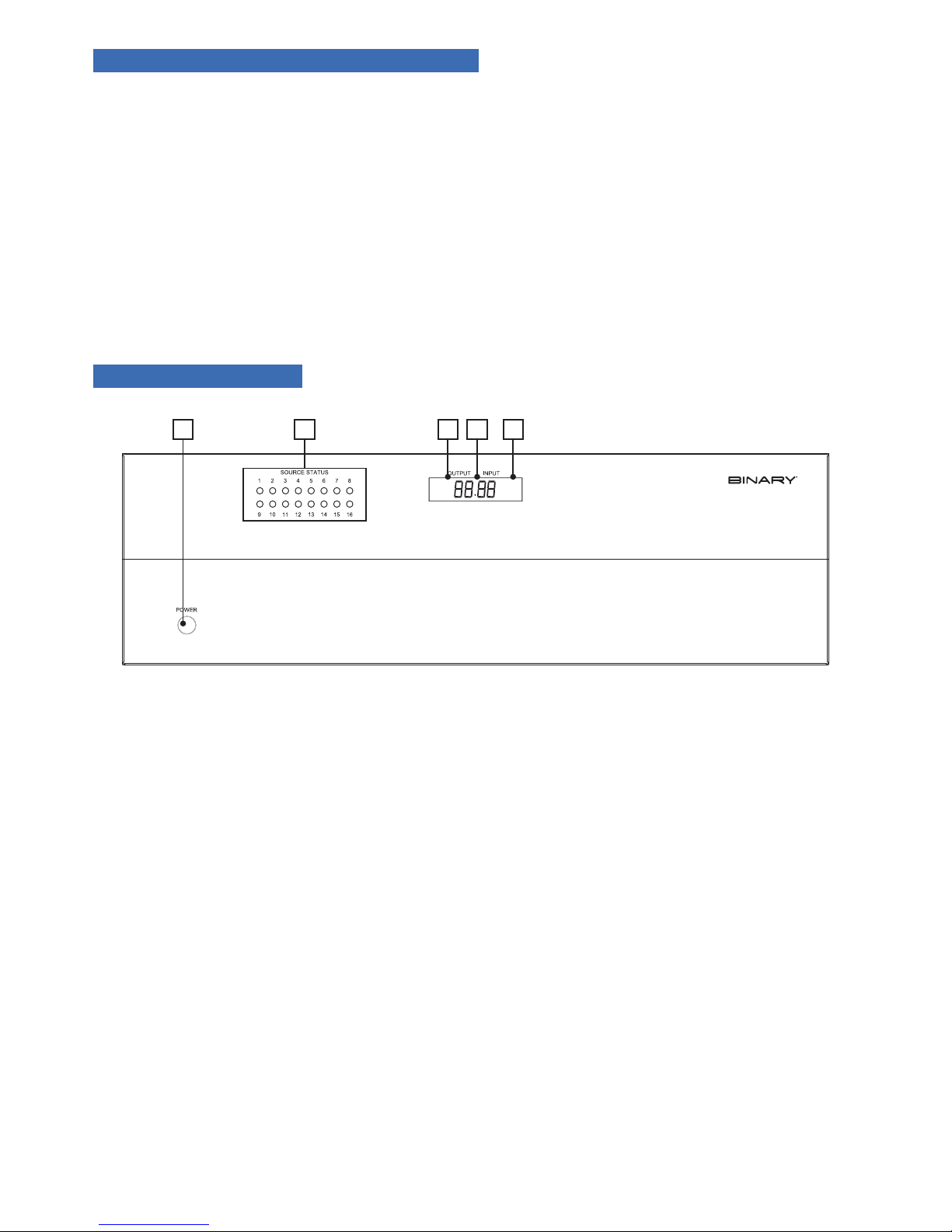
FIGURE 1: B-500-MTRX-230-16x16 Switcher Layout (Front View)
5.1. Front Panel of the B-500-MTRX-230-16x16 Switcher
A. Power On/Off Switch
Toggle Power from On to Stand-by. Can be disabled from Conguration Utility software.
B. Source Status LEDs
Indicates that the selected source is on and transmitting an HDMI signal.
C. Output Display
Displays the last output selected.
D. IR Receiver Window
IR receiver for Matrix to capture commands sent by IR remote.
E. Input Display
Displays the last input selected.
A EDCB
Page 6
6
5.2. Rear Panel of the B-500-MTRX-230-8x8 Switcher
IR INPUT
TO ROOM
IR INPUT
TO ROOM
IR OUTPUT
TO SOURCE
IR OUTPUT
TO SOURCE
1
2
3
4
567
8
9
10
1112131415
16
O
1
2
3
4
5
6
7
8
9
10
11
12
13
14
15
16
UTPUTS
12V DC 16 A
INPUT
LINK
LINK
LINK
LINK
LINK
LINK
LINK
LINK
LINK
LINK
LINK
LINK
LINK
LINK
LINK
LINK
O
N
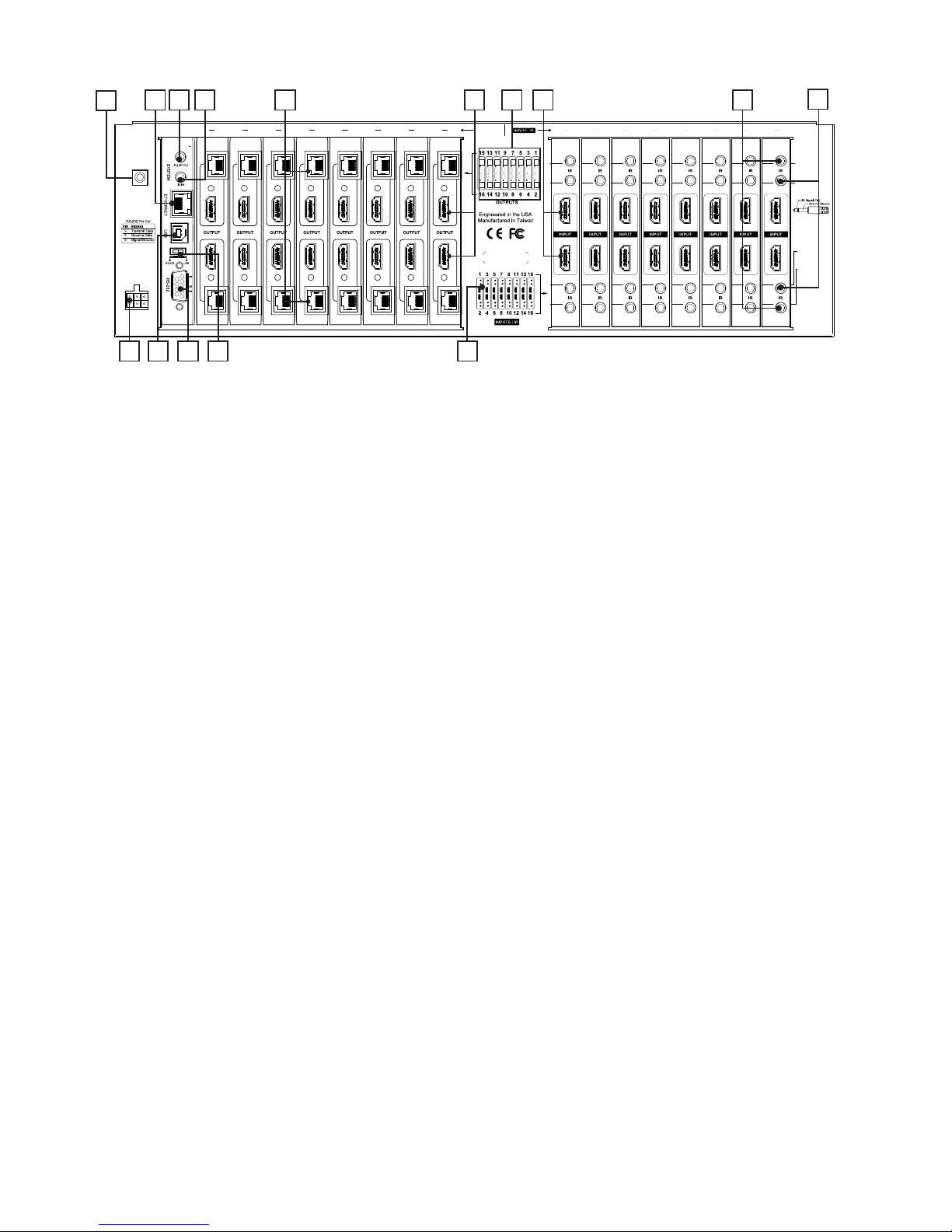
FIGURE 2: B-500-MTRX-230-16x16 Switcher Layout (Rear View)
A. Banana Jack
Service grounding jack provided for safety. See section 13 for replacing input/output cards.
Note: Phillips screws for service located above and below replaceable corresponding input/output card.
B. Ethernet Port
RJ45 port for connecting an Ethernet Cat5e/6 cable for IP control of the B-500-MTRX-230.
C. System All IR Out
3.5mm mono mini port, repeats all IR commands from all connected HDBaseT outputs (from IR Receiver port
of B-500-RX-230-IR).
D. System IR In
3.5mm mono mini IR input port for matrix control.
E. HDBaseT Outputs 1 through 16 (RJ45)
Connect 568B terminated Cat5e/6 HDBaseT cable routed to a B-500-RX-230-IR to feed HDMI signal to
display. Output simultaneously displays the same source as the HDMI output of the same number. Odd
numbered outputs are at the top and even numbered outputs are at the bottom.
F. HDMI Outputs 1 through 16
Connect HDMI cables to route to displays. Output simultaneously displays the same source as the HDBaseT
output of the same number. Odd numbered outputs are at the top and even numbered outputs are at the bottom.
G. Output Number Legend
Printed diagram to indicate output numbering.
H. HDMI Inputs 1 through 8 (or 16)
Connect HDMI cables from sources to the matrix switcher for distribution. Odd numbered outputs are at the
top and even numbered outputs are at the bottom.
I. IR Output to Source 1 through 8 (or 16)
Blue 3.5mm mono mini ports are used to connect IR ashers for controlling sources. These ports may be set to
route commands only from the IR output corresponding to the HDBaseT output number (IR zone routing), or
directly to the source selected on an HDBaseT output (IR source routing). Odd numbered outputs are at the top
and even numbered outputs are at the bottom. See Section 8.1. IR Source Routing on page 20 for routing setup.
J. IR Input to Room
Green 3.5mm mono mini ports are used to route IR commands to the B-500-RX-230-IR IR Flasher port
connected to each respective output. Use these connections to control displays or other equipment from the
matrix location. Odd numbered outputs are at the top and even numbered outputs are at the bottom. Use a
phillips head screwdriver to service a replaceable input or output card.
K. Power Jack
Dual polarized, 12V DC 16A power connections.
L. USB Port
Reserved for future use.
A
D G
J
B C
K M N OL
E F H I
Page 7
7
M. RS-232 Control (DB9)
Attach connection from control system or Windows PC for serial control of the B-500-MTRX-230. Update
rmware on the matrix switcher.
N. USB/RS232 Toggle Switch
The USB/RS232 rmware update switch is for main board updates. The toggle switch must be set to RS232 for
normal operation.
O. Input Number Legend
Printed diagram to indicate input and IR connection numbering.
6. INSTALLATION & SETUP
6.1. Basic Installation Diagram
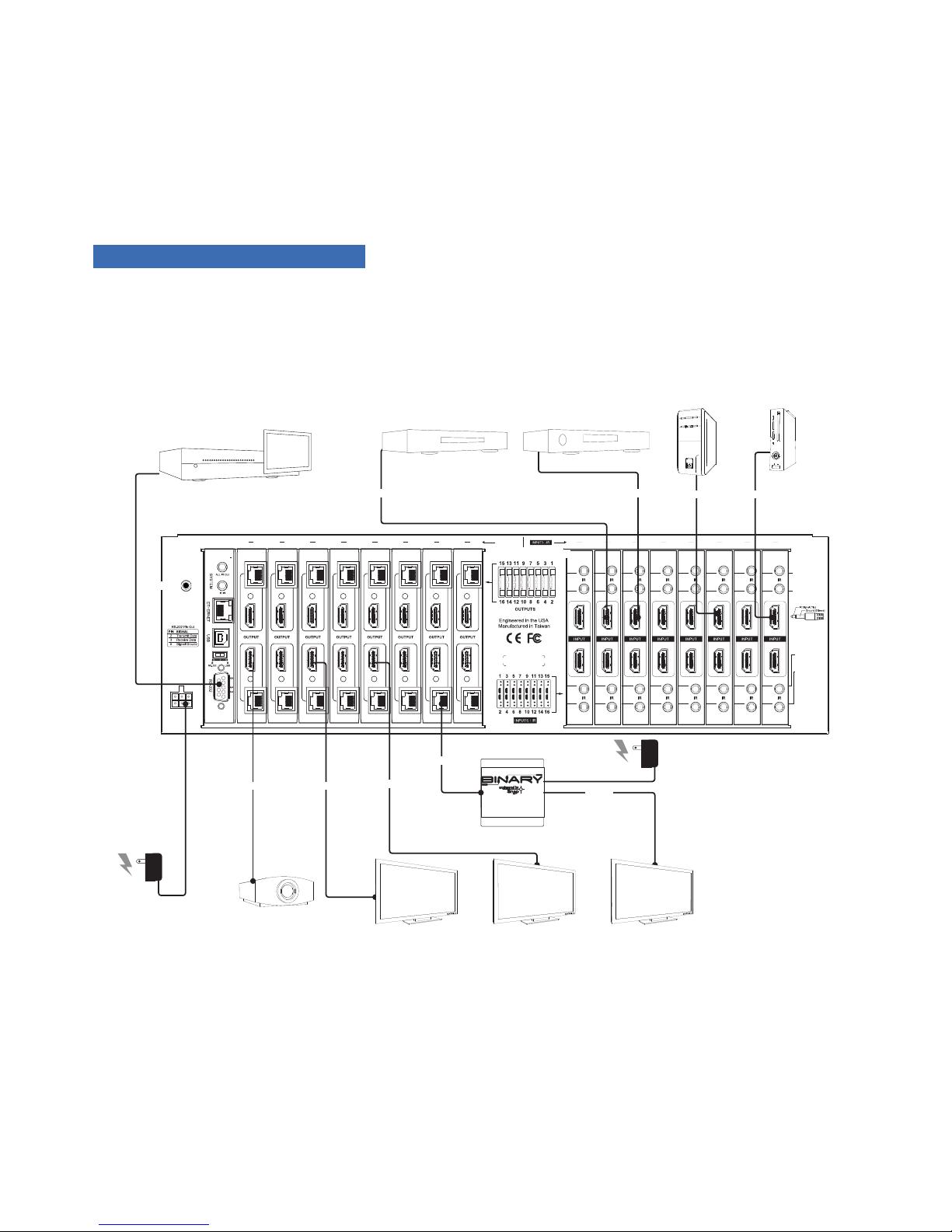
Complete the basic installation section to set up the matrix switcher for media distribution before completing any other
setup. Use this diagram for reference during basic installation of the matrix switcher, sources, displays and wiring.
IR INPUT
TO ROOM
IR INPUT
TO ROOM
IR OUTPUT
TO SOURCE
IR OUTPUT
TO SOURCE
1
2
3
4
567
8
9
10
1112131415
16
O
1
2
3
4
5
6
7
8
9
10
11
12
13
14
15
16
UTPUTS
12V DC 16A
INPUT
LINK
LINK
LINK
LINK
LINK
LINK
LINK
LINK
LINK
LINK
LINK
LINK
LINK
LINK
LINK
LINK
ON
B-500-RX-230-
IR
FIGURE 2: B-500-MTRX 8x8/B-500-MTRX-230-16x16 Installation
Control System
AC Power
AC Power
Projector
TV TV TV
Blu-ray Player Cable/Sat Box
PC
Game
Console
HDMI HDMI
HDMI
HDMI HDMI
HDMI
HDMI
HDMI
HDMI
RS-232
Cat5e/6
Page 8

8
6.2. Basic Instructions
These are the basic steps that must be taken to connect equipment to the inputs and outputs of the matrix
switcher and congure the system for use. See the sections listed for full information on completing each step.
1. Unpack the matrix and install it near the source equipment. (6.4. Switcher Location and Placement, page 9)
Note: Do not power the matrix switcher until it is indicated to do so.
2. Install and connect each source to an input on the matrix switcher using the shortest HDMI cable possible.
(6.6. HDMI Input Connections, page 9).
3. Install the displays and output wiring to the matrix location using HDMI cables for standard HDMI output or
Cat 5e/6 if B-500-RX-230-IR receivers will be used. (6.7. Output Connections, page 10).
4. Record the inputs and outputs used in the System Layout Chart for future reference. (13. System Layout Chart,
page 28).
5. If using a control system, connect it to the appropriate port on the matrix switcher for the driver type being
used: IR, RS-232, or IP control. (6.13. Matrix Control Connections, page 11).
6. Install and congure the driver for matrix switching control into the control system processor. (6.7. Matrix
Control Connections, page 11).
7. Install the IR equipment and set up IR passthrough if necessary. (6.17. IR Passthrough Installation and Setup,
page 12).
8. Attach the power supplies to the matrix, sources, and displays, then power up the system.
9. Test all input and output selections for sync, reliable switching, correct audio format and video resolution. Use the
factory remote or the Matrix Conguration Utility to set up EDIDs as needed. (7. EDID Conguration, page 17).
10. Change any advanced settings in the Matrix Conguration Utility as needed to suit the installation. (8.
Advanced Setup Using the Conguration Utility, page 20).
6.3. Installation Tips
Following these tips during the installation process will help guarantee a successful installation.
• Always test every cable before use.
Field-terminated cables should be checked for continuity after termination to be sure the connectors were
installed correctly.
• Label each cable as it is installed.
This will aid in connection setup and programming, and will also make it easier to come back to a job at a later
date and immediately know what is connected where.
• Complete the System Layout Chart (page 28) in the back of the manual during installation.
Record the source connected to each input, the output number of each display, and the method of routing
signal in the chart for reference during installation and setup. Use it afterward to keep track of equipment in
use, open ports for expansion, and to help identify where to troubleshoot issues if they arise later.
• Leave an RS-232 connection easily accessible for using the Conguration Utility.
The B-500-MTRX-230-8x16 / B-500-MTRX-230-16x16 is equipped with many setup functions that must
be accessed by using a PC and the Conguration Utility. Leave an RS-232 cable connected during setup and
testing that can easily be connected to the PC. If the matrix is being controlled by RS-232, disconnect the
control system while using the Utility.
Page 9

9
• Do not fully secure wiring and equipment until setup and testing has been successfully completed.
Wait until all programming, sources, and zones have been set up and thoroughly tested to strap wiring and
equipment down, in order to avoid restricting access to connections and settings on the equipment.
• Complete initial setup with all sources connected to the matrix locally.
If a source will be connected to an input by an HDMI extender, complete initial setup by connecting directly to
the input with a short HDMI cable. Relocate the source and install the extender after the source has been set
up and tested, and then conrm the new arrangement works.
6.4. Switcher Location and Placement
Binary matrix switchers are designed to deliver unsurpassed technology with superior performance. However,
where you install the switcher could greatly affect the performance of the system, and the life of the unit. Here are
some guidelines to follow when installing a B-500-MTRX-230-8x16 / B-500-MTRX-230-16x16 switcher.
• Be sure that the unit is in a well-ventilated area that provides adequate cooling.
• Do not block the cooling vents located on both sides of the unit.
• Do not place the unit on carpeting or any similar material.
• Do not install the unit near a source of heat, or in an extremely humid or wet location.
• If your enclosure lacks good air ow (such as solid cabinet doors or wall-mounted racks), it may be necessary to
create ventilation to allow outside air into the space.
• Allow a minimum of 3” of free air space on either side of the unit. (Does not apply to rack mounting).
• Allow a minimum of 3 “U” spaces above the unit for proper ventilation.
• Allow a minimum of 2” of depth behind unit to accommodate cables and connectors.
• When placing on a cabinet shelf, position the unit with all feet resting on a solid level surface.
6.5. Rack Installation
The B-500-MTRX-230-8x16 / B-500-MTRX-230-16x16 can be mounted in a rack with the front or rear panel
facing outward, and will displace 3U of vertical space when installed. Rear-facing installation allows for easy access
to the connections for installations that do not require the front panel of the unit to be accessed. Front-facing
mounting is useful for applications where the front panel must be accessible or visible.
The rack ears are packaged separately from the matrix switcher in the box. Attach the ears to the sides of the
matrix at the front or back using the included screws. Tighten with a #2 Phillips Screwdriver. It may be necessary to
remove the feet from the bottom when rack mounting the matrix switcher. Remove the screws for the feet with a
#2 Phillips Screwdriver and store the feet and screws together in case they are needed in the future.
Note: The rack ears and mounting holes are only designed to safely hold the weight of the
B-500-MTRX-230-8x16/B-500-MTRX-230-16x16.
CAUTION: Do not use the matrix switcher as a shelf for other equipment in the rack.
6.6. HDMI Input Connections
Each of the 8 or 16 inputs on the B-500-MTRX-230-8X16/16X16 utilizes a standard HDMI port for connection.
Follow these guidelines when connecting sources to the inputs
• Always use the shortest cable possible between source equipment and the matrix switcher inputs. Use
high-speed rated cables to guarantee the best possible performance.
• Always run one continuous cable when possible and avoid using HDMI cable adapters in runs.
Page 10

10
6.7. Output Connections
The B-500-MTRX-230 matrix switcher is equipped with one HDMI and one HDBaseT output port for each of the
16 output zones. See the sections below for specic instructions and details for each connection type.
Note: Any input selected on an output zone is played on both the HDMI and HDBaseT outputs for that zone
simultaneously. This can be used to feed the same source to two devices. Read more about this feature below.
6.8. Choosing the Correct Output Connection
• Outputs to sinks (TVs, AV receivers, etc.) can be connected using either an HDMI cable or a Category cable
along with an HDBaseT Receiver (with a short HDMI cable).
• Use HDBaseT for any run over about 50 feet or for any output that will utilize IR passthrough.
• Use HDMI for short runs where IR passthrough is NOT needed.
• In some situations it may be benecial to use both outputs. If two displays need to be fed the same source at all
times, one display can be fed from the HDBaseT output, and one from the HDMI output.
Example: In a setup where an AV receiver feeding surround sound to a zone, the audio can be fed to the receiver
via HDMI, and an HDBaseT receiver can be used to route video to the display. This is benecial with AV receivers
that have older or less reliable HDMI scaling or passthrough.
6.9. HDMI Outputs
The HDMI outputs of the Matrix can be connected to the input of a sink device (TV, AV receiver, ber extender,
etc.). Please follow the guidelines below to ensure best performance and reliability.
• Always use the shortest, possible cable between equipment. Use high speed rated cables to guarantee the best
possible performance.
• Always run continuous HDMI cables and avoid using HDMI cable adapters.
• When routing HDMI to an AV receiver, make sure to set the AV receiver to an HDMI mode where the signal
will not be processed or scaled to a different format. This will avoid signal timing issues that can cause
intermittent sync or total loss of sync. Contact the device manufacturer for details regarding HDMI setup.
6.10. HDBaseT Outputs
Follow the guidelines outlined below when selecting and installing the HDBaseT cable.
6.11. HDBaseT Wiring Recommendations
Cable Type- Shielded or Unshielded Cat
• Cable Distance Limitations:
Cat 5e/6: Up to 200 ft
Cat 6a/7: Up to 230 ft
• Use the shortest possible length of high-quality twisted pair solid conductor Category cable rated to at least
350 Mhz bandwidth. The higher the cable standard, the better it will perform.
• For best results, install shielded cable with grounded shield drains. This reduces signal dropouts and artifacts
caused by electromagnetic and radio interference (EMI/RFI) from ceiling fans, appliances, electric motors, etc.
• Up to two patch cables can be used provided that they are not longer than 5m in length, and 568B terminated.
Use shielded patch cables if the run is shielded to maintain shield continuity.
• Use no more than two keystones or couplers in the run. Use shielded keystones or couplers with shielded cable
to maintain continuity.
• Cleanly terminate all cable ends and test every cable used before connecting the extender to avoid having to
troubleshoot termination problems later.
• Mark each end of the HDBaseT cable with the included labels to avoid confusion.
Connector Type- RJ45
• Use a high quality RJ45 connector that matches or exceeds the standard of the cable in use. Shielded
connectors must be used with shielded cables, and must maintain continuity of the shield to both connectors
to protect from interference.
• The use of EZ style, open end RJ45’s with HDMI extenders is discouraged.
• Always terminate RJ45 connectors in the HDBaseT signal path to the 568B termination standard as required
by HDBaseT standards.
Page 11

11
TIA/EIA Standard 568B (Gold Pins Facing Up)
Pin 1 White/Orange Pin 5 White/Blue
Pin 2 Orange Pin 6 Green
Pin 3 White/Green Pin 7 White/Brown
Pin 4 Blue Pin 8 Brown
FIGURE 3: RJ45 Pinout Conguration
6.12. Installation Instructions
1. Install the Category cable and terminate the ends, then test the cable to ensure operation.
2. Connect the Category cable to the desired HDBaseT output of the matrix switcher.
3. Connect the Category cable to the B-500-RX-230-IR Receiver or the HDBaseT device in use. Connect to an
optional 12V DC, 2A power supply (B-PS-12VDC-2A).
4. Connect an HDMI cable (2 meters or shorter is recommended) between the HDMI OUT port on the receiver
and the desired HDMI input on the display.
5. Installation is now complete. Test all connected inputs and outputs together to ensure reliable operation.
Note: For IR Passthrough integration, see section 6.17. IR Passthrough Installation and Setup, page 12.
6.13. Matrix Control Connections
All drivers, associated software and extra documentation is available under the Support tab on the
B-500-MTRX-230-8x16 / B-500-MTRX-230-16x16 product page.
FIGURE 4: System IR
6.14. IR Control
The B-500-MTRX-230 can be controlled by IR asher from the front panel receiver or by attaching a mono cable
from the control system asher output to the “System IR In” port on the back of the matrix switcher. For the most
reliable control, use the System IR In port.
The matrix switcher can also be controlled by commands received on IR Receiver inputs from
connected B-500-RX-230-IR HDBaseT Receivers. (See Section 6.27 IR Pass-Through from Rooms to Sources on
page 16 for an application example of this feature.)
Note: System IR control, front panel IR Receiver and Matrix control from Room can be disabled when not in
use by using the Conguration Utility. See the Conguration Utility manual section, “Other Settings” for more
information.
Matrix IR
Control Input
Page 12
12
6.15. RS-232 Control
To control the B-500-MTRX-230-8x16 / B-500-MTRX-230-16x16 with RS-232, the devices must connect using
the correct pin conguration for the control system in use.
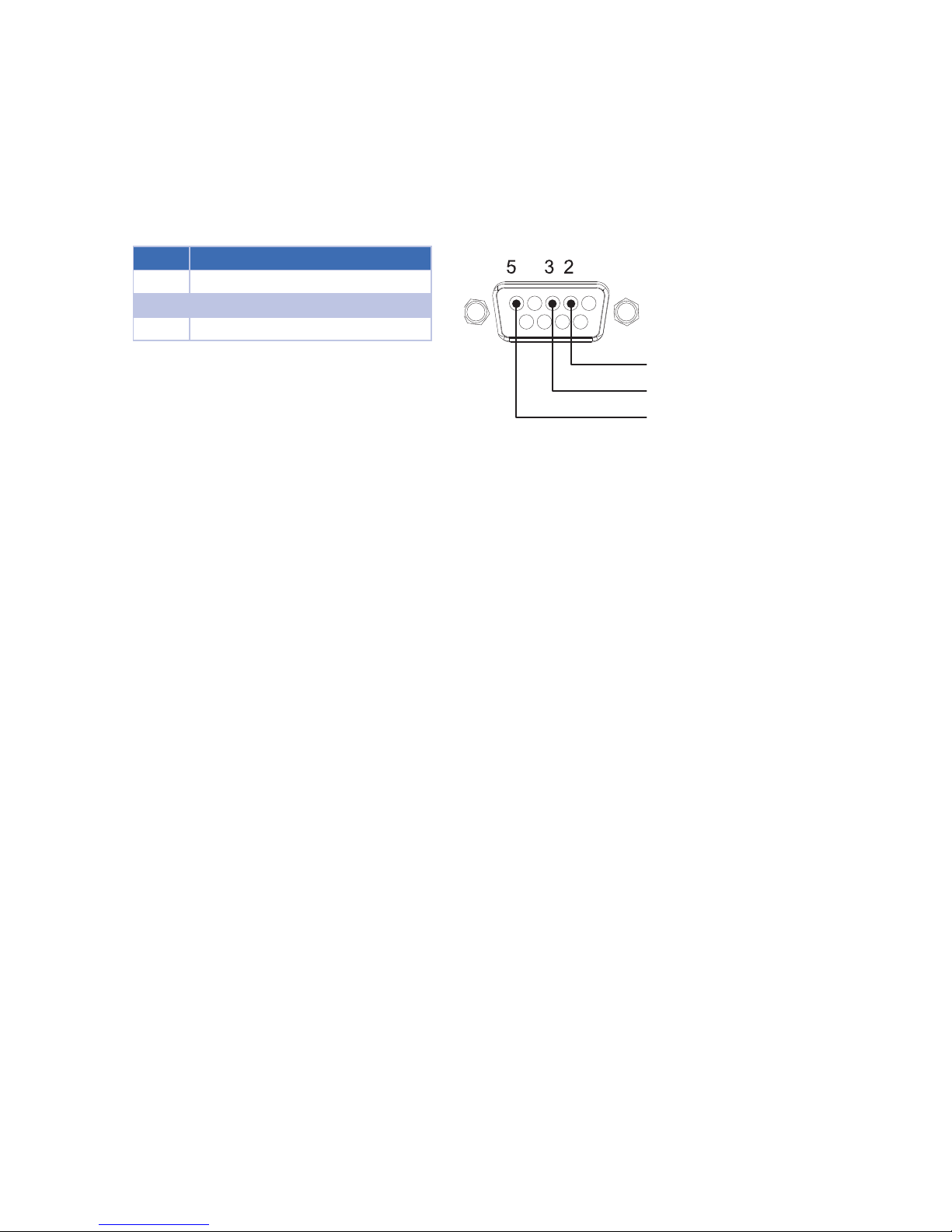
The matrix switcher receives control data on pin 2 (RxD – Data Receive) and transmits control data on pin 3
(TxD-Data Transmit). See the diagram below for details.
Conguration for control system serial ports can vary. Refer to the documentation for the system in use to ensure
proper connection and conguration.
Note: This port is also used to communicate with a PC when using the PC Conguration Utility. Refer to the
Conguration Utility Manual for details.
Pin Function
2 RxD (Data Receive)
3 TxD (Data Transmit)
5 Ground/Common
FIGURE 5: RS-232 (DB9) Pin Congurations
6.16. Ethernet/IP Control
The B-500-MTRX-230-8x16 / B-500-MTRX-230-16x16 includes an Ethernet port that can be used to control
the device using Telnet Protocol. This port follows TIA 568 A/B standards; please refer to these standards when
terminating cables.
To congure the matrix switcher for use with the driver, it will be necessary to connect the unit to a PC and access
it with the Matrix Conguration Utility. See the Conguration Utility Manual and the IP driver documentation for
complete setup instructions.
6.17. IR Passthrough Installation and Setup
To utilize IR passthrough between a display location and the matrix switcher, install a B-500-RX-230-IR HDBaseT
receiver at the display and connect using Category cable to the matrix. The matrix switcher and the matrix receiver
are equipped with ports to allow IR commands to be sent to the display or from the display area. This section
details the pinouts and correct use of the IR passthrough ports.
DB9 Female Connector
RxD (Data Receiver
TxD (Data Transmit)
GND
Page 13
13
6.18. Matrix Switcher IR Connections
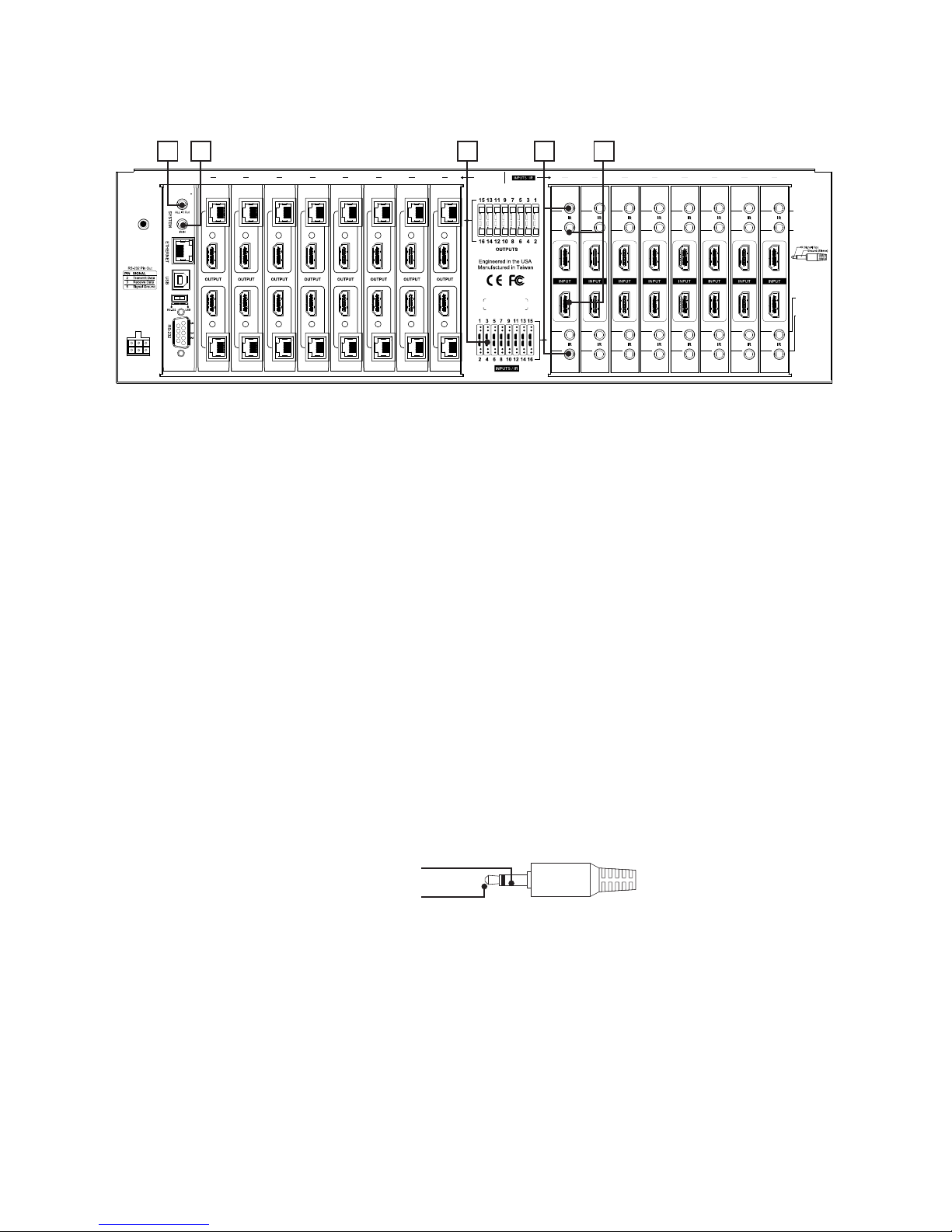
The ports indicated in the diagram are described in detail below. Guides for standard applications are included on
the following pages for reference during setup.
IR INPUT
TO ROOM
IR INPUT
TO ROOM
IR OUTPUT
TO SOURCE
IR OUTPUT
TO SOURCE
1
2
3
4
567
8
9
10
1112131415
16
O
1
2
3
4
5
6
7
8
9
10
11
12
13
14
15
16
UTPUTS
12V DC 16A
INPUT
LINK
LINK
LINK
LINK
LINK
LINK
LINK
LINK
LINK
LINK
LINK
LINK
LINK
LINK
LINK
LINK
O
N
FIGURE 6: IR Connections
A. System All IR Out
This port repeats any command sent from the IR receiver ports on B-500-RX-230-IR HDBaseT receivers
connected to any HDBaseT output.
B. System IR In (3.5mm mono)
IR input port for matrix switcher IR control.
C. System Input Legend
Printed diagram to indicate input and IR connection numbering.
D. IR Output to Source
The IR output from each connected HDBaseT receiver such as the B-500-RX-230-IR is transmitted to the IR
Output to Source ports. Commands can be routed to the source selected or passed from the like-numbered
HDBaseT port.
E. IR Input to Room
Use 3.5mm mini-mono cables to connect IR outputs on a control system to these ports to send commands to
displays or equipment located at the B-500-RX-230-IR HDBaseT receiver location. The number corresponds
to the output zone number, so IR Input to Room port 1 will send signals to HDBaseT Output 1.
6.19. Matrix Switcher IR Port Conguration
All IR connection ports on the B-500-MTRX-230-8x16 / B-500-MTRX-230-16x16 are 3.5mm mono and use this
pinout conguration.
Note: Consult with the manufacturer of any attached IR equipment to conrm their pinout matches before use.
FIGURE 11: IR Port Conguration
A DCB E
IR Signal (Tip)
GND (Sleeve)
Page 14
14
6.20. B-500-RX-230-IR IR Connections
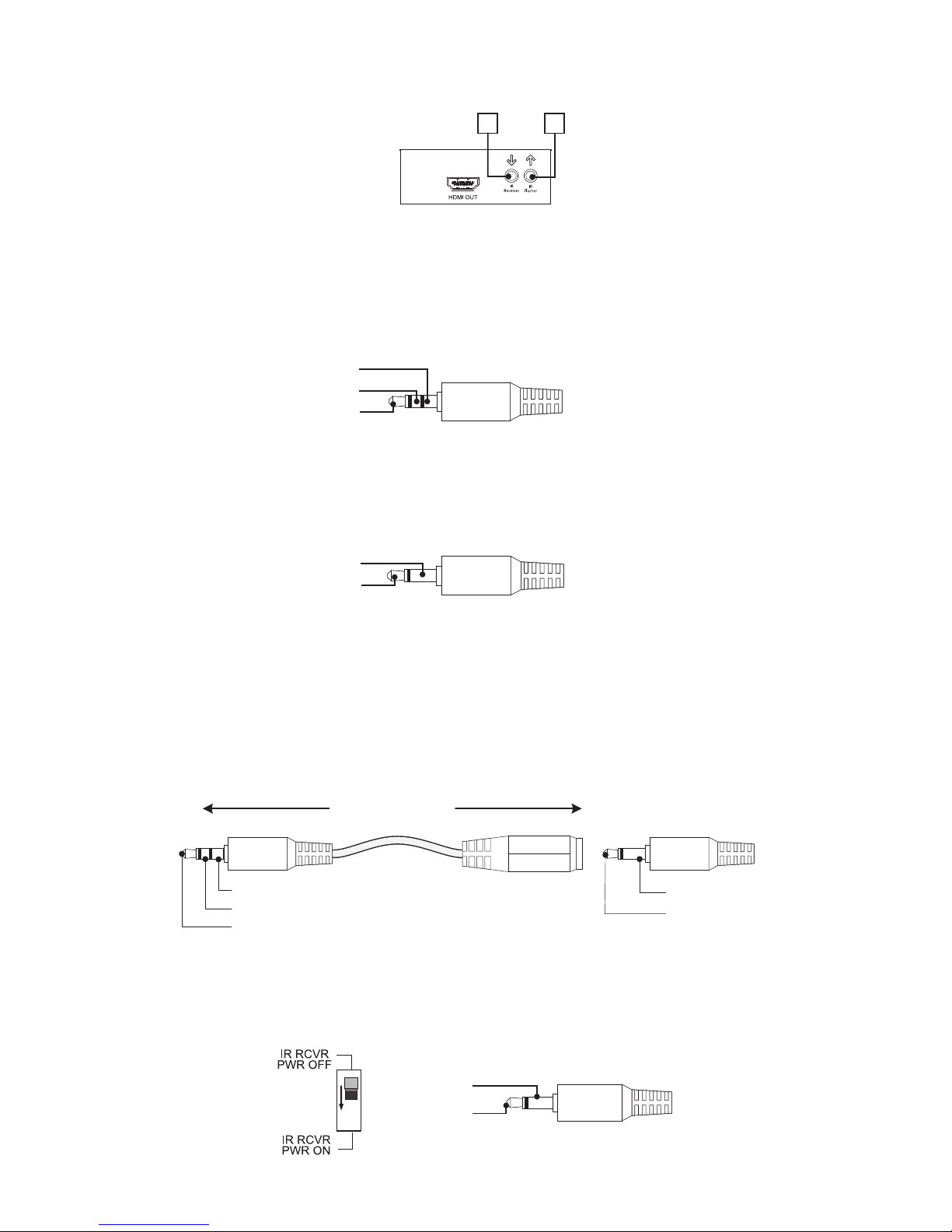
The B-500-RX-230-IR IR ports are described below. Use the diagram for reference.
FIGURE 7:
A. IR Flasher–IR output to connect to IR Flasher
B. IR Receiver–IR input to connect to IR Receiver or to output of a control system
6.21. IR Receiver
Attach an IR receiver to this port to capture IR commands in the room for pass through to sources. This port will
also send commands back to the matrix switcher for control of source selection in each zone.
FIGURE 8:
6.22. IR Flasher
Attach an IR asher to this port for controlling a display or other equipment with commands sent from a control
system asher output, into the matrix switcher IR INPUT TO ROOM ports and then to this port.
FIGURE 9:
6.23. Yellow Tag IR Adapter
The yellow tagged adapter included with the B-500-RX-230-IR (illustrated below) is used to plug a 3.5mm mono
mini cable into the IR Receiver port of the B-500-RX-230-IR. This is used to send IR commands to the matrix
switcher from other asher outputs instead of an IR Receiver.
IR Signal (Tip)
GND (Ring)
12V DC (Sleeve)
IR Signal (Tip)
GND (Sleeve)
To IR Control System
or
Connecting Block
To B-500-MTRX
FIGURE 10:
6.24. Control System - Mono (3.5mm) IR Receiver
When using a control system which generates the signal through a mono jack, the IR RCVR PWR switch should be
in the OFF position.
1
ON
IR Signal (Tip)
GND (Sleeve)
FIGURE 11:
A B
IR Signal (Tip)
GND (Sleeve)
12V DC(Sleeve)
IR Signal (Tip)
GND (Sleeve)
Page 15
15
6.25. IR Flasher
IR ashers attached to this port will control equipment using commands sent from a control system asher output
into the matrix IR Input to Room ports.
FIGURE 12:
6.26. IR Application Diagrams
IR INPUT
TO ROOM
IR INPUT
TO ROOM
IR OUTPUT
TO S OURCE
IR OUTPUT
TO S OURCE
1
2
3
4
567
8
9
10
1112131415
16
O
1
2
3
4
5
6
7
8
9
10
11
12
13
14
15
16
UTPUTS
12V DC 16A
INPUT
LINK
LINK
LINK
LINK
LINK
LINK
LINK
LINK
LINK
LINK
LINK
LINK
LINK
LINK
LINK
LINK
ON
IR Outputs
RS232
IR Inputs
PLAY
256
FIGURE 13: IR Passthrough Using Control System
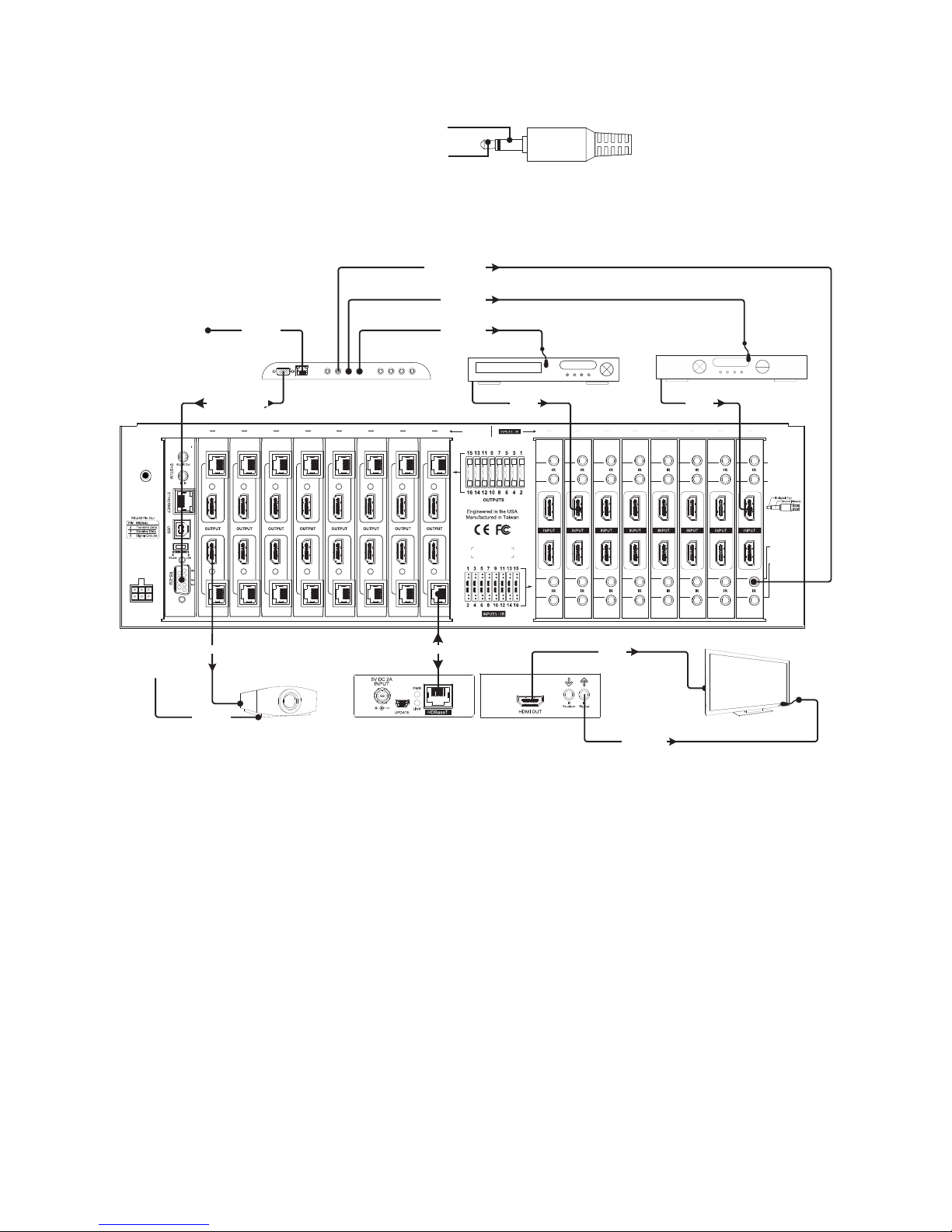
The diagram above illustrates a typical installation with a B-500-MTRX-230 where all of the equipment is being
controlled by a control system that uses RF (Radio Frequency) remotes in each output zone.
• The control system sends commands to each device being controlled via the RF remotes. The control system can
automatically switch inputs and outputs in the matrix switcher as needed.
• Connect each device requiring IR control to the system via the HDBaseT output of the matrix switcher.
Connect a B-500-RX-230-IR Receiver using a Cat 5e/6 cable, then attach a display via HDMI. IR commands are
sent to the display via the IR asher port and sources are directly controlled by the control system.
• IR control for displays is routed from the control system to the matrix switcher using 3.5mm mono mini cables
route IR signals from the control system to the matrix via the IR INPUT TO ROOM ports. The commands pass
from a matrix switcher port to the HDBaseT output of the same number. In the diagram the mono cable used
to send commands to the output 16 zone is plugged into IR INPUT TO ROOM port 16. This allows discrete
control of each display connected, even if they are models with the same codes.
• Some devices can be controlled by methods other than IR. Devices featuring IP control receive commands from
the control system over an Ethernet connection. An HDMI cable connecting the control system to the matrix
switcher output requires no IR asher.
• If two outputs are connected to the same input, the source will change on both outputs with any command
sent. This must be considered when deciding on the sources to connect for distribution.
Example: In a home with ve displays connected, if users in every room want to watch satellite on different
channels, there must be ve satellite receivers set up as sources. With custom programming, each output can
be programmed to use only one of the satellite source inputs, giving each output a dedicated satellite box, while
allowing other less-used sources to connect to any output..
IR Signal (Tip)
GND (Sleeve)
Ethernet Connection
Ethernet Connection
HDMI Source
HDMI Source
IR Flasher
IR Flasher
IR Flasher
TV
Cat 5e/6
Projector
Cat 5e/6
Cat 5e/6
RS-232 Cable
3.5mm Mono
HDMI HDMI
HDMIHDMI
B-500-RX-230 -IR
Page 16
16
6.27. IR Passthrough from Rooms to Sources
IR INPUT
TO ROOM
IR INPUT
TO ROOM
IR OUTPUT
TO SOURCE
IR OUTPUT
TO SOURCE
1
2
3
4
567
8
9
10
1112131415
16
O
1
2
3
4
5
6
7
8
9
10
11
12
13
14
15
16
UTPUTS
12V DC 16A
INPUT
LINK
LINK
LINK
LINK
LINK
LINK
LINK
LINK
LINK
LINK
LINK
LINK
LINK
LINK
LINK
LINK
ON
PLAY
256
FIGURE 14: IR Passthrough
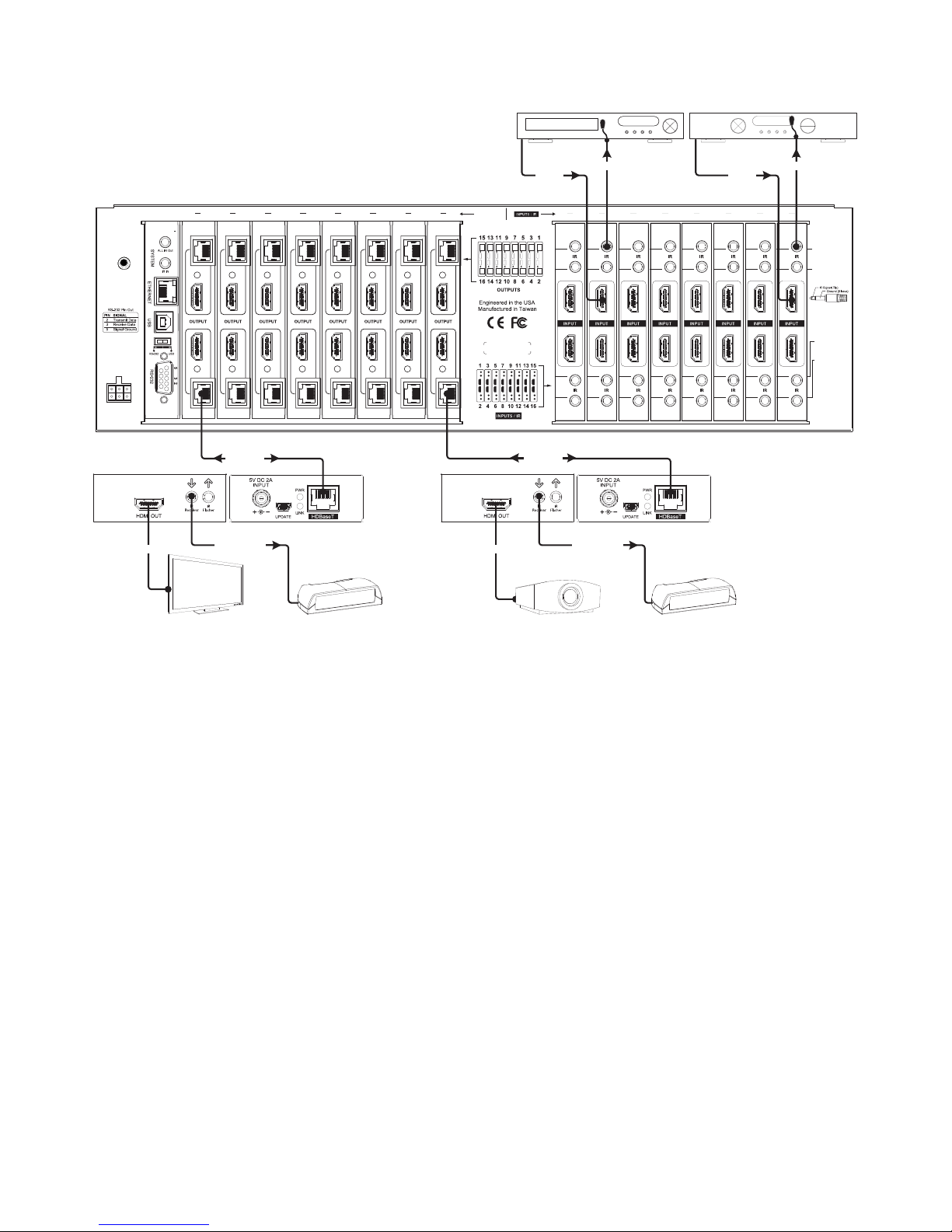
The diagram above illustrates a typical installation with a B-500-MTRX-230 where all of the equipment is being
controlled by IR remotes in each output zone.
• In each room with a connected display, an entry-level universal IR remote is being used to control the display
and sources in use. Custom programming set up in each remote by the installer sends IR commands out of the
remote meant for the display device in the room, the sources, and the matrix switcher simultaneously. The
matrix commands are programmed to be sent automatically as needed so the end user only has to select the
source they want to watch.
• To make this system work seamlessly, two advanced IR options have been enabled in the matrix switcher
Conguration Utility “Other Settings” menu: IR Source Routing and IR Matrix Control from room.
• IR Source Routing allows the commands from the room to be routed directly to the source selected to be
displayed in the room. This simplies IR routing because only one asher has to connect to the source.
• IR Matrix Control sets the matrix switcher so that any command sent from any HDBaseT output to control
the matrix is automatically received internally, eliminating the need for an external connection back to the
matrix for control.
See Section 8. Advanced Setup Using the Conguration Utility on page 20 for more information on changing
these settings.
• When the commands are sent, the display device is controlled directly by the remote. The commands for the
matrix switcher and sources are picked up by the IR receiver connected to the B-500-RX-230-IR and sent back
to the correct IR OUTPUT TO SOURCE port and to the matrix.
• When the system is in use, if two outputs are connected to the same input, the source will change on both
outputs with any command sent since it can’t send two HDMI streams at once. This must be considered when
deciding on the sources to connect for distribution.
Example: In a home with ve displays connected, if users in every room want to watch satellite on different
channels, there must be ve satellite receivers set up as sources. With custom programming, each output can
be programmed to use only one of the satellite source inputs, giving each output a dedicated satellite box while
allowing other less-used sources to connect to any output.
HDMI
HDMITVHDMI HDMI
HDMI
IR Flasher IR Flasher
IR Receiver
IR Receiver
Cat 5e/6 Cat 5e/6
B-500-RX-230-IR B-500-RX-230-IR
IR Receiver
IR Receiver
Projector
HDMI Source HDMI Source
Page 17

17
7. EDID CONFIGURATION
The displays used within an installation usually vary from room to room, and some may not support all resolutions
available from a source. It is necessary to make sure sources will provide a video and audio format compatible
with all connected displays programmed to use them. To accomplish this, the B-500-MTRX-230 includes built-in
EDID management for each source input. The stored EDID is per source, so all display locations will see the same
resolution and have the same audio format when that source is selected.
Note: Source is only able to output one video resolution and one audio format.
Note: The default EDID for each input is always 1080p with 2 channel stereo audio, since this format is accepted
by most displays with no issues.
The following sections explain conguring EDIDs via the included IR Remote. Before conguring the EDID, be
sure to refer to the source and display manuals for available features and resolutions for each device. For more
information about using the included remote, see Section 10.1 IR Remote on page 22.
While all EDID congurations are available via the remote, the Conguration Utility can be used for faster setup.
Download the Conguration Utility and manual on the Support Tab at the product page for the B-500-MTRX-230.
What is EDID? EDID, or Extended Display Identication Data, is a stream of information sent from a display to a
source when the two devices are connected to tell the source what video and audio formats the display can use.
This prevents sources from outputting media that won’t work with the display.
7.1. Source Setup
Check each source and conrm that the audio format and video resolution are set so that they will change based
on the EDID. Normally this setting is called Auto or similar.
Note: EDID setup is not required if the source supports setting one xed video resolution and audio format.
7.2. Display Setup
It is recommended that Consumer Electronics Control (CEC) be turned OFF in all displays when using the B-500MTRX-230. This will provide for proper communication of video/audio signals and allow EDIDs to function at their
optimum performance. Refer to the manual for the display for information on how to turn this function OFF.
7.3. Auto EDID Conguration
The quickest and easiest method for conguration is to use Auto EDID. When this mode is used the matrix
switcher looks at the EDID from each of the connected displays. It uses the highest common video resolution to
create a new EDID and saves that EDID in all of the inputs.
Note: Auto EDID sets audio to 2ch stereo for all inputs regardless of the capability of the connected displays. If
multi-channel audio is desired, embedded EDIDs or Learned EDIDs will need to be used.
When to use Auto EDID
• All sources will be available on all displays.
• As a rst step to conguration following up with advanced methods for particular displays and dedicated sources.
• For advanced EDID conguration when using a legacy display and/or dedicated sources, use embedded EDIDs
or learning as described in the following sections.
Page 18

18
7.4. How to Congure Auto EDID
To set up Auto EDID conguration, rst make sure that all displays are powered on and connected to the matrix
switcher. Then, press the following remote buttons in this order. Be sure to press each button within 10 seconds of
the previous button-press to prevent the command from resetting.
Sets EDID Based on All Connected Displays Display Readout (Example)
1. Press DEFAULT
2. Press Number Key 9
..
3. Press ENTER
.0.
7.5. Embedded EDID Conguration
In addition to the automatic conguration method, EDIDs in the B-500-MTRX-230 can be set to inputs manually
by selecting an EDID from the embedded list (default EDIDs programmed into the matrix switcher).
The matrix switcher contains eight embedded EDIDs that may be assigned to inputs. These EDIDs dene groups of
video and audio capabilities that are useful for conguring sources in most systems.
7.6. Embedded EDID Chart
Embedded EDID Resolution Color Depth Audio
1 1080p@60Hz 24-Bit 7.1ch
2 (Factory Default) 1080p@60Hz 24-Bit 2ch
3 1080p@60Hz 24-Bit 3D 7.1ch
4 1080p@60Hz 24-Bit 3D 2ch
5 1080i@60Hz 36-Bit 3D 7.1ch
6 1080i@60Hz 36-Bit 3D 2ch
7 1080i@30Hz / 720p@60Hz 24-Bit 7.1ch
8 1080i@30Hz/ 720p@60Hz 24-Bit 2ch
Explanation of Embedded EDIDs
Video Resolution in the Embedded EDIDs is the highest resolution a connected source will output. That is, if the
source is capable of 1080P@60 it will be required by EDIDs 1-6 to provide that resolution. However, if the source
is only capable of 1080i it will output 1080i, etc. It is assumed that any display that can accept the specied video
resolution can also accept all standard video resolutions less than that specied.
Color Depth is the maximum number of bits used to encode color. 24bit color depth is 8bits per color (red, blue,
green).
3D indicates that the source can output 3D if it is available in the content.
Audio Format indicates the maximum number of audio channels, as well as the audio format that the source is
allowed to output. For an Embedded EDID with 7.1ch Audio Format, the source device will output the highest
audio possible based on the content. For example, if 7.1ch is not available and 5.1ch is available, then the output
will be 5.1ch.The same is true if 2ch stereo is the only audio available from the source. Embedded EDIDs with 2ch
stereo will limit output to that audio format regardless of what is available in the content.
Embedded EDIDs 7 and 8 are provided for legacy displays that can only accept resolutions up to a maximum of
1080i / 720p. The 1080i is listed rst since almost all older HD displays can accept 1080i but not all can accept
720p. For these two Embedded EDIDs, (7&8) the source will output 1080i. Should 1080i not be available, the
source will output 720p.
Note: There is a possibility that 720p may not work for a very small number of older displays that may still be in
use. It will be necessary to use a Learned EDID from the display to store in the Input EDID of any sources that will
be routed to that display if 720p is not supported. See Section 7.9. EDID Learning below for directions to set a
learned EDID.
When to Use Embedded EDIDs
• 2 channel audio is required for a particular output.
• Lower video resolution is required for a particular output.
Page 19

19
7.7. How to Set Embedded EDID for a Single Input
Example: Input =1 Embedded EDID=4 Display Readout (Example)
1. Press DEFAULT
2. Press Number Key (1-8) to select one Embedded EDID
0 ..
3. Press INPUT
0 ..
4. Press Number Key (1-8) to select the Input to which the EDID is applied
0 . 0.
5. Press ENTER
(success)
FF FF
(fail)
7.8. How to Set Embedded EDID for All Inputs
Example: Input =1 Embedded EDID=4 Display Readout (Example)
1. Press DEFAULT
2. Press ALL to select all Inputs
3. Press Number Key (1-8) to select Embedded EDID
0 ..
4. Press ENTER
(success)
FF FF
(fail)
7.9. EDID Learning
For more advanced EDID conguration, learning can be used to assign EDIDs directly from displays to one or more
inputs. This is useful when the system contains a display that cannot accept the highest resolution available from
sources, but all sources need to be available to all displays.
Note: EDIDs can be learned from displays connected via the HDBaseT or the HDMI output.
When to Use Learned EDIDs
• An older display does not work properly with any of the embedded EDIDs.
• When the source is a PC it may be necessary to use a learned EDID.
7.10. How to Learn EDID to a Single Input
Example: Input =1 EDID Learned from Output 4 Display Readout (Example)
1. Press LEARN once for HDMI port or twice for HDBaseT port
L._.
2. Press OUTPUT
L._.
3. Press Number key (1-8) to select the Output the EDID is learned from.
Use 10+ to select Outputs through 10-16
0 ..
4. Press INPUT
0 ..
5. Press Number Key (1-8) to select the Input to which the EDID is applied.
Use 10+ to select Outputs through 10-16
0. . 0. .
6. Press ENTER
(success)
FF FF
(fail)
Page 20

20
7.11. How to Learn EDID to All Inputs
Example: Input=All EDID Learned from Output 4 Display Readout (Example)
1. Press LEARN
L._.
2. Press OUTPUT
L._.
3. Press Number Key (1-8) to select the Output the EDID is learned from.
Use 10+ to select Outputs through 10-16
0 ..
4. Press ENTER
(success)
FF FF
(fail)
7.12. Viewing Input EDID Status
If there is a question about the EDID set for an input, the status of that input’s EDID can be reviewed using the
included IR remote and watching the matrix switcher front panel display.
Example: View the EDID for Input 3. Display Readout (Example)
EDID 5 Assigned from
Embedded EDID Table
EDID Learned from
Output 4
1. Press STATUS
2. Press INPUT
3. Press Number Key (1-8)to select the desired
Input. Use 10+ to select Outputs through 10-16
0.. 0..
4. Press ENTER
0 0.. 0.. 0..
Notes about EDID Status
• If the EDID was learned from an output, the exact EDID specications will not be shown, but the output
number will be identied. Review the specications of the display attached to the output to determine its
compatible resolutions.
• If the second digit (the Input being queried) has a dot after it, then the rst digit is the EDID number from the
Embedded EDID table.
• If the second digit (the Input being queried) does not have a dot after it, the rst digit is the output the EDID
was learned from (step 4 from example above).
8. ADVANCED SETUP USING THE CONFIGURATION UTILITY
There are several setup options available that can only be modied using the matrix switcher Conguration Utility.
These items are defaulted to the most common settings that should work in most installations.
The Conguration Utility and manual are available for download on the Support Tab of the B-500-MTRX-230
product page. Download and run the Utility to gain access to these settings connecting to the matrix and clicking
Other Settings.
8.1. IR Source Routing
Default Setting: Yes
The IR Source Routing feature allows discrete control of the source selected from any connected HDBaseT
output using an IR receiver plugged into the B-500-RX-230-IR. This setting is only relevant when using in-room
IR remotes to control sources connected to the matrix switcher. When set to Yes, the matrix will route commands
from the HDBaseT Receiver to the IR Output to Source port that matches the source input number currently
selected on that output.
When set to No, commands will be sent only out of the IR Output to Source port that matches the HDBaseT
Receiver number from which it originated.
Page 21

21
8.2. IR Front Panel IR Enable
Default Setting: Yes
This setting controls the operation of the front panel IR receiver built into the B-500-MTRX-230. This should be
disabled if using the SYSTEM IR IN port to control the matrix switcher via IR, or if the matrix switcher is missing or
receiving extra commands during use (stray IR interfering with the port).
8.3. Matrix Control from Room Enable
Default Setting: Yes
The Matrix Control from Room Enable option allows Matrix Control IR commands to be sent from the room as if a
source were being controlled. Turn this option off if the matrix switcher is being controlled by any other method
than in-room IR.
Note: To use Matrix Control from Room, it is recommended to program a universal remote control with discrete
commands for matrix control to keep in each zone, rather than using the included IR remote or commands learned
from it. Go to the Support Tab of the B-500-MTRX-230 product page to see and download the available IR codes
and drivers for IR remote programming.
8.4. Front Panel Power Button Active
Default Setting: Yes
The Front Panel Power Button can be disabled if desired. Disable the button when the matrix switcher is
programmed to be on at all times or in jobs where turning off the matrix from the switcher can cause issues with
control.
9. FIRMWARE UPDATE
Binary may occasionally release new rmware for the B-500-MTRX-230 to address new standards and technology.
It will never be necessary to perform an update to an existing, correctly functioning system, but during installation
or service, it is recommended to check the installed version to be sure it is the newest available.
For full update instructions, see the section titled, Firmware Update in the Conguration Utility manual. New
rmware, the Conguration Utility, and the Conguration Utility manual are available for download on the Support
Tab of the B-500-MTRX-230 product page.
Page 22
22
10. OPERATION AND CONTROL
During setup and testing, use the included IR remote to control the matrix switcher. After setup is complete, a
control method should have been setup and programmed as described in Section 6.13. Matrix Control Connections
on page 11 for regular operation.
10.1. IR Remote
This section describes the correct button-push sequences to perform regular operations with the IR remote.
To enter a number higher than 9 when selecting an input or output, press the “10+” button to enter 10, or press
“10+” followed by the desired number for 11-16 (Example: “10+” + “2” = 12).
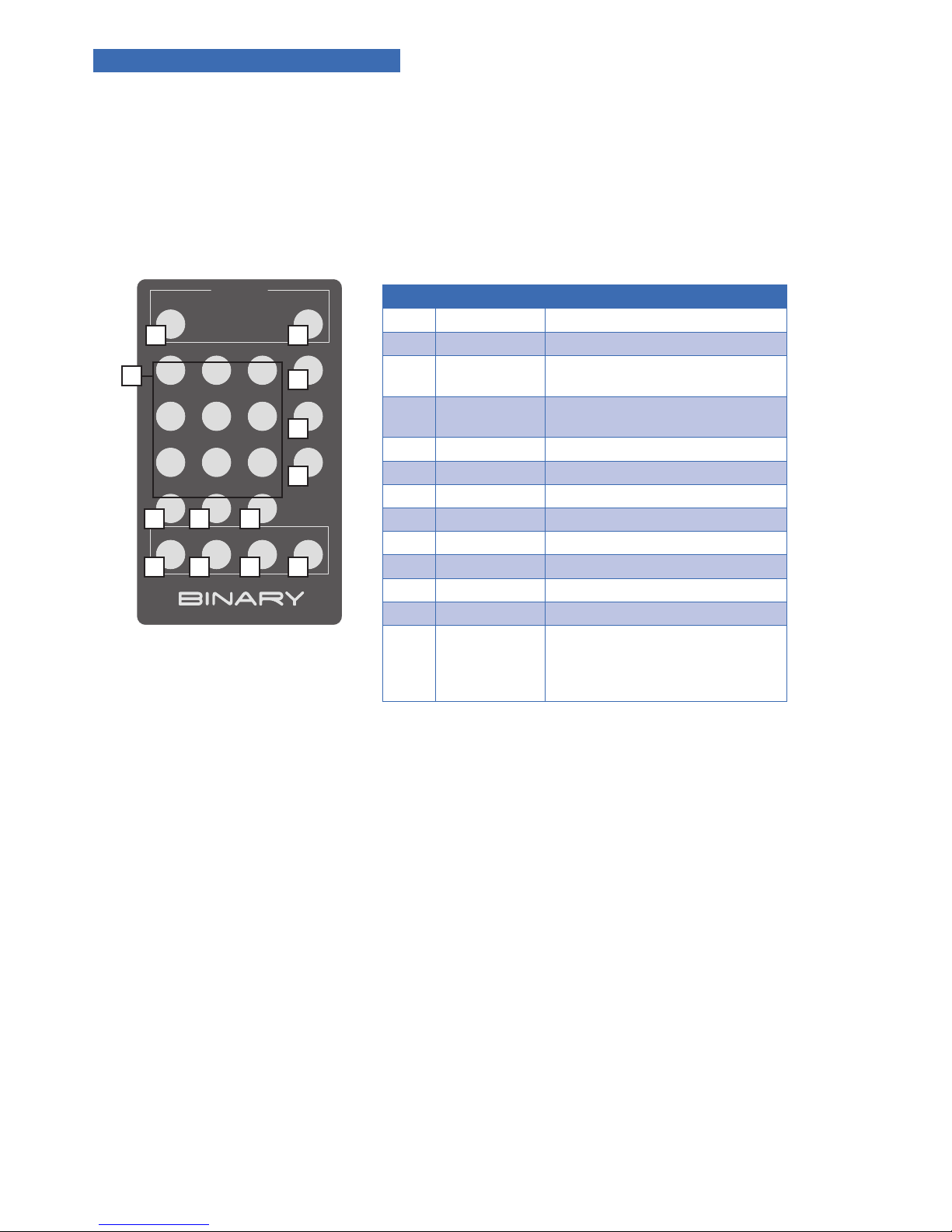
Key Function
1 ON Power on the matrix switcher
2 OFF Enter standby mode
3 Number Keys
1-9
Select a number
4 10+ Select numbers for Input or Output
higher than 9
5 ALL Select all Inputs or Outputs
6 ENTER* Enter to trigger the previous setting
7 OUTPUT Begin output selection
8 INPUT Begin input selection
9 OUTPUT OFF Turn off/Mute the selected Output
10 STATUS Present EDID or Output status
11 LEARN Learn EDID from one output
12 DEFAULT Begin Embedded EDID Selection
13 CLEAR Clear the former IR operation
procedure which user just pressed
but has not yet applied by pressing
ENTER
FIGURE 15: FIGURE: 18
POWER
1
ON OFF
23
OUTPUT
INPUT
OUTPUT
OFF
STATUS LEARNDEFAULTCLEAR
ALL
456
78
10+
ENTER
9
1 2
7
8
9
3
4
11
5
10
6
12 13
Page 23

23
10.2. Route Inputs to Outputs
Input to Single Output
Example: Output=3 Input=4
Display Readout (Example)
1. Press OUTPUT
2. Press Number Key (1-8) to select Output
3. Press INPUT
4.Press Number Key (1-8) to select Input
5. Press ENTER
Input to All Outputs
Example: Output=All Input=4
Display Readout (Example)
1. Press OUTPUT
2. Press ALL to select all Outputs
3. Press INPUT
4. Press Number Key (1-8) to select Input
6. Press ENTER
10.3. Turn Off (Mute) Outputs
Mute one Output Example: Output=1 Display Readout (Example)
1. Press OUTPUT
2. Press Number Key (1-8) to select Output
0
3. Press OUTPUT OFF
0 00
4. Press ENTER
0 00
Mute All Outputs Display Readout (Example)
1. Press OUTPUT
2. Press ALL to select All Outputs
0
3. Press OUTPUT OFF
0 0
4. Press ENTER
6 00
10.4. Display Output Status
Display Readout (Example)
Example Output=3,
Input=4
Example Output=3
Muted
1. Press STATUS
2. Press OUTPUT
3. Press Number Key (1-8) to select one Output
0 0
4. Press ENTER
0 0 0 00
Page 24

24
10.5. Resetting to Factory Defaults
This procedure resets the B-500-MTRX-230 to factory defaults:
• EDIDs - 1080p 60 2 channel stereo (embedded 2)
• I/O - All Outputs set to Input 1
Reset Factory Defaults Display Readout (Example)
1. Press DEFAULT
2. Press DEFAULT
3. Press DEFAULT
4. Press DEFAULT
5. Press ENTER
0 0
Note: Resetting factory defaults can take up to 2 minutes to complete. Wait until the screen displays an output and
input selection of 1.1 before attempting further setup or use.
11. TROUBLESHOOTING
If issues arise during installation or testing of the B-500-MTRX-230, follow these guidelines to troubleshoot. Use
the System Layout chart on the page 28 to record a description of each part of the system. If a problem cannot be
solved using the methods listed here, ll out the System Layout Chart as completely as possible and contact Binary
Tech Support for assistance at 866.838.5052.
11.1. General Troubleshooting Guidelines
• Always set up the connections between the matrix switcher and all equipment before attempting EDID setup
or testing video and audio to be sure that all displays have been accounted for.
• Only change one part of a setup at a time when troubleshooting. Changing more than one variable may lead to
inconsistent results.
• When any issue arises with video or audio, inspect the cable connections rst. Most issues arise from a
connector not being fully seated in its port or a poorly terminated Cat 5e/6 cable.
• Try to simplify the signal route when troubleshooting. Remove any additional equipment from between the
source and display as possible, and add one piece back until the issue re-appears.
• If a source will not work with all displays, or a display will only work with some sources, the issue is usually
either an incorrect EDID for an input, or a source menu is set incorrectly.
• Swap devices to different ports on the matrix to determine whether issues follow the devices or the ports in
use. Issues following sources are almost always related to the internal settings of the source. Set the source
output to adjust automatically for the EDID of the display. Then set up the EDIDs using a learned EDID from an
output with a “problem” display, or selecting an embedded EDID compatible with all of the connected displays’
supported resolutions.
Page 25

25
11.2. No Signal from Source to any Display
If a source will not send a signal to any connected display, it is probably due to an issue with the cable in use, the
EDID setting for the input, or the settings in the source:
• Swap the cable between the source and the input of the matrix for a short, working HDMI cable.
• Test the source using a different input. If the source works with displays when connected to a different input,
the EDID needs to be changed to one that is compatible with all displays.
• If the problem follows the source, its output settings are not compatible with the displays in use, or the source
is not working correctly. Test the source and set it up to work by connecting directly to a display with an HDMI
cable.
11.3. No Signal from any Source to any Display
If a display connected to a matrix output will not sync to any source, the issue is usually either an incompatible
EDID on all inputs or a problem with the cable connecting the display to the matrix switcher:
• Learn the EDID of the “problem” output to all inputs.
• Re-terminate the HDBaseT cable (if applicable) and test it for continuity, and try a different HDBaseT receiver.
Replace any HDMI cables with known working units.
• Bypass all other equipment and wire directly from the output of the matrix to the input of the display with the
shortest HDMI cable possible to eliminate other equipment as the cause of the issue.
• Connect the display wiring to a different matrix switcher output.
• Connect each source directly to the display using an HDMI cable and test to be sure the display and its input
port work correctly with sources. If this works there may HDBaseT or HDMI wiring issues.
• Use a known good HDBaseT receiver and a test run of Cat5e/6 cable outside the wall to help identify HDBaseT
issues. If the B-500-RX-230-IR HDBaseT Receiver is being used, see its manual for more troubleshooting tips
directly related to HDBaseT.
11.4. Audio Issues
If a display on an output using 2 channel stereo audio is switched to an input with its EDID set to surround sound
audio format, audio at the display speakers may be garbled, missing pieces of the audio track, or muted altogether.
This symptom indicates that the display cannot down-convert the audio stream from the source. To x this issue,
the source must be set to output only 2 channel stereo audio.
This may result in limited audio quality in zones with surround systems. With sources like cable or satellite boxes,
surround sound audio isn’t as critical to the end user experience, so these sources can send stereo audio through
the speaker system with no perceived difference. For Blu-ray players or streaming devices where sound quality is
critical, the compromise would be to connect a second source of the same type so that one is set to stereo and one
is set to surround sound, or one is connected directly to the AV receiver instead of the matrix switch.
11.5. Error Codes
Description Display Readout (Example)
*Indicates the matrix switcher has reached maximum operating
ambient temperature (122°F/50°C).
00
*Note: To protect itself from damage, the matrix switcher will shut down. To avoid this issue, a few precautionary
steps are needed. First, remove power from the matrix switcher and allow an hour to cool down. Second, remove
or rearrange any equipment surrounding the matrix switcher that might be contributing to excessive heat. Third,
verify the room has proper ventilation so that air may circulate. If proper ventilation is not established, the matrix
will shut itself down again, and more precautionary measures may be necessary. For more information on how to
safely place equipment around the matrix switcher, see section 6.4 on page 9.
Page 26
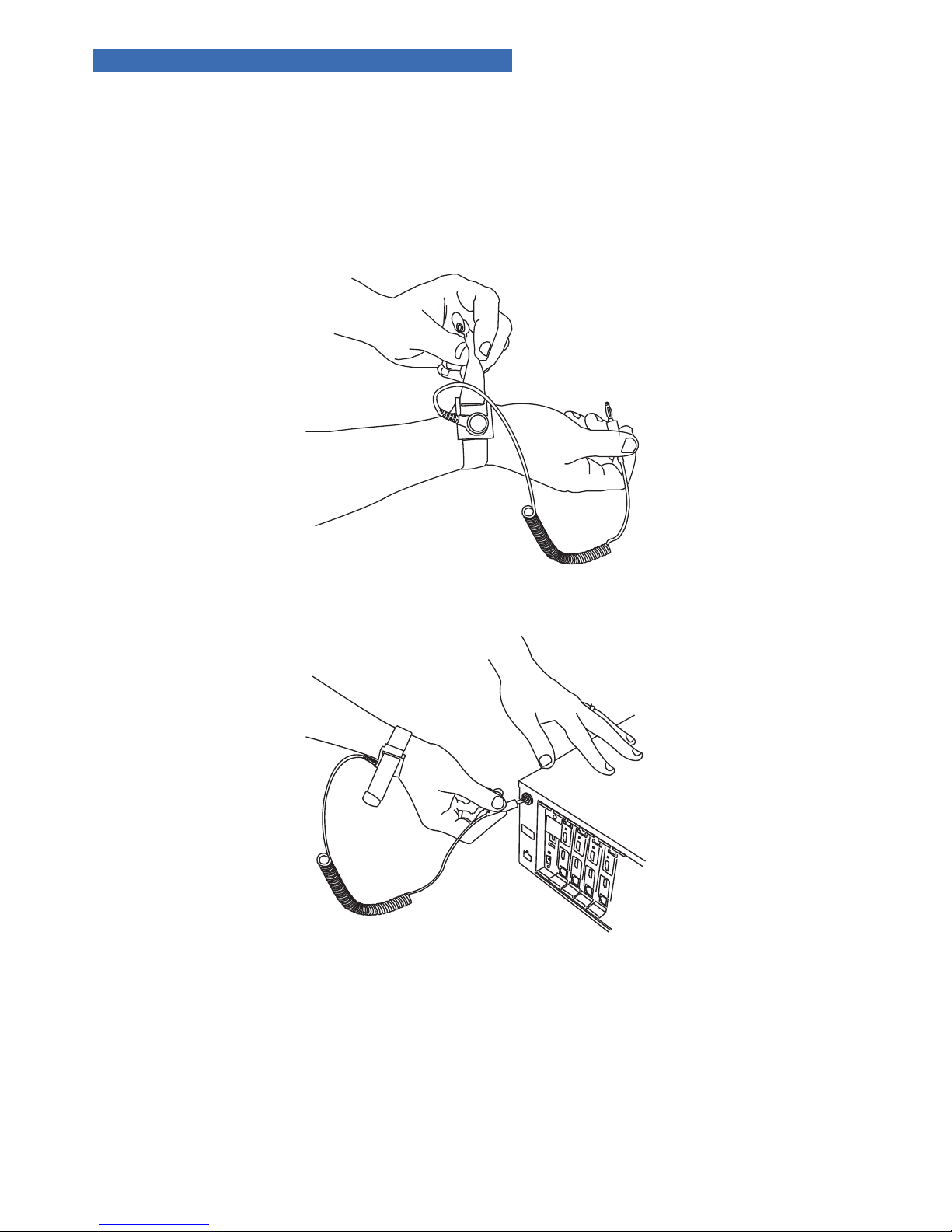
26
12. FIELD REPLACEABLE WARRANTY CARDS
If an HDMI input, HDMI/HDBaseT output, IR only input or control card is determined to be inoperable please
notify Tech Support (section 14). If an input or output card is deemed defective, follow the instructions below.
Note: Please review all installation instructions and procedures prior to beginning this process.
Disconnect power from the rear of the matrix switcher.
• Document every device connected to the defective card, then disconnect all connected devices from that card.
• Locate the anti-static grounding strap provided with the replacement card. Remove the alligator clip. Tighten
the wrist strap so that the metal makes contact with your skin. It is necessary to remain connected in this way
for the entirety of the procedure to ensure the safety of the matrix switcher and the replacement card.
• Insert the banana plug on the anti-static grounding strap into the green grounding jack located in the rear
upper left corner of the matrix switcher.
Page 27
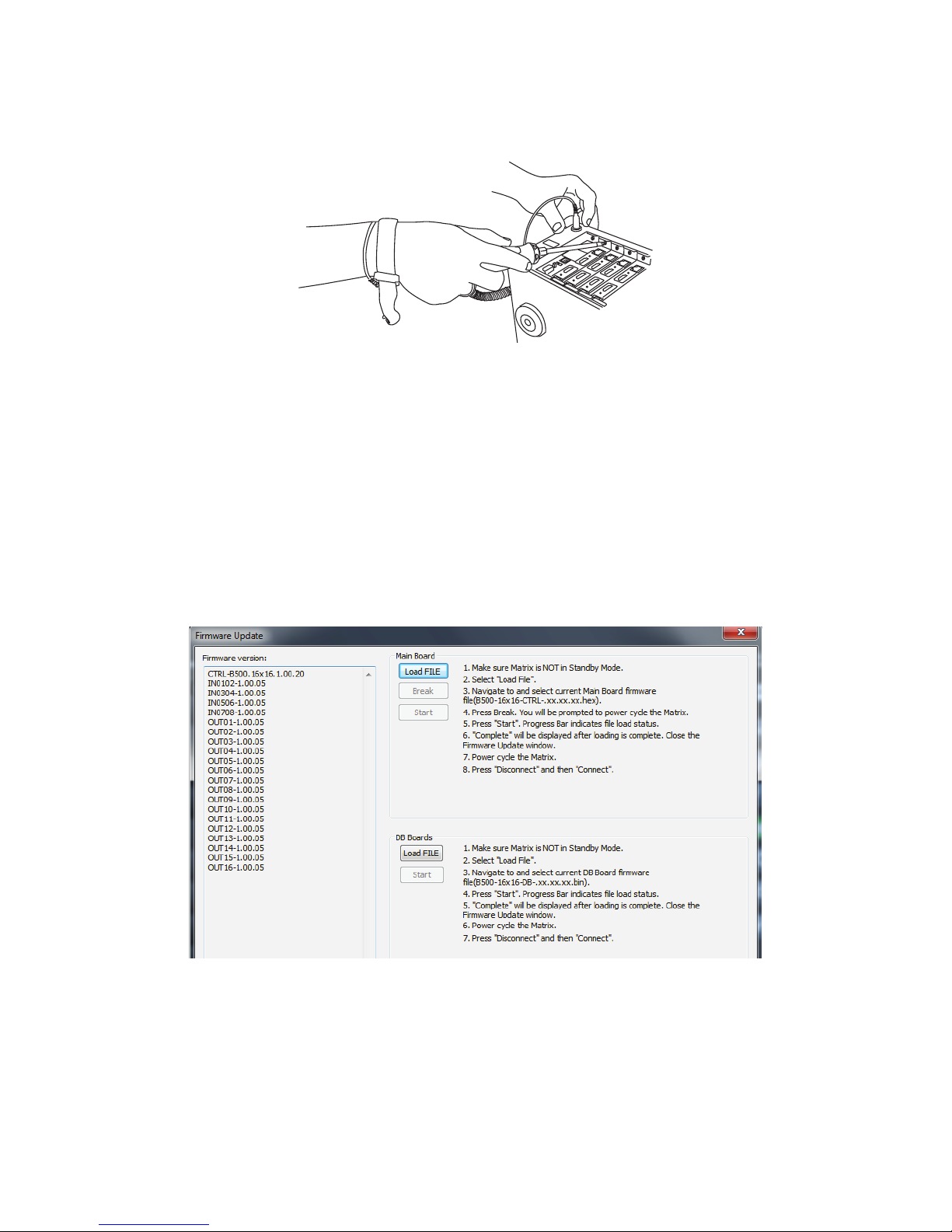
27
• Before continuing, have the provided ESD bag labeled “Return” ready to store the defective card. This bag will
keep the defective card from being misplaced or confused with the new card.
• Using a #2 Phillips screw driver with a magnetic tip, remove the Phillips screw under the upper pull-handle of
the card to be replaced. Once the screw has been removed, gently pull on both the upper and lower tabs, then
slide the card out and place it into the empty ESD bag labeled “Return”.
• Remove the replacement card from its ESD protected packaging.
• Install the replacement card by grasping both the upper and lower tabs, and gently insert the card into the
upper and lower guide slots. You will feel the card engage the back plane when the card is fully seated.
Note: If the replacement card is not on track with the guide slots, the card will not be seated properly, potentially leading
to further damage to the card and/or matrix switcher.
• Reinstall the Phillips screw to engage the card to the top of the chassis. Every replacement card is shipped with
4 spare screws in the event that one is misplaced. Please do not use a different type of screw other than the
provided spares.
Note: Failure to re-install the Phillips screw through the replacement card’s tab into the chassis can lead to improper
grounding, potentially causing failure of the card and/or the matrix switcher in the future from ESD and EMI events.
• Once the card is fully replaced, verify that the new card is seated properly.
• Remove both the ground and wrist straps.
• Reconnect the power supply to the matrix switcher.
Note: The “Daughter Boards” should all be on the same rmware version, which is not the same as the rmware on the
switcher.
• Verify that the rmware is current for both the replacement card and the matrix switcher.
For more direction on how to verify the current version of rmware (if a new version is available), open a web
broswer and visit the “Support” tab on the matrix switcher’s product page at SnapAV.com and download the
latest rmware/software. For information regarding how to update the rmware, refer to the instructions on
the right-hand side of the “Firmware Update” page in the Conguration Utility.
Now that the process is complete, reconnect all the devices that were disconnected and documented at the
beginning of the process and verify that all functionality is as expected. If the card still does not perform as
expected, review the previous steps and ensure that they were all followed correctly.
Page 28

28
13. SYSTEM LAYOUT CHART
Use this chart to identify the sources and displays attached to the system, and make any notes about each part.
When completing the outputs chart, make sure to indicate whether an HDMI cable, B-500-RX-230-IR, or another
brand HDBaseT receiver is being used to extend signal to the display, and indicate the approximate length of any
cables.
Input
Number
Source Brand
and Model Location
Cable
Length Notes
1
2
3
4
5
6
7
8
9
10
11
12
13
14
15
16
Page 29

29
Output
Number
Source Brand
and Model Location
HDMI or
HDBaseT
Cable
Length Notes
1
2
3
4
5
6
7
8
9
10
11
12
13
14
15
16
Page 30

30
14. SPECIFICATIONS
TECHNICAL
B-500-MTRX-230-8x16 B-500-MTRX-230-16x16
HDMI Compliance HDMI 3D
HDCP Compliance Yes
Video Bandwidth 6.75Gbps
HDMI over UTP Transmission
Resolution Cat5e/ Cat6 Cat6a
1080i / 720p 24-bit color 200ft 230ft
Full HD 1080P 24-bit color 200ft 230ft
Full HD 1080P 36-bit deep color 200ft 230ft
Input TMDS Signal 1.2 Volts (peak-to-peak)
Input DDC Signal 5 Volts (peak-to-peak, TTL)
ESD Protection
(1) Human body model — ±15kV (air-gap discharge) & ±8kV
(contact discharge) (2) Core chipset — ±8kV
IR Signal (Bi-directional) Carrier frequency: 20-60kHz
CONNECTIONS
HDBaseT Link 16 x RJ45
HDMI 24 x HDMI Type A (19-pin female) 32 x HDMI Type A (19-pin female)
IR (In) 1 x 3.5mm Mono
All IR (Out) 1 x 3.5mm Mono
IR Input to Room 16 x 3.5mm Mono
IR Output to Source 16 x 3.5mm Mono
RS232 Control Port DB9
Power Polarized
Ethernet 1 x RJ45
Banana Jack Ground Service
MECHANICAL
Housing Metal enclosure
Dimensions (W x H x D) 17.32” x 5.20” x 12.72” (without ears)
Weight 21 lbs.
Power Supply 12V DC 16A
Power Consumption 110w (max) 120w (max)
Operation Temperature 32~104°F
Storage Temperature -4~140°F
Relative Humidity 20~90% RH (no condensation)
Certications and Compliance
Product: CE, FCC
Power Supply: CE, FCC, UL
15. CONTACTING TECH SUPPORT
866.838.5052
For SnapAV customers, snapav.com
For Aisle 8 customers, onaisle8.com
Page 31

31
16. WARRANTY
16.1. 2 Year Limited Warranty
This Binary product has a 2-Year limited warranty. This warranty includes parts and labor repairs on all
components found to be defective in material or workmanship under normal conditions of use. This warranty
shall not apply to products that have been abused, modied or disassembled. Products to be repaired under
this warranty must be returned to a designated service center with prior notication and an assigned return
authorization number (RA)..
Page 32

16.2.
Rev: 151130-0840
®
 Loading...