

Page 1

BiPAC 2075
Powerline 500M / HomePlug AV
Gigabit Ethernet Adapter
Quick Start Guide
Page 2

Page 3
Billion BiPAC 2075 PLC 500M/ HomePlug AV Gigabit Ethernet Adapter
-1-
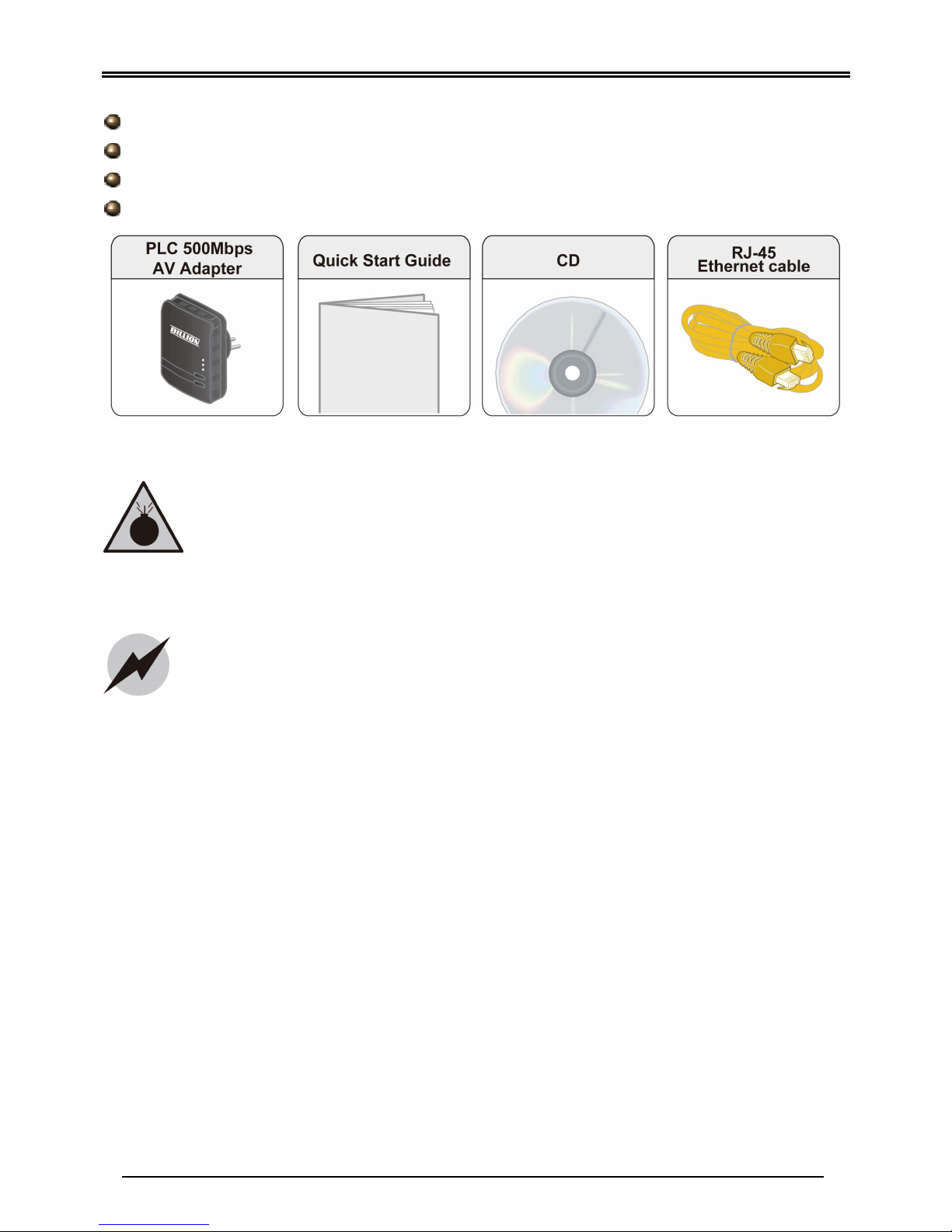
Package Content (BiPAC 2075 )
BiPAC 2075 PLC 500M / HomePlug AV Gigabit Ethernet Adapter
Quick Start Guide
CD (containing user manual, QSG and utility)
Ethernet (CAT-5 LAN) cable
Warning
Attention
Place the
adapter on
a stable surface.
“Homeplug AV” , “IEEE 1901 standard” compliant Power Line
Communication (PLC) adapter for remote access is necessary
Do not use the a
dapter
in high humidity or high temperatures.
Do not open or repair the case yourself.
Avoid using this product and all accessories outdoors.
Page 4
Quick Start Guide
-2-
Hardware Overview
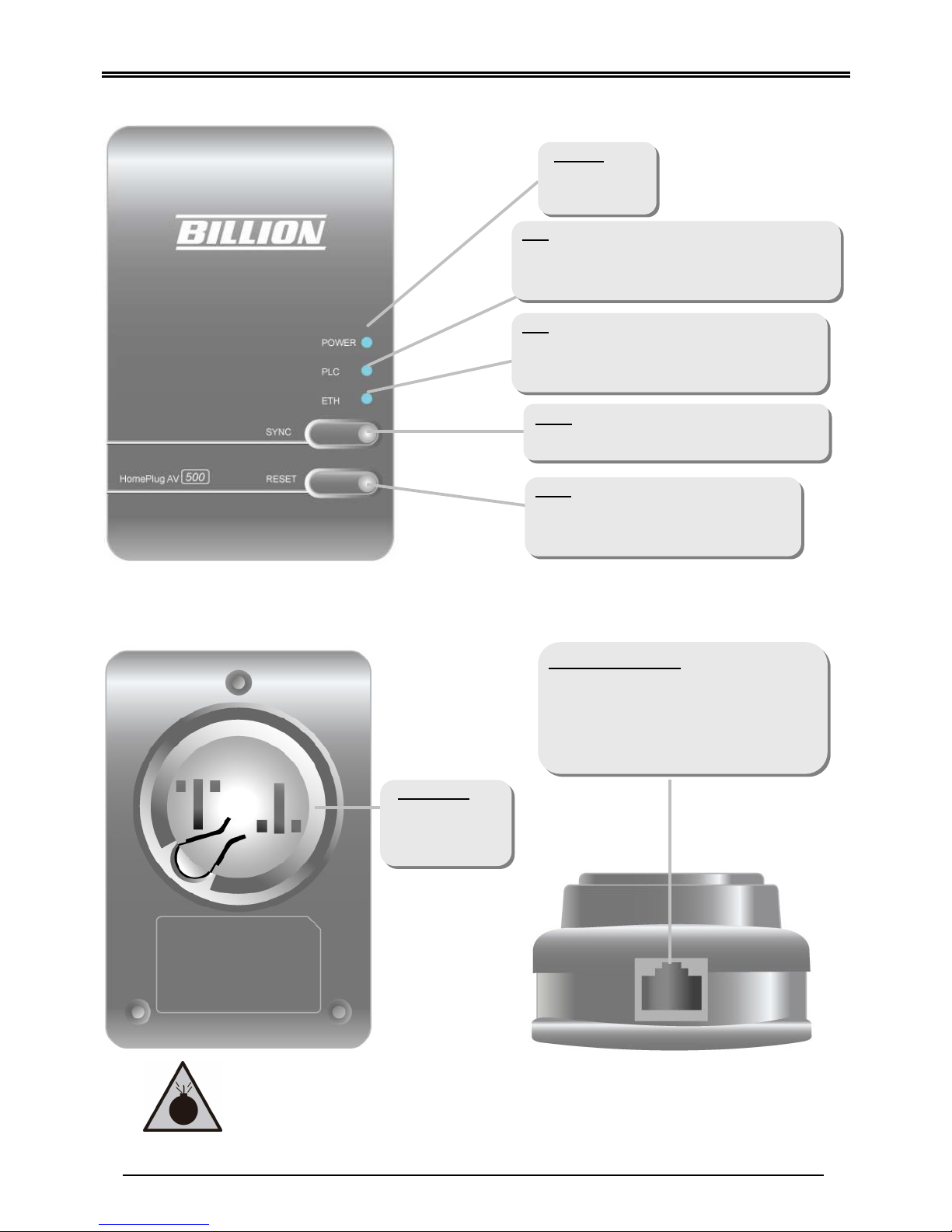
The LEDs and Buttons
The Rear Side The Ethernet Port
(For separated plug clip type only)
ETH:
* Lit when connected to an Ethernet device.
* Blinking when data is transmitted or received
via Ethernet port.
PLC:
* Lit when the power line sync is established.
* Blinking quickly when data is transmitted or
received.
POWER
:
* Lit when the
device is
power on.
SYNC
:
* Used to establish a LAN network with
other PLC adapters.
Reset
:
* Press this button to for 1~3 second(s)
to reset device to factory default
settings.
Gigabit
Ethernet Port
:
Connect the PLC 500M/ AV device with
an Ethernet device (e.g. computer,
router, hub/switch , IP pone, IPTV
set-top-box, gaming consoles…), using
the RJ-45 (Cat.5 8P8C) Ethernet cable
included.
Clip Socket
:
* Install the clip
into this
socket.
Please
DO
NOT
remove or
dis
assemble the
socket
clip
frequently as this may cause serious damage to your
PLC 500M /AV device!
Warning
Page 5
Billion BiPAC 2075 PLC 500M/ HomePlug AV Gigabit Ethernet Adapter
-3-
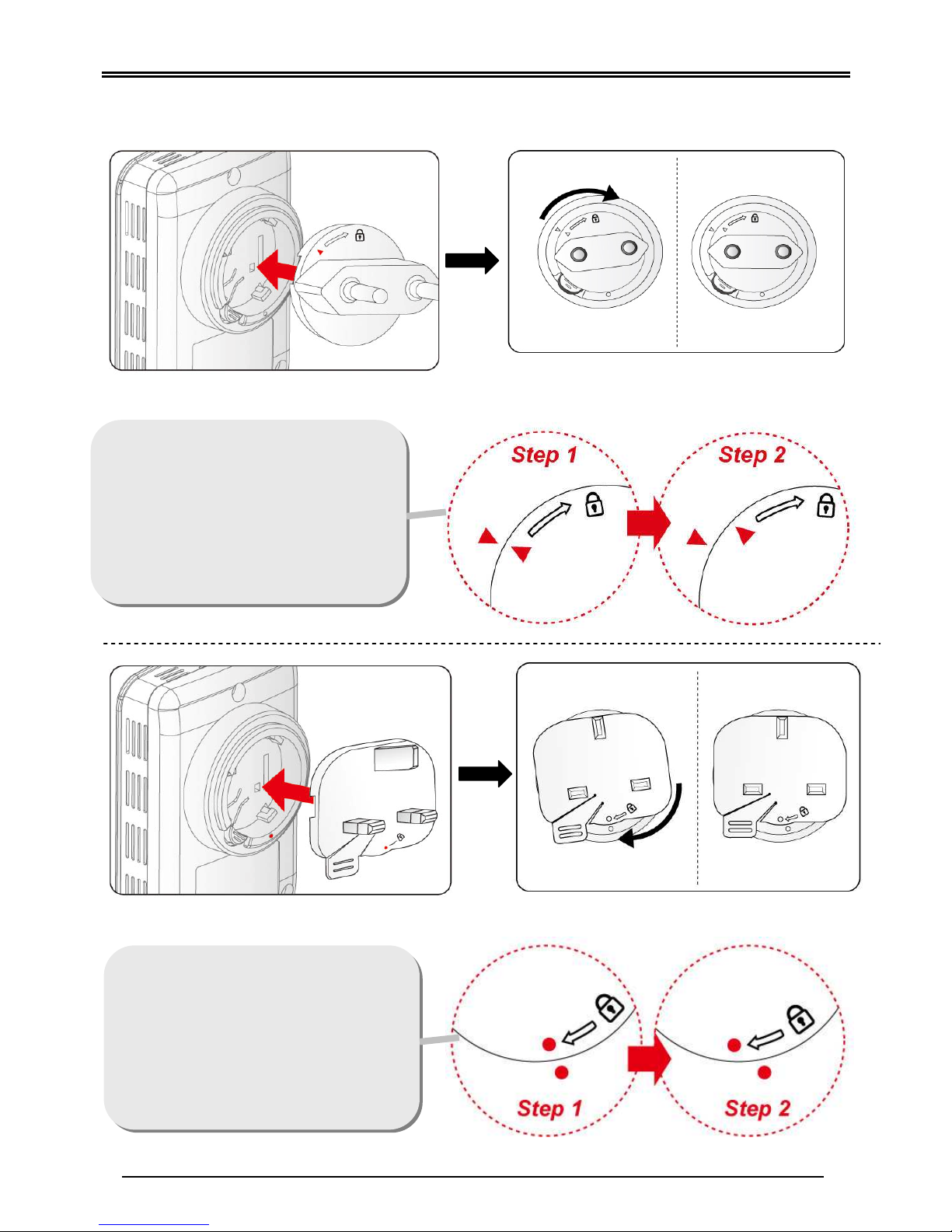
Clip Installation (For separated plug clip type only)
Installing the clip with BiPAC 2075
Follow the diagrams and direction to
install the clip.
(This is an example of EU clip.
Please check the lock instruction on
your clip. If you got the “Triangle
Lock”, refer to right diagram.)
Follow the diagrams and direction to
install the clip.
(This is an example of UK clip.
Please check the lock instruction on
your clip. If you got the “Circle
Lock”, refer to right to diagram.)
Page 6
Quick Start Guide
-4-
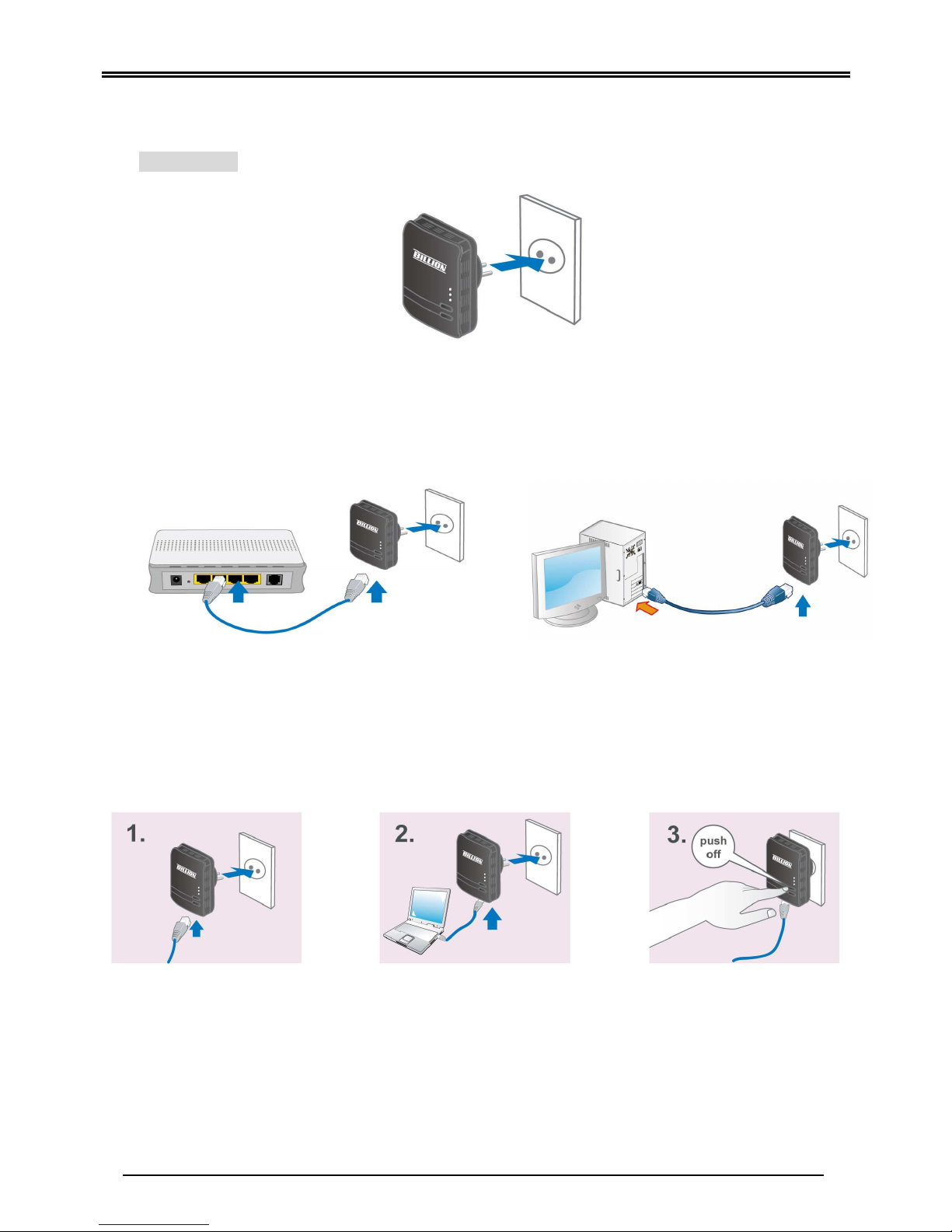
Hardware Installation
1. Power Connection
BiPAC 2075
Plug the Power Line 500M /Homeplug AV Gigabit Ethernet Adapter into the wall outlet/socket.
2. LAN Connection
Connect the supplied RJ-45 Ethernet cable to the Ethernet port on Power Line 500M /AV
Ethernet bridge/adapter and the other side to the device’s Ethernet interface.
3. Connection of the BiPAC 2075
Setup Utility
After you complete the hardware installation, insert the CD-ROM to the CD-ROM drive to
perform Setup Utility for network configuration. The Setup Utility will auto-run. Follow the
step-by-step configuration wizard, the utility will guide you complete the basic network
configuration.
Connect a network cable
to the adapter and then
plug the BiPAC 2075
into a power socket.
Then connect the BiPAC
2075 to a PC, modem,
router or a set-top-box.
Create a secure network
by simply pushing the
SYNC button for 1~3
seconds.
Page 7
Billion BiPAC 2075 PLC 500M/ HomePlug AV Gigabit Ethernet Adapter
-5-
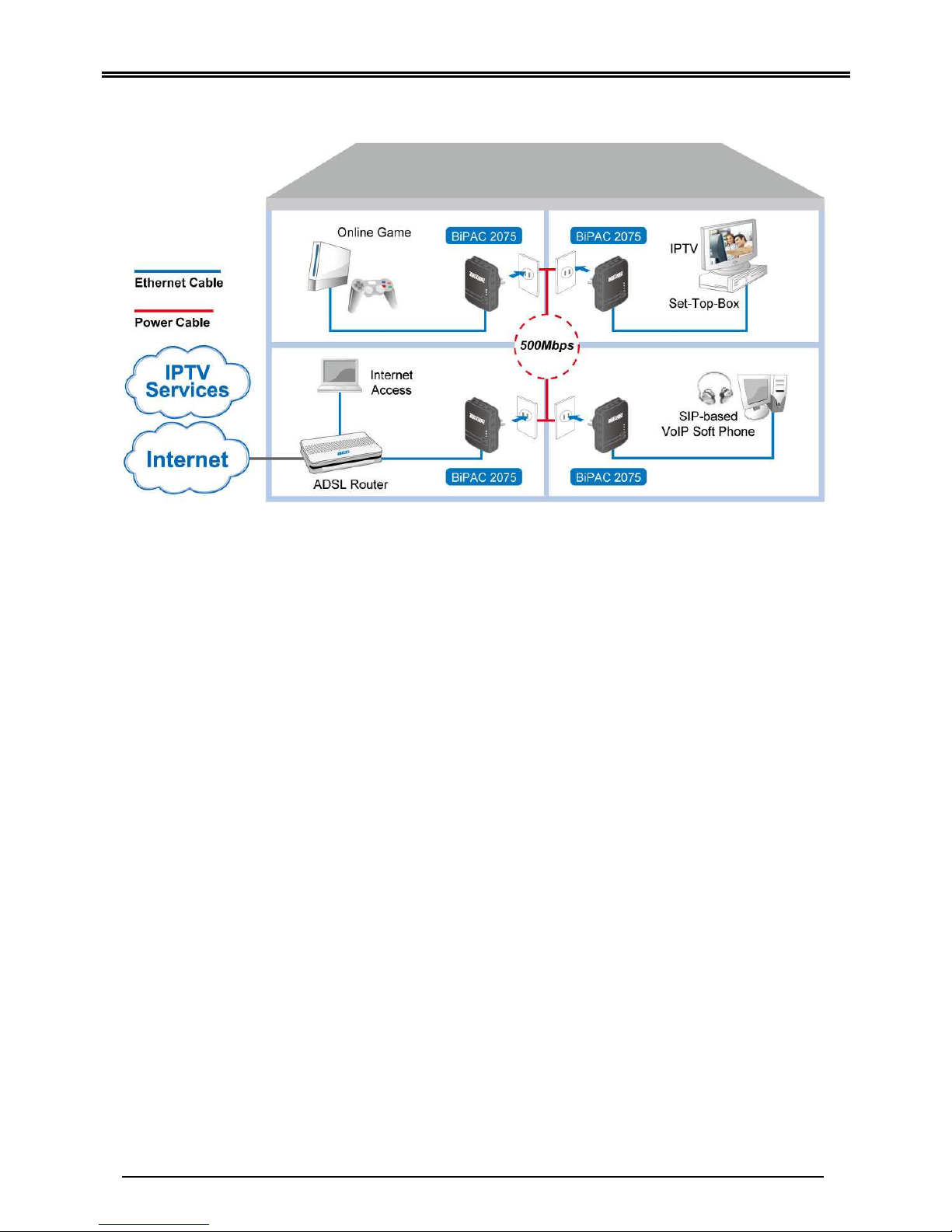
Product Application
Product Support and Contact Information
Most problems can be solved by referring to the Troubleshooting section in the User’s Manual.
If you cannot resolve the problem with the Troubleshooting chapter, please contact the dealer
where you purchased this product.
Contact Billion WORLDWIDE
http://www.billion.com
BiPAC 2075 V.1.00EN
(AAMPIMBIL2075XXXX0)
 Loading...