

Page 1
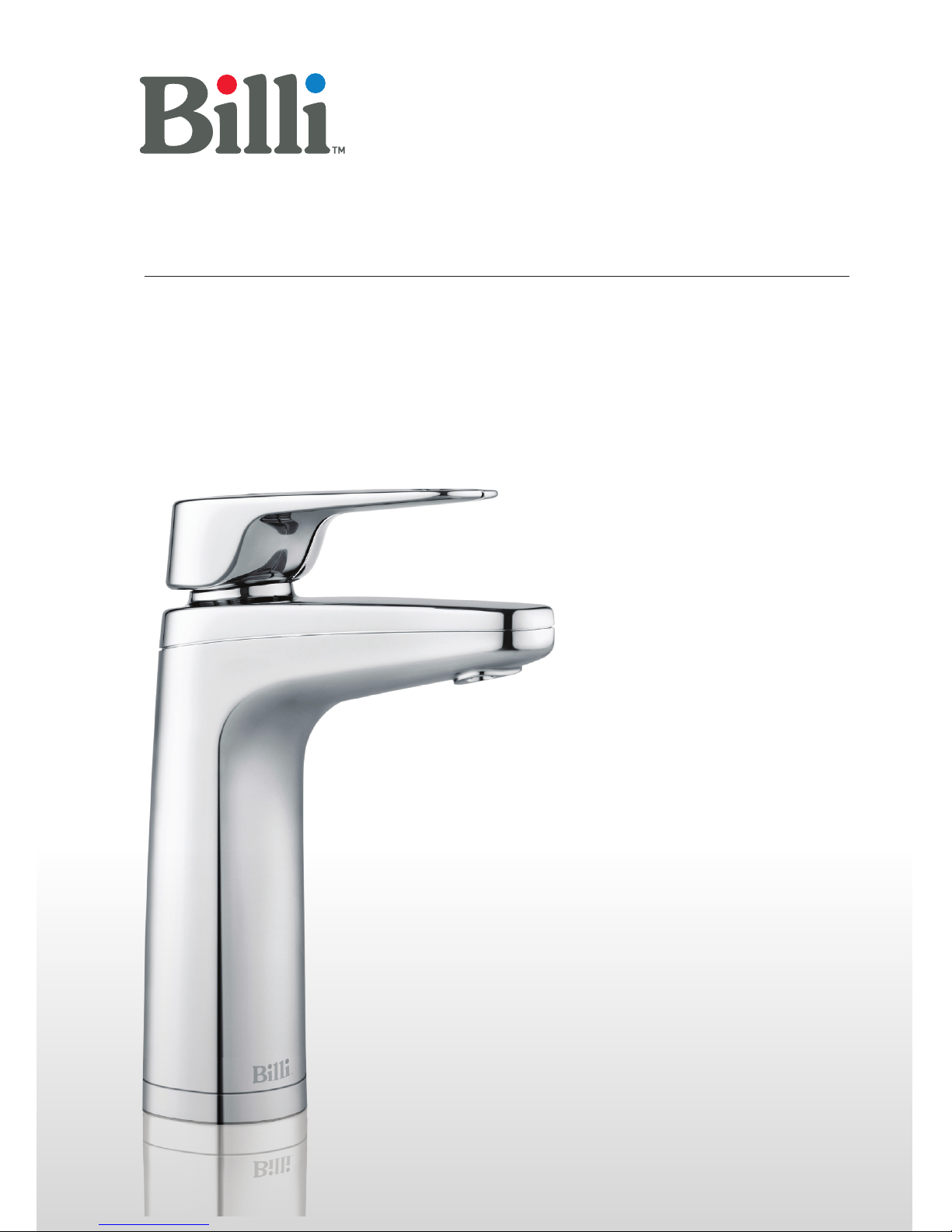
User guide
Billi Sahara & Sahara Plus
Page 2

2
User guide
Billi Sahara & Sahara Plus.
Contents
Warnings & Important information ........2
General Maintenance.....................3
Features and Modes......................4
Options & Operation . . . . . . . . . . . . . . . . . . . . . . 5
Dispenser Icon Codes.....................6
Filtration Information.....................7
Changing the filter .......................8
Service Support .........................9
Warranty ...............................10
Warnings & Important information
– For continued safety of this appliance it
must be installed, operated and maintained
in accordance with the manufacturer's
instructions.
– Your appliance should be installed
by a suitably qualified tradesperson.
– For correct operation of this appliance
it is essential to observe the instructions
as outlined in this booklet.
– Do not use this appliance with water that
is microbiologically unsafe or with water
of unknown quality without adequate
disinfection before or after the system.
Systems certified for cyst reduction may
be used on disinfected water that may
contain filterable cysts.
– Filter replacement must be performed
at intervals of not more than 6 months.
– Use this appliance only as directed
in these instructions and only for its
designed purpose.
– This appliance is not intended for use by
persons (including children) with reduced
physical, sensory or mental capabilities,
or lack of experience and knowledge,
unless they have been given supervision
or instruction concerning use of the
appliance by a person responsible
for their safety.
– This appliance is not suitable in an
area where a water jet could be used.
– Children should be supervised to ensure
that they do not play with the appliance.
– DANGER: The operation of the thermal
cut-out indicates a possibly dangerous
situation. Do not reset the thermal cut-out
until the water heater has been serviced
by a suitably qualified person.
– WARNING: Do not connect any restrictor
or pressure relief device to the vent pipe
of this water heater if installed.
Page 3

– If the supply cord is damaged, it must be
replaced by the manufacturer, its service
agent or similarly qualified persons in
order to avoid creation of a hazard.
– Billi hose sets as supplied with the
appliance are to be used. Old or other
manufacturer’s hose sets should not
be re-used.
– If the appliance is located where the
ambient air temperature could fall below
4°C when the heater is not in use, do not
turn o the power supply to the appliance.
This safeguard does not oer the same
protection to the connecting pipework
and fittings.
– The ambient temperatures this unit
should operate within are 4°C to 45°C.
– Turn o power to unit, by unplugging the
power cord from the power point, if water
supply is turned o
Caution and safety
Boiling water is dangerous and can
cause severe burns, particularly with
young children. Boiling water must always
be handled with caution. Use this appliance
only as directed in these instructions and
only for the purpose for which it has been
designed. Your Billi Sahara is designed to be
safe and practical. In an environment with
young children, it is recommended that the
boiling water safety switch is activated.
The following safety features have been
included:
– Ergonomic levers
– Levers/touch activations located
safely above water outlet.
– Smooth electronically controlled boiling
water flow rate. Flow is briefly reduced as
water first enters cup to prevent splashing.
– Dispenser remains cool to touch.
– Childproof safety switch.
– Boiling water Safety Isolation mode.
General Maintenance
Your Billi Sahara has been designed to require
minimal maintenance other than replacement
of filter cartridges. During each filter change,
check all water connection fittings for signs
of leakage. Check all tubing for any signs of
damage. Check the cupboard area around the
base of unit for any signs of moisture. Ensure
side vents of the under bench module are kept
clear and airflow is not obstructed. Restricted
airflow will cause inecient operation of the
refrigeration system.
—Cleaning the dispenser
Your Billi Sahara Dispenser is fabricated
from robust metal with a tough protect
chrome plating. Care of dispenser is as
with any chrome plated tapware. Avoid using
abrasive cleaners. Wipe clean using a damp
cloth. Use of a non-solvent, non-smearing
cleaner such as Windex is recommended.
Do not pour water over dispenser.
Cupboard ventilation requirements
Your Billi Sahara underbench module requires
no cupboard ventilation but requires air
space around the unit of 25mm. Care should
be taken when using the cupboard space,
to avoid stretching or damaging plastic pipe
work. Check fittings and tubing at each filter
change for signs of damage or leakage.
Always ensure access to power switch
and water supply tap is not restricted.
3
User guide
Billi Sahara & Sahara Plus.
Page 4

User guide
Billi Sahara & Sahara Plus.
Features and Modes
—Dispenser Swivel
The Sahara dispenser incorporates a swivel
function, allowing the dispenser to be swung
out of the way if more sink space is required.
A central position stop provides positive
location during normal usage.
—Safety timeout
The Billi Sahara incorporates a water delivery
Safety Timeout to prevent an uncontrolled flow
of water. Water flow stops automatically after
a set time interval. Flow can be started again
by releasing and pressing the dispenser lever.
Boiling water timeout – 10 secs;
Ambient water – 1 minute.
—Childproof safety switch
The Billi Sahara is fitted with a childproof
safety lock-out feature to protect against
accidental dispensing of boiling water and
the risk of burns. Please refer to page 5.
—Standby mode
Standby operation may be optionally
enabled to reduce power consumption.
In standby mode the hot water set point is
reduced to 72°C and the cold water set point
is increased to 18°C. When enabled, standby
is invoked after two hours from the time of last
use. When a tap lever is pressed in standby no
water is dispensed. The indicators will flash to
indicate the water is not ready. The tap can be
repressed to dispense water. During Standby
mode the Moon & Star icons will flash, to
activate, refer to Options, page 5.
—Boiling water disabled mode
Your Billi Sahara features an additional
boiling water safety isolation feature.
Once activated, delivery of boiling water
becomes totally disabled. Chilled water
can be dispensed normally.
During this mode, the hot – red - icon will
remain o. To activate, refer to Options &
Operation, Safety Switch Settings on page 5.
—Holiday mode
Holiday Mode is provided to save energy
when the unit will not be used for long periods.
In this mode both the water chiller and water
heater are disabled and the unit will use
very little power. Pressing the Pressure
Relief button places the unit in Holiday Mode.
The unit will exit Holiday Mode if either the
power is turned o then on or if any of the tap
levers are pressed. The Self Learning Timer
will ignore user behaviour while the unit is in
Holiday Mode and resume normal operation
when the mode is terminated. Holiday Mode
is indicated the moon and star icon, see page
6 for icon codes.
4
Page 5

5
User guide
Billi Sahara & Sahara Plus.
Options & Operation
To operate, simply press the left lever to
dispense boiling water and the right lever
to dispense chilled. When lifted the levers
will latch for continual delivery, until released
with a light press.
Operating modes can be selected by the
user by entering Options Mode.
Within the options mode, you can set the safety
switch through the hot water lever and power
save mode through the cold water lever.
See below for further instructions.
—To enter the options mode:
1. Turn on the unit and wait for normal
operation (icons are both illuminated
constantly).
2. Push both the hot and cold levers
down & then while holding the two
levers down press the safety switch
at rear of tap. Hold both levers and
safety switch for 3 seconds.
3. Icons will flash yellow.
4. Release both the levers & safety switch.
5. Unit is now in options mode.
6. If you wish to change or set the safety
switch mode, follow the safety switch
settings procedure below. If you wish
to change or activate the power saving
mode follow the power save mode
settings procedure below.
—Safety Switch settings
The Red padlock indicates the dierent safety
settings enabled. To change or activate a
setting once in options mode as above, press
and release the hot (left) lever to scroll through
the following options;
– Red Icon O: indicates the hot tap is
disabled.
– Padlock icon on, Red icon o: indicates
safety switch is enabled
– Red Icon On: indicates normal operation
with safety switch not enabled.
To save new setting and exit Options Mode,
touch the safety switch and release. Wait 10
seconds for unit to return to normal operation.
— Power save mode settings
(EcoIntelligence, standby or on 24/7)
The Green icons on the tap indicates the
power save level that is selected. To change
or activate a setting once in options mode,
press and release the ambient (right) lever
to scroll through the following options;
– Green leaf on: indicates Eco Intelligence™
self learning timer is enabled.
– Green moon & stars icon flashing:
indicates Standby Mode is enabled.
– White Icon On: indicates system is in
24 hour continuous mode.
To save new setting and exit Options Mode,
press the safety switch and release. Wait 10
seconds for unit to return to normal operation.
—Holiday mode
To set press the pressure relief valve located
under the unit cover beside the filter housing.
Page 6
6
User guide
Billi Sahara & Sahara Plus.
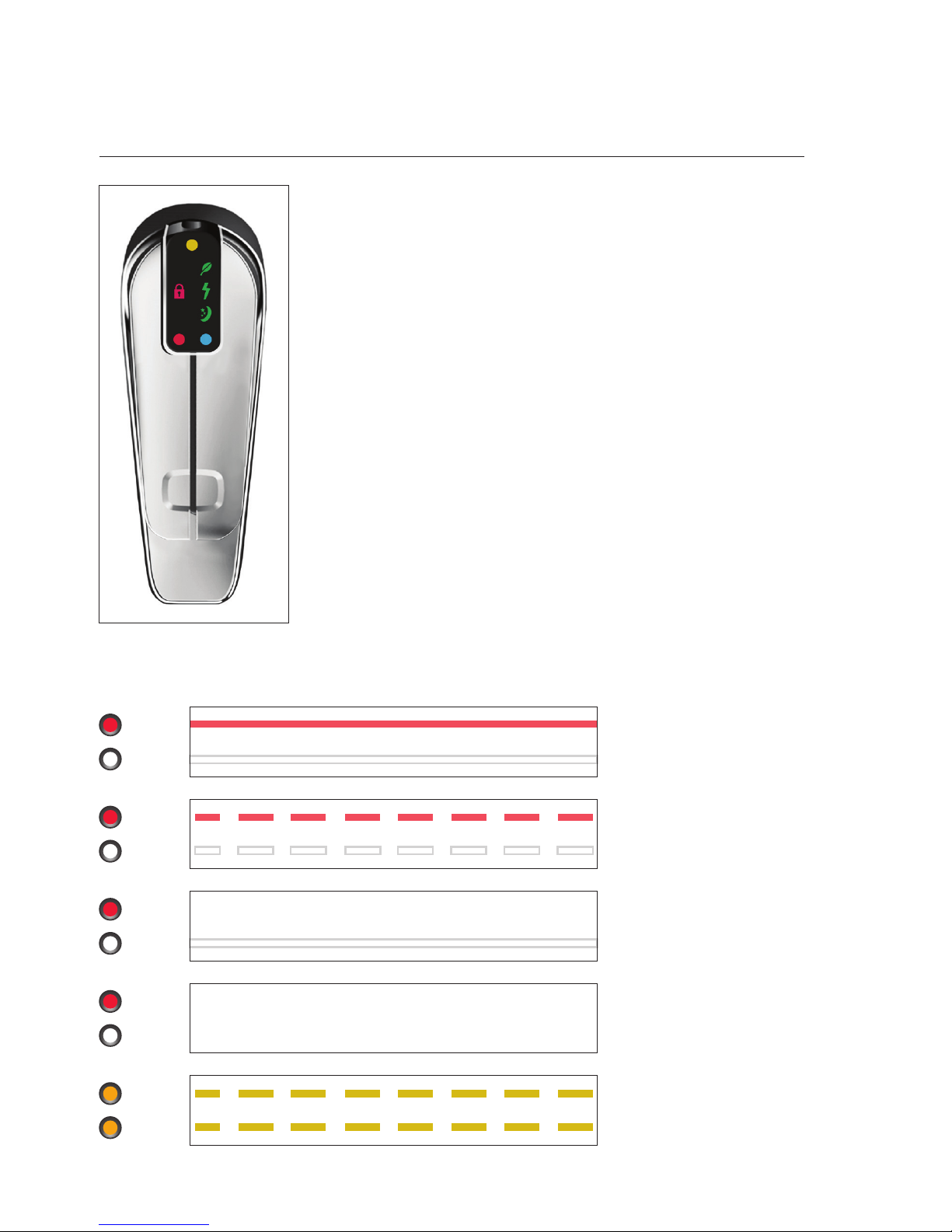
Dispenser Icon
Orange dot.
Flashes when filter change due. On constant when overdue.
Red lock illuminated.
Safety button activated. To use, press the indent on the
back of the tap momentarily & lift or press the boiling lever.
Green leaf illuminated.
Eco intelligence.
Green moon & stars illuminated.
In holiday mode or o.
Green moon & stars flashing
In standby mode.
Red dot.
Flashes when heating up to temperature. On constant when
boiling water ready. O when in holiday, standby or boilng
water disabled
White dot.
On constantly to indicate filtered water.
Red & white dots will flash yellow if the unit goes into fault.
Dispenser Icon codes
Red
White
Red
White
Red
White
Red
White
Orange
Orange
Normal operation
Normal operation
Operating temperatures
of hot and cold water not
yet reached
Boiling water disabled
System in holiday or
standby Mode or o
Unit in Fault Mode
Page 7

7
User guide
Billi Sahara & Sahara Plus.
Billi Filter Cartridges
The Bill Sahara is fitted with single dual action
filter incorporating sediment and chemical
removal elements. All Billi Sahara filters are
manufactured using bacteria and biofilm
resistant materials for improved water quality.
Premium filters provide better tasting water
due to the high quality, carbon chemical
removal filter. Sub micron rated, these
filters have excellent chemical absorption,
removing or reducing chlorine, volatile organic
compounds (VOCs), chemicals, tastes and
odours. Use only genuine filters as designed
for this system. All drinking water filtration
systems should be flushed after a period of
non-use. If your Billi Sahara has not been used
for a period of 48 hours or more, operate
the lever and run water for 1 minute then
release the lever.
—Replacement of Billi Filter Cartridge
Periodic replacement of your Bill Sahara
Filter Cartridge is necessary to maintain
the cleanliness of your drinking water.
Billi recommends a filter replacement
every 6 months. A replacement filter change
service is available. If you wish to install the
replacement filter cartridges yourself, your
Billi representative will provide genuine
Billi replacement filter cartridge sets.
—Filter Change Due Monitor
The Sahara filter change due monitor
operates by counting the number of cups
dispensed and the number of days elapsed
until a pre-set level is reached. Once reached,
the dispenser icons will briefly change to
orange once every five seconds. The Sahara
will continue to operate while the filter
indicator is flashing. Water filters installed
in areas with higher levels of sediment will
experience a reduced service life. It may
be necessary to change filters before the
change filter indicator flashes. If particularly
dirty water is noticed coming through the
water supply, e.g. from other tap ware,
immediately place your Billi Sahara into
Holiday Mode by pressing the Pressure Relief
button. This will help prevent premature
blocking of the filter cartridges.
Filter
Type
Order
Part No. Suits Micr. Filters Sediment Chlorine VOCs Chemicals
Taste
Odour
Fluoride
Minerals
Expected
Life
Prem. 990413
Billi
Sahara
sub Single
Slight
6 - 12
months
Stand. 990402
Billi
Sahara
5 Single
6 - 12
months
Billi Filter Cartridges – Reduces & Removal
Page 8
8
User guide
Billi Sahara & Sahara Plus.
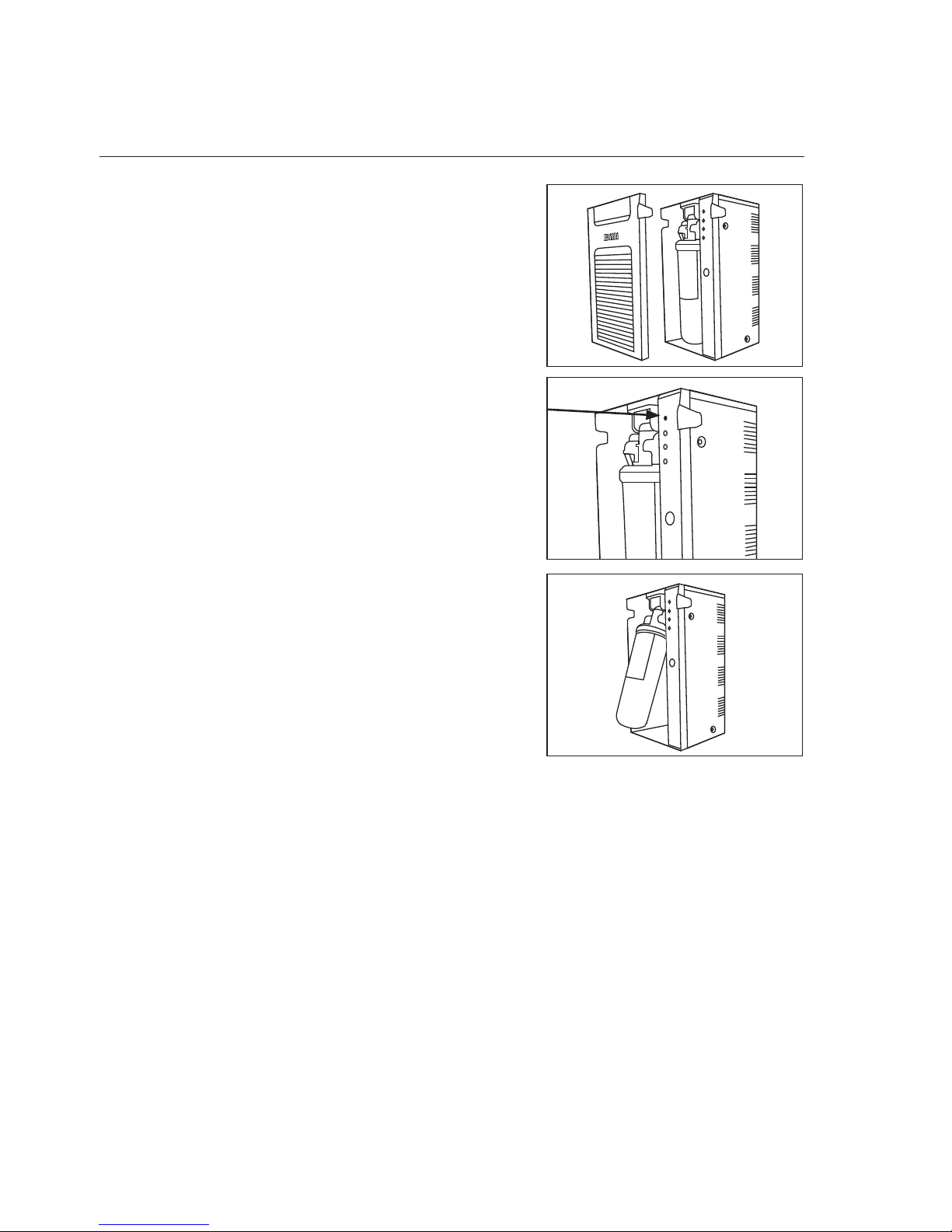
Filter removal and
replacement instructions
Important note: Please ensure you remove the
foam packing under the filter before installing.
1. Remove the front panel.
2. Place the unit in Holiday Mode by pressing
the Pressure Relief button once. The lights
on the dispenser will alternate and then go
o
3. Hold filter and swing towards you slowly.
The top of the filter is in a hinged cradle
assembly. It should stop after approximately
30 degrees of travel.
4. The filter can now be released from the
holding cradle by pulling down on the filter.
5. Take care not to spill water in the base of the
tray. If so wipe gently with absorbent paper.
6. Install new filter into the same location
by pushing all the way up into the cradle.
7. Push filter back into the unit until it locks
into place. Power light should come back on.
8. Lift cold lever and run until water flow stops.
Close cold lever and wait for 10 minutes.
Lift cold lever and run until water stops.
Close cold lever.
9. Check for any leaks from around the filter,
hosing or pipeworks.
10. Replace the front cover.
Page 9

9
User guide
Billi Sahara & Sahara Plus.
Thank you for choosing to install a
Billi Sahara Drinking Water Appliance.
Your Sahara is manufactured to
exacting standards using high quality
materials and with proper maintenance
and care, should function for many
years.
For information on our filtration
and service contract please contact
Merquip Ltd on 0800 636-0-636
or email service@merquip.co.nz
For technical support please call
0800 636-0-636 and speak to one
of Billi’s experienced technician’s.
To book a service call out request
a filter change or please contact the
Page 10

10
User guide
Billi Sahara & Sahara Plus.
Warranty
a) direct an accredited service provider
to attend the customer's premises
(provided that the premises are located
within Australia) and repair the defect
free of charge; but if the customer's
premises are located more than
25 kilometres from one of Billi's
authorised service agent's locations
then the customer will be liable for any
increased freight costs, fees, charges
or levies Billi may incur as a result
of fulfilling its obligations under this
paragraph a) of this Product Warranty; or
b) direct the customer to return the
product to Billi so that Billi may provide
a replacement product free of charge.
If Billi elects to do this, Billi will also
pay the necessary freight charges,
and the customer will pay for the
removal of the product and the costs
of reinstalling the replacement product.
Any product replaced or repaired under
this Product Warranty will be covered by the
product's remaining warranty period, or three
months, whichever is greater. If the product
or any part thereof is replaced by Billi under
this Product Warranty, all of the right, title and
interest in and to the replaced product or part
shall vest in Billi upon it being replaced.
—Warranty exclusions
1. Billi shall not be liable under this Product
Warranty:
a) unless the product was installed correctly
and as per the installation instructions
supplied with the product;
b) if the defect is contributed to or caused
by any improper usage of the product or
usage of the product for purposes other
than that for which the product was
designed or intended;
c) if the defect occurs wholly or partially
as a result of any act or omission by the
customer, or any person other than Billi;
d) if the product is subject to misuse,
neglect, accident or abuse or the
customer continues to use the product
after the defect becomes apparent;
e) if the product is damaged as a result of
poor water quality;
f) if the product is repaired, or any attempt
to repair the product is made, by anyone
other than an authorised repairer of the
products acting at Billi's direction; or
g) if the product is altered or modified in
any way unless such modification has
been approved in writing by Billi.
2. Notwithstanding anything to the contrary,
filters are not covered by this (or any other)
Product Warranty.
Subject to the warranty exclusions set
out below, if a defect in a new product
supplied by Billi Pty Ltd (ACN 124 066 717) ("Billi")
and purchased by you ("customer")
from a reseller authorised by Billi occurs within
12 months of the date of purchase of
the product as a result of defective materials or
defective manufacture by Billi, and Billi receives a
written claim (containing details
of the product defect together with a receipt from
the reseller of the products showing the date of
purchase of the products, or such other proof of
purchase and the date of purchase as Billi may
accept) within 13 months of the date of
purchase, Billi shall, at its discretion:
Page 11

11
User guide
Billi Sahara & Sahara Plus.
—Limitation of liability
3. Except for the Product Warranty set
out above, and except for any liability
in connection with the supply of goods
imposed on Billi by the Trade Practices
Act 1974 (Cth) and other similar state
and territory legislation (including for
breach of implied conditions and warranties)
which cannot, or which can only to a limited
extent, be lawfully excluded, all liability
of, and conditions and warranties relating
to the supply of the products by, Billi are
hereby expressly excluded. Any such liability
which cannot be lawfully excluded is limited,
at Billi's option, to any one or more of the
following:
a) the replacement of the goods or the
supply of equivalent goods;
b) the repair of the goods;
c) the payment of the cost of replacing the
goods or of acquiring equivalent goods; or
d) the payment of the cost of having the
goods repaired.
Page 12
Designed and manufactured in Australia.
As Billi Pty Ltd has a policy of continual
improvement, all details are subject
to change without notice. All goods
are sold subject to our published terms
and conditions. Billi is a registered
NZ Distributor:
Merquip Ltd
Auckland
Ph: 0800 636-0-636
www.merquip.co.nz
trademark. 1012
 Loading...