

Page 1
6
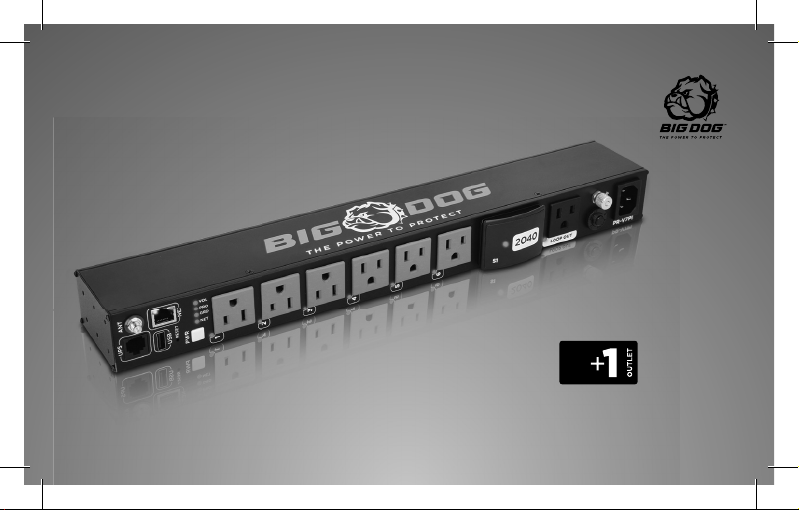
Intelligent VERTI CAL Ra ck Mount
POWER DISTRIBUTION UNIT
LOOP OUT
PR-V7PI
1
Page 2

Introduction
Thank you for purchasing the PR-V7PI. Your
new Power Distribution Unit (PDU) by Big
Dog Power provides filtered AC power to
your equipment. 6 individually controlled
outlets provide up to 2040 Joules of surge
Protection. Wi-Fi and Wired LAN connections
allow for flexibility with placement and
network connectivity. The built in SelfHealing functions of the PR-V7PI will keep
your network connected equipment going by
automatically resetting the power going
to the outlet.
2
Page 3
Features
• 6 individually controlled outlets
• 1 always on Loop Out outlet: Gives the
ability to expand with additional PR-V7PI
to match your needs
• Rack Mountable 1U or vertical
• Additional mounting holes on the ends
and along the side allows for additional
mounting orientations
• Self-Healing functions for network
connected equipment
6
SMART OUTLETS
+1 LOOP OUT
REPLACEABLE M.O.V.
SURGE MODULE
POWER METERING
INDIVIDUAL OUTLETS
MAVBASE APP
MANAGEMENT
• Surge Mileage: Track when a Surge Event
happens and the remaining health of the
surge protection
• Replaceable surge modules
• 2040 Joule surge protection
• Web and Mobile app for remote
management and notification
• RS-232/Serial and IP automation integration
• Grounding Lug
• 120V/12A Rating
SELF HEALING
AUTO REBOOT
FLEXIBLE MOUNTING
OPTIONS
WIRED/WIRELESS
CONNECTIVITY
SET MULTIPL E
SCHEDULES
CONNECTED EQUIPMEN T
GUARANTEE
3
Page 4

Big Dog Power™
by Metra Home Theatre, LLC Limited Product Warranty
and Connected Equipment Limited Warranty
Valid in the United States and Canada
THIS WARRANTY DEFINES ETHEREAL
HOME THEATRE. LLC’S LIABILITY FOR ANY
AND ALL DAMAGES RESULTING FROM
THE OPERATION OR FAILURE OF THE
PRODUCT. THE WARRANTY PROVIDED
IS IN LIEU OF ANY AND ALL OTHER
WARRANTIES, EXPRESS OR IMPLIED. TO
THE MAXIMUM EXTENT PERMITTED BY
APPLICABLE LAW, METRA DISCLAIMS ANY
AND ALL OTHER WARRANTIES WHETHER
EXPRESS OR IMPLIED. TO THE MAXIMUM
EXTENT PERMITTED BY APPLICABLE LAW,
ETHEREAL HOME THEATRE. LLC HEREBY
DISCLAIMS ANY AND ALL LIABILITY
4
FOR DIRECT, SPECIAL, INCIDENTAL OR
CONSEQUENTIAL DAMAGES RESULTING
FROM ANY PRODUCT FAILURE, ANY
BREACH OF WARRANTY OR CONDITION,
OR UNDER ANY OTHER LEGAL THEORY,
INCLUDING BUT NOT LIMITED TO LOSS OF
USE; LOSS OF REVENUE; LOSS OF ACTUAL
OR ANTICIPATED PROFITS (INCLUDING
LOSS OF PROFITS ON CONTRACTS);
LOSS OF THE USE OF MONEY; LOSS OF
ANTICIPATED SAVINGS; LOSS OF BUSINESS;
LOSS OF OPPORTUNITY; LOSS OF
GOODWILL; LOSS OF REPUTATION;
LOSS OF, DAMAGE TO, COMPROMISE OR
CORRUPTION OF DATA; OR ANY INDIRECT
OR CONSEQUENTIAL LOSS OR DAMAGE
Page 5

HOWSOEVER CAUSED INCLUDING THE
REPLACEMENT OF EQUIPMENT AND
PROPERTY, ANY COSTS OF RECOVERING,
PROGRAMMING, OR REPRODUCING ANY
PROGRAM OR DATA STORED IN OR USED
WITH THE PRODUCT. FURTHER, TO THE
MAXIMUM EXTENT ALLOWED BY
APPLICABLE LAW, Ethereal Home Theatre,
LLC HEREBY EXPLICITLY DISCLAIMS ANY
WARRANTY OF MERCHANTABILITY OR
FITNESS FOR A PARTICULAR PURPOSE.
THESE LIMITATIONS SHALL NOT APPLY TO
ANY DEATH OR PERSONAL INJURY CLAIMS,
OR ANY LIABILITY FOR INTENTIONAL ACTS
OR ACTS OF GROSS NEGLIGENCE
Limited Product Warranty:
Ethereal Home Theatre, LLC warrants this
product to be free of material defects for
a period of: (1) 5 years for the PR-R13PI,
PR-V7PI and PR-W3PI products, (2) 3 years
for the PR-S1PI product, (3) PR-RMS1 and
PR-RMS2, replaceable surge modules carry a
90 Day warranty from manufacturing defects
and (4) 3 years for any other product subject
to this Warranty (referred to as the applicable
“warranty period”). If the product fails during
the warranty period, Ethereal Home Theatre,
LLC will, at its option: (1) Repair the product
in a reasonable time period, (2) Replace the
product with the same model (or a successor
model with the same or substantially similar
features), or (3) Refund the purchase price.
This Warranty applies only to an original
purchaser of the product who provides proof
of purchase at the time a claim is made.
5
Page 6

Conditions and Limitations:
Proof of purchase is required.
Damage caused by accidents, abuse, misuse
or modification of the surge suppressor will
render this warranty null and void.
Transient Voltage Surge Suppression devices
using MOV (Metal Oxide Varistor) technology
are designed to sacrifice themselves to
protect the connected equipment. The proper
functioning of this surge suppressor during a
catastrophic surge event like lightning may
result in the depletion of the unit’s protection
capabilities. This is not a defect in design,
material, or workmanship.
6
Excluded Items:
This warranty does not apply to: (1)
consumable items, such as a replaceable
surge protection module, (2) cosmetic
damage such as scratches, dents, broken
plastic parts, and discoloration (unless same
is the result of a defect in materials or
workmanship), (3) damage resulting from
the failure of another product, (4) damage
caused by misuse or abuse, or (5) damage
caused by unauthorized service of the
product.
Page 7
Connected Equipment Limited Warranty:
This is a limited warranty, subject to the conditions,
limitations and exclusions identified herein.
Ethereal Home Theatre, LLC warrants to the original
purchaser of this surge suppressor that it will at its
option, pay the fair market value of, repair, or replace,
any home entertainment equipment which is damaged
by a transient surge while properly connected through
the Ethereal Home Theatre, LLC surge suppressor to
a properly wired and grounded AC power line. The
Ethereal Home Theatre, LLC surge suppressor must
have been designed for the particular application.
For additional warranty information including
Connected Equipment coverage and process visit us at
metraav.com
PR-V7PI
7
Page 8

Anatomy
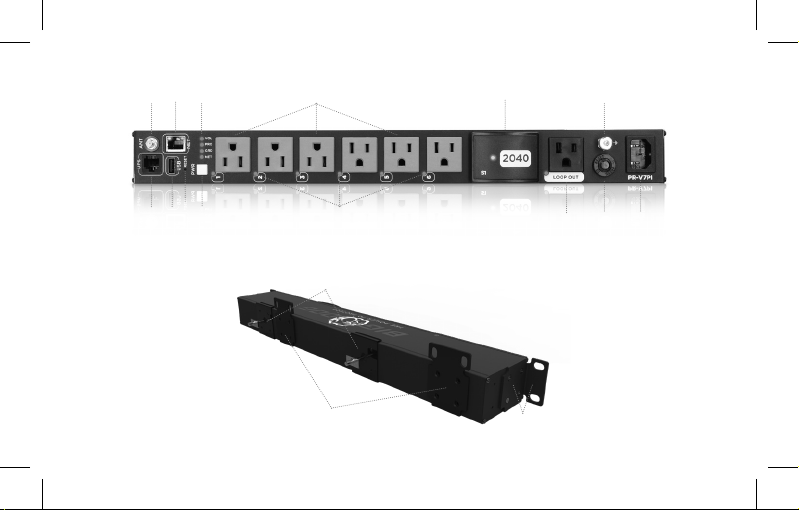
A. Wi-Fi Antenna
B. Ethernet Port
C. At a glance status LEDs
See LED functions for more information
D. Individually controlled outlets
E. Replaceable Surge Module
S1 – 2040 Joule Rating
F. Grounding pin
G. 1U Horizontal Rack Ears
H. UPS Link
For future use
I. USB Power Supply
2.4 amp 5V
J. Recessed Reset button
Hold button for 10 seconds to perform factory restore
8
K. Configurable Power Button
L. Outlet Status LEDs
See LED functions for more information
M. Loop Out Outlet
NOTE: This outlet is NOT surge protected, it is intended to
be used with additional PR-V7PI units.
N. 15-amp Circuit Breaker
O. IEC Power Input 120V
P. Traditional Vertical Rack Clips
These clips use the groove on the back of the PR-V7PI
Q. Vertical Rack Ear mounting locations
Shown are the included flat rack ears
Page 9
B
C
A
D
E
F
J
I
K
H
L
M
ON
Front
P
Q
Back
G
9
Page 10

LED Indicators
“G” or Ground
“P” or Power
“N” or Network
Outlet Status
“VOL” or
Safe Voltage
Loop Out
S1 Surge Module
10
ON: PDU is grounded properly
OFF: PDU is not grounded
BLUE: Good / Protected and Clean power
RED: Bad / No Protection
BLINKING RED: No Network Connection
SOLID BLUE: Good Network Connection
RAPID BLINKING RED: PDU failure requires reboot or reset
ON: Outlet is On
OFF: Outlet is Off
SOLID BLUE: Normal/Good Voltage
SOLID RED: Over/Under Voltage
ON: Outlet is On
OFF: Outlet is Off
ON: Good / Protected
OFF: Bad / No Protection
Page 11
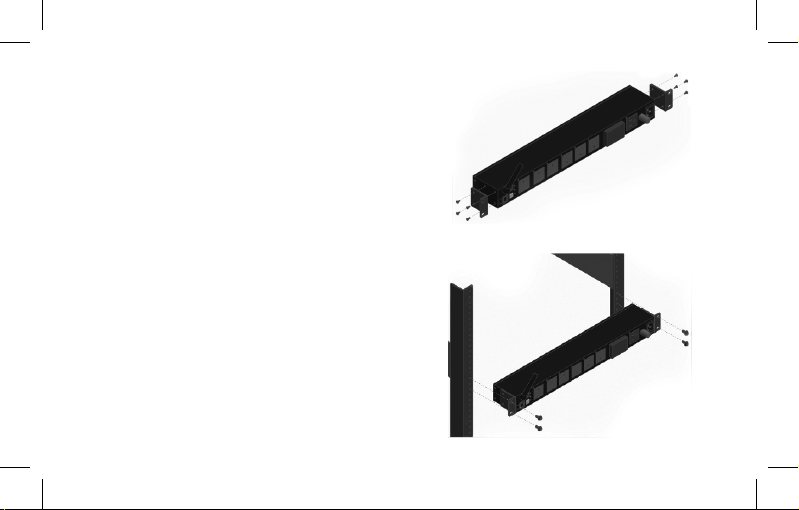
Installation
Rack Mount 1U Horizontal
1. Use the included screws to attach the Rack Mount ears to
the PDU near the face of the PDU
2. Slide the PDU into the rack where you intend to mount it
3. Secure the PDU using the appropriate screws for your rack
Step 1
Step 2
11
Page 12
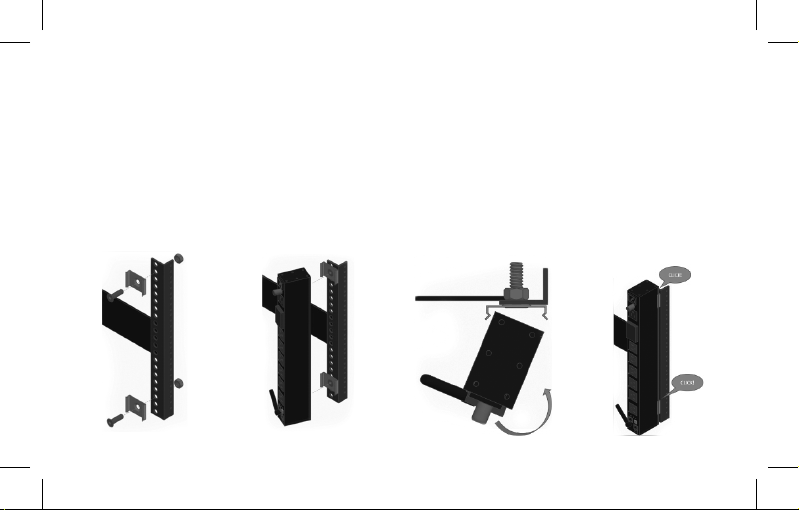
Installation
Rack Mount Vertical with Clips
1. Use the included bolt and nuts and secure the included
clip to the rack at appropriate lengths apart
No further than the length of the PDU (44cm, 17.32in)
Ensure that the clips are aligned together
2. Slot the PDU into the clips and press into place until a
click is heard and the PDU does not slip
12
Step 1 Step 2 Step 3 Step 4
Page 13
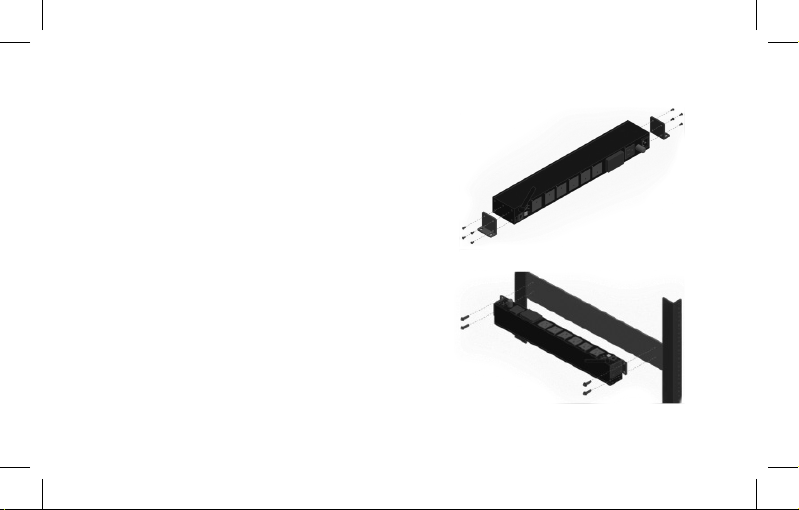
Installation
Surface Mount
1. Use the included screws to attach the included Rack Mount
ears to PDU
Additional Mounting holes can be found at either end and
along the side of the PDU
2. Install appropriate surface mount screws (not included)
through the Rack Mount ears into the desired surface
Step 1
Step 2
13
Page 14

Connections and Use
Physical Connections
1. Screw in the Wi-Fi Antenna
2. Plug in all to be used connections Including:
Ethernet LAN (Skip the Ethernet cable if you will be
using Wi-Fi)
Connected equipment power cables
3. Insert the female end of the included 6ft power cord
into the PR-V7PI
4. Plug in the Male end of the included 6ft power cord into
the main outlet on your wall
14
Wi-Fi Setup
If using the Wi-Fi connection, follow these
instructions
1. Plug in the included power cable to the PDU and to the
AC main outlet on the wall. Wait approximately 15-30
seconds, the power button will begin to flash
2. Scan for Wi-Fi on your Wi-Fi enabled device with a
web browser
3. Connect to the Wi-Fi SSID of the PDU
The SSID of the PDU will be “Metra-xxxxxxxxxxxx” where
the “x” are the MAC address or device ID of the PDU. Verify
the code of the SSID matches the MAC address of the PDU
with the sticker that is attached to the bottom of the PDU
4. In a web browser go to “192.168.4.1”
5. Go to “Network”
Page 15

6. Click “SCAN NETWORKS”
The network mode can also be changed before scanning.
For ease of setup we’ll use the default DHCP settings.
7. Select the desired network SSID
NOTE: the PDU requires a 2.4Ghz Wi-Fi connection.
8. If required enter the password for the Wi-Fi connection
9. Click “Save”
The PDU will now connect and reboot. After it has
rebooted it will attempt to connect to the Wi-Fi signal.
10. Once the PDU has been connected to the network and
has access to the web, proceed to the next steps
Replaceable Surge Modules
Remove
1. Firmly grasp the front top and bottom lip of the
surge module
2. Pull the surge module from the front of the PDU
A slight side to side motion may help release the surge
module from the PDU
Replace
1. Ensure the correct module is being inserted into the
correct slot on the PDU
2. Gently slide the surge module into the PDU until you
feel resistance
3. Firmly push the surge module into the PDU until you hear
and feel a click
DO NOT: Smack the surge module into the slot
15
Page 16

Cloud setup
1. Log in to your MAVbase.com account
2. Click the Add New button
3. Click “ADD PDU”
4. Add the PR-V7PI to your account using the MAC
address of the PDU
Surge Protection
Protected Circuit(s)
Replaceable 2040 Total Joule Protection
from the Line to Neutral to Ground circuit.
For use only with SPD Modules specified by
the manufacturer.
This SPD is suitable for use only with
manufacturer’s specified Cat. No. PR-RMS1
16
replaceable SPD Module. Using this SPD with
other than the manufacturer’s specified SPD
may create a risk of fire or shock.
This equipment is not suitable for use in
locations where children are likely to be
present”
“Cet équipement ne convient pas à une
utilisation dans des lieux pouvant accueillir
des enfants”
“Equipment is intended for installation in
Restricted Access Area”
“Les matériels sont destinés à être installés
dans des EMPLACEMENTS À ACCÈS
RESTREINT”
Page 17

Important Safety Instructions
Read and observe the following safety points
at all times.
Notice
For indoor use only. Internal components are
not sealed from the environment. The device
can only be used in a fixed location such as
a telecommunication center, or a dedicated
computer room. When you install the device,
ensure that the protective earthing connection
of the socket-outlet is verified by a skilled
person. Suitable for installation in Information
Technology Rooms to power ITE equipment
such as Monitors, Computers, Etc.
Only use brackets/attachments/accessories
specified by the manufacturer.
Do not place the device in an unstable
position where it might fall and cause injuries.
This equipment is not suitable for use in
locations where children are likely to be
present. Do not cover this device with a cloth.
Do not install it on a carpet or rug
Caution
Potential injury
Do not use this product with extension
cords, multi-outlet power strips, multi-outlet
extenders, or UPS devices (other than a Big
Dog Power UPS). The power capacity of
these accessories can be overloaded by this
product and may result in a risk of fire, or
property damage.
Exposure to Heat
Do not expose the PDU to direct sunlight or
place it near wall heaters, space heaters, or
in an enclosed space prone to temperature
increase.
17
Page 18

Do not use the device in a confined, poorlyventilated location; this can overheat the
unit, possibly even causing a fire. If used in a
small space other than an EIA-standard rack,
ensure that there is adequate space around
the device.
Proper Cleaning
In general, the only cleaning necessary for is
a light dusting. Unplug the PDU from the wall
outlet before cleaning it. Do not use liquid or
aerosol cleaners.
Warning
Power sources, grounding, and
polarization
This plug is designed to be inserted into a
NEMA 5-15 (three-prong grounded) outlet
only. Do not force the plug into an outlet that
is not designed to accept it. Never dismantle
18
the plug or to alter the power cord, and do
not attempt to defeat the grounding feature
by using a 3-to-2 prong adapter. If you have
questions about grounding, consult your local
power company or a qualified electrician.
This PDU requires a properly grounded outlet
for safety. If you’re not sure if your home’s
electrical wiring is properly grounded, have it
checked by a qualified electrician.
If a rooftop device such as a satellite dish
connects to the PDU, ensure that the device’s
wires are also properly grounded.
Liquid: avoiding electrical shocks
Do not operate the PDU if liquid of any kind is
spilled onto or inside the unit. Do not operate
it near rain or water, even water that is
contained (for example, bathtub or sink).
Page 19

Power cord safety
Do not place the power cord near areas
with heavy foot traffic (for example,
hallways). Do not create a trip hazard
with the power cord. If the power cord’s
protective jacket rips or frays, exposing
the internal wiring or shielding, disconnect
it from the power source and replace the
power cord immediately. See the warranty
section of the owner’s manual for details.
No User-Serviceable Parts Inside
If the PDU is not operating properly, do not
remove any part of the unit (cover, etc.)
for repair. Unplug the unit and consult the
warranty section of the owner’s manual.
FCC Warning
WARNING!! Changes or modifications to this
unit not expressly approved by the party
responsible for compliance could void the
user’s authority to operate the equipment.
This equipment has been tested and found
to comply with the limits for a Class B Digital
Device, pursuant to Part 15 of the FCC
Rules. These limits are designed to provide
reasonable protection against harmful
interference in residential installation. This
equipment generates, uses and can radiate
radio frequency energy and, if not installed
and used in accordance with the instruction
manual, may cause harmful interference to
radio communications. However, there is no
guarantee that interference will not occur
in a particular installation. If this equipment
does cause harmful interference to radio or
television reception, which can be determined
19
Page 20

by turning the equipment off and on, the
user is encouraged to try to correct the
interference by one or more of the following
measures:
• Reorient or relocate the receiving antenna.
• Increase the separation between the
equipment and receiver.
• Connect the equipment into an outlet on
a circuit different from that to which the
receiver is connected.
• Consult the dealer or an experienced
radio/TV technician for help.
Notice: (1) An unshielded-type power cord is
required in order to meet FCC emission limits
and also to prevent interference to the nearby
radio and television reception. It is essential
that only the supplied power cord by used.
(2) Use only shielded cables to connect I/O
20
devices to this equipment.
Note: THE MANUFACTURER IS NOT
RESPONSIBLE FOR ANY RADIO OR TV
INTERFERENCE CAUSED BY
UNAUTHORIZED MODIFICATIONS TO
THIS EQUIPMENT. SUCH MODIFICATIONS
COULD VOID THE USER’S AUTHORITY TO
OPERATE THE EQUIPMENT.
The Class B digital apparatus meets all
requirements of the Canadian InterferenceCausing Equipment Regulation
Cet appareil numerique de la class B respecte
toutes les exigencies du Reglement sur le
materiel brouilleur du Canada.
Page 21

FCC Part15C+RSS247
To assure continued FCC compliance:
1. Any changes or modifications not
expressly approved by the grantee of this
device could void the user’s authority to
operate the equipment.
2. This equipment complies with FCC
radiation exposure limits set forth for an
uncontrolled environment.
This equipment should be installed and
operated with minimum distance 20cm
between the radiator & your body.
This radio transmitter [27941-PRW3PI] has
been approved by Innovation, Science and
Economic Development Canada to operate
with the antenna types listed below, with the
maximum permissible gain indicated. Antenna
types not included in this list that have a gain
greater than the maximum gain indicated for
any type listed are strictly prohibited for use
with this device.
NO.
Antenna Type
Model Name
Gain (Peak)
1
Dipole
Q0211
2dBi
21
Page 22

IC
This device complies with Industry Canada
license-exempt RSS standard(s). Operation
is subject to the following two conditions:
(1) this device may not cause interference,
and (2) this device must accept any
interference, including interference that may
cause undesired operation of the device.
This equipment complies with IC radiation
exposure limits set forth for an uncontrolled
environment. This equipment should be
installed and operated with minimum
distance 20cm between the radiator and
your body.
22
IC French:
Cet appareil radio est conforme au CNR247d’Industrie Canada. L’utilisation de ce
dispositif est autorisée seulement aux deux
conditions suivantes : (1) il ne doit pas
produire de brouillage, et (2) l’utilisateur
du dispositif doit être prêt à accepter tout
brouillage radioélectrique reçu, même si ce
brouillage est susceptible de compromettre le
fonctionnement du dispositif.
Cet équipement est conforme aux limites
d’exposition aux rayonnements IC établies
pour un environnement non contrôlé. Cet
équipement doit être installé et utilisé avec
un minimum de 20 cm de distance entre la
source de rayonnement et votre corps.
Page 23

UL Safety:
• Type 1, Operating Control
• External Pollution Situation:
Pollution Degree 2
• Rated Impulse Voltage:1500 V
© Copyright 2022 Ethereal Home Theater, LLC.
An online purchase registration is available
at www.metraav.com. Registering your surge
protector at the time of purchase can make
the process a lot easier if you ever need to file
a claim.
Please contact the Ethereal Home Theatre, LLC
Customer Service Department at 386-2571186 if you have any questions regarding the
product warranty or the connected equipment
warranty.
Ethereal Home Theatre, LLC
460 Walker Street
Holly Hill, FL 32117
Phone:386-257-1186
E-Mail: [email protected]
23
Page 24
INTELLIGENT
POWER
We’ve combined all of the features
integrators need into one unique
power distribution unit to deliver surge
protection, remote control, smart
home integration and more. The 6
individually controllable outlets have
power metering, self-healing and
automatic reboot capabilities for
smarter remote management of your
connected devices. An additional
loop-out outlet allows daisy chaining
multiple units for unlimited
configuration and easy addition for
new devices.
24
Specifications:
Operating Temperature: 14˚F-104˚F (-10˚C-40˚C )
Surge Protection: 2040 Joule (Replaceable )
External Antenna: Yes
Outlets (Total): 7 outlets
LOOP-OUT Outlet: 1 outlet for daisy chainin g
Switched Outlets: 6
AC Input Outlet: IEC C14, 15A circuit, product UL rating 12A
Circuit Breaker (COP): Yes (rear)
Cord Length: 6ft
Safety Certifications :
UL/CUL, FCC. UL 62368-1+UL 498+1449 with CSA 269.3+UL 1283, FCC
Part15B+ICES-003, FCC ID/ISED (wireless de vice FCC)
Warranty: 5 Year Limited
Metra Electronics Corp.
BigDogPower.com
APP: MAVbase.com
386-255-0234
 Loading...