

Page 1

bhi Ltd
ParaPro EQ20-DSP
ParaPro EQ20
Quickstart Guide for bhi ParaPro EQ20 Range
Introduction
The bhi ParaPro EQ20 range of audio DSP units feature a 20W modular audio power amplifier with a
parametric equaliser plus the option of the latest bhi dual Channel DSP noise cancelling technology and
Bluetooth technology. The parametric equaliser allows any specific part of the frequency range to be
selected and adjusted in strength. The user is then able to adjust these parameters to determine exactly
how the equalization is applied. The most important feature of a parametric equaliser is that it allows you
to select which frequency to adjust. For example, instead of having a simple mid-range adjustment as in
a standard graphic equaliser which boosts or reduces a pre-set range of frequencies, you can specify
exactly which frequency to boost or reduce. This gives you greater flexibility and accuracy to set the audio
to suit your own hearing.
The bhi DSP noise cancelling option provides mono and stereo DSP noise cancellation to improve the
speech quality in all types of radio and voice communications and the Bluetooth option allows the user to
transmit audio from their Bluetooth enabled device through the EQ20, effectively turning their wired
speakers that are connected to the EQ20 unit into Bluetooth speakers.
Each ParaPro EQ20 unit is supplied with a selection of cables and connectors to enable you to connect to
your radio and speaker/speakers or headphones, and start enjoying the superb audio quality of your bhi
ParaPro EQ20 audio DSP unit.
Page 2

Accessories and options
Your bhi ParaPro EQ20 product is supplied with the following:
EQ20 & EQ20B versions (Non DSP noise cancelling)
1 x ALD-007 - 3.5mm stereo jack plug to 3.5mm jack plug lead 1.2M long.
2 x ALD-001 - 3.5mm mono jack plug to 3.5mm mono jack plug lead 1.2m long.
2 x 4mm red banana plugs – 2 x red banana plugs with screw terminals for speaker connection
2 x 4mm black banana plugs - 2 x black banana plugs with screw terminals for speaker connection
1 x 1030-FPL – Fused DC power lead
1 x PSU12-2A-ROW – UK/US/EU/AUS 12V DC 2 Amp mains plug-in power supply 2.1mm plug Centre
+VE
2 x ADP-P004 - Phono Plug to 3.5mm Mono Socket
Quick start user guide
Feedback card
EQ20-DSP & EQ20B-DSP (DSP noise cancelling versions)
1 x ALD-007 - 3.5mm stereo jack plug to 3.5mm jack plug lead 1.2M long.
2 x ALD-001 - 3.5mm mono jack plug to 3.5mm mono jack plug lead 1.2m long.
2 x 4mm red banana plugs – 2 x red banana plugs with screw terminals for speaker connection
2 x 4mm black banana plugs - 2 x black banana plugs with screw terminals for speaker connection
1 x 1030-FPL – Fused DC power lead
2 x ADP-P004 - Phono Plug to 3.5mm Mono Socket
Quick start user guide
Feedback card
Optional extras:
1 x PSU12-2A-ROW – UK/US/EU/AUS 12V DC 2 Amp mains plug-in power supply 2.1mm plug Centre
+VE
Before you Begin
Using the rear panel diagram and descriptions of each connection below, connect your equipment to the
relevant sockets using the connections on the rear of the unit to suit your own setup. Connect the power.
Using the unit
Once you are ready to use the unit turn the power supply on and switch the EQ20 unit on using the green
on/off button. Switch on your radio, receiver or audio source and set the various controls to tailor the
audio to your own individual taste.
Try adjusting the Bass and treble controls along with the boost or cut function for each control to give you
the best audio for your ears. For the EQ only units without DSP this will just be a case of adjusting the
audio. For EQ-DSP users there is the added feature of adjusting the DSP noise filter to remove noise
and interference to give you improved speech quality. Increasing the “DSP Noise Filter” (12) control will
further reduce the background noises and enhance any voice signals. Adjust the unit until you find a
suitable filter level for the current signal you are listening to.
You may find that you have to increase the appropriate Volume Level after increasing the filter level as
the effect of the noise reduction reduces the mean audio level so that everything sounds quieter (this is
because you have reduced the noise level significantly). You can get a feel for how much clearer the
Noise Reduction is making the signal by switching the “DSP Noise Filter” (12) control fully anticlockwise
to DSP off, and then clockwise back to the selected filter level. Note that the DSP algorithm may take a
short while to take full effect, approximately 500 ms, dependent on the noise content of the signal.
Bluetooth
The Bluetooth function is enabled by pressing the “Sel” (6) until the Bluetooth LED illuminates. Once you
have done this make sure that you enable the Bluetooth scan function on your Bluetooth input source
device so that you can pair with your EQ20 unit. You should see a Bluetooth device named
“ParaProxxxx” identified in your Bluetooth device list. Connect to this device and you will then be
2
Page 3

connected via Bluetooth to your Bluetooth enabled bhi ParaPro EQ20 unit. Select the audio on your
1 2 3
4
5 6 8
7
9
10
11
12
14
20
15
19
18
17
13
21
22
16
device and this should now play out of the speakers that you have connected to your device or through
headphones if connected to the front of the unit (9). This in effect turns your speakers into Bluetooth
speakers. Adjust the volume control on your device as well as the Volume control on the EQ20 unit to get
the desired audio output. Adjusting the Bass and treble controls along with the boost or cut function for
each control to give you the best audio for your ears. For the EQ only units without DSP this will just be a
case of adjusting the audio response to suit your ears.
Note: See the section “Notes for EQ User Guide” for a more in depth explanation of the input signal
levels and parametric equaliser settings
Front Panel Controls and display indications
Rear Panel connections
3
Page 4

Input connections:
19 – Ch1 3.5mm mono socket
20 – Stereo input, 3.5mm stereo socket (Main connection for stereo line level inputs)
21 – Ch2 3.5mm mono socket
22 – 12V DC input socket, 2.1mm centre positive (2A)
Audio output connections
13 – Speaker output Right channel gnd, 4mm socket (Black)
14 – Speaker output Right channel signal, 4mm socket (Red)
15 – Speaker output Left channel gnd, 4mm socket (Black)
16 - Speaker output Left channel signal, 4mm socket (Red)
17 – Speaker output Right channel RCA phono socket (Red)
18 – Speaker output Left channel RCA phono socket (White)
Front Panel Controls and connections
1 - Power on/off volume control. Push to switch the unit on and off (source select LED’s will light in
sequence). Rotate clockwise to increase volume.
2 – Bass tone control 100Hz to 1 kHz. Rotate clockwise to increase Bass frequency (use in conjunction
with Bass boost or cut control. See Notes for EQ20.
3 – Treble tone control - 1 kHz TO 10 kHz. Rotate to treble increase frequency (use in conjunction with
treble boost and cut function). See Notes for EQ20.
4 – Ch1 select LED. Lights orange when Channel 1 is selected.
5 – Ch2 select LED. Lights red when Channel 2 is selected.
6 – Audio input select button. Press to select input source.
7 - Stereo audio select LED. Lights green when stereo audio is selected.
8 – Bluetooth select LED. Lights blue when Bluetooth is selected. Pair with input device Bluetooth and
play audio through EQ20 via Bluetooth.
9 – 3.5mm stereo socket. Stereo headphone socket. Listen with stereo headphones. Speaker output
muted once headphones are plugged-in.
10 – Treble boot or cut control. Booth or cut your selected frequency by + or – 10dB.
11 - Bass boost or cut control. Booth or cut your selected frequency by + or – 10dB.
12 – DSP noise filter control. Fully anticlockwise audio bypassed DSP not selected. Rotate clockwise to
increase filter level from 9 to 40dB of noise reduction.
Notes for EQ20 User Guide
Input signal level
The input signal(s) must be as high as possible that does not cause clipping. This will ensure the best
possible performance of the DSP noise filtering function.
The currently selected input channel is shown with an illuminated LED. That LED will flash rapidly for 1.5
seconds if it detects a peak in the signal that is likely to cause clipping.
The input signal level is controlled from the signal source equipment (not the EQ20 unit). Adjust the
source level so that it is marginally below the level that causes the LED on the EQ20 unit to start flashing
(overload detection).
Very occasional flashing of the LED is ok, there is some margin before the onset of clipping occurs.
Clipping distortion can be very severe if the input signal is much too high, so ensure your source signal is
not too high.
Signal-to-noise-ratio and also the performance of the DSP noise filtering will not be optimum if your input
signal is much too low. An input signal “just” lower than the clipping limit is ideal.
4
Page 5
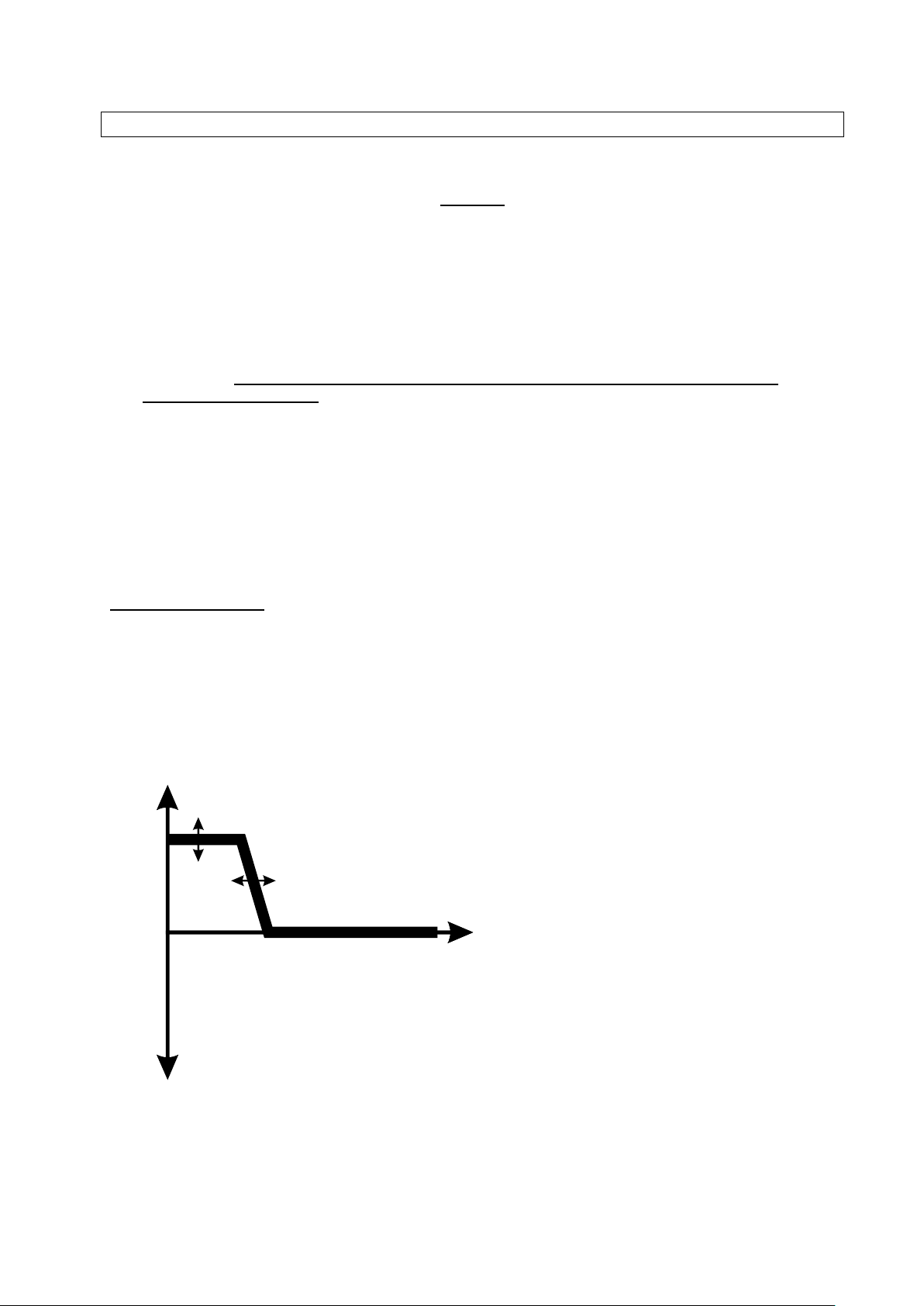
Remember, the input signal level is controlled from your source equipment, not the EQ20 unit!
Boost
Freq.
Frequency of cut/boost
can be adjusted.
Amount of cut/boost
can be adjusted.
Cut
Top Tips
1. Adjust your source signal to the maximum possible that does not cause the clipping warning to
occur. Nominal input should be around 0.9Vpk-pk.
2. When the input signal level is set (on your source equipment), adjust the listening volume on the
ParaPro only.
3. The speaker outputs are Class-D type to maximise power efficiency and eliminate the need for bulky
heat sinking. For this reason, do not ground any of the speaker outputs or connect any of the
speaker outputs together.
4. To minimise RF emissions from the ParaPro EQ20, keep speaker connections as short as possible.
5. The headphone outputs are Class-AB with a common ground to the input supply and input signals.
6. To minimise interference from external high power RF sources, do not join the external ground
connections of the ParaPro EQ20 unit together, doing so will bypass the internal RF filtering.
7. Use only a good quality power supply of nominally 12V (or 13.8V) at 3A. Linear power supplies are
best for audio and RF applications.
Parametric Equaliser
The EQ20 Parametric Equaliser allows you to shape the frequency response of the audio path. Unlike a
graphic equaliser, the EQ20 Parametric Equaliser allows you to adjust the frequency of any cut/boost
function. With a graphic equaliser, the frequency bands are fixed and can yield a very discontinuous
response.
The key to understanding the behaviour of the EQ20 Parametric Equaliser is to consider it as 2 very
flexible “shelving filters”. Consider the Bass filter first:
The Bass controls allow you to adjust the amount of cut or boost that occurs below your selected
frequency adjustment.
5
Page 6
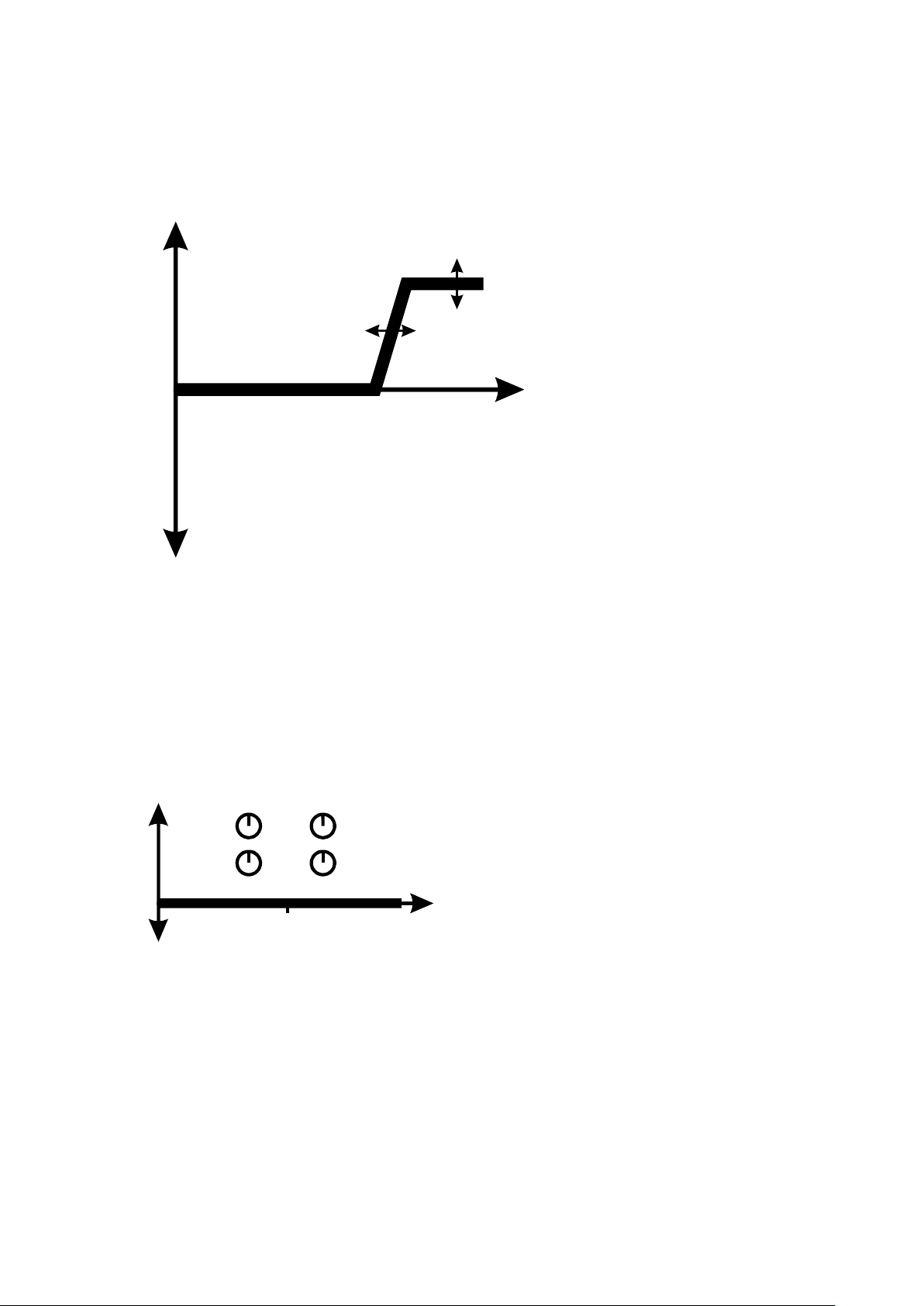
Boost
Freq.
Frequency of cut/boost
can be adjusted.
Amount of cut/boost
can be adjusted.
Cut
Boost
Bass Treble
Freq. Freq.
Cut/Boost Cut/Boost
Freq.
1kHz
Cut
Now consider the Treble filter:
By combining the two filters, a variety of response shapes can be created, suiting your listening tastes,
source characteristics, speaker characteristics and room acoustics.
Here are some examples which illustrate that the amount of cut or boost and the frequencies at which
they occur are all continuously variable:
Flat response
6
Page 7
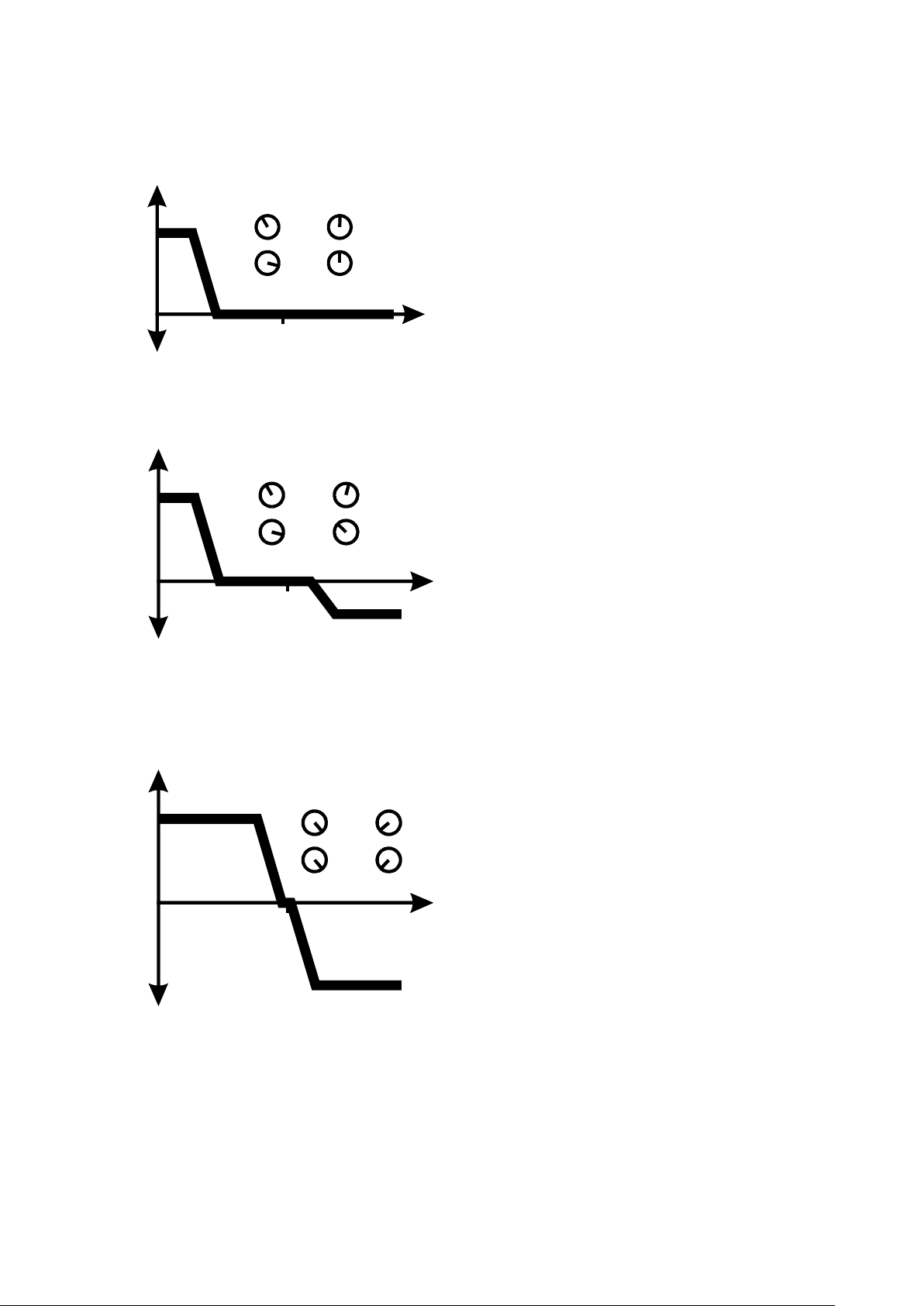
Bass boost and no treble cut or boost
Boost
Bass Treble
Freq. Freq.
Cut/Boost Cut/Boost
Freq.
1kHz
Cut
Boost
Bass Treble
Freq. Freq.
Cut/Boost Cut/Boost
Freq.
1kHz
Cut
Boost
Bass Treble
Freq. Freq.
Cut/Boost Cut/Boost
Freq.
1kHz
Cut
Bass boost and some treble cut
Bass boost and treble cut with crossover close to 1 kHz
7
Page 8
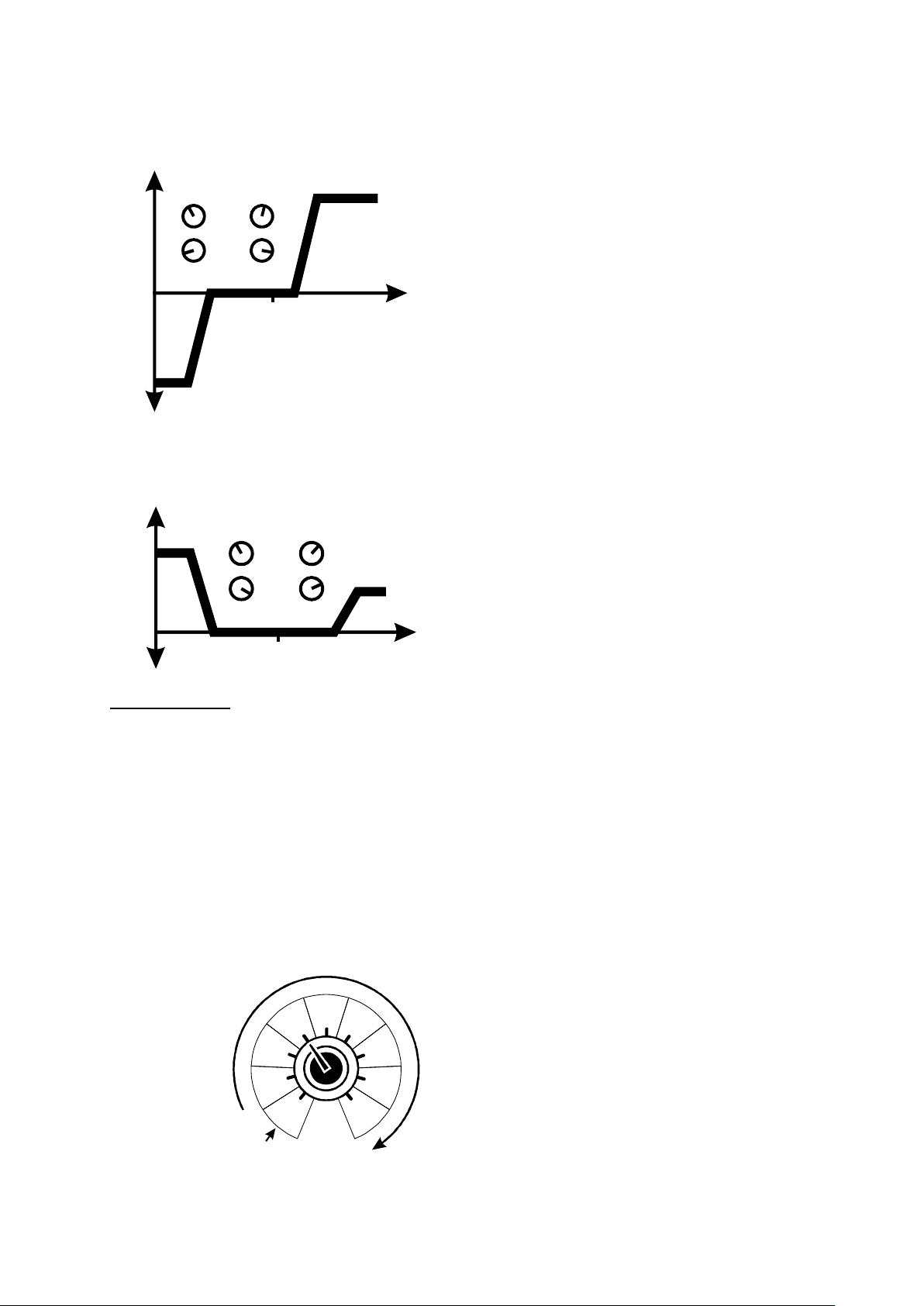
Bass cut and treble boost
Boost
Bass Treble
Freq. Freq.
Cut/Boost Cut/Boost
Freq.
1kHz
Cut
Boost
Bass Treble
Freq. Freq.
Cut/Boost Cut/Boost
Freq.
1kHz
Cut
Off
Max
DSP Noise Filter
No DSP noise reduction
Full audio bandwidth
Increasing level of DSP noise reduction
(with Voice/CW optimised audio bandwidth)
Bass boost and some treble boost
DSP Noise Filter
If your ParaPro unit is fitted with a DSP Noise Filter, you will see a control (bottom left) that allows you to
adjust the level of noise filtering.
At the minimum setting, the DSP noise filtering is completely disabled and audio is passed with full
bandwidth. Equalisation is still adjustable with the Parametric Equaliser controls. If the DSP Noise Filter
control is turned up, the DSP filtering will be enabled and the audio bandwidth optimised for CW and
Voice communications. The level of DSP noise filtering is adjustable in 8 steps throughout the control’s
rotation. Even with the DSP noise filtering enabled, the Parametric Equaliser controls can be adjusted to
further improve the listening intelligibility or listening preference.
8
Page 9

BHI Amplifier Module (Model ParaPro EQ20)
Key Specifications
Power Supply
Voltage range (Vs): 11V to 15V (usually 12V or 13.8V)
Current consumption: <0.2A with no signal.
~1.2A at 13.8V for 10W output (5W per channel into 8 Ohms)
Reverse polarity protected.
Audio Inputs
Line level inputs:
Input impedance: 20k Ohms
Nominal input level: 0.9 Vpk-pk
Overload warning*: 1.2 Vpk-pk
Max input level: 1.6 Vpk-pk
Stereo 3.5mm socket (channel 1 and channel 2)
Mono 3.5mm socket (channel 1)
Mono 3.5mm socket (channel 2)
Bluetooth input:
Bluetooth version: 3.0, Class 2
Nominal range: 10 meters (33 feet)
Frequency band: 2.40-2.48 GHz
RF output power: 4 dBm
RF input sensitivity: -85 dBm (at 0.1% BER)
Broadcast name: “bhi ParaPro xxxx”
*Overload indication: Source selection LED flashes at 4Hz for at least 1.5 seconds
Audio Outputs
Phones out: Stereo or Mono compatible.
Headphone impedance: 8-32 Ohms.
Headphone output power: 25mW per channel into 32 Ohms.
Speaker out: Channel 1 and Channel 2
Impedance: > 4 Ohms
Max output: 10 Watts per channel (Vs=15.0V, R=8Ω)
8 Watts per channel (Vs=13.8V, R=8Ω)
6 Watts per channel (Vs=12.0V, R=8Ω)
Outputs via phono (RCA) sockets and 4mm sockets.
Audio controls
Volume: Analogue (digitally read), 64dB adjustment range.
DSP Noise Filter (Optional): 9 levels (including off).
Parametric Filter Type: Two channel, dual cascaded 2nd order Bi-Quad IIR
Bass Parametric Frequency: 100Hz to 1 kHz
Bass Cut/Boost: -10dB to +10dB
Treble Parametric Frequency: 1 kHz to 10 kHz
Treble Cut/Boost: -10dB to +10dB
Channel select: Switchable between the following 4 options using a push button:
A. Channel 1 to both left and right outputs.
B. Channel 2 to both left and right outputs.
C. Channel 1 to left output and channel 2 to right output.
D. Bluetooth stereo.
9
Page 10

Audio Performance (to be updated)
General
Audio resolution: 24 bits Linear PCM per channel
Audio sample rate: 48 kHz (DSP noise cancelling OFF)
16 kHz (DSP noise cancelling ON)
Speaker outputs
Mode: Class-D BTL
PWM rate: 384 kHz ±2%
Maximum rated power: 10W per channel sine wave power into 8 Ohms
Total harmonic distortion: 0.13% (Vs=15.0V, PO=1W, f=1 kHz)
10% (Vs=15.0V, PO=10W, f=1 kHz)
Signal-to-noise ratio: 90dB
Crosstalk (Ch1/Ch2): -60dB (Vs=13.8V, Vin=0.9Vpk-pk, PO=1W, f=1 kHz)
Frequency range (to -3dB): 18Hz to 22 kHz (DSP noise cancelling OFF)
300Hz to 5 kHz (DSP noise cancelling ON)
Headphone output
Maximum power: 25mW sine wave power into 32 Ohms
Total harmonic distortion: 0.2% (PO=10mW, f=1 kHz)
1% (PO=25mW, f=1 kHz)
Signal-to-noise ratio: 90dB
Crosstalk (Ch1/Ch2): -60dB (Vin=0.9Vpk-pk, PO=10mW, f=1 kHz)
Frequency range (to -3dB): 18Hz to 22 kHz (DSP noise cancelling OFF)
300Hz to 5 kHz (DSP noise cancelling ON)
1. bhi support
Every bhi product comes with a 12 month guarantee against defective materials and workmanship. If you
do have a problem then please contact us by telephone or email and we will try to resolve it for you.
Before you make you contact us please have the following information to hand:
1. Your serial number (found on the bottom or rear of the unit).
2. Details of when and where you purchased the unit.
See our website www.bhi-ltd.com for FAQs and answers to common questions; otherwise most queries
can be resolved over the telephone or via email. If not we will arrange with you to have your unit sent
back to us for analysis, repair or replacement (if within 12 months from date of purchase, if outside the
guarantee period an estimate of the cost of repair will be given). For contact details please refer to the
back cover of this manual. If you have any suggestions for improvements please complete and return the
customer feedback form. Note: Opening the case will void any warranty unless agreed beforehand by
bhi Ltd. No user serviceable parts inside
Important Information:
Copyright
This publication, including all photographs and illustrations is protected under international copyright laws,
with all rights reserved. Neither this manual, nor any of the material within, may be copied or reproduced
without the written consent of bhi Ltd.
Disclaimer
The information in this document is subject to change without notice. bhi Ltd makes no representations or
warranties with respect to the contents hereof and specifically disclaims any implied warranties of
merchantability or fitness for any particular purpose. Furthermore, bhi Ltd reserves the right to revise this
publication and to make changes from time to time in the content hereof without obligation of bhi Ltd to
notify any person of such revision or changes.
10
Page 11

Weee Statement for correct disposal of this product
Remove the noise and hear the speech!
www.bhi-ltd.com
(Applicable in the European Union and other European countries with separate collection
systems). This marking shown on the product or its literature, indicates that it should not be
disposed of with other household wastes at the end of its working life. To prevent possible
harm to the environment or human health from uncontrolled waste disposal, please separate
this from other types of wastes and recycle it responsibly to promote the sustainable reuse of material
resources. Household users should contact either the retailer where they purchased this product, or their
local government office, for details of where and how they can take this item for environmentally safe
recycling. Business users should contact their supplier and check the terms and conditions of the
purchase contract. This product should not be mixed with other commercial wastes for disposal.
bhi Ltd
22 Woolven Close, Burgess Hill
West Sussex, RH15 9RR
England
Telephone: + 44 (0)1444 870333
Email: [email protected]
Web: www.bhi-ltd.com
11
 Loading...