

Page 1
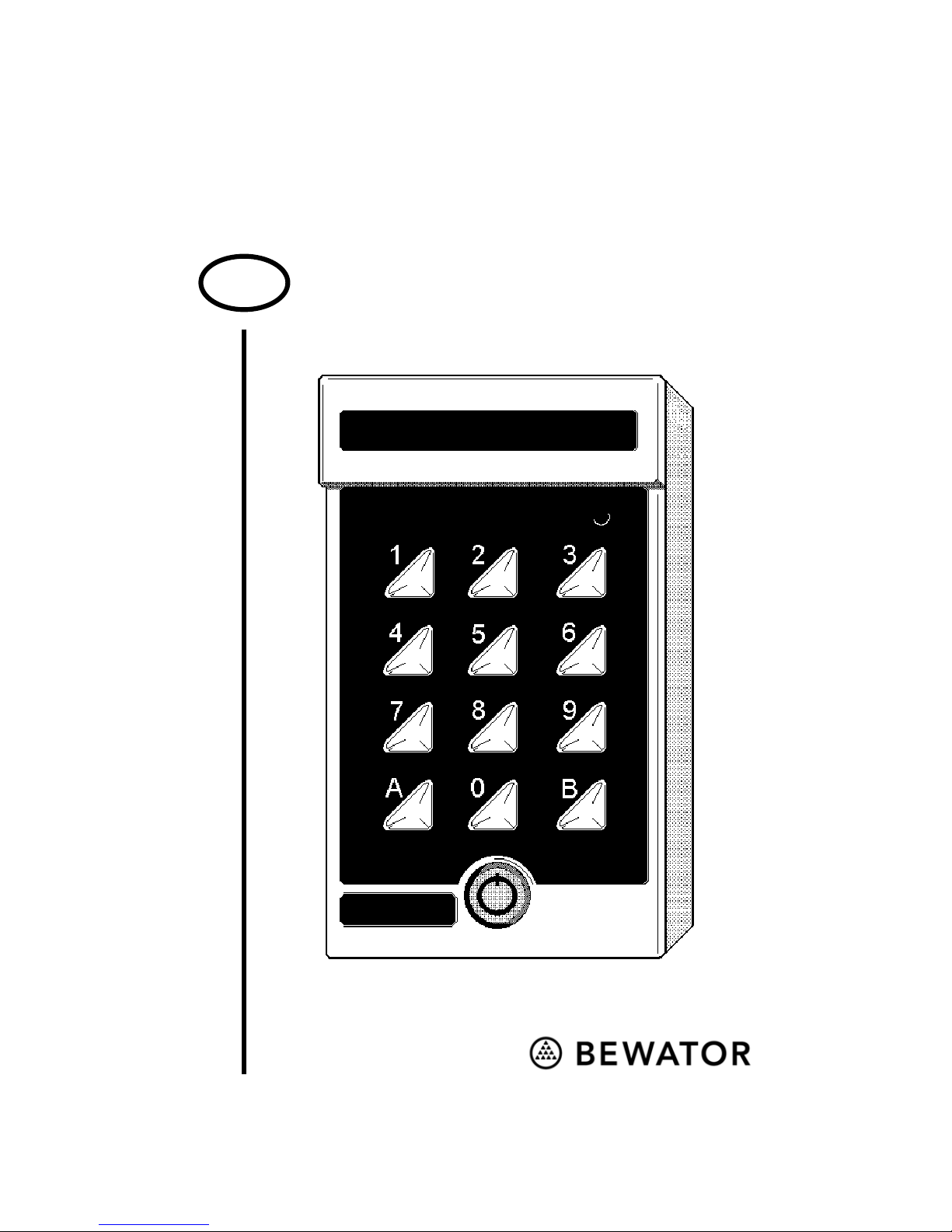
K44 Code lock
Technical manual
GB
Page 2

Copyright © 2002 Bewator AB, Solna, Sweden.
Material from the K44 Technical manual may only be copied with the
consent in writing of Bewator. Bewator reserves the right to alter both
the content of the manual and the design of the product.
Document number: 80084-1
Bewator AB is part of the Swedish Bewator Group AB, which
develops and markets a complete security product range that includes
access control and alarm. Sales, installation and servicing are handled
by a national dealer network.
Actions (such as unauthorised manipulation, copying etc.), must not
be taken with the software contained in the products and systems.
Such actions are regarded as copyright violation and may result in
imprisonment or fines and may likewise lead to an obligation to pay
damages and compensation for using the software.
Page 3

K44 Technical manual 3
What is K44?.......................................... 4
Timing the codes.................................. 4
Standard mode and advanced mode...5
Duress ................................................. 5
Zero opening........................................ 5
The keypad............................................. 8
Wiring ..................................................... 6
Buzzer and LEDs................................. 9
Choose password .............................. 10
Change password.............................. 11
Programming the codes..................... 11
Erasing codes.................................... 12
Changing codes................................. 13
Set opening time................................ 13
Deactivating the Buzzer ..................... 14
Door open permanently ..................... 15
Duress on/off ..................................... 16
Standard mode or advanced.............. 17
Erase the memory.............................. 17
Using K44............................................. 18
Entrance ............................................ 18
Unlock the door permanently ............. 18
Enter duress code.............................. 19
Technical data ..................................... 20
Programming overview....................... 22
Page 4

4 K44 Technical manual
What is K44?
K44 is a compact code lock designed for one
door. To open the door, a four-digit entrance
code is used (six-digit codes can be used in
advanced mode). All programming is done
using the keypad.
Timing the codes
K44 offers the possibility to time the codes
you have programmed via an external time
clock. This is useful if certain codes, e.g. the
cleaner's code, should only be valid certain
hours while the staff should have access to the
door 24 hours a day.
Connecting two time clocks to K44, you can
make use of three different time zones for code
timing: one controlled by time clock 1, one
controlled by time clock 2 and one valid 24
hours a day, i.e. no timing.
When programming the codes you should
determine to what time control group they
should belong.
0 = no timing, 1 = group 1 and 2 = group 2.
Page 5

K44 Technical manual 5
Standard mode and advanced
mode
K44 is delivered in standard mode, which
means you can program up to four different
four-digit codes. If you set the code lock to
advanced mode you can program 20 four-digit
and 10 six-digit codes.
Duress
K44 is equipped with an output for duress. If a
person is forced to open the door under threat,
he or she can enter a special code activating an
alarm (if connected).
Zero opening
To facilitate entrance, e.g. during office hours,
you can connect an external contact enabling
you to activate or deactivate the possibility to
open the door by simply pressing the zero
button on the keypad
Page 6

6 K44 Technical manual
Wiring
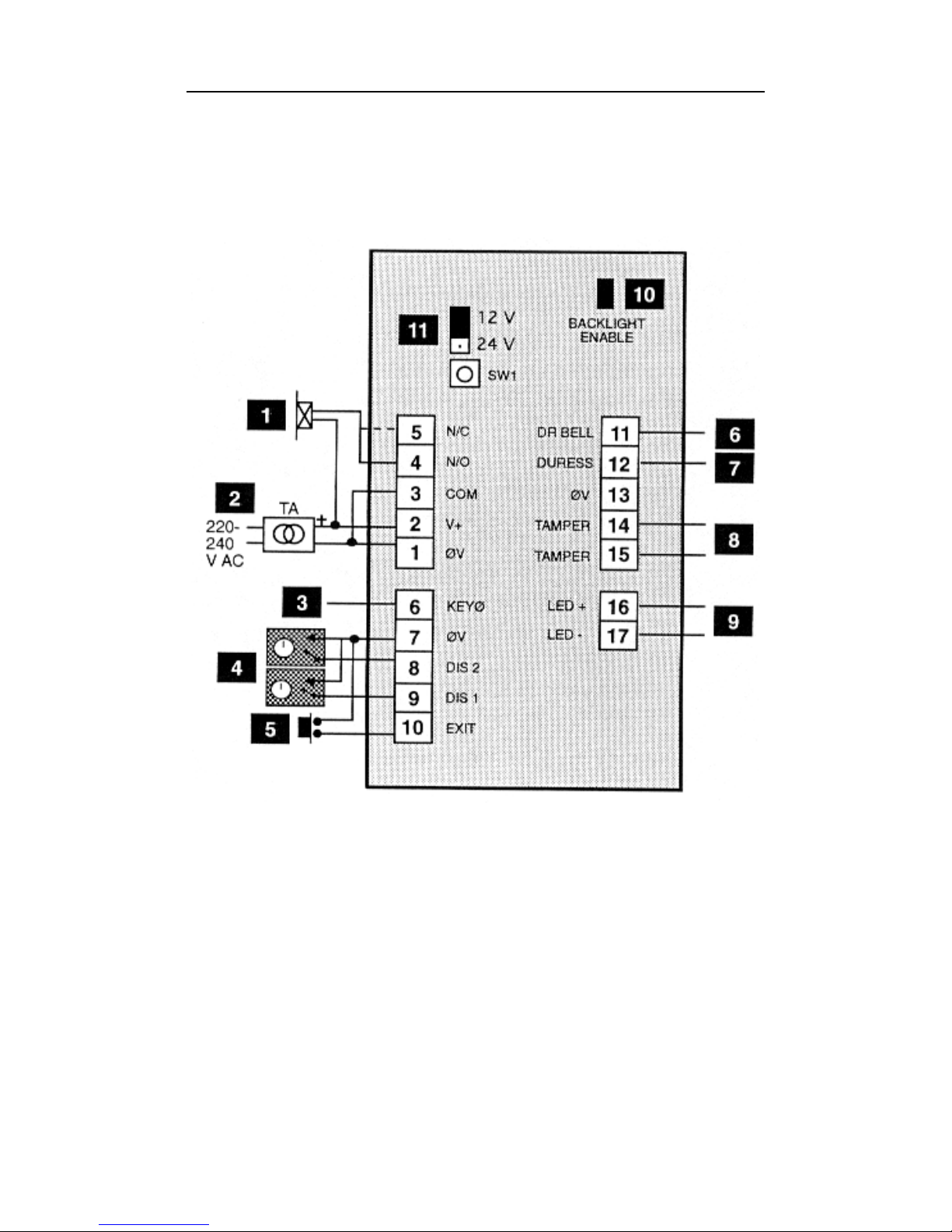
The numbers refer to the diagram on the right.
1
Electric locking device. Dashed line refers to
locks with failsafe function.
2
Voltage feed in, terminal block nos. 1 and 2.
3
Contact for zero opening. Close terminal
block nos 6 and 7 (or 13).
4
Timing from external time clock. Input 1:
close terminal block nos. 9 and 7 (or 13).
Input 2: close nos. 8 and 7 (or 13).
5
Remote opening button. Close terminal
block pos. 10 and 7 (or 13).
6
Door bell. Output for activating a buzzer or
similar. Always use relay E7 (connect
between nos. 11 and 2(+).
7
Duress. Output for activating e.g. an alarm.
Always use relay E7 (connect between nos.
12 and 2(+).
8
Tamper switch. Normally closed when the
housing is closed.
9
Extra LED. Max. voltage 30V DC.
1
0
Remove the jumper if background lighting is
not desired.
11
If the voltage feed is below 20 V, set the
jumper to 12 V.
Page 7
K44 Technical manual 7
Page 8
8 K44 Technical manual
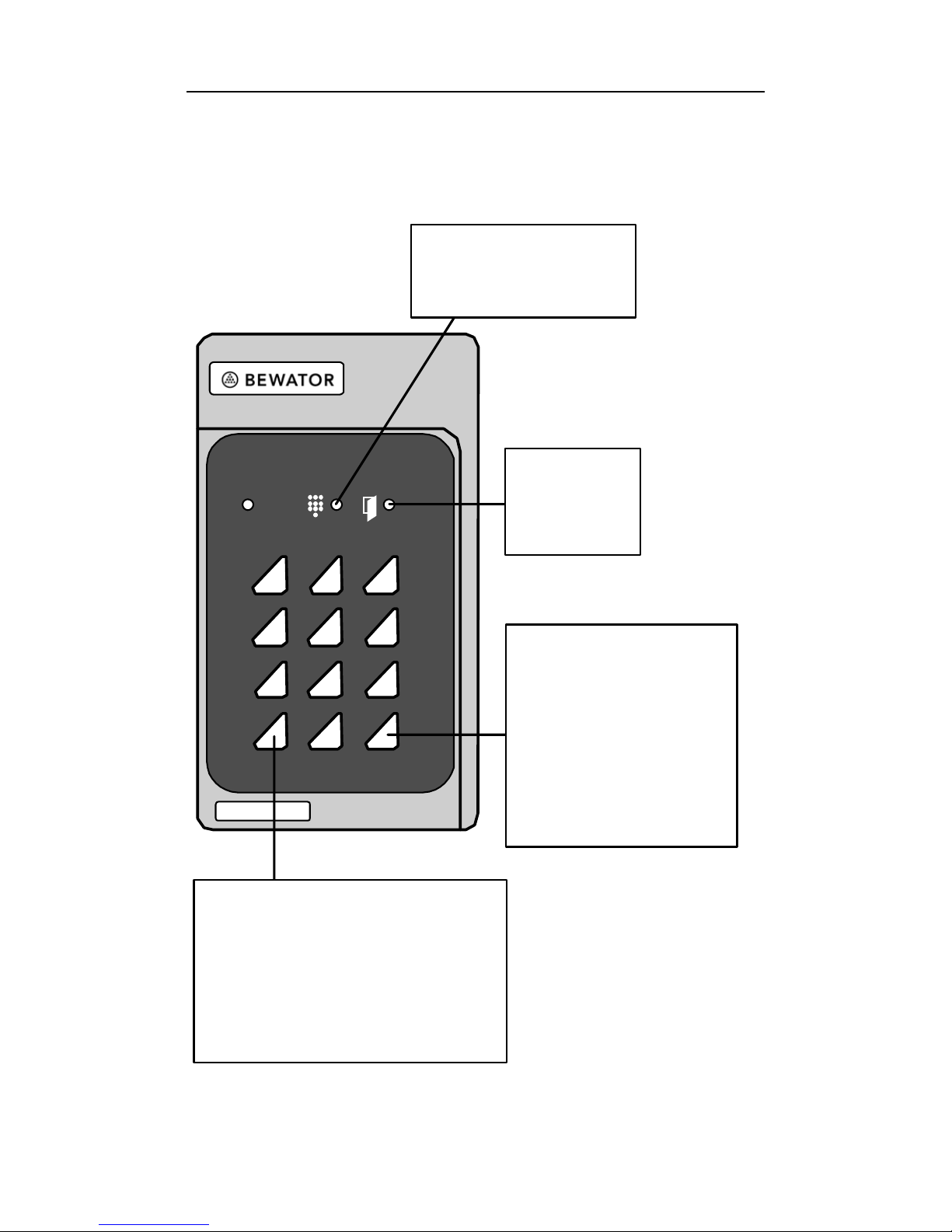
The keypad
1 2 3
4 5 6
7 8 9
0 B
Y
ellow LED
Indicates
ke
yp
resses.
Green LED
Lit when
the lock is
open.
B
Press B and enter
the 6-digit
password to
program K44.
Press B to
leave programming
mode.
= A
Functions as a door bell
and starts the sequence
telling K44 what you
want to program, e.g.
A
21 to program codes.
Page 9

K44 Technical manual 9
Programming
Before you start programming K44 it might be
a good idea to make a note of the codes to
program and to which timing group they
should belong. On the inside cover you will
find a chart designed for this purpose. When
programming, look at your notes and follow
the instructions below.
Buzzer and LEDs
During programming you will be guided by
the buzzer and the LEDs.
In programming mode before a function is
chosen: The buzzer sounds with short beeps
during which both LEDs.
During programming: The beeps come in
shorter intervals. The LEDs are lit, off or
flashes depending on the function being
programmed.
Correct instruction: Confirmed by a rising
signal consisting of two quick beeps.
Faulty instruction: Confirmed by a falling
signal consisting of two quick beeps.
Page 10
10 K44 Technical manual
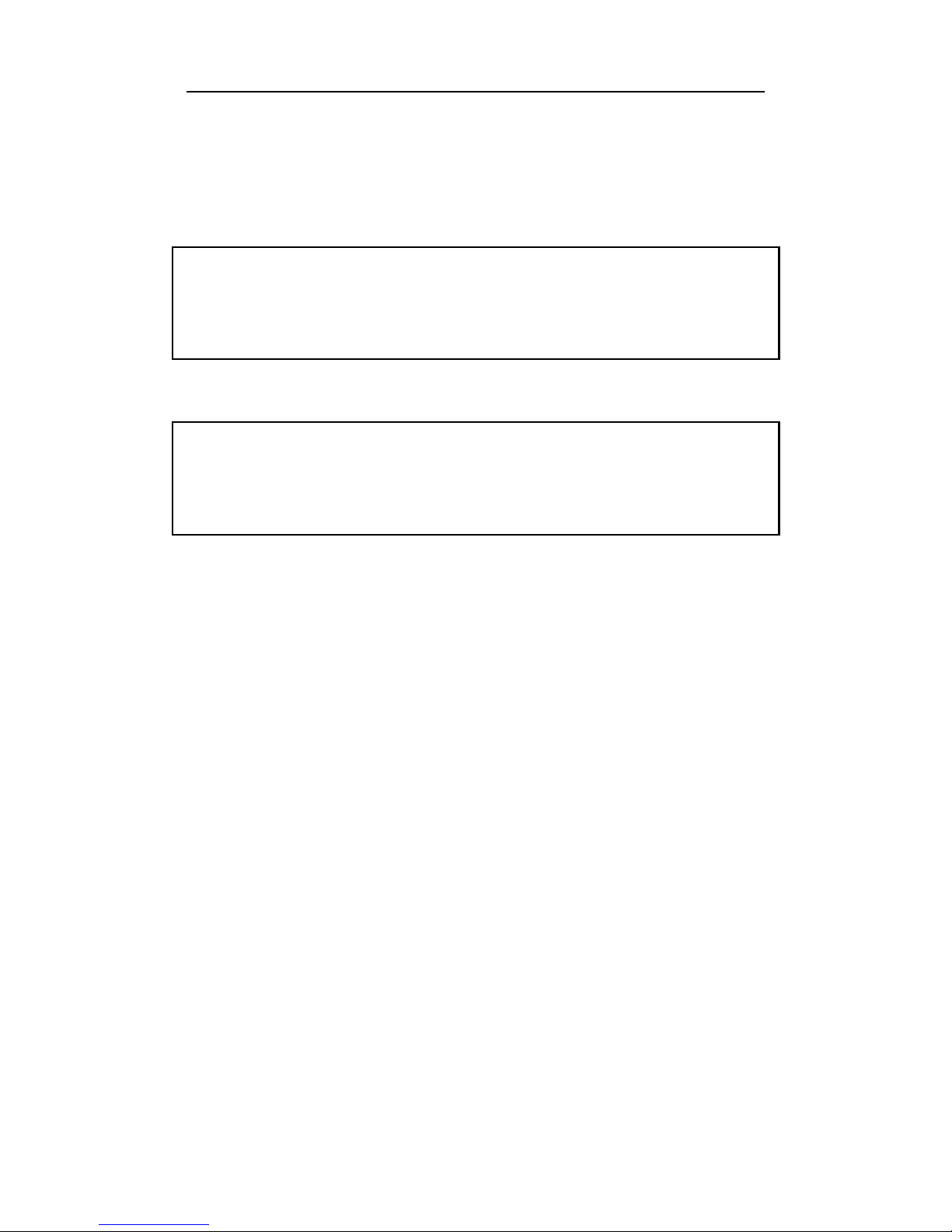
In this manual the LEDs are illustrated in the
following way:
= Off
z = Lit Á = Flashes
Note 1! In all programming instructions below
“A” (in e.g. A21) refers to the bell button the
keypad
Note 2! During programming mode, if a
button is not pressed within 20 seconds, the
code lock goes back to normal operation.
Choose password
When K44 is delivered, the memory is
completely erased. The first thing to do before
installing the code lock is to choose a
password. Proceed as follows:
1 Press the SWl button on the code lock's
circuit board. Both LEDs start flashing at
the same time as the buzzer sounds.
2 Enter a 6-digit password.
3 Make a note of the new password and keep
it in safe place.
Page 11

K44 Technical manual 11
Change password
1 Press B and enter the current password.
2 Enter A27.
3 Enter the new password. A warning tone is
heard.
4 Enter the new password once again.
5 Press B to leave programming mode.
6 Make a note of the new password and keep
it in safe place.
Programming the codes
1 Press B and enter the password.
2 Enter A21.
z
3 Enter the desired code location using two
digits (01-04 if K44 is in standard mode or
01-30 if K44 is in advanced mode).
Note! In the Standard mode or advanced
mode section you will find instructions on
how to change the setting between
standard and advanced mode.
4 Enter the entrance code for the chosen
code location (four digits for code
locations 01-20 or six digits for code
locations 21-30).
Page 12

12 K44 Technical manual
Note! The first four digits in a six-digit
code must not be equal to the digits in a
four-digit code and vice versa.
5 State whether the code should be timed
from an external time clock. Press 0 if the
code should not be timed. Press 1 if the
code should be timed from time clock 1 or
2 if it should be timed from time clock 2.
6 Enter a new code location or press B to
leave code programming.
7 Press B (leaves programming mode).
Erasing codes
1 Press B and enter the password.
2 Press A21.
z
3 Enter the two-digit code location to which
the code belongs.
4 If the code consists of four digits, press
0000 If the code consists of six digits,
press 000000.
5 Press B to leave code programming.
6 Press B to leave programming mode.
Page 13

K44 Technical manual 13
Changing codes
1 Press B and enter the password.
2 Enter A22. Á
3 Enter the existing code. If it is a 4-digit
code, enter A after the last digit.
4 Enter the new code using four (standard
mode) or six digits (advanced mode).
5 Enter the new code once again.
6 If the code should not be timed, press 0.
Press 1 if the code should be timed from
time clock 1 - or 2 for time clock 2.
7 Change another code or press B to leave
code programming.
8 Press B to leave programming mode.
Set opening time
The opening time determines for how long the
lock should remain open following a correct
entrance code. When K44 is delivered the
opening time is 7 seconds for both relays.
1 Press B and enter the password.
2 Enter A28.
z
3 Enter the desired opening time (01-99)
using two digits, e.g. 09 for 9 seconds.
4 Press B to leave programming mode.
Page 14

14 K44 Technical manual
Deactivating the buzzer
When K44 is delivered the buzzer is activated.
If you do not want the buzzer to beep during
key presses and door opening, you can turn it
off. Note that the buzzer will continue beeping
during programming.
1 Press B and enter the password.
2 Enter A65.
z z
3 Enter 0.
4 Press B to leave programming mode.
To activate the buzzer again, press 1 in step 3
instead.
Page 15

K44 Technical manual 15
Door open permanently
When K44 is delivered, the code lock is set so
that you cannot unlock the door permanently
using the code for code location 04. To
activate this possibility, proceed as follows:
1 Press B and enter the password.
2 Enter A68.
z z
3 Enter 1.
4 Press B to leave programming mode.
Whenever you want to deactivate the function,
enter 0 in step 3 instead.
In the Unlocking the door permanently section
you will find instructions on how to unlock the
door using the code.
Page 16

16 K44 Technical manual
Duress on/off
With the duress function activated, a staff
member can enter a special code if he or she is
forced to open the door under theat. An alarm
signal is then transmitted to an alarm central,
the police or similar. When K44 is delivered,
the duress function is deactivated.
This is how to activate the duress function:
1 Press B and enter the password.
2 Enter A69.
z z
3 Enter 1.
4 Press B.
To deactivate the function, enter 0 in step 3
instead.
The Enter duress code section describes how a
user should enter the duress code.
Note! If Duress is activated, make sure you
have not programmed codes with
consecutive digits. Code 1234 must not exist
with codes 1235 and 1233. Code 5679 must
not exist with codes 5670 and 5678.
Page 17

K44 Technical manual 17
Standard mode or advanced
When K44 is delivered, the code lock is set to
standard mode. This means that 4 four-digit
codes can be programmed. If set to advanced
mode, you can program 20 four-digit and 10
six-digit codes.
This is how to set K44 to advanced mode:
1 Press B and enter the password.
2 Enter A99. Á
3 Enter 1.
4 Press B to leave programming mode.
To reset K44 to standard mode, enter 0 in step
3 instead.
Erase the memory
This is how to erase all programmed
information (including the password):
1 Press B and enter the password.
2 Press SW1 on K44 circuit board.
3 Enter 112186.
4 Enter 112186 once again. The memory is
now erased and K44 goes back to the
factory settings.
Page 18

18 K44 Technical manual
Using K44
Entrance
To open the lock, a four-digit (or six-digit)
entrance code should be entered on the code
lock's keypad. When a correct code is entered
the lock opens. The lock will close again after
the time set as opening time.
K44 is blocked if a visitor performs 12 key
presses without managing to find a correct
entrance code. To release the blockage, enter a
correct code twice in succession.
Unlock the door permanently
To unlock the door permanently, proceed as
follows:
1 Press B. Á
2 Enter the code programmed for code
location 04.
3 Enter 1.
From now on the visitor does not have to enter
a code to open the door – the door is unlocked
(indicated by the green LED.
Whenever you want to lock the door again,
follow the instructions above; only enter 0 in
step 3 instead. The visitor now has to enter a
code to open the door.
Page 19

K44 Technical manual 19
Enter duress code
This is how to activate the alarm output when
forced to open the door under threat:
1 Enter the usual entrance code, only add 1
to the last digit in the code.
Example 1: If the entrance code is 1234,
enter 1235 instead.
Example 2: If the code is 1239, enter 1230
instead.
When a duress code is entered, the door will
open at the same time as the duress output is
activated. It will remain activated until reset by
somebody entering programming mode.
Page 20

20 K44 Technical manual
Technical data
Power supply: 8-24V AC, 10-35V DC
Power consumption: 7 mA quiescent
without backlighting,
35 mA with
backlighting.
Maximum load over
the relay contacts: 2 A 28 V DC
Dimensions: 140x80x40 mm
(HxWxD)
Suitable
height: 1200-1400 mm from
ground to bottom edge
If needed, complete the installation with flush
mounting kit BB3.
Page 21

K44 Technical manual 21
This page is empty
Page 22
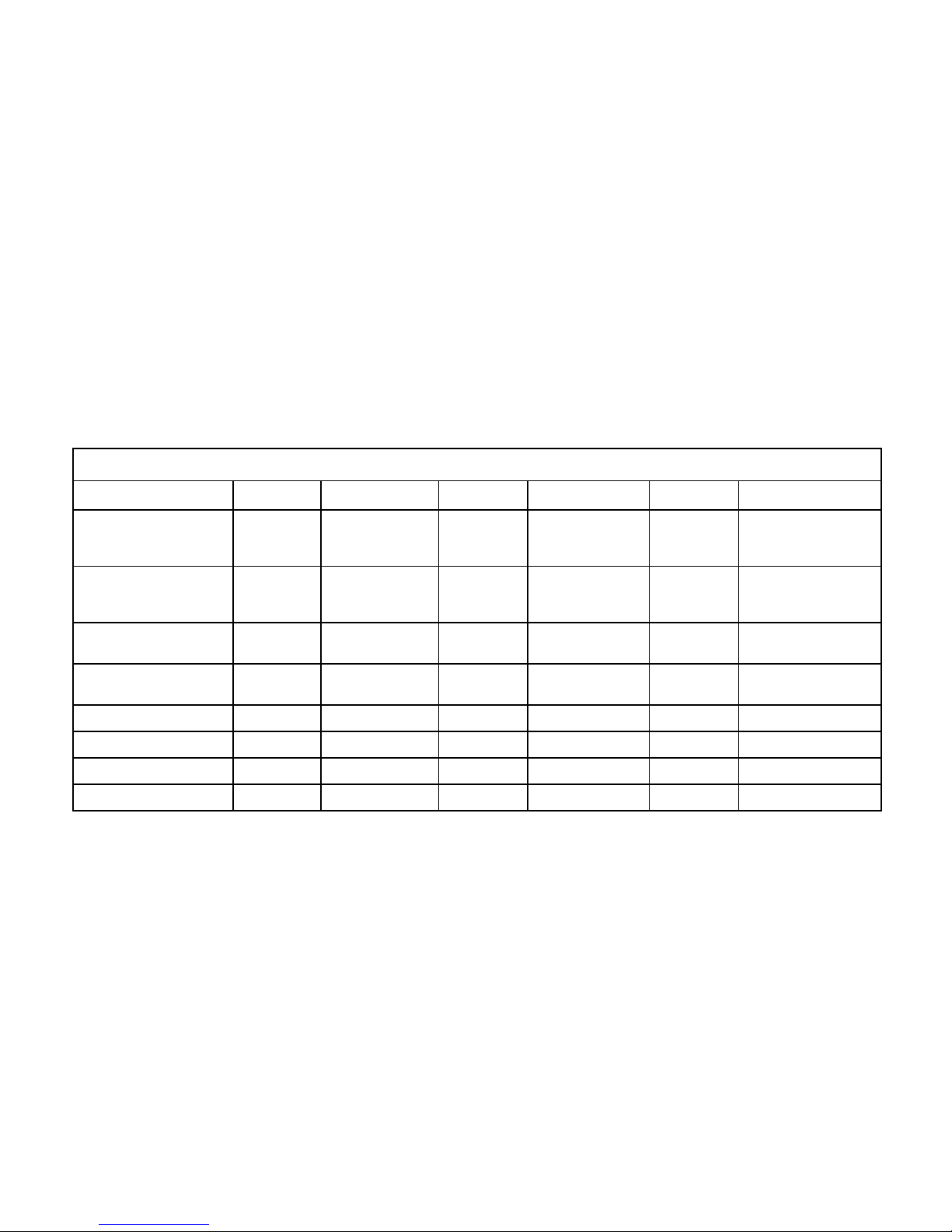
Programming overview
Always start by pressing B and entering the password. Exit: Press B.
Function Sequence Step 1 Step 2 Step 3 Step 4 Step 5
New entrance code A21 Enter code
location
(2 digits).
Enter code
(4 or 6
digits)
Enter timing
group (0, 1 or 2)
Program
new code or
press B
Change entrance code A22 Enter old code
using
4 (+A ) or 6 digits
Enter new
code using
4 or 6 digits
Enter new code
using 4 or 6 digits
Enter timing
group (0, 1
or 2)
Change another code
or press B
Change password A27 Enter new code
(6 digits)
Enter new
code again
Change opening time A28 Enter seconds
(01-99)
Buzzer on/off A65 0 = off 1 = on
Door open permanently A68 0 = off 1 = on
Duress on/off A69 0 = off 1 = on
Advanced mode on/off A99 0 = off 1 = on
Page 23
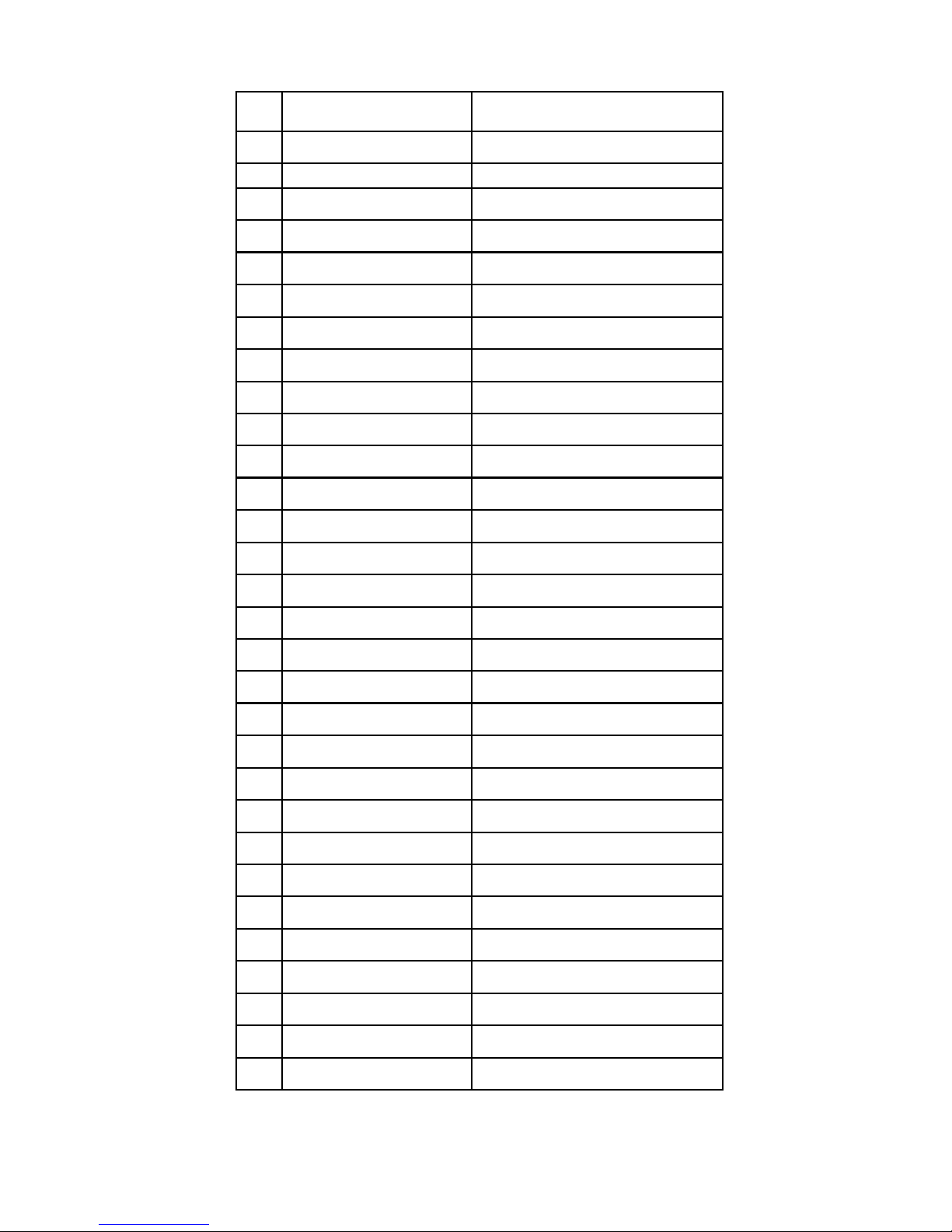
Nr Code
Time group
01
02
03
04
05
06
07
08
09
10
11
12
13
14
15
16
17
18
19
20
21
22
23
24
25
26
27
28
29
30
Page 24

 Loading...