

Page 1
PAGE 1
Add: Floor3,Building A,No.257,Junye Road,Huangpu District,Guangzhou,China
E-mail:[email protected] Http://www.bevsinfo.com
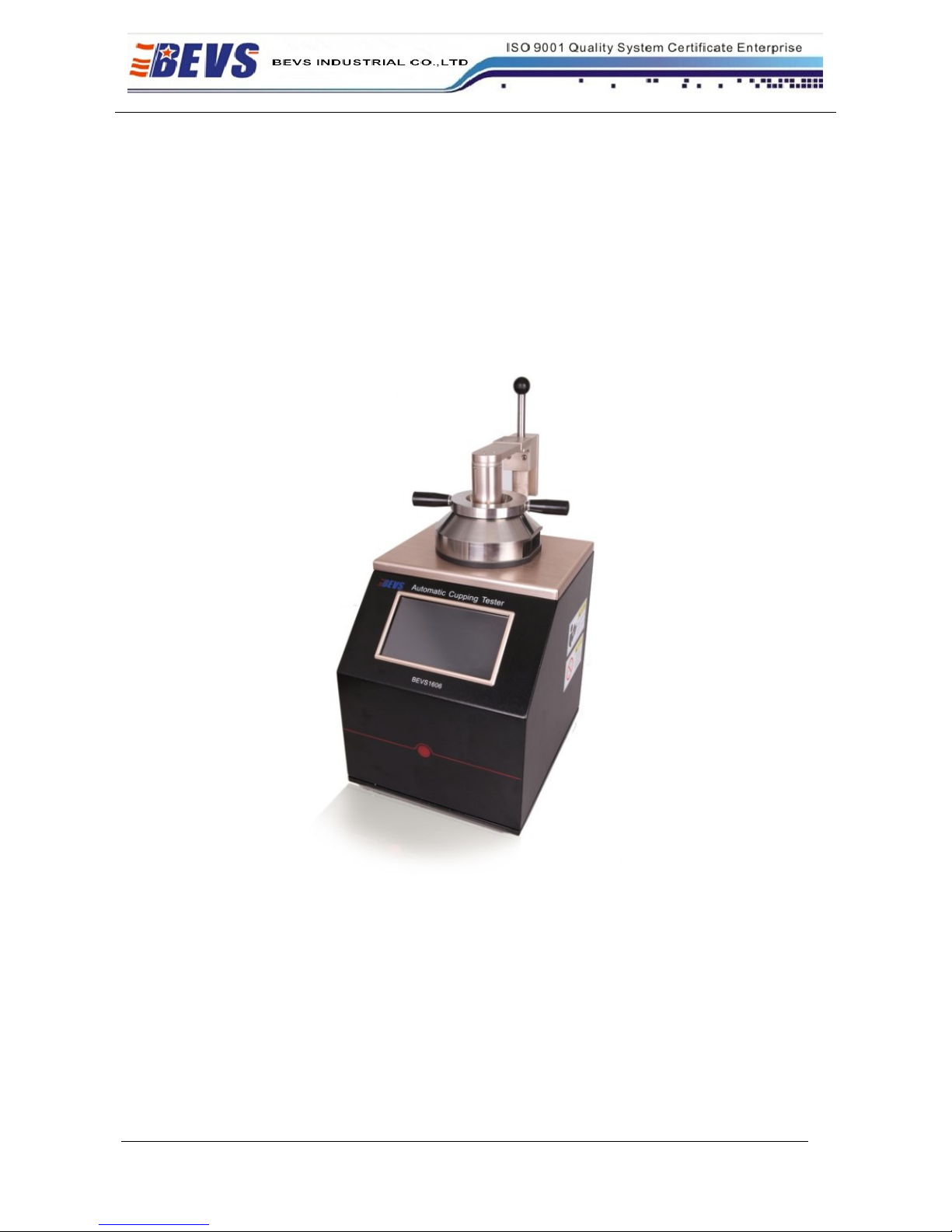
Automatic Cupping Tester
BEVS 1606
User Manual
Version 201503
This manual shall be read carefully before starting. Directions included in this operation manual
shall be strictly followed.
Page 2

PAGE 2
Add: Floor3,Building A,No.257,Junye Road,Huangpu District,Guangzhou,China
E-mail:[email protected] Http://www.bevsinfo.com
Content
1 Company Profile
2 Product Introduction
2.1 Technical Specification
2.2 Feature
3 Operation Introduction
3.1 Operating Environment
3.2 Power
3.3 Operation Guideline
4 Maintenance
5 Attention
6 Order Information of Accessories
Page 3

PAGE 3
Add: Floor3,Building A,No.257,Junye Road,Huangpu District,Guangzhou,China
E-mail:[email protected] Http://www.bevsinfo.com
1 Company Profile
BEVS Industrial Co., Ltd. is a leading manufacturer that specializes in coatings, ink, painting, resin
testing instruments and laboratory whole solution.
We offer the complete and unique products in this field to meet customer's challenging demands of
today and tomorrow, the products are complied with the standards of ISO, ASTM, DIN, BS, EN etc.
With strong supports and hard work by lots of end-users and worldwide agents, BEVS become
more and more famous in the world and provides more competitive values for our customers.
2 Product Introduction
BEVS Automatic Cupping Tester is a advance technology to efficiently assess the elasticity and
cupping resistance of various coatings, with a new generation micro-electro and CCD technology,
also has strong functions such as can be video or photo the deformation process or result that can be
downloaded the image and video to the PC to analyze the various factors between coating
performance and substrate etc.
Customized design software operation system and provide the USB port for mouse and U disk and
camera. It is the best choice for R&D and QC people.
2.1 Technical Specification
Stroke length
0-15mm,accuracy: ± 0.011% of set speed
Indenter Speed
0.02-0.4mm/s, accuracy: ±0.5 mm
Control
Automatic
Camera
Colorful CCD
Light source
LED light source
Cupping result
Digital(resolution 0.001mm)
Interface
USB port for mouse &U disk &CCD
Max. panel width
70mm
Max. panel thickness
steel
1.25 mm(Standard Speed 0.2mm/s)
Max. panel thickness
aluminum
3mm( Standard Speed 0.2mm/s)
Power Supply
230 VAC, 50 Hz(110V-60HZ option)
Max. cupping force
15KN
Page 4

PAGE 4
Add: Floor3,Building A,No.257,Junye Road,Huangpu District,Guangzhou,China
E-mail:[email protected] Http://www.bevsinfo.com
2.2 Features
Touch screen control technology
Customized operation system
Mouse directly connect with instrument
Directly input testing parameter via screen or mouse
Realtime display cupping process
Realtime monitor cupping image
Realtime show cupping speed and depth
With video and photo
Automatic calibration zero
Manual and preset mode
3 Operation Introduction
3.1 Operating Environment
3.1.1 When using the instrument, should be paid attention to the following points.
3.1.1.1 Forbid the operation in too hot environment
3.1.1.2 Forbid the operation in too wet environment
3.1.1.3 Forbid the operation in vibration environment and keep the environment clean.
3.1.2 This instrument is used in the laboratory, the technical indicator of operation environment as
following.
3.1.2.1 Temperature 10℃~35℃
3.1.2.2 Humidity 15~85% No Condensation
3.2 Power
Must use the power with the ground wire
3.3 Operation Guideline
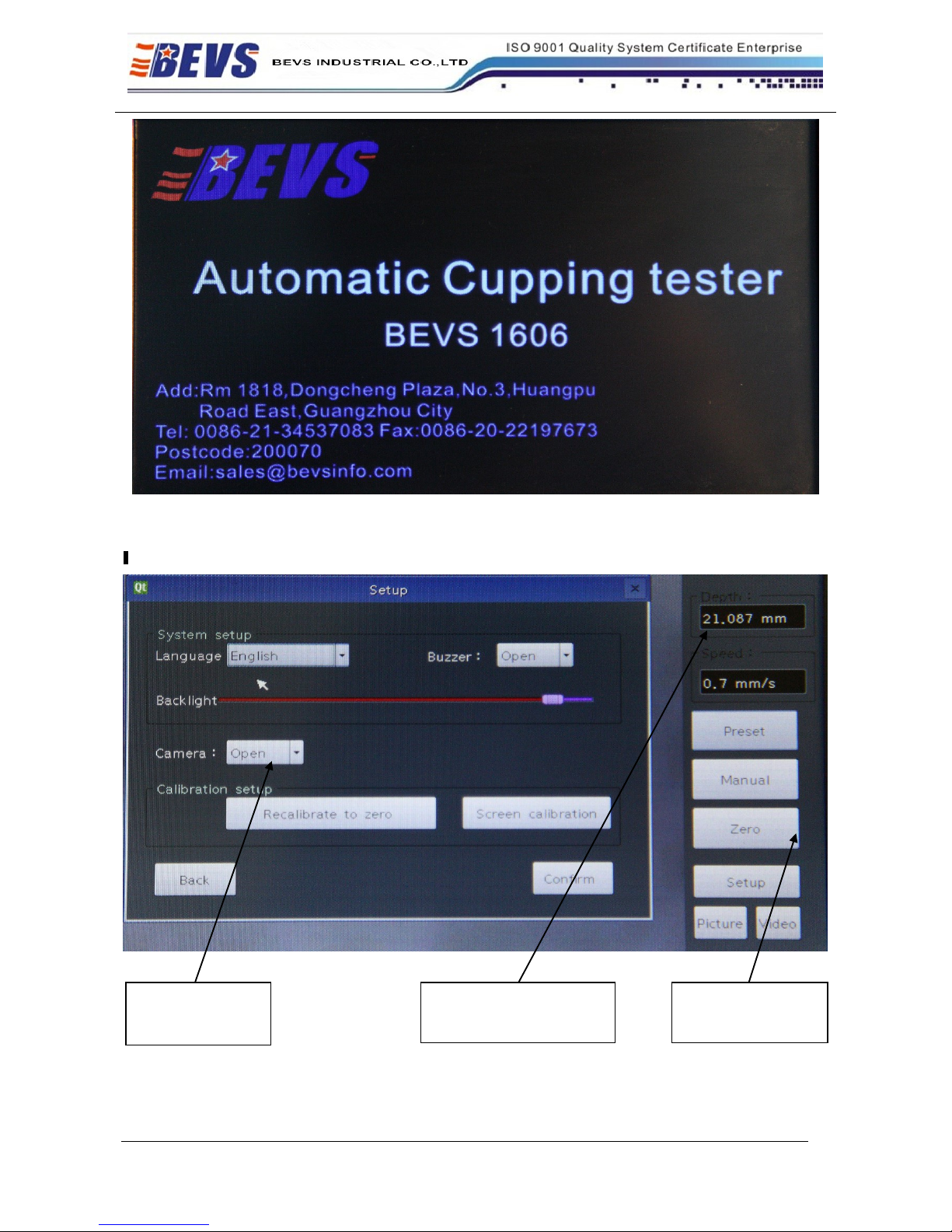
3.3.1 The welcome screen and select the language, as below Figure1:
Page 5
PAGE 5
Add: Floor3,Building A,No.257,Junye Road,Huangpu District,Guangzhou,China
E-mail:[email protected] Http://www.bevsinfo.com
Figure 1
3.3.2The main interfaces as shown in Figure 2:
Figure 2
Realtime display
cupping process
The operation button
area
Realtime show cupping
speed and depth
Page 6
PAGE 6
Add: Floor3,Building A,No.257,Junye Road,Huangpu District,Guangzhou,China
E-mail:[email protected] Http://www.bevsinfo.com
3.3.3 The Cupping Test:
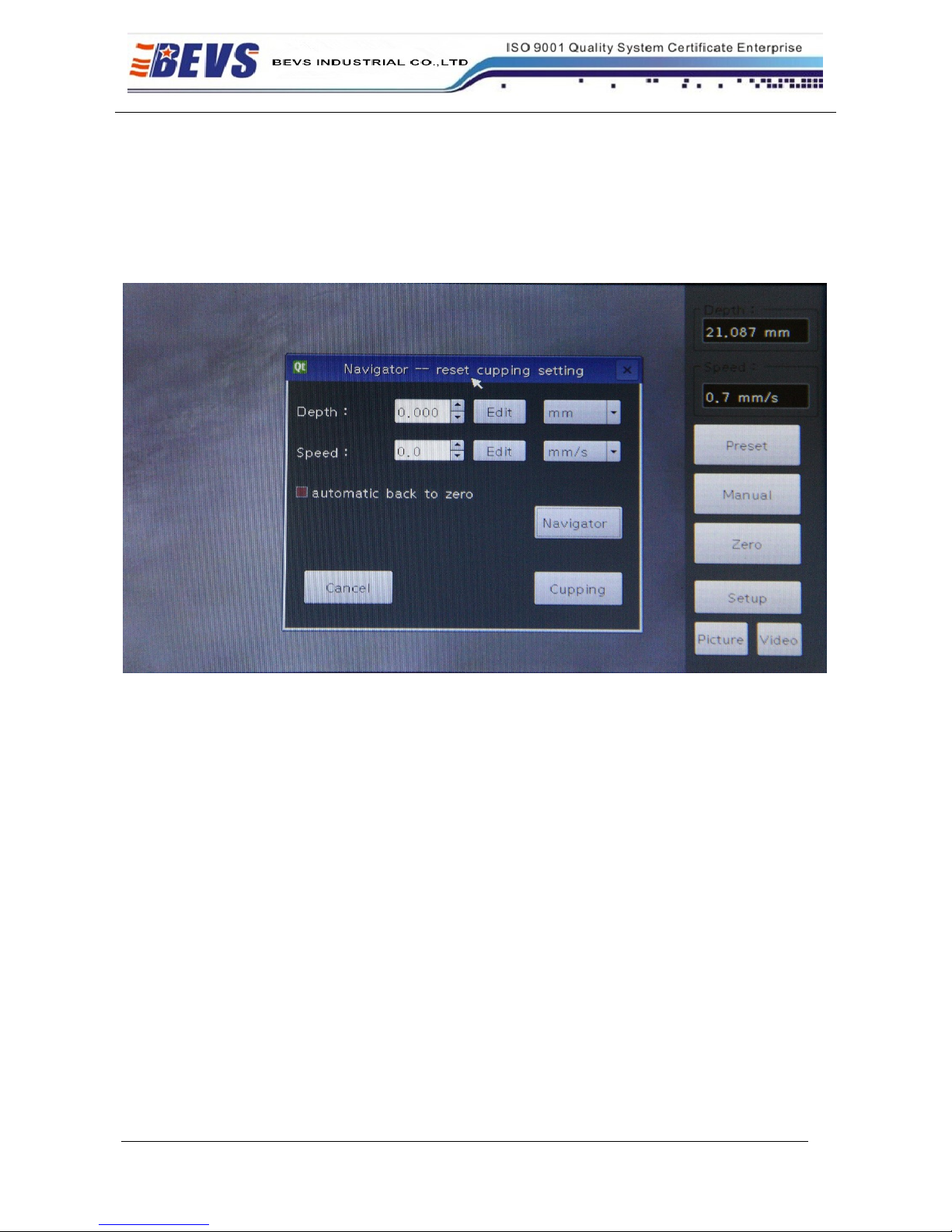
1.If it’s the first time to do the cupping test,please click the button ”Preset” to enter into the below
interface:
Figure 3
1.1 In this interface, you can set the ”Depth” and “Speed” as request.
1.2 The option of “automatic back to zero” means when the test is finished, the machine will back
to zero automatically.
1.3 Before you click the “cupping” button, must ensure the camera system’s regulation is clear, and
the machine has been calibrated to zero.
1.4 Well noted that the bench has been fitted with test board for calibration. The test board’s
specification must in this machine’s specifications range. Or you may damage the machine.
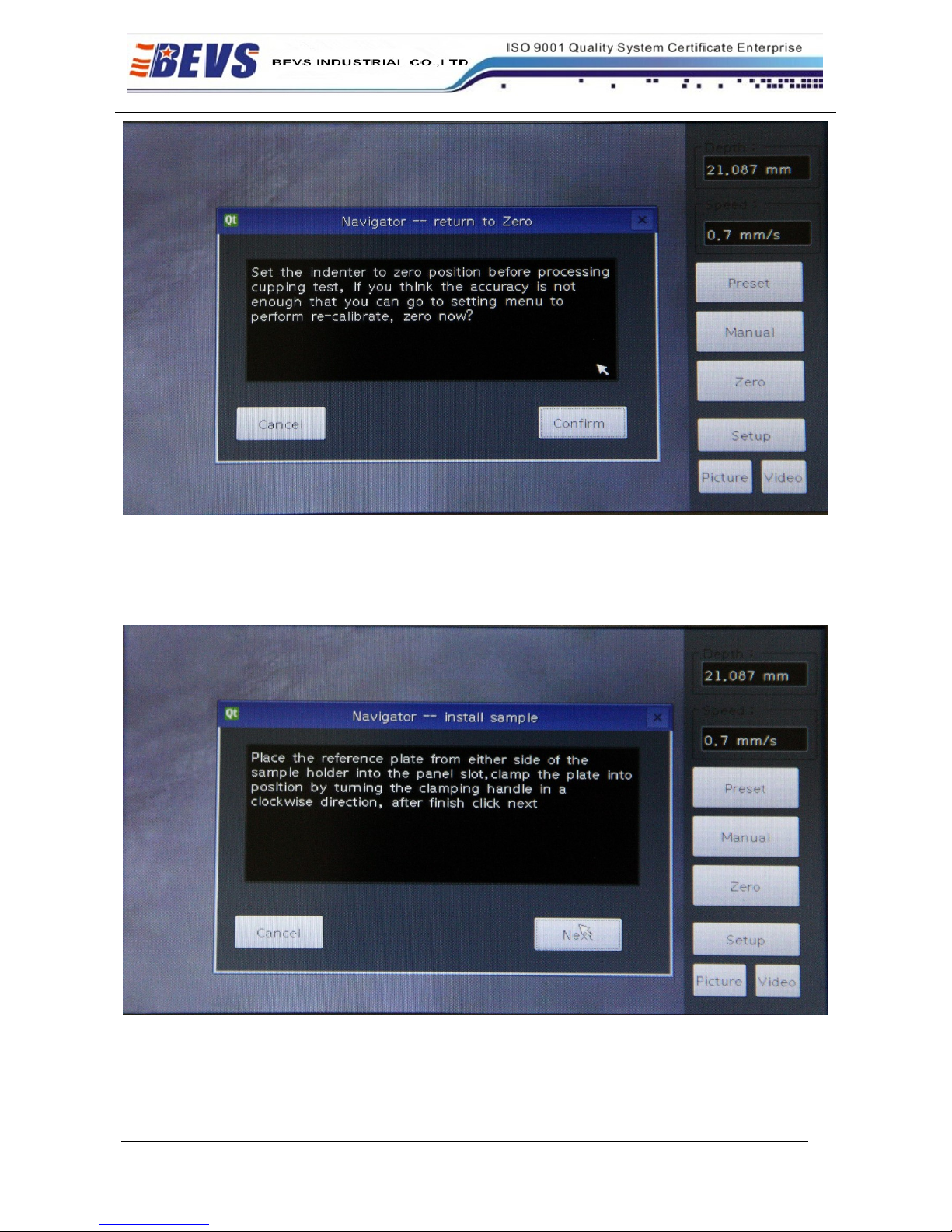
1.5 If just to begin to use the machine, strongly suggest to choose the “Navigator” to enter to the
interface as below:
Page 7
PAGE 7
Add: Floor3,Building A,No.257,Junye Road,Huangpu District,Guangzhou,China
E-mail:[email protected] Http://www.bevsinfo.com
Figure 4
2 If you first use the machine, the machine has been accurately calibrate to zero when out of factory. You can
chose “confirm” to the interface below, just chose “Next” button:
Figure 5
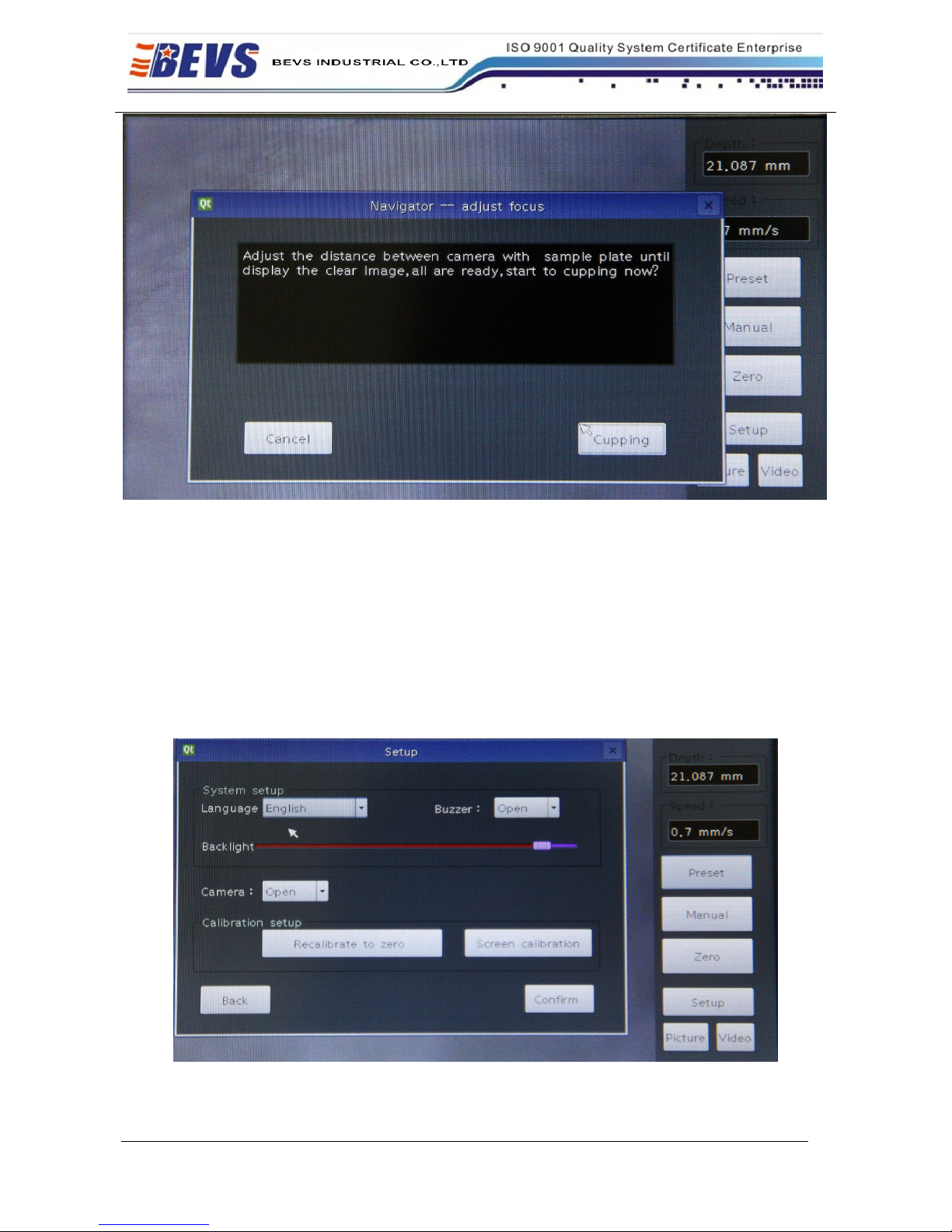
3 When in the interface below Figure 6, should install the test board firstly:
Page 8
PAGE 8
Add: Floor3,Building A,No.257,Junye Road,Huangpu District,Guangzhou,China
E-mail:[email protected] Http://www.bevsinfo.com
Figure 6
If you have not adjusted the camera, please adjust the camera in this step. The camera focus has
been adjusted in place when out of factory, you only need to well-place the camera and the USB
firstly, and then tighten the three screws.
You can gently twist the shaft between the camera lens and test board to get the best viewing effect.
Click the “Cupping” button to start the cupping test.
You can click the “Stopping cupping” button to stop cupping as request.
Zero calibration:
Click the “Setup” button in the main interface to recalibration, as shown in below figure 7:
Figure 7
Page 9

PAGE 9
Add: Floor3,Building A,No.257,Junye Road,Huangpu District,Guangzhou,China
E-mail:[email protected] Http://www.bevsinfo.com
Normal “power off”:
You can click the “Setup” button in the main interface to “power off”.
The machine will back to zero and power off automatically when the machine not back to zero, then
turn off the power.
Abnormal “power off”:
If the machine shut off directly by accident, you will be reminded to recalibrate to zero. Please
follow the instrument to zero calibration, to ensure the accuracy of the machine.
Manual:
The “manual” function means you can choose to cupping by hand operation, will cupping one time
by each click.
Picture and Video:
After well-placed the U-disk, the picture or video will store into U-disk automatically by click
“Picture” or “Video” button.
4 Maintenance
4.1 Regular maintenance is necessary
4.2 Make sure that the instrument is in off status and the power is in outage status
4.3 When the stylus across the film in the test plate, if some chippings happened, it means the stylus
is broken, should change in time
4.4 Clean with the soft cloth, forbid to use the chemical reagent with corrosive
5 Attention
5.1 Read the user manual carefully before operation
5.2 Keep the operation manual for the future reference
5.3 Learn more about the safe operation details
5.4 Not allow to operate in potential explosive environment and in liquid status
5.5 Must operate in the horizontal table
5.6 Not allow to touch the inner part when the instrument is working
6 Order Information
BEVS 1606 Automatic Cupping Tester
 Loading...