

Page 1

Beoplay A9
Quick guide
Kort vejledning
Kurzanleitung
Guía rápida
Guide rapide
Guida rapida
クイックガ イド
간편 안내서
Snelgids
Guia rápido
Краткое руководство
Snabbguide
快速指南
快速操作指南
Page 2

Page 3
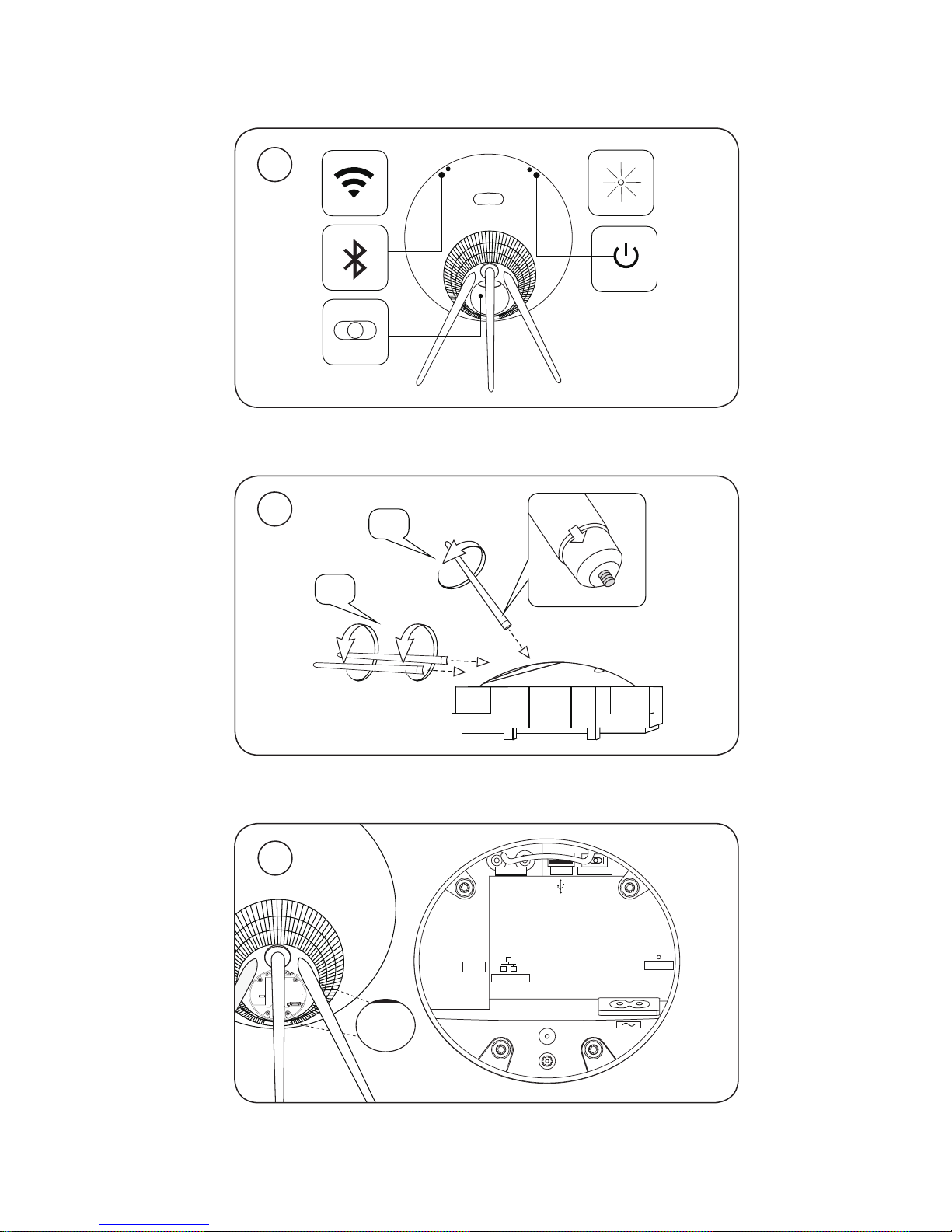
3
A
B
A
How to set up your A9
FREE
WALL
CORNER
POSITION
USB
LINE IN
RESET
ETHERNET
2
1
3
Page 4
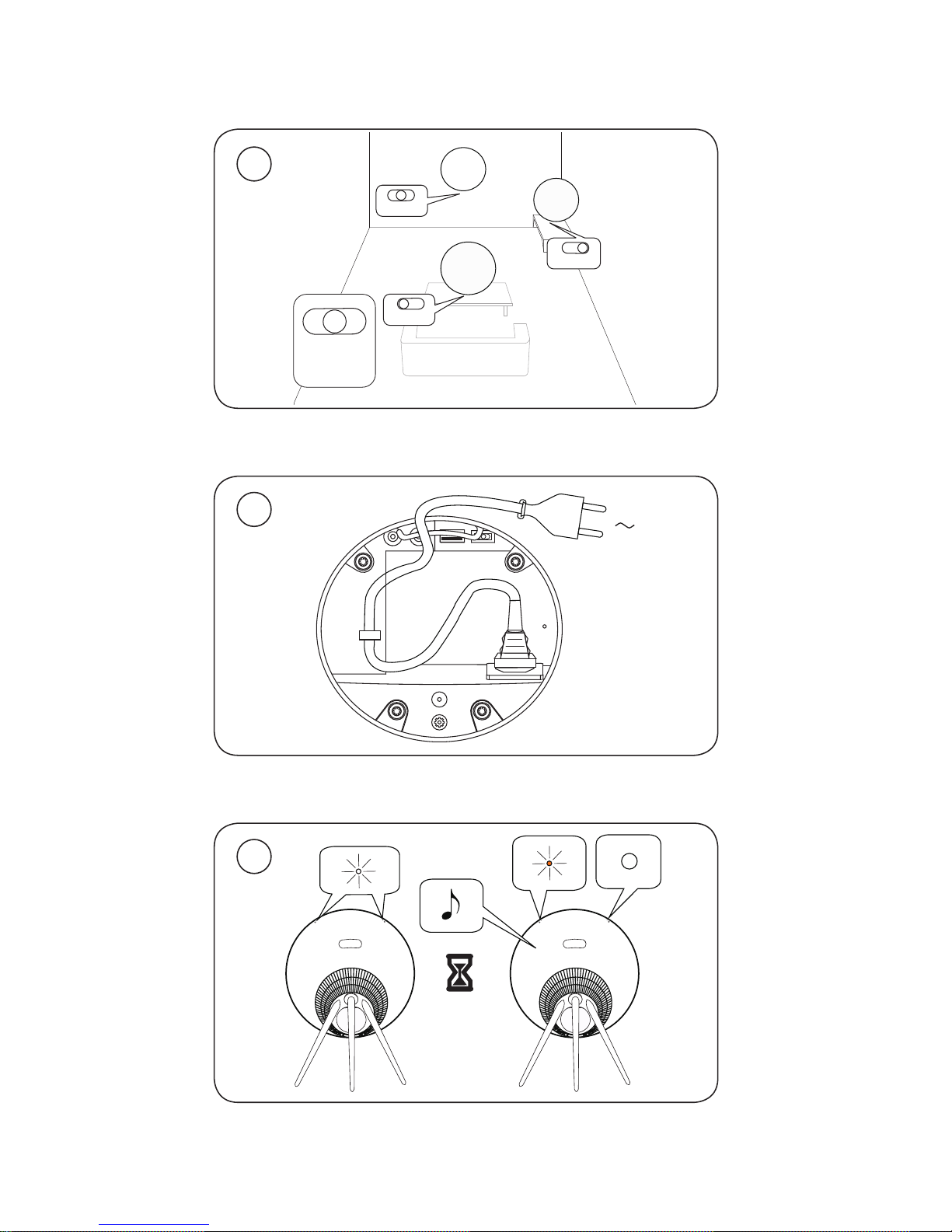
45
5
WALL
FREE
CORNER
FREE
WALL
CORNER
POSITION
WALL
CORNER
FREE
FREE
WALL
CORNER
01:00
6
4
Page 5
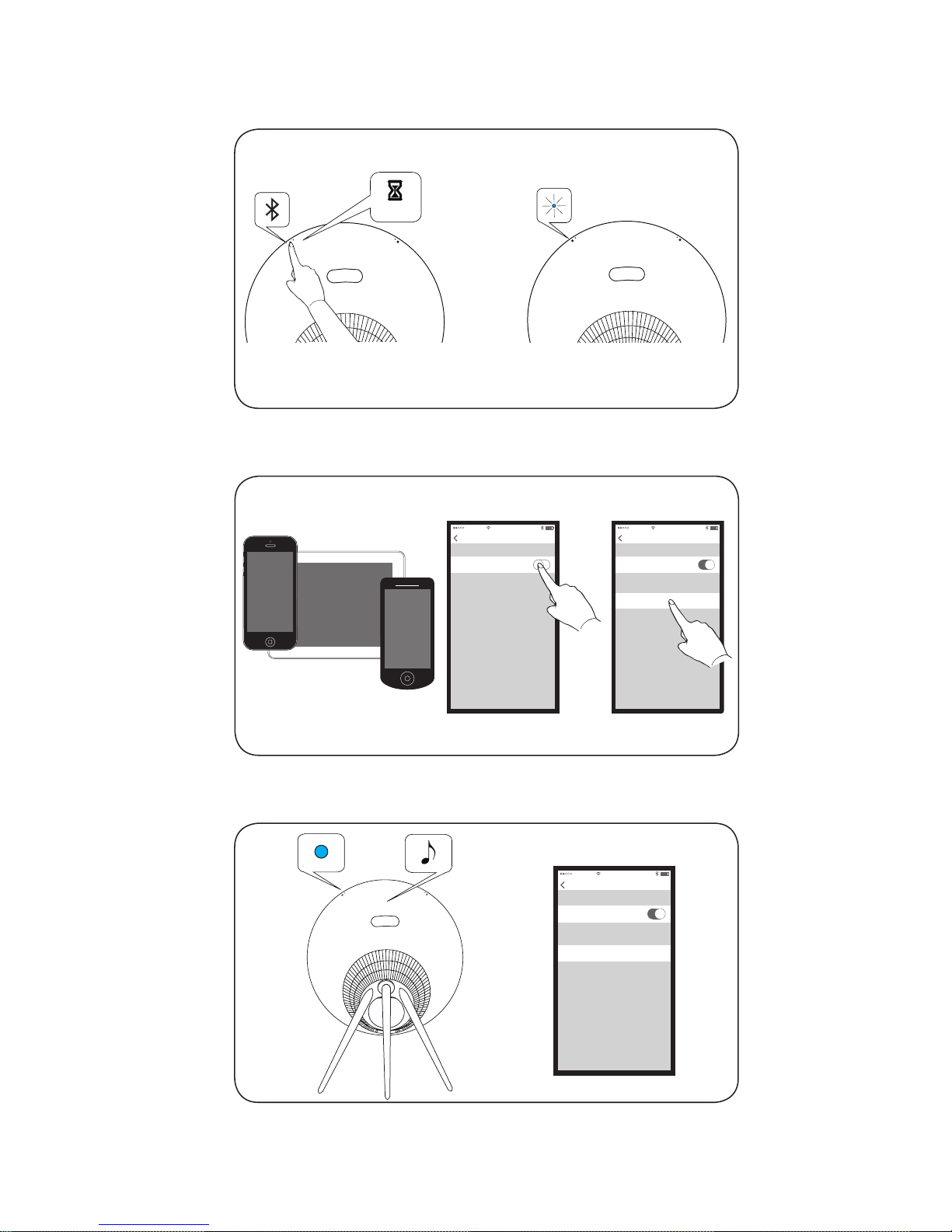
45
How to connect with Bluetooth
00:02
Bluetooth
Bluetooth
Settings
11:11
Bluetooth
Bluetooth
Settings
11:11
Beoplay A9 Not Paired
DEVICES
Bluetooth
Bluetooth
Settings
11:11
Beoplay A9 Connected
DEVICES
Page 6
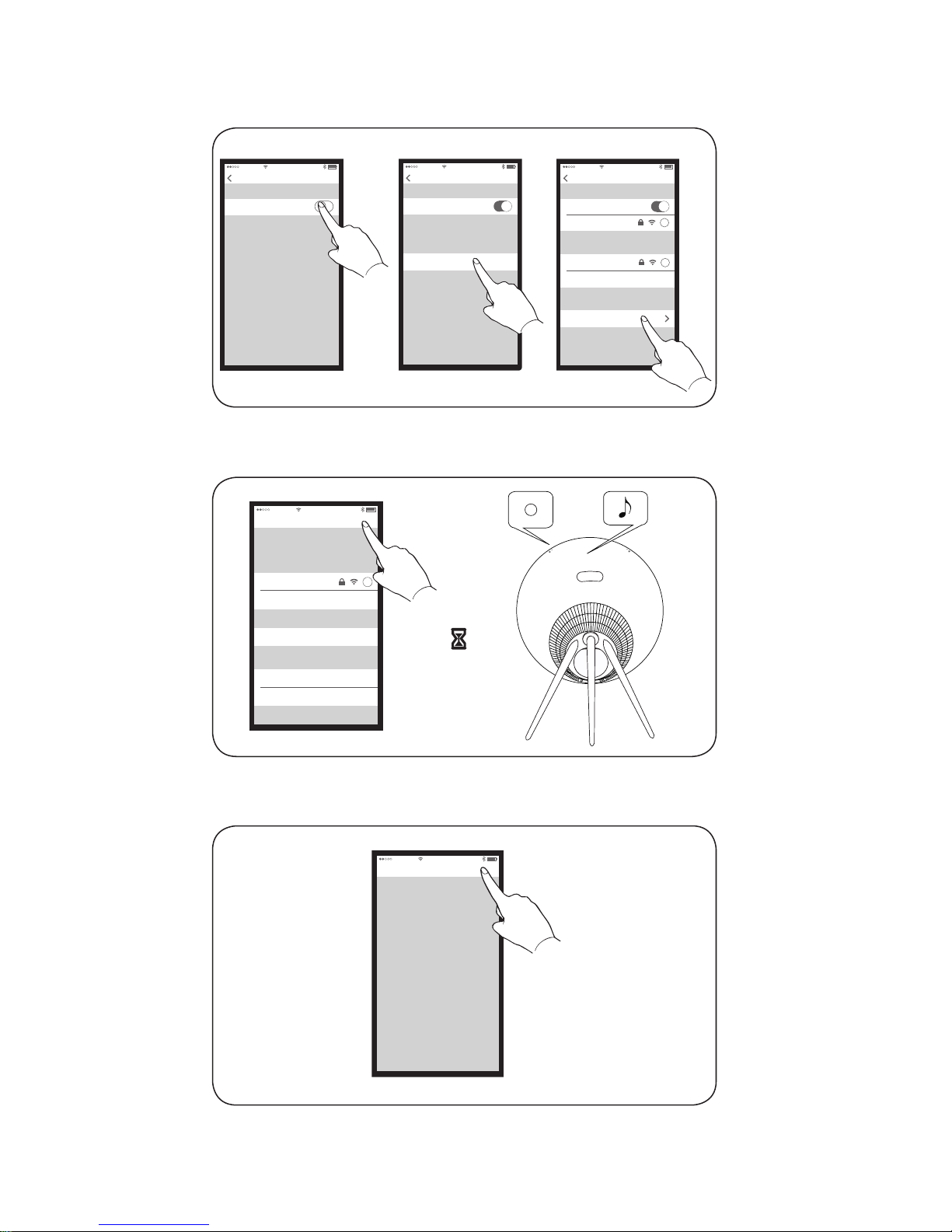
67
How to connect with Airplay over WiFi
Wi-Fi
Wi-Fi
Settings
11:11
Wi-Fi
Wi-Fi
Settings
11:11
Home network
CHOOSE A NETWORK
Wi-Fi
Wi-Fi
Settings
11:11
Home Network
i
Office
CHOOSE A NETWORK
i
Other
Beoplay A9_xxxxxxxx
SET UP NEW AIRPLAY SPEAKER
AirPlay Setup
Cancel
11:11
Home network
NETWORK
i
Show Other Networks
Speaker Name:
Beoplay A9
Next
This AirPlay speaker will be set up to join
“Home network”
Password Optional
SPEAKER PASSWORD
Verify Verify Password
00:30
Setup Complete
11:11
Done
This AirPlay speaker joined “Home Network”
Page 7
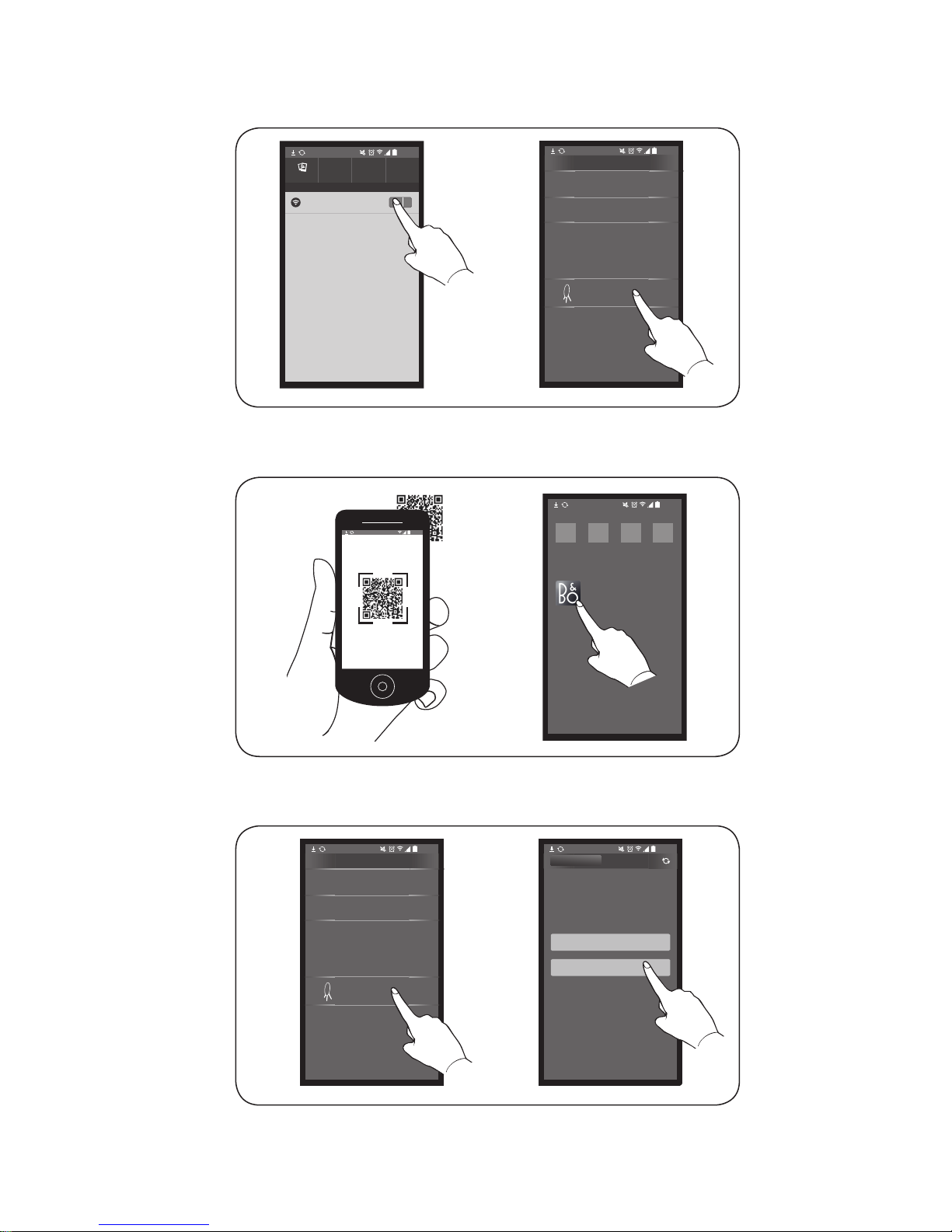
67
11:11
Wi-Fi
Network Connections
Connections
>
PRODUCT VIEW
SETUP GUIDES
LEARN MORE
When ready, your product will appear below.
This may take some time.
PRODUCTS FOUND ON YOUR NETWORK
Beoplay A9_xxxxxxxx
>
11:11
11:11
11:11
11:11
BeoSetup
In order to ensure that your products have the
latest features and improvements, automatic
system software updates are enabled by default,
and this is the recommended setting. You may
change this at any time in the UPDATE
PRODUCT SOFTWARE menu.
11:11
LEARN MORE
OK
PRODUCT VIEW
>
PRODUCT VIEW
SETUP GUIDES
LEARN MORE
When ready, your product will appear below.
This may take some time.
PRODUCTS FOUND ON YOUR NETWORK
Beoplay A9_xxxxxxxx
>
11:11
How to connect with BeoSetup app for Android
Page 8
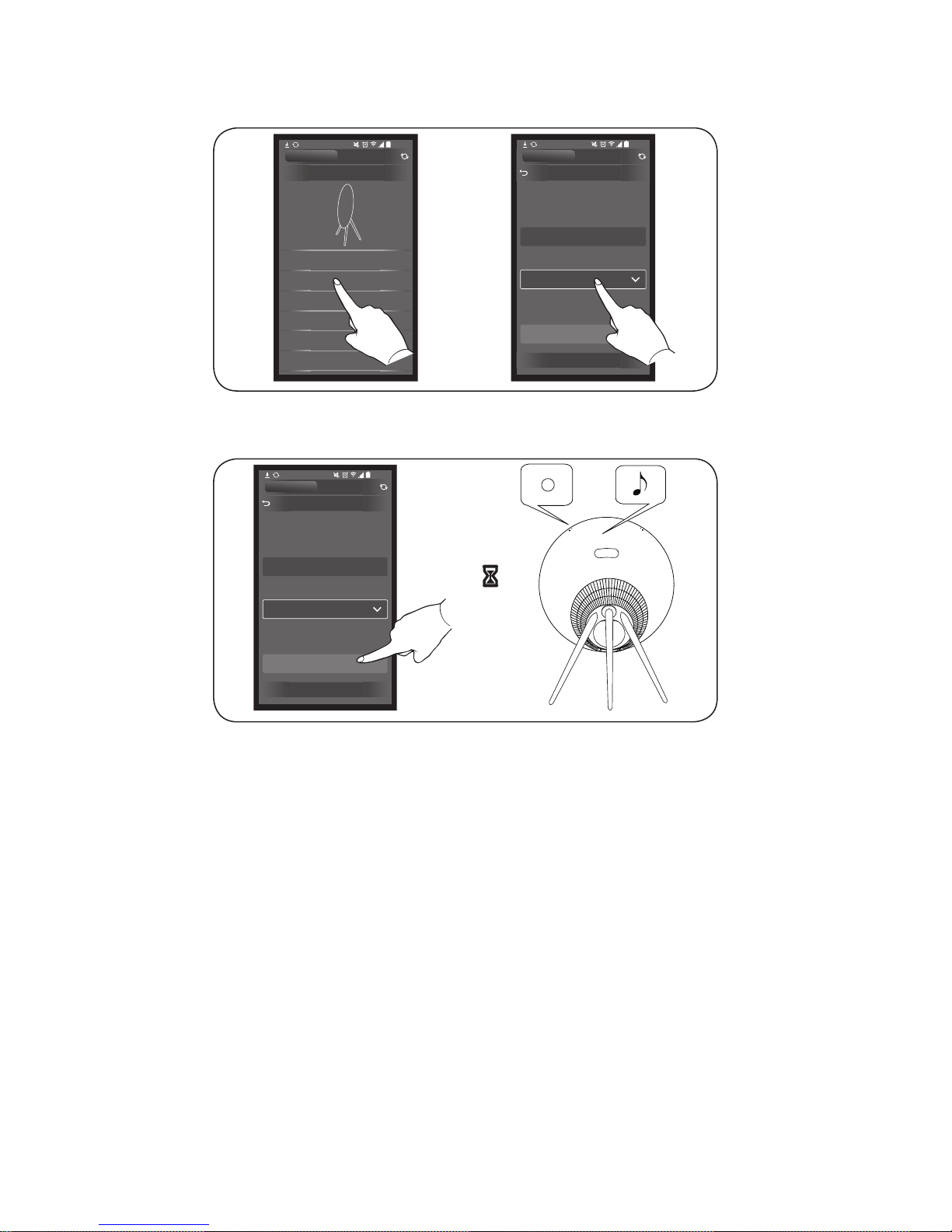
89
STATUS
NETWORK
UPDATE PRODUCT SOFTWARE
YOUR CONTENT
REMOTE CONTROLS
SETTINGS
WELCOME
11:11
PRODUCT VIEW
NETWORK
Please select the wireless network you would like
to connect to, then enter your password to set up
your product.
Product name
Network name (SSID)
Password
Beoplay A9_XXXXXXXX
Home Network
APPLY CHANGES
SHOW ADVANCED SETTINGS
11:11
PRODUCT VIEW
NETWORK
Please select the wireless network you would like
to connect to, then enter your password to set up
your product.
Product name
Network name (SSID)
Password
Beoplay A9_XXXXXXXX
Home Network
APPLY CHANGES
SHOW ADVANCED SETTINGS
11:11
PRODUCT VIEW
00:30
Page 9
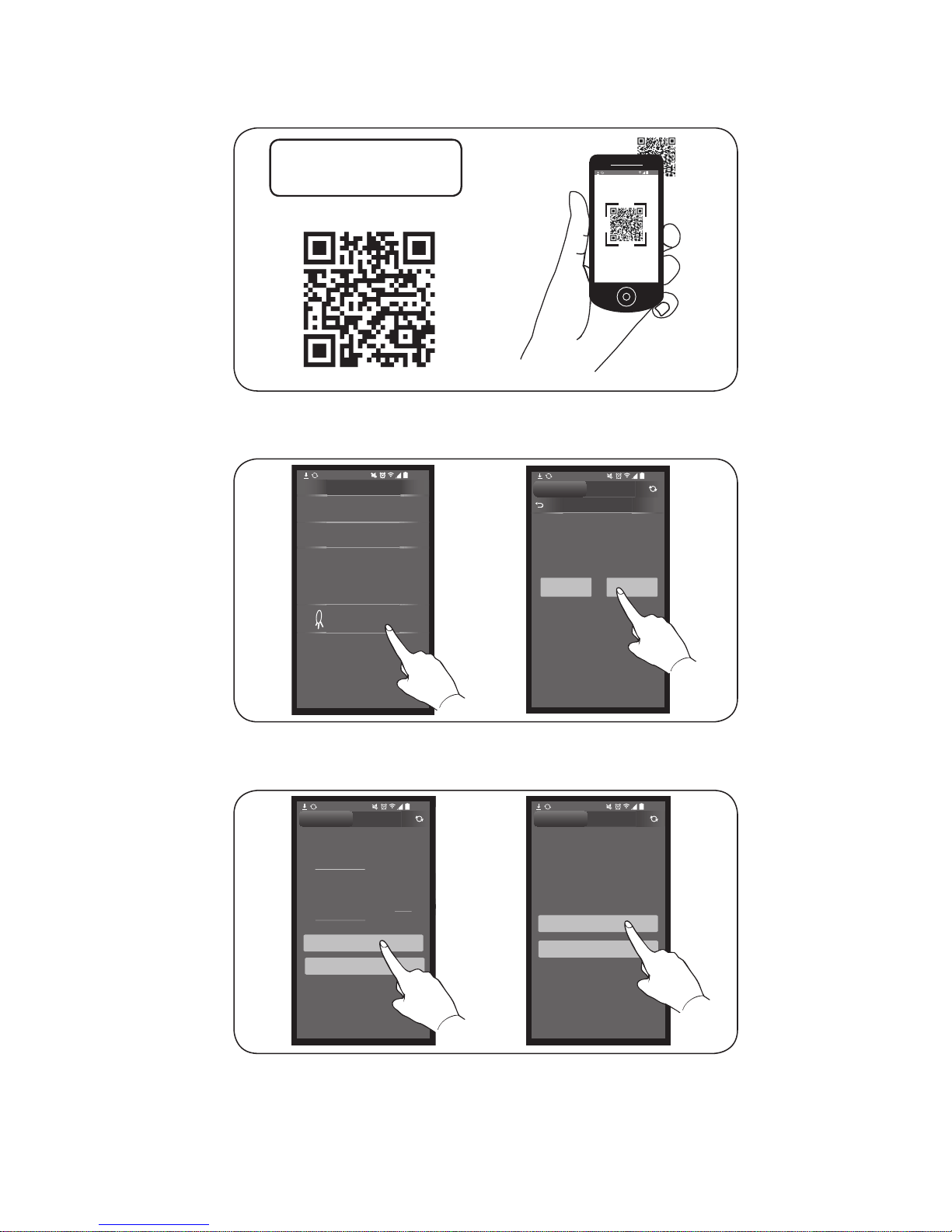
89
How to connect with Google Cast
11:1
11:11
BeoSetup App
BeoSetup App
BeoS
SETUP
>
PRODUCT VIEW
SETUP GUIDES
LEARN MORE
When ready, your product will appear below .
This may take some time.
PRODUCTS FOUND ON NETWORK
BeoSound 35_xxxxxxxx
>
11:11
>
PRODUCT VIEW
SETUP GUIDES
LEARN MORE
When ready, your product will appear below.
This may take some time.
PRODUCTS FOUND ON YOUR NETWORK
Beoplay A9_xxxxxxxx
>
11:11
The Google Privacy Polic
y
information that Google
c
your setup and use of Go
o
By pressing “Accept”
b
that you agree to the Go
o
and Google Privacy Polic
ACC
E
GOOGLE
DECL
Product is ready to update.
Current software: xx.xx.xx.x
New software: yy.yy.yy.y
Do you want to update software?
11:11
NO YES
PRODUCT VIEW
NEW SOFTWARE AVAILABLE
Y
The Google Privacy Policy describes the
information that Google collects during
your setup and use of Google Cast.
By pressing “Accept” below
that you agree to the Google Te
and Google Privacy Policy.
ACCEPT
GOOGLE CAST
DECLINE
NEW SOFTWARE AVAILABLE
.
.yy.yy.y
11:11
NO YES
Y
The Google Privacy Policy describes the
information that Google collects during
your setup and use of Google Cast.
By pressing “Accept” below, you acknowledge
that you agree to the Google Terms of Service
and Google Privacy Polic y.
11:11
GOOGLE CAST
DECLINE
ARE AVAILABLE
e .
x
y.y
?
11:11
YES
BeoPlay A9 is now read
y
YCast your favourite mus
your phone or tablet to y
o
Note, it may take a coupl
e
Google Cast depending o
n
NO T
H
11:11
DECLINE
ACCEPT
Beoplay A9 is now ready for use.
Cast your favourite music and radio apps from
your phone or tablet to your Beoplay A9.
Note, it may take a couple of minutes to install
Google Cast depending on your Internet connection.
11:11
LEARN MORE
NO THANKS
GOOGLE CAST
and Google Privacy Policy.
that you agree to the Google Terms of Service
By pressing “Accept” below, you acknowledge
your setup and use of Google Cast.
information that Google collects during
The Google Privacy Policy describes the
PRODUCT VIEW PRODUCT VIEW
Page 10
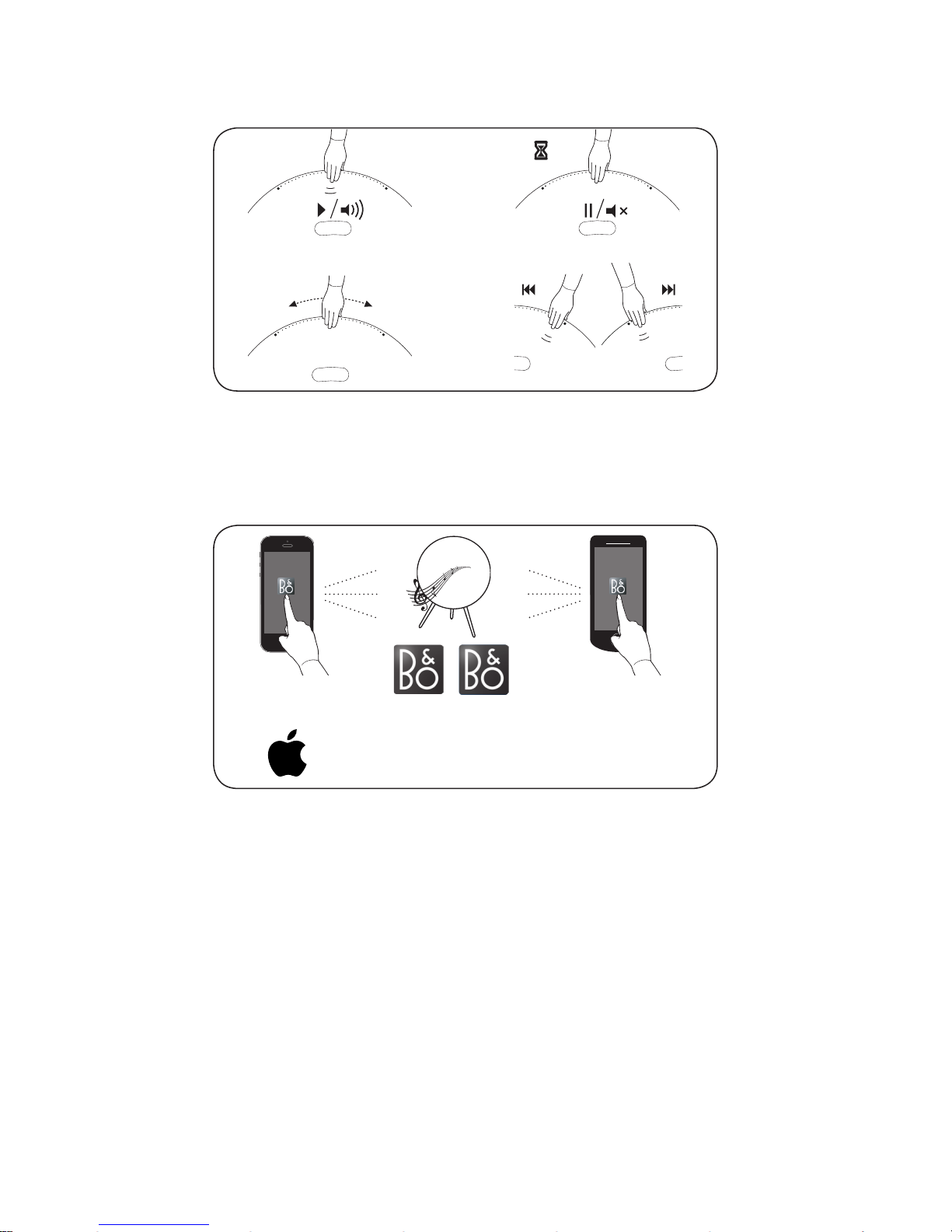
1011
How to control music on A9
How to stream music using BeoMusic App
-
+
00:02
BeoMusic
BeoMusic
BeoSetup Ap p BeoMusic A pp
JLD to verify
Andriod
TM
Page 11

1011
Dansk
For at du kan få det fulde udbytte af din BeoplayA9 anbefaler vi,
at du bruger BeoMusic appen og en eller flere af følgende:
En TuneIn-konto med dine foretrukne radiostationer
(www.tunein.com)
En DeezerPremium+ konto, som giver dig adgang til din
yndlingsmusik (www.deezer.com), eller…
…
en SpotifyPremium-konto, som giver dig adgang til din
yndlingsmusik (www.spotify.com/connect)
English
To get the full experience of your Beoplay A9, we recommend to
use BeoMusic App and one or more of the following:
A TuneIn account with your favourite radio stations
(www.tunein.com)
A Deezer Premium+ subscription for music service with your
favourite music (www.deezer.com), or ...
... A Spotify Premium account for music service with your
favourite music (www.spotify.com/connect)
Deutsch
Damit Sie in den vollen Genuss Ihres BeoplayA9 kommen,
empfehlen wir die Verwendung der BeoMusic App. Darüber
hinaus sollten Sie ein Abonnement der folgenden Dienste in
Erwägung ziehen:
Mit einem TuneIn-Konto erhalten Sie Zugri auf Ihre
Lieblingsradiosender (www.tunein.com)
Ein Deezer-Premium+-Abonnement bietet Zugri auf
Ihre
Lieblingsmusik (www.deezer.com) oder alternativ dazu:
Ein Spotify-Premium-Konto, mit dem Sie ebenfalls auf Ihre
Lieblingsmusik zugreifen können. (www.spotify.com/connect)
Page 12

1213
Français
Pour profiter au maximum de votre BeoplayA9, nous vous
recommandons d’utiliser l’application BeoMusic et un ou plusieurs
des éléments suivants:
Un compte TuneIn avec vos stations de radio préférées
(www.tunein.com)
Un abonnement Deezer Premium+ pour les services musicaux
avec votre musique préférée (www.deezer.com) ou ...
... Un compte Spotify Premium pour les services musicaux avec
votre musique préférée (www.spotify.com/connect)
Español
Para disfrutar al completo de la experiencia que proporciona
Beoplay A9, se recomienda usar la aplicación BeoMusic y uno
o más de los siguientes servicios:
una cuenta de TuneIn con sus emisoras de radio favoritas
(www.tunein.com),
una suscripción al servicio de música Deezer Premium+ con
su música favorita (www.deezer.com), o...
... una suscripción al servicio de música Spotify Premium con
su música favorita (www.spotify.com/connect).
Italiano
Per ottenere il massimo dal Beoplay A9, raccomandiamo di
utilizzare l’app BeoMusic e uno o più dei seguenti servizi:
Un account TuneIn con le proprie emittenti radio preferite
(www.tunein.com)
Un abbonamento Deezer Premium+ per un servizio musicale
con la propria musica preferita (www.deezer.com), oppure...
...Un abbonamento Spotify Premium per un servizio musicale
con la propria musica preferita (www.spotify/connect)
Page 13

1213
한국어
Beoplay A9이 제공하는 모든 기능을 적극 활용하시려면
BeoMusic App과 다음을 이용하실 것을 권해 드립니다.
즐겨 찾는 라디오 방송국(www.tunein.com)에 등록한
TuneIn 계정
즐겨 듣는 음악을 청취하기 위한 음악 서비스로서
Deezer Premium+ 구독(www.deezer.com), 또는 ...
... 즐겨 듣는 음악을 청취하기 위한 음악 서비스로서
Spotify Premium 계정(www.spotify.com/connect)
日本語
Beoplay A9の 性能を堪能するには、BeoMusicの ほ か 、以 下 の ア プ
リ と の 併 用( 複 数 も 可 )を 推 奨 し て お り ま す 。
好きなラジオ局とつながるTuneInアカウント
(www.tunein.com)
好きな音楽とつながる音楽 配 信サービス Deezer Premium+
(www.deezer.com) ...
... 好きな音楽とつながる音楽 配 信サービス
Spotify Premiumア
カウント(www.spotify.com/connect)
Nederlands
Om volledig van uw Beoplay A9 te kunnen genieten raden
wij u aan de BeoMusic App te gebruiken en een of meer van
onderstaande:
Een TuneIn account met uw favoriete radiozenders
(www.tunein.com)
Een Deezer Premium+ abonnement voor muziekdienst met
uw favoriete muziek (www.deezer.com), of...
... Een Spotify Premium account voor muziekdienst met
uw favoriete muziek (www.spotify.com/connect)
Page 14

1415
Português
Para obter o máximo proveito do seu Beoplay A9, recomendamos
que
use a aplicação BeoMusic acompanhada de um ou mais dos
seguintes:
Uma conta TuneIn com as suas estações de rádio favoritas
(www.tunein.com)
Uma subscrição Premium+ no Deezer para serviço de música
com
as suas músicas favoritas (www.deezer.com) ou...
... Uma subscrição Premium no Spotify para serviço de música
com
as suas músicas favoritas (www.spotify.com/connect)
Русский
Чтобы воспользоваться всеми функциями вашего Beoplay A9,
рекомендуем использовать приложение BeoMusic и один или
несколько следующих сервисов:
Учетную запись A TuneIn® с вашими избранными
радиостанциями (www.tunein.com)
Подписку на музыкальный сервис Deezer® Premium+
с вашей избранной музыкой (www.deezer.com) или...
... Учетную запись Spotify® Premium музыкального сервиса
с вашей избранной музыкой (www.spotify.com/connect)
Svenska
För att du ska få ut så mycket som möjligt av din BeoplayA9,
rekommenderar
vi att du använder appen BeoMusic och något
eller fler av följande:
Ett TuneIn-konto med dina favoritradiostationer
(www.tunein.com)
En Deezer Premium+-prenumeration för tillgång till din
favoritmusik (www.deezer.com), eller…
… ett Spotify Premium-konto för tillgång till din favoritmusik
(www.spotify.com/connect)
Page 15

1415
繁体中文
為讓Beoplay A9提 供 最 佳 體 驗 ,我 們 建 議 使 用 BeoMusic App 及以
下一種或多種程式:
TuneIn 帳戶,以便收聽您最愛的廣播電台 (www.tunein.com)
訂閱Deezer Premium+ 提供的音樂服務,以便取得您最愛的音
樂 (www.deezer.com),或 ......
...Spotify Premium帳戶提供的音樂服務,以便取得您最愛的音
樂 (www.spotify.com/connect)
简体中文
为了全 面体 验Beoplay A9,我们建议您使用BeoMusic App和以下一
项或多项服务:
TuneIn 帐户和您最喜爱的电台 (www.tunein.com)
Deezer Premium+ 音乐订阅服务和您最喜爱的音乐
(www.deezer.com) 或......
... Spotify Premium+ 音乐订阅帐号和您最喜爱的音乐
(www.spotify.com/connect) 或......
QQ音乐订阅服务中QPlay上您最喜爱的音乐 (y.qq.com)
Page 16
1617
The Wi-Fi CERTIFIED™ Logo
is a certification mark of Wi-Fi
Alliance®.
The Bluetooth® word mark and
logos are registered trademarks
owned by Bluetooth SIG, Inc.
and any use of such marks by
Bang & Olufsen group is under
license. Other trademarks and
trade names are those of their
respective owners.
The Spotify software is subject
to third party licenses found
here: www.spotify.com/
connect/third-partylicenses: www.spotify.com/
connect/third-party-licenses.
Important information
AirPlay, iPad, iPhone, iPod, iPod
classic, iPod nano, iPod touch,
and Retina are trademarks of
Apple Inc., registered in the
U.S. and other countries. iPad
Air, iPad mini, and Lightning
are trademarks of Apple Inc.
“Made for iPod” and “Made for
iPhone” mean that an electronic
accessory has been designed
to connect specifically to iPod
or iPhone respectively, and has
been certified by the developer
to meet Apple performance
standards. Apple is not
responsible for the operation
of this device or its compliance
with safety and
regulatory
standards. Please note that the
use of this accessory with iPod
or iPhone may aect wireless
performance.
Page 17
1617
The Deezer name and logo
are trademarks of Deezer.
All other trademarks
are the property of their
respective owners.
Google Cast and the
Google Cast badge are
trademarks of Google inc.
Page 18

1819
(EN) Automatic system software update
Log information
(DA) Automatisk softwareopdatering
Logoplysninger
(DE) Automatische Systemsoftware-Aktualisierung
Log-Information
(ES) Actualización automática del software del sistema
Información de registro
(FR) Mise à jour automatique du logiciel système
Informations du journal
(IT) Aggiornamento software di sistema automatico
Informazioni registrate
(JA) システムソフトウェアの自動更新
ログ情 報
(KO) 자동 시스템 소프트웨어 업데이트
로그인 정보
(NL) Automatische software-updatesysteem
Loginformatie
(PT) Actualização automática do software do sistema
Informações de registo
(RU) Автоматическое обновление системного ПО
Запись информации
(SV) Automatisk systemprogramuppdatering
Logga information
(ZH)系 统 软 件 自 动 更 新
记录信息
(ZH _T W)系 統 軟體自 動 更 新
登入資訊
Page 19
1819
10:00
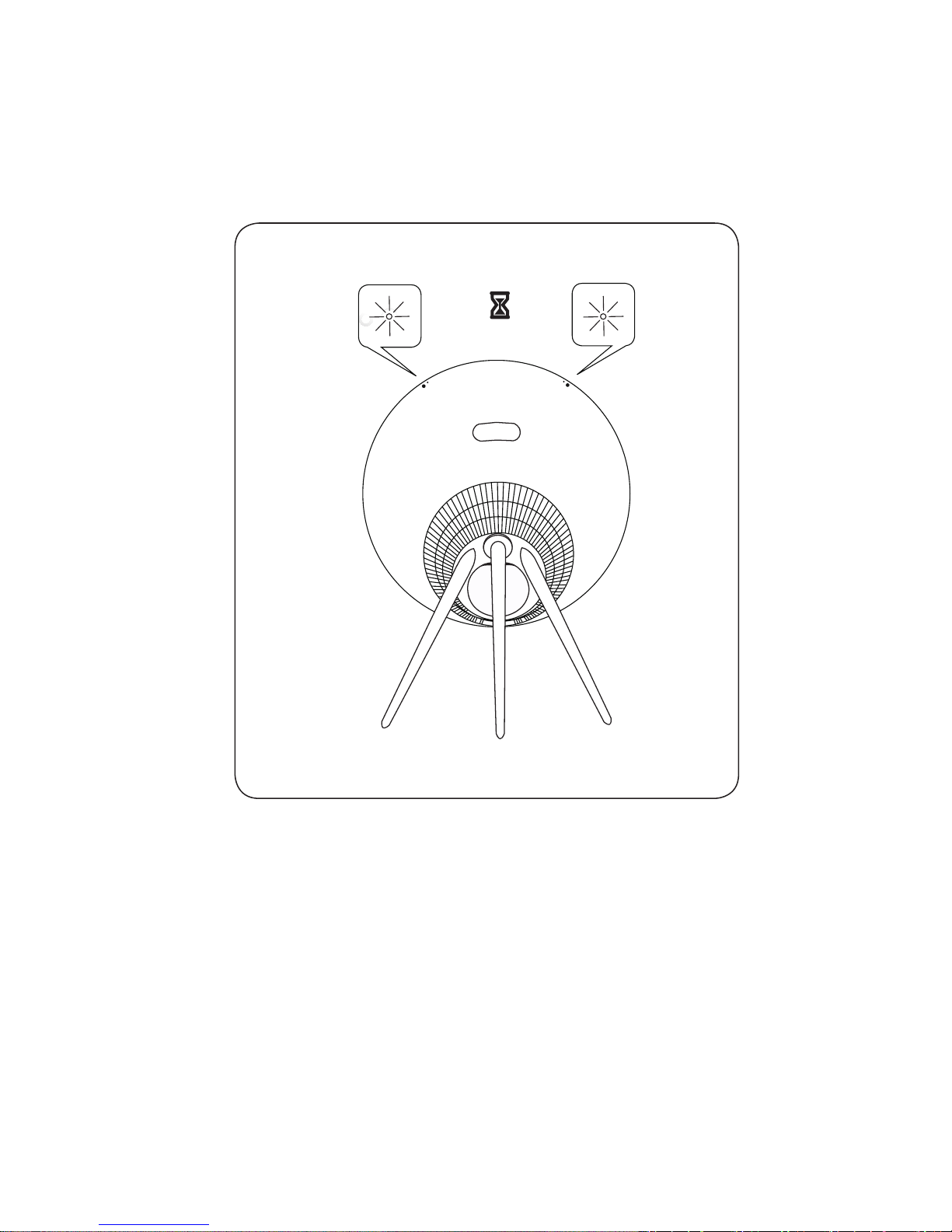
When red LEDs are flashing, software is updating.
Please wait 10 minutes.
Page 20

2021
Automatic system software update
In order to ensure that your products have the latest features and
improvements, automatic system software updates are enabled by
default, and this is the recommended setting. You may change this
at any time in the UPDATE PRODUCT SOFTWARE menu using the
BeoSetup App.
Log information
To help us improve our range of available products and services
oered to you, we may request certain information from your
product about its performance and usage patterns. The
information will at all times be provided on an anonymous basis
only. You can at any time easily disable this function in the
STATUS menu using the BeoSetup App.
Automatisk softwareopdatering
Da vi gerne vil sikre, at du har de seneste funktioner og forbedringer
,
er automatisk softwareopdatering slået til som standard, og dette
er den anbefalede indstilling. Du kan til enhver tid ændre dette
i menuen OPDATER PRODUKTSOFTWARE ved hjælp af
BeoSetupApp.
Logoplysninger
For at forbedre vores udbud af produkter og tjenester kan du blive
bedt om bestemte oplysninger vedr. dit produkts ydeevne og din
brug af produktet. Disse oplysninger videregives altid kun
anonymt. Det er til enhver tid muligt at deaktivere denne funktion
i menuen STATUS i BeoSetupApp.
Automatische Systemsoftware-Aktualisierung
Um sicherzustellen, dass Ihre Geräte über die neuesten
Funktionen und Verbesserungen verfügen, sind die automatischen
Aktualisierungen der Systemsoftware standardmäßig aktiviert.
Diese Einstellung wird empfohlen. Sie können diese Einstellung
jederzeit über die BeoSetup-App im Menü PRODUKTSOFTWARE
AKTUALISIEREN ändern.
Log-Information
Um die von uns angebotenen Produkte und Services zu verbessern,
werden wir ggf. Informationen zur Leistung Ihres Geräts und des
Nutzungsverhaltens abrufen. Die Bereitstellung der entsprechenden
Informationen erfolgt vollständig anonym. Sie haben jederzeit die
Möglichkeit, diese Funktion über die BeoSetup-App im STATUSMenü zu deaktivieren.
ENDADE
Page 21

2021
Actualización automática del software del sistema
Para garantizar que sus equipos cuenten siempre con las
funciones y mejoras más recientes, las actualizaciones automáticas
del software del sistema se encuentran habilitadas de forma
predeterminada (esta es la configuración recomendada). Puede
deshabilitarlas en cualquier momento a través del menú
ACTUALIZACIÓN DE SOFTWARE DEL EQUIPO, empleando
la aplicación BeoSetup.
Información de registro
Con el fin de mejorar la gama de productos y servicios que ponemos
a su disposición, puede que solicitemos al equipo cierta información
acerca de su rendimiento y sus patrones de uso. Tal información
será recopilada en todo momento con carácter anónimo. Puede
deshabilitar esta función cuando lo desee en el menú ESTADO,
empleando la aplicación BeoSetup.
Mise à jour automatique du logiciel système
Afin de garantir que vos produits disposent des dernières
fonctionnalités et améliorations, les mises à jour automatiques du
logiciel système sont activées par défaut. Il s’agit d’un paramètre
recommandé. Vous pouvez modifier ce paramètre à tout moment
dans le menu METTRE À JOUR LE LOGICIEL DU PRODUIT à l’aide
de l’app BeoSetup.
Informations du journal
Pour nous aider à améliorer notre gamme de produits et services mis
à votre disposition, nous sommes susceptibles de vous demander
certaines informations sur les performances et l’utilisation de
votre produit. Les informations seront fournies à tout moment
de manière anonyme uniquement. Vous pouvez à tout moment
désactiver facilement cette fonction dans le menu ÉTAT à l’aide
de l’app BeoSetup.
Aggiornamento software di sistema automatico
Per assicurare che i prodotti siano dotati delle ultime funzioni
e miglioramenti, gli aggiornamenti software automatici sono
abilitati per impostazione predefinita e questa è l’impostazione
consigliata. È possibile modificare questa impostazione in qualsiasi
momento nel menu AGGIORNA SOFTWARE PRODOTTO utilizzando
l’app BeoSetup.
ESFR
IT
Page 22

2223
Informazioni registrate
Per aiutarci a migliorare la nostra gamma di prodotti e servizi
oerti, potremmo richiedere determinate informazioni sul prodotto
,
le sue prestazioni e l’utilizzo. Le informazioni saranno sempre
fornite su base anonima. È possibile disattivare questa funzione
in qualsiasi momento nel menu STATO utilizzando l’app BeoSetup
.
システムソフトウェアの自動 更新
最新の機能と改善点がご使用中の製品に確実に反映されるように、
推奨 設定であるシステムソフトウェアの自動更 新機 能がデフォルトで
有効になっています。この設定は、BeoSetup Appを 通 じ て 、[ 製 品 ソ フ
トウェア更新] メニューからいつでも変更できます。
ログ情 報
当社は提供する製品とサービスをの質を改善するために、その性能と
使用形態に関する特定の情 報を当社製品から収 集することがありま
す 。こう し た 情 報 は 常 に 匿 名 ベ ー ス で の み 収 集 さ れ ま す 。こ の 機 能
は、BeoSetup Appを通じて、ステータスメニューから簡単に無効に
で きます。
자동 시스템 소프트웨어 업데이트
제품에 최신 기능을 설치하고 최적 상태로 유지하기 위해, 자동
시스템 소프트웨어 업데이트는 기본값이 사용함으로 설정되며,
이는 권장 사항입니다. BeoSetup App을 사용하여 제품 소프트웨어
업데이트 메뉴에서 언제든지 설정을 바꿀 수 있습니다.
로그인 정보
B&O는 제공해 드린 제품이나 서비스의 품질과 종류를 개선하기
위하여 고객 여러분께 제품의 성능과 사용 패턴에 관한 특정 정보를
요청할 수 있습니다. 제공해주신 정보는 언제나 익명으로 처리됩니다.
이 기능은 BeoSetup App의 상태 메뉴에서 언제든지 취소할 수
있습니다.
Automatische software-update
Om ervoor te zorgen dat uw producten van de laatste kenmerken
en verbeteringen genieten, zijn automatische systeemsoftwareupdates standaard ingeschakeld en dit is de aanbevolen instelling.
U kunt dit op elk gewenst moment wijzigen in het menu
PRODUCTSOFTWARE UPDATEN met behulp van de BeoSetup App
.
JAKONL
Page 23

2223
PT
Loginformatie
Om ons te helpen ons assortiment beschikbare producten en
diensten te verbeteren, kan het zijn dat we bepaalde informatie
over de prestaties en de gebruikspatronen van uw product vragen
.
De informatie zal altijd uitsluitend anoniem worden gegeven, U kan
deze functie te allen tijde uitschakelen in het menu STATUS via de
BeoSetup App.
Actualização automática do software do sistema
Para assegurar que os seus produtos possuem as mais recentes
funcionalidades e melhorias, as actualizações automáticas de
software do sistema estão activadas por defeito e esta é a definição
recomendada. Poderá alterar isto em qualquer momento no menu
ACTUALIZAÇÃO DE SOFTWARE DO PRODUTO da aplicação
BeoSetup.
Informações de registo
Para nos ajudar a melhorar a gama de produtos e serviços que
colocamos à sua disposição, poderemos pedir ao seu produto
determinadas informações relativas ao respectivo desempenho
e padrões de utilização. Estas informações serão sempre fornecidas
em modo anónimo. Poderá desactivar esta função em qualquer
momento através do menu ESTADO da aplicação BeoSetup.
Автоматическое обновление системного ПО
Чтобы обеспечить ваши устройства самыми новыми функциями
и улучшениями, автоматическое обновление системного
ПО включено по умолчанию и является рекомендованной
настройкой. Вы можете изменить эту настройку в любое
время в меню ОБНОВЛЕНИЕ ПРОГРАММНОГО ОБЕСПЕЧЕНИЯ
с помощью приложения BeoSetup.
Запись информации
Чтобы помочь нам в улучшении нашей линейки доступных
устройств и услуг, предлагаемых вам, мы можем запрашивать
из вашего устройства некоторые сведения о его работе
и паттернах использования. При этом вся информация всегда
будет передаваться только на анонимной основе. Вы можете
в любое время легко выключить эту функцию в меню СТАТУС
с помощью приложения BeoSetup.
RU
Page 24

2425
SVZHZHTW
Automatisk systemprogramuppdatering
För att säkerställa att dina produkter alltid har de senaste
funktionerna och förbättringarna är automatiska systemprogramu
ppdateringar aktiverade som standard och den inställning som
rekommenderas. Du kan när som helst ändra inställningen på
menyn UPPDATERA PRODUKTENS PROGRAMVARA med hjälp
av BeoSetup App.
Logga information
Vi kan begära viss information från din produkt om dess prestanda
och användningsmönster för att hjälpa oss att förbättra vårt
sortiment av tillgängliga produkter och tjänster som erbjuds.
Informationen ska alltid lämnas anonymt. Du kan när som helst
enkelt avaktivera denna funktion i menyn STATUS med hjälp av
BeoSetup App.
系统软件自动更 新
为确保您的产品获得最新的功能和更新,默认会启用系统软件自动更新
功能,建议保留此设置。您可以随时使用BeoSetup App在“更新产品
软件”菜单中更改 此设置。
记录信息
为帮助我们改进产品和服务,我们可能会 请求从您的产品获取有关其
性能和使用情况的信息。这些信息将始终以匿名方式传输。您可以随时
使用BeoSetup App在“状态”菜单中禁用此功能。
系統軟體自動更新
為確保您的產品享有最新功能和改良功能,系統軟體自動更新
預設為啟用,且為建議設定。您可在 [更新產品軟體] 選單中使
用
BeoSetup App
,隨 時 變 更 此 設 定 。
登入資訊
如要協助我們改善給您的產品與服務,請您提供有關產品性能和使
用
型態等特定資訊。您的資訊僅會匿名提供。您可隨時在 [狀態] 選單
中
使用BeoSetup App,輕鬆停用此功能。
Page 25

2425
 Loading...