

Page 1

True USB Multimedia Speaker System
2.0
User’s Manual
Page 2

FX USB-D User’s Manual
Congratulations on your new set of Benwin FX USB-D 2.0 multimedia speakers.
You’re now the proud owner of the most innovative, stylish and acoustically
sound speakers available today. We at Benwin take pride in developing
innovative audio systems that reflect our passion for blending unprecedented
design and the latest advances in audio technology. We’re glad to be able to
extend these audio systems on to you. Thank you for choosing Benwin. Enjoy!
Table of Contents
1. Product Description and Installation
2. Troubleshooting
3. Warranty Information
4. Manufacturer Contact Information
Package Contents
In addition to this User’s manual, this package includes the following:
1. 2 satellite speakers
2. Registration card
If any of these items are missing, please contact the place of purchase. If they
cannot help you, please call Benwin’s customer service center at 888.229.6888,
Monday through Friday, 9:00 AM – 5:00 PM PST.
1. Product Description and Installation
The FX USB-D is a two-piece multimedia speaker system featuring built-in, super
efficient Class-D digital amplifier that produce 80% more power yet consumes
40% less energy than most traditional digital amplifiers. These USB powered
speakers are instantly detected and automatically configured upon installation –
additional drivers or power sources are not required, making it a great solution for
a wide variety of multimedia audio applications. Simply plug into your favorite
audio system and enjoy!
Page 1
Page 3
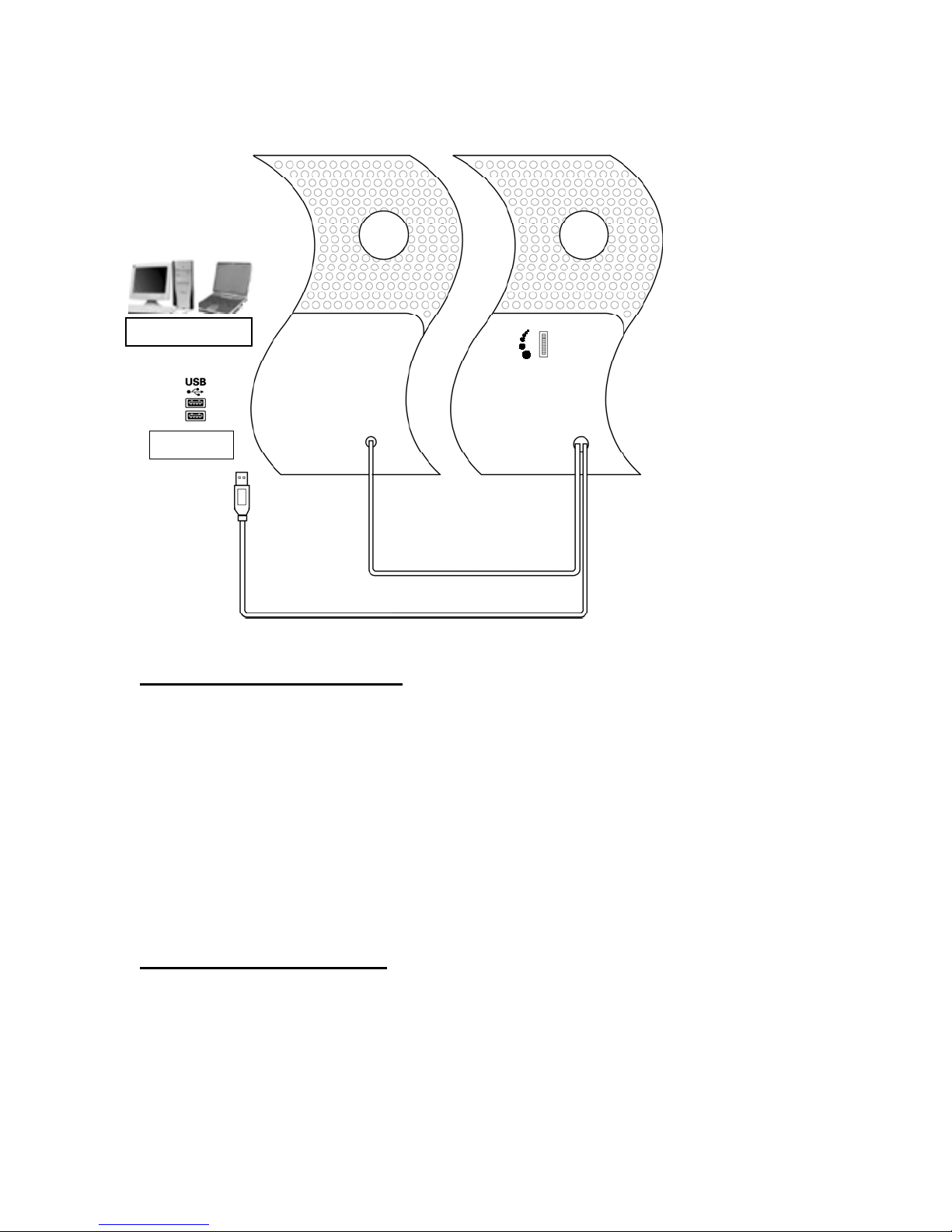
g
Left Right
PC/ Laptop
USB Port
Left Speaker Signal Cable
USB Cable
Volume Control
Installation Instructions
1. Place both speakers in the desired location.
2. Turn the volume down on your speakers so that they are turned OFF.
3. Find the USB port on your computer or audio device.
4. Insert the USB plug (from the back of the right speaker) into the USB port
on your computer or audio device.
5. Power up your computer or audio device and adjust the volume levels on
both your computer or audio device and speaker system.
If your speakers do not work properly after installation, please refer to the section
titled Troubleshooting.
System Specifications
Total Power Output (RMS): 3W + 3W
Total Power Output (P.M.P.O.): 48W
Frequency Response: 60Hz – 20KHz
Driver: 2.75” Full Range &
1” Neomanic™ Microfoil
Impedance: 4 Ohms
Pa
e 2
Page 4

Cable Length: 6.5 Ft.
g
Dimensions: 8.8” x 5.5” x 2.5”
Weight: 2 Lbs.
Power: USB Powered
System Requirements: USB Port
Compatibility: Windows™ 98/2000/Millenium/XP
Mac™ OS 9.01/X
Portable audio devices with an available
USB port
2. TROUBLESHOOTING
If you experience problems after installing your new speakers, refer to the
following information.
1. No sound - check the stereo mini-plug connection and turn connector
slightly to ensure proper contact. Make sure that the USB plug is plugged
in properly. Refer to the systems manuals for these products to find the
line out, and for information on adjusting line out volume. Also, make sure
sound is coming from your audio unit.
2. Sound is too high/low - adjust the volume on the audio unit. Also adjust
the volume on the speakers.
3. Sound cuts out - check all connections to ensure proper contact.
Unplug the USB Power and restart your Media Program. Adjust the
volume settings on your Media Program. If this does not work, restart the
computer.
4. Buzzing - check stereo mini-plug connection and turn connectors
slightly to ensure proper contact.
5. Howling/feedback - turn down the volume or move the speakers further
away from your microphone. You can also turn off your microphone. To
do this, refer to the documentation that comes with your PC or audio unit.
3. WARRANTY INFORMATION
Manufacturer will repair or replace this product with new or rebuilt parts, free of charge, in the
USA or Puerto Rico, in the event of a defect in materials or workmanship for a period of one year
from the date of purchase.
This warranty is extended only to the original purchaser. A purchase receipt or other proof of date
of original purchase will be required before warranty performance is rendered. If this product is
Pa
e 3
Page 5

found to be defective, return this product in its original package to the original place of
purchase.
This limited warranty only covers failures due to defects in materials or workmanship, which occur
during normal use. It does not cover damage, which occurs in shipment or handling, or failures,
caused by products not supplied by Manufacturer. It does not cover failures which result from
accident, misuse, abuse, neglect, mishandling, misapplication, faulty installation, set-up
adjustments, improper maintenance, alteration, modification, tampering, negligence, lack of
reasonable care, maladjustment of consumer controls, line power surge, acts of God, or repair or
service by anyone other than a service facility authorized by Manufacturer. This warranty will be
void if the model or serial number has been altered, tampered with, defaced or removed.
There are no express warranties except as listed above.
THE DURATION OF ANY IMPLIED WARRANTIES INCLUDING THE IMPLIED WARRANTY OF
MERCHANTABILITY, IS LIMITED TO THE DURATION OF THE EXPRESS WARRANTY
HEREIN. MANUFACTURER SHALL NOT BE LIABLE FOR THE LOSS OF USE OF THE
PRODUCT, INCONVENIENCE, LOSS OR ANY OTHER DAMAGES, WHETHER DIRECT,
INCIDENTAL, OR CONSEQUENTIAL INCLUDING, WITHOUT LIMITATION, DAMAGE TO
OTHER EQUIPMENT RESULTING FROM THE USE OF THIS PRODUCT, OR ARISING OUT
OF ANY BREACH OF THIS WARRANTY. ALL EXPRESS AND IMPLIED WARRANTIES,
INCLUDING THE WARRANTIES OF MERCHANTABILITY AND FITNESS FOR PARTICULAR
PURPOSE, ARE LIMITED TO THE WARRANTY PERIOD SET FORTH ABOVE.
Some states do not allow the exclusion of incidental or consequential damages or limitations on
how long the implied warranty lasts, so these limitations or exclusions may not apply to you. This
warranty gives you specific legal rights and you may also have other rights, which vary, from state
to state.
Page 4
Page 6

4. MANUFACTURER - CONTACT INFORMATION
/
Need additional information? We’re here to help. Our office hours are Monday
through Friday 9:00 AM – 5:00 PM Pacific Standard Time. You can also visit us
at http://www.benwin.com
Toll Free:
Fax:
Sales Inquiries:
Tech Support
Customer Service:
Mail:
888.229.6888
626.839.3787
Benwin Product Support
c/o: Alltek Vision, LLC.
17568 E. Rowland Street
City of Industry, CA 91748
Page 5
Page 7

Benwin
c/o: Alltek Vision, LLC.
17568 E. Rowland Street
City of Industry, CA 91748
Copyright 2004. Alltek Vision, LLC. All rights reserved.
 Loading...