

Page 1
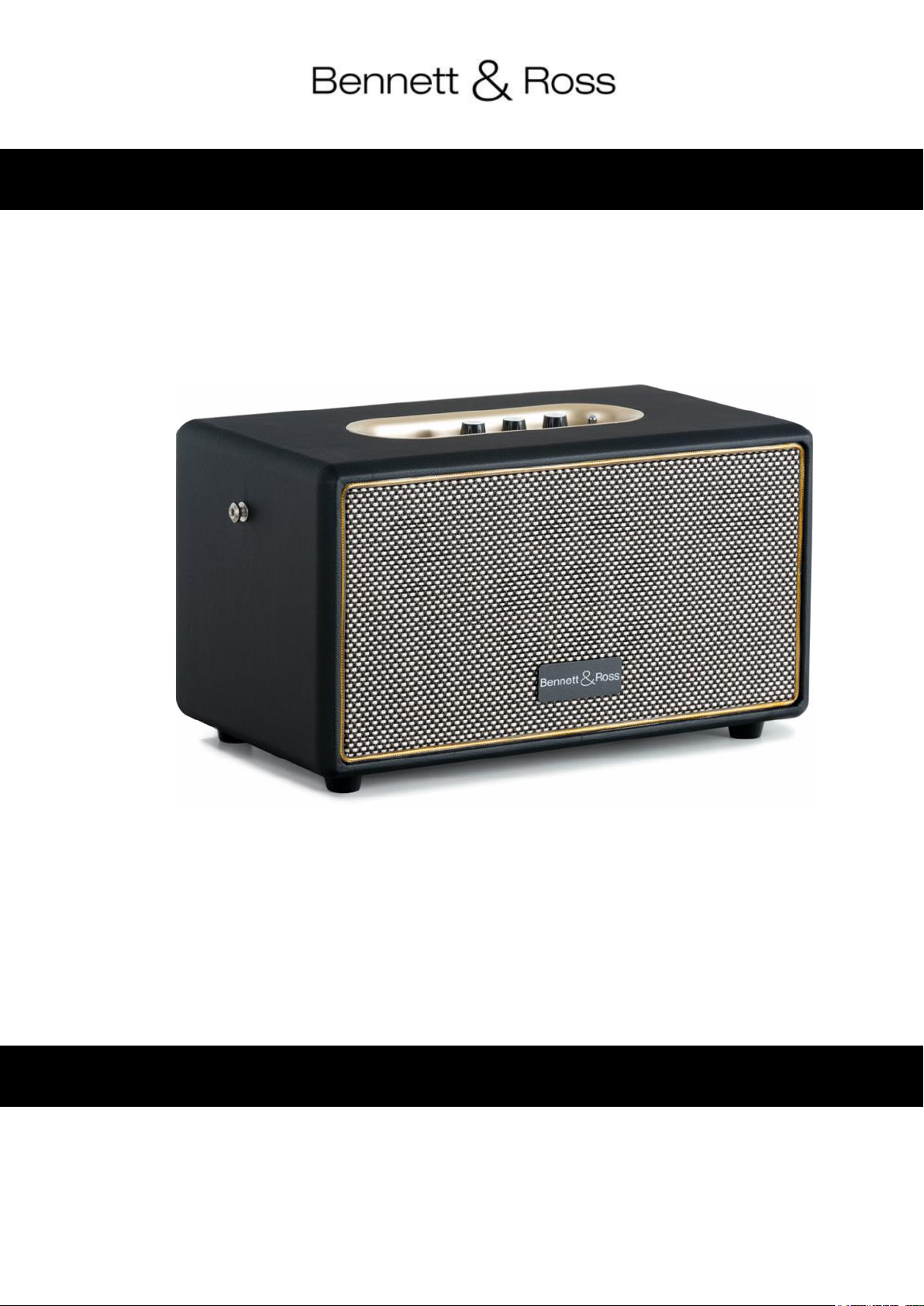
BB-860A Blackmore Bluetooth Lautsprecher
Bedienungsanleitung
Art.Nr.: 00093704
© 2024, Version 08/24
Diese Bedienungsanleitung ist urheberrechtlich geschützt. Die Vervielfältigung dieser Bedienungsanleitung, auch
auszugsweise, ist nur mit Genehmigung der Musikhaus Kirstein GmbH gestattet. Gleiches gilt für die
Vervielfältigung oder das Kopieren von Bildern, auch in geänderter Form
Page 2
Bedienungsanleitung beachten!
Mit dem Signalwort WARNUNG sind die Gefahren gekennzeichnet, die ohne
Vorsichtsmaßnahmen zu schweren Verletzungen führen können.
Mit dem Signalwort HINWEIS sind allgemeine Vorsichtsmaßnahmen gekennzeichnet, die
im Umgang mit dem Produkt beachtet werden sollen.
Bilder und Bildschirmdarstellungen in dieser Bedienungsanleitung können vom
Erscheinungsbild des tatsächlichen Produkts geringfügig abweichen, solange dies keine
negativen Auswirkungen auf die technischen Eigenschaften und Sicherheit des Produkts
hat.
Alle personenbezogenen Formulierungen in dieser Bedienungsanleitung sind
geschlechtsneutral zu betrachten.
Kinder sollten beaufsichtigt werden, um sicherzustellen, dass sie nicht mit dem Gerät
spielen.
Lassen Sie die Kinder nicht unbeaufsichtigt.
Vergewissern Sie sich vor dem Aufbau und Installation des Geräts, dass das
Netzkabel nicht an das Stromnetz angeschlossen ist.
Stellen Sie sicher, dass das Gerät so aufgestellt ist, dass niemand über das
Netzkabel stolpern kann.
Vielen Dank, dass Sie sich für dieses Produkt entschieden haben.
Um sicherzustellen, dass Sie mit diesem Lautsprecher voll und ganz zufrieden sind, lesen Sie diese
Bedienungsanleitung sorgfältig und komplett, bevor Sie den BB-860A verwenden.
Diese Bedienungsanleitung gilt für Personen, die von einer für ihre Sicherheit verantwortlichen Person beaufsichtigt
oder in die Bedienung des Gerätes eingewiesen wurden und nachgewiesen haben mit dem Gerät umgehen zu
können.
Alle Informationen in dieser Bedienungsanleitung wurden nach bestem Wissen und Gewissen kontrolliert. Weder Autor noch
Herausgeber können jedoch für Schäden haftbar gemacht werden, die in Zusammenhang mit der Verwendung dieser
Bedienungsanleitung stehen.
Sonstige, in diesem Dokument aufgeführte Produkt-, Marken- und Unternehmensbezeichnungen können die
Warenzeichen ihrer jeweiligen Eigentümer sein. Die Einhaltung sämtlicher anwendbarer Urheberrechtsgesetze liegt
in der Verantwortung des Anwenders dieses Dokuments.
Installation und Bedienung
• Überprüfen Sie den Inhalt, um sicherzustellen, dass alle Teile vorhanden und in gutem Zustand sind.
Benachrichtigen Sie den Spediteur oder Händler unverzüglich und bewahren Sie das
Verpackungsmaterial zur Überprüfung auf, wenn Teile durch den Versand beschädigt wurden oder wenn
die Transportverpackung Anzeichen für eine falsche Handhabung aufweist;
• Bewahren Sie die Transportverpackung und alle Verpackungsmaterialien auf.
Für den Fall, dass ein Gerät an den Händler zurückgeschickt werden muss, ist es wichtig, dass das Gerät
in der Originalverpackung des Herstellers zurückgeschickt wird;
• Auf der Rückseite des Lautsprechers finden Sie ebenfalls wichtige Angaben zur geeigneten Verkabelung
(Stromversorgung). Nichtbeachtung kann das Gerät irreparabel beschädigen
SICHERHEIT
• Verwenden Sie ausschließlich die für das Gerät vorgeschriebene richtige Netzspannung. Die erforderliche
Spannung finden Sie auf dem Typenschild des Geräts oder in den Technischen Spezifikationen am Ende
der Anleitung.
• Führen Sie keine Reparaturen selbst durch. Nehmen Sie keine Änderungen am Gerät vor; Öffnen Sie das
Gerät nicht. Es besteht Gefahr für Leib und Leben durch einen elektrischen Schlag.
Page 3
• Die Garantie gilt nicht für Unfälle oder Schäden, die durch unsachgemäße Verwendung, eigenmächtige
Reparatur oder Nichtbeachtung der in diesem Handbuch enthaltenen Warnungen verursacht wurden;
• Der Hersteller kann nicht für Personenschäden verantwortlich gemacht werden, die durch Nichtbeachtung
der Sicherheitsempfehlungen und Warnungen verursacht wurden. Dies gilt für alle Schäden in welcher
Form auch immer.
Wichtige Sicherheitshinweise
• Gehörschäden sind möglich!
Diese Lautsprecherkomponente erzeugt je nach Einstellung einen sehr hohen Schalldruckpegel (SPL),
der den Nutzern, Technikern und den Zuhörern dauerhafte Gehörschäden zu fügen kann. Vermeiden Sie
es deshalb Schalldruckpegeln von mehr als 85 dB länger ausgesetzt zu sein.
• Mögliche Sachschäden durch Magnetfelder. Lautsprecher erzeugen generell ein statisches Magnetfeld.
Sorgen Sie daher für einen entsprechenden Abstand zu anderen Geräten, die durch ein externes
Magnetfeld in Ihrer Funktion beeinträchtigt oder beschädigt werden können.
• Überlasten Sie die Geräte nicht, um Schäden an den Lautsprechern und/oder den Komponenten zu vermeiden;
• Stellen Sie kein offenes Feuer (Kerze usw.) auf oder neben die Box – Es besteht BRANDGEFAHR;
• Wenn das Gerät derart beschädigt ist, dass innere Bauteile sichtbar sind, schließen Sie es NICHT an und
schalten Sie es NICHT ein. Wenden Sie sich an Ihren Händler.
• Wenn das Netzkabel ausgefranst ist oder der Netzstecker bzw. das Kabel beschädigt ist oder wird, wenn
es während der Verwendung des Geräts zu einem plötzlichen Tonausfall kommt, oder wenn es einen
ungewöhnlichen Geruch oder Rauch erzeugen sollte, schalten Sie den Netzschalter sofort aus, ziehen
Sie den Netzstecker aus der Netzsteckdose! Benutzen Sie den Lautsprecher dann nicht mehr und
wenden sich an einen Fachmann bzw. Ihren Händler.
Produktbeschreibung und Handhabung
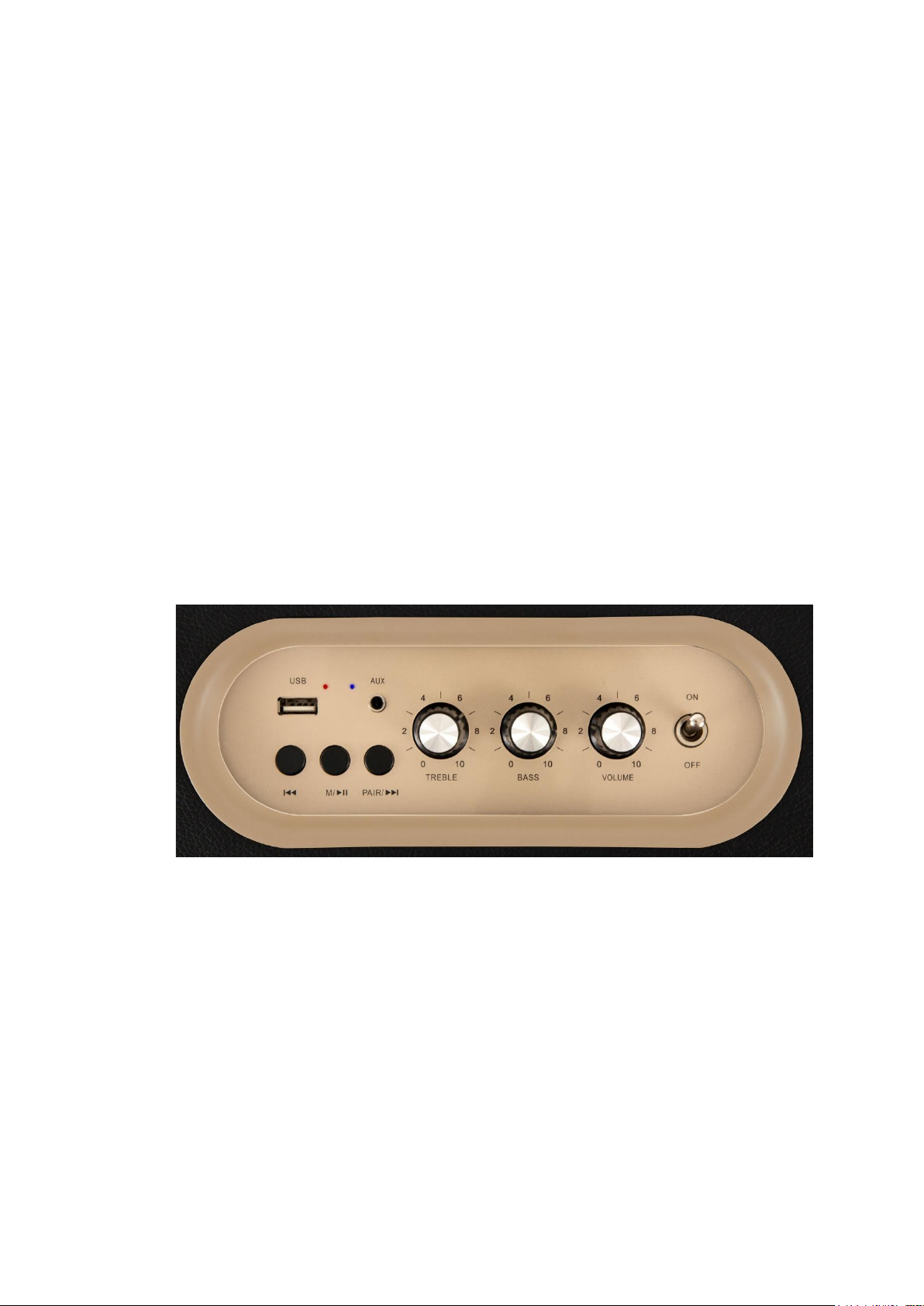
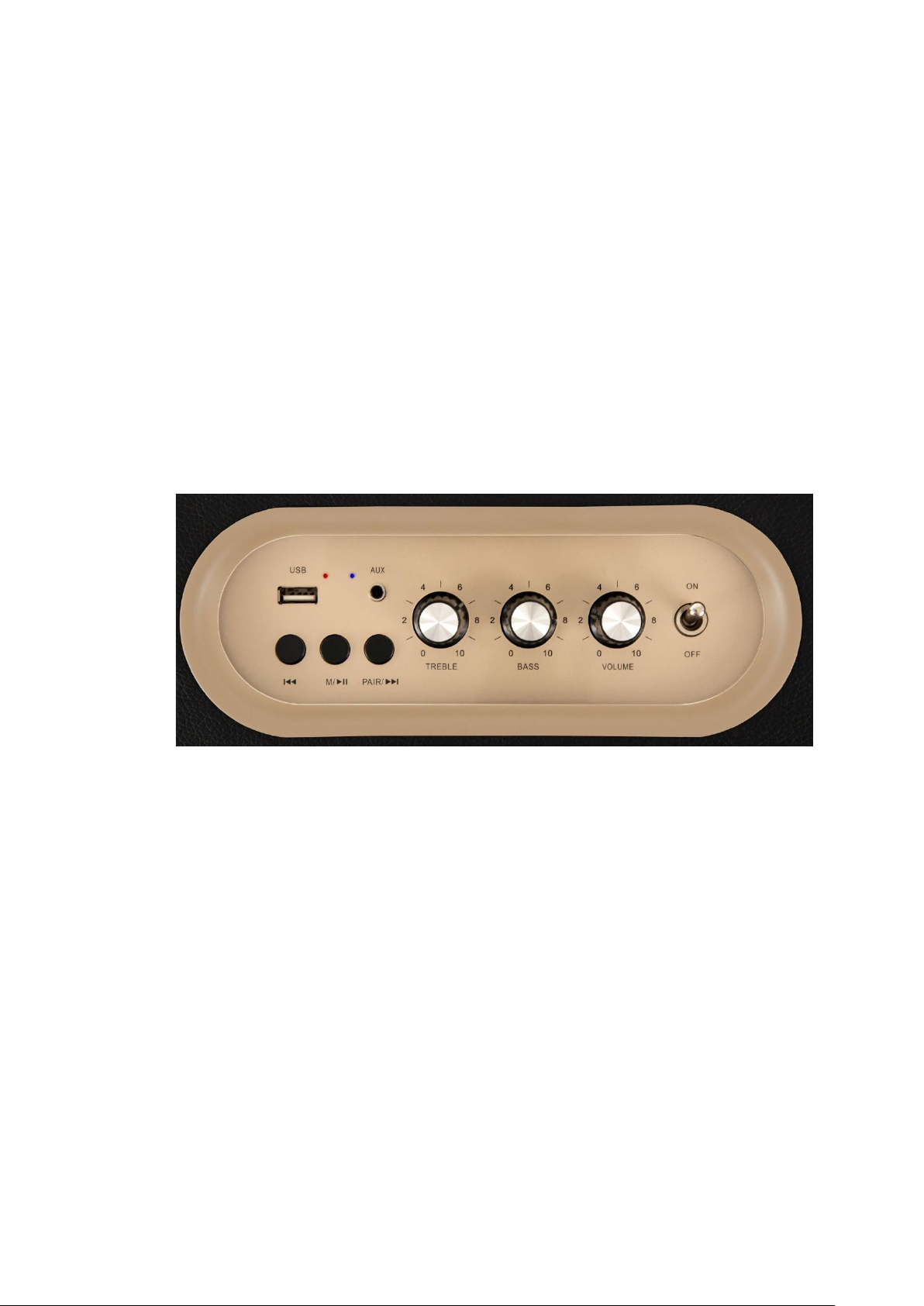
1. USB-Card Abspielfunktion/Eingang
2. Bluetooth Verbindungsanzeige (linke kleine LED blau)
3. LED Anzeige “ Geräteakku lädt” (rechte kleine LED rot)
4. AUX IN Eingang
5. I<< Knopf : Song zurück
6. “M” Knopf : langes Drücken um AUX Eingang zu aktivieren bzw deaktivieren / kurzes
Drücken für Songwiedergabe pausieren
7. “Pair”-Knopf / >>I kurzes Drücken für Abspielen Nächster Song / längeres Drücken für
Bluetooth-Verbindung trennen
8. Treble Drehregler (Höhenregelung)
9. Bass Drehregler (Tieftonregelung)
10. Volume Drehregler (Lautstärke)
11. Kippschalter Ein/Ausschaltung (On/OFF)
2
Page 4

Ein-/Ausschalten bzw Laden des Produkts
Stecken Sie den DC-Stecker des Ladekabels in die DC-Buchse an der Rückseite des Gerätes. Schließen Sie das
USB-Ende des Ladekabels an die USB Buchse Ihres PC’s oder Notebooks bzw. einen passenden
Steckdosenadapter (nicht im Lieferumfang enthalten). Stellen Sie sicher, dass die Spannung kompatibel ist.
Stellen Sie anschließend den ON / OFF-Kippschalter auf die ON-Position auf der Oberseite rechts am
Gerätebedienfeld. Die kleine Blaue LED beginnt zu blinken.
ersten Mal nutzen.Wenn das Ladekabel eingesteckt ist und Strom hat bzw lädt, leuchtet die rechte der beiden
kleinen LEDs gelb.
Das Gerät kann mobil mit geladenem Akku je nach Nutzung ca. 8-10 Std. kabellosen Musikgenuss bieten
Nach der Nutzung, schalten Sie das Gerät aus, indem Sie den EIN / AUS-Kippschalter auf OFF stellen.
Die blaue LED erlischt. Verbleibt das Ladekabel an einer Stromquelle und in der Ladebuchse, bleicht die gelbe
Ladeanzeige-LED an.
Bitte laden Sie den Akku zunächst ca. 4-6 h vollständig auf, bevor Sie den Lautsprecher zum
Allgemeine Bedienung Bluetooth
Vergewissern Sie sich vor der BT-Nutzung, dass an die AUX-IN-Buchse kein Klinkenkabel angeschlossen ist.
Bringen Sie den ON / OFF SWITCH-Kippschalter in die ON-Position. Die blaue Bluetooth-LED-Anzeige links vom
AUX-Eingang beginnt automatisch zu blinken.
Richten Sie die Bluetooth-Funktion an Ihrem externen Gerät (z. B. Ihrem Smartphone) ein. Ihr externes Gerät sollte
Ihnen anschließend eine Liste der verfügbaren Bluetooth-Sender in Ihrer direkten Umgebung anzeigen. Bitte
wählen Sie den Pairing-Namen „Blackmore BB-860A“ und bestätigen Sie dies in Ihrer Liste.
Sollte Ihnen der Pairing/Kopplunsgname am Dispaly Ihres Smartphones / Tablets nicht automatisch angezeigt
werden, dann drücken Sie bitte die runde Taste „ PAIR“ am Bedienfeld.
Sobald das Pairing erfolgreich ist, hören Sie einen Signalton. Sie können nun die Wiedergabe der Songs auf Ihrem
externen Gerät starten. Die Songsteuerung (vor oder zurück) können Sie sowohl auf Ihrem externen Gerät
vornehmen als auch über die Tasten I<< oder >>I am BB-860A.
Es wird empfohlen, die Lautstärke an Ihrem Ausgabegerät (Smartphone oder Tablet) auf Maximal zu stellen und die
Laustärke des BT-Lautsprechers dann direkt am goldenen Bedienpanel des Lautsprechers über den Drehregler
„Volume“ auf ein für Sie angenehmes Level einzustellen.
Um die BT-Kopplung zu trennen, drücken Sie die Taste „Pair“ für 2-3 Sekunden oder verwenden Sie die Funktion
zum Trennen der Verbindung direkt auf Ihrem externen Gerät (Smartphone etc).
Beim nächsten Einschalten des Blackmore BB-860A wird automatisch eine Verbindung zum zuletzt verbundenen
Bluetooth-Wiedergabegerät hergestellt. Wenn Ihre Bluetooth-Wiedergabe nicht automatisch wieder mit dem Gerät
verbunden wird, sollten Sie die Verbindung zu Ihrem Bluetooth-Gerät bitte nochmals manuell wiederherstellen.
Wenn Sie ein Smartphone als Bluetooth-Wiedergabegerät verwenden, und währenddessen ein Anruf eingeht, wird
die Audiodatei am Bluetooth Lautsprecher automatisch stummgeschaltet. Sie können dann in Ruhe telefonieren.
Die Annahme / Beendigung des Anrufs erfolgt über das Smartphone. Nach Beendigung des Gesprächs am
Smartphone wird die Wiedergabe am Lautsprecher automatisch fortgesetzt.
Kommt übere längere Zeit kein Ausdiosignal vom Smartphone bei dem BB-860A an, wird die BT-Verbindung
automatisch getrennt.
Eine Bluetooth Verbindung funktioniert je nach örtlichen Gegebenheiten bis zu ca.8-10 Metern. Hindernisse
zwischen Sender und Empfänger wie Möbel, Mauern, Bäume oder auch Personen im Raum können ggf. die
Übertragung verschlechtern oder sogar unterbrechen. Sollte die Kopplung nicht funktionieren, wiederholen Sie bitte
den oben genannten Prozess.
3
Page 5

Sonderfunktion TWS-Funktion (True Wireless)
Der Begriff TWS oder True Wireless Stereo bezieht sich auf eine Technologie, mit der zwei Audiogeräte
(Lautsprecher) über Bluetooth gekoppelt werden können und Musik von einem Smartphone gleichzeitig/simultan
über einen zweiten BT-Speaker des gleichen Modells wiedergegeben werden kann. (Modell BB-860A!)
Achten Sie bitte vor dem TWS-Koppeln darauf, dass kein AUX-Kabel im Aux-in Eingang steckt.
Schalten Sie dann die Bluetooth-Funktion beider Lautsprecher gleichzeitig ein. Suchen Sie die „ “-Taste
eines Lautsprechers und drücken Sie diese dann lange (ca. 3 Sekunden) zum Koppeln.
Nach einer erfolgreichen Kopplung hören Sie einen Verbindungsbenachrichtigungston von beiden Lautsprechern.
Schalten Sie die BT-Funktion Ihres Bluetooth-fähigen Wiedergabegeräts (z.B. ein Mobiltelefon, Tablet oder
Computer) ein und koppeln Sie es mit dem entsprechenden Lautsprechermodellnamen („Blackmore BB-860A“), das
auf Ihrem Display angezeigt wird.
Stellen Sie sicher, dass die Lautsprecher nun kabellos mit dem gewünschten Bluetooth-fähigen Wiedergabegeräte
verbunden sind. Es sollte in Ihrem Smartphone Bluetooth Menü die Anzeige „ BT-verbunden“ erscheinen. Achten
Sie darauf, dass der Abstand zwischen Smartphone und den Lautsprecher und zwischen den beiden Lautsprechern
max. 8-10 Meter beträgt.
Nach erfolgreicher Verbindung kann ein Song gleichzeitig über die beiden Lautsprecher wiedergegeben werden
Stellen Sie die Lautstärke mit einem angeschlossenen Gerät oder direkt dem Volume-Drehknopf am BB-860A ein.
Sie können zurück in den USB- und AUX-IN-Modus wechseln, indem Sie die Taste "M" drücken.
Abspielen von Dateien auf einem USB-Stick
Schalten Sie den Lautsprecher wie im oberen Kapitel beschrieben ein.
Wenn Sie dann den Stick oder die Karte auf dem goldenen Bedienfeld in den dafür vorgesehenen Slot stecken,
erkennt das Gerät dies und spielt die Dateien von diesem Speichermedium ab.
Über die Tasten I<< oder >>I am BB-860A können Sie die Musikwiedergabe steuern, bzw mit der ganz linken Taste
pausieren/stoppen.
Wenn Sie den USD Stick oder die Karte aus dem Gerät entfernen, wird dies durch den Lautsprecher mit einem
Beep quittiert und es springt zurück in den Bluetooth Modus.
Ist Ihr Smartphone noch im „BT-aktiviert Zustand“, können Sie direkt die Wiedergabe von Songs aus Ihrem
Smartphone über Bluetooth beginnen bzw. fortsetzen
Abspielen von Musik über AUX-Kabelverbindung (3,5mm
Klinkeneingang)
Dieses Gerät verfügt über eine zusätzliche Audiosignal-Eingangsbuchse für den Anschluss externer Audiogeräte
wie MP3-Player, Smartphones und CD-Player über ein Kabel, sodass Sie Ihre externe Quelle über die Lautsprecher
dieses Systems hören können.
Bitte verwenden Sie ein Audiokabel mit einem 3,5-mm-Stereoanschluss an jedem Ende des Kabels. Schließen Sie
ein Ende an die AUX-IN-Buchse am BB-860A und das andere Ende an die Line-Out-Buchse des Audiogeräts an.
Wenn das Audiokabel an die AUX-IN-Buchse angeschlossen ist, drücken Sie bitte die Taste "M" für 2-3 Sekunden.
Die blaue LED-Anzeige leuchtet konstant. Schalten Sie das AUX-Gerät (z. B. Ihr Smartphone) ein. Der
Lautstärkepegel kann über das Hauptgerät gesteuert werden. Bedienen Sie alle Funktionen des externen Gerätes
wie gewohnt.
Wenn Sie die AUX-Kabelverbindung / -funktion beenden möchten, müssen Sie die Taste „M“ erneut 2-3
Sekunden lang drücken, um den AUX-Modus zu verlassen. Dann ist der Bluetooth-Sender wieder im
Standby-Modus und die Bluetooth-Funktion kann anstatt der AUX-Funktion verwendet werden.
Pflege und Wartung
Schalten Sie den Lautsprecher aus, wenn Sie ihn längere Zeit nicht benutzen.
Stellen Sie vor dem Reinigen sicher, dass alle Geräte ausgeschaltet sind.
Oberflächen und Gehäuse müssen nur gelegentlich abgestaubt / gereinigt werden.
Verwenden Sie niemals Chemikalien oder Lösungsmittel, da diese die Oberfläche beschädigen können. Stets mit
einem trocknen oder nur leicht angefeuchteten Tuche reinigen.
Wenden Sie sich im Falle einer Fehlfunktion an ein zugelassenes Servicecenter oder den Händler.
4
Page 6

Bluetooth Version
V5.0
Akkuleistung
7.4V 6000 mAh.
Leistung
2*30Watt (RMS)
Bluetooth Sendeleistung
und Frequenz
<20mW , 2,4022,480Ghz
Stromversorgung
DC 5V/2.5A
Technische Spezifikationen
WEEE-Erklärung
(Waste of Electrical and Electronic Equipment)
Ihr Produkt wurde unter Verwendung hochwertiger Materialien und Komponenten entwickelt und hergestellt, die
recycelbar und wiederverwendbar sind. Das Symbol bedeutet, dass Ihr Produkt am Ende seiner Lebensdauer vom
Hausmüll getrennt entsorgt werden muss.
Entsorgen Sie dieses Gerät bei Ihrer örtlichen Sammelstelle oder Recyclingstelle.
Bitte helfen Sie mit, die Umwelt zu schützen, in der wir alle leben.
CE Konformität
VEREINFACHTE EU-KONFORMITÄTSERKLÄRUNG
Hiermit erklärt Musikhaus Kirstein GmbH, dass die Funkanlagentypen [Bennett & Ross BB-860A] der Richtlinie
2014/53/EU entsprechen. Der vollständige Text der EU-Konformitätserklärung ist unter der folgenden
Internetadresse verfügbar:
http://www.kirstein.de/docs/Konformitaetserklaerung/CE_Konformitaetserklaerung_00093074.pdf
Legal Notice
Alle technischen Daten und Erscheinungsbilder können ohne vorherige Ankündigung geändert werden. Alle
Angaben waren zum Zeitpunkt der Drucklegung korrekt. Die Musikhaus Kirstein GmbH übernimmt keine Gewähr für
die Richtigkeit oder Vollständigkeit der in diesem Handbuch enthaltenen Beschreibungen, Fotos oder Aussagen.
Gedruckte Farben und Spezifikationen können geringfügig vom Produkt abweichen. Produkte der Musikhaus
Kirstein GmbH werden nur über autorisierte Händler vertrieben. Distributoren und Händler sind keine Vertreter der
Musikhaus Kirstein GmbH und nicht befugt, die Musikhaus Kirstein GmbH in irgendeiner Weise rechtlich zu binden.
Musikhaus Kirstein GmbH
Bernbeurener Str. 11
86956 Schongau – Germany
Telefon/Phone: 0049-8861-909494-0
5
Page 7
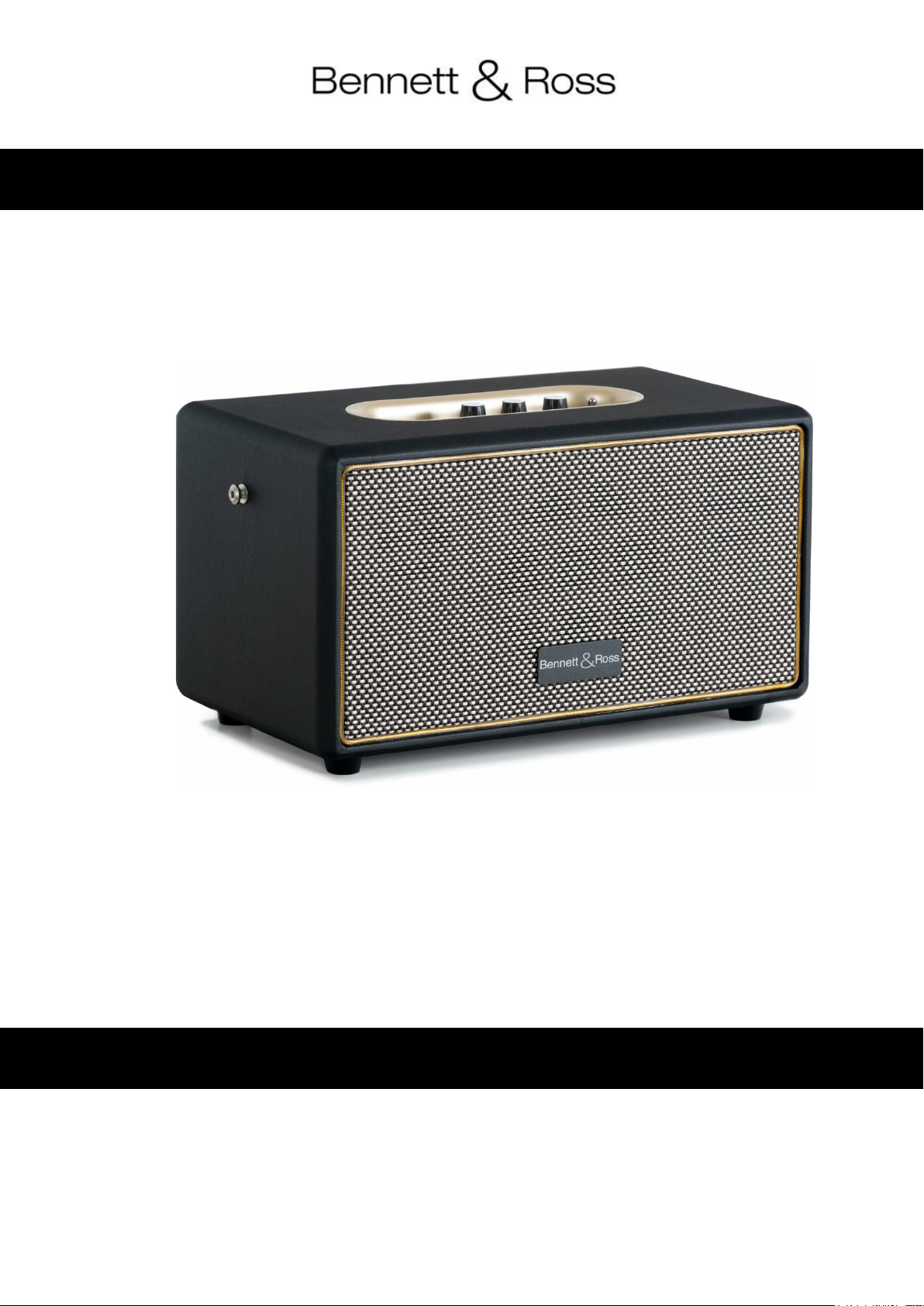
BB-860A Blackmore Bluetooth Speaker
Operating instructions
Art no.: 00093704
© 2024, Version 08/24
These operating instructions are protected by copyright. Reproduction of these operating instructions, even in part,
is only permitted with the permission of Musikhaus Kirstein GmbH. The same applies to the reproduction or copying
of pictures, even in modified form.
Page 8
Follow the operating instructions!
The signal word WARNING indicates hazards that can lead to serious injuries if no
precautionary measures are taken.
The signal word NOTE indicates general precautions to be observed when handling the
product.
Images and screen representations in these operating instructions may differ slightly from
the appearance of the actual product, as long as this does not have a negative impact on
the technical characteristics and safety of the product.
All person-related formulations in these operating instructions are to be regarded as genderneutral.
Children should be supervised to ensure that they do not play with the appliance. Do
not leave children unattended.
Before setting up and installing the unit, make sure that the mains cable is not
connected to the mains.
Make sure that the unit is positioned so that no one can trip over the mains cable.
Thank you for purchasing this product.
To ensure that you are fully satisfied with this speaker, please read these operating instructions carefully and
completely before using the BB-860A.
These operating instructions apply to persons who have been supervised or instructed in the operation of the
appliance by a person responsible for their safety and who have demonstrated that they can handle the appliance.
All information in these operating instructions has been checked to the best of our knowledge and belief. However, neither the
author nor the publisher can be held liable for any damage in connection with the use of these operating instructions.
Other product, brand and company names mentioned in this document may be the trademarks of their respective
owners. Compliance with all applicable copyright laws is the responsibility of the user of this document.
Installation and Usage
• Check the contents to ensure that all parts are present and in good condition. Notify the carrier or dealer
immediately and retain the packing material for inspection if any parts have been damaged in shipping or
if the shipping packaging shows signs of mishandling;
• Keep the transport packaging and all packaging materials.
In the event that a unit must be returned to the dealer, it is important that the unit is returned in the
manufacturer's original packaging;
• On the back of the speaker you will also find important information on suitable wiring (power supply). Non-
compliance can damage the unit irreparably.
SECURITY
• Only use the correct mains voltage prescribed for the unit. The required voltage can be found on the type
plate of the appliance or in the technical specifications at the end of the instructions.
• Do not carry out any repairs yourself. Do not make any modifications to the unit; do not open the unit.
There is a danger to life and health from electric shock.
• The warranty does not apply to accidents or damage caused by improper use, unauthorised repair or
failure to observe the warnings contained in this manual;
• The manufacturer cannot be held responsible for personal injury caused by failure to observe the safety
recommendations and warnings. This applies to all damage in whatever form.
Page 9
Important safety instructions
• Hearing damage is possible!
Depending on the setting, this loudspeaker component generates a very high sound pressure level (SPL),
which can cause permanent hearing damage to users, technicians and listeners. Therefore, avoid being
exposed to sound pressure levels of more than 85 dB for longer periods of time.
• Possible property damage due to magnetic fields. Loudspeakers generally generate a static magnetic
field. Therefore, ensure an appropriate distance from other devices whose function can be impaired or
damaged by an external magnetic field.
• Do not overload the units to avoid damage to the speakers and/or components;
• Do not place an open fire (candle, etc.) on or near the box - There is a FIRE HAZARD;
• If the unit is damaged to such an extent that internal components are visible, DO NOT connect it or switch
it on. Contact your dealer.
• If the mains cable is frayed or the mains plug or cable is or becomes damaged, if there is a sudden loss of
sound while using the unit, or if it should produce an unusual odour or smoke, switch off the mains switch
immediately, disconnect the mains plug from the mains socket! Then do not use the speaker any more
and contact a specialist or your dealer.
Product description and handling
1. USB card playback function/input
2. Bluetooth connection indicator (left small LED blue)
3. LED display " Unit battery charging" (right small LED red)
4. AUX IN input
5. I<< Button : Song back
6. "M" button : long press to activate/deactivate AUX input / short press to pause
song playback
7. "Pair" button / >>I short press for play Next song / longer press for disconnect
Bluetooth connection
8. treble knob (treble control)
9. bass control knob (bass control)
10. volume knob (volume)
11. toggle switch on/off (On/OFF)
2
Page 10
Switching on/off or charging the product
Plug the DC plug of the charging cable into the DC socket on the back of the unit. Connect the USB end of the
charging cable to the USB socket of your PC or notebook or a suitable socket adapter (not included). Make sure
that the voltage is compatible.
Then set the ON / OFF toggle switch to the ON position on the top right of the unit control panel. The small blue
LED starts flashing.
When the charging cable is plugged in and has power or is charging, the right-hand of the two small LEDs lights up
yellow.
The device can provide approx. 8-10 hours of wireless music enjoyment on the move with a charged battery,
depending on use.
After use, switch the unit off by setting the ON / OFF toggle switch to OFF.
The blue LED goes out. If the charging cable remains connected to a power source and in the charging socket, the
yellow charging indicator LED lights up.
Please fully charge the battery for approx. 4-6 h before using the speaker for the first time.
General Bluetooth Usage
Before using BT, make sure that no jack cable is connected to the AUX-IN socket.
Put the ON / OFF SWITCH toggle switch to the ON position. The blue Bluetooth LED indicator to the left of the AUX
input starts flashing automatically.
Set up the Bluetooth function on your external device (e.g. your smartphone). Your external device should then
show you a list of available Bluetooth transmitters in your immediate vicinity. Please select the pairing name
"Blackmore BB-860A" and confirm this in your list.
If the pairing name is not automatically displayed on the display of your smartphone/tablet, press the round " PAIR"
button on the control panel of the BB-860A.
As soon as the pairing is successful, you will hear a confirmation signal. You can now start playing the songs on
your external device. You can control the songs (forward or backward) on your external device as well as via the
buttons I<< or >>I on the BB-860A.
It is recommended that you set the volume on your output device (smartphone or tablet) to maximum and then
adjust the volume of the BT speaker directly on the golden control panel of the speaker to a level that is comfortable
for you using the "Volume" rotary control.
To disconnect the BT pairing, press the "Pair" button for 2-3 seconds or use the disconnect function directly on your
external device (smartphone etc).
The next time you switch on the Blackmore BB-860A, it will automatically connect to the last connected Bluetooth
playback device. If your Bluetooth playback does not reconnect automatically, please reconnect to your Bluetooth
device manually again.
If you are using a smartphone as a Bluetooth playback device and a call comes in during this time, the audio file on
the Bluetooth speaker is automatically muted. You can then talk on the phone in peace.
The call is accepted / ended via the smartphone. After ending the call on the smartphone, playback on the
loudspeaker is automatically continued.
If the BB-860A does not receive an audio signal from the smartphone for a longer period of time, the BT connection
is automatically disconnected.
A Bluetooth connection works up to approx. 8-10 metres, depending on the local conditions. Obstacles between the
transmitter and receiver such as furniture, walls, trees or even people in the room may impair or even interrupt the
transmission. If the pairing does not work, please repeat the above process.
3
Page 11

Special function TWS function (True Wireless)
The term TWS or True Wireless Stereo refers to a technology that allows two audio devices (speakers) to be paired
via Bluetooth and music from one smartphone to be played simultaneously/simultaneously through a second BT
speaker of the same model. (Model BB-860A!)
Before pairing the TWS, please make sure that no AUX cable is plugged into the aux-in input.
Then switch on the Bluetooth function of both speakers at the same time. Locate the " " button of one speaker
and then press it for a long time (approx. 3 seconds) to pair.
After a successful pairing, you will hear a connection notification tone from both speakers.
Turn on the BT function of your Bluetooth-enabled playback device (e.g. a mobile phone, tablet or computer) and
pair it with the corresponding speaker model name ("Blackmore BB-860A") shown on your display.
Make sure that the speakers are now wirelessly connected to the desired Bluetooth-enabled playback device. The
display "BT connected" should appear in your smartphone Bluetooth menu. Make sure that the distance between
the smartphone and speaker and between the two speakers is max. 8-10 metres.
After a successful connection, a song can be played back simultaneously via the two speakers.
Adjust the volume with a connected device or directly with the volume knob on the BB-860A.
You can switch back to USB and AUX-IN mode by pressing the "M" button.
Playing files on a USB stick
Switch on the loudspeaker as described in the upper chapter.
If you then insert the stick or card into the slot provided on the golden control panel, the unit recognizes this and
plays the files from this storage medium.
Use the I<< or >>I buttons on the BB-860A to control music playback, or the leftmost button to pause/stop.
If you remove the USD stick or card from the device, the speaker will acknowledge this with a beep and it will jump
back into Bluetooth mode.
If your smartphone is still in the "BT-activated state", you can directly start or continue the playback of songs from
your smartphone via Bluetooth.
Play music via AUX cable connection (3.5 mm jack input)
This unit has an additional audio signal input jack for connecting external audio devices such as MP3 players,
smartphones and CD players via a cable so that you can listen to your external source through the speakers of this
system.
Please use an audio cable with a 3.5 mm stereo jack on each end of the cable. Connect one end to the AUX-IN jack
on the BB-860A and the other end to the line-out jack on the audio device. When the audio cable is connected to
the AUX-IN socket, please press the "M" button for 2-3 seconds. The blue LED indicator lights up constantly. Switch
on the AUX device (e.g. your smartphone). The volume level can be controlled via the main unit. Operate all
functions of the external device as usual.
If you want to end the AUX cable connection / function, you must press the "M" button again for 2-3
seconds to exit the AUX mode. Then the Bluetooth transmitter is in standby mode again and the Bluetooth
function can be used instead of the AUX function.
4
Page 12

Bluetooth version
V5.0
Battery power
7.4V 6000 mAh.
Power
2*30Watt (RMS)
Bluetooth transmission
power and frequency
<20mW , 2.402-
2.480Ghz
Power supply
DC 5V/2.5A
Care and maintenance
Switch off the speaker if you are not going to use it for a long time.
Before cleaning, make sure that all appliances are switched off.
Surfaces and housing only need to be dusted / cleaned occasionally.
Never use chemicals or solvents as these can damage the surface. Always clean with a dry or slightly damp cloth.
In the event of a malfunction, contact an authorised service centre or the dealer.
Technical specifications
WEEE Declaration
(Waste of Electrical and Electronic Equipment)
Your product has been designed and manufactured using high quality materials and components that are recyclable
and reusable. The symbol means that your product must be disposed of separately from household waste at the
end of its life.
Dispose of this appliance at your local collection point or recycling centre.
Please help protect the environment in which we all live.
CE conformity
SIMPLIFIED EU DECLARATION OF CONFORMITY
Musikhaus Kirstein GmbH hereby declares that the radio equipment types [Bennett & Ross BB-860A] comply with
Directive 2014/53/EU. The full text of the EU declaration of conformity is available at the following internet address:
http://www.kirstein.de/docs/Konformitaetserklaerung/CE_Konformitaetserklaerung_00093074.pdf
Legal Notice
All technical data and appearances are subject to change without notice. All information was correct at the time of
going to press. Musikhaus Kirstein GmbH does not guarantee the accuracy or completeness of the descriptions,
photographs or statements contained in this manual. Printed colours and specifications may differ slightly from the
product. Musikhaus Kirstein GmbH products are only sold through authorised distributors. Distributors and dealers
are not representatives of Musikhaus Kirstein GmbH and are not authorised to legally bind Musikhaus Kirstein
GmbH in any way.
Music store Kirstein GmbH
Bernbeurener Str. 11
86956 Schongau - Germany
Telefon/Phone: 0049-8861-909494-0
5
 Loading...