

Page 1
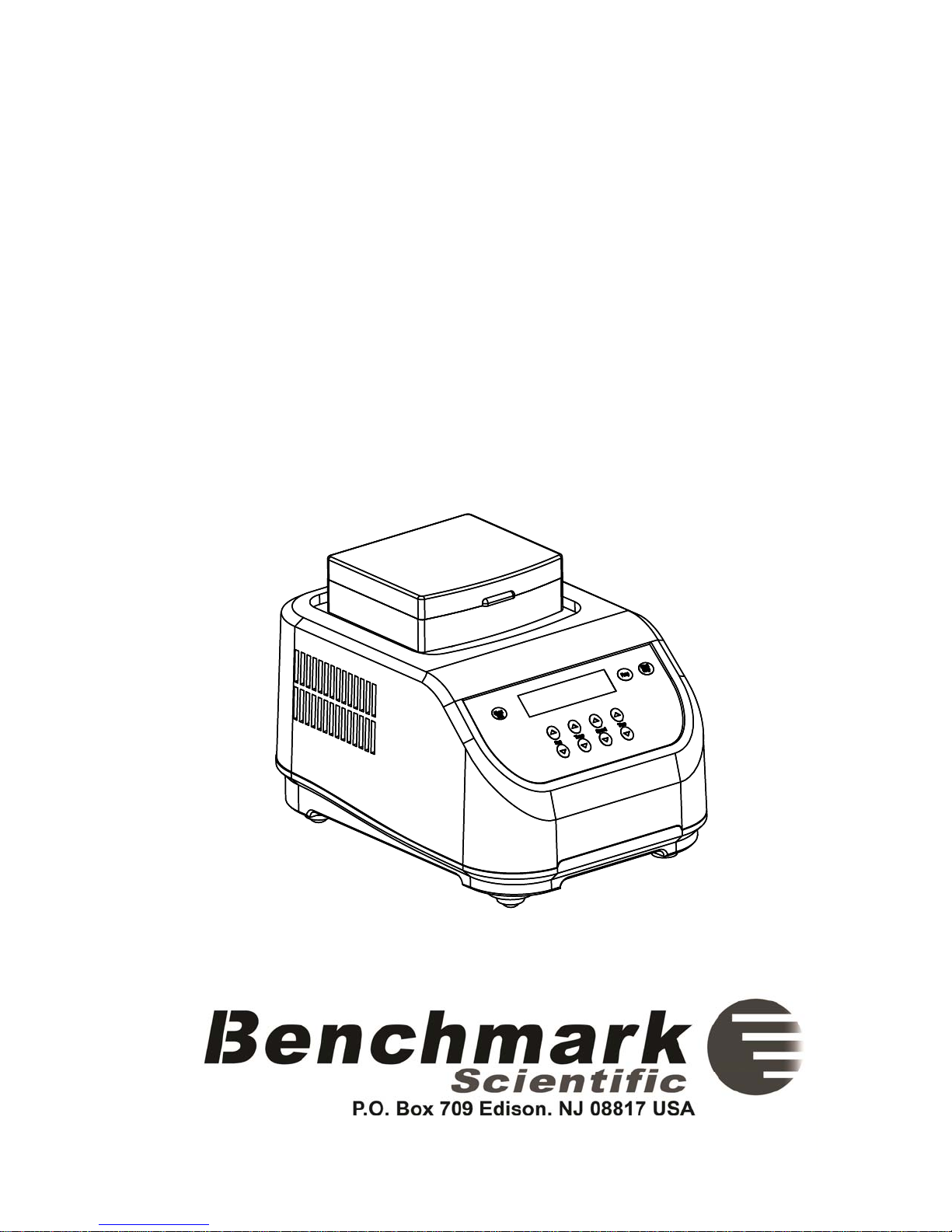
MultiTherm Shaker
Operations Manual
Item: H5000-H and H5000-HC
Page 2

Foreword
Thank you for purchasing a MultiTherm™ Shaker. This operations manual
contains instructions for the care of this Instrument. In order to use the
instrument properly, please read this manual carefully before operation.
Please keep it available for future use.
Prior to the initial operation:
Please check the Instrument and the accessories against the packing list
when you first open the shipping carton. If you find there is damage, a
discrepancy, or missing items, please contact the supplier immediately.
- 1 -
Page 3
g
Safety Warnings and Guidelines
1. Important operation information:
Please read this manual carefully prior to any attempt to operate the Instrument.
Read the manual prior to power up of the instrument. Read the
guidelines and directions below and be familiar with all safety
warnin
2. Security:
The operation, maintenance and repair of the Instrument must comply with the
basic guidelines and warnings stated below. Failure to comply may jeopardize the
instrument life, warranty coverage and user safety.
s and guidelines.
Use this product indoors. Do not operate in a damp or wet
environment.
Do not attempt to disassemble or repair the Instrument by
yourself. Disassembly will void the warranty. If there is a
malfunction contact your supplier for repair service.
The three pin plug supplied with the instrument is a safety
device that should be matched with a suitable grounded outlet.
Do not attempt to defeat the three pin plug or its grounded
function.
During normal operation, the temperature of metal block will
become very hot. Do not touch the block during or within 30
minutes of operation.
- 2 -
Close all test tube lids before inserting into the block. Do not
allow liquids to spill into the block or any part of the instrument.
Page 4
Before connectivity to a power source, check that the voltage
listed on the serial number label (on the bottom or back side of
the unit) to ensure that it matches the voltage available in your
area.
Be sure to install the Instrument in a cool, dry location away
from any direct sunlight or strong light sources. Additionally
the instrument should be kept away from corrosive gas,
magnetic fields and dusty environments. Keep the instrument
and the air vents at least 4 inches from walls, other instruments
or any obstructions.
The Main power switch is on the rear of the device,
push “I” to power on the instrument, and push “O” to
power off.
Shut the power off when you finish your work. Unplug the
machine if it will not be operated for a long time period and cover
it with a cloth or plastic paper for protection from dust particles
Immediately unplug the instrument from the outlet and
contact the vendor in the event of:
Fire or smoke.
Liquid has gotten into the Instrument;
Abnormal operation: such as abnormal sound or smell.
Instrument has been dropped or outer case is damaged.
The function has visibly changed.
3. Maintenance of the Instrument
The block wells should be cleaned by a cloth dampened with alcohol to ensure
good heat transmission between the block and the test tube. If there are marks, dirt
or stains on the instrument exterior, clean them with a cloth dampened with water
or a mild detergent solution.
Always shut the power off when cleaning the Instrument.
When cleaning the block wells, do not apply the cleaning liquid
directly to the block, use a dampened cloth. Do not use strong or
corrosive cleaning agents.
- 3 -
Page 5

Contents
Chapter 1: Introduction 5
Chapter 2: Specifications 5
1. Normal operating conditions 5
2. Technical data 6
Chapter 3: Preparations 8
1. Physical Description 8
2. Keyboard and Display panel 9
3. Key Functions 10
Chapter 4: Operation Guide 11
1. Single Temperature, Speed and Time setting 11
2. Sequence Link Setting 12
3. Disabling the Temperature Speed or Time 12
4. Pulse 13
5. Temperature Calibration 13
6. Changing the Block 16
Chapter 5: Failure analysis and troubleshooting 17
- 4 -
Page 6

H5000 Series MultiTherm Shakers
Chapter 1: Introduction
The MultiTherm shaker is an ideal instrument for intensive mixing of samples under
temperature regulated conditions.
Mixing and temperature control modes can be used both simultaneously and
independently i.e, the device can work as shaker and/or as an incubator. The base
instrument can be used with a variety of different blocks. The instrument is applicable
for DNA analysis, extraction of lipids and other cell components, DNA library creation,
PCR amplification, pre-denaturation in electrophoresis, serum solidification etc.
Features of this product as follows:
1. Because it can be used with various optional mixing blocks, the instrument can
adapt to different tubes and plates to accommodate many experimental needs.
Customized blocks are available to suit your specific demands.
2. LCD display
3. Simultaneous display of set and actual time, temperature and speed
4. Over-heat protection system ensures safety & reliability
5. Temperature can be calibrated to meet the user's needs
6. End-of-run signal alerts the user of cycle completion
Chapter 2: Specifications
1. Normal operating conditions
Ambient temperature: 5C ~30C / Relative humidity: ≤70%
Note: Do not attempt to operate the instrument at temperatures or humidity levels
outside of this range.
5
Page 7
H5000 Series MultiTherm Shakers
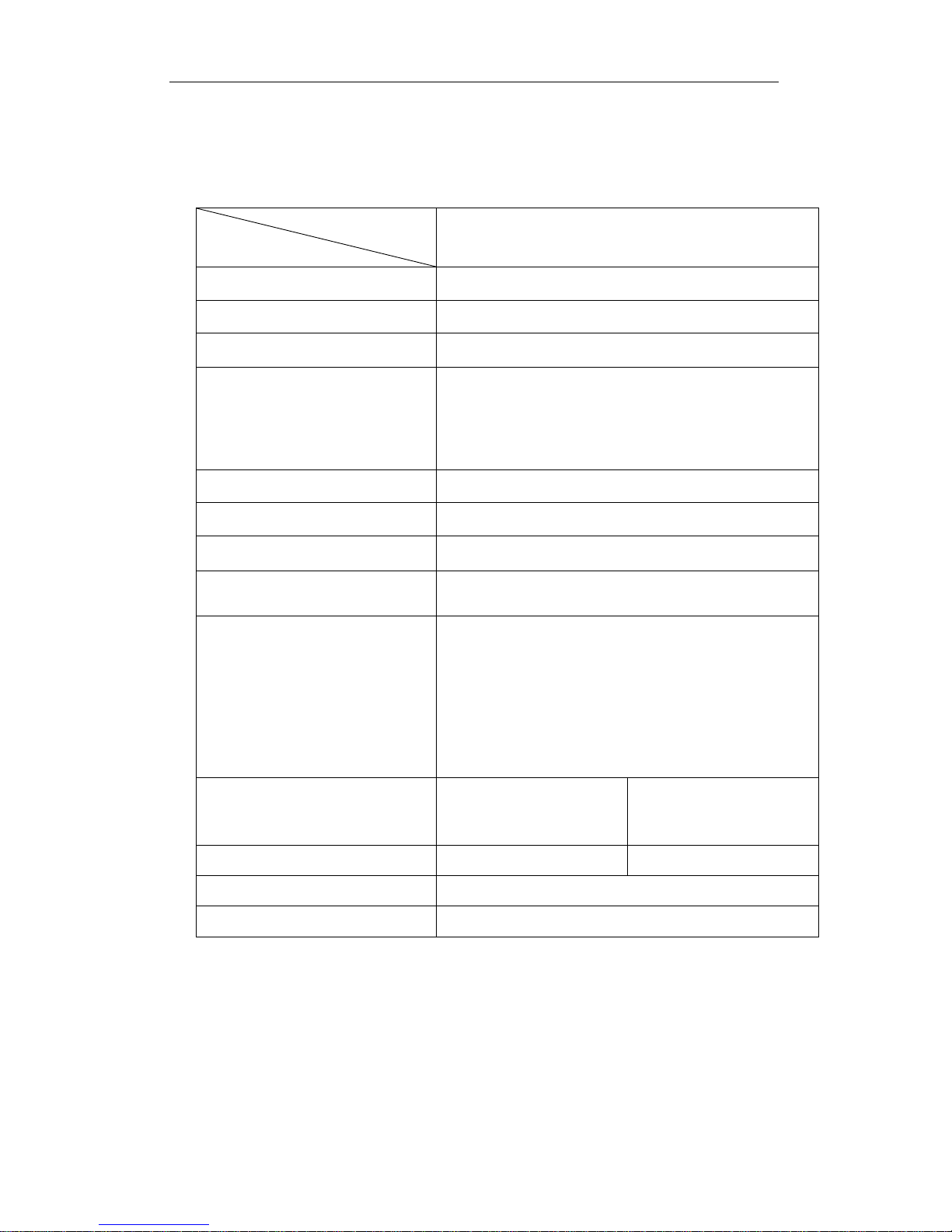
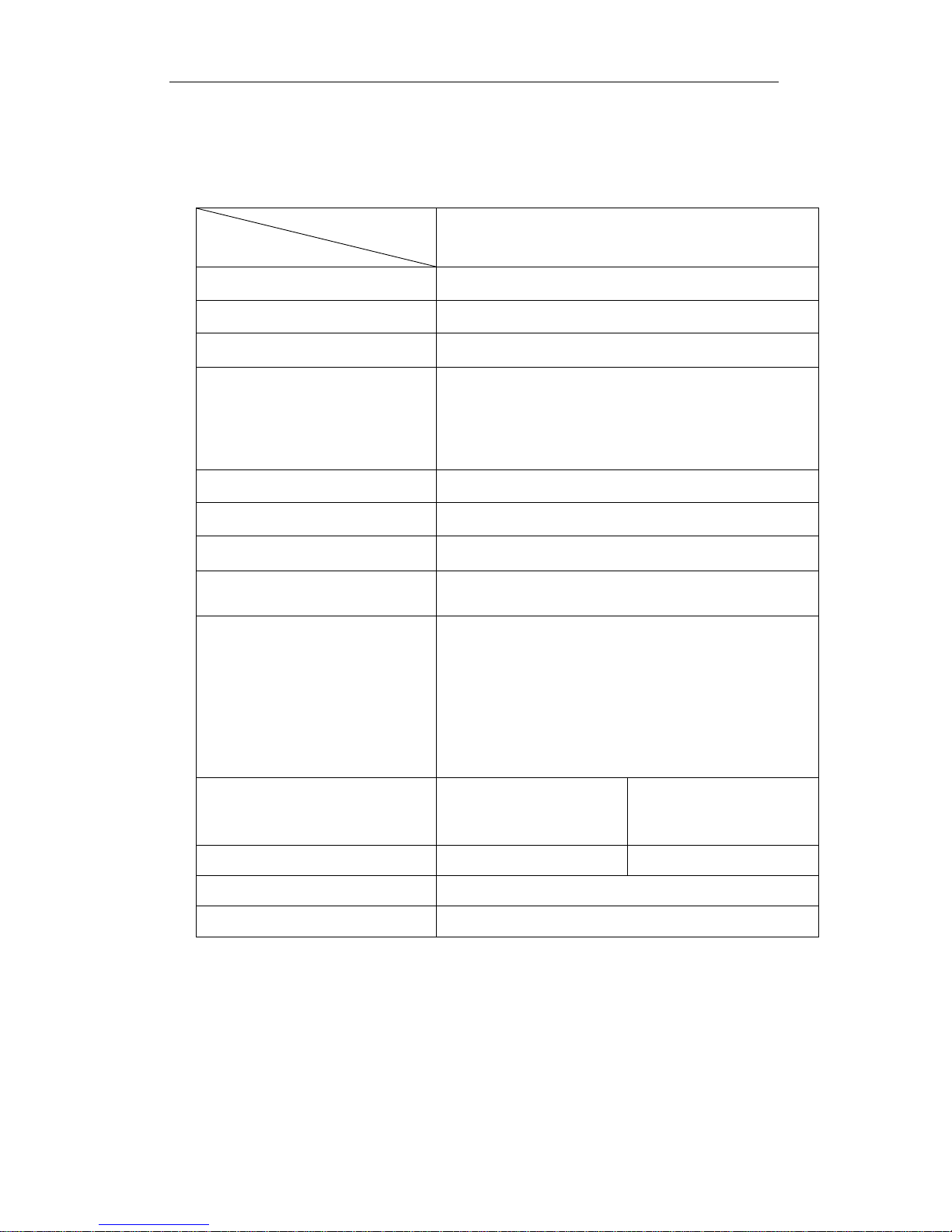
2. Technical data, H5000-H
Model
H5000-H
Parameter
Mixing rate* 200~1500 rpm
Orbit 2mm
Temperature setting range 5°C to 100°C
Temperature control range* Ambient +5°C to 100°C
Timing range 1min to 99h59min
Accuracy of the temperature ≤0.5°C
Heating time
≤15min (from 20°C to 100°C)
Cooling time N/A
A-BLOCK: 96 well Plate or 96 x 0.2ml;
B-BLOCK: 0.5ml x 54 C-BLOCK: 1.5ml x 35
Block Configuration
D-BLOCK: 2.0ml x 35 E-BLOCK: 15ml x 12
F-BLOCK: 12mm x 24
H-BLOCK: 0.5ml x 20 & 0.5ml x15
AC100-120~ 2.5A
G-BLOCK: 50ml x 6
AC200-240
~ 1.5A
Power Supply
50-60Hz
50-60Hz
Fuse 250V 4.0A Ф5×20mm 250V 3.0A Ф5×20mm
Dimension (mm) 300(D)×2 12(W)×210(H)
Net weight (kg) 8.5
*Specification is valid when used with “standard” blocks only. Larger blocks (Blocks E, F and G)
have different speed and temperature specifications.
6
Page 8
H5000 Series MultiTherm Shakers
Technical data, H5000-HC
Model
H5000-HC
Parameter
Mixing rate* 200~1500 rpm
Orbit 2mm
Temperature setting range 0° to 100°C
0° to 100° at Room temp. ≤20°C
Temperature control range*
4° to 100° at Room temp.≤25°C
10° to 100° at Room temp.≤30°C
Timing range 1min ~ 99h59min
Accuracy of the temperature ≤0.5°C
Heating time
≤15min (from 20°C to 100°C)
Cooling time ≤30min from room temp. to -20°C below room temp.
A-BLOCK: 96 well Plate or 96 x 0.2ml;
B-BLOCK: 0.5ml x 54 C-BLOCK: 1.5ml x 35
Block Configuration
D-BLOCK: 2.0ml x 35 E-BLOCK: 15ml x 12
F-BLOCK: 12mm x 24
H-BLOCK: 0.5ml x 20 & 0.5ml x15
AC100-120~ 2.5A
G-BLOCK: 50ml x 6
AC200-240
~ 1.5A
Power Supply
50-60Hz
50-60Hz
Fuse 250V 4.0A Ф5×20mm 250V 3.0A Ф5×20mm
Dimension (mm) 300(D)×2 12(W)×210(H)
Net weight (kg) 8.5
*Specification is valid when used with “standard” blocks only. Larger blocks (Blocks E, F and G)
have different speed and temperature specifications.
7
Page 9
H5000 Series MultiTherm Shakers
Chapter 3: Preparations
This chapter provides a physical description, location of controls, function of
individual keys, as well as some preparations before the initial power-on. You
should be familiar with this chapter before the Thermo Shaker is first operated.
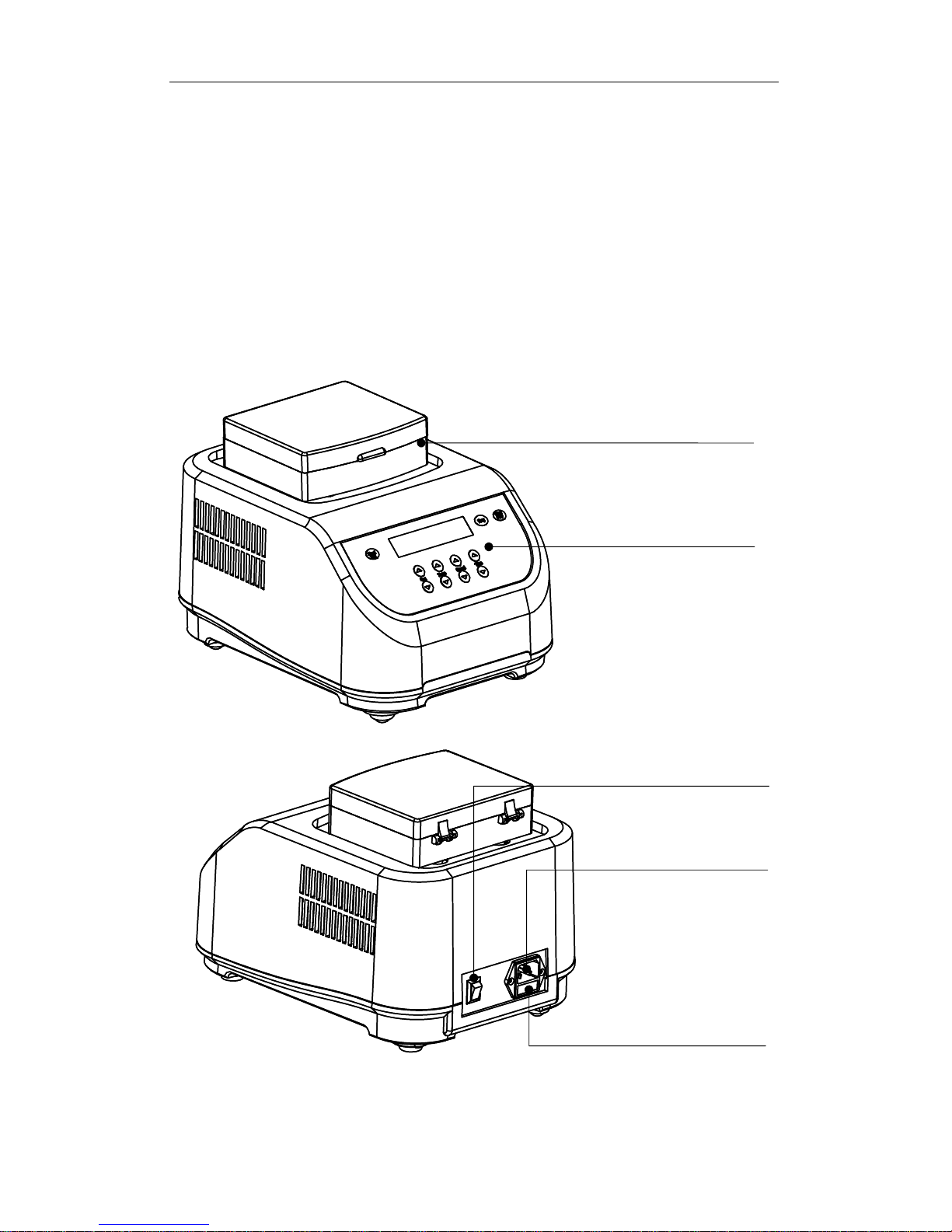
1. Physical Description
Standard Block
Keyboard
Power Switch
Power connector
Fuse
─ 8 ─
Page 10
H5000 Series MultiTherm Shakers
g
2. Keyboard and Display panel
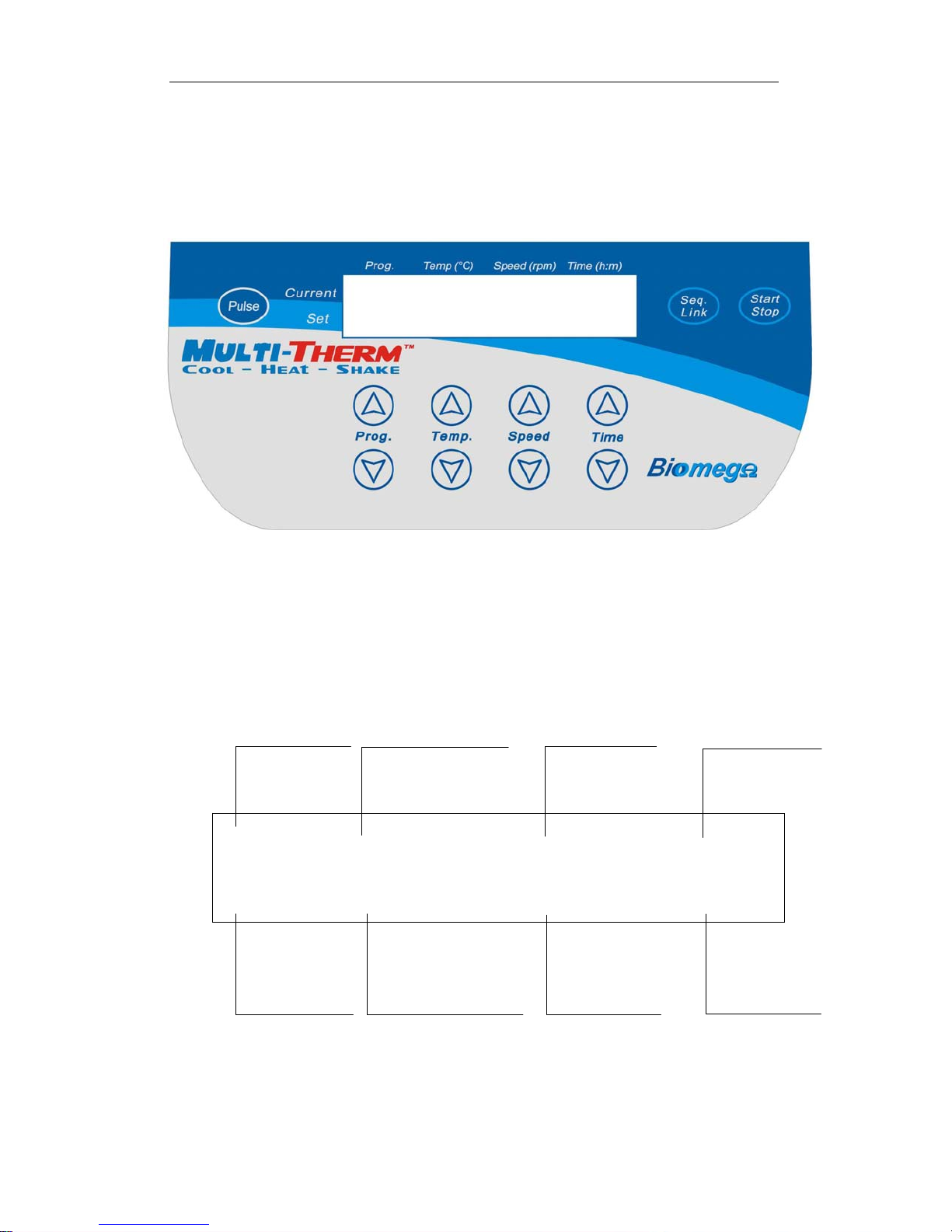
Display Panel:
Current program
P1100.0120010:30
P1100.0 120015:00
Selected pro
Current temperature
Selected temperature
ram
Current speed
Selected speed
Remaining time
Selected time
─ 9 ─
Page 11

H5000 Series MultiTherm Shakers
y
3. Key Functions
Prog.
Temp.
Speed
Time
Seq. Link
Pulse
Start/Stop
Program Selection Keys: Use the up and down keys to
choose the desired program (P1, P2, P3, P4 or P5).
Temperature Selection Keys: Press“” or “” to select the
desired temperature in increments of 1°C. (To quickly scroll to
the desired temperature, press and hold the“” or “” keys.)
Speed Selection Keys: Press “” or “” to select the desired
mixing speed in increments of 10rpm. (To quickly scroll to the
desired mixing speed, press and hold the“” or “” keys.)
Time Selection Keys: Press “” or “” to select the desired
run time. (To quickly scroll to the desired time, press and hold
the“” or “” keys.)
Sequence Link Key. Press the “Seq. Link” key to run
consecutive programs. Choose from P1 to P2, P1 to P3, P1 to
P4, or P1 to P5 to run up to five consecutive programs.
(The Sequence link function is only available on the H5000-HC.)
The device mixes at the speed shown on the display for as long
as the Pulse key is held down. The time is counted in seconds
until 999 Seconds has expired.
Start/Stop Key. press this key to start or stop the program. Press
to start. Press and hold to stop.
briefl
─ 10 ─
Page 12
H5000 Series MultiTherm Shakers
Chapter 4: Operation Guide
1. Single temperature, speed and time setting
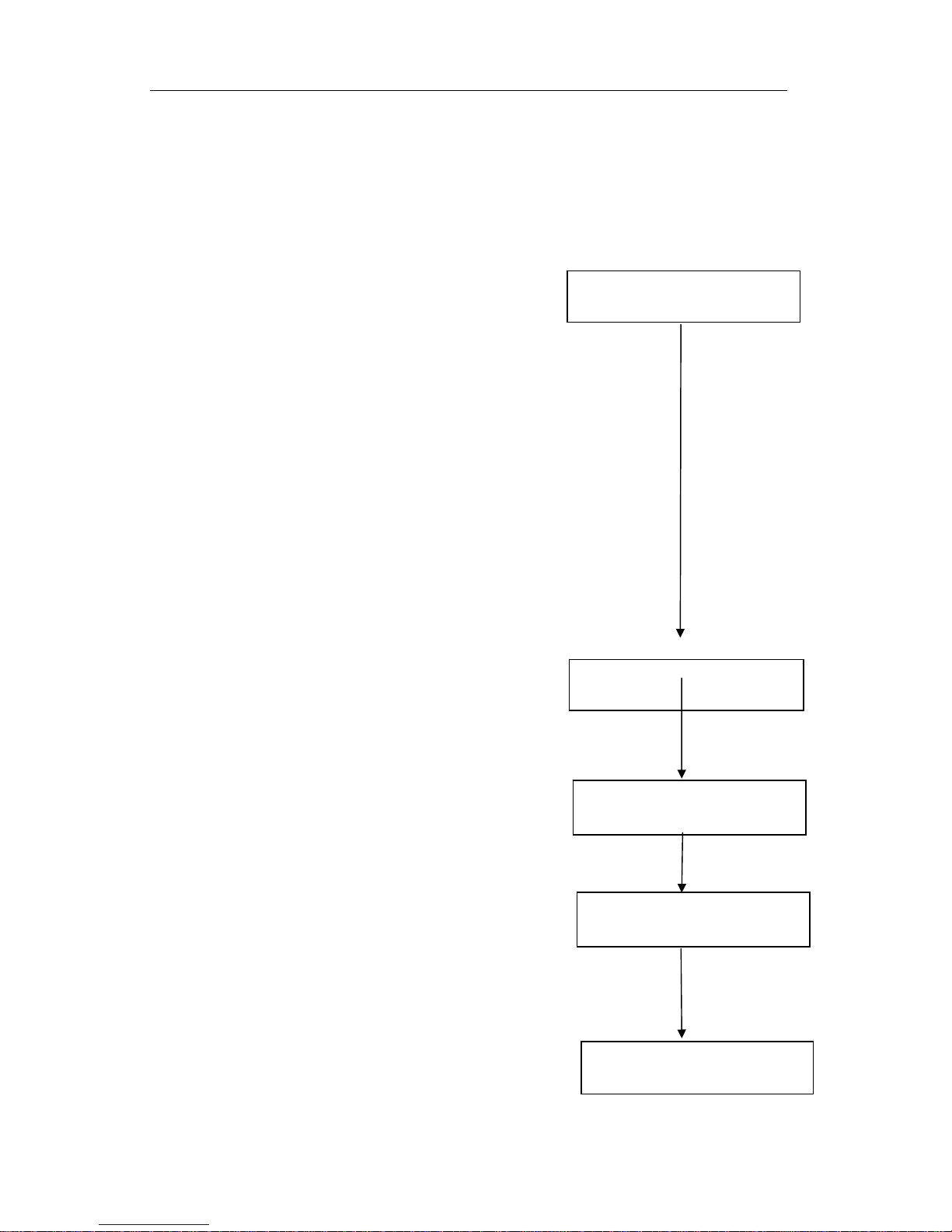
a) Following power up, the unit beeps once and
the LCD will display “System Testing”. After
approx. 5 seconds, the current and selected
settings appear on the display and the
System‐Testing
......
instrument is ready for use.
b) The current block temperature is displayed
on the LCD, for example, 30.0 along with the current
mixing speed, 0 rpm and the current time, 00:00. The
set or selected temperature shows 37.0, which is the
initial preset temperature. The initial preset mixing
speed and time are also displayed at 1000rpm and
10:00 respectively.
c) Five programs are available for storage. By
pressing the “” or “” Prog. keys, choose the
desired program, P1, P2, P3, P4 or P5.
By pressing the “” or “” Temp. keys,the value of
the selected temperature is adjusted in increments of
0.1°C on the display window.
Prog
P130.0000:00
P137.0100010:00
Temp
P130.0000:00
P140.0100010:00
By pressing the “” or “” Speed keys,the value of
the selected mixing speed is adjusted in increments
of 10 rpm.
By pressing the “” or “” time keys,the value of
the selected run time is adjusted in increments of 1
min.
Speed
P130.0000:00
P140.0120010:00
Time
P130.0000:00
P140.012002:00
— 11 —
Page 13

H5000 Series MultiTherm Shakers
NOTE: Press and hold the “” or “” adjustment
keys to quickly scroll through the available
temperature, speed and time range
Press the
2.
Sequence Link Program Setting (Available on H5000-HC only)
Star/Stop Key to begin the cycle
a) By Pressing the “Seq. Link” Key, the user can connect up to five programs to run
consecutively (P1-P2, P1-P2-P3, P1-P2-P3-P4, P1-P2-P3-P4-P5).
b) Once the Seq. Link button is pressed, the display
shows the starting program “P1” and the default
ending program, “P2”. To adjust the ending program,
press the “” or “” Prog. Keys. Once the ending
program has been selected, press the Seq. Link key
to finalize.
PROGtovalidate
Star:P1End:P2
P130.0000:00
c) To begin the first program, press the “start/stop”key.
The first program will run through completion.
Following completion, the subsequent cycle will begin
automatically.
NOTE: A program can always be stopped (cancelled) by pressing and
P14 50.014003:00
holding the “start/stop” key.
3. Disabling the temperature, speed or time functions.
a) To deactivate the temperature control, press and hold the “” Temp. key until the
set temp. shows “OFF”. The temperature control is now deactivated and the
instrument can be used solely as a shaker/mixer.
— 12 —
Page 14

H5000 Series MultiTherm Shakers
p
b) To deactivate the shaker speed, press and hold the “” Speed key until the set
speed shows “OFF”. The shaker is now deactivated and the instrument can be
used solely for temperature control.
c) To deactivate the timer, press and hold the “” Time key until the set time shows
“OFF”. The timer is now deactivated and the instrument will run continuously
until the user presses and holds the start/stop key.
NOTE: When running consecutive programs in the Seq. Link mode, the time should
not be set to “OFF” in any program.
4. Pulse
By pressing and holding the Pulse key, the
instrument mixes at the selected speed for as
long as the Pulse key is held down. The time is
counted in seconds until 999 seconds has
expired.
Pulse is running
600r
m 023S
5. Temperature calibration
The temperature of the Instrument has been factory adjusted and calibrated prior to
being shipped. But if there is deviation between the actual temperature and the displayed
temperature, the user can self-calibrate the instrument in order to correct the error.
Note: The temperature accuracy will be within ±0.5°C.
Calibration Procedure:
a) Verify that the ambient temperature is less than 25°C and power up the instrument.
Once powered on, verify that the current temperature in display is below 25°C. If the
temperature is above than 25°C, please wait for the unit to cool down to 25°C or less.
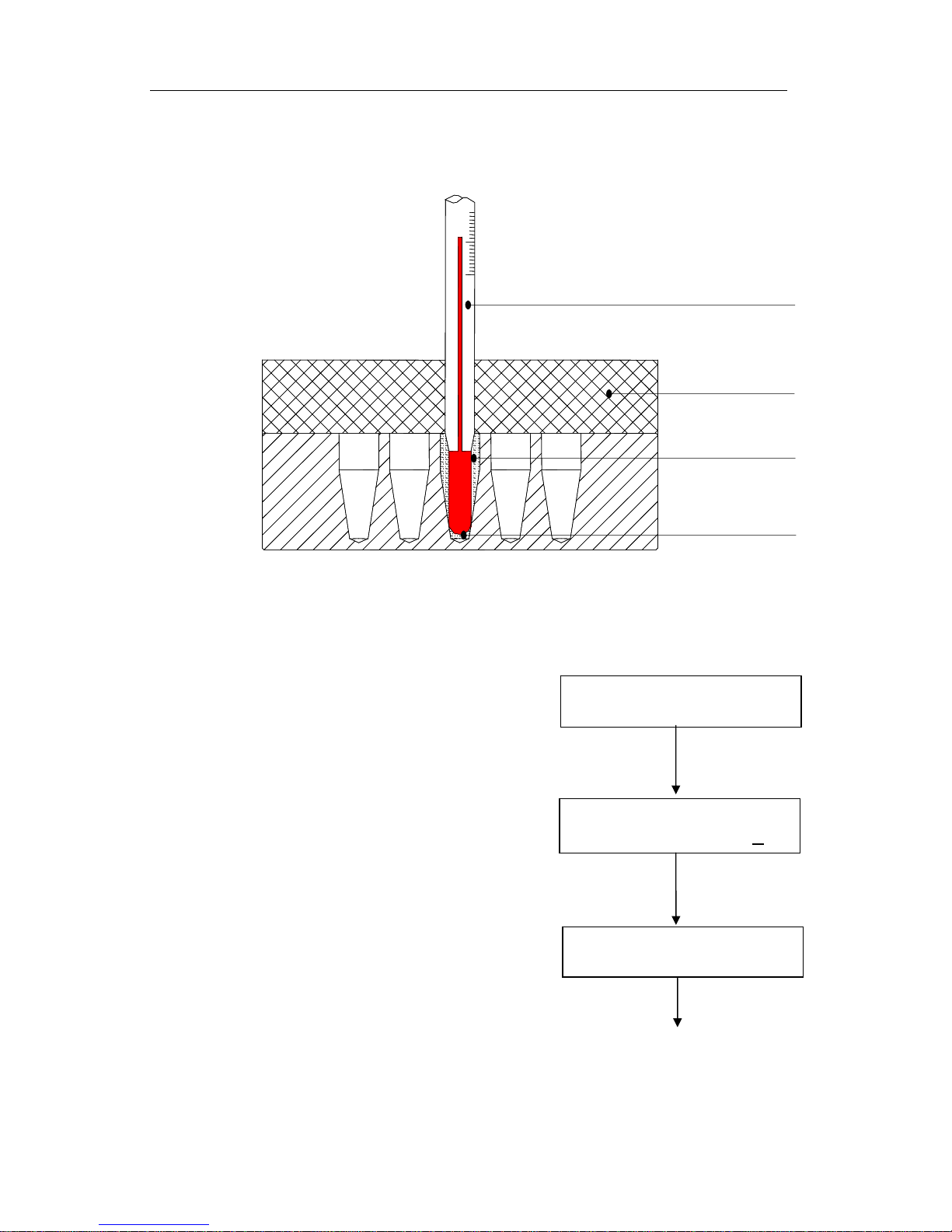
b) Inject olefin oil into one of the cone-shaped wells, and insert a thermometer into this
well. (Make sure the accuracy of the thermometer is to be within 0.1°C and that it is
completely immersed into well). Heat insulation material is needed on the block to
insulate it from the ambient temperature. See Fig a.:
— 13 —
Page 15
H5000 Series MultiTherm Shakers
Adj
Adj
Notes: Please read the actual value after allowing 20 minutes constant temperature
equilibration time.
To enter the temperature calibration mode, press
the “” and “” Prog. Keys simultaneously.
The instrument begins to cool to the low
calibration point.
- H5000-H
Calibration points: 40°C, 100°C
- H5000-HC
Calibration points: 10°C, 40°C, 100°C
c) After 20 mintues,read the temperature of the
Thermometer (for ex. 9.8°C). Using the “”
or “” Temp. keys, adjust the temperature of
the display to match that of the thermometer
and press the “start/stop”key to confirm.
Fig. A
Thermometer
Insulating sheet
Standard Mineral Oil
Well-bottom
P:20.5 ADJ
Temp= 10.0
P:10.0 ADJ
AdjTemp= 10.0
P:10.0 ADJ
Temp= 9.8
Press “stop/start”
— 14 —
Page 16
H5000 Series MultiTherm Shakers
Adj
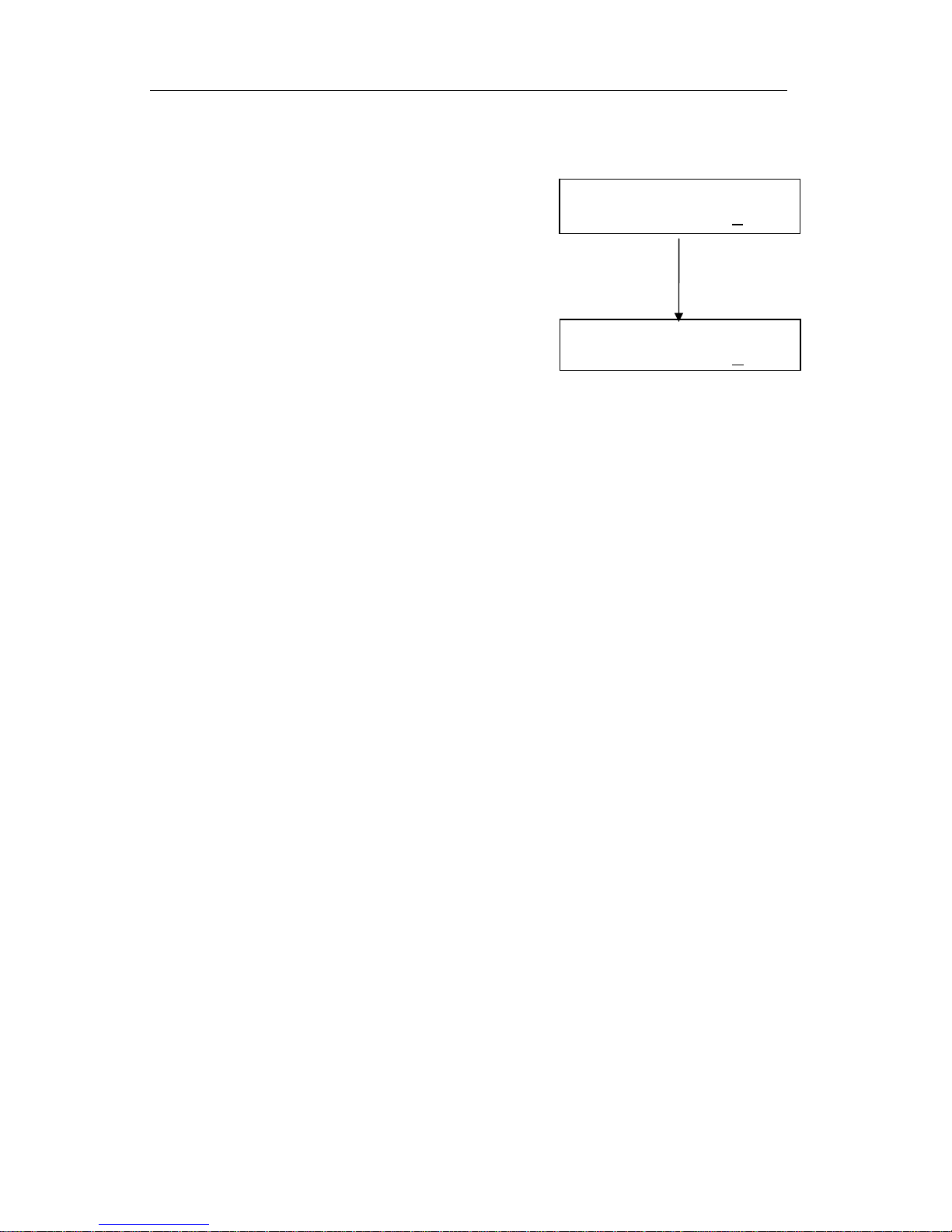
d) Repeat the above step for the remaining
temperature calibation points.
Following the adjustment to the final calibration point,
the temperature calibration of the instrument has now
been completed and the displayed temperature will
accurately represent the temperature of the heating
block.
P:40.1 ADJ
AdjTemp= 40.0
P:100.0 Adj
Temp= 98.0
NOTE: During the temperature calibration, press the “” and “” Prog. keys
simultaneously to cancel the calibration. The system will default back to the former
calibration.
— 15 —
Page 17
H5000 Series MultiTherm Shakers
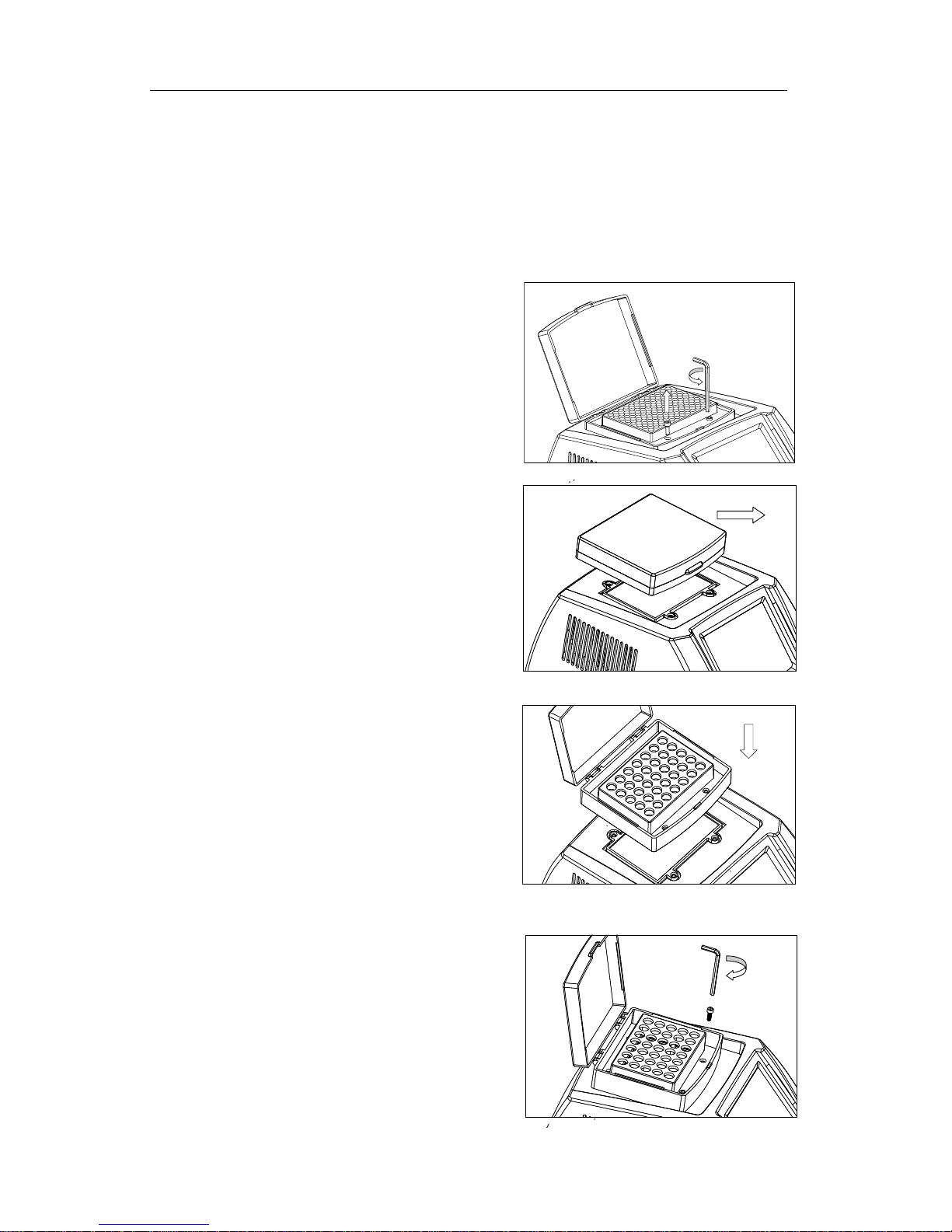
6.Changing the block
a) Open the transparent lid and use the
supplied hex wrench (3mm) to remove the
four screws that hold the block to the
heating board.
b) Close the lid and lift the block up and away
from the base unit.
c) Place the desired block softly on the
heating platform of the base unit and
carefully align the four screw holes.
d) Install and tighten the four screws. Do not
over tighten.
Screw
— 16 —
Page 18

Chapter 5: Failure analysis and troubleshooting
Failure analysis and processing procedures
No. Symptom Possible Causes Action
No power Check the power
No display when
1
powered up.
The actual and
displayed
2
temperatures are
significantly different.
“OPEN” in the
3
temperature display
with a short beep
“SHORT” in the
4
temperature display
with a shirt beep
5 No heating or cooling
No reaction when a
6
key is pressed
Fuse failure
Broken switch Replace the switch
Others Call for service
Temperature sensor failure Call for service
Temperature sensor failure
or the environmental
temperature is below zero
Temperature sensor failure
or the environmental
temperature is below zero
Broken sensor or Broken TE
module
Failed film switch Call for service
Exchange fuse(250V 3.0A
5X20mm)
Call for service
Call for service
Call for service
Page 19

 Loading...