

Page 1

Draft 1
Bellpal One
User manual
Model number BP01
FCC ID 2AQQN-BP01
Page 2

Draft 2
Regulatory information
This device complies with part 15 of the FCC Rules. Operation is subject to the following two
conditions: (1) This device may not cause harmful interference, and (2) this device must accept any
interference received, including interference that may cause undesired operation.
BP01 is only compliant if no changes or modifications are made to the device.
BP01 is compliant with the requirement for RF exposure in US with < 5 mm separation distance
between the user and/or bystander of the device.
Client hereby declares that this product is in compliance with the essential requirements and other
relevant provisions of Directive 2014/53/EU. See http://www.bellpal.se for more information.
Page 3

Draft 3
Table of contents
Regulatory information ........................................................................................................................... 2
Table of contents ..................................................................................................................................... 3
Description and Intended use ................................................................................................................. 4
User guide................................................................................................................................................ 5
Usage ................................................................................................................................................... 5
Pages in the App .................................................................................................................................. 6
Alarm handling in the App ................................................................................................................... 9
False alarms ....................................................................................................................................... 11
Updating app ..................................................................................................................................... 12
Restoring ........................................................................................................................................... 13
Technical specifications ......................................................................................................................... 14
Page 4
Draft 4
Description and Intended use
Bellpal One is a watch with a fall detection alarm and positioning system for seniors and their
caregiver ecosystem including relatives, care providers and senior homes. Bellpal One detects and
prevents falls and enables personalized, preventative care improving the quality of life for seniors
and their loved ones. Bellpal One is for seniors living in their own homes or in senior care facilities.
The watch connects with BLE to a smartphone which in turn connects to the internet.
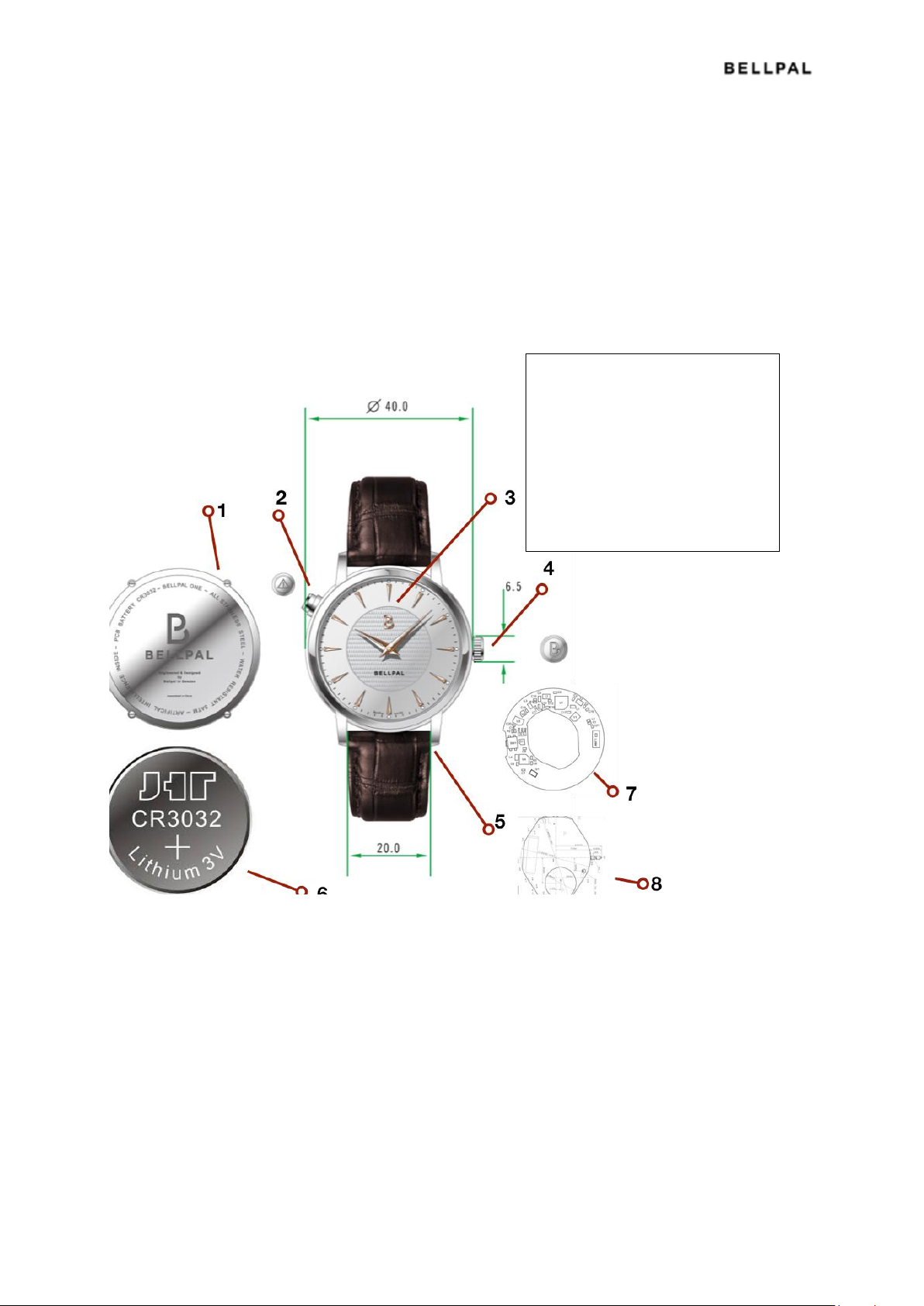
Figure 1. The parts of the watch
1. Case back
2. Alarm button
3. LED (RGB)
4. Winding crown
5. Bracelet attachment pins
6. Battery for the sensor
7. PCBA with sensors
8. Quartz movement
Page 5
Draft 5
User guide
Usage
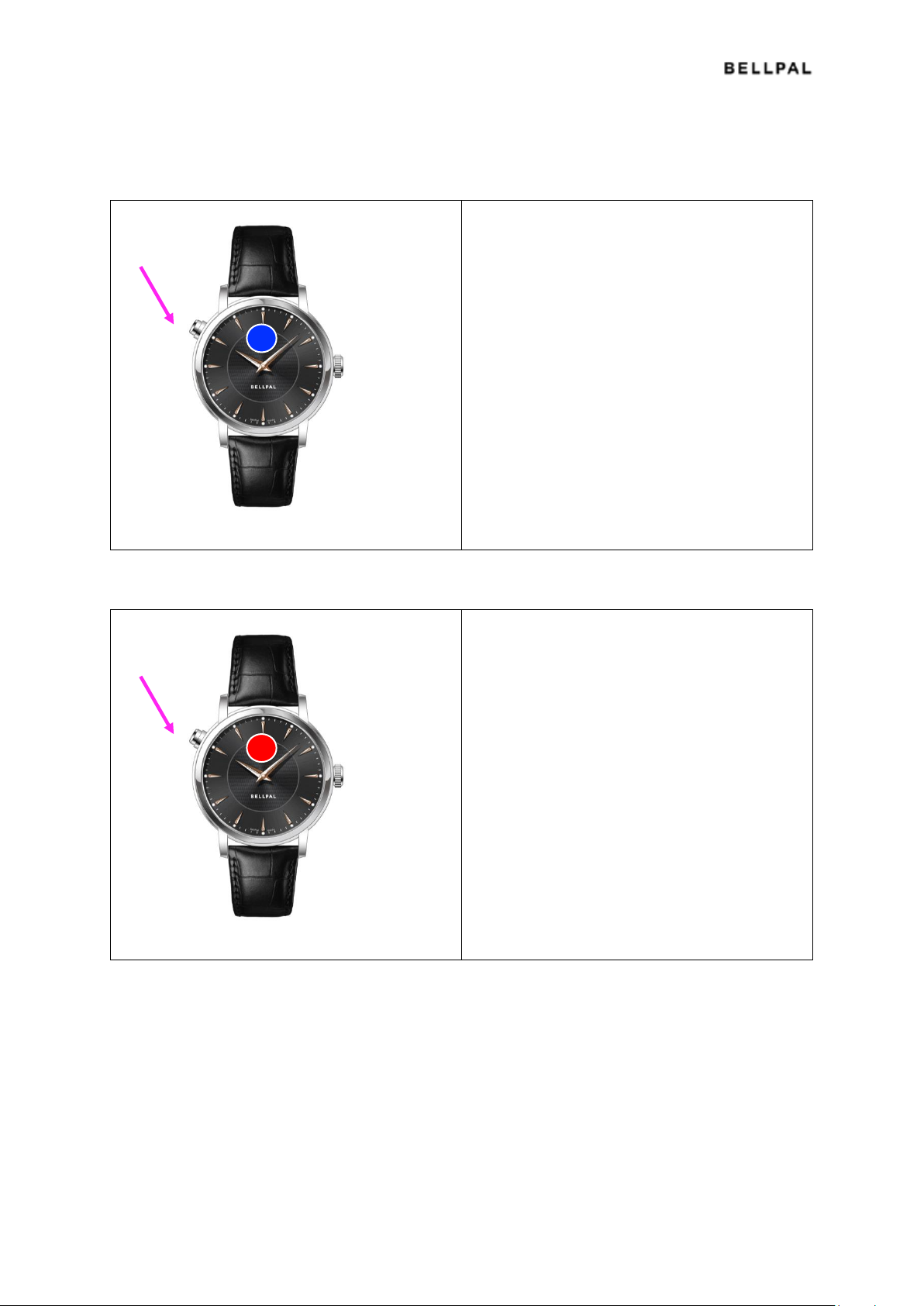
Pairing the watch and the app (for the first time)
1. Make sure Bluetooth is switched on in
your smartphone
2. Open the BellPal app
3. Follow the instructions in the app, i.e.
press the button on the watch for 2
seconds until the LED starts flashing
blue
Start alarm manually
1. Press and hold the button for 3 seconds
and release; the LED will start flashing
RED.
Page 6
Draft 6
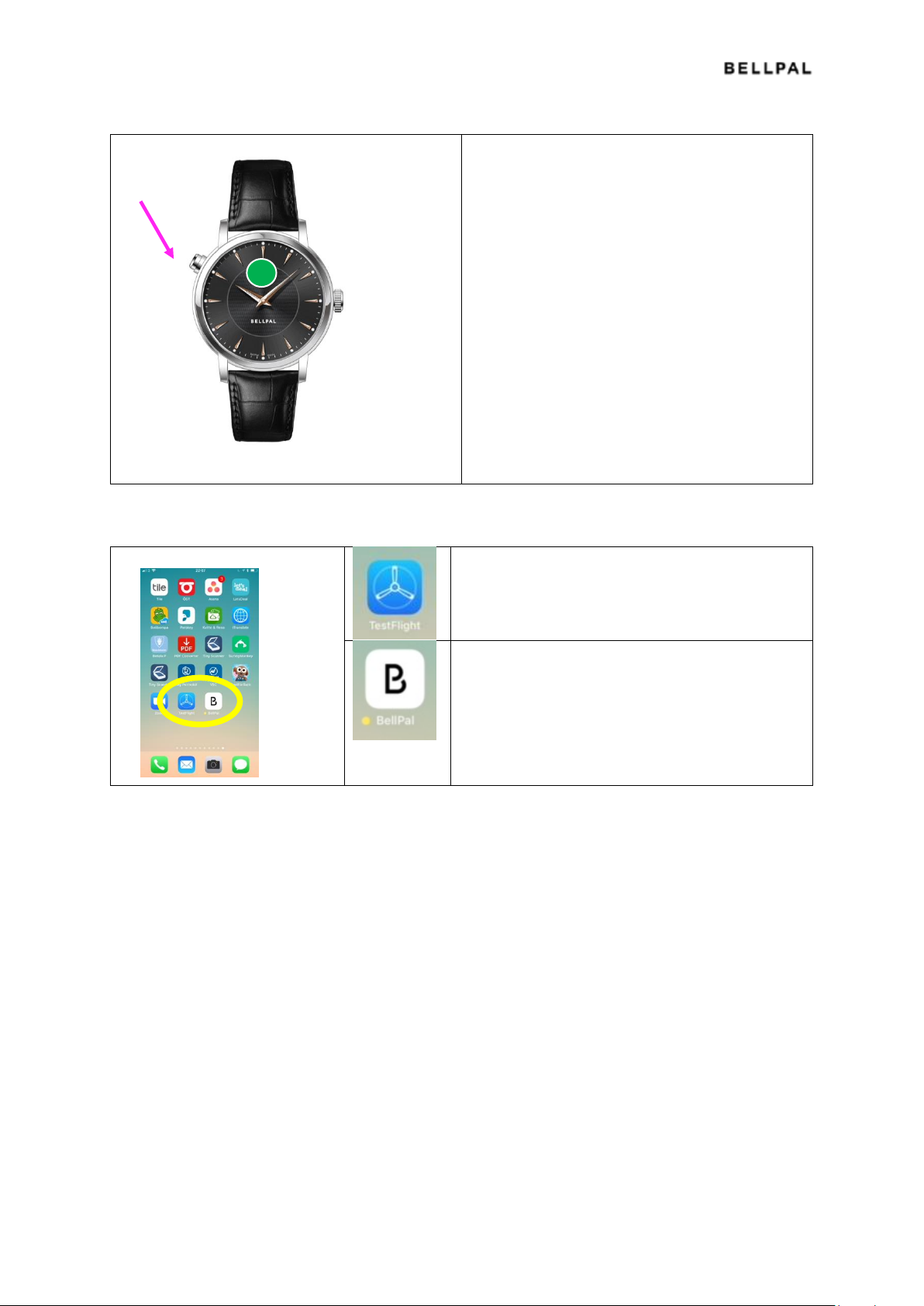
Cancel manual alarm
1. Press and hold the button for 10
seconds until the LED starts flashing
green and then stops.
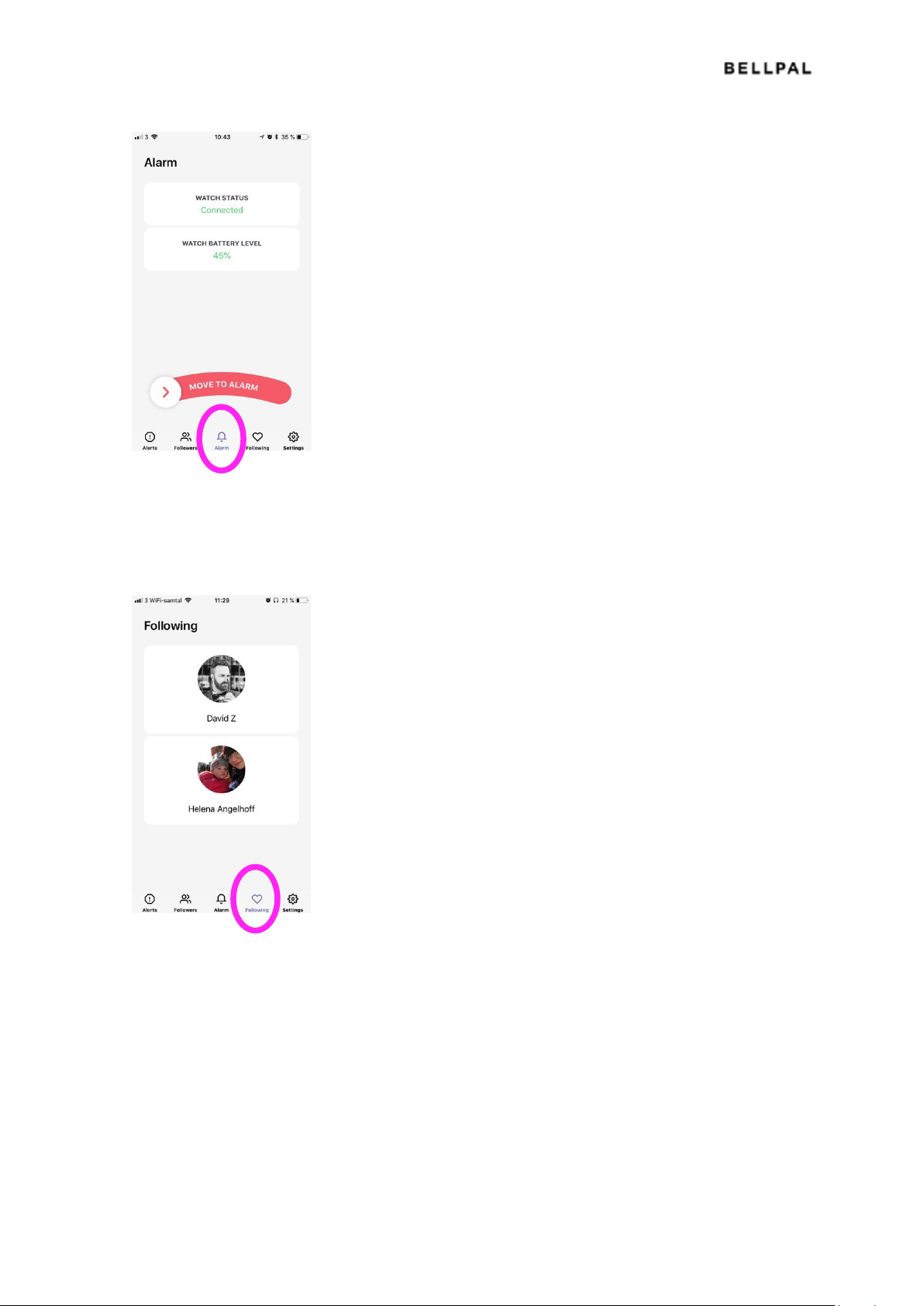
Pages in the App
Testflight: app för att ladda ner BellPal appen för
iPhone
Bellpal: appen du använder med BellPal-klockan.
Alerts
Notifications of active alarms (your own and they you are following)
Page 7
Draft 7
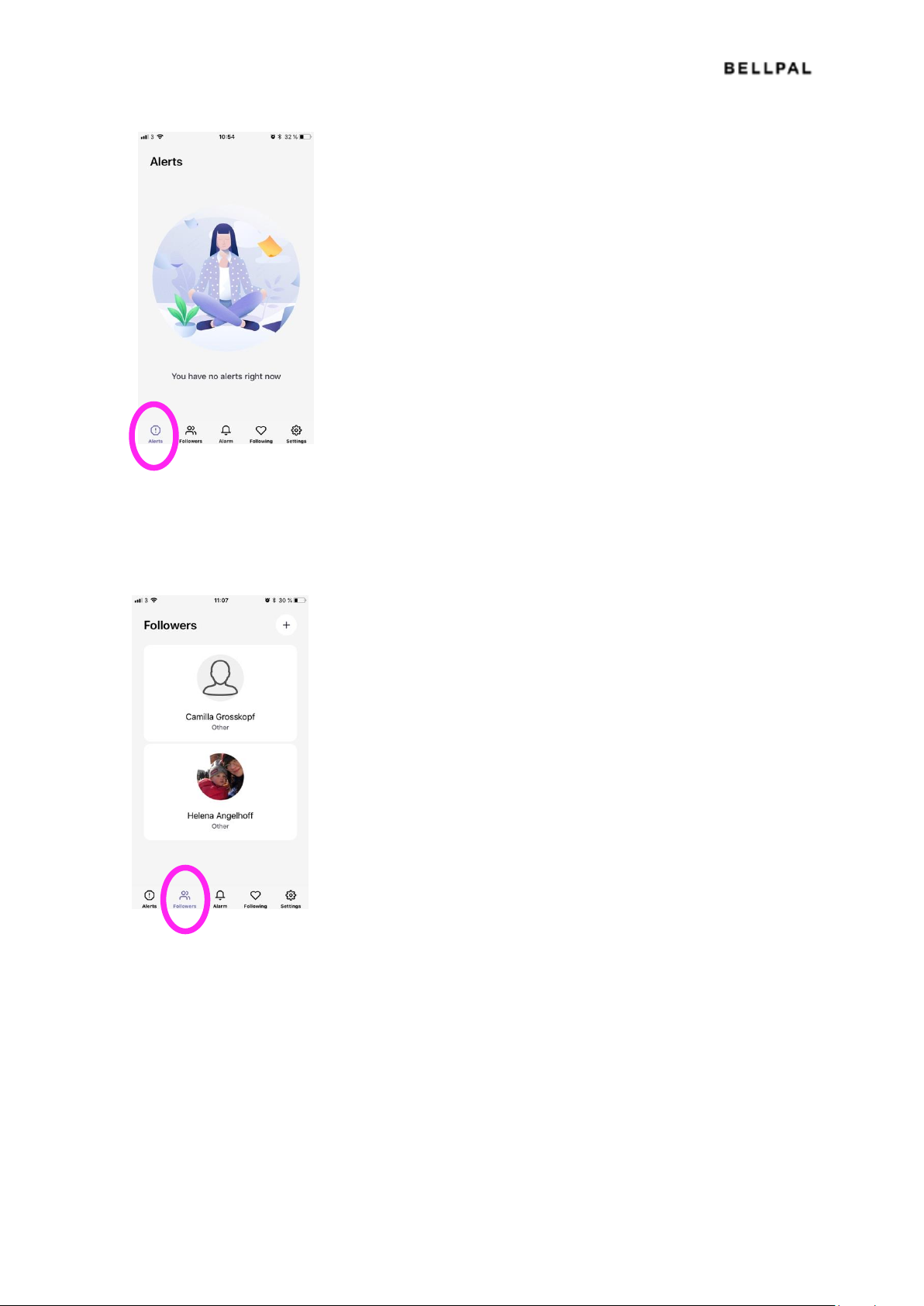
Followers
The people that follow you (and can see your alarms)
Alarm
Here you can start and stop your alarms
Page 8
Draft 8
Following
Other users you are following
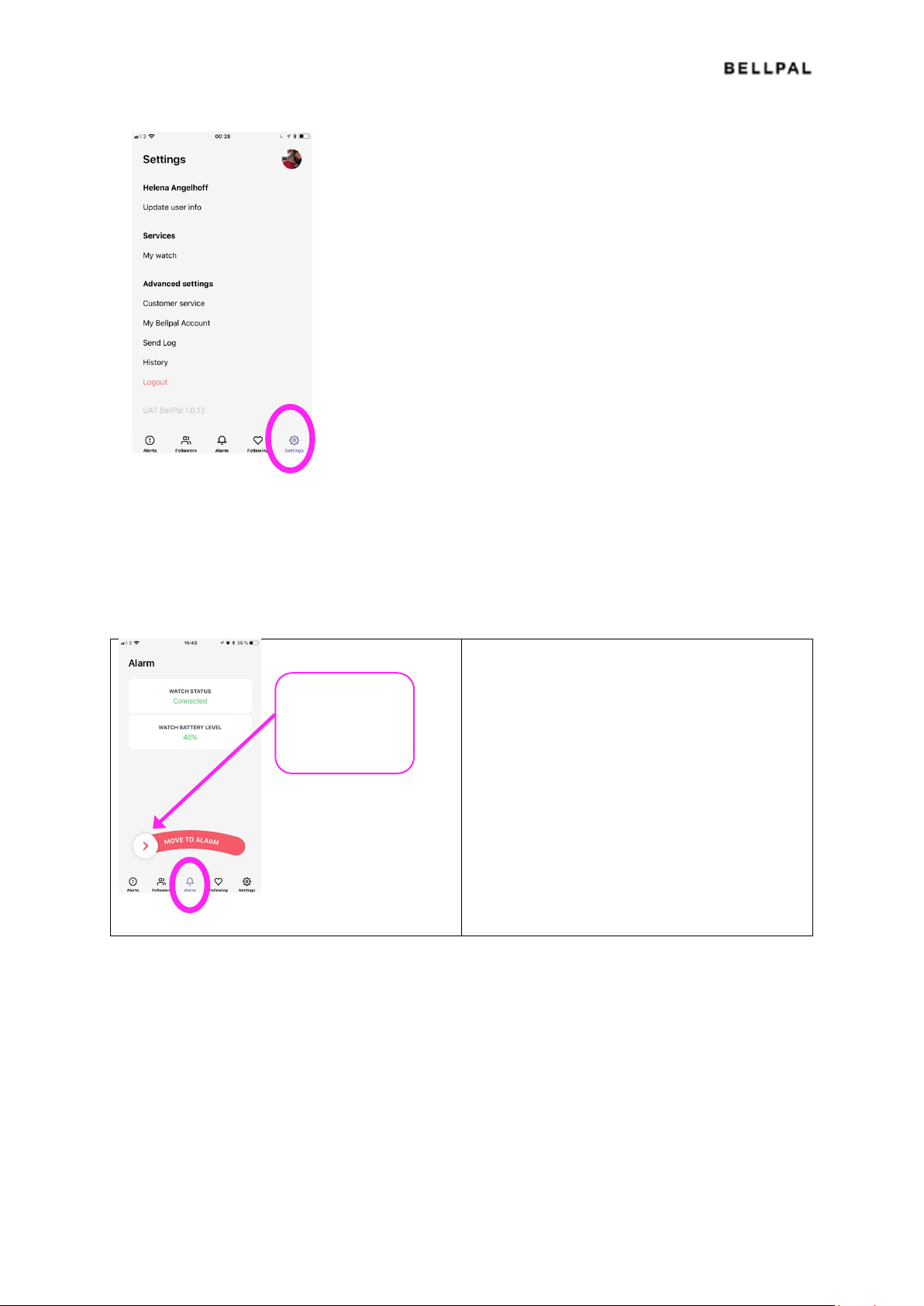
Settings
Here you can update your information, etc.
Page 9
Draft 9
Alarm handling in the App
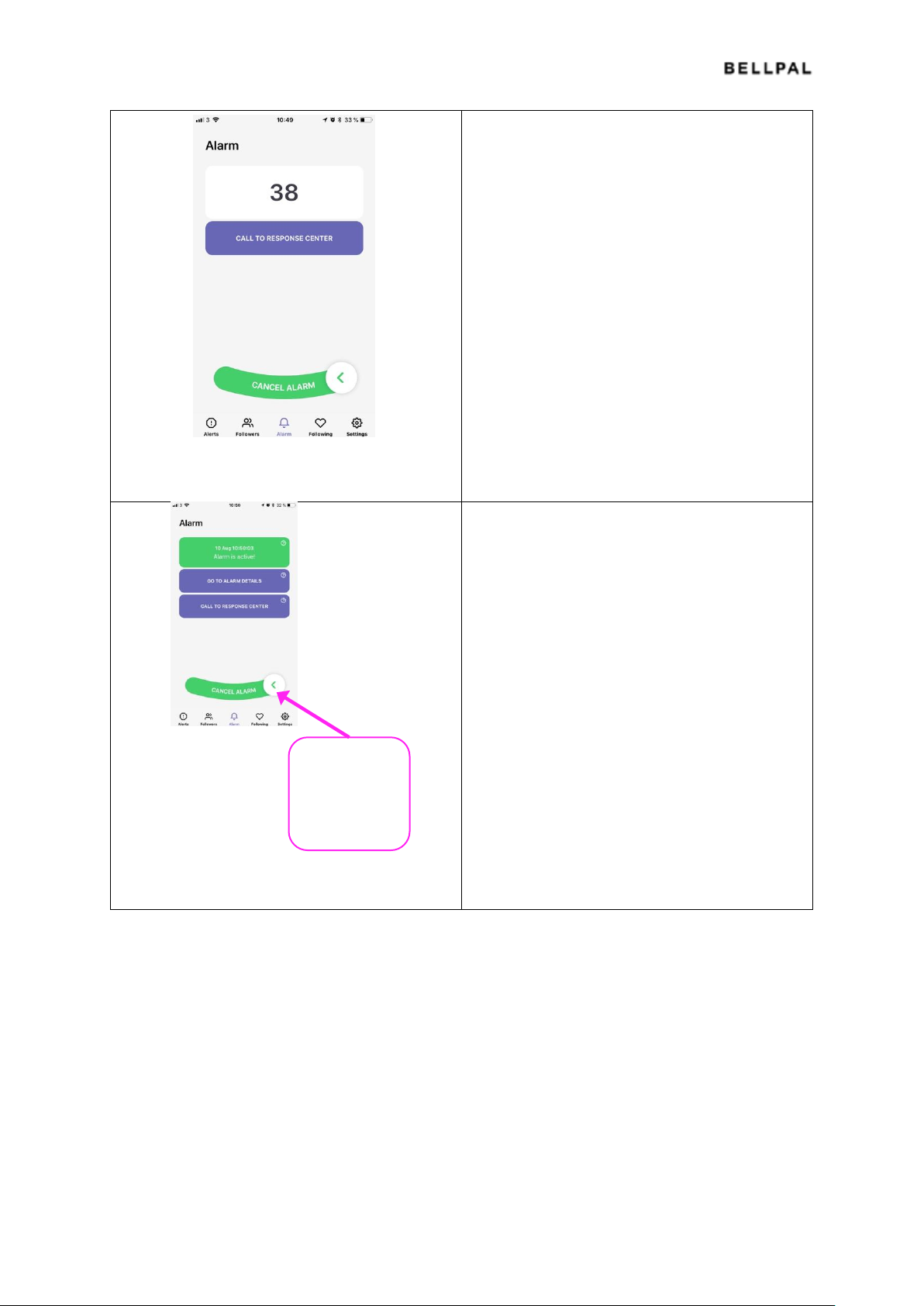
Starting and cancelling alarms
To start an
alarm, sweep the
alarm button to
the right
Page 10
Draft 10
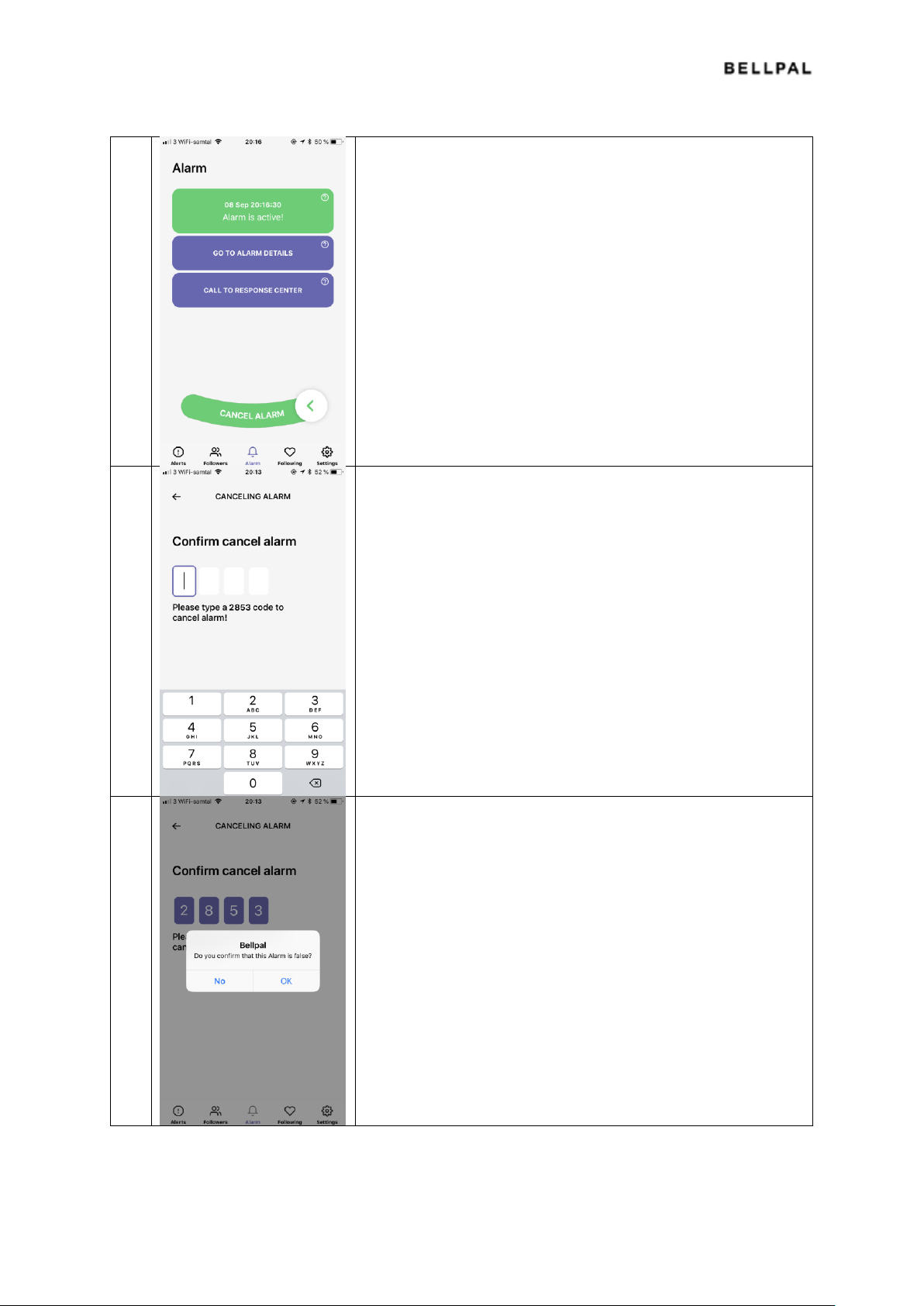
Initiated alarm with 45 seconds countdown.
During this time the alarm is only visible in your
app.
Confirmed alarm that has been sent to the
Response Center and the followers' apps.
🔔
🔔
To cancel an
alarm,
sweep the
alarm button
to the left
Page 11
Draft 11
False alarms
1 An automatic alarm has been activated, and is either
a) still in countdown
b) has been sent to the BellPal Response Center
In either case you can cancel the alarm yourself.
2 To cancel the alarm:
Swipe the button to the left and confirm with a PIN code (to
ensure that it is not cancelled by mistake).
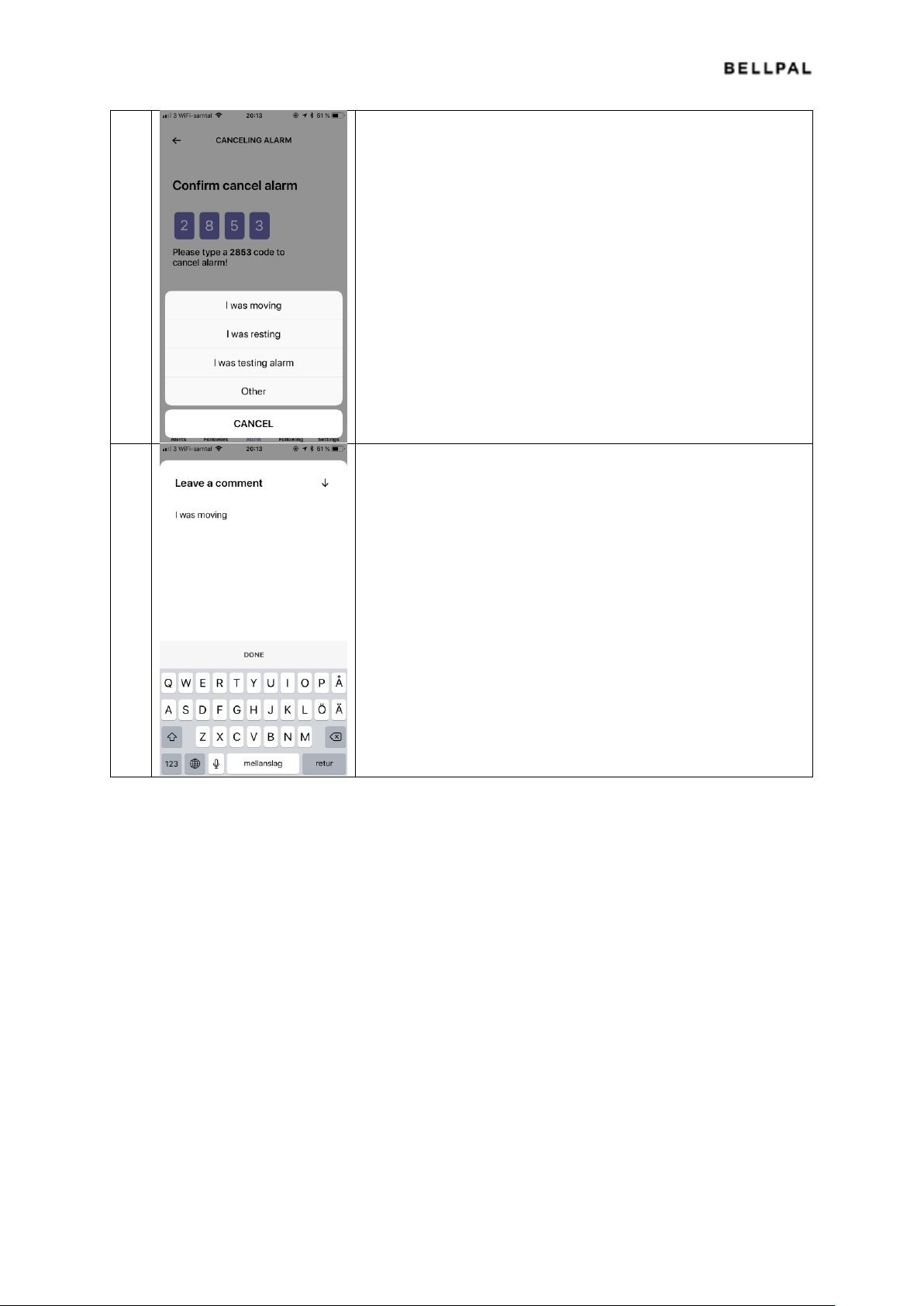
3 You will then confirm that the alarm is false.
Page 12
Draft 12
4 If the alarm was false you will get another question about what
you were doing when the alarm was activated:
I was moving
I was resting (not in motion)
I was testing alarm
Other (none of the above)
5 Finally a window is opened where you can write comments,
especially important if you remember what you were doing
when the alarm was activated, for example washing dishes,
playing tennis, banging your fist on the table.
Finish by pressing Done.
Updating app
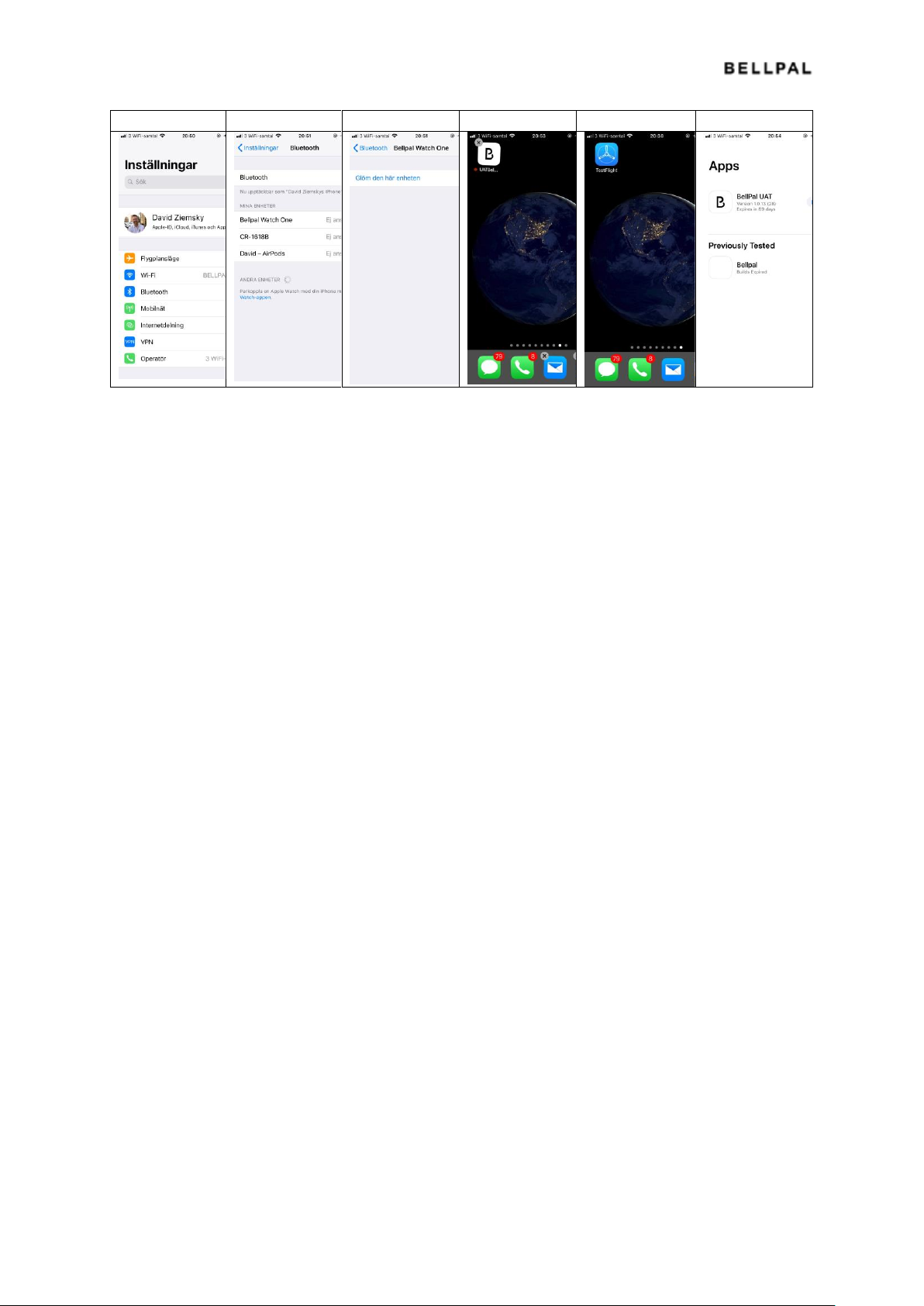
You will get a mail from Testflight when there is a new version of the BellPal app available.
Do the following
Disconnect the watch and erase the old app
1. Enter the smartphone's settings and select Bluetooth
2. Choose BellPal Watch One by pressing Info (i)
3. Click "Forget this unit"
4. Erase the BellPal App: Hold your finger on the app until it starts moving and gets an X in the
corner.
5. Click the X and confirm that you want to erase the app
Install the new app
6. Press Test Flight and choose "INSTALL" or "UPDATE" and a new BellPal app will be
downloaded. Then open the app and pair the watch with the app as usual.'
Page 13
Draft 13
1 2 3 4 5
6
Restoring
If something locks up or stops working, restore the watch and app like this:
1. Remove the BellPal app
Press the icon until an X appears in the top left corner, then click the X
2. Install a new app-version via Testflight
Open the Testflight app and press the button to the right (INSTALL)
3. Enter the smartphone's Bluetooth settings and remove the watch
Open settings, click Bluetooth, find the line with BellPal Watch One and press the "(i)" to the
right. Then press "Forget this unit".
4. Reset the watch bu pressing the button for at least 30 s.
5. Open the BellPal app and click "I have a watch".
Enter your mobile phone number and enter the code that is sent to you by SMS. You will see
your name and picture. Press "Apply".
6. Follow the instructions with pairing the watch
Click "Start pairing" and press the button on the watch for 2 s until it starts flashing blue.
7. Continue by accepting notifications and location tracking.
Page 14

Draft 14
Technical specifications
Model number BP01
FCC ID 2AQQN-BP01
Frequency band(s): 2400 – 2480 MHz
Maximum transmitted radio-frequency power: below 1 mW
Distance to users BP01 is to be used in contact with the user.
Main battery CR3032
Movement battery SR626
 Loading...