

Page 1
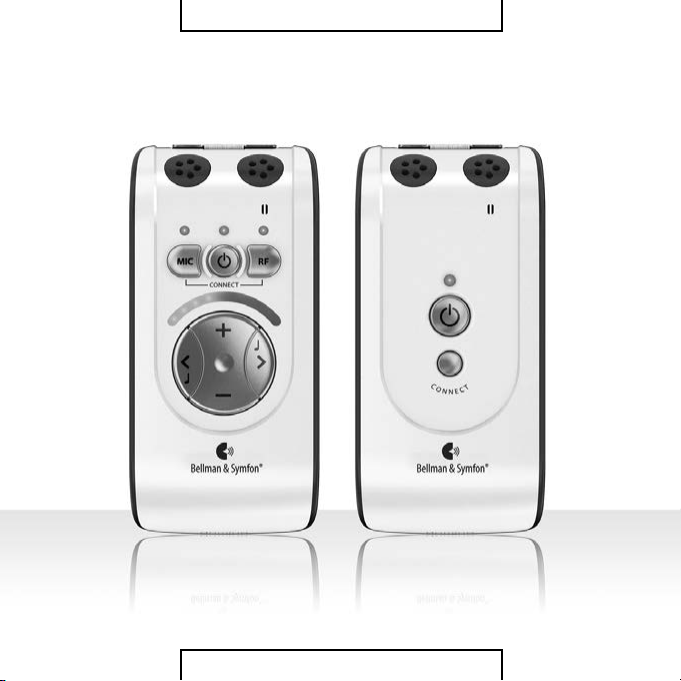
BELLM AN AU DIO DOMINO CLASSIC
PERSONAL HEARING SYSTEM
Page 2

目錄
Bellman Audio Domino Classic
個人聽力系統,BE2250/BE2270
290 目錄
291 簡介
292 安全規則
295 盒內有什麼物品?
295 資料參考
297 開始
297 測試
299 如何使用 Bellman Audio
Domino Classic
300 標誌和提示符號
301 充電
302 接收器的使用
302 開啟接收器
302 音量設置
303 音調設置
303 發射器的使用
303開啟發射器
304 透過發射器接聽
304 再次透過接 收器內置麥克風
接聽
305 關機
305 外部聲源
306 外部麥克風
306 聯合信號資源
307 無線數位傳輸
308 電量指示
308 與另一個發射器建立臨時連接
310 配件
312 簡單故障處理
314 Appendix
328
使用场合
336 Warranty conditons
簡介
感謝您選擇 Bellman & Symfon 的產品。
Bellman Audio 是一個輔助聽力的系統,它由一組元件組成,可幫助您解
決在不同環境下的聽力難題。Bellman Audio 產品為許多人的日常生活
帶來簡便,並讓人們贏得自由追求興趣的空間。
組成 Bellman Audio Domino 的無線聽覺產品經過特殊改造,使您在各
種聽覺困難的環境下暢通無阻。採用最先進的數位通信技術、加密技術
和無線技術,為您提供極佳的音質、安全可靠的無線電信號傳輸和使用
本產品的極大自主性。通用的無線電波和簡單的電池充電器使產品能夠
在全球範圍內安全、簡便地使用。
在使用產品前請先通讀此說明書。
請參考配件和連接選擇的圖示。
DE
DK
EN
ES
FI
FR
IT
JP
NL
PL
SE
SI-CN
TR-CN
APP
291290
Page 3

安全規則
• 請閱讀這些指示。
• 請保管這些指示。
• 請注意所有警告事項。
• 請遵照所有指示。
• 請勿在靠近水的地方使用本設備。
• 僅使用乾布進行清潔。
• 請勿堵塞任何通風孔。請按照製造廠商的指示進行安裝。
• 請勿安裝在任何熱源附近,例如散熱器、熱調節器、火爐或其他可產生
熱量的設備(包括功率放大器)。
• 請勿使極性或接地型插頭喪失安全作用。極性插頭具有寬窄兩個插腳。
接地型插頭有兩個插腳和第三個用於接地的插腳。較寬的插腳或第三個
接地插腳具有安全保護作用。如果所提供的插頭不適合您的電源插座,
請與電工聯絡以更換舊電源插座。
• 防止踩踏或擠壓電源線,尤其是插頭、電源插座以及它們在設備上的出
口位置。
• 僅使用製 造 廠商指定的附件/配件。
• 在雷雨天氣或長時間不使用時,請拔下本設備的電源線。
• 如需各類維修服務,請諮詢合格的維修人員。如果本設備以任何方式遭
受損毀,均需進行維修。其中包括電源線或插頭損毀、液體濺入或物件
落 入 設 備 內 、本 設 備 遭 受 雨 淋 或 受 潮 、無 法 正 常 操 作 或 掉 落 。
請注意,BE2250 和 BE2270 Bellman Audio Domino Classic 個人聽
力系統不是助聽器。Bellman & Symfon 公 司 建 議 ,如 果 使 用 者 已 經
聽力損 失請直接諮詢醫生。
警告!BE2250 和 BE2270 Bellman Audio Domino Classic 個人聽力
系統配備一個很強大的擴音器,如果操作不當,過度的音量可能
會引起不適,更嚴重者可能會損害聽力。因此,為了您的健康著
想,在佩戴耳機前請務必將音量調到最低。
警告!Bellman Audio Domino Classic 個人聽力系統由可充電的鋰
電子提供電量。因此,不要把電池暴露在火苗中或者直接對著陽
光 。電 池 只 能 由 Bellman & Symfon 的員工來更換並且只能更換同
一款電池。更換電池時的錯誤操作會有爆炸的危險。在第一次使
用之前,電池必須被充 滿電。警告:電池 只能在+5到+40攝氏度溫
度範圍內進行充電。
警告!Bellman Audio Domino Classic 個人聽力系統只能由
Bellman & Symfon 推薦的充電配件進行充電。
DE
DK
EN
ES
FI
FR
IT
JP
NL
PL
SE
SI-CN
TR-CN
APP
292
293
Page 4
警告!AC/DC適配器不能接觸到水或裝有液體的物品,如花瓶,不應放在
該聽力系統上。要切斷電源必須將AC/DC適配器插頭拔離電源插座。AC/
DC適配器插頭不能受阻,必須易於達到其預期用途。標識信息見AC/DC適
配器背面。
警告!該產品可能包含微小部件,為了您孩子的安全起見,請將其放置在兒
童接觸不到的地方。
這標誌表明,內置的電源設備絕不能把它當成是平常的生活垃圾。它應該
被投放到相應的電子設備或電器回收點。您可以從當地的政府、最近的回
收站或者您購買該產品的商店瞭解到更多的關於回收該產品的資訊。
盒內有什麼物品?
盒內包括使用 Bellman Audio
Domino Classic 所需要的所有
物品。盒子內裏配有配件儲藏
處 放 置 配 件 。盒 內 包 含 :
A BE2250 接收器
B BE2270 發射器
C BE9147 旅行包
D 說明書
E BE9142 國 際 充 電 器 ,配 有 四 個
主要插頭
F BE9139 USB充 電 連 接 線 ,兩 條
G BE9135 帶 安 全 扣 的 掛 繩 ,兩 條
H BE9124 耳塞式耳機
資料參考
接收器
1
接收器的內置麥克風
2
表示內置麥克風設定的LED
指示燈
3 電池狀態LED指示燈
綠 光 :開 啟 ,電 池 充 滿 電
閃爍綠光:開啟,電池電量低
閃爍橘光:開啟,電池耗盡,即
將自動關閉
橘 光 :正 在 充 電
4 表示通過發射器接聽的LED
指示燈
綠 光 :全 方 位 麥 克 風
綠 光 和 橘 光 :輸 入( 外 部 聲 源 )
5 選擇內置麥克風按鈕
DE
DK
EN
ES
FI
FR
IT
JP
NL
PL
SE
SI-CN
TR-CN
APP
294 295
Page 5

6 開關按鈕
7 選擇通過發射器接聽的按鈕
8 音量和音調LED指示燈
9 增加音量的按鈕
10 減少音量的按鈕
11 調低音的按鈕
12 調高音的按鈕
13 3.5毫米耳機插孔
14 充電插孔
15 夾子
發射器
16 發射器的內置麥克風
17 電池狀態LED指示燈
綠 光 :開 啟 ,電 池 充 滿 電
多 次 閃 爍 橘 光 和 綠 光 :一 個 外 部
聲源被接入
閃爍綠光:開啟,電池電量低
閃爍橘光:開啟,電池耗盡即將
自動關閉
橘 光 :正 在 充 電
18 開關按鈕
19 配對發射器和接收器的按鈕
20 2.5毫米外部聲源輸入插孔
21 充電插孔
22 夾子
開始
測試
1 發射器和接收器都配有內置式可充電電池。在第一次使用本品前,發射
器和接收器的電池都必須充滿電。請使用配套的充電器。
2 在 耳 機 插 孔( 13)連上耳機,按住接收器上的開關按鈕i(6)約 2秒 ,開
啟接收器。試聽接收器上的麥克風並使用音量按鈕+或-(9或10)調 整
音量。
3 按住發射器上的開關按鈕(18)約 2秒,開啟發射器。按下外部聲源按鈕
(7)轉到通過發射器的麥克風接聽。外部聲源,譬如音樂,可以通過外
部 聲 源 輸 入 插 孔( 20)連接到發射器。
音量控制可調整音量。+和-(9和10)可以提高和降低音量,而音量和
音調LED指 示 燈( 8)會顯示聲級。越多的LED指示燈發亮表示音量越高。
音量設定後10秒,LED指示燈會熄滅。
DE
DK
EN
ES
FI
FR
IT
JP
NL
PL
SE
SI-CN
TR-CN
APP
296 297
Page 6

音調 的控制可以調 節聲音的品質。>(12)和 <(11)可以提高降低音調。
音量和音調LED指 示 燈( 8)可以顯示音調的設置。音調設置後10秒,LED
指示燈會熄滅。
使用完畢,請通過開關按鈕i(6,18)關閉接收器和發射器,長按至電池
狀態LED指 示 燈( 3,17)熄 滅 。
如何使用Bellman Audio Domino Classic
Bellman Audio Domino Classic BE2250 和 BE2270 個人聽力系統經過專
門改造,給您高品質的聽覺感受。用 Bellman Audio Domino Classic 聽演
講和音樂,效果格外明顯。您可以使用接收器和發射器的內置麥克風或
者接入外部聲源。您可以使用配套的麥克風作為一個外部聲源或者用配
套的立體聲轉換線連接立體聲聲源。
DE
DK
EN
ES
FI
FR
IT
JP
NL
PL
SE
SI-CN
TR-CN
APP
298
299
Page 7
標誌和提示符號
充電
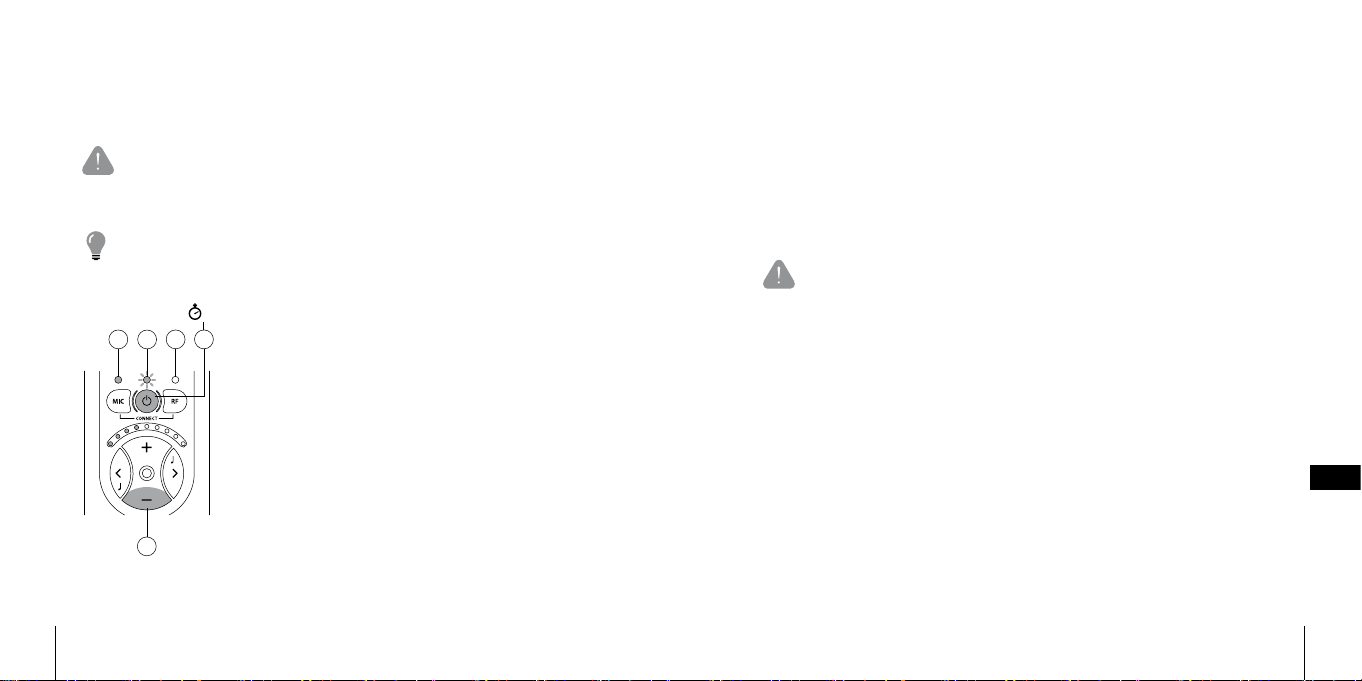
说明书使用以下标志,图释如下:
發射器和接 收器都配有內置式可充電電池。在第一次使用本品前,發射
器和接收器的電池都必須充飽電。
三角警告號表示為了保證產品正確運作和特殊情況下的人身安全
所必須遵守的指示。
燈泡指示一些能幫助您充分利用產品的有用資訊(提示和建議)。
I 塗滿顏色的指示器表示LED指示燈長亮
5 s
I
II
IIIVIV
II 塗滿顏色並有太陽圖案的指示器表示LED指
示燈閃爍
III 空 白 的 圓 圈 表示指示 燈 關 閉
IV 如果按鈕必須按住一個指定的時間,則用
灰色的按鈕和指明所需時間的碼錶來表示
V 灰色的按鈕表示需要按下的按鈕
Bellman Audio Domino Classic 包 含 鋰 電 池 和 通 用 充 電 器 ,適 合 歐 洲 、英
國、美國和澳大利亞使用的可替換插頭使產品適用於全球的大部分國
家。
警告:只能用配套的充電器或者是 Bellman & Symfon 的配件進行
充電。
按照本說明書的折疊式插頁圖連接充電器。
選擇適合本地區的充電插頭,連到壁上插座前請先檢查充電插頭是否與
充電器緊貼。當充電連線接到充電器時,發射器和接收器上的電池狀態
LED指示 燈(3,17)會從綠光變成橘光,表明充電正在進行。充電完成大概
2.5小 時 以 後 ,指 示 燈 會 再 一 次 變 成 綠 光 ;關 機 時 ,指 示 燈 熄 滅 。充 電 器 可
同時為發射器和接收器充電,也可以為其中之一充電。
DE
DK
EN
ES
FI
FR
IT
JP
NL
PL
SE
SI-CN
TR-CN
APP
300 301
Page 8
接收器的使用
把 BE9122 Bellman 立體聲耳機,BE9159 Bellman 環頸線圈,BE9125
Bellman 立體聲聽筒,BE9124 Bellman 耳塞式耳機或者是其他 Bellman &
Symfon 推薦的聽力產品連接到右面的耳機輸出口(13)如本說明書折頁
式插圖所示。
開啟接收器
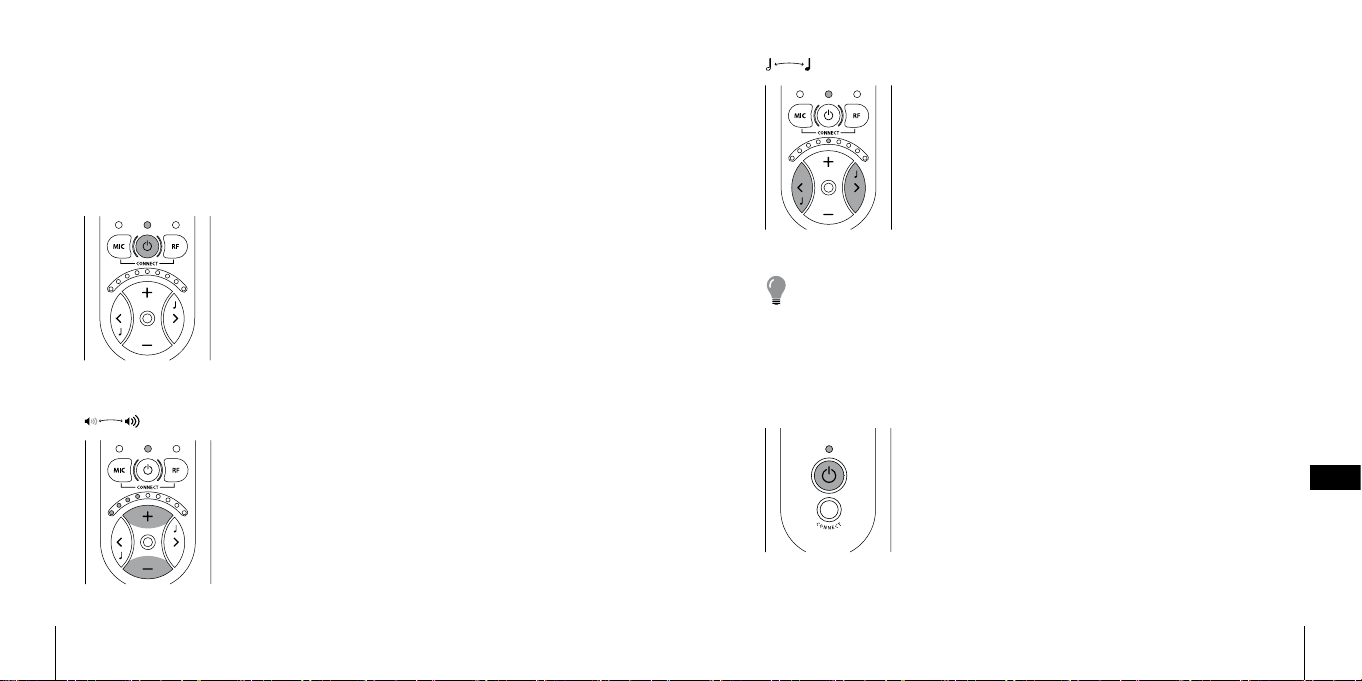
按住開關按鈕i(6)約 3 秒 ,電 池 狀 態 LED指示燈
(3)開始閃爍,綠燈表明機器處於開啟狀態。
音量設置
使用音量控制鍵
音量。音量、音調的指示燈表明音量的大小。音量
越大亮燈越多。為了節省用電,指示燈會在音量設
置完成10秒內關閉。
+(9)來 升 高 或 -(10)來 降 低
音調設置
使用音調控制鍵<(11)來 降 低 或 >(12)來 升 高 音
調。音量、音調的指示燈表明音量的大小。音量越
大亮燈越多。為了節省用電,指示燈會在音调設置
完成10秒內關閉。
注意:接收器本身也可以作為一個可攜式的擴音器使用,但是如
果您配合發射器一起使用,您將會體現到前所未有的聽覺感受並
享受接收器和發射器為您提供的極大的便利。
發射器的使用
開啟發射器
按住開關按鈕i(18),電池狀態指示燈開始閃
爍,綠燈表示機器處於開啟狀態。
DE
DK
EN
ES
FI
FR
IT
JP
NL
PL
SE
SI-CN
TR-CN
APP
302 303
Page 9
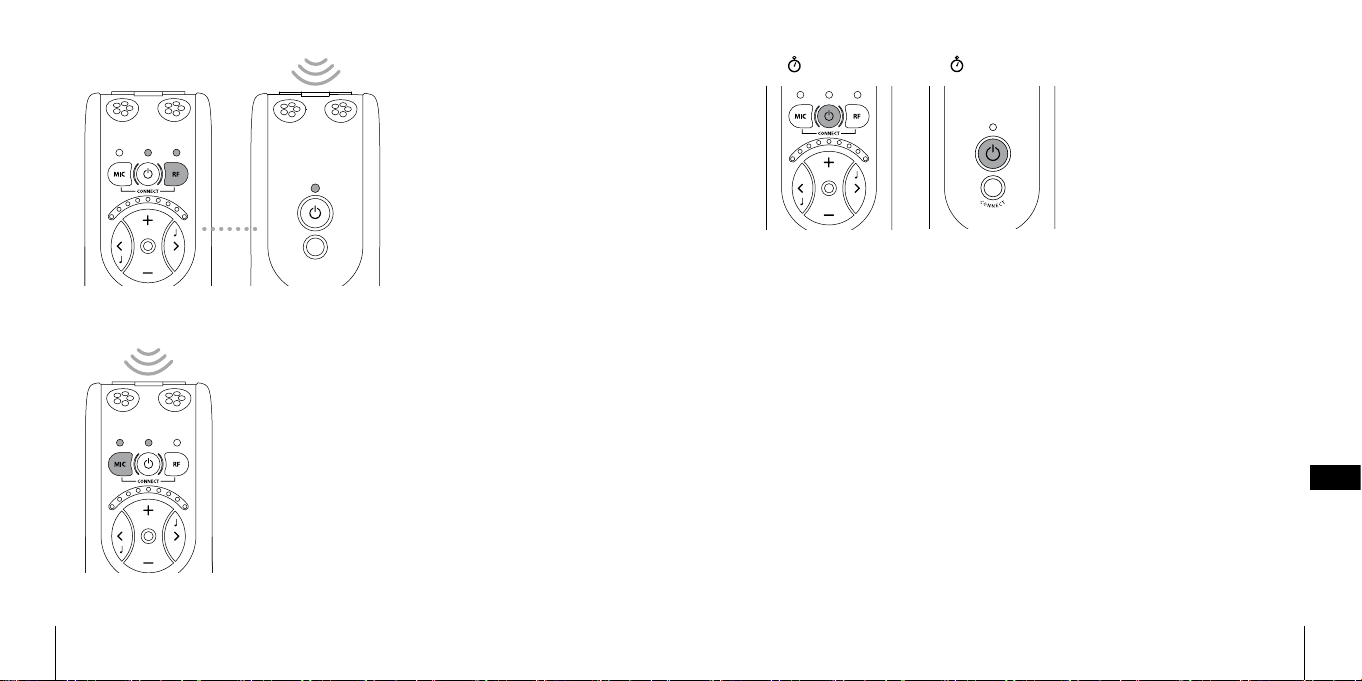
透過發射器接聽
要接 聽來自發射器麥克
風 的 聲 音 ,可 按 下 接 收 器
上的R按 鈕( 7),輕 鬆
切 換 。外 部 聲 源 LED指示
燈( 4)長 亮 ,此 時 ,耳 機
可接聽發射器偵察到的
聲音。
再次透過接收器內置麥克風接聽
短暫按下M按 鈕( 5)可再次選擇接收器的內置
麥克風作為聲源。內置麥克風LED指 示 燈( 2)發
亮 ,此 時 ,耳 機 再 一 次 接 聽 到 來 自 內 置 麥 克 風( 1)
的聲音。
1 s
OFF
1 s
OFF
關機
使用完畢,可通過開關按
鈕i(6,18)關 閉 發 射 器 和
接收器。長按開關按鈕直
到電池狀態指示燈(3,17)
熄滅。
外部聲源
如果配備的音讯轉換線(在一端附有2.5毫米的插孔)或者外部的麥克
風被連接到發射器的外部聲源輸入插孔(20),發 射 器 的 內 置 麥 克 風 會
自動斷開連接,而外部設備的聲源將自動被選擇。電源狀態LED指示燈
顯示橘光,並閃爍幾次,以確認外部的聲源已連接。外部聲源LED指示燈
(4)將會同時亮起綠光和橘光來指示聲音屬於外部聲源。
如果外部聲源斷開連接,聲音將重新連接到發射器的內置麥克風。
用音頻轉換線連接發射器和電視、音響設備、MP3播放器或者類似的聲
源,您將體會到絕對一流的立體聲感受,並且不受電線約束。
輸入靈敏度會根據聲源類別自動進行調整。
DE
DK
EN
ES
FI
FR
IT
JP
NL
PL
SE
SI-CN
TR-CN
APP
304 305
Page 10
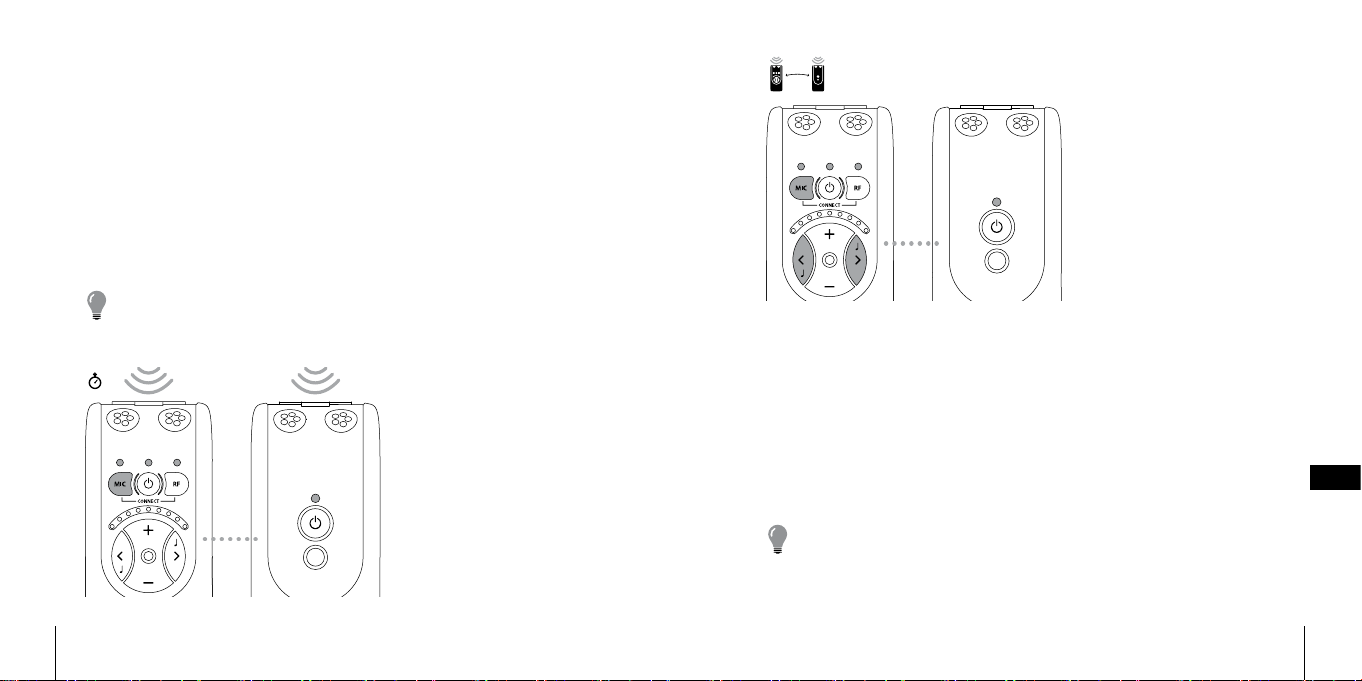
外部麥克風
把外部的麥克風連接到發射器上2.5毫米的插孔(20),電 池 狀 態 LED指
示燈顯示橘光,並閃爍幾次,已確認一項外部聲源被連接。外部聲源LED
指 示 燈( 4)同時亮起綠光和橘光表示聲音來自外部聲源。
在某些情況下,例如,演講者可以很輕易地攜帶一個外部麥克風並把一
個發射器放在他\她的衣袋裏來擴大音量,而不用大聲說話或者使用有
線麥克風。
一個發射器能夠把演講同時發射到幾個接收器。
一旦外部麥克風接入,輸入端靈敏度將自動調節到最適合的範圍。
請註意:當外部聲源插入時,發射器的電池狀態LED指 示 燈( 17)
交替閃爍綠光和橘光。
2 s
聯合信號資源
當接聽到來自發射器的麥
克風或者是外部聲源的聲
音時,這些聲音可以和接
收器內置的麥克風接收到
的 聲 音 聯 合 在 一 起 。按 下
R按 鈕( 7)選 擇 接 聽 來 自
發射器的聲音;按住M按
鈕( 5)知 道 M指 示 燈( 2)
和R指 示 燈( 4)齊 亮 。
來自發射器的聲音和來自
內置麥克風的聲 音混合在
一 起 。按 住 M按 鈕( 5)
的同時,再通過按下按鈕<
(11)或 >(12),就 可 以 調
節發射器和接收器之間的
平衡。
短按R(7)按鈕,就可以輕鬆切換至接聽來自發射器或者外部聲源的聲
音。如果您 想切換 至接聽 來自 內置麥克 風的聲音,請按下M按 鈕( 5)。
無線數位傳輸
Bellman Audio Domino Classic 使用了最新的無線通信技術通過數位傳
輸聲音,聲音具有超凡的音質就像來自於音響一樣。而且無線傳輸是加
密的,這樣可以保證高水準的安全性和保密性。
注 意 ,無 線 通 信 發 生 在 2.4GHz的頻率範圍,這是在全球範圍內都
允許使用的一個頻率。
DE
DK
EN
ES
FI
FR
IT
JP
NL
PL
SE
SI-CN
TR-CN
APP
306 307
Page 11
電量指示
電池狀態LED指示燈( 3,17) 在 一 般 狀 態 下 顯 示 綠 光 。這 表 明 機 器 處 於 開
啟狀態並且電量在一個令人滿意的水準。
當電量低的時候,電池狀態LED指 示 燈( 3,17)閃 爍 綠 光直 到 電量差不
多耗盡時會變成橘光。在機器閃爍綠光時,請充電。電量耗盡將自動關
機。
當充電器連接到充電器插孔(14,21)的時候,機器將會自動充電。充電
的進度會同時在充電器和機器上用橘燈顯示出來。一旦電池充滿電,指
示燈會顯示綠光,並且電池會一直保持充電狀態直到充電器斷開連接。
與另一個發射器建立臨時連接
為了保 證無 線通 信 的 正常 運行,Bellman Audio Domino Classic 發射器和
接收器之間必須建立無線連接。為了方便入門,發射器和接收器總是成
對提供使用的。
無論何時,只要您想接聽來自另一個發射器的聲音,都要與之建立臨時
的連接。一旦關閉接收器,它會重新與之前配對的發射器聯合工作。
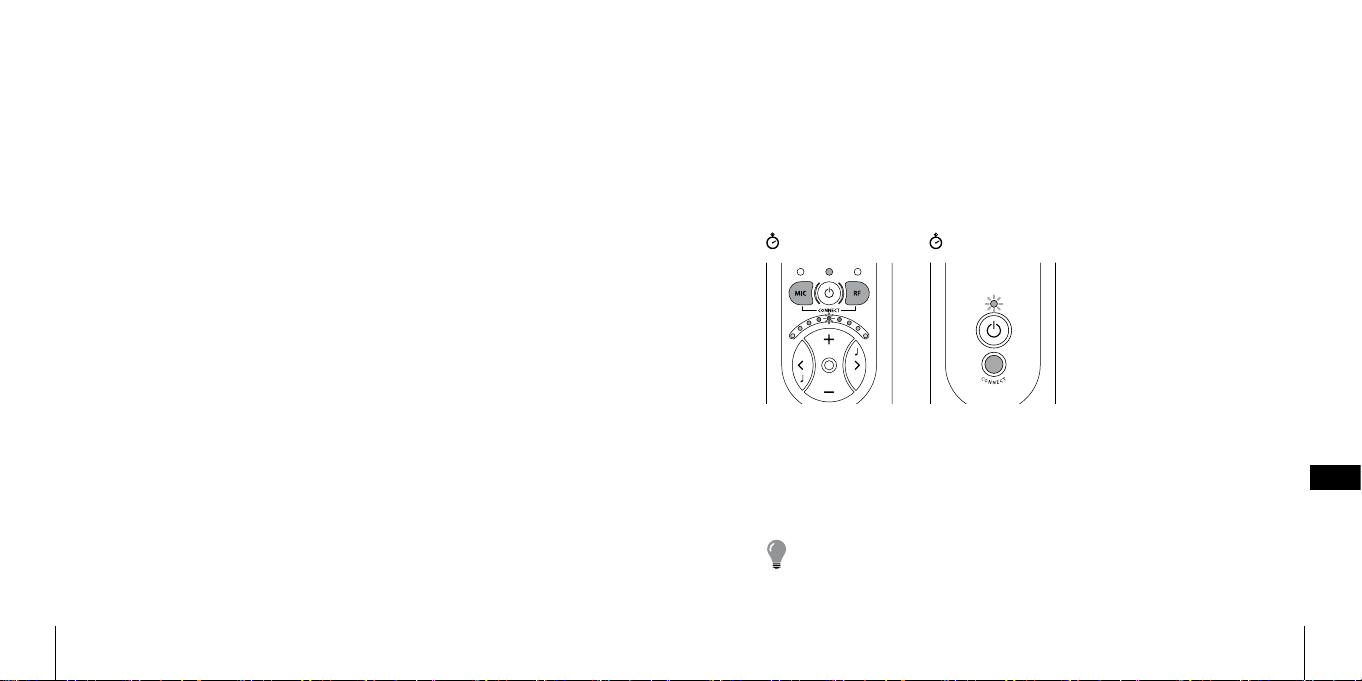
建立接收器和發射器的臨時連接步驟如下:
• 按下開關按鈕i(6,18)
• 按住發射器上的CONNECT按 鈕( 19)
• 同時按住接收器上的M按鈕( 5)和 R按 鈕( 7)
5 s
5 s
音量 和音調 L E D指示燈(8)
兩邊向中間部分滑動閃爍
表明臨時的連接已經成功
建立。
只有在發射 器 CONNECT按鈕被按下時,它才能和接收器連接。此步驟出
於安全性考慮,以防止發射器在毫無防備之下被其他接收器連接。
請注意:通過同樣的操作,您能夠很容易地用同一個發射器連接
DE
DK
EN
ES
FI
FR
IT
JP
NL
PL
SE
SI-CN
TR-CN
APP
308 309
Page 12

到多個接收器。然而,接收器的數量可能會影響該系統的正常運行。
配件
我公司可供應以下配件:
• BE9122 立體聲耳機
• BE9124 耳塞式耳機
• BE9125 立體聲聽筒
• BE9137 立體聲轉換線,1.5米的適配器,一邊是3.5毫米的插孔,
另一邊是RCA插頭
• BE9126 立體聲轉換線,5米( 16英尺)
• BE9136 帶夾子的麥克風
• BE9159 環頸線圈
• BE9141 豪華旅行包
• BE9143 USB汽車充電器
• BE1360 視頻轉換器
• BE2250 接收器
關於我公司的所有配件和更多最新配件的信息
請瀏覽網址:http://www.bellman.com
310
DE
DK
EN
ES
FI
FR
IT
JP
NL
PL
SE
SI-CN
TR-CN
APP
311
Page 13

簡單故障處理
常見問題 解決
按下開關時没反應 連接充電器,檢查充電是否在10秒
內開始。
請 注 意 :如 果 充 電 沒 有 在 1 0 秒 內 開
始,請馬上斷開充電器連接並聯繫
最近的銷售商。
接 收 器 處 於 開 啟 狀 態 ,但 聽 不 到 任
何聲音
接收器處於開啟狀態,並且外部聲
源已被選擇,依然聽不到任何聲音
按下音量按钮(9),擴大音量。
檢查內置麥克風是否被選中作為聲
源,用手指輕輕觸碰麥克風(1)檢
查是否 運作。
檢查耳機是否正確插入了耳機插
孔。
把耳機連接到其他的聲源設備(附
有3.5毫米的耳機插孔,檢查耳機是
否能夠正常運作。
檢查發射器是否開啟。
檢查外置麥克風是否被選中作為聲
源,用手指輕輕觸碰麥克風(16)檢
查是否 運作。
常見問題 解決
檢查發射器是否處於使用範圍之
內。
檢查無線連接是否正確。
如果立體聲轉換線被連接到外部聲
源輸入口(20)請檢查聲源是否正確
連接到發射器
耳機裏的高音噪音 調低音量或者增大麥克風和耳機之
間的距離。
使麥克風 遠 離自己。
聲音很分散並且斷斷續續 接收器與發射器之間的距離太遠
了,把兩個機器靠近些。
不止一個接收器連接到發射器上並
且至少有一個接收器離發射器太
遠。
太多接收器連接到同一個發射器
上。
有太多2.4GH的發射器或者有太多
Domino在附近,彼此間互相影響。
請 註 意 :墻 壁 、水 泥 板 、金 屬 等 都 會
影響到接收範圍。
DE
DK
EN
ES
FI
FR
IT
JP
NL
PL
SE
SI-CN
TR-CN
APP
312
313
Page 14

Appendix
Settings
Bellman Audio Domino Classic has some settings that you cannot access in user
mode. Go into the Settings Menu to change settings that you do not normally
need to change.
Version information
The product version information is presented here
via a pattern of lit and blinking LEDs. This internal
information is only intended as an aid for servicing
and support.
Pairing of units
The Transmitter and Receiver Units in the Bellman Audio Domino system must
have the radio link established in order for radio communication to operate. To
make it easier to get started, a Receiver Unit and a Transmitter Unit which are
paired together are always supplied so that they will work together.
314
Settings Menu
Start the Receiver Unit with the On/O button i (6) for about 3 seconds.
Hold down the On/O button i (6) and press the Volume Button -(10) within
1 second for at least 3 seconds.
You are now in Version Information mode.
Where you want to pair a Receiver Unit with a Transmitter Unit which is dier
ent from the Receiver Unit it was originally supplied with, you can do this in the
Settings Menu.
-
APP
315
Page 15
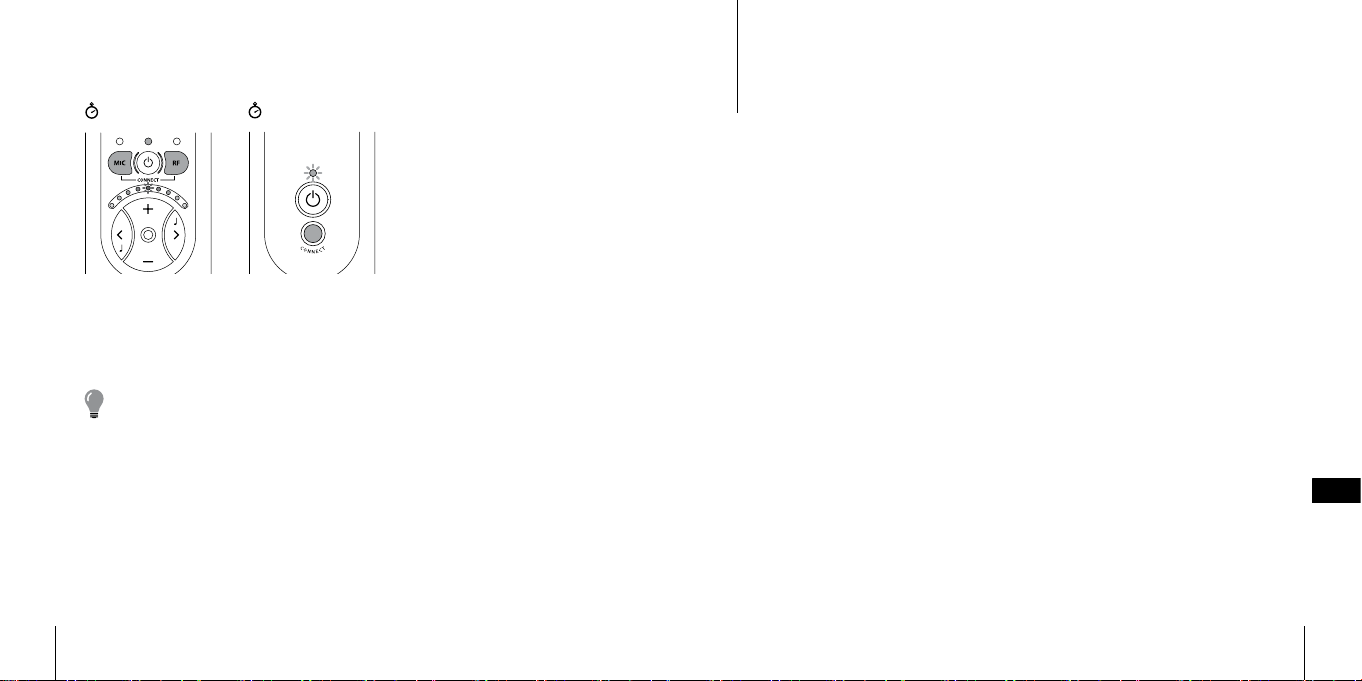
Proceed as follows to pair up the units:
5 s
A ”running light” on the Receiver Unit’s Volume and Tone LED Indicator (8)
moving towards the centre indicates that the link has been established.
Please note! If you pair up a Transmitter Unit a nd a Receiver Unit in the
Settings Menu, t his replaces the pairing carried out in the fac tory. This can
be useful when cha nging a Transmitter Unit un der guarantee or if you want
to pair up several Receiver Units to a Transmitter Unit (e.g. in a conference
room).
5 s
• Start b oth the units with the
On/O buttons i (6, 18).
• Go into the Settings Menu.
• Hold down the
button (19) on the Trans
mitter Unit.
• Hold down both the M
button (5) and the R but
ton (7) on the Receiver Unit.
CONNECT
Testing
It is easy to test the Bellman Audio Domino Classic Personal Hearing System. If
the Bellman Audio Domino Classic does not operate as described below, you
-
-
can carry out further troubleshooting as instructed under Troubleshooting.
How to test
The testing of Bellman Audio Domino Classic has been divided into three parts.
One part for the Receiver Unit for which only the Receiver Unit is required, one
part for the Transmitter Unit for which both units are required and nally one
for charging the two units.
Receiver Unit
• Switch on the unit and make sure that the Battery Status LED (3) lights up green.
• Connect the headphones to the Headphone Socket (13) and scrape carefully
on the round microphone (1) with your nger and check that there is a scraping
sound in the headphones.
• Press the buttons (9, 10, 11, 12) and check that the Volume and Tone Indicator
changes.
Transmitter Unit
• Swi tch on the unit and make sure that the Bat tery Status LED (17) lights up green.
APP
316
317
Page 16

• Press the R button (7) and make sure that the External Sound LED (4) lights up
green.
• Carefully scrape on the round microphone (16) on the Transmitter Unit with
your nger and check that there is a scraping sound in the headphones.
• Connect an external sound source to the External Sound Source Input (20) and
check that the sound from the sound source is heard in the headphones. The
External Sound Source Input (20) can be tested, for example, by connecting a
CD player or a radio to the input via an audio cable (accessory). The Transmitter
Unit automatically switches to an external sound source when a connector is
connected to the External Sound Source Input (20).
Charging
• Connect the charger to the mains socket and check that the LED on the charger
light up green.
• Connect the charging cables to both the charger and to the charging sockets
on the Receiver Unit and the Transmitter Unit (14, 21), see the fold-out section
of the manual.
• Check that the LED on the charger change from green to red.
• Check that the Battery Status LEDs on both the Transmitter Unit and Receiver
Unit light up orange.
Troubleshooting
Problem Solution
The Receiver Unit loses its link to the
Transmitter Unit when you switch o the
Receiver Unit.
Humming occurs when connecting the
stereo cable during charging.
Pair up the Receiver Unit and Transmitter
unit permanently in the Settings Menu.
Only use the charger supplied, BE9142.
APP
318
319
Page 17

Technical information
Power suppl y
Battery power Internal Lithium-Ion type, 617 mAh, type NTA2617
CAUTION:
Danger of explosion if battery is incorrec tly replaced.
Replace only with the same or equivalent type.
Operating time, fully charged 8-12 hours (standard battery)
Transmitter charging time 2.5 hour s (standard battery)
Receiver charging time 2.5 hour s (standard battery)
Input signals
Microphone Internal electret condenser type (omnidirectional)
External sound source input 2.5 mm stereo jack plug (0 dBV max input signal)
Output signals
Headphone socket 3.5 mm stereo jack plug
Output power 100 mW @ 16 Ω load
Distortion BE9122 Headphones 0.6 % THD
Automatically selec ts Aux. input or Ex ternal mic.
BE9124 Ear Phones 0.08 % THD
Dynamic range 95 dB SNR (electrical)
Frequency range 40 – 10.000 Hz (electrical)
Max output level, saturation
Full on gain
Full on gain
Digital radio technology 2.4 GHz fre quency band, 3 chann els
Topology Point-to-point or Point-to-multipoint
Diversity 2 antennas for r eception, one a ntenna for transmis sion
Transmitting output power Max. 25 mW
BE9122 Headphones
BE9124 Ear Phones
BE9125 Stetoclips
BE9122 Headphones
BE9124 Ear Phones
BE9125 Stetoclips
BE9122 Headphones
BE9124 Ear Phones
BE9125 Stetoclips
Radio function
BE2250: 124.3 dB SPL / BE 2270: 124.3 dB SPL (@ 2. 5 kHz)
BE2250: 132.0 dB SPL / BE2270: 130.5 dB SPL (@ 5 kHz)
BE2250: 133.7 dB SPL / BE2270: 133.6 dB SPL (@ 1 kHz)
(60 dB SPL input signal @ 1 kHz):
BE2250: 42.5 dB / BE2270: 44.0 dB
BE2250: 55.0 dB / BE2270: 57.5 dB
BE2250: 58.2 dB / BE2270: 64.2 dB
(60 dB SPL input signal, HFA):
BE2250: 46.5 dB / BE2270: 49.0 dB
BE2250: 51.5 dB / BE2270: 56 .0 dB
BE2250: 52.0 dB / BE2270: 59.4 dB
Co-exists with other equipment
Automatic channel selection
128 bits encryption
(Rx + Rx /Tx)
APP
320
321
Page 18
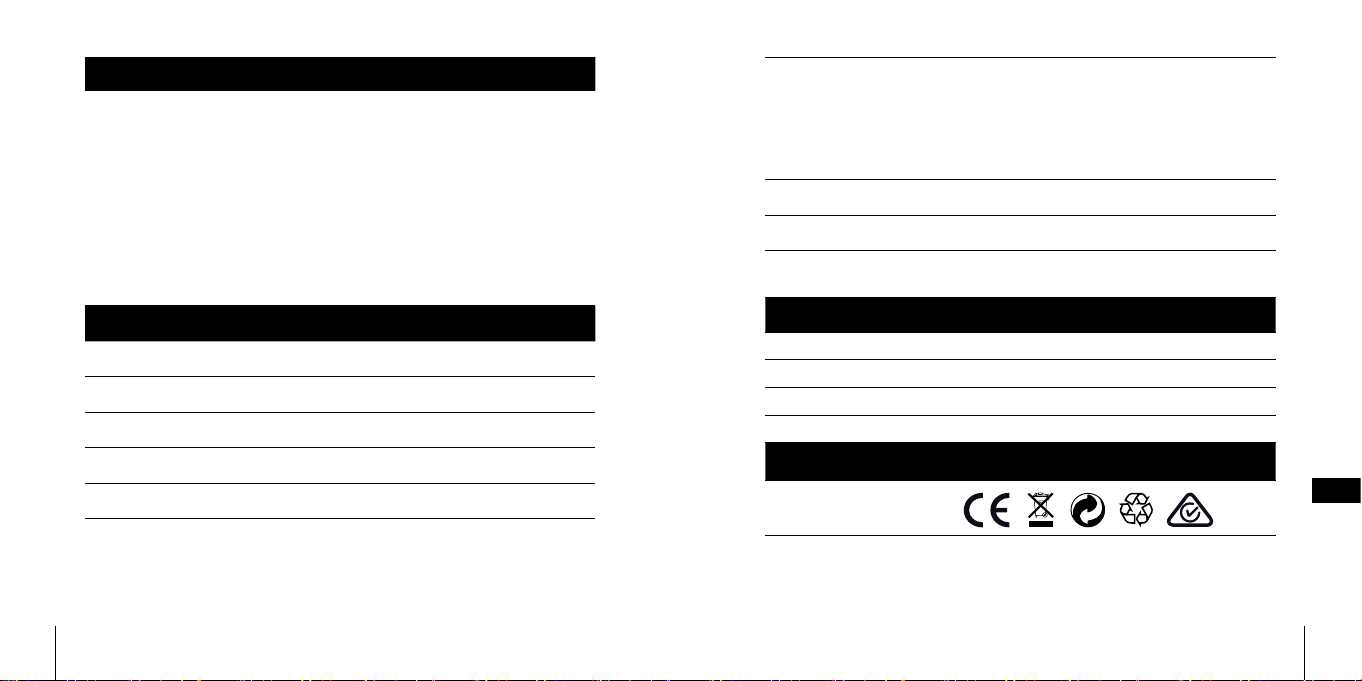
Radio function
Operating range radio
The following may also ae ct
the performance
Features
Volume control 9 steps (5 dB/step)
Tone control +/- 10 dB in 9 steps, cut-o frequenc y 1.6 kHz
Power switch On/O toggle but ton
Microphone and RF-mode Separate mode select buttons
R/L-channel balance setting 0 -20 dB programmable attenuation (in steps of 5 dB)
Up to 25 meters indoors clear line of sight, up to 100
meters outdoors clear line of sight. Walls, concrete
and metal reduce the range.
More than one Receiver is connected to a Transmitter
and at least one of the Receivers is too far away from
the Transmitter.
Too many Receivers are connected to the same Transmit ter.
Too many transmitters on 2.4 GHz or too many
Domino sy stems close to one anothe r.
Dynamic compressor 10 channels
Dynamic gain range 0 -35 dB
Compression 3:1
Ex pan sion 1:1,5
Attack tim e 20 ms <3kHz, 25 ms ≥3kHz
Release time 110 ms <3kHz, 200 ms ≥3kHz
Dynamic noise reduction 10-channel adaptive noise reduction
Feedback cancellation Adaptive phase shift t ype
Digital signal processing 22.050 kHz sampling frequency, 16-bit resolution in
stereo
Additional information
For indoor use only.
Dimensions HxWxD 99 x 48 x 22 mm
Weight BE2250: 74 g, BE2270: 70 g
Colour White/grey with silver-coloured buttons.
Regulatory requirements
CE, RoHS, WEEE, FCC VOC,
FCC ID, C-tick
APP
323322
Page 19
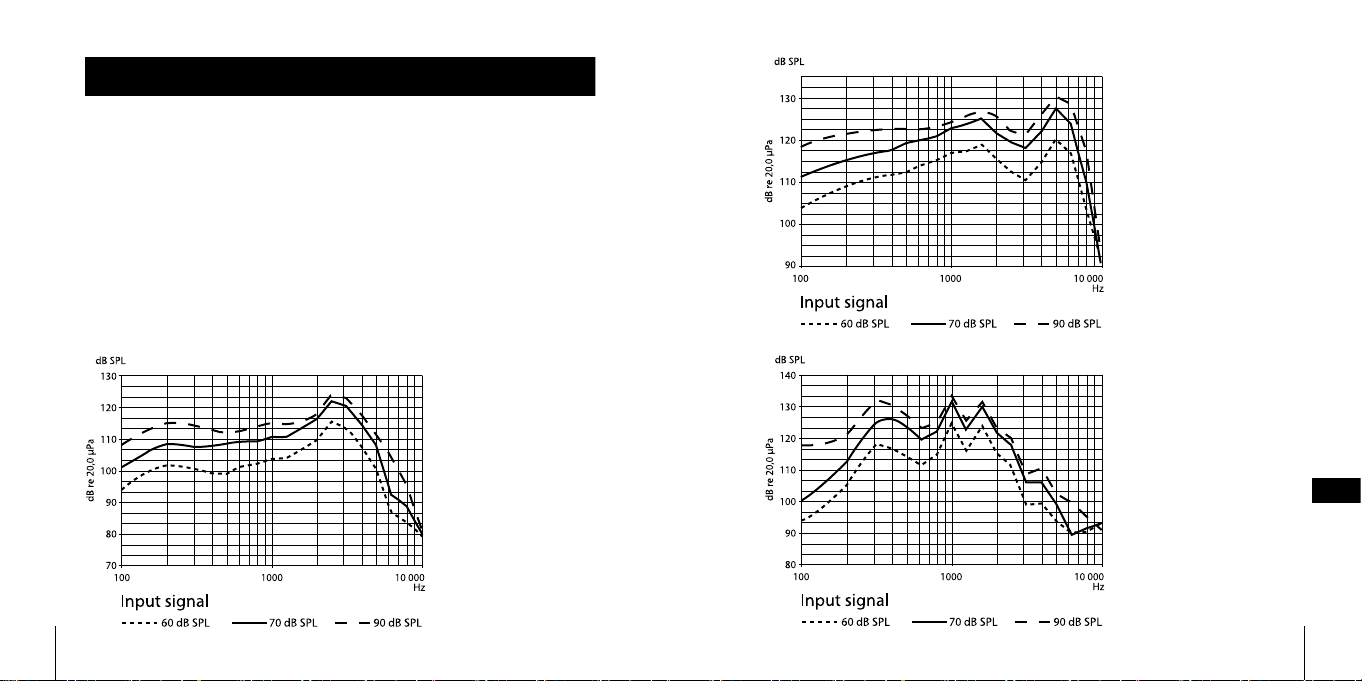
Measurements
Frequency response Acoustical (BE9122 Headphones, BE9124 Ear Phones
and BE9125 Stetoclips). See diagrams below.
Output signal with
BE9124, In-ear phones
Output signal with
BE9122, Stereo head
phones
Output signal with
-
BE9125, Stetoclips
APP
325324
Page 20
FCC compliance statement
This device comp lies with Part 15 of the FCC Rules. Operatio n is subject to the followin g two
conditions: (1) this device may not caus e harmful interference, a nd (2) this device must accept
any interfere nce received, including inter ference that may cause unde sired operation.
Warnin g: Changes or modications to this unit not expressly approved by the party
responsible fo r compliance could void the user ’s authority to operate th e equipment.
Note: This eq uipment has been tested and fo und to comply with the limits fo r a Class
B digital device, p ursuant to Part 15 of the FCC Rules. These limi ts are designed to provide reasonable protection against harmful interference in a residential installation.
This equipme nt generates, uses and can radi ate radio frequency en ergy and, if not installed and used i n accordance with the instructio ns, may cause harmful inter ference
to radio communications. However, there is no guarantee that interference will not
occur in a part icular installation. If this e quipment does cause har mful interference to
radio or television reception, which can be determined by turning the equipment o
and on, the user is en couraged to try to correct th e interference by one or more of th e
following measures:
• Re orient or relocate the receiv ing antenna.
• In crease the separation bet ween the equipment and r eceiver.
• Conn ect the equipment into an o utlet on a circuit dierent fro m that to which the
receiver is connected.
• Consul t the dealer or an expe rienced radio/T V technician for help.
Statement for Industry Canada
Le fonctionn ement de cet équipement e st soumis aux conditions suivante s:
(1) l’équipement concerné ne doit p as causer d’interféren ces, et (2) il doit accepter
toute interfé rence reçue, y compris les inter férences risquant d’engen drer un fonctionnement indésirable.
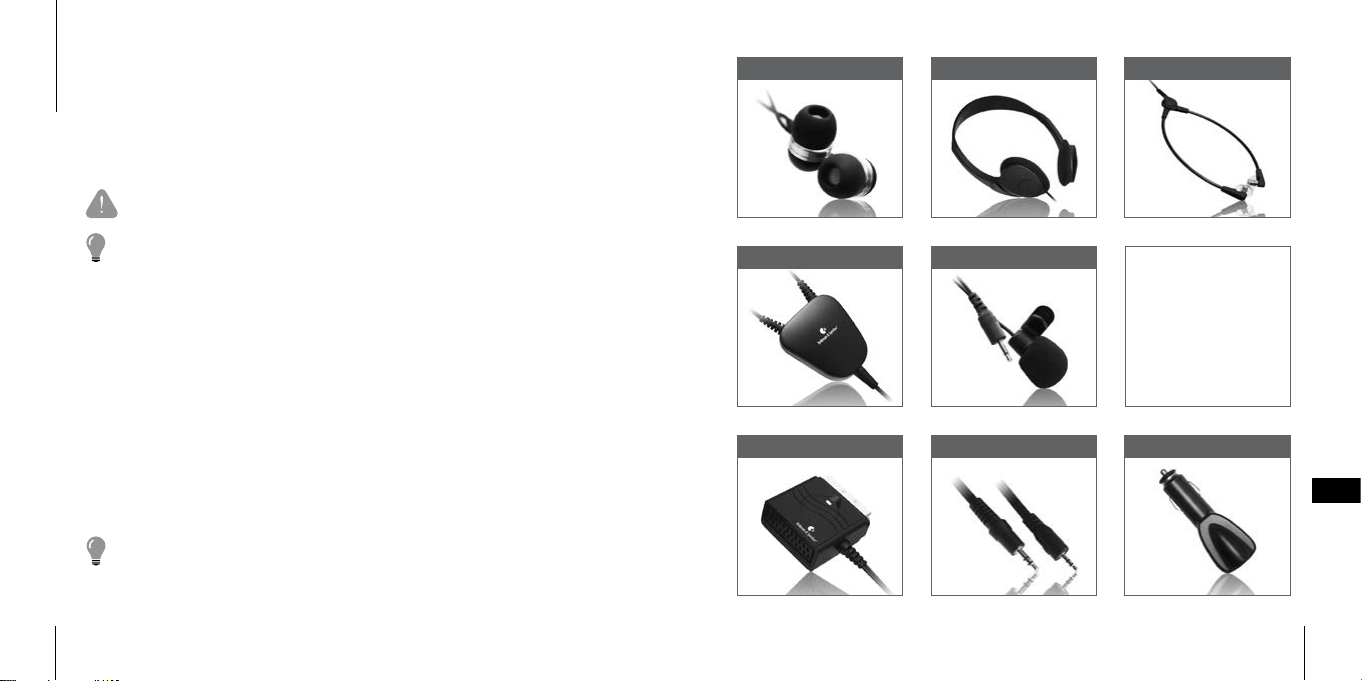
EAR PHONES HEADPHONES STETOCLIPS
NECK LOOP MICROPHONE
These original accessories are especially
develop ed to maximize
the per formance of your
Domino. Contact your
nearest d ealer or visit:
www.bellman.com
SCART SWITCH CABLE KIT, 16 FEET CAR CHARGER
APP
For Europe mainly
326
327
Page 21
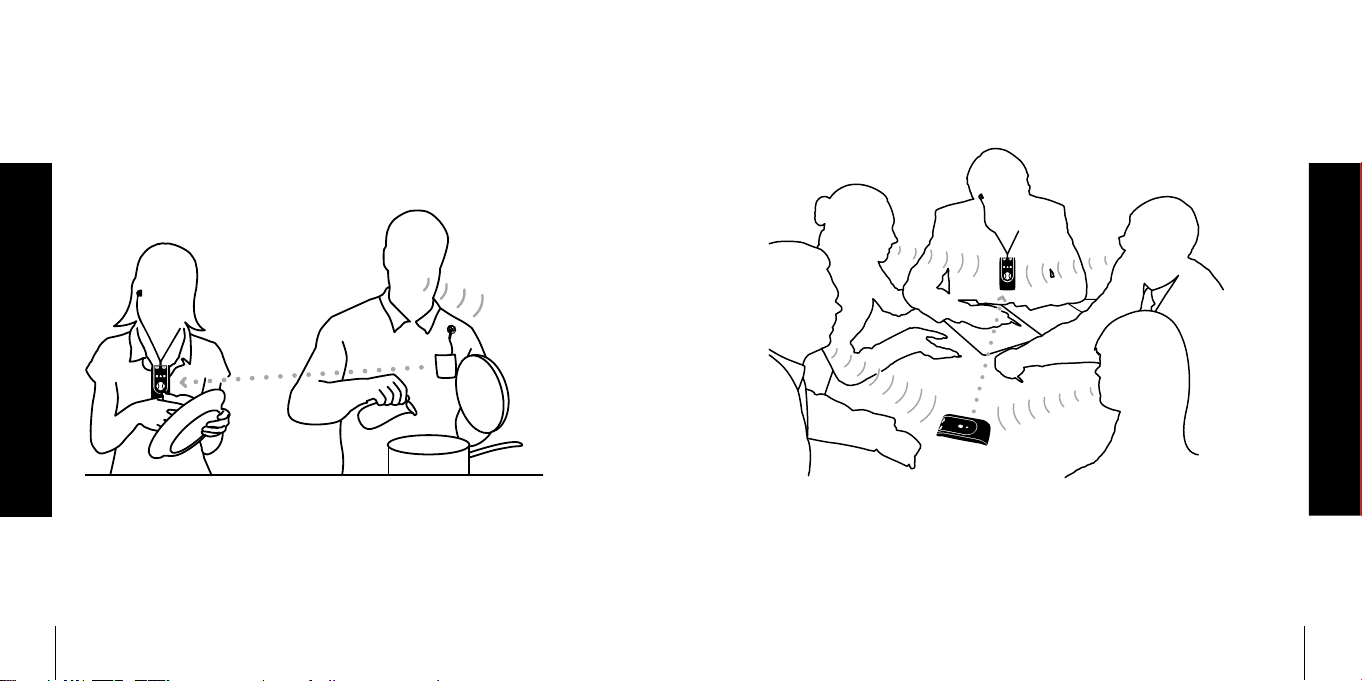
Einsatzgebiete • Anvendelsesområder • Areas of application •
Áreas de aplicación • Käyttökohteet • Champ d’application •
Ambiti di applicazione • 用途事例 • Toepassingen • Obszary zastosowań •
Användningsområden • 使用场合 • 使用場合 •
Zuhause • Indendørs • Indoors • Interiores • Sisätiloissa • À l’intérieur • Interni •
室内 • Binnen • W budynkach • Inomhus • 在室内 • 在室內
Auf der Arbeit • På arbejdspladsen • At work • En el trabajo • Työpaikalla •
Au travail • Al lavoro • 会議 • Op het werk • W pracy • På jobbet• 在工作 • 在工作
328 329
Page 22
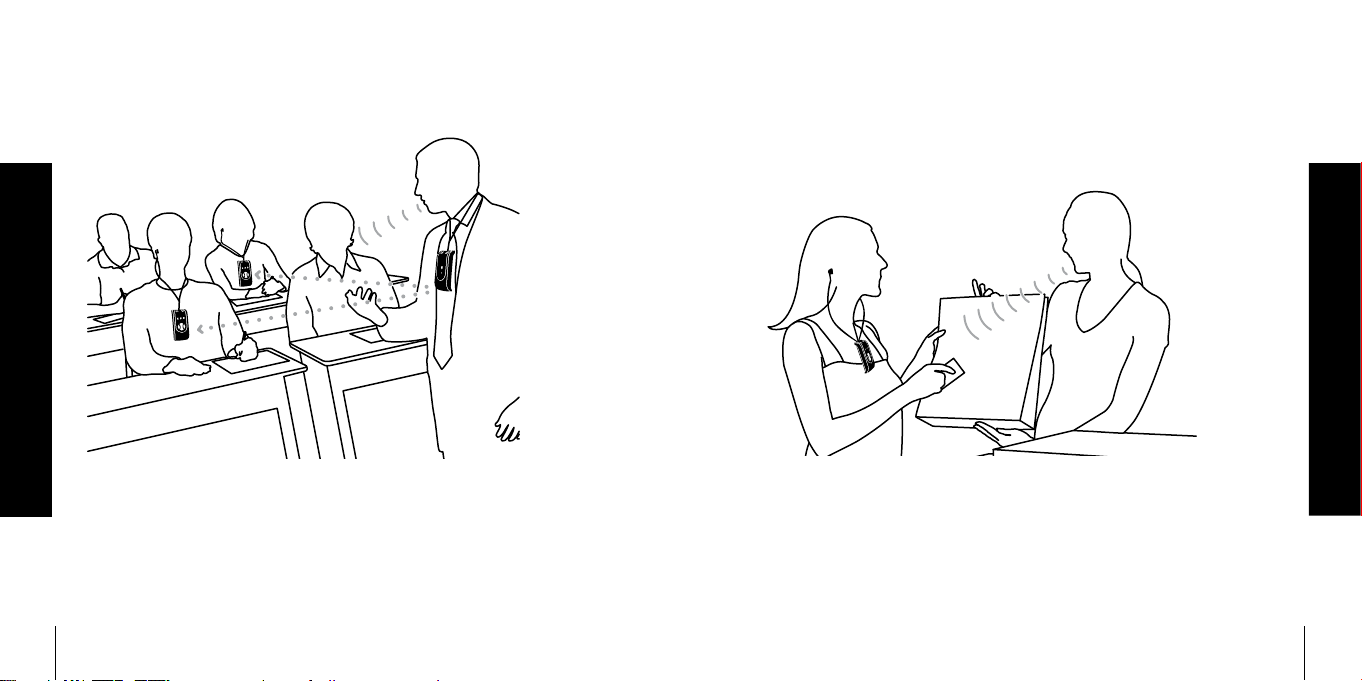
In der Schule • I skolen • At school • En clase • Koulussa • À l’école • A scuola •
学校 • Op school • W szkole • I skolan • 在学校 • 在學校
In der Stadt • I byen • In town • De paseo • Kaupungilla • En ville • In città •
街中 • In de stad • W mieście • På stan • 在城里 • 在城裏
330 331
Page 23
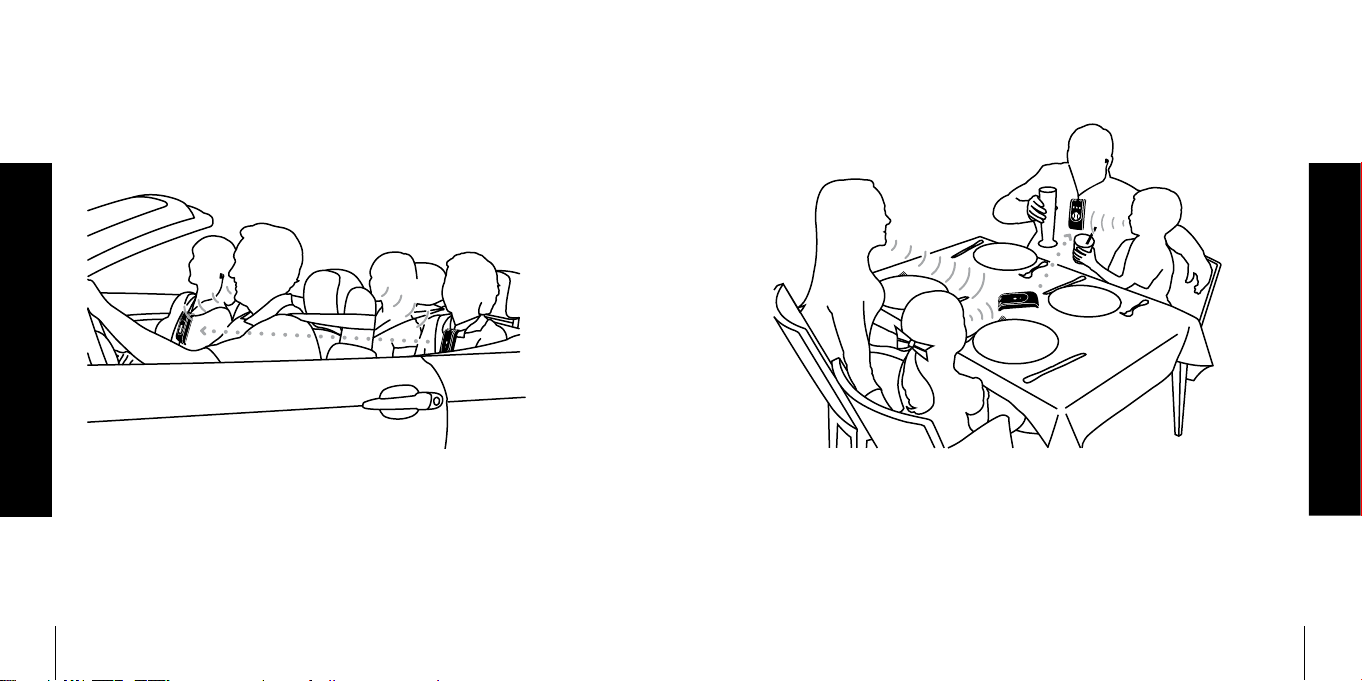
Auf Reisen • Under rejser • When travelling • De viaje • Matkoilla • En voyage •
Quando si viaggia • 旅行 • Op reis • W podróży • På resan • 在旅游 • 在旅遊
Beim Essen • Ved aftensmaden • At dinner • Durante una cena • Illallisella •
À table • A cena • 食卓 • Tijdens een diner • Na obiedzie • Vid middagen •
在餐厅 • 在餐廳
332 333
Page 24
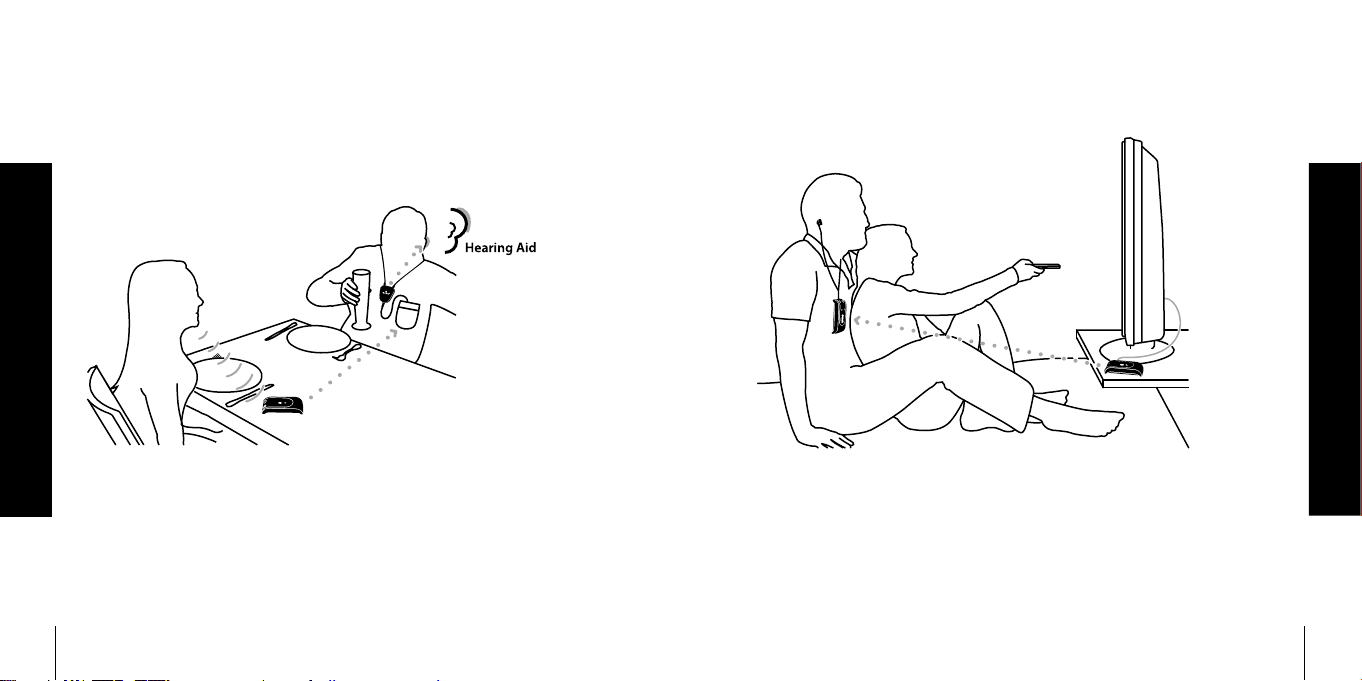
Mit Hörgerät • Med et høreapparat • With a hearing aid • Con un audífono •
Kuulokojeen kanssa • Avec appareil audit • Con un apparecchio acustico •
補聴器をしたまま • Met een gehoorapparaat • Z aparatem słuchowym •
Med hörapparat • 配合助听器 • 配合助聽器
Vor dem Fernseher • Foran tv’et • In front of the TV • Frente al televisor •
TV:n katselu • Devant la télévisio • Di fronte alla TV • TVの前で •
Voor de televisie • Przed telewizorem • Framför TV:n • 在看电视时 • 在看電視時
334 335
Page 25
Warranty conditons
Dear customer. Thank you for your purchase of this Bellman & Symfon® product. Our vision is to supply outstanding
products that are of great value for our customers. For this reason, we have put all our best eorts into designing and
manufacturing this product. However, if you should have any questions about the product or if you require repair, please
contact us.
General warranty conditions. Your Bellman & Symfon® product is covered by a limited warranty. Please read the following
conditions carefully and keep this information in a safe place. Please also save your receipt or other proof of purchase as you
will need this for warranty claims.
Warranty period. The warranty is depending on the type of product purchased and is valid from date of purchase.
Bellman & Symfon oers warranty as per below:
Bellman Products in general Two years of warranty from date of purchase
Bellman Neckloop One year of warranty from date of purchase
Rechargeable batteries One year of warranty from date of purchase
Bellman Accessories 90 days of warranty from date of purchase
Warranty conditions. Bellman & Symfon warrants that the Product that you have purchased is free from manufacturing defects in materials and workmanship when dispatched from our warehouse. Your sales receipt is your proof of the
date of purchase and the warranty period commences as of that date. During the warranty period, Bellman & Symfon
will have the option for the defective product to be repaired or replaced. The replacement product will be of equal or
greater function and in good working and physical order. Such a replacement will be supplied from refurbished stock.
The repaired or replaced product will be under warranty for the remainder of the original product’s warranty period.
Warranty limitations. This warranty automatically becomes void if the product has been physically damaged or rendered
defective (a) as a result of accident, misuse, or abuse, or other circumstances beyond Bellman & Symfon’s control; (b) by
the use of parts or peripherals not authorized by Bellman & Symfon; (c) as a result of normal wear and tear; (d) by use
within an improper operating environment; (e) by modication of the product; (f) by the serial number or product code
sticker being removed or defaced; (g) as a result of service rendered by anyone other than a Bellman & Symfon Authorized Service Agent; (h) as a result of the product being operated other than in accordance with Bellman & Symfon AB’s
users manual. Neither does the warranty cover failure due to causes outside Bellman & Symfon’s control such as failure
in your phone carrier’s line service (if applicable) or Acts of God. No warranty is oered for disposable batteries.
Return policies / warranty claim. Please see www.bellman.com/warranty
336
 Loading...