

Page 1
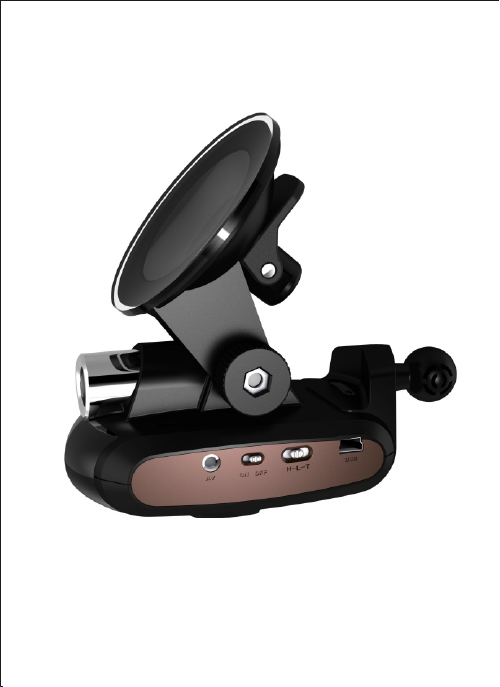
SAFE DRIVING GUARD DVRSAFE DRIVING GUARD DVR
(Pictu re s are fo r reference on ly)
Instruction Manual
Page 2
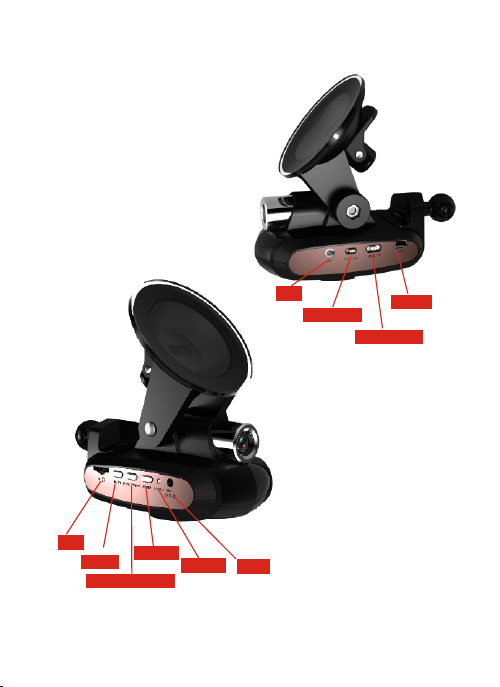
Structure and Buttons
TF
NEX T
START/ S TOP
MEM U
STATE
12V
AV
ON OF F
USB
H- L- T
Page 3

Information of Functions
Speci fications of the pr oducts
Connected to PND ( Portable Navigation Device) as
the monitor for recording and viewing simultaneously
Camera angle: 120°
Sensitive chip: 1/4colorCMOS
Shooting pixels: 640x480 pixels
Shooting format: video format AVI, photo format jpg.
They Can be connected to mobile phones, navigation
systems etc. for real-time playback
Power supply: connected to appliances charg er o r ca r
charg er o f 12 V / 24V. The internal lithium battery of
3.7V
200 mah supplies power to RTC.
Automatic cycle recording. Record continuously the
latest storing clip according to the memory capacity. The
latest video will cover the starting video.
Automatically start recording when the power is on
Recording video time is set for 5 minutes.
Tim e disp lay: In recording video mode, the time
displayed is recorded time, while in pause mode, it is
The time left for recording.
The maximum storage card for recording is 32 GB M MC
Card.
Size of the products: 128mm x 70mm x 114m
The adv antages of the prod uct
Automatically st ar t recording v id eo when t he power is
on. Photographing and playback can be switched at any
time.
Page 4

Connected to PND as monitor, larger and clearer video
can be seen.
The maximum storage card is 32 GB
The removable storage card can be changed when it is
full. And the video can be played in other devices such
as mobile phones and MP4.
Tim e wa termark marks essential evidence.
Colorful high-quality video with sound.
Acces sories
Car charg er, s tand sucker, USB data cable, instruction
manual in Chinese and English, AV-in line
SH-616 save driving guard is t he perf ec t co mb in at io n of
Basic functions
radar and traff ic r ec or de r. Co mb in ed w it h PN D an d
navigator, four functions can be realized in one device:
flow ve lo ci ty measurement, f ix ed velocity m ea su re me nt ,
video navigation and driving record.
Drivi ng record
(1)Video
A. Auto ma ti ca ll y start video and sound rec or di ng when
the po we r is on; sw it ch ed to video re co rd in g mode from
other m od es , automatically s ta rt video recording w it ho ut
any operation.
B. Vide o for ma t is 640x480. Five-minute clip. cycle
recording video will continue without a pause.
C. There are time in fo rm at ion on vid eo and photos for
reference. I nt er na l li th iu m battery c an ensure a cc ur at e
time.
2
Page 5

D. When th e storage c ar d is fu ll , cycle cover will keep th e
latest video.
E. When ex te rn al power supply su dd en ly fails, the
internal lith iu m battery can ensu re the machine to go on
working for about 30 seconds. The mac hi ne wi ll finish
saving monitoring file and exit the system.
(2)TV_out
TV_out: real-time monitoring vide o ca n be displayed on
PND, so it's convenient to adjust camera angle for the best
monitoring effe ct .
(3) Indi cator: Do uble-colo r LED indic ator
A. The gree n ligh t is on in vide o reco rd in g mode and it
wil l f l a s h c o ntinu o u s l y w hen vide o r ecord i n g i s
abnormal.
B. The yellow ligh t is on in photographing mod e and it
will flash continuously when photographing is abnormal.
C. The red l ig ht is on in playback mode and it will f la sh
continuously when playback is abnormal.
(4)Button s
A. MEN U: to swi tc h modes. The def au lt mode is video
recording. Press th is button t o sw it ch between video,
photograph and playback.
B. Start/ stop: to start stop mode.
In video recording m od e: Press t hi s b ut to n to display
“stop” to stop video recording. Press it ag ai n to di sp la y
“start video recording” to start recording.
In photographing mode: pres s this but to n and the sound
“kacha” will be heard and one picture will be taken.
In playback mode: press this button to browse pictures or
start video. Used with “Next” button, press start / stop
Page 6

Button for fi ve se co nd s to enter time s et ti ng sc re en in the
mode of stopping recording or photographing
C.NEXT
In pla yb ac k mode, press t hi s button to browse the next
picture or video clip.
In non -v id eo rec or di ng mode, press thi s button for fiv e
seconds to formatted TF c ar d.
In time-setting m od e, lon g pres s increases 10 and sho rt
press increases 1.
D. Combined bu tt on s: P re ss t he a bove three buttons at t he
same time can save the recording video.
II. Cl ip radar
)
(1 Radar ear ly warning f unction
A. Early warning of flow and fixed velocity measurement
can be realized combined with DSA software. Th e la te st
VCO sweep-frequency technique is used in flow velocity
measurement, which can ensure prompt adjustment of the
sampling monitoring frequency.
B. Dynamic satellite-sensing filtering system
(2) Voi ce switch
This device has a switch of voice switch to realize the
switch early warning from clip radar or navigator PND.
Tur n to “ on ” for external broadcast from clip radar.
Tur n to “ off” for internal broadcast from PND.
(3) Pr ogram swit ch
Page 7

This device has a p ro gr am sw it ch wh ic h e ns ur e the
perfect adaptation to th e pr im ar y PND programs sold in
market.
There are th re e gea rs fo r program switch: H, L and T.
Sw itc h to s uit abl e pos iti on a cco rdi ng to d iffer ent
programs. The l in e co nn ec te d to P ND i s a li ne o f 3 in 1 .
Electrical parameters
The parameters of the whole machine
Operating voltage: DC 12V/24V
Operating current: 200 mA
Standby current: <1mA
The parameters of recharg ea bl e ba tt er y:
Capacity: 200mAh
Charg e cu rr en t: 1 20 m A
Charg e ti me : 2. 5 ho ur s
Speaker: 8 ohm 1.5w runway model
Page 8

The parameters of camera
ite ms
Pix els
Dyn amic im age res oluti on
Sho oting i mage re solut ion
Num ber of co lors
Cam era str uctur e
Foc al leng th
F-n umber
Sho oting r ange
Fie ld of vie w
Dis torti on
Rel ative i llumi natio n
Ima ge tran sfer ra te
Whi te bala ncee Aut omati c
Gai n Aut omati c
Exp osure c ontro l Aut omati c
Out put sig nal
Enc oding O utput ana log vid eo
Out put pin 24 pi n
Fla sh
Ope ratin g volta ge
Lig ht sens itivi ty
Pow er diss ipati on 40 mW / 30mW
Out line di mensi on
Ope ratin g tempe ratur e
pro perti es
30 mi llion
640 x480
640 x480
24 Bi ts True Co lor
4E+ 1R asph eric le nses
2.9 m m
F2. 0
0.2 m→∞
120 .0°
1%
63%
15/ 30
RGB 5 :6:5
NC
3.3 v
1.0 L UX
43m mx13m mx20. 6mm
10° 60°
Rem arks
P0A 030
VGA
VGA
Fps SXGA/ SVGA
±0.2
Functions setting
I. Formatting
Long press of the “NEXT” button for five seconds will
format TF c ar d in s to p re co rd in g vi de o or
Page 9
Photographing mode and the word “formatting” will
appear on the screen.
II. Mode switch
Only after stopping recording video, can you switch to
another mode when pressing the “MENU” button: video
recording→photographing→playback. If video is being
recorded, please press START/STOP and then MENU to
switch.
III. Mode description
(1) Video recording mo de : th e de fa ul t mo de w he n po we r
is on. Wh en t hi s mo de i s st ar te d, t he re i s vo ic e pr om pt
“video recording”.
Press MENU to switch to other modes.
Press START/STOP to stop or start video recording with
voice prompts “Stop video recording” or “start video
recording”.
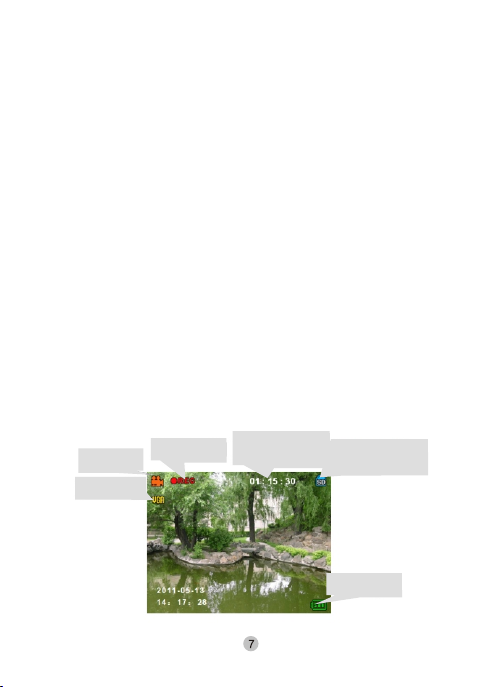
Video recor ding mode i s as follows :
Sym bol of
DV mod e
Res oluti on
Rec ordin g
sta te indi cator
Rec orded t ime/t ime
lef t to reco rd
The st ate of SD c ard
Bat tery st ate
Page 10
Recorded time / time left to record
In video recording mode, recorded time is displayed, in
STO P mode, the time left is displayed.
(2) Photographing mode: Press MENU to switch to this
mode with voice prompt “photographing”. Press
START/STOP to photograph and “kacha” will be heard.
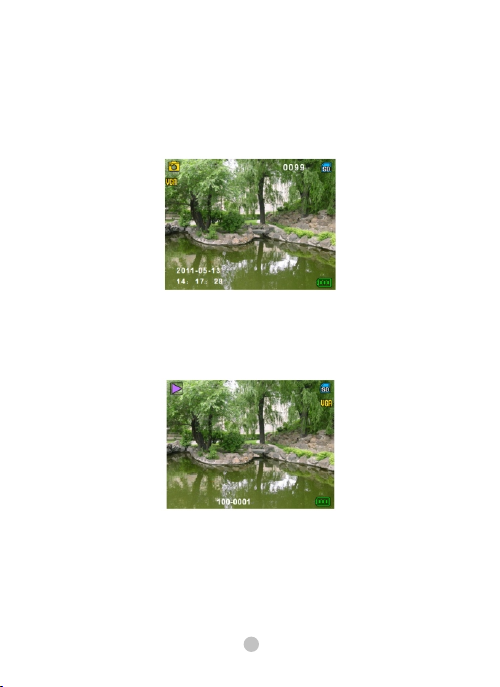
(3)picture playback: belongs to playback mode
Press MENU to switch to this mode with voice prompt
“playback”. Press NEXT to b ro ws e th e ne xt p ag e.
Pictures playback is as follows:
(4) video playback: belongs to playback mode
Press MENU to switch to this mode with voice prompt
“playback”. Press START/STOP to play
8
Page 11
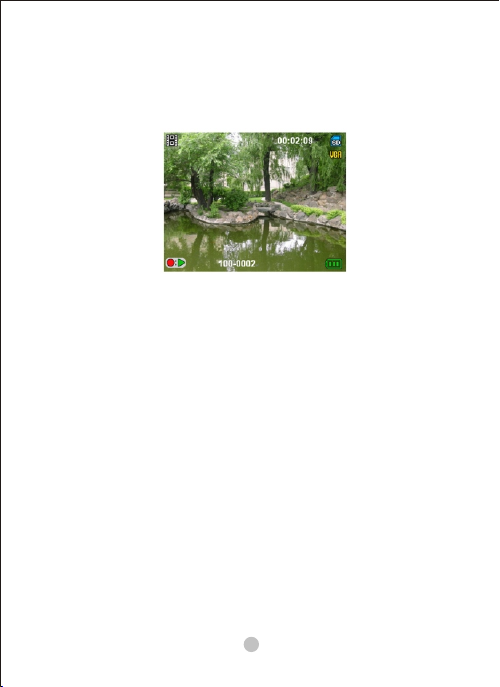
video or stop video; Press NEXT to br ow se t he n ex t
page.
Video playback is as follows:
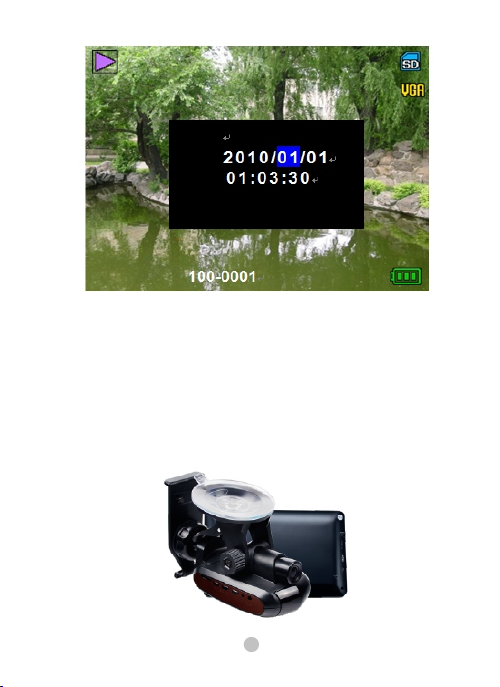
(5)Time setting:
A. Press START/STOP for five minutes to enter time
setting interface in the mode of stopping recording video
or photographing.
B. On time setting page, Year, M on th , Da y, Hour, M in ut e
and Second can be switched by pressing MENU button.
C. On time setting page, press NEXT to in cr ea se n um be r,
a long press increases 10 while a short press increases 1.
D. On time setting page, press START /STOP to confirm
changes and then exit and return to the previous state.
E. In time setting mode, if users do not operate after 10
seconds, it will return to previous state automatically and
will not save the time setting. It will start recording video
in video recording mode.
9
Page 12
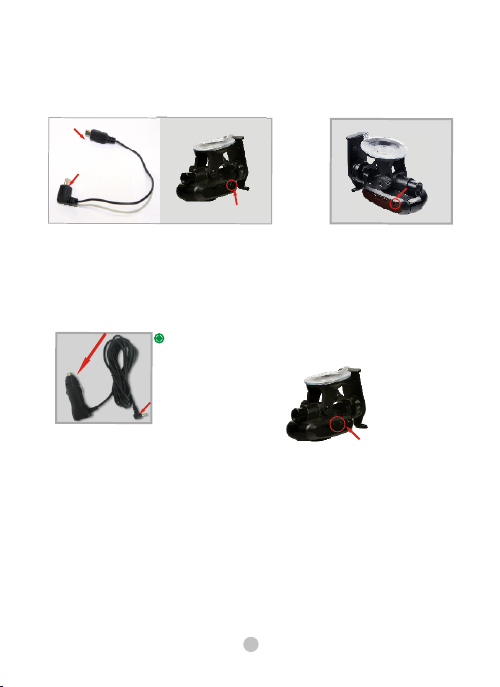
SH-616 is connected to navigator to make a four-i n- on e
Installation Instruction
machine.
10
Page 13
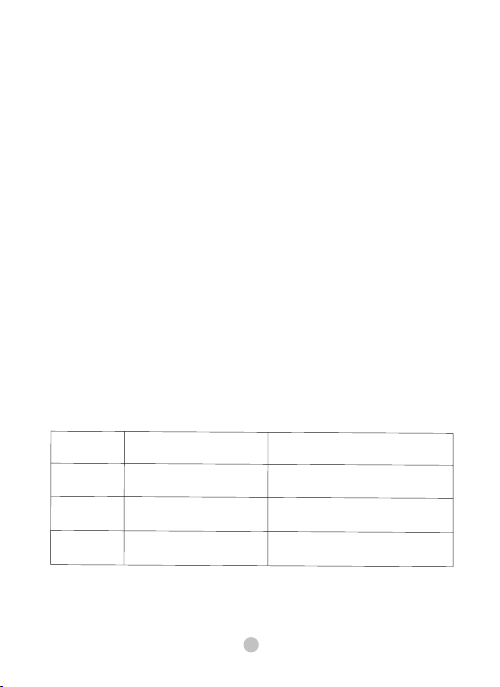
Installation instruction is shown as the following
Installation Instruction
pictures:
Con nect to P ND
Con nect to r adar
USB i nterf ace
Pow er inte rface
Connect SH-616 automobile data recorder navigator with
USB cable. (note: make sure the tonavigator is off be fo re
inserting the plug into it. )
cig arett e light er
Ins ert the c ar char ger int o the pos ition o f
cig arett e light er and ch eck if th e indic ator
Is on .
You can t urn on na vigat or afte r setti ng as abo ve, and
Ent er DSA sys tem and m ake var ious se tting a ccord ing to th e
ins truct ion of DS A.
12V po wer plu g
Ins truct ion of di al swit ch is sho wn on nex t page.
dia l switc h
1) Function description (only SH-616 with voice has the
following functions)
a. Combined with navigator, it can realize the functions of
3 in 1: GPS navigation, fixed velocity measurement, flow
velocity measurement.
b. Voice switch
2) Turn to ON, automatically choose voice warning from
radar or navigator.
11
Page 14
1)When the power is on, there will be a voice, “Safety
early warning system is being started”.
2)If not connected to navigator, automatically use voice
warning from SH-616. Wh en f lo w ve lo ci ty m ea su re me nt
is detected, there will be voice prompt, “tick, tick, tick,
radar signal is detected, tick… tick…”
Tur n to O FF t o tu rn o ff voice warning from radar and
switch to PND warning
1)when power is on, the machine is mute.
Note: before using, please make sure that the model of
SH-616 is correspondent to that of navigation host.
3-pin d ial switch, three p ositions are
marke d as H, L and T.
The configuration of corresponding program is as
follows:
Posi tion
H
L
T
Vol tage requi red
PND progr am requi res high
elect rical level for No. 4p.
PND progr am requi res high
elect rical level for No. 4p.
PND progr am requi res radar
signal for N o. 4p.
Corresponding program
Yuanf eng progr am
Jinbai sheng progr am, shanl i ng
4358T progr am
MTK pro gram, Aipeik e program ,
zhan gxunpro gram, m eisaida pro gram
( 5 pin)
12
Page 15
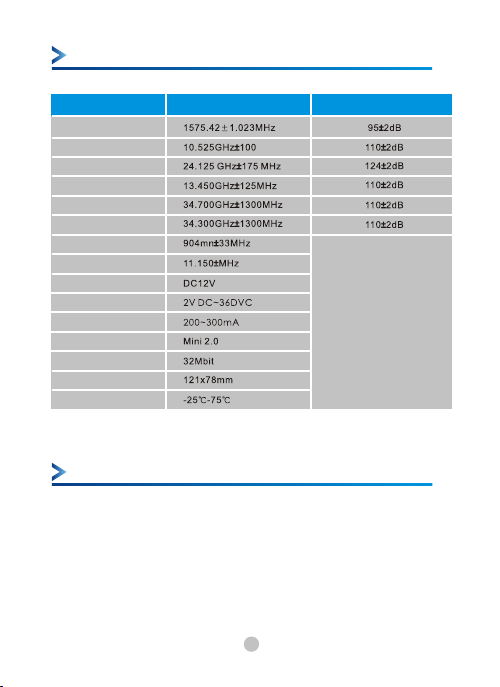
Main specifications
Main sp ec ifi ca tion
Sat ellit e frequ ency
Pol ice car X -band
Tri pod K -ba nd
Pol ice car K a-ban d
Tri pod c ar- ban d
Laser gun laser beam
Ant i-det ectio n Vg2
Volta ge
Car p ower su pply
Cur rent va lue
Req uirem ent
USB
Mem ory
out line si ze
Ope ratin g tempe rature
Receiving frequency range Sensi ti vit y va lue
1.D ata sto rage ca pacit y:
360 000
2.D istan ce erro r: ±10m
3.d istan ce disp lay: 0. 999m
4.E lectr onic co mpass : east,
sou th,we st,no rth,n orthe ast,
sou theas t,nor thwes t,sou thwes t
.
5. po wer sup ply: DC 1 2V
6. 36 0 ° detec tion of l aser ba nd
Present police standard system
1-4. Ku fixed photographing system. Lock the
photographing distance at 10m to 30m.
GPS satellite locates the distance for radar receiving
signal and gives warning about the distance according
to speed limit.
13
Page 16
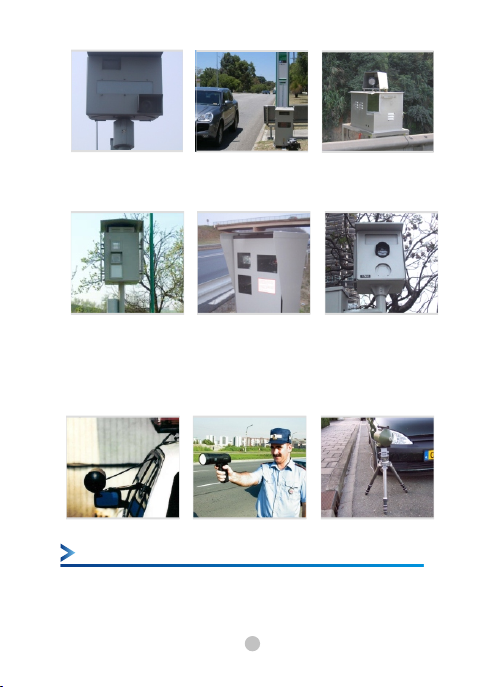
(pi cture s 1-4)
1-5. Fl ow Ku- band phot ogr aphi ng system: Lock the
phot ographi ng distanc e at 10m to 35m .
(pi cture s 1-5)
1-6. cr os s- se ct ion X-band sy st em : Lock the phot ogr aphi ng
distanc e at 300m to 450m .
Radar detector r ec ei ves signal at a dist ance of 3002500
met er s.
(pi cture s 1-6)
Present police standard system
1-7. Fl ow Ku- band phot ogr aphi ng system: Lock the
phot ographi ng distanc e at 10m to 35m .
14
Page 17
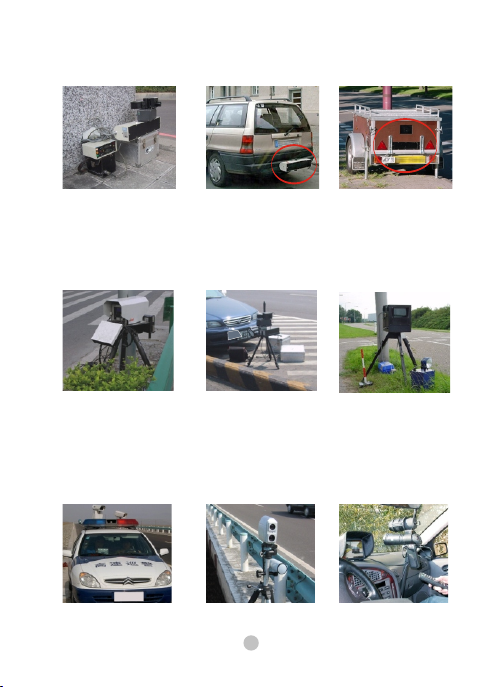
Rad a r d et e c t or r ec e i v es s ig n a l a t a d i s t a nc e of
3 5 0- 1 5 0 0 m e te r s .
(pi cture s 1-7)
1- 8. F lo w K-ban d ph otogr ap hing sy st em: Lock th e
photographing distance at 10m to 35m.
Radar dete ct or receives sig na l at a distance of 2501 50 0
meters.
(pi cture s 1-8)
1 - 9 . F lo w K p h o t o gr a ph i n g s ys t em : Lo c k t he
photographing distance at 10m to 30m.
Radar detector receives signal at a dist an ce of 2 50 15 00
meters.
(pi cture s 1-9)
15
Page 18
Moving ph ot og ra ph in g system usually ta ke pictures in
a mo vi ng invisible way. So it is not easy to b e found. In
today's market, only the r ad ar de te ct or of ou r company
can de te ct the moving in vi si bl e p ho to gr ap hi ng traces.
The detecting di st an ce is decided by the quality of
radar det ec to rs . This pr od uc t can receive sig na l at a
long distance, so it can help avoid being fined.
At p re se nt , Ka photographing sy st em in C hi na is
mainly used wi tn es si ng Ka radar and Ka system made
in Germ any accor ding to Europ ean rules . The
frequency of Ka ph ot og ra ph in g sy st em is so short and
its reflecting s ig na l is s o weak that traditional r ad ar c an
only r ec ei ve signal a t a short distance, so i f there i s Kaband warning, yo u have to be esp ecially careful, then
you can avoid being photographed.
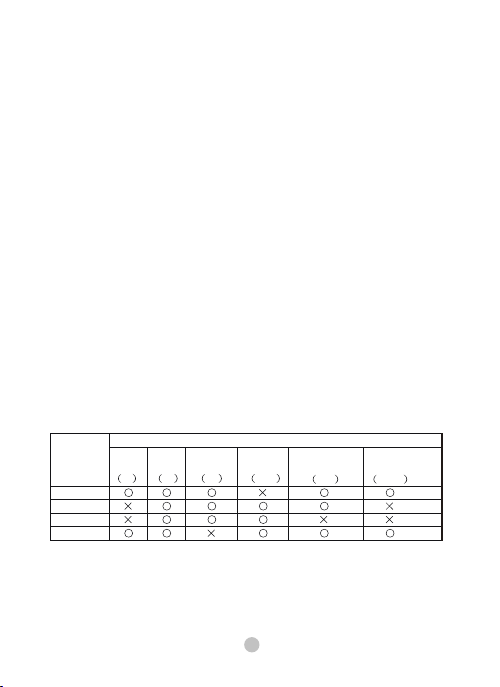
The toxic and haz ar do us su bs ta nc es ar e described as
follows according t o the requirements o f description in
Th e M ana g ing m e tho ds to pr e ven t P oll u tio n o f
Electronic P ro du ct s a nd T he Ma na gi ng methods to
pr e vent t h e pol l utio n o f Elec t ron i c I nfo r mat i on
Products:
Toxic a nd haza rdous s ubsta nces or c hemic al elem ents
Merc ury
Parts
Shel l
Circ uit boa rd
Wire t ype
Powe r suppl y
Lead
Pb
Hg
Cadm ium
Cd
Hexa valent
chrom ium
Cr6 +
16
Poly bromi nated
biph enyl
PBB
poly bromi nated
diph enyle thers
PBD E
Page 19

○: indicates that the toxic and hazardous substances are not
included in all homogeneous materials of that part or the
content of them is less than the limited
content required in the standard of SJ/T11363-200.
X : indicates the content of toxic and hazardous substances in
one of the homogeneous materials in
this part is more than the limited content required in
The standard of SJ/T11363-200.
Note: Most parts of this product are made of eco-friendly
materials which are not toxic or hazardous.
17
 Loading...