

Belimo EXT-CFU-230-D2, EXT-CFU-230-D4, EXT-CFU-230-D422, EXT-CFU-230-D222, EXT-CFU-230-D Installation Manual
Page 1
Installation manual
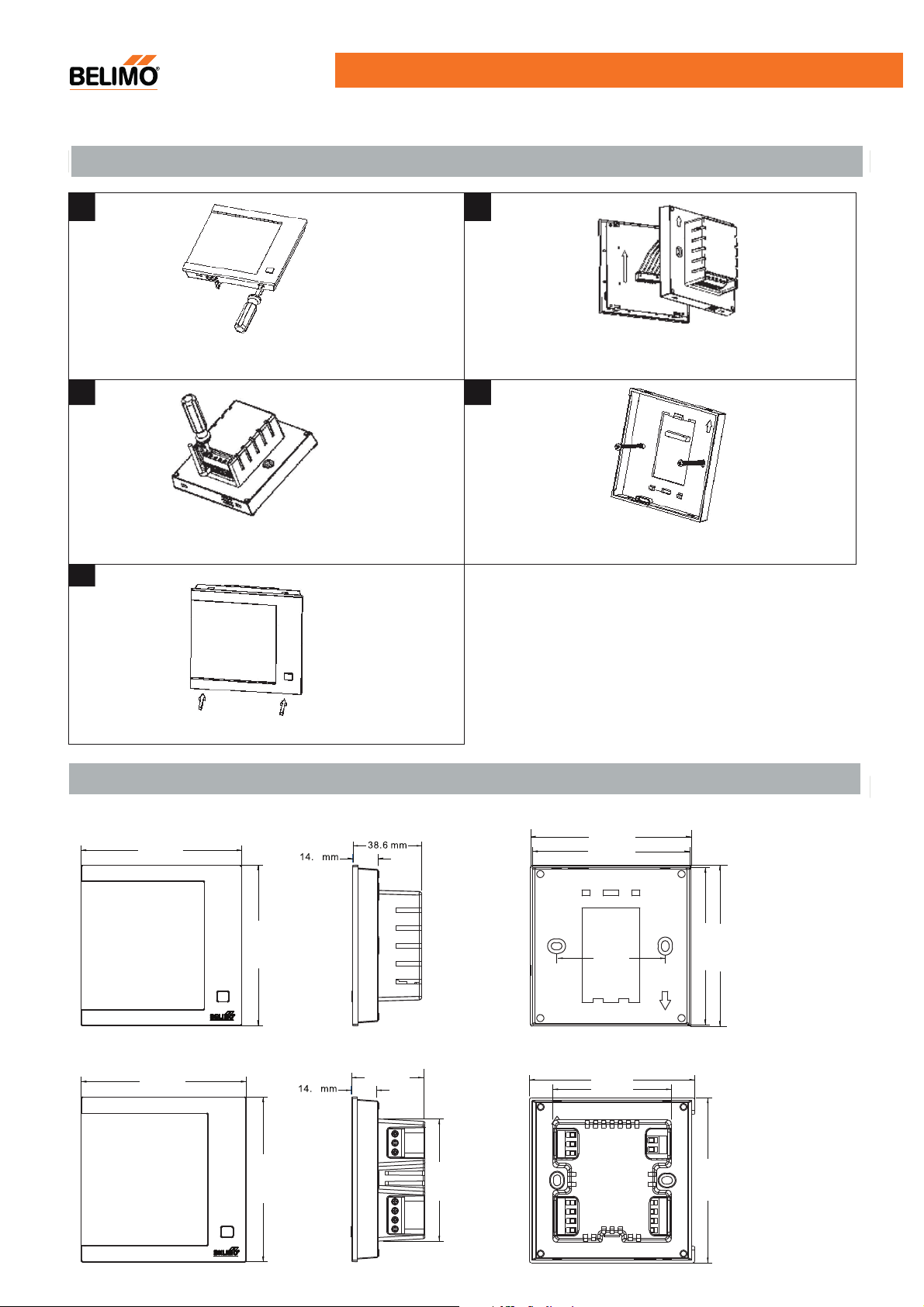
Mounting Method
1. 2.
EXT-CFU-230-D.. Touch Keypad Thermostat
Open the left clip and right clip with screw driver.
Open the front cover. Take off the wires.
3. 4.
Connect the wire according to the wiring diagram. Mount the housing to the wall using the two screws in the
packing box.
5.
Note: Make sure the wires are connected per the wiring diagram.
Avoid water, mud, paints and other substances from getting
into the PCB of thermostat.
Close the front cover.
Dimensions
EXT-CFU-230-D222/(D422)
90.0 mm
EXT-CFU-230-D2/(D4)
90.0 mm
V1.2 · 09.2016 · Subject to modification
90.0 mm
90.0 mm
90.0 mm
2
2
40.0 mm
66. 7 mm
86.8 mm
60 mm
90. 0 mm
64. 7 mm
86.8 mm
90.0 mm
90. 0 mm
1
Page 2
EXT-CFU-230-D.. Touch Keypad Thermostat
Low
L
Cooling
N
Med
F
Val1
Heating
Hi
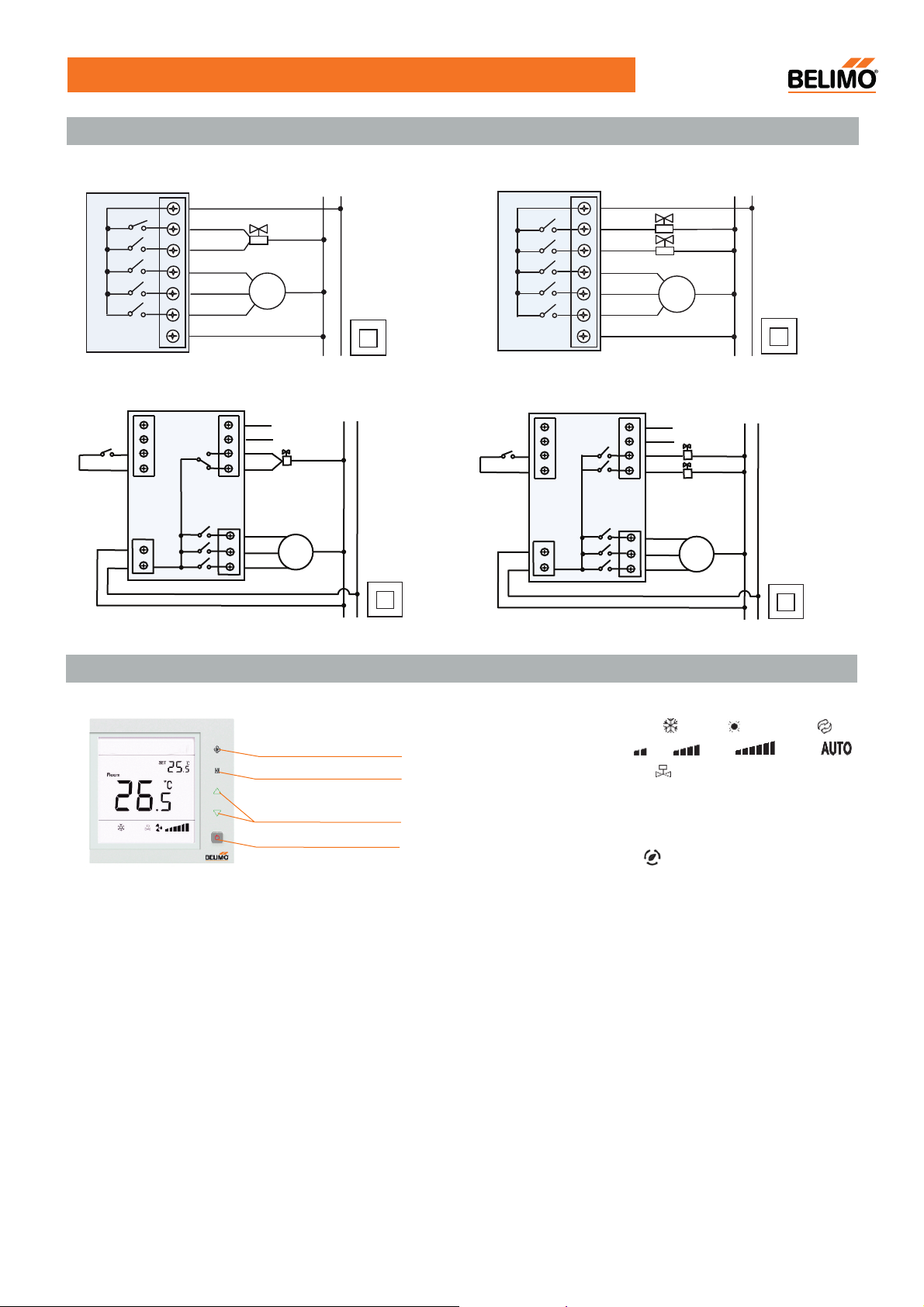
Wiring diagram
EXT-CFU-230-D222
EXT-CFU-230-D2
C2
C1
N
L
L
VC
VO
Low
Med
Hi
N
AC85~ 260V 50/60Hz
N L
Valve
Fan
AC85~ 260V 50/60Hz
S1
S2
VO
VC
Hi
Med
Low
Fan
N L
EXT-CFU-230-D422
EXT-CFU-230-D4
C2
C1
N
L
Val2
AC85~ 260V 50/60Hz
an
S1
S2
Val1
Val2
Hi
Med
Low
N L
AC85~ 260V 50/60Hz
N L
Cooling
Heating
Fan
Display
Fan speed
Mode
Temperature adjustment
On/Off
It shows following status:
·working status: cool , heating or ventilation
·fan speed: low ,Mid ,High ,or Auto
·FCU valve status
·Room temperature
·Temperature setpoint
For EXT-CFU-230-D2
Economy mode
·
Build-in sensor (display “Room”)
·
External sensor (“Room” disappear)
·
V1.2 · 09.2016 · Subject to modification
2
Page 3
Operation instructions
EXT-CFU-230-D.. Touch Keypad Thermostat
On/Off
Setting Temperature
Mode Selection
Fan Speed Selection
Control Motorised Valve Under
4-pipe Configuration
Low Temperature Protection Function
Low Temperature Protection Setting
Press “ ” to turn on, press “ ”again to turn off thermostat and its output.
Press “ ” to reduce temperature, press “▲” to raise temperature (0.5°C per step).
Press “M” to change system working in cooling “ ”, heating “ ” or ventilation “ ” mode.
Press “ ” to select (Hi), (Med), (Low), AUTO(Auto).
In “Auto” mode, the fan-speed changes automatically. When the differential temperature
between room temperature and setpoint exceeds 1°C, 2°C and 3°C, thermostat operates at Auto
LOW-speed, Auto MED-speed and Auto HI-speed respecctively.
If the differential temperature between room temperature and setpoint exceeds 1°C, FCU valve
will be opened; if room temperature and setpoint are equal, the thermostat will close the FCU
valve with the fan kept running.
In cooling, when the room temperature is higher than setpoint, the cooling Valve will be opened.
Otherwise it will be closed. Heating valve is always closed. In heating, When the room
temperature is lower than setpoint, the heating valve will be opened. Otherwise it will be closed.
Cooling valve is always closed.
Turn on:
turn on the fan and valve (with “ ” showing). When the room temperature is increased to 7°C,
the
Turn off: Press ”M” and hold for 3 seconds, it will display “OF” or “ON”, press “▲” or “▼” button
to adjust the parameter. “OF” indicates low temperature protection is turned off, “ON” indicates
low temperature protection function is turned on (Factory default setting is “OF”).
▲
When the room temperature is lower than 5°C, the thermostat will automatically
thermostat will automatically stop output.
Offset adjustment of temperature display
Alarm
Occupancy Contact
EXT-CFU-230-D2
External sensor
EXT-CFU-230-D2
In case that the user wants the displayed temperature on the thermostat higher or lower than
the real temperature(±5°C), the following operations could be taken:
Turn off:
“▼” to adjust the temperature value, it will be automatically confirmed after 6 seconds.
If the sensor has failure, the thermostat will close the fan and valve, displaying “E1” or “E2”.
E1: Sensor in short circuit alarm
E2: Sensor in open circuit alarm
It displays “HI” when the temperature is higher than 55°C , displaying “LO” when the temperature is lower than 0°C.
When contact is CLOSE, thermostat runs in economy mode and dispalys “ ”.
For cooling mode, thermostat runs at LOW fan speed with
For heating mode, thermostat runs at
During Economy mode, all the buttons become ineffective except the On/Off button.
When contact is OPEN, thermostat runs in normal mode and “ ” disappears. All the buttons
resume normal functioning.
When build-in sensor is used, thermostat displays “Room”. When external sensor is connected,
themostat switches to external sensor automatically and “Room” disappears.
Press “▲” and “▼” at the same time for 3 seconds, it will display “XX°C”, press “▲” or
default temperature setpoint 26
LOW fan speed
with the default temperature setpoint 18°C.
°C.
V1.2 · 09.2016 · Subject to modification
3
 Loading...