

Page 1
Installation manual
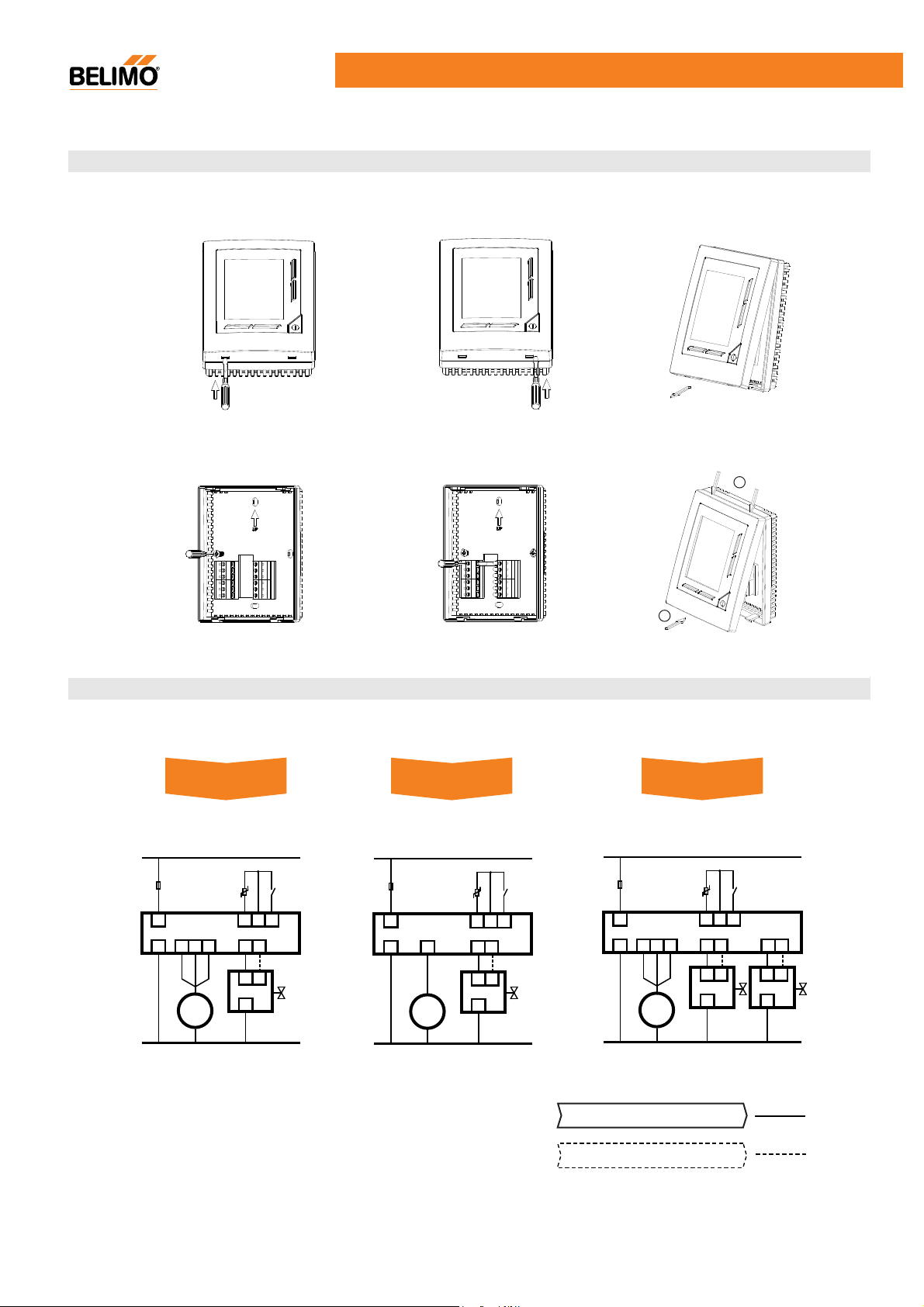
Mounting Method
LCD Electronic Thermostat CFU-D series
1. open the left clip
with screw driver
4. Mounting the
housing
2. open the right clip
3. Open the front cover
with screw driver
5. Wiring 6. Close the front cover
1
2
Wiring Diagram
L
6A fuse
L
N
N
Lo Mid Hi
II I III
FAN
Ext.
Sensor
S1S2S3
VO VC
2 3
1
Actuator
Occupancy
contact
CFU-D422CFU-D221 / D222 CFU-D221-SS
L
S1 S2 S3
VO VC
2 3
1
Actuator
Occupancy
contact
6A fuse
L
N
Ext.
Sensor
I
FAN
N
L
Ext.
6A fuse
Sensor
L
Lo Mid Hi
II I III
N
FAN
N
Occupancy
contact
S1S2S3
CO
CC HO HC
2 3
1
Actuator for
cooling
2 3
1
Actuator for
heating
2-wire actuator connection
V1.1 02.2011 Subject to modification.
3-wire actuator connection
1
Page 2
LCD Electronic Thermostat CFU-D series
Basic Operation
Modes
Fan speed
Backlight
Valve
Memory
Occupancy contact
Display selection
Temperature offset
Low temperature protection
(Defrost)
External sensor
Key lock
Error code
On/Off , Cooling / Heating
Press button “ ” to switch on or off. To switch off, press and hold the button 2 seconds.
Press button “ M ” to select cooling or heating mode.
*CFU-D422, auto change mode for cooling and heating.
3 speed ( Low , Middle , High ) / Auto ( > > )
Auto speed: difference between set point and ambient temperature;
1 K - Low ; 2 K - Middle ; 3 K - High .
Fan will keep running when power on (except economy mode).
The backlight will light up 120 seconds when any button pressed.
The icon “ ” displays when valve open.
All last saved parameters will be kept after power failure or switch off.
Contacts close > economy mode ; Contact open > normal mode
Fan output is synchronised with valve output (economy mode).
In parameter setting, select display ambient temperature or set point.
In parameter setting, adjust measured temperature to +3, +2, +1, 0, -1, -2, -3.
When unit is off and measured temperature < 5°C , unit start in heating mode
automatically until tempaerature reached 7°C.
In parameter setting, select external sensor or built-in sensor.
To lock or unlock the buttons, press & simultaneously and hold 5 seconds.
When key lock is activated, buttons will no action when press it.
E1 : Internal sensor short circuit. E2 : Internal sensor open circuit.
E3 : External sensor short circuit. E4 : External sensor open circuit.
Parameter Setting
When the unit in “ OFF ” status, press and hold for 5 seconds to enter “ p-setting mode ”. Press to change over from
dISP > OSEt > dEfr > USP > LSP > SEn* > COOL* > HEAt* . Use , button to change setting. If button is not pressed over
10 seconds, the changed setting will be saved and exit automatically.
dISP Display selection : ambient temperature “rt” / set point “SP” [ factory setting rt ]
OSEt Temperature offset : -3,-2,-1, 0, 1, 2, 3 [ factory setting 0 ]
dEfr Defrost - low temperature protection : On / OFF [ factory setting OFF ]
USP Upper set point limit : 10 ... 35 °C [ factory setting 35°C ]
LSP Lower set point limit : 5 ... 30 °C [ factory setting 5°C ]
SEn Sensor selection : external “Et” / internal “Int” [ factory setting Int ]
COOL Economy set point range for cooling : 25 ... 30 °C [ factory setting 28°C ]
HEAt* Economy set point range for heating : 15 ... 20 °C [ factory setting 15°C ]
*available on corresponding models
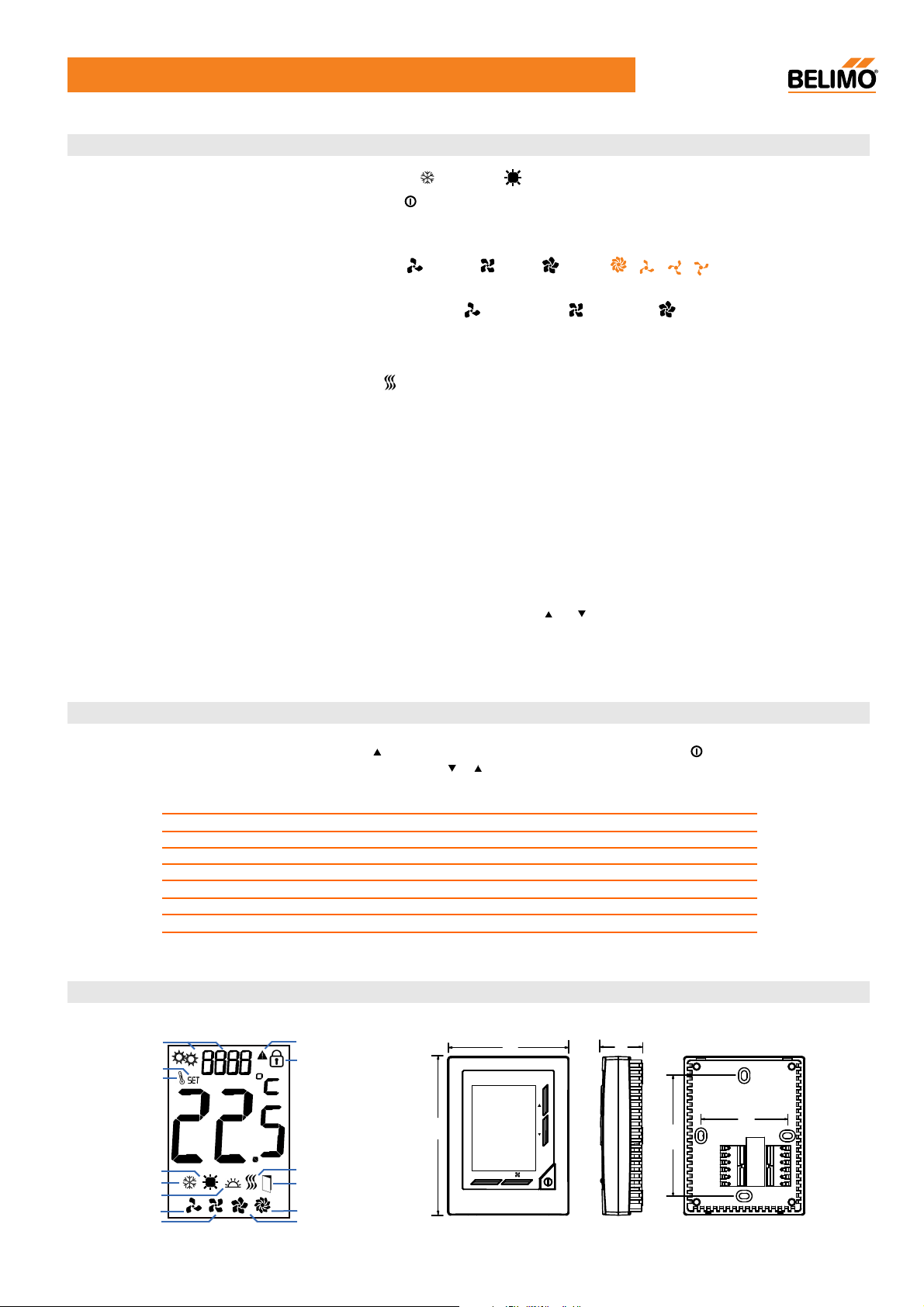
LCD Segment & Dimensions [mm]
P-setting mode
Set point
Ambient temp.
Heating
Cooling
Defrost
Low
Mid High
Error
Key lock
Valve output
Economy
Auto speed
110
84
M
28
60
83.5
V1.1 02.2011 Subject to modification.
2
 Loading...