

Page 1
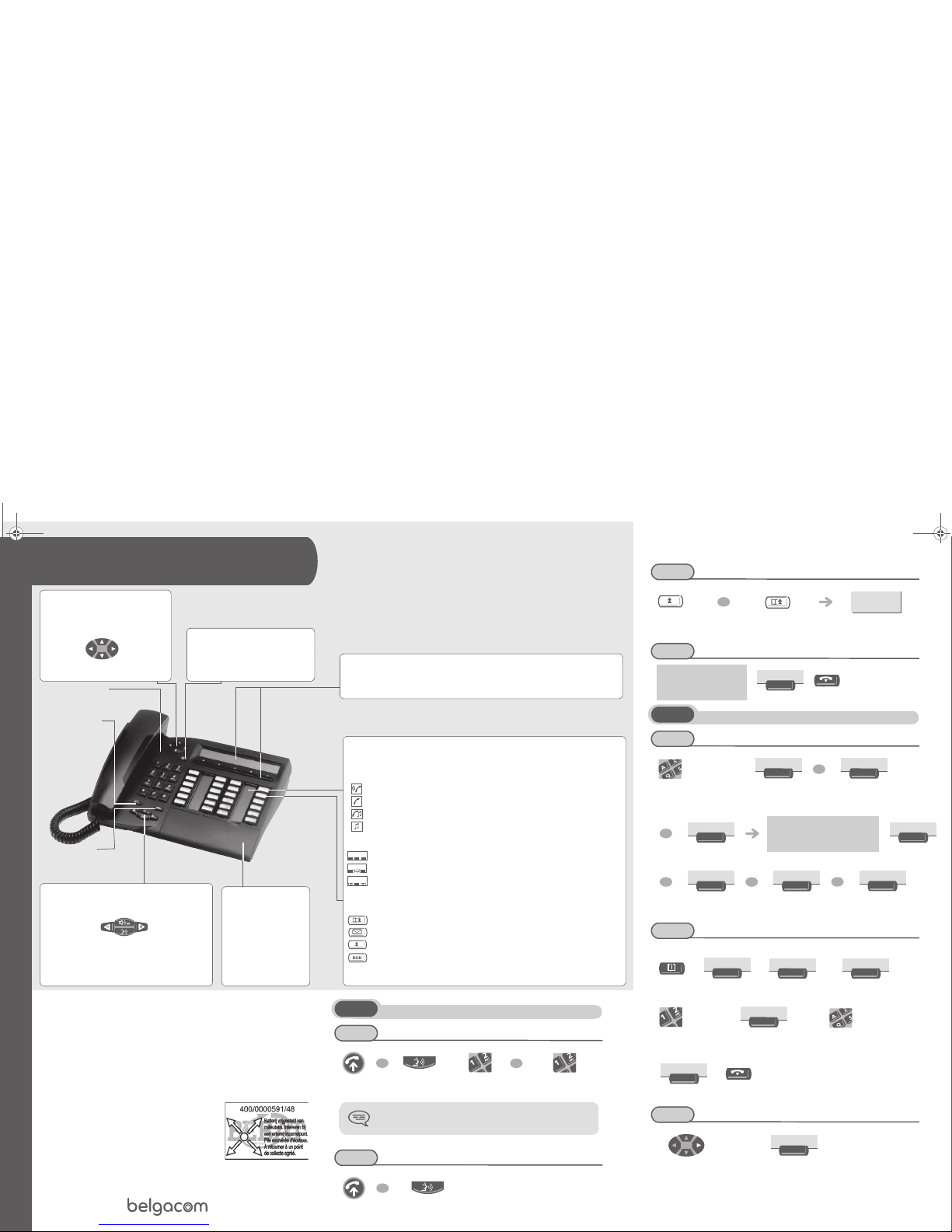
Belgacom IDS 310
Belgacom Forum
TM
750
Light
indicating messages received
Guide key
This key lets you:
• obtain information about the
telephone
• program the keys
Mute key
so that
your correspondent
can no longer hear
you
Intercom
so that
your terminal
automatically answers
a call without having
to lift the receiver
Alphabetic keypad
Protected by a flap, used for
call by name, message
service and programming.
You have a self-adhesive
"Memo"
label to stick
inside the flap.
Audio keys
Loudspeaker:
to share a conversation
to reduce
loudspeaker or
receiver volume
to increase
loudspeaker or
receiver volume
Hands free:
to make or a
nswer a call without
lifting the receiver
Display and display keys
Displays 2 lines and several pages giving information on your correspondent and the functions
available through the keys associated with the lines of the display screen.
Programmable keys and icons
To make a call, activate a service or manage your calls.
Icons are associated with each of these keys.
Call icons:
Incoming call (flashing).
Call in progress.
Call on hold.
Call on common hold.
Function icons:
Function active.
Function requiring action.
Terminal or line busy.
Preprogrammed function keys:
Temporarily storing a number to call again.
Access the various mail services.
Automatically redial the last number dialled.
To consult the list of unanswered ISDN calls or to make an ISDN call.
Hang-up key
To terminate a call or programming
Navigator
Lets you browse through several pages of
the display and select a line (the bottom line
is implicitly active).
Top line
Previous
page
Next
page
Bottom line
Other
Guarantee and clauses
Any unauthorised modification to the product shall render this declaration of
compliance null and void. A copy of the original of this declaratio n of compliance
can be obtained by post from:
ALCATEL BUSINESS SYSTEMS
Technical Services - Approvals Manager
1, route du Dr. Albert Schweitzer
F 67408 Illkirch - France
Using your telephone
Making a call
Receiving a call
lift the receiver hands free dial
dial directly the
number for your call
To make an external call, dial the outside line access code
before dialling your correspondent's number.
lift the receiver hands free
OR
OR
OR
Redialling
Making a call-back request
Directory
Using call by name
Programming your personal directory
Your personal directory can contain up to 45 numbers.
Calling from your personal directory
select the
"redial" function
number stored number called
your correspondent does
not reply or is busy
enter the name or initials or
the surname and first name
of your correspondent
display of first name in list and
corresponding number
if name is ok
show next
name
show previous
name
press a display key
correspondent’s number
to be programmed
enter name
(max. 6 characters)
navigate in the name
list
call the chosen
correspondent
OR
0155667000
CallBk
Name
OR
Init.
OR
Name&F
Call
OR
Next
OR
Prev
OR
Cancel
Prog
Keys
Empty
Apply
Apply
Helen
BEN-2-oxe3eh21040.fm Page 3 Mercredi, 22. octobre 2003 2:16 14
à3AK19530GNAA010343ïëòä
We,
Alcatel Business Systems,
hereby declare that we assume
Dig
ital terminal IDS 310 (Alcatel Reflexes 4035)
product to be compliant with the essential requirements of Directive 1999/5/CE of the
European Parliament and Council.
Page 2

Divert your calls to another number
Divert your calls to another number
Diverting your calls to your voice message service
When you return, cancel all diversions
During a conversation
Sending DTMF signals
During a conversation you sometimes have to send DTMF signals, such as with a voice
server, an automated attendant or a remotely consulted answering machine. The function
is automatically cancelled when you hang up.
display of functions of the
Forwarding list group
select type of diversion
dial the destination
number
display of functions of the
Forwarding list group
select type of diversion
display of functions of the
Forwarding list group
During a conversation
to activate to disable
Conslt
Servic
Apply
Apply
Conslt
Servic
Apply
Apply
Voice
Conslt
Servic
Apply
FwdOff
Apply
¤DTMF
×DTMF
Calling a second person during a conversation
During a conversation, to call a second person.
• To cancel your second call and recover the first:
Receiving a second call
During a conversation, another person is trying to call you.
Switching between two calls (Broker call)
During a conversation, a second call is on hold.
To accept the second call:
Transferring a call
During a conversation, to transfer the call to another number:
Three-way conference
During a conversation, a second call is on hold.
Voice message service
Consulting your voice mailbox
The light indicates that messages have been received.
the first call is on hold
dial directly the number
for your call
dial
name of caller is
displayed for 3 seconds
line key for which icon
is flashing
single-line terminal
the first call is on hold
the first call is on hold
line key corresponding
to icon
single-line terminal
number to be
called
single-line terminal
only
three-way
conference
cancel conference and return
to first correspondent
end the first
conversation
display number of new
messages
OR
Enquir
EnqOff
Smith John
OR
Conslt
OR
Broker
Transf
OR
Conf
×Conf
Customize your terminal
Programming your personal code
This password controls access to the programming and terminal locking functions by the
user (default password: 0000).
Adjusting the audio functions
Terminal idle:
Adjusting screen brightness
Installing the programmable key label
A printed label is supplied with th e terminal. This should be installed beneath the
programmable keys.
follow the instructions of th e
voice guide
enter the old
password
enter the new password
(twice)
choose the tune
adjusting the ringer volume
this function is used to read or modify the
software licence agreements.
1. Insert a flat “ blade ” into the slot (1 slot per key block).
2. Raise the cover.
3. Slide the printed label into position.
4. Replace the cover.
Voice
Prog
Passwd
Prev
Next
UP
DOWN
OR
Prog
Displ
+
OR
_
BEN-2-oxe3eh21040.fm Page 4 Mercredi, 22. octobre 2003 2:16 14
 Loading...