

Page 1
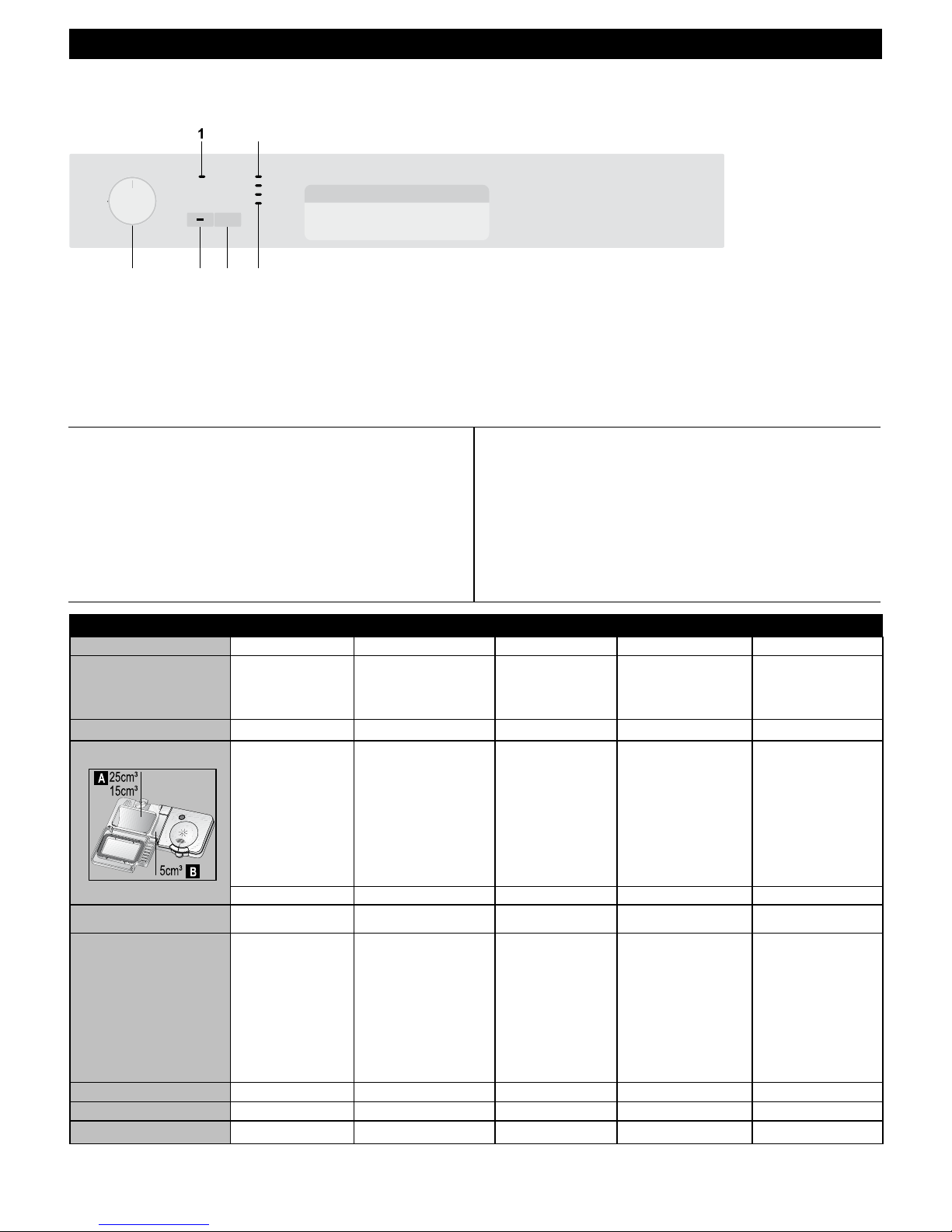
QUICK REFERENCE GUIDE
EN
How to use your dishwasher:
• Open the water tap.
• Plug to the mains.
• Open the door and load the dishwasher. Check if both upper
and lower spray arms move freely.
• Fill enough detergent into the detergent dispenser and close
the door.
• Check the rinse aid level indicator lights. If necessary, refill
rinse aid.
• Use the on / off / programme selection knob to choose your
washing programme.
• Start the programme with the Start/Cancel button:
Attention
Avoid opening the door during the washing process. This interrupts
the washing process, and hot steam will escape. When the door is
closed, the programme will continue.
• Use the on / off / programme selection key to turn the machine
off again. When the progress indicator light “programme end”
lights up, the programme is complete.
• Close the water tap. Pull out the plug.
• Allow your dishes to cool for 15 minutes, with the door open.
Unload the dishes. Begin with the lower basket.
! Attention:
Please read the operating manual prior to operating the machine for the first time.
4
5
6
1
2
3
Half Load (1/2)
On/Off/Programme
selection Knob
Start/Cancel Key
“ON” indicator light
LED progress indicator
lights
6
2
345
Rinse aid level
indicator light
Programme Table
Programme number
1Reference* 2 3 4 5
Programme name
Cleaning temperature
Degree of Soiling Most economical washing
program for the normally soiled
daily dishes that are kept
waiting.
Suitable for heavily soiled dishes,
pots and pans.
Daily washing program at
which the medium soiled
dishes that are kept waiting
are cleaned in the fastest way.
Daily washing program at which
the medium soiled dishes that are
kept waiting are cleaned and dried
in the fastest way.
Suitable for lightly soiled daily
dishes that are scraped or pre-
cleaned.
Medium High Medium Medium Few
Detergents
A=25 cm³/15 cm³ B=5 cm³
A+B A+B A+B A+B A
Programme sequence
(without options)
Pre-wash
▼
Wash
▼
Cold rinse
▼
Hot Rinse
▼
Dry
▼
End
Pre-wash
▼
Wash
▼
Cold rinse
▼
Hot Rinse
▼
Dry
▼
End
Wash
▼
Cold rinse
▼
Hot Rinse
▼
Dry
▼
End
Wash
▼
Cold rinse
▼
Hot Rinse
▼
Dry
▼
End
Wash
▼
Cold rinse
▼
Hot Rinse
▼
End
Duration (min)
125 124 90 58 30
Water (I)
15,3 17,6 11,8 11,8 11,8
Energy (kWh)
0,88 1,7 1,24 1,20 0,79
The consumption values shown in the table were determined under standard conditions. Differences may therefore occur under practical conditions.
* Reference programme for testing institutes according to AS/NZS 2007
Quick & ShineIntensiveEco Clean & Shine
45°C 60°C70°C 65°C 35°C
Mini 30
Page 2

QUICK REFERENCE GUIDE
EN
Rinse aid level indicator light
If the indicator light comes on, you have to rell
rinse aid (If applicable).
You can also tell whether rinse aid must be
relled by looking at the rinse aid dispenser.
When the visual ll indicator is dark, there is
enough rinse aid in the dispenser.
When the colour is light, open the dispenser and
rell rinse aid.
ON/OFF
Machine will be switched on when you move the Programme
Selection knob to position “1”. “ON” light will illuminate.
Machine will be switched off when you move it to” OFF” position. All
lights will turn off.
Programme selection Knob
Used to switch on/off the machine and select the washing
programmes.
Half Load (1/2) button
When there are few dishes, you press this button after pressing
the programme selection button. When turning the dishwasher on,
the indicator light on the button lights up. This function helps you to
save water and energy.
Start/Cancel key
You use the key to start the selected programme.
Stop the programme with the Start / Cancel key if you would like
to open the door once the dishwasher’s washing programme is
running.
LED progress indicator lights
The programme sequence throughout the
washing process can be monitored from the
progress indicator lights on the control panel.
! Warning
Following the washing stage, in order to drain
and remove water from inside the machine completely, the machine
will still be engaged for approximately 35 minutes. Do not worry this
is not a fault. The End progress indicator light will come on
when
nished.
! Warning
Do not switch the machine off before End light comes on.
How to cancel the washing program
To cancel a programme while the machine is operating:
Press start/stop key for 3 seconds. The machine will drain the water
inside the machine for 45 seconds. The programme is cancelled
when washing light goes off. Then, you can choose and start a new
programme.
! Important: Depending on the stage of the programme you have
cancelled, there may be detergent residue or rinse aid inside the
machine and on the load. Make sure the items in the dishwasher
are not used before being washed properly.
Improper Loading Of Dishware
15 0492 01 00_AB
ON
Wash
Dry
End
Visual Indicator
(If applicable)
4
5
6
1
2
3
Half Load (1/2)
On/Off/Programme
selection Knob
Start/Cancel Key
“ON” indicator light
LED progress indicator
lights
6
2
345
Rinse aid level
indicator light
 Loading...