

Page 1
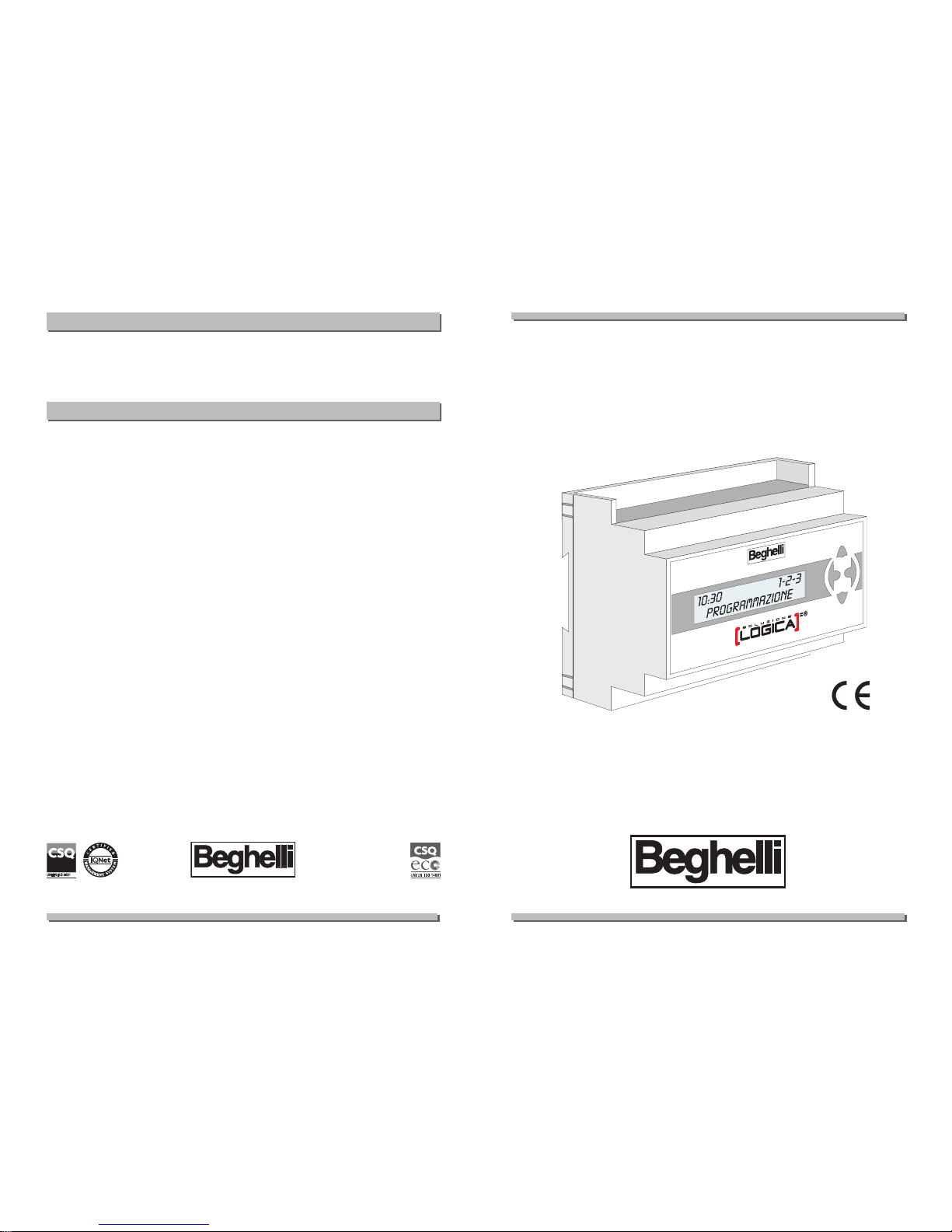
BEGHELLI LOGICA®CONTROL UNIT
Control unit for centralised management and control of
Control unit for centralised management and control of
lighting and emergency lighting appliances
lighting and emergency lighting appliances
INSTRUCTIONS
INSTRUCTIONS
FOR USE AND INST
FOR USE AND INST
ALLA
ALLA
TION
TION
Esc
ok
334.900.395
- Battery: NiCd 7V 0,75Ah
- Power supply voltage: 230V
- Max. input from mains: 10Va
SPECIFICA
SPECIFICA
TIONS
TIONS
- Before connecting this appliance, check that the rating plate data correspond to the mains data.
- This appliance must be used solely for the purpose for which it was built.
Any other use is to be considered as improper, and may cause damage. The
manufacturer will not be liable for any damage to human beings, animals
or properties caused by improper, wrong or unreasonable use.
- Before any cleaning or maintenance operation, disconnect the appliance
from the mains.
- Warning: this product contains materials that can be harmful if leaked/dumped in the environment.
- Beghelli products are covered by laws on intellectual property.
- Should any repairs be necessary, contact an authorised service centre
and always request the use of original spare parts. Failure to comply with
the above may undermine the safety of the appliance.
- For repairs/replacements under guarantee contact an Authorised Dealer.
WWARNINGS / W
ARNINGS / W
ARRANTIES
ARRANTIES
www.beghelli.com
BEGHELLI S.p.A. - Via Mozzeghine 13, 15 - 40050 MONTEVEGLIO (BO)
Tel. 051 9660411 - Fax 051 9660444
Page 2

2
INDEX
INDEX
•
• WHAT IS THE BEGHELLI LOGICA CONTROL UNIT page 3
•
• APPLIANCE FUNCTION page 3
Wiring diagram page 4
Groups and scenes page 5
Menu page 5
Password page 6
Initial menu page 6
“Activate scene” menu 1 page 6
“Light” menu 2 page 7
“Maintenance” menu 3 page 10
emergency function and management 3-2 page 11
error status 3-3 page 12
test management 3-4 page 13
lamp management 3-5 page 14
group management 3-6
page 16
control unit management 3-7 page 17
configuration management 3-8 page 19
“status MSG” menu 4 page 19
•
• SPECIFICATIONS page 20
•
• WARNINGS / WARRANTIES page 20
3
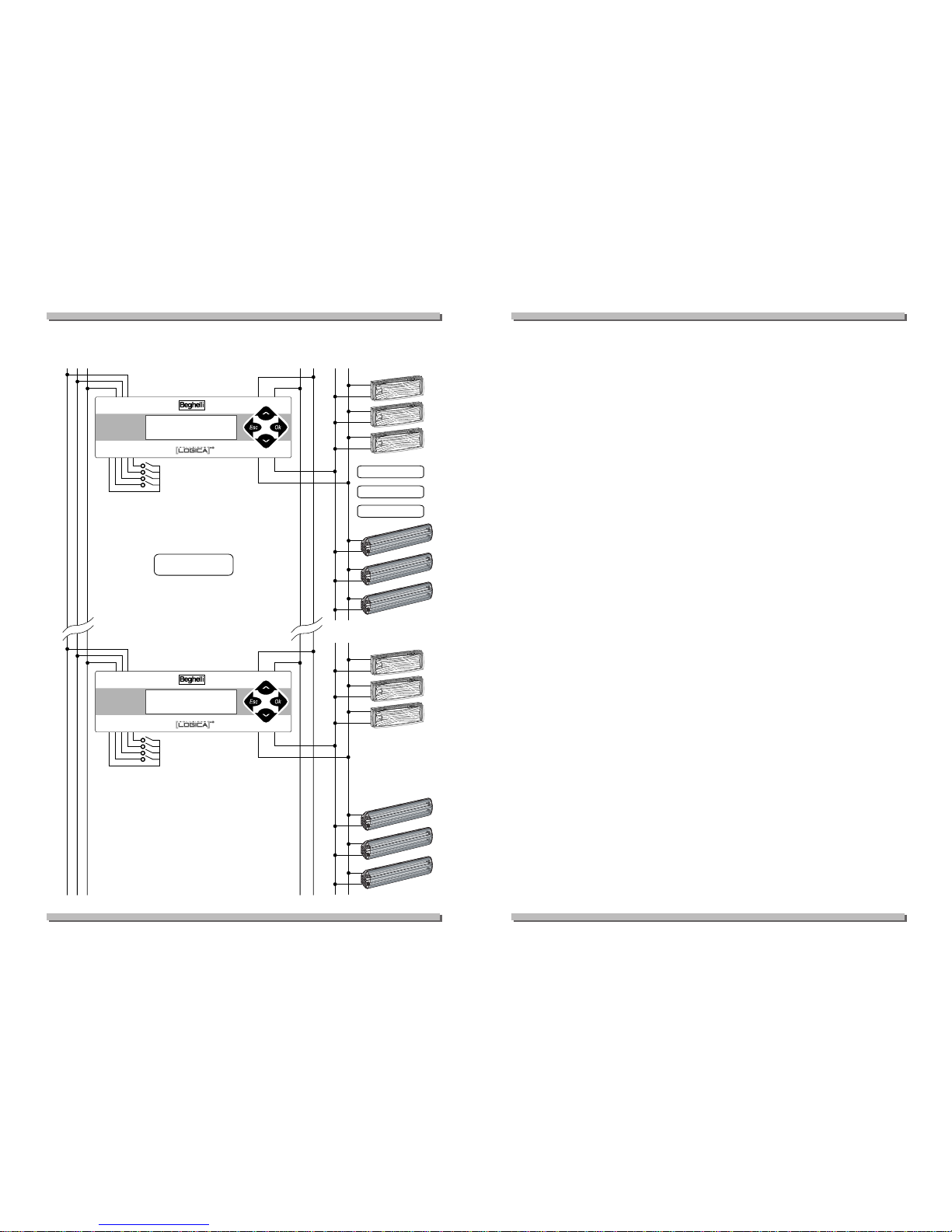
The Logica control unit has been designed to dialogue with different communication protocols. It enables the simultaneous management of both lighting and emergency lighting appliances. As well as the various functions
dedicated to testing and controlling emergency lighting, the Logica control
unit can command individual appliances or groups of lamps using the DALI
protocol, the international protocol that complies with IEC standard 60929.
The control unit also allows the creation of customised "scenes" for controlling
the type of lighting according to the varying lighting requirements at different
times of the day. It is also possible to adjust the brightness using a dimmer
for single appliances or groups, even when fitted with a timer or connected
to light sensors, which makes it possible to light rooms or areas in the most
similar way to natural sunlight (biodynamic lighting).
The control unit is composed of a keyboard+display for all user operations,
four programmable switches for light activation, an RS485 input for remote
connection and the DALI-compatible bus input for managing the system.
The control unit houses the bus' built-in feeder and can autonomously manage a complete system comprising 128 appliances without requiring further
equipment.
If the local switches are used the normally open buttons must be employed.
The control unit manages and controls the status of the programmed appliances, controls routine tests according to the modes set by the user and can
perform a vast series of manual operations that can be selected from a series
of menus accessible from the keyboard.
WHA
WHA
T IS THE BEGHELLI LOGICA CONTROL UNIT
T IS THE BEGHELLI LOGICA CONTROL UNIT
APPLIANCE FUNCTION
APPLIANCE FUNCTION
Page 3
4
+UX -UX COM BUS 485
NP
SWITCHES
DALI
RETE
NOT POLARIZED
RS485
AD
DA
NOT POLARIZED
DA
N
P
GND
COM
-UX
+UX
4321
MAX 128 UNITS
SWITCH
MAX 128 LOGICA
MAX 64 DALI
MAX 255
CENTRAL
SWITCHES
DALI
RETE
RS485
AD
N
P
GND
COM
-UX
+UX
4321
SWITCH
WIRING DIAGRAM
WIRING DIAGRAM
GROUPS AND SCENES
GROUPS AND SCENES
All the appliances programmed can be associated to 16 groups; each device may pertain to one or more groups or none at all. These groups can enable specific operations on subsets of the system.
A scene is a preset coordinated lighting combination that involves several
appliances.
By giving the system the order to go to scene "xx" (from 1 to 16), each lighting appliance goes to a particular internally stored brightness condition.
Given that this value is independent for each lighting appliance, preset lighting situations can be created and performed simultaneously, thus combining
in a single command many lighting settings for different appliances.
For each scene it is possible to decide that the appliance will switch on,
switch off, go to a given brightness percentage, or do nothing at all, ignoring
the order and remaining in the current state of brightness.
MENU
MENU
All control unit functions can be accessed from menus: a first level enables
a general overview of the system, activates lights or preset lighting scenes;
in a second level it is possible to set, programme and modify the system and
settings.
The second level is password-protected (the installer will modify it at his
discretion in order to protect the settings programmed).
The menus can be scrolled "vertically" using the arrows
DD
and CC; by pres-
sing
B
one selects the item currently displayed; by pressing A one moves
up a level. The display back-light is activated when any key is pressed.
To generate a manual test proceed as follows:
• select the "manual test" menu;
• select the appliance or group of appliances or even the entire system on
which the operation is to be performed;
• select the operation to be performed, for instance "functional test";
• press
B
; the operation will now be performed and the control unit is
ready to receive new commands.
5
Page 4

6
PASSWORD
PASSWORD
Given menu sections relate to appliance and/or system parameter setting that
must be protected in order to prevent accidental unprogramming of the
system.
In order to access a protected menu, the user must enter the password and
will then be allowed access for 5 minutes. Should operations last longer than
5 minutes, the User will be required to enter the password again.
INITIAL MENU
INITIAL MENU
The "Initial menu" enables the User to use previously entered settings,
manage lights, check the overall state of the system.
There are four possible options:
-
AACCTTIIVVEE SSCCEENNEE 11
- makes it possible to select and activate one of the 16 pre-
set scenes.
-
LLIIGGHHTTSS 22
- makes it possible to activate any appliance and to switch it on,
switch it off and dimmer it.
-
MMAAIINNTTEENNAANNCCEE 33
- enables access, protected by a password, to all the set-
ting and programming functions reserved for system fitters.
-
SSTTAATTUUSS MMSSGG 44
- displays all the control unit status messages currently
active.
“Active scene 1” Menu
“Active scene 1” Menu
This menu enables the activating of the preset lighting scenes.
AACCTTIIVVEE SSCCEENNEE 11
B
AACCTTIIVVEE SSCCEENNEE 0011 11--11
CC
AACCTTIIVVEE SSCCEENNEE 0022 11--11
Choose the scene to be activated from 01 to 16 and press Bto confirm.
SSCCEENNEE AACCTTIIVVAATTEE
Use the "lights menu" to programme the "scenes".
7
“Lights 2” Menu
“Lights 2” Menu
This menu enables switching on, switching off or dimming individual lighting
appliances, groups of appliances or the entire system.
When one enters the third level of the menu it is possible to modify brightness
directly, in real time, by using the
DD
and
CC
buttons:
•a brief pressing of the
DD
key switches on the appliances at maximum bri-
ghtness;
•a brief pressing of the
CC
key switches the appliances off;
•a prolonged pressing of the
DD
or
CC
keys causes a slow variation of
brightness in the chosen direction;
• by releasing the key the appliances maintain the brightness achieved.
To access the "off" and "on" menus one must enter the password.
LLIIGGHHTTSS 22
B
AALLLL 22--11
B
AALLLL 22--11--11
CC
SSWWIITTCCHH OOFFFF 22--11--11
password required
B
SSEETT IINN SSCCEENNEE 0011 22--11--11--11
DD
DDEELL IINN SSCCEENNEE 0011 22--11--11--22
choose scene from 01 to 16 and press Bto confirm.
SSCCEENNEE SSTTOORREEDD
SSCCEENNEE DDEELLEETTEEDD
DD
SSWWIITTCCHH OONN MMAAXX 22--11--11
password required
B
SSEETT IINN SSCCEENNEE 0011 22--11--11--11
DD
DDEELL IINN SSCCEENNEE 0011 22--11--11--22
choose scene from 01 to 16 with
CC
or DDand press Bto confirm.
SSCCEENNEE SSTTOORREEDD PPRREESSSSEEDD
DD orCC
DDIIMMMMEERR ----%% 22--11--11
B
SSEETT IINN SSCCEENNEE 0011 22--11--11--11
DD
DDEELL IINN SSCCEENNEE 0011 22--11--11--22
choose scene from 01 to 16 with
CC
or DDand press Bto confirm.
SSCCEENNEE SSTTOORREEDD
SSCCEENNEE DDEELLEETTEEDD
Page 5

B
LLOOGGIICCAA 22--22
B
LLOOGG -------- 22--22--11
choose the lamp with
CC
or DDand press Bto confirm.
CC
SSWWIITTCCHH OOFFFF 22--22--11
B
SSEETT IINN SSCCEENNEE 0011 22--22--11--11
DD
DDEELL IINN SSCCEENNEE 0011 22--22--11--22
choose scene from 01 to 16 with
CC
or DDand press Bto confirm.
SSCCEENNEE SSTTOORREEDD
SSCCEENNEE DDEELLEETTEEDD
DD
SSWWIITTCCHH OONN MMAAXX 22--22--11
B
SSEETT IINN SSCCEENNEE 0011 22--22--11--11
DD
DDEELL IINN SSCCEENNEE 0011 22--22--11--22
choose scene from 01 to 16 with
CC
or DDand press Bto confirm.
SSCCEENNEE SSTTOORREEDD
SSCCEENNEE DDEELLEETTEEDD
pressed
DD orCC
DDIIMMMMEERR ----%% 22--22--11
B
SSEETT IINN SSCCEENNEE 0011 22--22--11--11
DD
DDEELL IINN SSCCEENNEE 0011 22--22--11--22
choose scene from 01 to 16 with
CC
or DDand press Bto confirm.
SSCCEENNEE SSTTOORREEDD
SSCCEENNEE DDEELLEETTEEDD
B
BBAALLLLAASSTT ---- 22--33
B
BBAALLLLAASSTT ---- 22--33--11
choose the lamp with
CC
or DDand press Bto confirm.
CC
SSWWIITTCCHH OOFFFF 22--33--11
B
SSEETT IINN SSCCEENNEE 0011 22--33--11--11
DD
DDEELL IINN SSCCEENNEE 0011 22--33--11--22
choose scene from 01 to 16 with
CC
or DDand press Bto confirm.
8
SSCCEENNEE SSTTOORREEDD
SSCCEENNEE DDEELLEETTEEDD
DD
SSWWIITTCCHH OONN MMAAXX 22--33--11
B
SSEETT IINN SSCCEENNEE 0011 22--33--11--11
DD
DDEELL IINN SSCCEENNEE 0011 22--33--11--22
choose scene from 01 to 16 with
CC
or DDand press Bto confirm.
SSCCEENNEE SSTTOORREEDD
SSCCEENNEE DDEELLEETTEEDD
pressed
DD oCC
DDIIMMMMEERR ----%% 22--33--11
B
SSEETT IINN SSCCEENNEE 0011 22--33--11--11
DD
DDEELL IINN SSCCEENNEE 0011 22--33--11--22
choose scene from 01 to 16 with
CC
or DDand press Bto confirm.
SSCCEENNEE SSTTOORREEDD
SSCCEENNEE DDEELLEETTEEDD
B
GGRROOUUPP 0011 22--44
B
GGRROOUUPP 0011 22--44--11
Choose the group from 01 to 16 with
CC
or DDand press Bto confirm.
CC
SSWWIITTCCHH OOFFFF 22--44--11
B
SSEETT IINN SSCCEENNEE 0011 22--44--11--11
DD
DDEELL IINN SSCCEENNEE 0011 22--44--11--22
choose scene from 01 to 16 with
CC
or DDand press Bto confirm.
SSCCEENNEE SSTTOORREEDD
SSCCEENNEE DDEELLEETTEEDD
DD
SSWWIITTCCHH OONN MMAAXX 22--44--11
B
SSEETT IINN SSCCEENNEE 0011 22--44--11--11
DD
DDEELL IINN SSCCEENNEE 0011 22--44--11--22
choose scene from 01 to 16 with
CC
or DDand press Bto confirm.
9
Page 6

SSCCEENNEE SSTTOORREEDD
SSCCEENNEE DDEELLEETTEEDD
pressed
DD orCC
DDIIMMMMEERR ----%% 22--44--11
B
SSEETT IINN SSCCEENNEE 0011 22--44--11--11
DD
DDEELL IINN SSCCEENNEE 0011 22--44--11--22
choose scene from 01 to 16 with
CC
or DDand press Bto confirm.
SSCCEENNEE SSTTOORREEDD
SSCCEENNEE DDEELLEETTEEDD
“Maintenance 3” menu
“Maintenance 3” menu
All "Maintenance" menus are password-protected.
In the "maintenance menu - manual test 3-1" it is possible to perform and
interrupt manual tests on individual appliances, groups or the entire system.
One can give different test commands on different appliances, without waiting
for the first to finish before starting the subsequent ones; the lamp that receives
a test start autonomously proceeds for the necessary time, without requiring the
control unit, thus giving the opportunity to control other tests on other lamps.
MMAAIINNTTEENNAANNCCEE 33
B
MMAANNUUAALL TTEESSTT 33--11
B
AALLLL 33--11--11
B
SSTTOOPP TTEESSTT 33--11--11--11
CC
FFUUNNCCTTIIOONNAALL 33--11--11--22
CC
AALLWWAAYYSS SSWWIITTCCHH OONN 33--11--11--33
CC
0000hh 0000mmiinn 0000sseecc 33--11--11--44
choose the time with
CC
or DDand press Bto confirm.
CCOOMMMMAANNDD EEXXEECCUUTTEEDD
B
LLOOGGIICCAA -------- 33--11--22
B
SSTTOOPP TTEESSTT 33--11--22--11
CC
FFUUNNCCTTIIOONNAALL 33--11--22--22
CC
AALLWWAAYYSS SSWWIITTCCHH OONN 33--11--22--33
10
CC
0000hh 0000mmiinn 0000sseecc 33--11--22--44
choose the time with
CC
or DDand press Bto confirm.
CCOOMMMMAANNDD EEXXEECCUUTTEEDD
B
GGRROOUUPP 0011 33--11--33
B
SSTTOOPP TTEESSTT 33--11--33--11
CC
FFUUNNCCTTIIOONNAALL 33--11--33--22
CC
AALLWWAAYYSS SSWWIITTCCHH OONN 33--11--33--33
CC
0000hh 0000mmiinn 0000sseecc 33--11--33--44
choose the time with
CC
or DDand press Bto confirm.
CCOOMMMMAANNDD EEXXEECCUUTTEEDD
The unconditioned on function entails the switching on of the emergency
lamps powered by battery even in the presence of mains power, without pre-
set duration, in which the duration of the battery is not under examination; it
is interrupted when the battery is completely run down or by sending a "stop
test" command. The autonomy test is associated to the duration that it
must have. This duration is at the User's discretion and can be selected by
scrolling the menu downwards. This manual test does not in any way modify
the timing and the durations set for the automatic tests.
In the "Maintenance menu - Emergency (Management) 3-2" it is possible to inhibit or enable the emergency condition for individual LOGIC appliances, groups or the entire system.
It is not possible to permanently inhibit the emergency function or to programme inhibition for the next blackout: each appliance can be inhibited or
enabled only if already in blackout conditions, otherwise the command will
be rejected.
MMAAIINNTTEENNAANNCCEE 33
B
EEMMEERRGGEENNCCYY 33--22
B
AALLLL 33--22--11
B
EEMMEERRGG.. EENNAABBLLEEDD 33--22--11--11
CC
EEMMEERRGG.. UUNNEENNAABBLLEEDD 33--22--11--22
CC
SSWWIITTCCHH OOFFFF 33--22--11--33
B
CCOOMMMMAANNDD EEXXEECCUUTTEEDD
11
Page 7

B
LLOOGGIICCAA -------- 33--22--22
B
EEMMEERRGG.. EENNAABBLLEEDD 33--22--22--11
CC
EEMMEERRGG.. UUNNEENNAABBLLEEDD 33--22--22--22
CC
SSWWIITTCCHH OOFFFF 33--22--22--33
B
CCOOMMMMAANNDD EEXXEECCUUTTEEDD
B
GGRROOUUPP 0011 33--22--33
B
EEMMEERRGG.. EENNAABBLLEEDD 33--22--33--11
CC
EEMMEERRGG.. UUNNEENNAABBLLEEDD 33--22--33--22
CC
SSWWIITTCCHH OOFFFF 33--22--33--33
B
CCOOMMMMAANNDD EEXXEECCUUTTEEDD
Whereas the enable/disable functions are reversible, the off function is irreversible, unless the mains power comes back on: it is useful to maintain the
charge of the light accumulators and, if referred to the entire system, it is used
to disable it in the event of particularly lengthy maintenance operations.
When the operations have been completed, the control unit switches off and
in order to change status again the mains supply must come back on.
In the "Maintenance menu - Error status 3-3" it is possible to see whether
there are error conditions present on the Logica appliances, obtain information about the error conditions and any components that require replacing,
and to cancel any error condition indicated.
If a single lamp is selected, only the lights that effectively contain errors in the
memory are proposed.
MMAAIINNTTEENNAANNCCEE 33
B
EERRRROORR SSTTAATTUUSS 33--33
B
AALLLL 33--33--33
B
DDEELLEETTEE EERRRROORRSS 33--33--33--11
B
CCOOMMMMAANNDD EEXXEECCUUTTEEDD
For each appliance, only the errors currently in the memory will appear, as well
as the possibility to cancel them.
In the event of the selection of groups of appliances or the entire system,
the possibility of cancelling errors only is given without further details.
12
In order to display the details concerning certain errors press B; you will
receive further information on the type of battery or tube, on the minutes of
autonomy not completed in the last test.
In the "Maintenance menu - Management Test 3-4" it is possible to set
the timings and the frequency of the automatic tests of the emergency
part of the system: it is possible to select when to perform the next func-
tional/autonomy test and every how many days to perform the subsequent
ones; furthermore it is possible to break the system down into odd and even
lights in order to make them perform autonomy tests seven days apart.
The tests cannot be inhibited.
MMAAIINNTTEENNAANNCCEE 33
B
TTEESSTT MMAANNAAGGEEMMEENNTT 33--44
B
NNEEXXTT FFUUNNCCTTIIOONNAALL TTEESSTT 33--44--11
B
------ DDAAYYSS 33--44--11--11
choose with DDand
CC
then press Bto confirm.
B
XXXXXX DDAAYYSS 33--44--11--11
---- HHOOUURRSS 33--44--11--11
choose with DDand
CC
then press Bto confirm.
B
XXXXXX DDAAYYSS XXXX HHOOUURRSS 33--44--11--11
---- MMIINNUUTTEESS 33--44--11--11
choose with DDand
CC
then press Bto confirm.
B
NNEEXXTT AAUUTT.. TTEESSTT 33--44--22
B
------ DDAAYYSS 33--44--22--11
choose with DDand
CC
then press Bto confirm.
B
---- HHOOUURRSS 33--44--22--11
choose with DDand
CC
then press Bto confirm.
B
---- MMIINNUUTTEESS 33--44--22--11
choose with DDand
CC
then press Bto confirm.
B
FFUUNNCC..TTEESSTT PPEERRIIOODD 33--44--33
13
Page 8

B
------ DDAAYYSS 33--44--33--11
choose with DDand
CC
then press Bto confirm.
B
---- HHOOUURRSS 33--44--33--11
choose with DDand
CC
then press Bto confirm.
B
---- MMIINNUUTTEESS 33--44--33--11
choose with DDand
CC
then press Bto confirm.
B
AAUUTT..TTEESSTT PPEERRIIOODD 33--44--44
B
------ DDAAYYSS 33--44--44--11
choose with DDand
CC
then press Bto confirm.
B
EEVVEENN OODDDD TTEESSTT 33--44--55
CC
CCOONNTTEEMMPPOORRAARRYY 33--44--55--11
CC
77 DDAAYYSS DDEEFFEERRRREEDD 33--44--55--22
choose with DDand
CC
then press Bto confirm.
B
CCOOMMMMAANNDD EEXXEECCUUTTEEDD
In the "Maintenance menu - Management Lamps 3-5" it is possible to evaluate the current status of each Logica appliance or group and modify the
autonomy settings (1h or 3h) and the even or odd status.
The information on the appliance relate to the presence of mains supply, the
presence of errors, emergency operation inhibition/enabling, the test in
progress or postponed condition, the Software version and the programming condition.
MMAAIINNTTEENNAANNCCEE 33
B
FFIITTTTIINNGG MMAANNAAGGEEMM.. 33--55
B
AALLLL 33--55--11
Display when unprogrammed.
B
IIDD SSWW ------..-- 33--55--11--11
B
NNOOTT PPRROOGG//PPRROOGG ((??)) 33--55--11--22
14
B
11HH//33HH ((??)) 33--55--11--33
B
EEVVEENN//OODDDD ((??)) 33--55--11--44
B
------------------------ 33--55--11--55
B
EEMMEERRGG.. EENNAABBLLEEDD 33--55--11--66
B
SSTTOOPP TTEESSTT ((??)) 33--55--11--77
B
DDEELL TTEESSTT SSUUSSPP.. ((??)) 33--55--11--88
B
DDEELL EERRRROORRSS ((??)) 33--55--11--99
B
SSEELLFF DDIIMMMMEERR 33--55--11--1100
B
DDIIMMMMEERR ++//-- 33--55--11--1111
B
LLOOGGIICCAA 33--55--22
Display when programmed.
B
IIDD SSWW
XXXXXX..XX
33--55--22--11
B
PPRROOGGRRAAMMMMEEDD 33--55--22--22
B
AAUUTTOONNOOMMYY 33HH 33--55--22--33
B
EEVVEENN FFIITTTTIINNGG 33--55--22--44
B
MMAAIINN OONN 33--55--22--55
B
EEMMEERRGG.. EENNAABBLLEEDD 33--55--22--66
B
NNOO TTEESSTT OONN SS33--55--22--77
B
NNOO TTEESSTT SSUUSSPPEENN 33--55--22--88
B
NNOONNEE EERRRROORRSS 33--55--22--99
B
GGRROOUUPP 0011 33--55--33
choose with DDand
CC
then press Bto confirm.
B
IIDD SSWW ------..-- 33--55--33--11
Display when programmed.
B
NNOOTT PPRROOGG//PPRROOGG ((??)) 33--55--33--22
B
11HH//33HH ((??)) 33--55--33--33
B
EEVVEENN//OODDDD ((??)) 33--55--33--44
B
------------------------ 33--55--33--55
B
EEMMEERRGG.. EENNAABBLLEEDD 33--55--33--66
15
Page 9

B
SSTTOOPP TTEESSTT ((??)) 33--55--33--77
B
DDEELL TTEESSTT SSUUSSPP.. ((??)) 33--55--33--88
B
DDEELL EERRRROORRSS ((??)) 33--55--33--99
B
SSEELLFF DDIIMMMMEERR 33--55--33--1100
B
DDIIMMMMEERR ++//-- 33--55--33--1111
In the "Maintenance menu - Management groups 3-6" it is possible to assign each appliance or switch (local) to one or more groups or to none at all,
in a totally free and unrestrictive way. There are 16 groups available, there is
no obligation to start from the lowest numbers.
At the last level of this menu 16 figures will be displayed (0 or 1): by going
towards the right you can select the "x" group (numbered from 1 to 16 from
left to right) and with the keys
DD
and CCyou can pass from the figure "0"
to "1" and vice versa. The figure "1" identifies the belonging to the selected group.
An appliance can therefore also have all "1" (belongs to all groups), just
some or none, so as to be completely independent from the other appliances. The local switches (four) are managed in the same way: they are assigned to one or more groups; when a button is pressed the action
(on/off/dimmer) addresses all the lamps that belong to the groups that the
pressed button belongs to. Subsequent commands activate the on/off
functions; pressing varies the brightness level. This management concerns
the entire lighting and emergency lighting system, and therefore both
the Logica and Dali appliances.
MMAAIINNTTEENNAANNCCEE 33
B
GGRROOUUPP MMAANNAAGGEEMMEENNTT 33--66
B
AALLLL 33--66--11
B
11 00 00 11 00 00 00 11 00 00 11 11 11 00 11 11 33--66--11--11
choose 1 with the DDkey and 0 with the
CC
key.
B
LLOOGGIICCAA -------- 33--66--22
B
11 00 00 11 00 00 00 11 00 00 11 11 11 00 11 11 33--66--22--11
choose 1 with the DDkey and 0 with the
CC
key.
16
B
DDAALLII ---- 33--66--33
B
11 00 00 11 00 00 00 11 00 00 11 11 11 00 11 11 33--66--33--11
choose 1 with the DDkey and 0 with the
CC
key.
B
SSWWIITTCCHH 11 33--66--44
choose 1÷4 with the keys DDand CC.
B
11 11 11 11 11 11 11 11 11 11 11 11 11 11 11 11 33--66--44--11
choose 1 with the DDkey and 0 with the
CC
key.
B
GGRROOUUPP 0011 33--66--55
choose 1÷16 with the keys DDand CC.
B
11 11 11 11 11 11 11 11 11 11 11 11 11 11 11 11 33--66--55--11
choose 1 with the DDkey and 0 with the
CC
key.
In the "Maintenance menu - Control unit management 3-7" it is possible
to set the current Day/Time, modify the maintenance password, the remo-
te address of the control unit (in the case of multiple systems), order printouts (in the case of local printers) and perform macrocommands.
Some functions of this menu may not be displayed as they depend on the type
of system installed.
MMAAIINNTTEENNAANNCCEE 33
B
CC..UU MMAANNAAGGEEMMEENNTT 33--77
B
SSYYSSTTEEMM TTYYPPEE 33--77--11
B
GGEENNEERRIICC** 33--77--11--11
**
default setting
B
SSCCHHOOOOLL 33--77--11--22
B
HHOOSSPPIITTAALL 33--77--11--33
B
CCIINNEEMMAA 33--77--11--44
B
OOFFFFIICCEE 33--77--11--55
B
SSPPOORRTTSS HHAALLLL 33--77--11--66
17
Page 10

B
CCHHAANNGGEE DDAATTEE -- HHOOUURR 33--77--22
B
MMOONN 0000::0000 33--77--22--11
choose with DDand
CC
then press Bto confirm.
B
CCHHAANNGGEE PPAASSSSWWOORRDD 33--77--33
B
OOLLDD PPAASSSSWWOORRDD --------
B
NNEEWW PPAASSSSWWOORRDD --------
choose numbers with DDand
CC
keys then press Bto confirm.
B
CCHHAANNGGEE AADDDDRREESSSS 33--77--44
B
AADDDDRREESSSS 000000 33--77--44--11
choose numbers with DDand
CC
keys then press Bto confirm.
B
LLOOCCAALL PPRRIINNTTEERR 33--77--55
B
NNOOTT PPRREESSEENNTT//PPRREESSEENNTT 33--77--55--11
B
PPRRIINNTT 33--77--66
B
NNOO PPRRIINNTT** 33--77--66--11
**
default setting
B
CCOONNFFIIGGUURRAATTIIOONN 33--77--66--22
B
PPRROOGGRRAAMMMMAATTIIOONN 33--77--66--33
B
EERRRROORRSS 33--77--66--44
B
EEVVEENNTTSS 33--77--66--55
B
CCOONNFFIIGG.. SSWWIITTCCHH 33--77--77
B
TTIIMMEERR SSEENNSSOORR 33--77--88
18
In the "Maintenance Menu - Configuration 3-8" it is possible to configure the system, i.e. make the control unit search for all the appliances present:
only DALI appliances or only LOGICA appliances.
MMAAIINNTTEENNAANNCCEE 33
B
CCOONNFFIIGGUURRAATTIIOONN 33--88
B
NNEEWW 33--88--11
B
NNEEWW DDAALLII 33--88--22
B
NNEEWW LLOOGGIICCAA 33--88--33
Configuration does not change the settings that each appliance had previously, it merely acquires its address and current status.
“Status MSG 4” menu
“Status MSG 4” menu
SSTTAATTUUSS MMSSGG 44
B
XXXXXX LLOOGGIICCAA LLAAMMPP 44--11
CC
XXXX DDAALLII LLAAMMPP 44--22
CC
TTOOTT:: XXXXXX FFIITTTTIINNGG 44--33
CC
XXXX EERRRR.. LLOOGGIICCAA 44--44
CC
XXXX EERRRR..DDAALLII 44--55
CC
TTOOTT::XXXXXX EERRRROORRSS 44--66
CC
IIDD SSWW
XXXXXX..XX
44--77
19
 Loading...