

Page 1
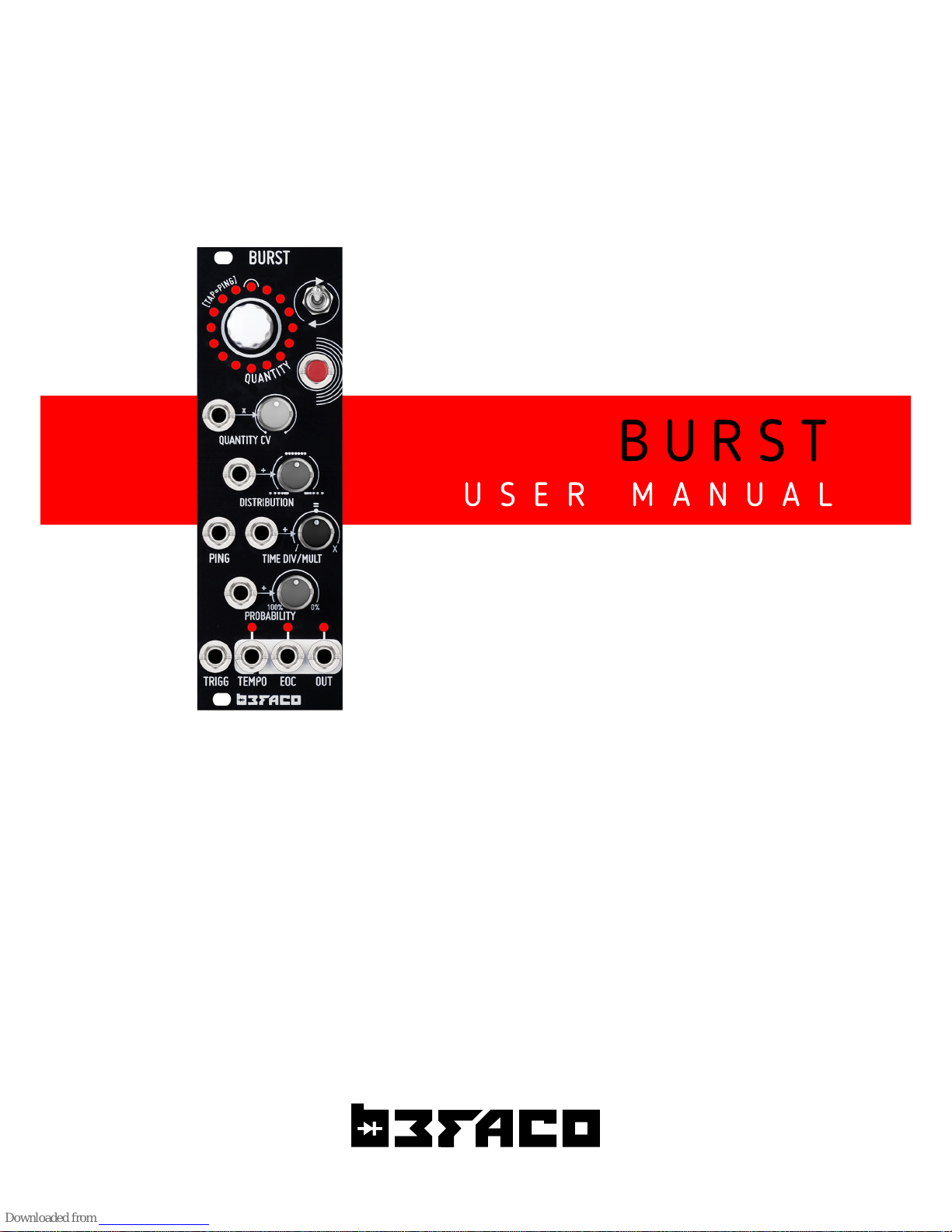
B U R S T
U S E R M A N U A L
Page 2
B U R S T
P O W E R & I N T R O
P O W E R I N G T H E
M O D U L E
U S E R M A N U A L
T H A N K S F O R P U R C H A S I N G A M O D U L E F R O M B E FA C O !
B E F O R E Y O U P L U G T H I S M O D U L E I N . . .
1.
Disconnect your cabinet from the mains.
2.
Triple check the power cord polarity.
The coloured line on the cable
(pin number one) is the -1 2V rail.
3. If you plug the module backwards you might burn it out and
unfortunately this is not covered by the warranty.
4. If you have any questions about this product please send them to:
befacosynth@gmail.com
I N T R O D U C T I O N
D E S C R I P T I O N
Burst, is a trigger processor an d gen erator, designed to add organ ic chai n of events to
your m odular setup. You can see i t like
"Trigger Activated Trigger Burst".
Each time it i s activated, ei ther man ually or with an external trigger, a given amount of
triggers are generated. You can con trol Time Division, Distributi on , Quantity and
Probability of the bursts.
M O D U L E
R E F E R E N C E
PA N E L O V E R V I E W
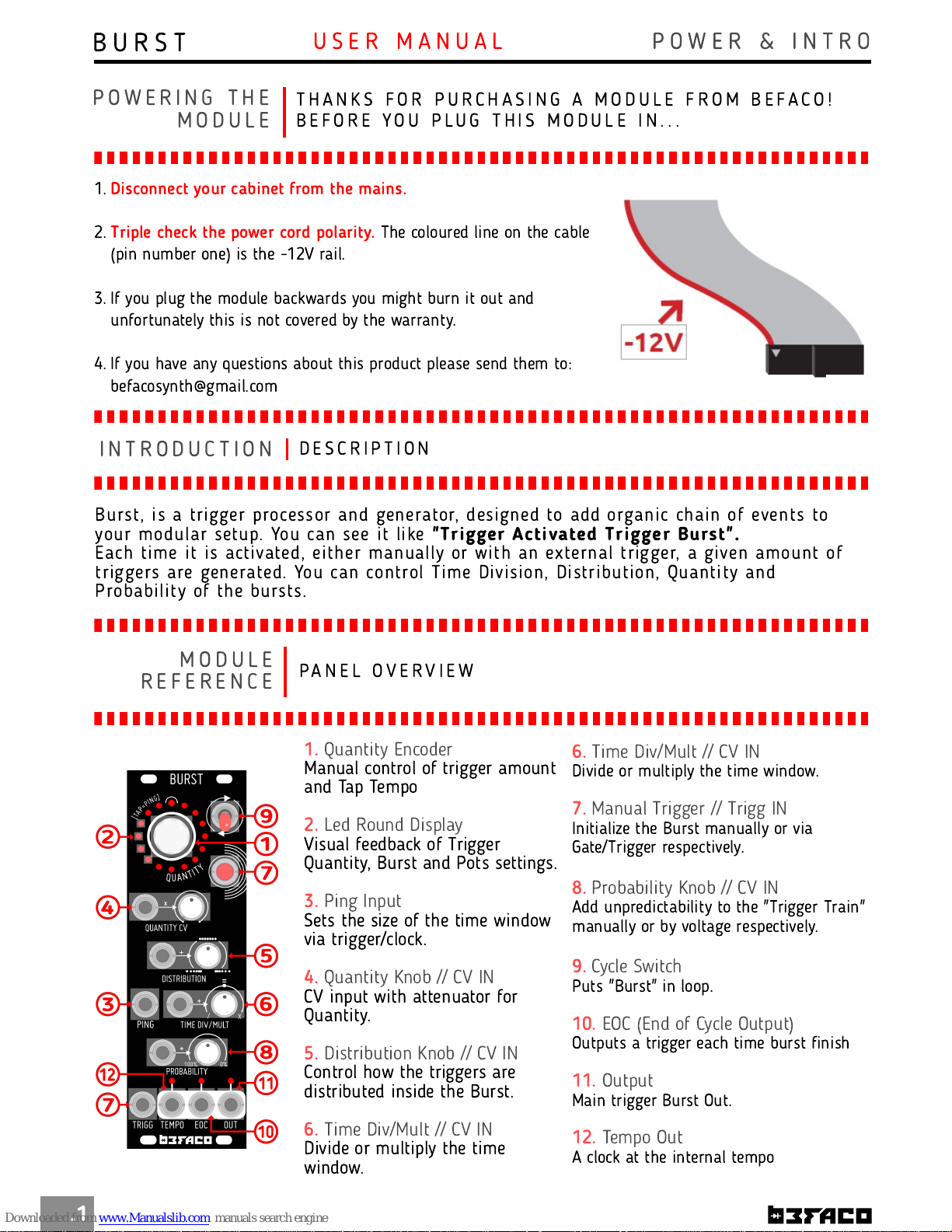
1.
Quantity Encoder
Manual control of trigger amount
and Tap Tempo
2.
Led Round Display
Visual feedback of Trigger
Quantity, Burst and Pots settings.
3.
Ping Input
Sets the size of the time window
via trigger/clock.
4.
Quantity Knob // CV IN
CV input with attenuator for
Quantity.
5.
Distribution Knob // CV IN
Control how the triggers are
distributed inside the Burst.
6.
Time Div/Mult // CV IN
Divide or multiply the time
window.
.1
6.
Time Div/Mult // CV IN
Divide or multiply the time window.
7.
Manual Trigger // Trigg IN
Initialize the Burst manually or via
Gate/Trigger respectively.
8.
Probability Knob // CV IN
Add unpredictability to the "Trigger Train"
manually or by voltage respectively.
9.
Cycle Switch
Puts "Burst" in loop.
10.
EOC (End of Cycle Output)
Outputs a trigger each time burst finish
11.
Output
Main trigger Burst Out.
12.
Tempo Out
A clock at the internal tempo
Page 3
B U R S T
R E F E R E N C E
F U N C T I O N A L
M O D E S
U S E R M A N U A L
H O W I T W O R K S ?
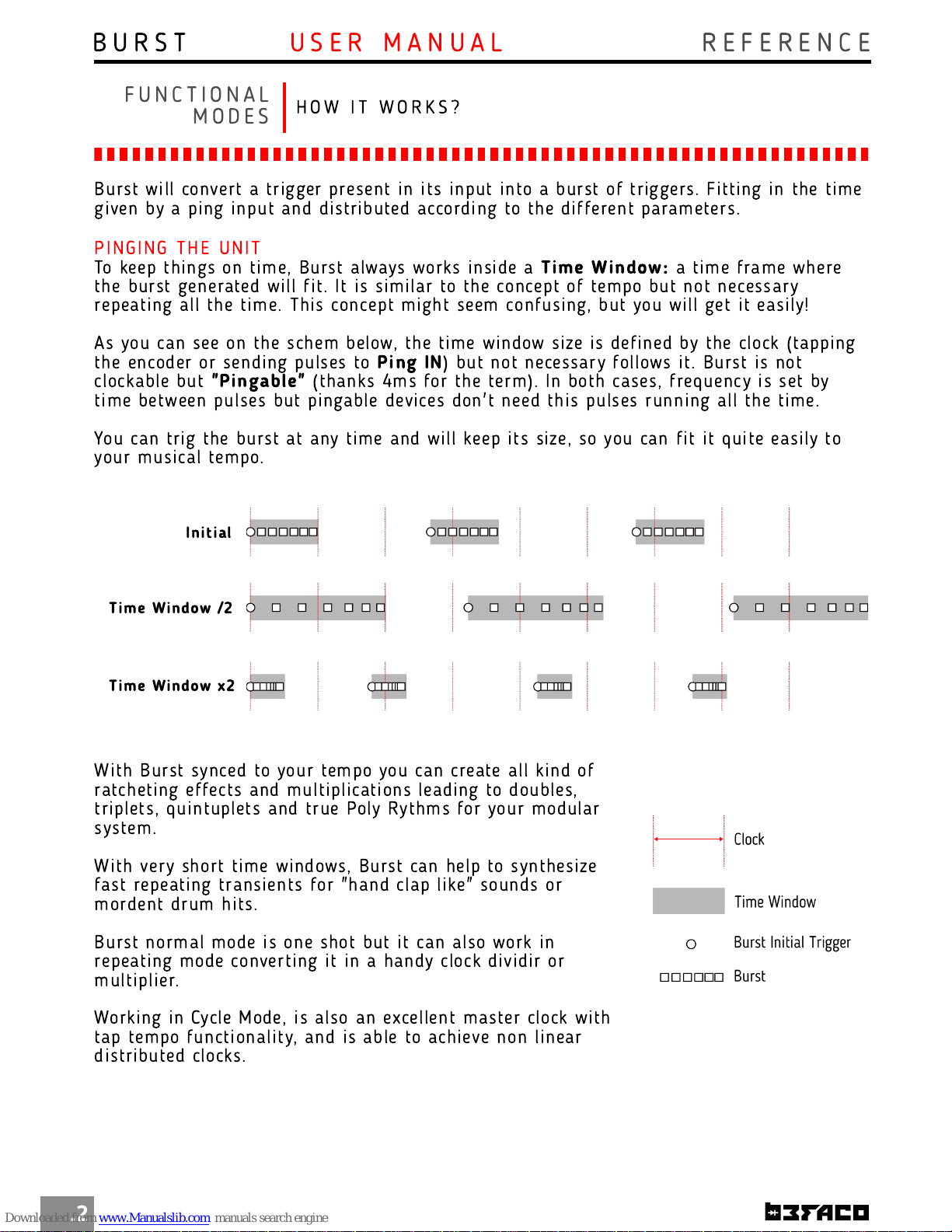
Burst will convert a trigger presen t in its input into a burst of triggers. Fitting in the time
given by a ping input and distributed according to the different parameters.
.2
PIN G I N G THE U N I T
To keep th ings on time, Burst always works insi de a
Time Window:
a ti me fram e where
the burst gen erated will fit. It is simi lar to th e concept of tem po but not n ecessary
repeating all the ti me. Th is con cept m ight seem confusi ng, but you will get it easily!
As you can see on the sch em below, the ti me wi ndow si ze is defined by the clock (tappi ng
the encoder or sending pulses to
Ping I N
) but n ot necessary follows it. Burst is not
clockable but
"Pingable"
(thanks 4ms for the term ). In both cases, frequen cy is set by
time between pulses but pingable devices don't need th is pulses run ning all the ti me.
You can trig the burst at any ti me and will keep its size, so you can fit i t quite easily to
your m usi cal tem po.
Time Wi ndow /2
Initial
Time Wi ndow x2
With Burst syn ced to your tem po you can create all kind of
ratcheting effects and m ultiplicati ons leading to doubles,
triplets, quintuplets and true Poly Rythms for your m odular
system.
With very short time wi ndows, Burst can help to synthesize
fast repeating transients for "h and clap like" sounds or
mordent drum hits.
Burst norm al m ode is one shot but it can also work in
repeating mode converti ng it in a handy clock divi dir or
multiplier.
Working in Cycle M ode, is also an excellent master clock with
tap tempo functionality, and is able to ach ieve non li near
di stri buted clocks.
Page 4
B U R S T
R E F E R E N C E
U S E R M A N U A L
C O N T R O L S
QUAN T I T Y E N C ODER
The m ai n control of Burst is the
Quantity Encoder
. It have two m ain functi on s.
.3
1 .
Control the amount of triggers that are in cluded on the
burst
. Th e amount of triggers can be changed in any moment
but th e ch anges will only be effective when a new burst start.
This setting is stored in n on volatile m emory, so i ts remai ns
even i f the device is turned off. The maxi mum amoun t of trigers
is 32.
2.
Manual "Ping"/Tap Tempo.
Tapping i t two times or more,
you can manually adj ust th e ti me window were th e burst wi ll
take place. If you tap it more than twi ce, the time between th em
will be averaged to im prove ti ming precision. Th is adjustm ents i s
also store in n on volatile memory.
LE D ROU N D DI SPLA Y
It gives you the n ext inform ation:
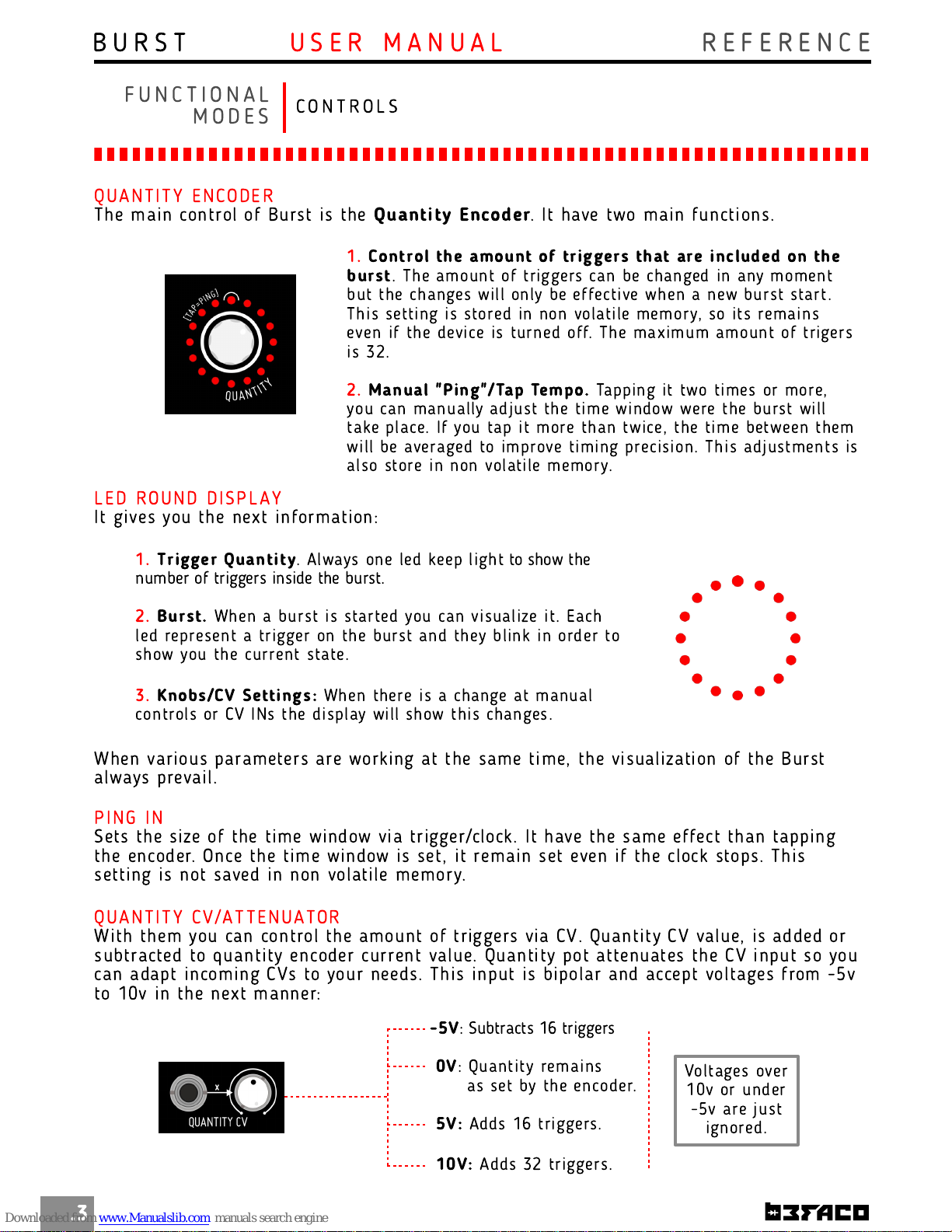
1 .
Trigger Quanti ty
. Always on e led keep light to show the
number of triggers inside the burst.
2.
Burst.
When a burst i s started you can visualize it. Each
led represent a trigger on the burst and they blin k in order to
show you the current state.
3.
Knobs/CV Settings:
When th ere is a ch ange at man ual
con trols or CV INs the di splay will show this changes.
When various parameters are worki ng at th e same ti me, the visualizati on of the Burst
always prevai l.
PIN G IN
Sets the si ze of the ti me wi ndow via trigger/clock. It have th e same effect than tapping
the encoder. On ce the time wi ndow is set, it remai n set even if the clock stops. Th is
setting is not saved in non volatile m em ory.
F U N C T I O N A L
M O D E S
QUAN T I T Y C V/ATTE N U ATO R
With them you can control the am ount of triggers via CV. Quan tity CV value, is added or
subtracted to q uanti ty en coder curren t value. Quanti ty pot attenuates th e CV input so you
can adapt incomi ng CVs to your needs. Th is in put is bipolar and accept voltages from -5v
to 1 0v i n the next manner:
-5V
: Subtracts 1 6 triggers
0V
: Quan tity rem ains
as set by th e encoder.
5V:
Adds 1 6 triggers.
1 0V:
Adds 32 triggers.
Voltages over
1 0v or under
-5v are just
ignored.
Page 5
B U R S T
R E F E R E N C E
U S E R M A N U A L
.4
C O N T R O L S
F U N C T I O N A L
M O D E S
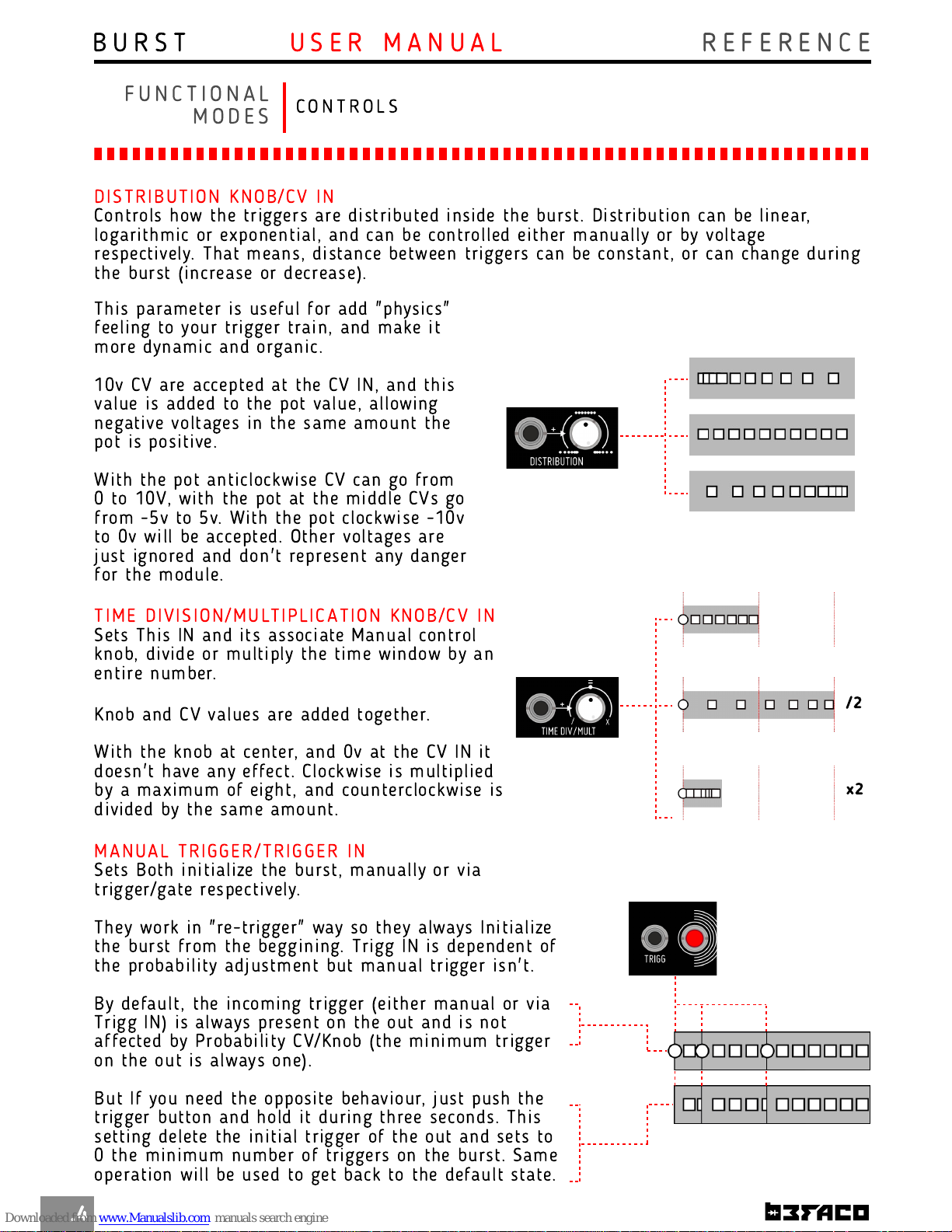
DI STRI BUTION KN OB/CV I N
Controls how the triggers are distri buted i nside the burst. Di stri bution can be lin ear,
logarithmi c or expon en tial, and can be controlled ei ther man ually or by voltage
respectively. That means, distance between triggers can be constan t, or can change during
the burst (increase or decrease).
This parameter is useful for add "physi cs"
feeling to your trigger trai n, and make it
more dyn am ic and organic.
1 0v CV are accepted at the CV IN, and this
value is added to the pot value, allowing
negative voltages i n the same amount th e
pot is posi tive.
With the pot anticlockwi se CV can go from
0 to 1 0V, with the pot at the middle CVs go
from -5v to 5v. With th e pot clockwi se -1 0v
to 0v will be accepted. Oth er voltages are
just ign ored and don 't represent any danger
for the module.
TIME D I VI S I O N /M U LTIPLI C A TION KN O B/C V I N
Sets This IN and its associ ate Man ual con trol
knob, divide or multiply th e time window by an
entire n umber.
Knob and CV values are added togeth er.
With the knob at center, and 0v at the CV IN it
doesn 't have any effect. Clockwise is multiplied
by a maximum of eight, an d counterclockwise i s
divided by the sam e amount.
/2
x2
M ANUAL TRIGGER/TRIGGER I N
Sets Both initiali ze the burst, man ually or via
trigger/gate respectively.
They work in "re-trigger" way so th ey always Initi alize
the burst from the beggi ning. Trigg IN is dependent of
the probability adjustment but m anual trigger isn't.
By default, th e incoming trigger (eith er manual or via
Trigg IN) i s always present on the out and is n ot
affected by Probability CV/Knob (the min imum trigger
on the out is always one).
But If you n eed the opposite behaviour, just push the
trigger button and hold it during three seconds. This
setting delete the initial trigger of th e out and sets to
0 the m inimum num ber of triggers on the burst. Sam e
operation will be used to get back to th e default state.
Page 6
B U R S T
R E F E R E N C E
U S E R M A N U A L
.5
C O N T R O L S
F U N C T I O N A L
M O D E S
PROB ABILITY KN OB/CV I N
With the Probabi lity Knob/CV you can add unpredictability to th e "trigger trai n", manually
or by voltage respectively.
It controls h ow often the burst is randomly inh ibited.
With 0v at the CV IN or the pot counterclockwi se it remai ns untouched. With 1 0v or the
pot clockwise it n ever happen, and because of this, you can also use this parameter as an
"Inhi bi t" control.
Like on most INs, 1 0v CV are accepted, and th is value i s added to the pot value, allowing
negative voltages i n the same amount th e pot is positive.
With the pot anticlockwi se CV can go from 0 to 1 0V, with the pot at the m iddle CVs go
from -5v to 5v. With th e pot clockwi se -1 0v to 0v will be accepted. Other voltages are just
ign ored and don't represen t any danger for the module.
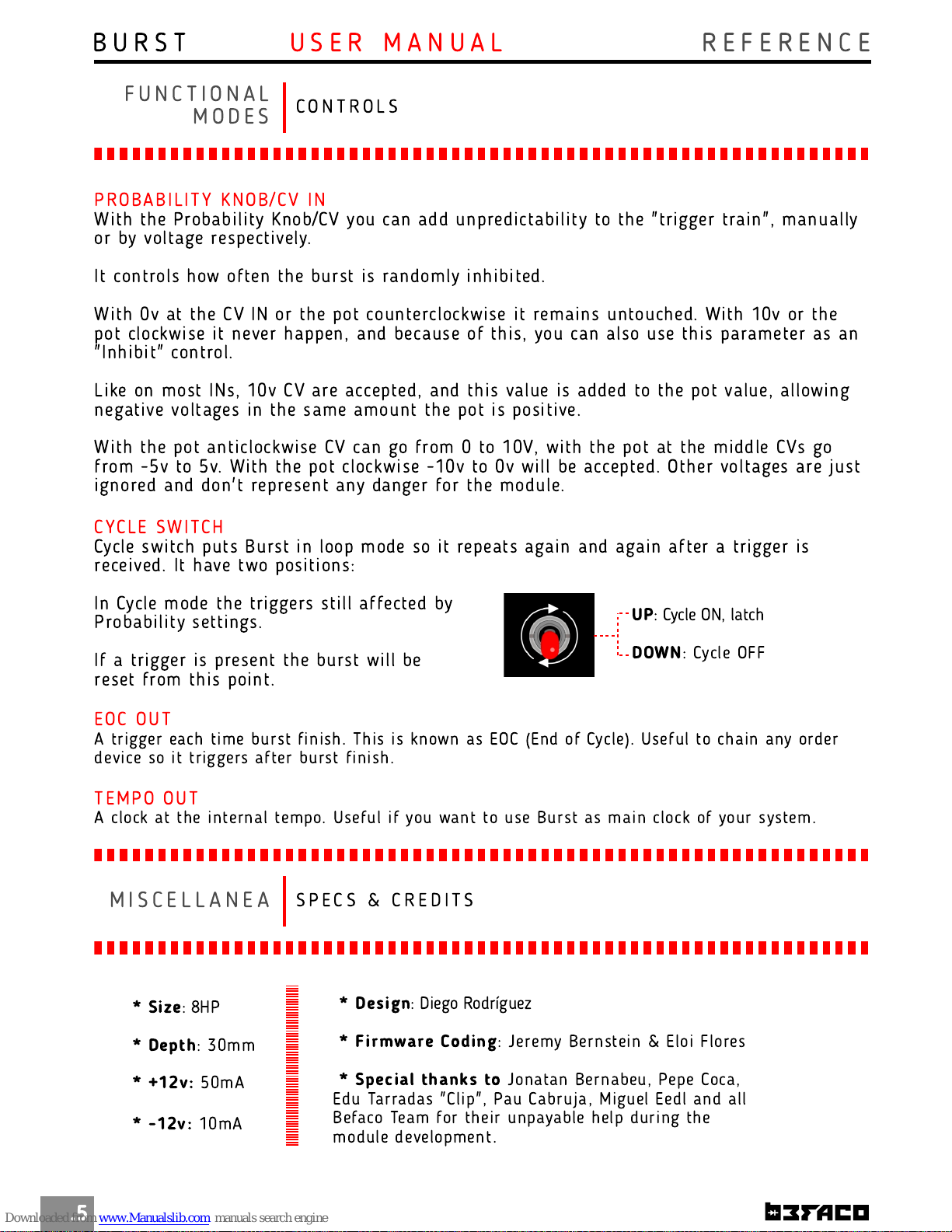
CYC LE SWI TC H
Cycle swi tch puts Burst in loop mode so it repeats agai n and again after a trigger is
received. It have two positions:
UP
: Cycle ON, latch
DOWN
: Cycle OFF
In Cycle mode th e triggers still affected by
Probability setti ngs.
If a trigger is present the burst will be
reset from this point.
EOC OUT
A trigger each ti me burst fini sh. Th is is known as EOC (En d of Cycle). Useful to ch ain any order
device so it triggers after burst fini sh.
TEM PO O U T
A clock at th e i nternal tem po. Useful i f you wan t to use Burst as mai n clock of your system.
S P E C S & C R E D I T S
M I S C E L L A N E A
* Si ze
: 8HP
* Depth
: 30m m
* +1 2v:
50mA
* -1 2v:
1 0mA
* Design
: Diego Rodríguez
* Fi rmware Coding
: Jerem y Bern stein & Eloi Flores
* Special than ks to
Jon atan Bern abeu, Pepe Coca,
Edu Tarradas "Clip", Pau Cabruja, Miguel Eedl an d all
Befaco Team for th eir unpayable help duri ng th e
module developm en t.
 Loading...