

Page 1
http://midi-overdrive-switcher.becosfx.com/
1
TS8-MS Quick Setup
For full product information go to http://midi-overdrive-switcher.becosfx.com/
1. Power off pedal (battery or DC power adapter) and set the Multi Function rotary HEX
switch inside to a position corresponding to the desired setup setting.
2. Push and hold the Footswitch while power on pedal and continue to hold the Footswitch
for at least 3 seconds, until visual indication of LED's confirm saving the setting.
3. Power off pedal. The setting is saved. Power on pedal and start using it.
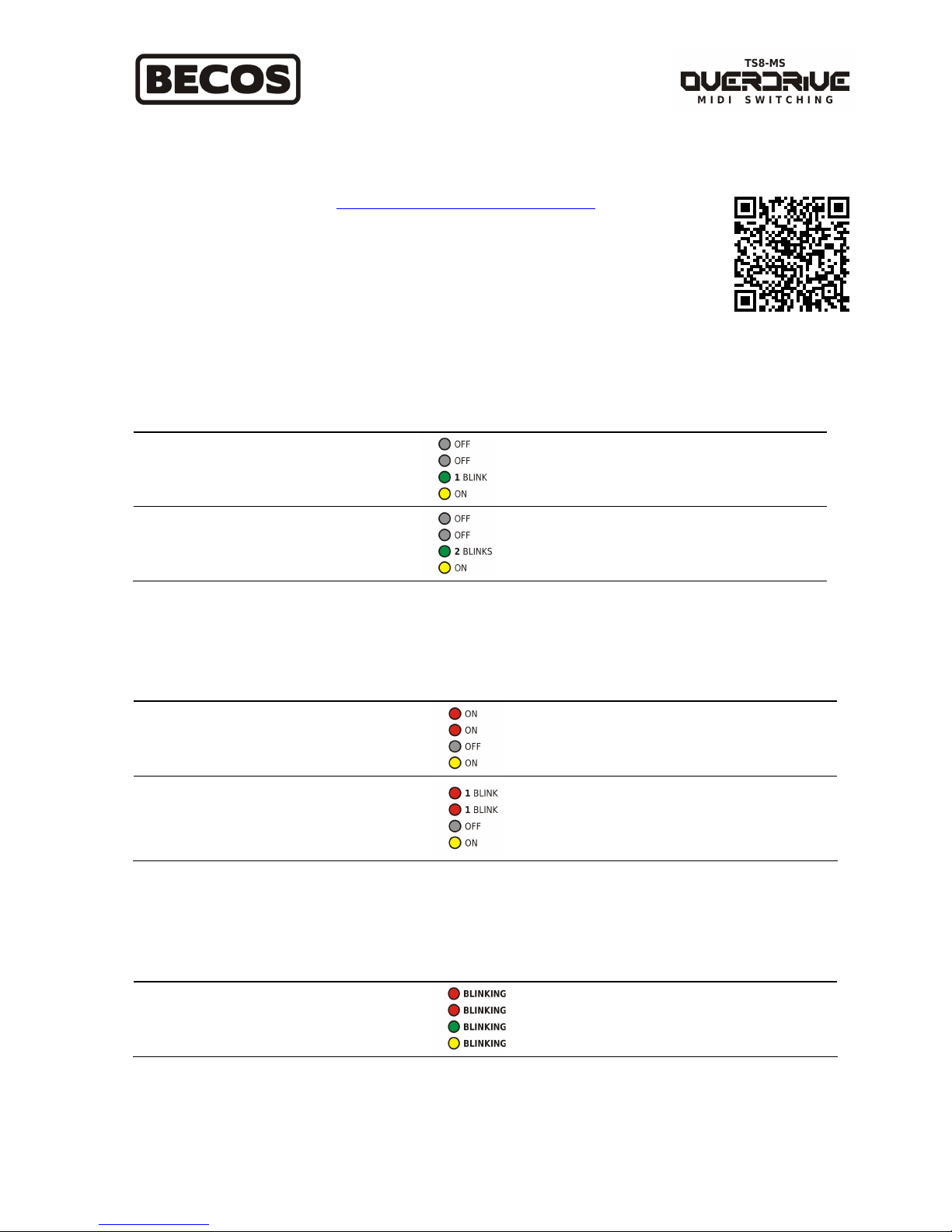
Set the type of Bypass
Bypass Type
Multi Function
Switch Position*
Visual
Indication**
Notes
Buffered Bypass
(factory default)
HEX = A
Silent "soft switching" using FET transistors
placed between input and output buffers. No
sound loss even with long connection cables.
Recommended and used as factory default.
Relay True Bypass HEX = B
Mechanical switching using relays controlled
by a microcontroller. In bypass or without
power, signal goes directly from input to
output. Avoid long connection cables.
Set the switching mode of External Switching Relays
Switching Type
Multi Function
Switch Position*
Visual
Indication**
Notes
Latching Switching
(factory default)
HEX = 0
External Relay switching with latching. When
relays are ON, Tip-to-Ground or/and Ring-toGround are shorted and mentained until OFF
command is initiated.
Momentary
Switching
HEX = 1
External Relay switching is momentary ON.
Tip-to-Ground or/and Ring-to-Ground in the
External Switching 1/4TRS Connector are
shorted momentarely (100ms ON, then OFF)
for either "ON" or "OFF" relay commands.
Reset to Factory Defaults
Reset
Multi Function
Switch Position*
Visual
Indication**
Notes
Factory Defaults HEX = F
Pedal settings are restored to factory defaults.
* After setting procedure is finished (power off), you may need to set the Multi Function switch to a different in operation position than
the one used for setup.
** During setup, LED blinking is continuous until power off. Steady lit LED's remain as such until power off.
Download Full Manual
Page 2
http://midi-overdrive-switcher.becosfx.com/
2
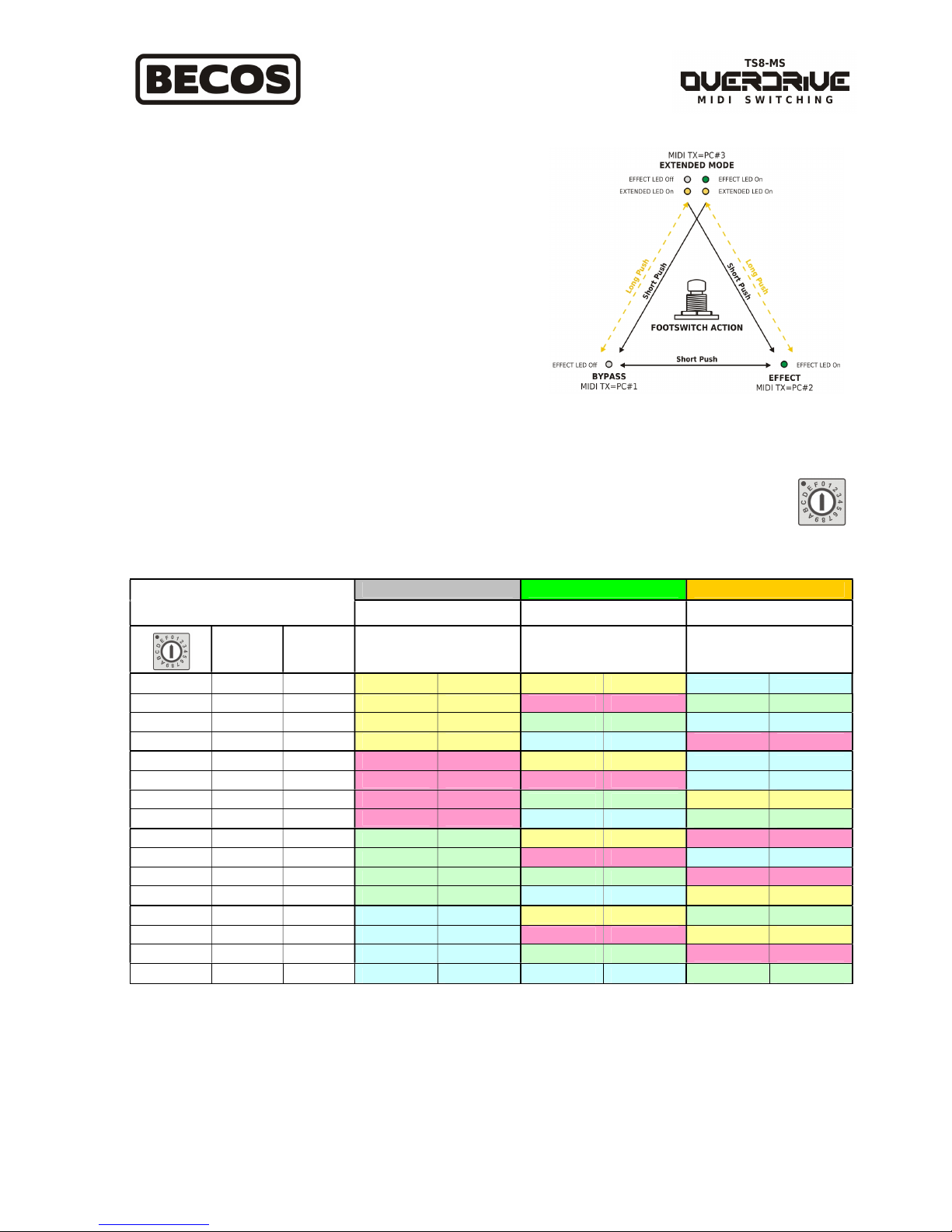
Footswitch Action
You can use pedal footswitch to perform the following actions:
1. Change pedal state: Bypass / Overdrive / Extended (long-
push; pedal state is preserved; only External Switching
Relays are affected).
2. Switch amp channel with each pedal state - see Multi
Function switch and External Switching Relay switching
pattern Table 1.
3. Transmit MIDI Program Change with each pedal state - see
Multi Function switch.
Multi Function Switch
The Multi Function switch inside pedal has 16 positions and it is used to:
1. Set MIDI Channel for Transmit or Receive function (see: How to set pedal to transmit or receive
MIDI).
2. Assign External Switching Relays switching pattern, when pedal footswitch is used.
BYPASS EFFECT EXTENDED
MULTI FUNCTION SWITCH
MIDI Transmit = PC# 1 MIDI Transmit = PC# 2 MIDI Transmit = PC# 3
MIDI Ch.
Transmit
MIDI Ch.
Receive
External
Switching
Relay 1
External
Switching
Relay 2
External
Switching
Relay 1
External
Switching
Relay 2
External
Switching
Relay 1
External
Switching
Relay 2
0 16 OMNI Off Off Off Off
On On
1 1 1 Off Off On Off
Off On
2 2 2 Off Off
Off On On On
3 3 3 Off Off
On On
On Off
4 4 4 On Off Off Off
On On
5 5 5 On Off On Off
On On
6 6 6 On Off
Off On
Off Off
7 7 7 On Off
On On Off On
8 8 8
Off On
Off Off On Off
9 9 9
Off On
On Off
On On
A 10 10
Off On Off On
On Off
B 11 11
Off On On On
Off Off
C 12 12
On On
Off Off
Off On
D 13 13
On On
On Off Off Off
E 14 14
On On Off On
On Off
F 15 15
On On On On Off On
Table 1 - Footswitch Action - External Switching Relays switching pattern and MIDI Channel select
based on Multi Function switch position set (and MIDI Socket used on circuit board: TX or RX)
Note: External Switching Relay 1 = Tip-To-Ground, External Switching Relay 2 = Ring-To-Ground
Page 3
http://midi-overdrive-switcher.becosfx.com/
3
Set TS8-MS pedal to transmit or receive MIDI
Inside the pedal there are two small 4-pin sockets: one socket is for MIDI Receive function (factory default) and another
for MIDI Transmit function. The external 5-pin MIDI connector is connected to the circuit board on one socket or the
other, through a 4-wire jumper cable. Only one function can be used at a time.
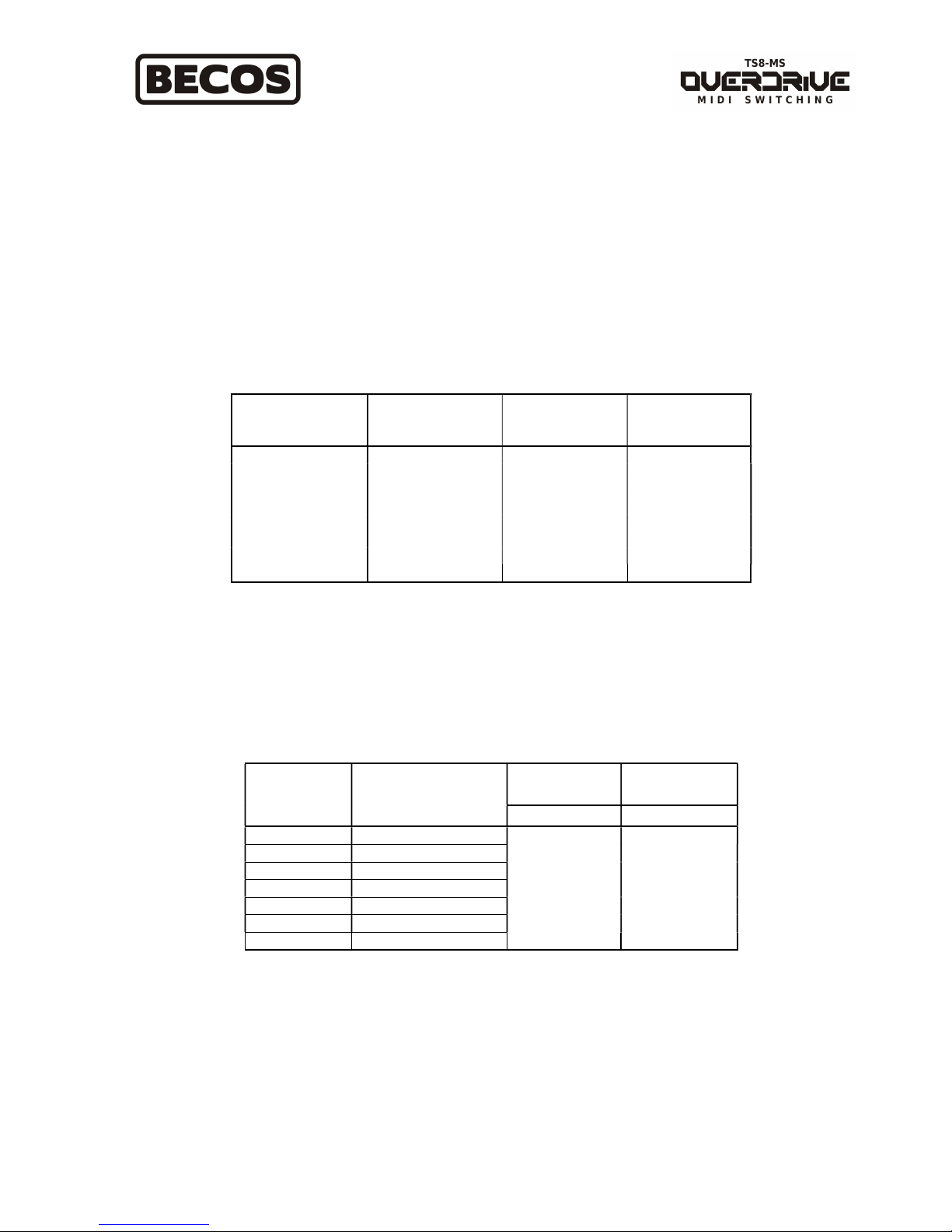
MIDI Control - Program Change
TS8-MS pedal is pre-programmed to respond to the following Program Change numbers:
Program Change
Number
Bypass / Effect
Relay
Switching
Relay 1
Tip-To-Gnd
Switching
Relay 2
Ring-To-Gnd
#50 Bypass Off Off
#51 Bypass On On
#52 Bypass Off On
#53 Bypass On Off
#54 Effect Off Off
#55 Effect On On
#56 Effect Off On
#57 Effect On Off
Table 2 - MIDI Program Change switching options in TS8-MS
MIDI Control - Control Change
TS8-MS pedal is pre-programmed to respond to the following MIDI Control Change numbers:
Relay/LED
OFF
Relay/LED
ON
Control
Change
Number
Relays Controlled
CC Value CC Value
80 Bypass
81 R1
82 R2
83 Bypass, R1, R2
84 Bypass, R1
85 R1, R2
86 Bypass, R2
0-63 64-127
Table 3 - MIDI Control Change switching options in TS8-MS
Note: Bypass = Effect/Bypass Relay. R1 = External Switching Relay 1 (Tip-to-Ground). R2 = External Switching Relay 2
(Ring-to-Ground).
Page 4
http://midi-overdrive-switcher.becosfx.com/
4
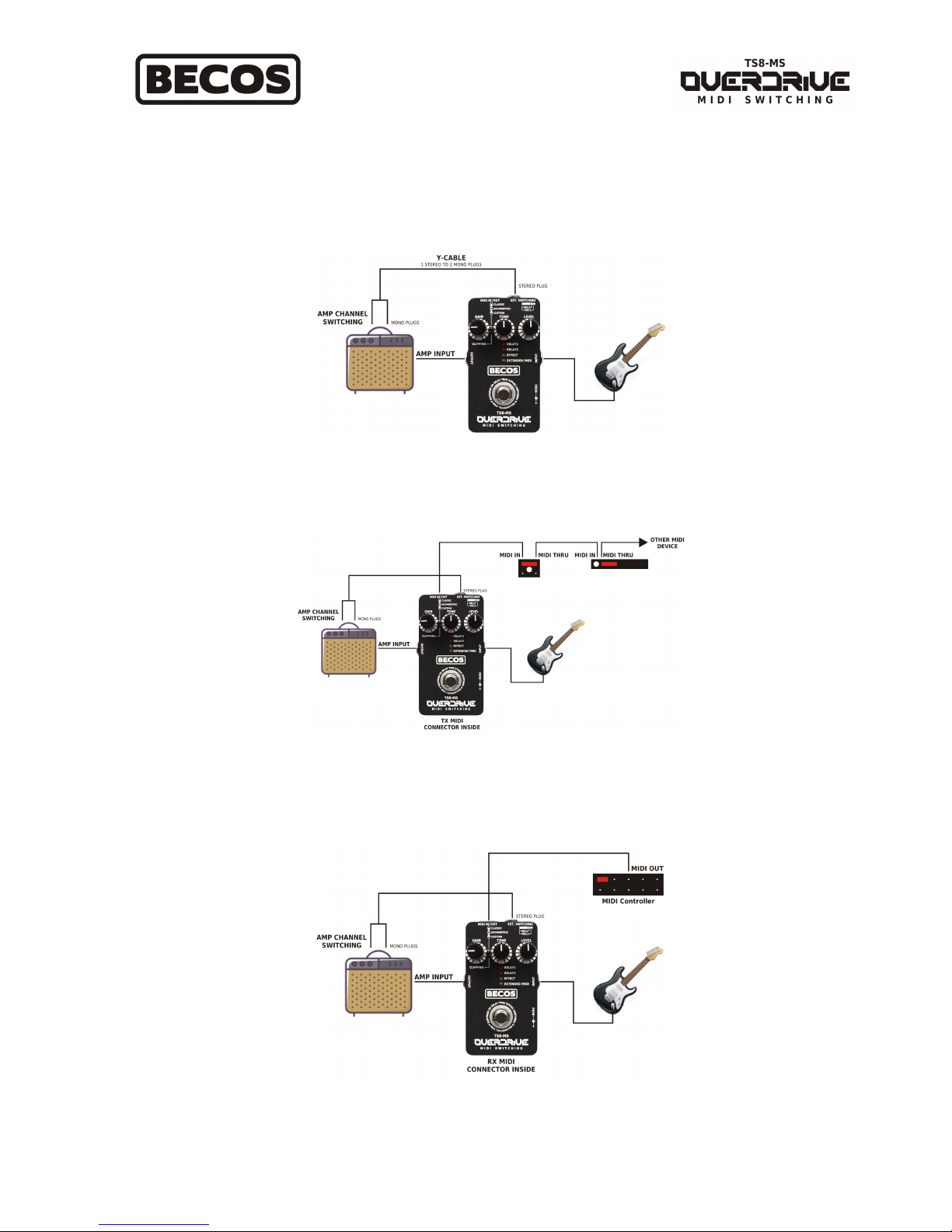
How to use TS8-MS
TS8-MS is an analog overdrive pedal which can be enabled with midi, is a MIDI switcher and a MIDI transmitter in a
box. All of the above function simultaneously in either setup mode. Here are several examples of how you can use it:
Footswitch Action - use TS8-MS as analog overdrive and amp channel switcher
Footswitch Action - use TS8-MS as analog overdrive, switch amplifier channels
and transmit MIDI Program Change messages, all at once
External MIDI Control - switch TS8-MS analog overdrive and amp channels with an external MIDI Controller
 Loading...