

Page 1
b
CIQ-2 COMPIQ MINI PRO COMPRESSOR PEDAL
MANUAL
Last modified: November 18, 2018
SPECIFICATIONS
Input impedance: > 1MΩ
Output Impedance: ~100Ω
Ratio: 1:1 to inf:1
Threshold: -40dB to +10dB
Make-up gain: -20dB to +20dB
0dB input referrence level: -20dBu (77.5mV)
Output noise: -95dBV @0dBV gain
THD: 0.05% for -5dBV input signal level @ 1kHz
Output frequency response: -2dB @ 40Hz; 0dB @ 100Hz - 22KHz
Optimal Power Voltage: 9-12VDC ±10% Center Negative Barrel
DC Power Plug Barrel: Ø 5.1/2.1mm, 12-15mm long
Power Consumtion: < 25mAh
Product Size: Lenght: 39mm, Depth: 92mm, Height: 51mm
Product Weight: 163 gr.
Packed Weight: 183 gr.
ADVICE, WARNING & CAUTIONS
- Read this manual and keep it handy.
- Do not exceed 12VDC (center negative) when powering this pedal.
- Use a DC Power Plug with a barrel longer than 12mm (15mm
recommended).
- Do not place the pedal & batteries in direct sunlight, in extreme
temperature and humidity conditions, or in dusty environment.
- Do not make modifications to the circuit and do not install the
pedal in any other way except as described in this manual.
- As we struggle to improve ourselves and our products, we may
change products specifications, design, and features without notice.
Likewise, this manual may be changed or modified without notice so
we advise you to download it from the website before using the
product.
INTRODUCTION
Thank you for chosing CompIQ MINI Pro Compressor as your audio
dynamic processing tool for your instrument.
CIQ-2 CompIQ MINI is an all analog studio grade compressor
featuring Ratio, Threshold, Make-up Gain manual controls,
Soft/Hard Compression Knee selector, Auto Adaptive Attack &
Release timings which respond to playing dynamics, and Dry/Wet
Mix control for a perfect blend of processed and clean signal. A true
RMS-level detector constantly measures input signal and applies
accurate compression through a transparent sounding, high
performance Blackmer® VCA. The exact amount of compression is
indicated by a 5-LED display.
This compression circuit was designed with guitar and bass in mind,
but make no mistake, it can add warmth and dynamic feeling to
any audio signal, including string instruments, harmonica, brass
instruments, even vocals - with an appropriate preamp.
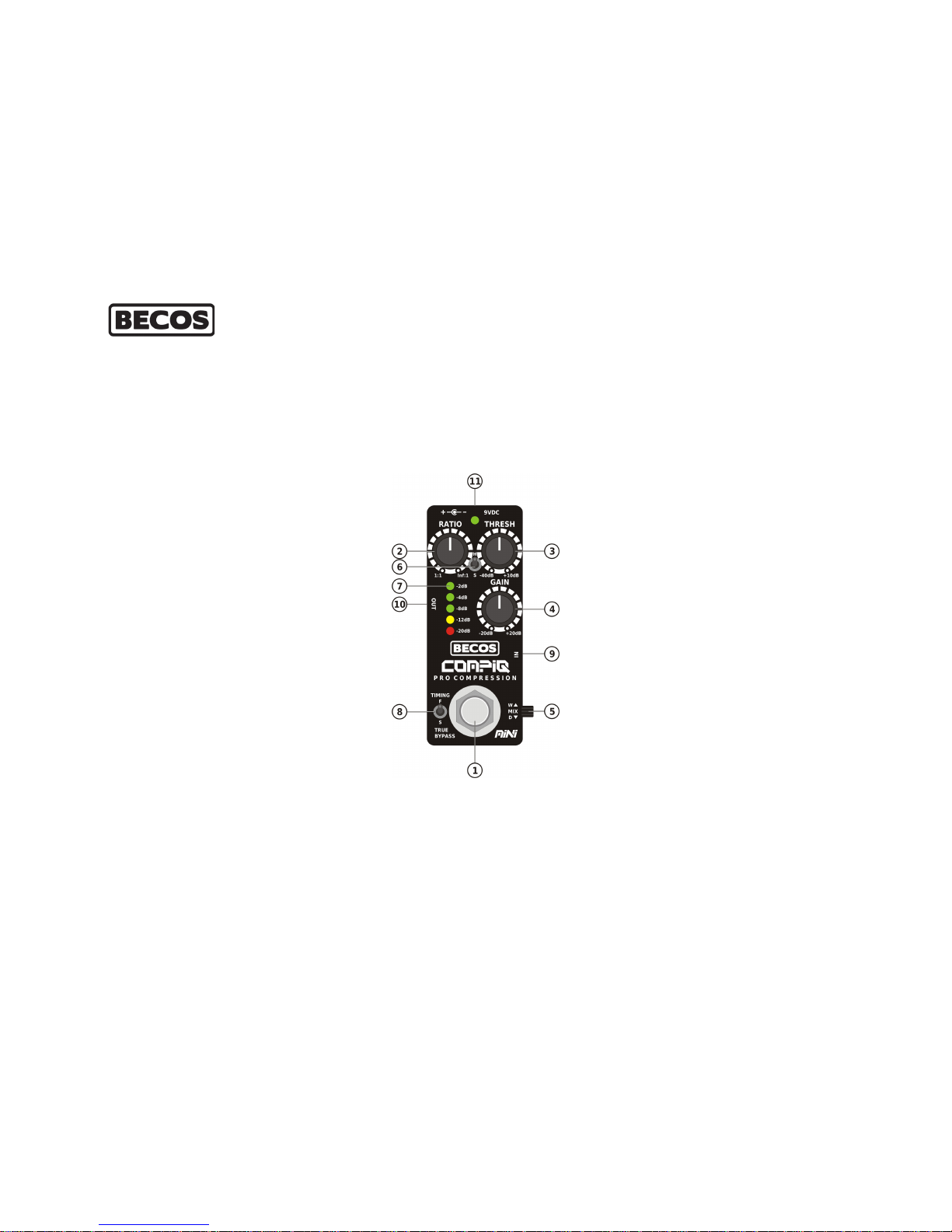
EFFECT CONTROLS
1. FOOTSWITCH - When engaged, the switch routes the audio
signal through the circuitry, and Power LED is lit Green. When
pushed again, the signal is routed in True Bypass from Input to
Output, leaving the audio untouched. This routing is still
available even when pedal is not powered.
2. RATIO - This control sets how much the audio signal is going to
be compressed, after it passes above the set threshold. It has a
continuous range starting from 1:1 (for one unit of input signal
level you get one unit of signal output level; which means no
compression is applied) and up to Infinite:1. At 9'clock, the
control corresponds to 2:1 ratio - a mild, musical and very useful
compression, which delicately evens out signal level jumps. At
12'clock it corresponds to 4:1 ratio - usually set when more
compression feel is desirable, like when playing arpegiated
chords. At 3'clock it corresponds to 10:1 ratio - a rather
aggressive compression, which may be desirable when note
sustain is needed, or a country style music is played. After 20dB
amount of compression, the amplitude reduction tends to
behave like Inf:1 ratio, which corresponds to Limiting effect.
When used as limiter, use Threshold control to set the level after
which compressor will act like a limiter, and set Ratio above 10:1.
Keep in mind that the more compression is applied, the more
make-up gain is needed, which results in a normal increase of
noise.
3. THRESHOLD - This control sets the signal level after which
compression is applied. Compression is only aplied to the
portion of signal that goes above the threshold. Set very low, it
makes the compression kick in immediately even for small input
signals. Set higher, it lets a good portion of the signal untouched.
This is a very powerful control, because it allows the
compression to affect only higher strokes of signal, while leaving
the meat and bone of audio untouched. This also translates into
a greater sound transparency and an increase in output level,
making some make-up gain (or mixing Dry/Wet signals) totally
unncecessary, which, in turn, reduces amplification noise at the
output. Because of the 50dB threshold range, CompIQ can
accomodate a wide range of audio signals from electric
instruments. With an appropriate preamp, it may be used even
with vocal or instrument microphones. When Threshold is set
higher, CompIQ can be used with studio line level signal.
4. MAKE-UP GAIN - Because compression means lowering the
output signal, some recovery gain is needed, to match output
with input level. The more compression is applied (higher
compression ratio), the more recovery gain has to be dialed in
to compensate. Be aware of the fact that at higher compression
ratios, the recovery circuit must re-amplify a very low signal and
with amplification, more noise is introduced. To overcome this,
we strongly advise using Threshold, setting lower compression
Ratios. Ultimately, blend in some dry signal with the Mix control.
However, it makes no sense to over compress a signal at low
thresholds just to recover its gain afterward, and increase
output noise resulted from amplification.
5. DRY/WET MIX - This control acts like an audio mixer, where you
can blend input clean signal with the output compressed signal.
This helps restore some transients or some squished frequencies
which are less perceived by ear, because they are reduced to
lower level, after compression. In the middle, the mix is 50-50.
Page 2

Such a setting washes out a lot of compression feel, and makeup gain must be dialed in quite a bit, to preserve the dynamic
processing feeling. As always, you compromise transparency for
a bit of noise in compression, but that is less noticeable in a mix,
because dry signal is not amplified. The dry signal alone is a
perfect replication of the input signal. When set to 100% dry,
CompIQ MINI acts like a buffer.
6. SOFT/HARD COMPRESSION KNEE - Rarely available in
compression pedals, this control multiplies the compression
flavors that can be achieved. The Hard Knee compression is
evident and the ear will perceive the dynamic processing easely.
Once signal gets above threshold, compression kicks in with a
sharp corner, and with higher compression ratios it makes the
limiting effect obvious - a desirable setting for chic'n'pickin or
country playing style. With lower ratios, it provides a good and
musical compression effect. The Soft Knee compression is more
subtle and is applied progressively, with a soft corner curve. The
effect is gentle and desirable when compression doesn't have to
be obvious (lower ratios up to 4:1), or used as an audio effect.
Think of it like a mastering tool for voicing audio content. With
higher ratios (in between 4:1 and 10:1), it makes for a studio
quality compression effect. Soft Knee is also more usable when
threshold is set low, because it makes the compression more
musical. When Soft Knee is used with higher thresholds, it adds
more transparency to the sound, diluting compression feel.
7. COMPRESSION DISPLAY - A 5-LED display takes precise
information from the RMS-level sensor and compiles a visual
feedback for the amount of compression applied to input signal
that goes above the threshold. The visual indication is calibrated
for -20dBu (77.5mV) input referrence signal level, suitable to a
wide range of electric instrument pickups. The display is very
precise, but is also totally related to input audio signal level,
which is highly dynamic by nature and may vary wildly from
calibrated referrence when using different sources. Even at low
to mid Ratios, if audio input level is higher, the display can peak
Yellow or Red color. Red color does not indicate anything
wrong! This may happen frequently if you have high input signal
levels, lower Threshold and higher Ratio. Use only your ear to
attain the desired compression effect!
8. AUTO ADJUSTING DINAMIC TIMING - Any dynamic processing
requires a precise timing of the Attack and Release of the effect.
CompIQ uses a responsive Auto Adjusting Timing Circuit, which
adapts to playing dynamics. Short and percussive transients are
handled with faster timings, while longer, steady signals, benefit
from slower timings. The circuit responds dinamically to your
playing and is very fast in changing these timings. Attack and
Release timings are applied with softness, which makes this kind
of processing very musical. A manual set of Attack and Release
would hardly match the quality of auto timing of this circuit! On
top of that, the Timing Switch allow you to chose from Fast or
Slower attack & release times. Slower Timings position are
approximately 10-15ms for attack time and 100-220ms for
release time. Faster timings are approximately 5-7ms for attack,
70ms for release. Attack time means the time it takes for the
maximum compression to reach the set amount. Release time
means the time it takes for the compression to return to normal
(input) audio level.
9. INPUT - Here you will connect either an instrument directly, or
the output of another effect or even a microphone preamp, or a
signal taken from the amplifier's SEND FX-loop.
10. OUTPUT - From here you will send the compressed signal to the
next effect pedal, or an amplifier's input, or to the RETURN FXloop of an amplifier. Output signal can also be recorded directly
into a Hi-Z interface input. When not engaged (or powered), the
pedal is in True Bypass.
11. DC POWER CONNECTOR - Use only good filtered power
supplies, with a voltage of 9-12 VDC, with center negative
polarity. Use a DC Power Plug Ø5.1/2.1mm, with a barrel longer
than 12mm (15mm recommended).
LAST WORD
Compressors are usually placed right after an instrument, first in the
signal chain. This is an arbitrary convention. Its placement depends
on what you're trying to achieve. For instance, if a compressor is set
last in the FX loop of an amplifier, it may act like a mastering tool.
The combination of Ratio, Threshold, Make-up Gain and Dry/Wet
Mix manual controls along with Compression Knee and Fast/Slower
Dynamic Timings selectable options, makes this tiny little pedal a
mighty weapon of dynamic processing. You will simply not gonna
find this many features and this quality in such a pedal form factor,
anywhere. You may also use it with vocals or other stringed
instruments like accoustic guitars, violins, celos, or brass instruments
like trumpets.
CompIQ MINI Pro Compressor is fitted with a quiet high quality FET
dual op-amp. We set it in a socket, so you can easily experiment with
other equivalent components. We recommend using IC's like TL072,
NE5532, OPA2134, OP1642, OPA2604.
CIQ-2 COMPIQ MINI PRO COMPRESSOR PEDAL
FOR GUITAR & BASS
MANUAL
Version 1.1
Please check and download latest manual!
Thank you for using BECOS products!
Designed & Hand Made in Romania/EU
www.becosfx.com
 Loading...