

Page 1
1325 Millersport Hwy
Suite 203
Williamsville, NY 14221
Voice 716-689-0871
Toll Free 888-556-3998
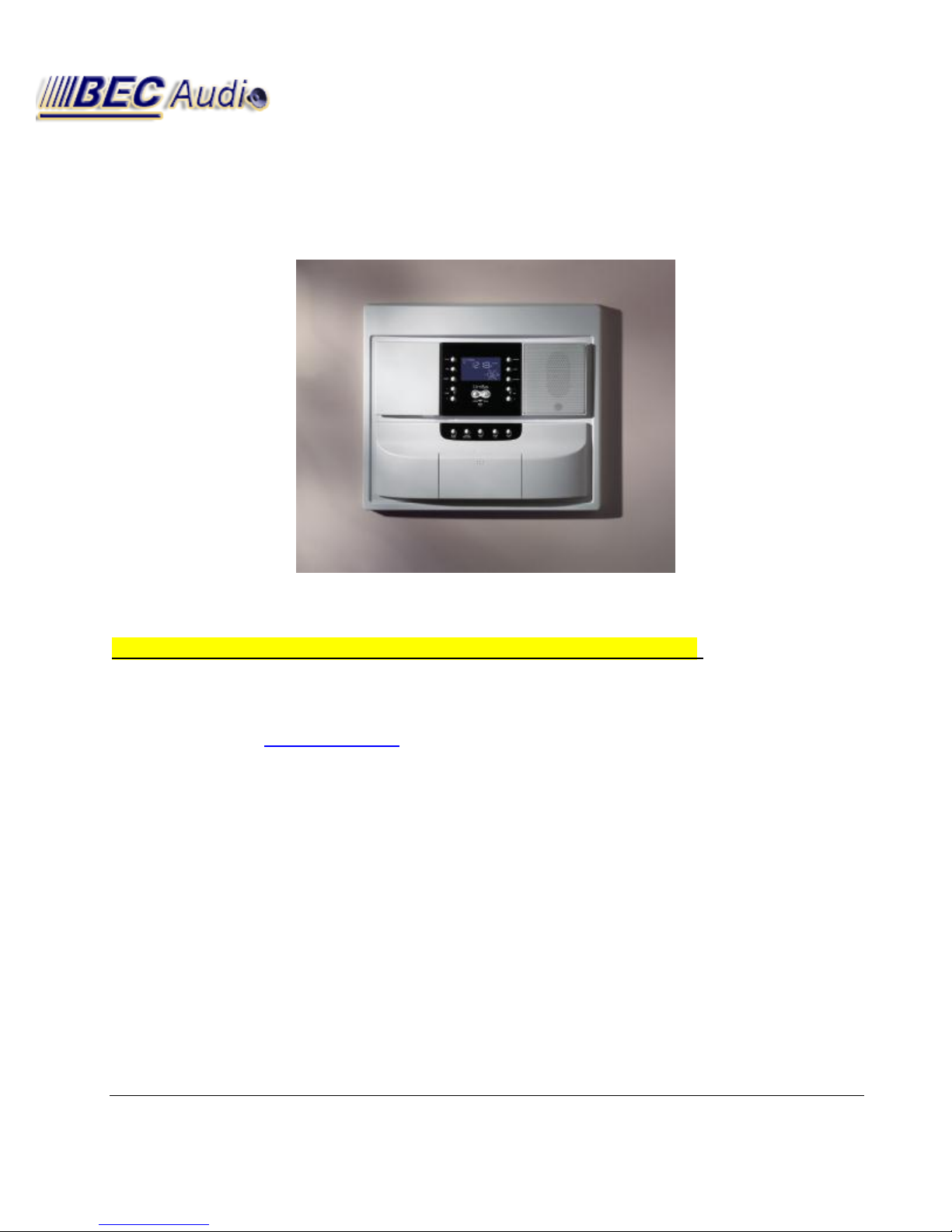
M&S Systems DMC3-4 / DMC1 Troubleshooting Guide
If there is “No Power” on the unit—it will not power up:
· Check that the circuit breaker at the electrical box is on.
· Check that the TE5 transformer is connected correctly. Refer to diagram on the
transformer. (Brown to Yellow 16-18 VAC, Blue to Red 16-18 VAC)
· Check the fuses on the back of the master unit. Replace if necessary (Radio Shack
Part #270-1065).
· Reset master unit by inserting a paperclip in the reset hole, which is located
behind the door.
If the radio reception is poor:
AM
· Check that AM antenna is installed in accordance with finish out
instructions, and connected to tuner module.
1325 Millersport Hwy (Suite 203) Williamsville, NY 14221
Toll Free 888-556-3998 / Main Office #716-689-0871
BEC Audio
Page 2

THE ORANGE ANTENNA WIRE SHOULD BE CONNECTED TO THE OUTSIDE AM
CONNECTOR – THE ONE FURTHEST FROM THE FM CONNECTION.
· Check that TE5 transformer is properly grounded.
· Check that ribbon cable from tuner to circuit board is seated properly.
· Possible defective master.
FM
· Check that FM antenna is installed in accordance with finish out instructions,
and connected to tuner module.
· Check that ribbon cable from tuner to circuit board is seated properly.
· Possible defective master.
If feedback occurs when initiating talk or listen:
· Check that intercom stations are not installed back to back or in the same
wall cavity.
· Check that intercom stations are not installed within 10 feet of each other.
· Check for shorts on intercom station cable runs.
· Reduce intercom volume.
If the CD will not eject the cartridge:
· Check that there are no room station cables or other wires routed behind the mechanism in
the CD chassis.
· Make sure that the CD chassis and plastic faceplate is installed correctly.
· Check that the CD eject PCB is plugged into the mechanism.
If intercom buttons don’t function properly:
· Check that intercom switches are not in the “OFF” position.
· Check that room station and patio connectors are terminated correctly.
1325 Millersport Hwy (Suite 203) Williamsville, NY 14221
Toll Free 888-556-3998 / Main Office #716-689-0871
BEC Audio
Page 3

· Check for shorts or opens on intercom station cable runs.
· Check for shorts or opens on chime module and door station cable runs. (Continuous
chime will lock up the master. See System Diagnostics.)
· Reset master unit by inserting a paperclip in the reset hole, which is located
behind the door.
· Check that there are not a lot of excess room station cables run behind the
master. Bulky wire may cause master circuit boards to compress against each
other and trigger the buttons.
· Check the total length of run isn't above 350' or system over 1000' total
If there is no radio or intercom audio:
· Check that room switches are not in the “OFF” or “MONITOR” position.
· Check that volume settings and controls are set properly. (See AUDIO
SETTINGS)
· Make sure the “SOURCE” selection is correct.
· Check for shorts or opens on intercom station cable runs.
· Check that room station and patio connectors are terminated correctly.
· Reset master unit by inserting a paperclip in the reset hole, which is located
behind the door.
· Possible defective master.
If the unit has hum, popping, or audible oscillation:
· Check that room station and patio connectors are terminated correctly.
(Remove room stations from the master one at a time to identify the source of
the interference.)
· Check for shorts on intercom station cable runs.
· Check that cable runs are not too close to AC lines.
· Check that room stations and master are not mounted too close to electrical
equipment. (i.e. TV, Cordless phones, microwave oven, etc.)
1325 Millersport Hwy (Suite 203) Williamsville, NY 14221
Toll Free 888-556-3998 / Main Office #716-689-0871
BEC Audio
Page 4

· Check that master is on a dedicated 120 Volt 15 amp circuit breaker.
· Possible defective transformer (TE5).
· Possible defective master.
If there is no communication to the door:
· Make sure to perform “DOOR TALK” correctly. (press “Listen” and “Talk”
simultaneously to talk to the door. Release to listen to the door).
· Check that door speaker is connected properly at master unit and door
station.
· Check for short or open on door station cable.
· Check that master is not in “off” position
· Check that intercom and master volume levels are set properly.
· Possible defective door station.
· Possible defective master.
If there is no chime, or continuous chime:
· Check that the chime module (MC3 or MC8) is connected correctly to the
master unit.
· Check that the bell button wires are connected to screws on back of bell
button. (Bell button should be lit if connected properly to the chime module.)
· Check that room switches at master are in “RADIO INT” or “INTERCOM”
position. (No chime when stations are switched to the “Monitor” or “Off”
position.)
· Check that “INTERCOM VOLUME” and room station volume controls are
adjusted properly. (See AUDIO SETTINGS.)
· Check for short or open on bell button wires. (Short will cause Error 9).
· Possible defective chime module.
1325 Millersport Hwy (Suite 203) Williamsville, NY 14221
Toll Free 888-556-3998 / Main Office #716-689-0871
BEC Audio
Page 5

If the room station does not function properly:
· Check that room station and patio station connectors are terminated
correctly. (Make sure there are no loose or broken wires and that the correct
color code was used to connect the room stations.)
· Check for shorted or open room station cable run.
· Possible defective intercom station.
· Possible defective transformer (TE5).
· Possible defective master.
For DMC 4 wire: If all else fails, try unplugging all wires EXCEPT GREEN:
Add all RED wires one at a time, checking for Master Talk and Music
Add all WHITE wires one at a time, checking for Listen and Talk
Add all BLACK wires one at a time.
System Diagnostics:
· To put the dmc master into “test mode,” press VOLUME UP and TUNE UP
simultaneously. The display will show the version number of the software (e.g “1.7”)
and the word “test”.
· To display stored error messages press TUNE DOWN and “PRESET”
simultaneously. This will display the last four error codes.
· To exit error codes, press TUNE DOWN and “PRESET” simultaneously.
· To exit “test” press VOLUME UP and TUNE UP simultaneously
1325 Millersport Hwy (Suite 203) Williamsville, NY 14221
Toll Free 888-556-3998 / Main Office #716-689-0871
BEC Audio
Page 6

Code
Description
Possible Causes
1
CD Mechanism Failure
Improperly inserted or defective cable,
defective Compact Disc,
or defective mechanism
2
CD Mechanism Thermal Protection
Improper installation,
or defective mechanism
3
CD communications failure
Control cable not connected,
no power to the mechanism,
or defective mechanism
4
FM Tuner Frequency Lock Failure
Improper AM antenna installation,
ribbon cable not seated correctly,
defective tuner module,
or defective master
5
Room Station Control
Shorted cable run,
incorrect terminations,
defective room station
Too Long of a single or combined
cable run (single 350'/comb 1000')
6
Patio Control
Shorted cable run,
improper termination,
defective patio station
7
Disc Data Error
Compact Disc dirty or damaged
9
Continuous Chime
Stuck bell button,
short on door station cable run,
or defective chime module
dmc1 Error Codes
1325 Millersport Hwy (Suite 203) Williamsville, NY 14221
BEC Audio
Toll Free 888-556-3998 / Main Office #716-689-0871
Page 7

Audio Settings
Function
Recommended Setting from
Software VER 1.7 and 1.9
Master Volume
10
Loudness
On
Treble
10
Bass
8
Balance (optional mc960PA only)
0
Intercom Volume
10
Function
Recommended Setting from
Software VER 2.4 and later
Master Volume
25
Loudness
On
Treble
10
Bass
8
Balance (optional mc960PA only)
0
Intercom Volume
25
Volume
· Music—Adjusts the volume for system music
· Master Station—Adjusts the volume for the speaker on the Master Station only
· Intercom—Adjusts the volume for the system intercom
Tone
· Loudness
· Treble
· Bass
· Balance (if you have the optional stereo power amplifier)
1325 Millersport Hwy (Suite 203) Williamsville, NY 14221
BEC Audio
Toll Free 888-556-3998 / Main Office #716-689-0871
Page 8
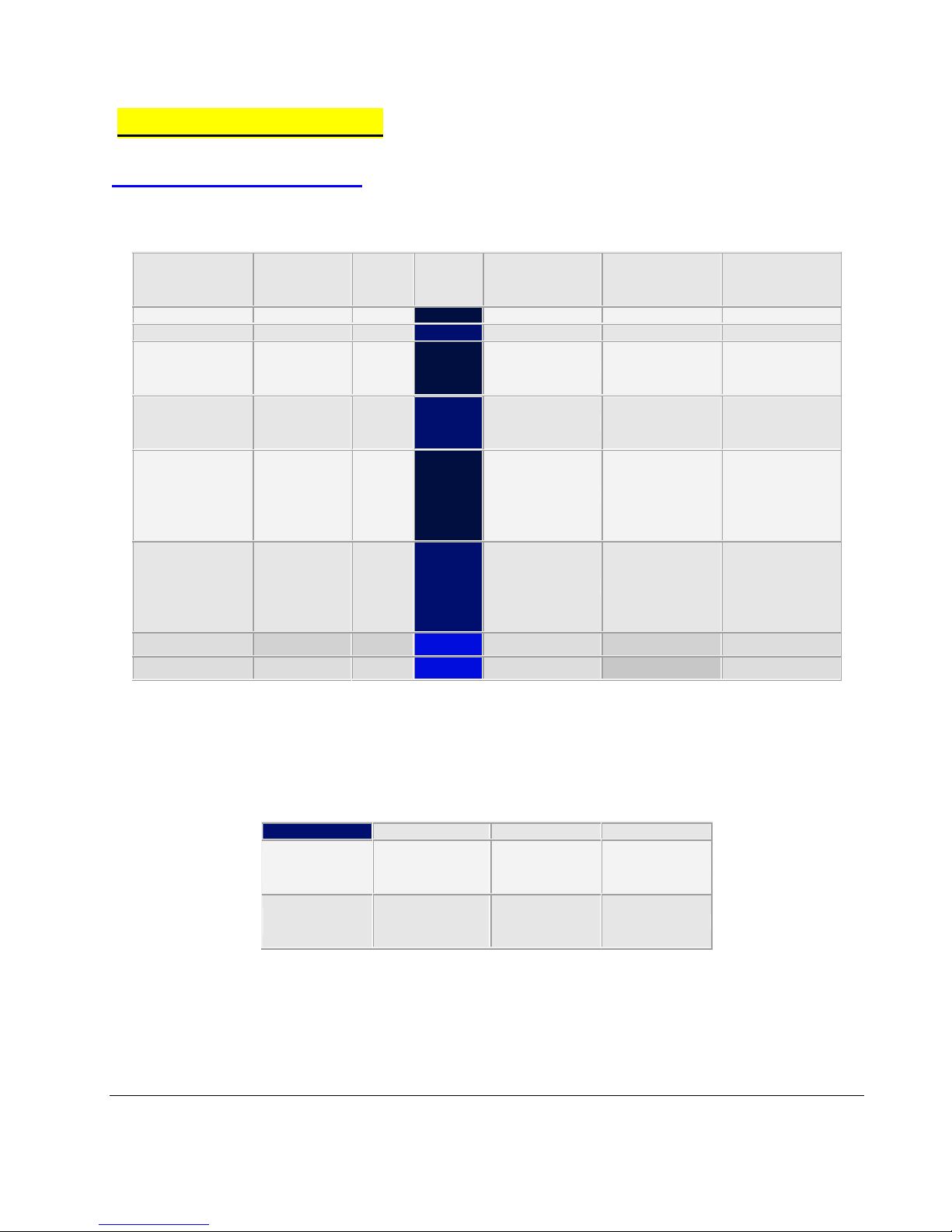
CAT5
FUNCTION
M&S
MS7
M&S
MS6
NUTONE
IW6
RITTENHOUSE
8 CONDUCTOR
RITTENHOUSE
7200
ORANGE
IC INPUT
BLUE
BLUE
ORANGE
GREEN
GREEN
ORANGE/WHITE
IC INPUT
YELLOW
YELLOW
ORANGE/WHITE
YELLOW
YELLOW
BLUE
ROOM/PATIO
A/D
RED
RED
BLACK
RED
BLUE
GREEN/WHITE
RELAY
CONTROL
BLACK
BLACK
BLACK/WHITE
BLACK
BLACK
BLUE/WHITE
&
BROWN
GROUND
WHITE
WHITE
RED/WHITE
WHITE
WHITE
BROWN/WHITE
&
GREEN
AUDIO
GREEN
GREEN
RED
BLUE
BROWN
NOT USED
VIOLET
ORANGE
NOT USED
GREY
Polarity
CAT5
45 Ω SPEAKER
MVC1
Positive +
Green and
Brown/White
Red
Violet
Negative -
Brown and
Blue/White
Black
Blue
Useful Information
DMC 1 Wire Functions
CAT5 – Retrofit Wire Conversion Chart
1325 Millersport Hwy (Suite 203) Williamsville, NY 14221
45 Ω Polarity Chart
FOR MONO SPEAKERS ON dmc1 MASTER UNIT
BEC Audio
Toll Free 888-556-3998 / Main Office #716-689-0871
Page 9
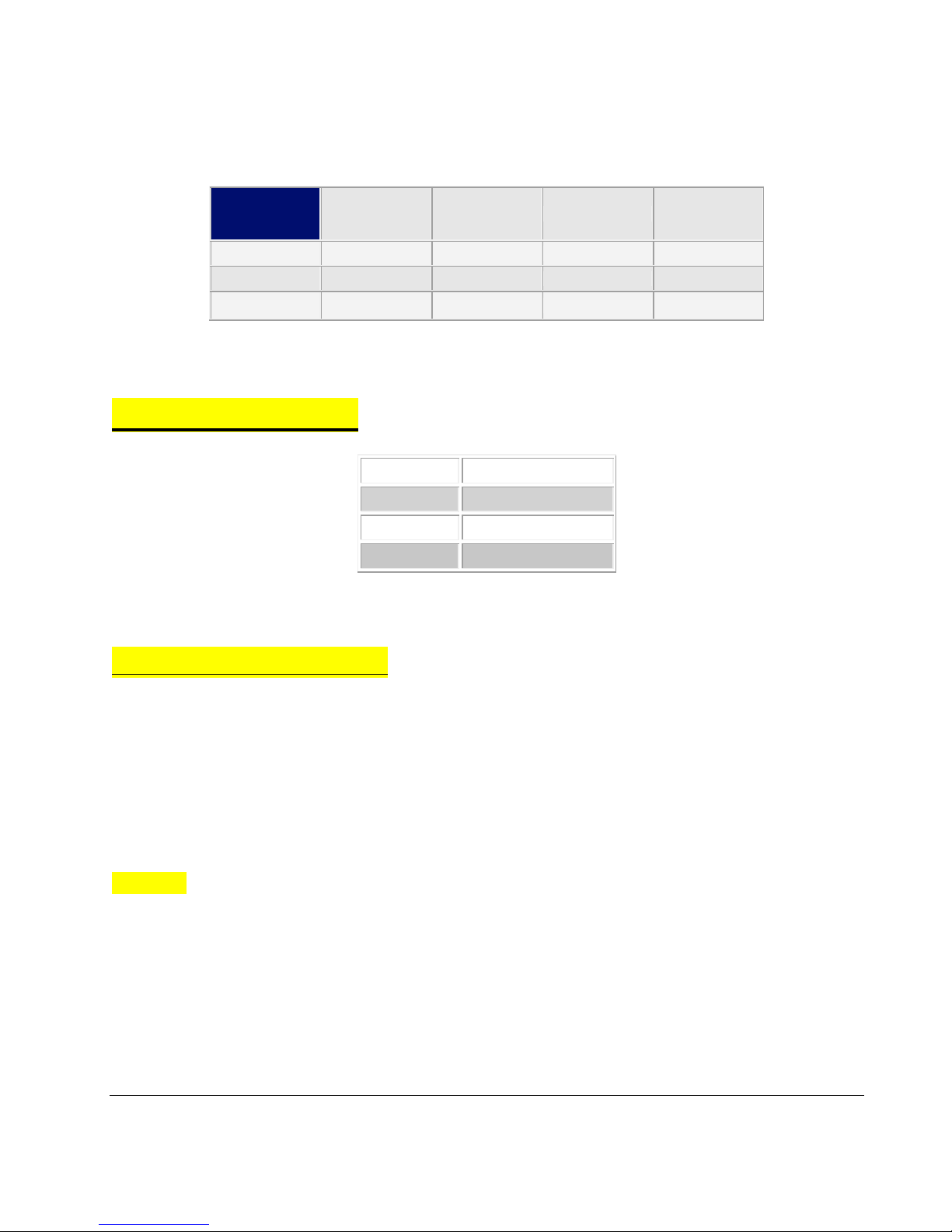
Polarity
SVC96
45 Ω
Speaker
MS2SXSC
MS5XSC
Left +
Green
Red
Violet
Green
Right +
Violet
Red
Violet
Violet
Negative -
White
Black
Blue
White
Black
Relay
Red
Common
White
Audio Out
Green
Audio In
DMC 3-4 Wiring
45 Ω Polarity Chart
FOR STEREO SPEAKERS ON MC960PA
4 Wire Troubleshooting
Remove patio black and see if intercom can speak to master
THIS TROUBLESHOOTING INFORMATION IS ONLY FOR A 4-WIRE SYSTEM
TEST FROM MASTER ONLY
1st. STEP
Remove “PATIO BLACK” Wire
Test Communication From Master Out To Your Room/Patio Stations.
If Room Stations Still Can Not Hear You Or Can Barely Hear You, Do Not Add The Patio Black
Wire Back Just Yet Just Set It Aside.
1325 Millersport Hwy (Suite 203) Williamsville, NY 14221
BEC Audio
Toll Free 888-556-3998 / Main Office #716-689-0871
Page 10

2nd STEP
There Will Be A Large Lifted Screw Terminal Labeled “BLACK” Remove ALL The Wires From
That Screw Terminal, Then Test Communication Again.
** IF YOU ARE NOW ABLE TO TALK OUT OF THE MASTER UNIT
Put All BLACK Wires Back ONE At A Time (Test Communication Every Time You Add A Black
Wire) Until You Find The One That Is Locking Up Your System Or Causing The Volume To Drop.
*** REMEMBER After Testing A Wire And If It Works Do Not Remove The Wire Keep It Under
The Large Lifted Screw Terminal And Add In Another Wire To It, We Need To Put A Load On
The System.
** IF YOU ARE STILL NOT ABLE TO TALK OUT OF MASTER
Then Keep All BLACK Wires Removed And Now Remove All The WHITE Wires, Then Test
Communication Again.
If At The Point You Are Able To Talk Out To The Room Stations At A Normal Volume Then Go
Ahead And Put All Your BLACK Wires Back, Then Test Communication Once Again.
If You Can Still Communicate Put All WHITE Wires Back ONE At A Time (Test Communication
Every Time You Add A White Wire) Until You Find The One That Is Locking Up Your System Or
Causing The Volume To Drop.
*** REMEMBER After Testing A Wire And If It Works Do Not Remove The Wire Keep It Under
The Large Lifted Screw Terminal And Add In Another Wire To It, We Need To Put A Load On
The System.
Visit BEC Audio
www.BECAudio.com
1325 Millersport Hwy (Suite 203) Williamsville, NY 14221
Toll Free 888-556-3998 / Main Office #716-689-0871
BEC Audio
 Loading...