

Page 1

QUICK START GUIDE
“b” logo on cover prints PMS Red 186C
Page 2

EN When “b” is ashing, go to device
to connect.
FR Lorsque “b” clignote, approchez
l’appareil pour effectuer
la connexion.
ES Cuando “b” parpadee, seleccione
el dispositivo que desea conectar.
IT Quando il pulsante “b” lampeggia,
effettuare il collegamento con
il dispositivo.
DE Wenn das “b” zu blinken beginnt,
wechseln Sie zum Herstellen
einer Verbindung zum
entsprechenden Gerät.
NL Wanneer de “b”-knop knippert,
gaat u naar het toestel om het
te verbinden.
GETTING STARTED
EN To turn on your PillTM, press
power button.
FR Pour mettre en marche votre
Pill
TM
, appuyez sur le bouton
d’alimentation.
ES Para encender su PillTM, pulse el
botón de encendido.
IT Per accendere il diffusore PillTM,
premere il pulsante di alimentazione.
DE Drücken Sie den Netzschalter, um
Ihren PillTM einzuschalten.
NL Druk op de startknop om uw PillTM
aan te zetten.
Page 3

EN Charge your Pill™ using the Micro
USB cable provided.
FR Rechargez votre PillTM en utilisant le
câble Micro USB fourni.
ES Cargue su Pill™ con el cable Micro
USB incluido.
IT Ricarica del diffusore Pill™ con il
cavo Micro USB fornito in dotazione.
DE Laden Sie Ihren Pill™ nur mit dem
mitgelieferten Micro-USB-Kabel.
NL Laad uw Pill™ op via de
meegeleverde Micro USB-kabel.
EN
For NFC Paring, touch your device to the
pairing icon on the side of your PillTM.
FR Pour l’Appairage NFC, mettez en
contact votre appareil avec le
symbole d’appairage situé sur le
côté de votre Pill
TM.
ES Para Efectuar la Sincronización NFC,
presione el icono de sincronización
del dispositivo en el lateral de su PillTM.
IT Per l’Associazione NFC, toccare
il dispositivo in corrispondenza
dell’icona di associazione posta su
uno dei due lati di PillTM.
DE Um ein NFC-Pairing herzustellen,
berühren Sie mit Ihrem NFC-fähigen
Gerät das Paring-Symbol an der Seite
Ihres Pill™
NL Voor NFC-Pairing houdt u uw toestel
tegen het pairingsymbool aan de
zijkant van uw PillTM.
Page 4

EN Charge your phone or USB device
using the Charge Out port.
FR Rechargez votre téléphone ou votre
appareil USB à l’aide du port de
rechargement (Charge Out).
ES Cargue su teléfono o dispositivo
USB mediante el puerto de Salida
de Carga.
IT Ricarica del telefono o di un
dispositivo USB attraverso la presa
“Charge Out”.
DE Über den Ladeanschluss können
Sie ein Mobiltelefon oder
USB-Gerät laden.
NL Laad uw telefoon of USB-toestel via
de Laaduitgang.
EN Access PillTM Charge Out by pulling
and rotating rubber port cover on foot.
FR Accédez au port de rechargement
(Charge Out) du PillTM en tirant et
faisant pivoter le cache du port en
caoutchouc sur le pied.
ES Acceda a la Salida de Carga de
PillTM tirando y girando la cubierta de
caucho del puerto situado en la base.
IT Accedere alla presa “Charge Out”
del diffusore PillTM tirando e facendo
ruotare il relativo coperchietto
in gomma.
DE Den Ladeanschluss des Pill™ legen
Sie frei, indem Sie gleichzeitig an
der Gummiabdeckung am Fuß des
Geräts ziehen und drehen.
NL Trek en draai aan het rubberen
poortkapje aan de onderkant voor
toegang tot de PillTM Laaduitgang.
Page 5
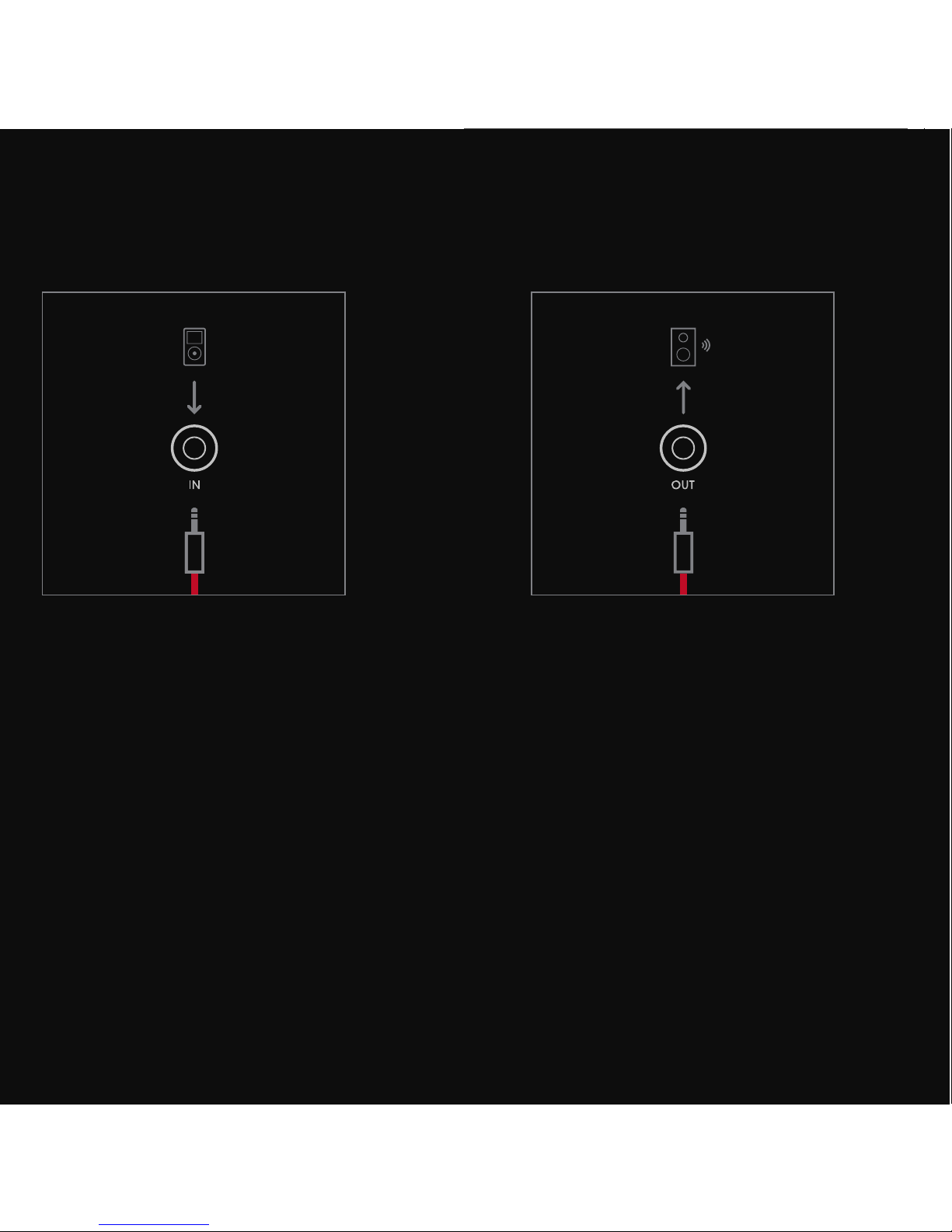
EN To connect to an alternate audio
system, plug cable into the “OUT”
jack on back of the Pill
TM
.
FR Pour connecter à un autre système
audio, branchez le câble dans la
che “OUT” située à l’arrière du Pill
TM
.
ES Para conectarse a un sistema
de audio alternativo, conecte el
cable en la toma “OUT” de la parte
posterior de Pill
TM
.
IT
Per collegare un altro sistema audio,
inserire il cavo nella presa “OUT” posta
sul lato posteriore del diffusore PillTM.
DE
Um eine Verbindung mit einem
alternativen Audio-System herzustellen,
schließen Sie das Kabel an die “OUT”Buchse an der Rückseite des Pill™ an.
NL Om een verbinding met een ander
audiosysteem te maken, steekt u
de kabel in de “OUT”-poort aan de
achterkant van de PillTM.
EN To connect via AUX cable, plug
cable into the “IN” jack on the back
of the Pill
TM
.
FR Pour connecter par un câble AUX,
branchez le câble dans la che “IN”
située à l’arrière du Pill
TM
.
ES Para establecer una conexión con
un cable AUX, conecte el cable en la
toma “IN” de la parte posterior de PillTM.
IT Per eseguire il collegamento tramite
cavo AUX, inserire il cavo nella presa
“IN” che si trova sul lato posteriore
del diffusore PillTM.
DE Um eine Verbindung über ein AUX-
Kabel herzustellen, schließen Sie
das Kabel an die “IN”-Buchse an der
Rückseite des Pill™ an.
NL Voor een AUX-verbinding steekt u
de kabel in de “IN”-ingang aan de
achterkant van de PillTM.
Page 6

EN To connect and disconnect
Bluetooth®, press and hold “b”
3 seconds.
FR Pour connecter et déconnecter le
Bluetooth
®
, appuyez sur “b” pendant
3 secondes.
ES Para conectar y desconectar el
Bluetooth®, mantenga pulsado “b”
durante 3 segundos.
IT Per attivare e disattivare la
connessione Bluetooth®, premere
e tenere premuto per 3 secondi il
pulsante “b”.
DE Um eine Bluetooth®-Verbindung
herzustellen oder zu unterbrechen,
halten Sie die Taste “b” 3 Sekunden
lang gedrückt.
NL Om een Bluetooth®-verbinding te
maken of te verbreken, houdt u de
“b”-knop 3 seconden ingedrukt.
EN To disconnect NFC, touch your
device to the pairing icon on the side
of your Pill™.
FR Pour déconnecter l’appairage NFC,
mettez en contact votre appareil
avec le symbole d’appairage situé
sur le côté de votre Pill™.
ES Para desconectar la NFC, presione
el icono de sincronización del
dispositivo en el lateral de su Pill™.
IT Per disattivare la connessione NFC,
appoggiare il dispositivo sull’icona
relativa alla funzione di pairing che
si trova sul lato del diffusore Pill™.
DE Um die NFC-Verbindung zu trennen,
berühren Sie mit Ihrem NFC-fähigen
Gerät das Paring-Symbol an der Seite
Ihres Pill™.
NL Om de NFC-verbinding te verbreken,
houdt u uw toestel tegen het
pairingsymbool aan de zijkant van
uw Pill
TM
.
Page 7

PILL CONTROLS
Answer, Répondre, Responder,
Rispondi, Annehmen, Beantwoorden
End Call, Raccrocher,
Reproducir/Pausa, Termina
Chiamata, Gespräch beenden,
Oproep beëindigen
Volume Control, Contrôle
du Volume, Control del
Volumen, Regolazione
Volume, Lautstärkeregelung,
Volumeregeling
Internal Microphone, Microphone
Interne, Micrófono Interno,
Microfono Interno, Internes
Mikrofon, Interne Microfoon
Next Track, Piste Suivante, Pista
Siguiente, Brano Successivo,
Nächster Titel, Volgend Nummer
x2
Previous Track, Piste Précédente,
Pista Anterior, Brano Precedente,
Vorheriger Titel, Vorig Nummer
x3
Play/Pause, Lecture/Pause,
Reproducir/Pausa, Riproduci/
Sospendi, Wiedergabe/Pause,
Spelen/Pauzeren
Page 8

NEED MORE INFORMATION?
Firmware Updates
Mises à Jour du Firmware
Actualizaciones de Firmware
Aggiornamenti del Firmware
Firmware-Aktualisierungen
Firmware-updates
User Guide
Guide de l’Utilisateur
Guía del Usuario
Guida per l’Uso
Gebrauchsanweisung
Gebruikershandleiding
beatsbydre.com/support
Product Registration
Enregistrement du Produit
Registro del Producto
Registrazione del Prodotto
Produktregistrierung
Productregistratie
Helpful Tips
Conseils Utiles
Consejos Útiles
Suggerimenti Utili
Nützliche Hinweise
Nuttige Tips
Page 9

Bluetooth® and the Bluetooth® logo are registered trademarks of Bluetooth SIG, Inc. “beats by dr. dre” and
“beats” are registered trademarks of Beats Electronics, LLC. “pill” and the “b” logo are trademarks of Beats
Electronics LLC.
Bluetooth
®
et le logo Bluetooth® sont des marques déposées de Bluetooth SIG, Inc. “beats by dr. dre” et “beats”
sont des marques déposées de Beats Electronics, LLC. “pill” et le logo “b” sont des marques déposées de Beats
Electronics, LLC.
Bluetooth
®
y el logotipo de Bluetooth® son marcas comerciales registradas de Bluetooth SIG, Inc. “beats by dr.
dre” y “beats” son marcas comerciales registradas de Beats Electronics, LLC. “pill” y el logotipo “b” son marcas
comerciales registradas de Beats Electronics LLC.
Bluetooth
®
e il logo Bluetooth® sono marchi registrati di Bluetooth SIG, Inc. “beats by dr. dre” e “beats” sono
marchi registrati di Beats Electronics, LLC. “pill” e il logo “b” sono marchi di Beats Electronics LLC.
Bluetooth
®
und das Bluetooth®-Logo sind eingetragene Marken von Bluetooth SIG, Inc. “beats by dr. dre” und
“beats” sind eingetragene Marken von Beats Electronics, LLC. „pill“ und das „b“-Logo sind Marken von Beats
Electronics, LLC.
Bluetooth
®
en het Bluetooth® logo zijn gedeponeerde handelsmerken van Bluetooth SIG, Inc. “beats by dr.
dre” en “beats” zijn gedeponeerde handelsmerken van Beats Electronics, LLC. “pill” en het “b” logo zijn
handelsmerken van Beats Electronics LLC.
© 2013 Beats Electronics LLC
780-00015-03-AModel No. B0513
Page 10

beatsbydre.com
facebook.com/beat sbydre
@beatsbydre
 Loading...