

Page 1
SL645
SILVER LINE
ENGLISH
Instructions for Use
Read and observe the following information and keep the
instructions for use for future reference!
WARNING!
Safety indications
●Explosion hazard!
●Use only the mains power supplies supplied!
●Use only rechargeable batteries supplied or equivalent!
●Always treat batteries and rechargeable batteries with caution
and use batteries and rechargeable batteries only as described.
●Never mix rechargeable batteries with batteries.
●Never use rechargeable batteries or batteries with dierent
capacities or states of charge.
●Avoid using defective rechargeable batteries or batteries.
●Death hazard for pacemaker users!
●Maintain a safety distance of at least 15 cm from pacemaker
users.
●Choking hazard due to small parts, protective lms and
packaging!
●Keep this packaging out of the reach of children!
●Rechargeable batteries and batteries can cause damage to
health and the environment!
●Do not open, damage, swallow or disperse accumulators and
batteries in the environment. These can contain heavy metals
harmful and damaging for the environment.
ATTENTION!
●Risk of material damage.
●Avoid exposure to smoke, dust, vibrations, chemicals,
●humidity, heat and direct sunlight.
●Repairs should only be entrusted to qualied personnel from the
technical assistance service.
Note that some services of your mobile phone may need to
be activated by this provider before you can use it.
USE ACCORDING TO THE INTENDED USE
This mobile phone allows you to make phone calls and send
SMS. Any other use is considered improper. Observe local laws
and regulations. Unauthorized modications or changes are not
allowed. Do not open the appliance for any reason, nor carry out
repairs on your own initiative.
OBJECT SUPPLIED
1 mobile phone, 1 rechargeable lithium-ion battery, 1 user manual,
1 charging station
Charge the rechargeable battery
Charge the rechargeable battery for the rst time for at least
12 hours, then fully charge and discharge it for a few cycles.
This prolongs the useful life of the rechargeable battery.
Place the portable unit in the charging station.
COMMISSIONING
Insert SIM card and rechargeable battery
●The SIM card can be damaged.
●Be careful to keep the SIM card clean and intact. Insert the SIM
card from the correct side.
●The rechargeable battery or phone can be damaged.
●Make sure that the rechargeable battery is inserted correctly.
Switch the phone o before removing the battery compartment
cover. Switch the device on again only after having installed the
battery compartment cover.
Remove the battery compartment cover, insert the SIM card Insert
the battery, install the battery compartment cover
EN
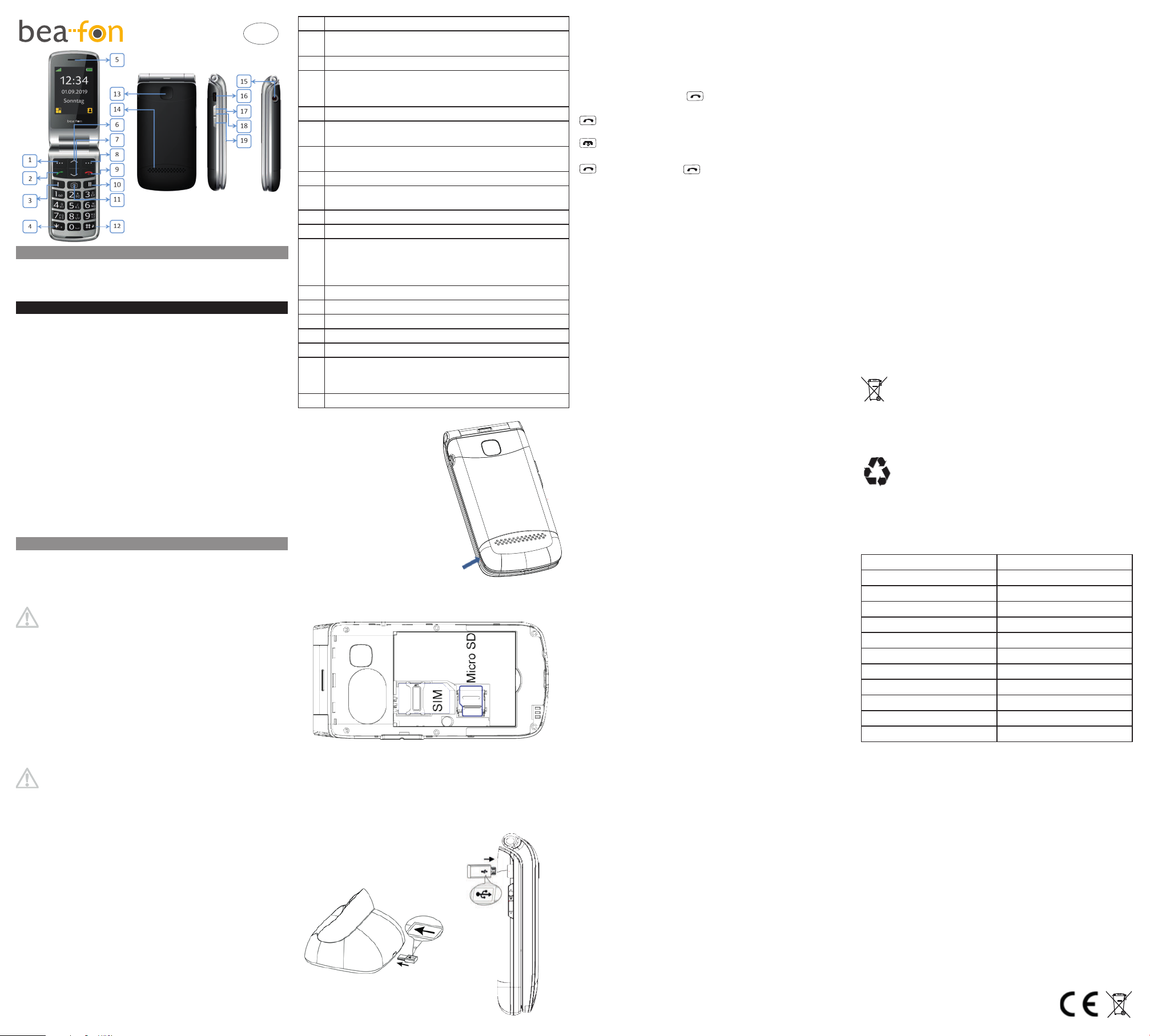
1 Left menu key / Main menu
2 Green Call key / Call logs
To access the call log from standby
3 M1 one-touch key
4 Key *
Press this key in standby mode to access the following
characters: */+/P/W.
5 Speaker
6 Direction button (up)
In standby mode, access the SMS menu;
7 Direction button (down)
In standby mode, access to photos contacts
8 Right menu key / In standby mode, access the directory
9 Turn the phone on or o, end a call, reject a call
10 M2 one-touch key
11 Camera key
12 Hash # key
Press and hold in standby mode to enable/disable the
silent mode.
In writing mode, it allows you to change the input method.
13 Emergency call button
14 Polyphonic speakers
15 Headphone input (3.5 mm)
16 Micro USB charging port
17 Volume up (+) key
18 Flashlight
Press and hold the volume up key 17 or volume down key
19 key to turn the ashlight on/o
19 Volume down (-) key
Insert the SIM/microSD card
The phone must be turned o
and disconnected from the
charger.
To remove the battery
compartment cover from the
back, press with the thumb nail
on the bottom left of the cover.
Insert the SIM card carefully into the space provided.
Charge the rechargeable battery
There are two options for charging the battery:
A. Charging base
B. Battery charger
1. Insert the charger connector into the phone.
2. Connect the charger to a power outlet.
SET THE DISPLAY LANGUAGE
<Menu> --> <Settings> OK
<Phone settings> OK <Language> OK
[Choose a language] OK
CALL
Dial
[Insert the phone number]
Answer a call
End a call
Redial from the call list
--> [Select an entry]
STRUCTURE AND FUNCTIONS MENU
PHONE CONTACTS
<Menu> --> <Contacts> OK
■Add new contact ■Speed dial ■Direct number
■Photocall ■Settings
MESSAGES
<Menu> --> <Messages> OK
■Write message ■Inbox ■Drafts ■Outbox
■Sent messages ■Broadcast ■Voicemail ■Message settings
CALL LIST
<Menu> --> <Call log> OK
■Missed calls ■Outgoing calls ■Received calls
■All calls ■Delete call logs
ORGANIZER
<Menu> --> <Organizer> OK
■Alarm ■Event ■Calculator ■Calendar ■Services
MULTIMEDIA
<Menu> --> <Multimedia> OK
■Camera ■Image viewer ■FM radio ■File manager
SETTINGS
<Menu> --> <Settings> OK
The number is
♦User profiles (Ringtone settings)
♦SOS
■SOS alarm ■Set SOS number ■SOS message
♦Phone settings
■Time and date ■Language ■Pref. input method ■Display
■LCD backlight
♦Call settings
■Caller ID ■Call waiting ■Call divert
■Call barring ■Blacklist ■Call time reminder
■Answer mode
♦Network settings
■Network selection ■ GPRS connection ■GPRS transfer pref.
♦Security settings
■SIM security ■Phone security (Phone lock, Change password
(Default PIN: 0000)
♦Connectivity
■Bluetooth ■Data Accounts
♦Restore factory settings
(NOTE: When the factory settings are restored, all personal
settings will be lost!)
Volume control
During a phone call, use the volume up and down keys to adjust
the volume.
SOS description
The SOS app is a simple function that can save human lives in
critical moments. You can save all the desired contacts in the app
and send them a notication via SMS.
The numbers of the SOS app, which can be saved in the desired
sequence, will be automatically selected in the event of an
emergency by holding down the emergency call button on the back
of the phone for about 2 seconds.
Once the emergency call is activated, an alert tone audible to
people nearby will sound.
Then, an emergency SMS will be sent to all saved emergency
numbers, if the function has been enabled.
The telephone then dials the rst number saved in the SOS app; if
no one answers, automatically dials the next number and so on.
The phone will try to reach the emergency contact for about 19
seconds (call conrmation tone). If the call is not answered, the
phone automatically stops the operation and goes on to call the
next SOS number.
This feature prevents calls from being forwarded to voicemail.
In Europe, most operators expect calls to be forwarded to
voicemail after about 20-25 seconds.
Declaration of conformity
Bea-fon Mobile GmbH hereby declares that the SL645 model
complies with the essential requirements and other applicable
provisions of the EU Directive (RED) 2014/53/UE. The full text of
the declaration of conformity can be requested at any time.
You can download a copy of the declaration of conformity from our
home page at: http://beafon.com/service/certication/
Limitation of liability
Bea-fon Mobile GmbH will not be responsible for any indirect,
special, accidental or unavoidable injuries resulting from the use of
this product regardless of whether they are foreseeable or not.
The manufacturer declines any responsibility in relation to any
losses caused by natural disasters (such as earthquakes, oods,
etc.), or other events or accidents (such as improper, deliberate
or accidental use, during these accidents or in other unusual
circumstances) beyond the responsibility of the manufacturer.
The commercial warranty period is 24 months from the date of
purchase (for accessories, 6 months)
Further information
If you have questions or for more information about our products,
you can visit our website at www.beafon.com or contact us directly.
E-mail: [email protected]
Address
BEAFON MOBILE GmbH
4722 Peuerbach
Enzing 4
Austria
Disposal
If you no longer want to use your device, please bring it to
the collection center of your municipality's waste treatment
organization (e.g. recycling center). According to the law on
electrical and electronic devices, owners of used devices are
required to put all used electrical and electronic devices in a
separate collector. The icon indicated means that you should never
throw your device into household waste!
You are required by law to dispose of your batteries and
rechargeable batteries at a battery dealer and at collection
centers responsible for their disposal, which make suitable
containers available. Their disposal is free. The icon
indicated means that you should never throw batteries and
rechargeable batteries into household waste, but that you must
take them to a collection center. Dispose of packaging supplies in
accordance with local regulations.
Technical data
Band network: GSM 850/900/1800/1900
Battery Lithium-ion, 3.7 V - 1000 mAh
Dimensions: 114,8x60x19,1mm
Standby time: Approximately 250 hours*
Talk time: Approximately 220 minutes*
SAR
Head: 1.748 W/kg
Body: 1.631 W/kg
Maximum transmission power
GSM 900 1.901 W
GSM1800 0.990 W
Bluetooth 3.981 mW
*Battery life depends on SIM card, network, settings, use and
environment.
Mains power supply
Using the energy-ecient model power adapter SL645
(AC input 100-240 V ~ 50-60 Hz, DC output 5 V/500 mA)
Suggestion
If the fonts are too small and dicult to read, please view a full
manual version with larger fonts on our website.
Visit our website and go to the Products section: www.beafon.com
We do not assume any responsibility for
printing errors and any other errors.
V1.0
 Loading...