

Page 1
5
10
15
20
25
30
35
40
45
50
55
½
1
oz
2
oz
60
Loading the syringe:
1. Pull syring e barrel clamp out, rotate
it to the left and gently rele ase it.
2. Twist grippe r control clockwise to rais e
the drive hea d (gray) to it s fully extended position.
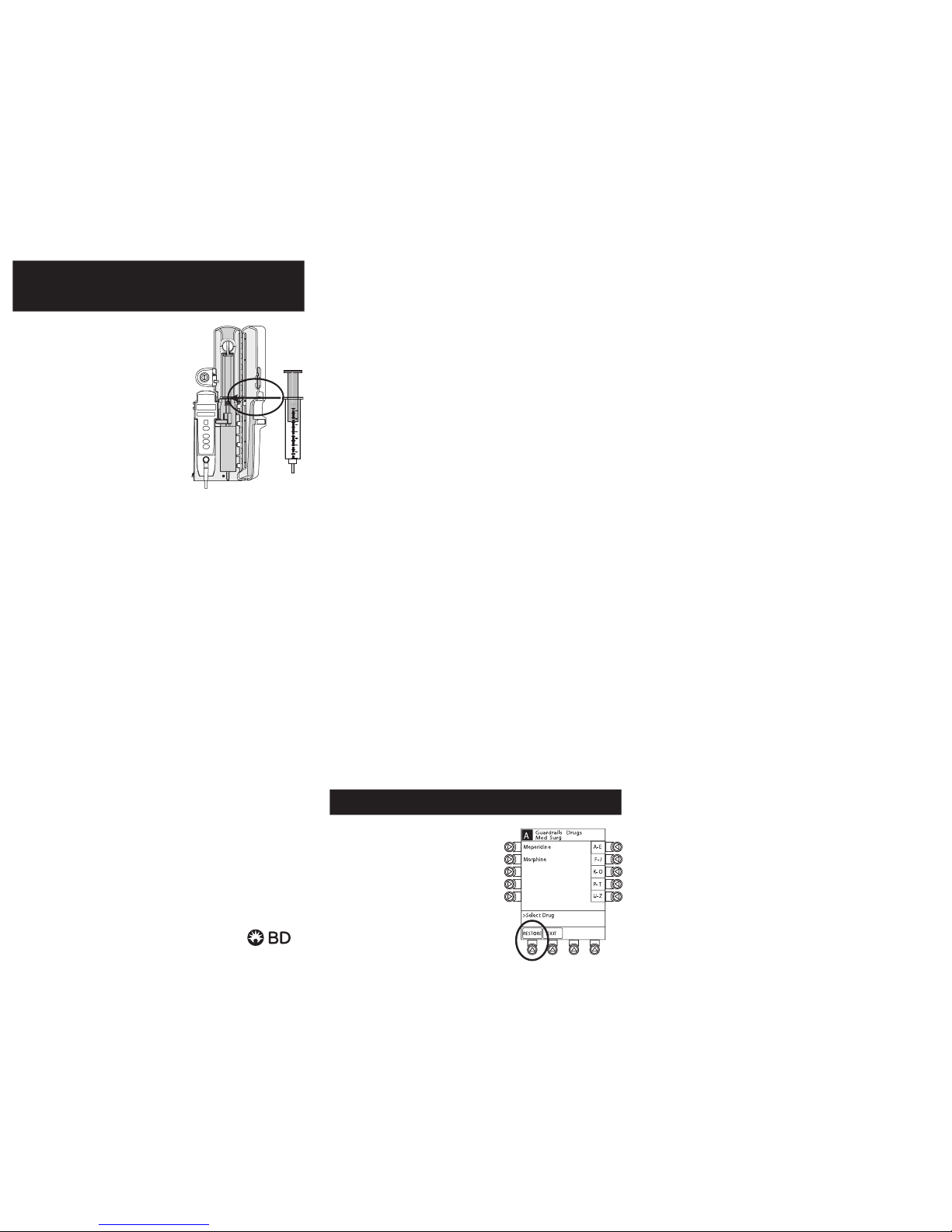
3. Insert the syrin ge by sliding the flat edges between
the barrel f lange grippers (see drawing).
4. Lock syringe in place by closing the bar rel clamp.
To close the barrel c lamp, pull out and rotate it to right.
5. Twist grippe r control clockwise, ge ntly lower drive head
and releas e gripper to lock the plun ger in place.
Priming the syringe using the Alaris
TM
PCA module:
Note: Do not prime the syringe while it is attached to
the patient.
1. PRIME softkey is available only afte r syringe type and
medication selection (prior to infusion mode selec tion).
2. At the Infusion Mo de screen, press OPTIONS, then press
PRIME SET WI TH SYRINGE.
3. Press and hold PRIME key to prime tubing.
Programming guide initial setup:
1. Load the syringe with the adm inistration set attach ed.
2. Press the SYSTEM ON key.
3. Selec t Yes or No to New Patient?
4. Select appropriate profile.
5. If required, enter p atient identifier or press EXIT.
6. Press the CHANNEL SELECT ke y.
7. Set key to PROGRAM position.
8. Confirm time of day or chang e time if necessary.
9. Select the correct syringe ty pe and size. Press CONFIRM.
Note: Applies to all syringes.
Programming the Alaris PCA module with PCA Pau se
Protocol enabled:
1. Perform steps 1–10 of initial se tup and then continue with
the following steps.
2. Review the Clinical Advis ory: Attach an Alaris SpO
2
or Alaris
EtCO
2
module now.
3. Press CONFIRM.
Note: If a monitoring modu le is not attached and started,
PCA Pause Protocol will not ac tivate.
4. Press the NEXT key to verify medication parameters.
5. Review Advisory.
6. Press PAUSE LIMITS to review the settings or
press CONFIRM.
7. Select desired infusion mode a nd follow on-screen
programming prompts.
AlarisTM PCA module pocket guide
bd.com
© 2017 BD. BD, the BD Logo a nd Alaris are tra demarks of Bec ton,
Dickinson and Company. IF7879 (0917/2500) CF/201/17/0043
4. Set key to the Program posit ion and close door.
5. Press the CHANNEL SELECT key.
6. Select and confirm correc t syringe type and size.
7. If using the same drug, dosing unit s and concentration,
then press RESTORE .
8. Verify that the drug, concentratio n and dosing parameters
are correc t.
9. Lock door and open tubing clamp.
0. Review settings an d press STAR T.
Change program/mode:
1. Press CHANNEL SELECT key.
2. Press PROGRAM.
3. Set key to Program position or enter autho rization
code (if enabled).
4. Press CHANGE MODE. Select desired infusion mode
and follow on-screen prompts.
Give a clinician b olus dose:
1. Press CHANNEL SELECT key.
2. Press BOLUS DOSE .
3. Set key to Program position or enter autho rization
code (if enabled).
4. Enter the bolus dose a mount and lock the door.
5. Press CONFIRM.
6. Review settings an d press STAR T.
Beginning of shift/Summary review:
1. Press CHANNEL SELECT key and verify settings.
2. Press STA RT key.
Access drug event history:
1. Press CHANNEL SELECT key.
2. Press OPTIONS; then press DRUG EVENT HISTORY.
3. Press EXIT and then press STA RT.
Warning: Before loading or
unloading the syringe, always turn
off fluid fl ow to the patient using a
tubing clamp. Uncontrolled fluid flow
can occur when the administration
set is not clam ped or turned off and
may cause ser ious injury or death.
1. Press PAUSE on PC A module.
Note: Always clamp administration
set before changing syringe.
2. Use the PCA key to unlo ck
the door; remove the syringe
and press SILENCE.
3. Attach the new syringe to the
tubing and load the new
syringe into the PCA module.
Change syringe and use Re store feature
Operator precautions: For proper operation of the Alaris System, the use r must be familia r with the feature s, disposabl es,
administration sets, setup and programming.
This guide includes selected information and suggestions and is not intended to be comprehensive instructions for the setup
and operation of the Alaris System. For complete instructions along with warnings and cautions, refer to the User Manual.
10. Select correct medication and concentration.
11. At Infusion Mode screen, pres s OPTIONS, then press
PRIME SET WI TH SYRINGE.
12. Press and hold the PRIME key to prime tu bing.
Note: Do not prime the tubing while it is attached to the patient.
13. Press EXIT when priming is complete.
14. Select de sired infusion mode and follow on-screen p rompts to
enter dosing parameters.
15. Close and lock the door.
16. Attach adminis tration set tubing to the pat ient.
17. Review and verify settings.
18. Open tubing clamp.
19. Press STA RT.
1
Page 2

• Time that past history was
LAST CLEARED
4. Press the ZOOM key (time interval) as app ropriate and
review drug tota ls.
5. To clear the p atient history, press CLEAR HISTORY and
then press YES or N O.
6. To view 24-hour tota ls: Press 24 H Totals.
Note: This is a moving window of time, meaning that
after 24 hours the patient history rewrites.
7. Press EXIT and then press STA RT.
PCA/Monitoring trend data:
Note: This function requires use of the Alaris PC A
monitoring module(s):
1. Press CHANNEL SELECT on monitoring module.
2. Press OPTIONS.
3. Press PCA /Monitoring trend data.
4. To exit: Press (Et CO
2
or SpO2) MAIN.
5. Press MAIN SCREEN.
Change PCA Pause alarm limits:
1. Press the CHANNEL SELECT key on the PC A module.
2. Press OPTIONS.
3. Press PCA PAUSE LIMITS.
4. Selec t desired parameter and ente r value.
Note: If acceptable range value is not within the
hospital defined range, a prompt is provided.
5. Follow on-screen prompts.
6. Press CONFIRM and pres s START.
Responding to a PCA Paus e alarm:
1. Always follow hospital protocol.
2. Press CONFIRM.
Note: Main screen shows PAUSED. The Alaris PCA module
cannot be restarted until the patient ’s monitoring values have
been rees tablished and are within hospita l established limit s.
3. Press RES TART.
Note: To view time and patient PC A pause value
that caused the PCA module to pause, access drug
event history.
Disabling and enabling the PCA Pause alarm:
1. Press the CHANNEL SELECT key on the PC A module.
2. Press OPTIONS.
3. Press PCA PAUSE LIMITS.
4. Selec t Disable SpO
2
or Disable EtCO2.
5. Press CONFIRM.
6. Press S TART.
Note: To enable the PCA Pause function, follow steps 1–3,
then press Enable Sp O
2
or Enable EtCO2.
Change dos e request co rd audio and light setting:
1. Press the CHANNEL SELECT key.
2. Press OPTIONS.
3. Press Dose Re quest Setup.
4 Select desired dose cord profile.
(1=light flashes, 2=light on, 3=light off)
5. Press CONFIRM. Then pre ss STAR T.
To attach the dose request cord:
Align the red m arkings on both the Alaris PCA mo dule and
Dose Request Cord.
To detach the dose request cord:
Hold the body of the latchin g connector on the Dos e Request
Cord and pull s traight away from the Alaris P CA module,
without twisting or turning.
Detaching the Alaris PC A module:
Use the PC A key to unlock the door. Locate th e black lever inside
at the bottom left and dep ress. At the same time: Ho ld the Alaris
PCA mod ule and move the bottom of the A laris PCA module
away from the Al aris PC Unit.
Troubleshooting: Alarms, errors, messages
Note: During an alarm state, the Alaris PC A module is not infusing.
Incorrect concentration or dosing:
An incorrec t concentration or dosin g parameter may have
been program med, which could result in a n excessive volume
or dose being d elivered.
1. Remove the syringe.
2. Verify the conce ntration listed on the syr inge matches the
concentration (DRUG AMOUNT and DILUENT VOLUME)
programmed into the PCA module.
3. Reprogram.
Note: This message can be the result of an incorrec t DRUG
AMOUNT and/or DILUENT VOLUME e ntry, or it can occur if
hospital-established Guardrails
TM
software limits are very wide.
Be sure to enter either a drug a mount per 1 mL or total drug
amount per total volume. For example, a 30 mL syringe with
concentration of 1 mg/1 mL can b e entered in one of two ways:
• DRUG AMOUNT 1 mg
• DILUENT VOLUME 1 mL
or
• DRUG AMOUNT 30 mg
• DILUENT VOLUME 30 mL
Maximum limit reached:
The programm ed maximum limit has be en reached over the
time period specified. Infu sion paused until time limit h as expired .
Alarm message Max Limit Reached will scroll in c hannel message
display on the A laris PCA module. To silence s afety alarm tone,
press the SILENCE key. The Alari s PCA module will remai n silent.
Near End of infusion aler t (NEOI):
The aler t message, Near End a lternates with remaining V TBI on
the scre en until the syringe is empt y. The aler t message will scroll
in the channel message display on the A laris PCA module. T he
Alaris PC A module remains func tional and will continue infu sing.
To silence the safety alert tone, pre ss the SILENCE key. The Alaris
PCA module will remain silent until the Syringe Empty alarm
sounds. When programmed in PCA d ose-only mode, the green
indicator light illuminates only when a PC A dose is being delivered .
When programmed in PCA do se and continuous mo de, the green
indica tor light rema ins illuminated. T he yellow indicator light will
flash dur ing an NEOI alert.
Syringe Empty:
The alarm m essage, Syringe Empty will scroll in the channel
message display on the A laris PCA module. To silence the safety
alarm tone, p ress the SILENCE key. The Alaris P CA module will
remain silent for ap proximately two minutes and w ill sound again.
Patient history/24-hour history:
1. Press the CHANNEL SELECT key.
2. Press OPTIONS.
3. Press PATIENT HISTORY.
Note: The top of the PAT IEN T
HISTORY screen displays
• The exact time frame for
patient history. Histor y from
##:## - ##:##
 Loading...