

Page 1
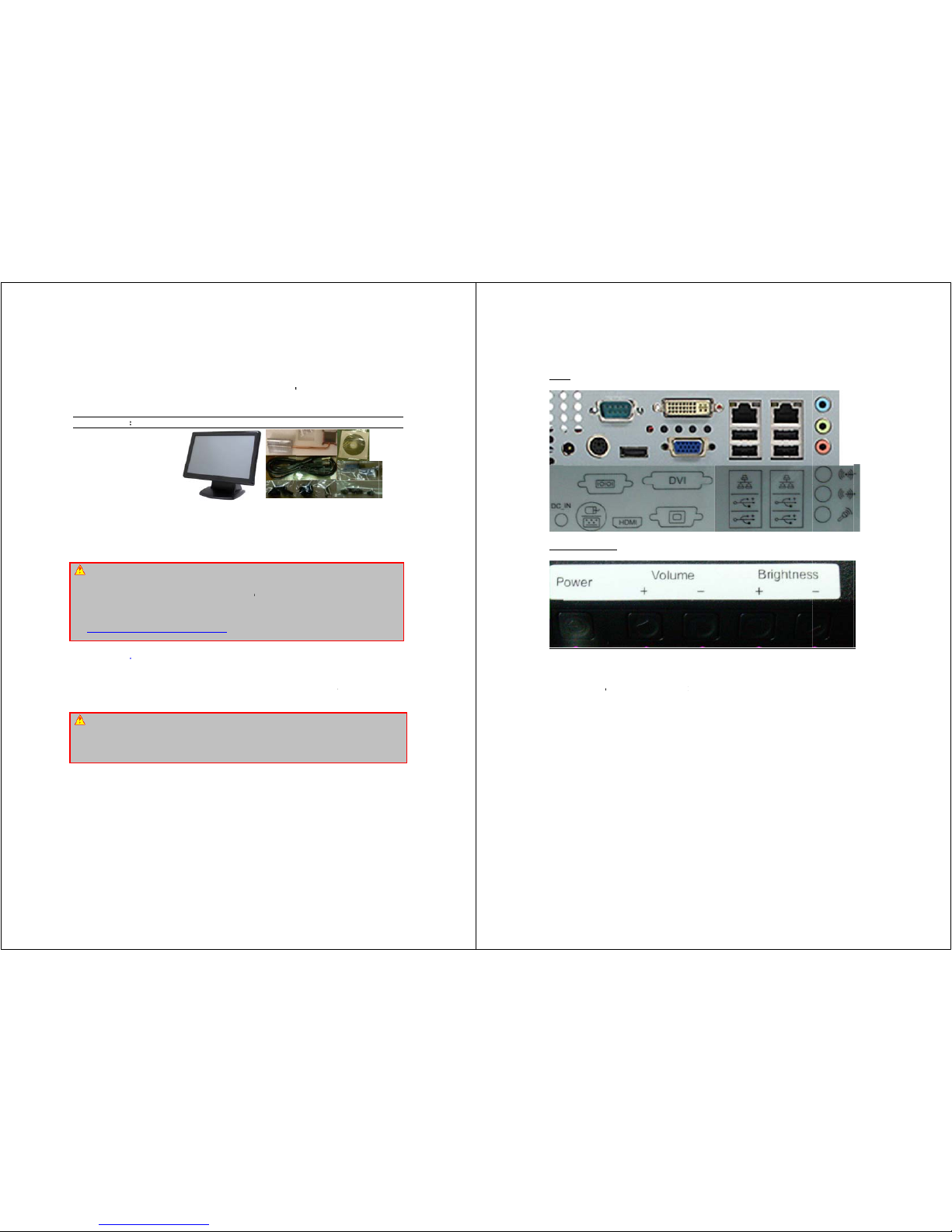
Use
r
Ins
p
One
P
One
P
One
P
One
H
One
S
One
P
One
D
One
U
Res
p
This
m
impli
e
loss
o
dam
a
reser
v
W
Repl
a
type
t
explo
ordin
a
warr
a
Perc
h
See
h
Add
Addit
i
Onlin
e
http:
/
mess
A
If yo
u
any
o
or m
o
your
m
chan
g
P
r
’s Quick S
t
ect the Pac
PC19W-45G
M
ower Adapto
r
ower Cord (U
S
eatpipe
ATA CD ROM
ack of Screw
s
river CD/DVD
ser’s Quick S
onsibility:
anual is prov
i
d warranties o
r
f profits, loss
o
ges of any kin
d
e the right to
m
ARNING:
C
ce your syste
m
o avoid risk of
de. Always dis
nce (where a
p
nty.
lorate Material
-
ttp://www.dtsc.
c
itional Info
r
onal informatio
n
User’s Ma
n
/www.bcmco
m
ages or submit
TTENTIO
N
do not know h
f the settings t
h
dification in th
e
otherboard’s
m
e.
PC1
art Card
kage:
Barebone
)
Adaptor
tart Card
ded “As-Is” wit
conditions of t
h
f business, lo
s
, even the pos
s
odify and upda
t
MOS Batt
e
’s CMOS RAM
personal injury
pose of used
b
plicable). The
Special Handli
n
a.gov/hazardo
u
mation:
on setting thi
s
ual and FA
Q
.com. If your
q
a new FAQ thr
o
: Incorrect
B
ow to handle B
an otherwise in
BIOS setup c
a
anufacturer w
a
9W-
4
V
h no warrantie
s
is product’s fit
n
s of data, inte
r
ibility of such d
t
e the user ma
n
ry Damage
battery only wit
or physical da
m
atteries accor
d
damage due t
o
g May Apply.
swaste/perchl
o
board up can
/Knowledge
B
uestion is not
a
ugh FAQ Sub
m
IOS Setup
IOS setup or h
o
structed in the
U
n render your
s
rranty. Try Cl
e
5G
M
ersion 1.00
of any kind,
e
ess for any p
a
ruption of busi
amages arising
ual without prio
h the identical
C
age to your e
q
ing to the m
a
not following t
h
rate/
be found in the
ase can be
nswered in ou
r
ittal form for us
w to set it up
p
ser’s Quick St
a
system unstabl
e
ar CMOS infor
m
Ba
r
h
xpressed or i
m
rticular purpos
e
ness, or indire
c
from any defe
c
r notice.
R-2032 3V Lit
h
uipment. Impr
o
nufacturer’s in
s
is warning will
User’s Manual
found on ou
FAQ/Knowled
g
to add your qu
e
roperly, it is st
r
rt Card. Even
or unusable.
I
ation when sy
s
ebo
n
ttp://www.
b
plied, includin
g
. In no event s
h
t, special, inci
d
t or error in thi
s
ium-Ion coin c
e
per installatio
n
tructions, or a
s
void your mot
h
in the provided
r website by
e Base, visit o
u
stion in our F
A
ongly advisabl
e
a seemingly s
m
Incorrect BIOS
s
tem does not
b
e
cmcom.co
m
, but not limit
e
all we be liabl
e
ental, or cons
e
manual or pro
d
ll (or equivalen
t
might cause
b
required by
t
erboard’s man
u
CD or DVD R
O
visiting our
ur forums and
p
Q with our ans
w
that you do n
o
all incorrect ad
j
setup is not co
v
oot after BIOS
d to the
for any
quential
uct. We
) battery
attery to
he local
facturer
M. The
website:
ost your
er.
t modify
justment
ered by
settings
Por
t
Fu
n
Pow
e
Vol
u
Vol
u
Brig
h
Brig
h
s
ction Butt
o
r button: Tur
n
me “+”: Incr
e
me “-“: Decr
e
tness “+”: In
c
tness “-“: D
e
ns
on and off t
h
ase the audio
ase the audio
crease the bri
g
crease the bri
g
e unit.
volume outp
u
volume outp
u
htness of LC
D
htness of L
C
t
t
D panel
D panel
Page 2
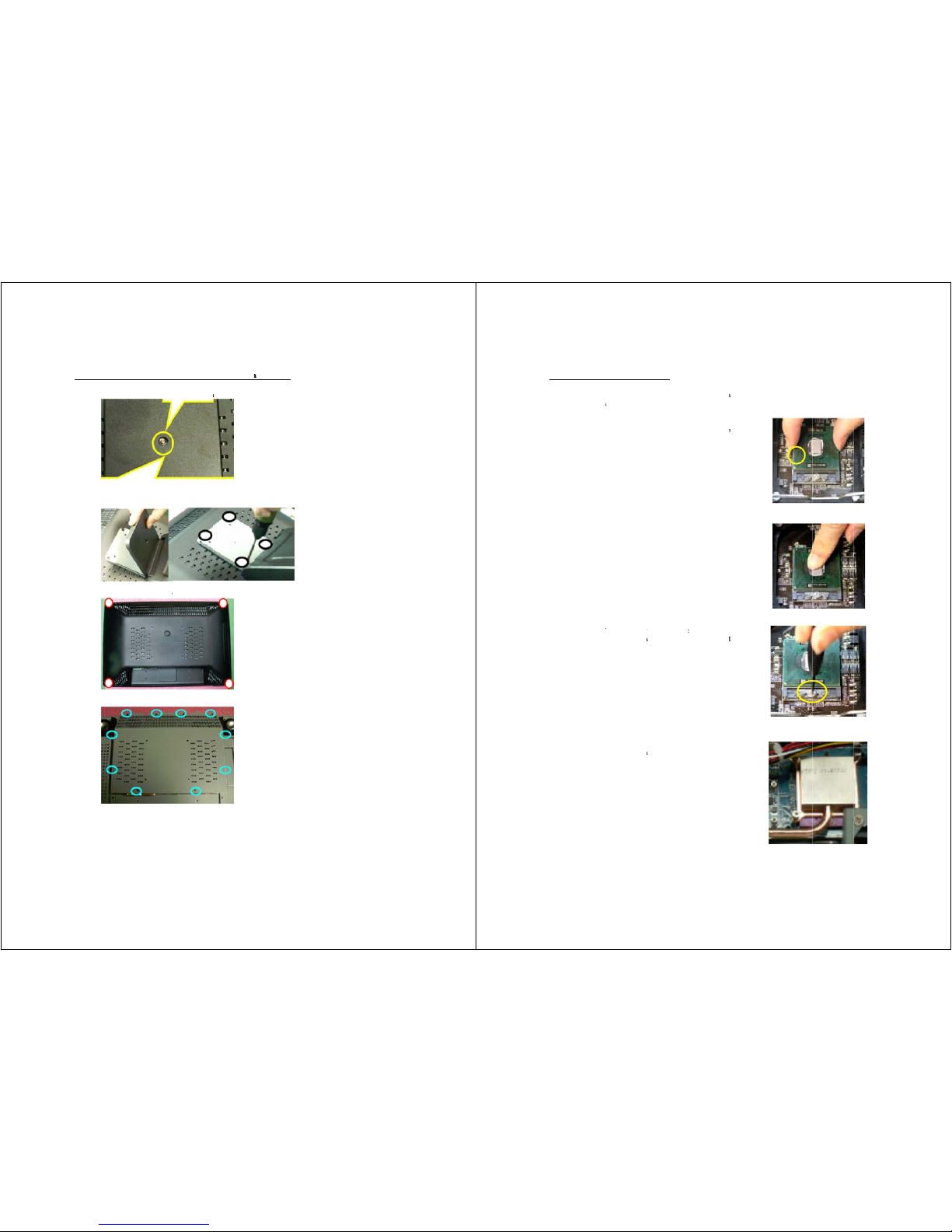
Ho
w
2
3
4
to access
1. Take out
. Take out
less.
. Take out
. Open up
t
inside the
u
the M3 screw
the plastic st
a
4x #6-32 scre
w
he plastic ba
c
nit to inst
a
from the sta
n
nd cover and
w
s from four
k cover. Tak
e
ll CPU,
m
d with 2 lb-in
take out 4x #
6
corners with
3
out 10x M3
s
emory, ...
or less.
-32 screws f
r
lb-in or less.
crews from t
h
om the meta
l
e back cover
stand with 3
with 3 lb-in
o
lb-in or
r less.
CP
U
This
prec
a
and Hea
t
processor is i
n
utions such
a
1. Place the
align the
g
on the soc
k
2. Push the
the socket
.
3. On the
f
mechanis
m
sure that
with a scr
e
4. Place the
h
the screw
s
installed b
pipe Insta
l
tended to be
s using appro
p
CPU on top
old arrow on
et.
CPU down u
n
ront end of
t
designed i
n
you actuate
o
wdriver befo
r
eatpipe eve
n
in 4 corners
ack bracket.
lation
professionall
y
riate ground
of the socket
.
the CPU wit
h
til its pins s
e
t
he CPU so
c
to the form
o
r de-actuate
e and after in
ly on the CP
U
with 2 lb-in
installed. T
a
strips, gloves
,
Make sure
t
the arrow k
e
curely fit in
t
ket is a loc
k
f a screw.
M
this mechan
stalling the C
P
die. Lock d
o
or less onto
p
ke proper ele
c
and ESD ma
t
o
y
o
ing
ake
ism
U.
wn
re-
trostatics dis
c
s.
harge (ESD)
 Loading...