

Page 1
www.b-cam.net
USER MANUAL
B-CAM SRU v1.0
Page 2

CAMERA SPECIFICATIONS
Processor:
Sensor:
Camera Lens:
Video Resolution;
Video Encoding:
Video File Format:
Photo File Format:
Display:
Infrared LED:
GPS:
Recording Time:
Recording Capacity:
Standby Time:
Battery:
Ambarella A5S30
Aptina 5 Megapixel CMOS
142º Field of View
1920 x 1080 @ 30fps
1280 x 720 @ 30-60fps
848 x 480 @ 30-60fps
H.264
MP4
JPEG
2.0" TFT LCD, 960 x 240px
2 High Intensity, 60º
Infrared Image Enhancement
Based on SIRFstar IV Technology
>5hrs @ Full HD (1920 x 1080)
>8hrs (Internal 32GB TF Flash)
> 12hrs
2,900 mah
Recording:
Charging:
Controls:
PTT Port:
Mount Points:
Battery:
File review:
USB:
IP Rating:
Operating
Temperature Range:
Operating Humidity:
Visual & Audio Indicators
Visual Indicator
Raised buttons for gloved use
For use with PTT Radio/Mic cable
Easy & secure attachment of
uniform mating systems.
Quick release battery door allows
for quick and toolless battery
replacement.
Built-in playback and review buttons.
Built-in High Speed,
USB Micro-B Connector.
IP67
-20ºC ~ +70ºC
10% ~ 70% RH
MECHANICAL FEATURES
for more information, please go to www.b-cam.net
Page 3
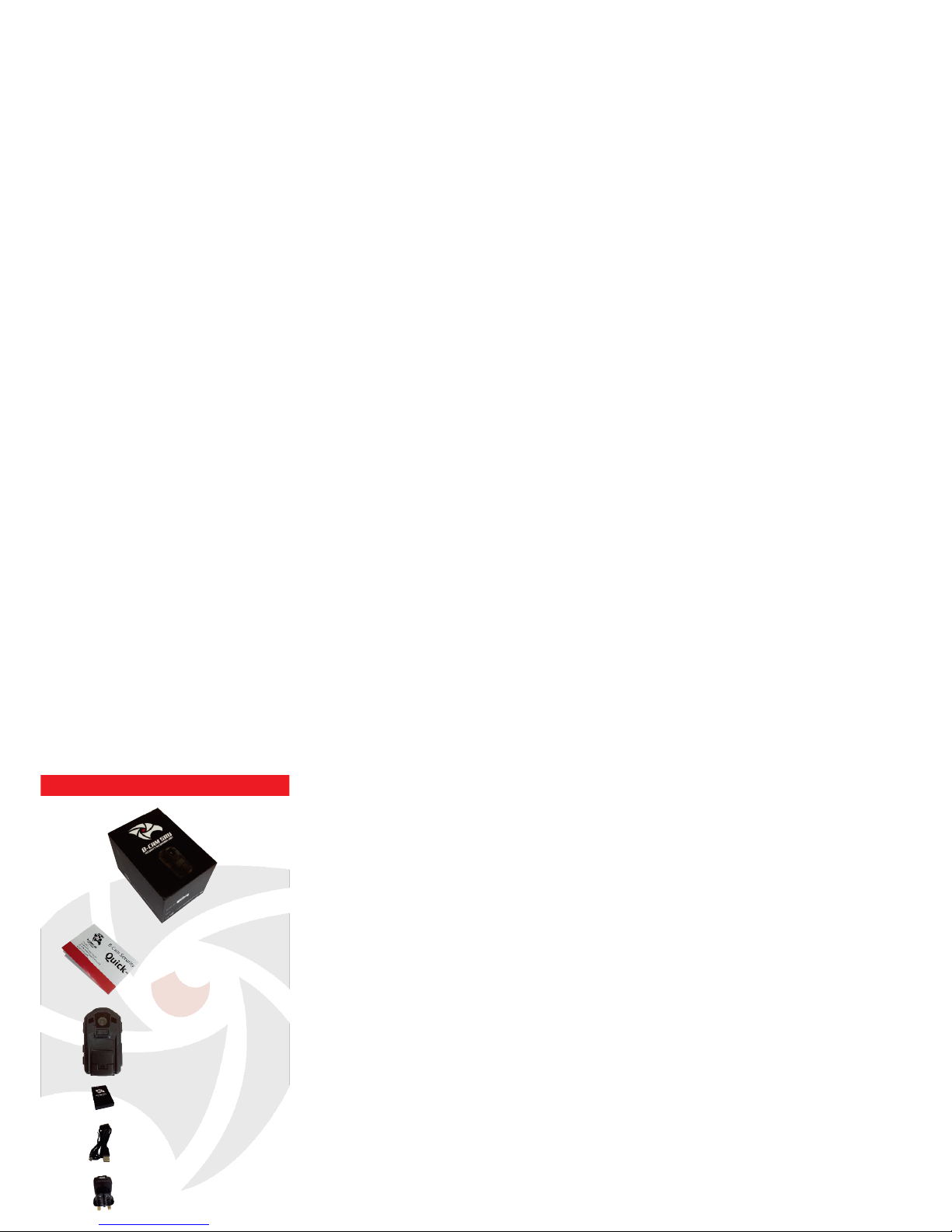
BOX CONTENTS
Quick Start Guide
Recording Unit
Battery
Micro-USB Cable
Mains Plug
Page 4
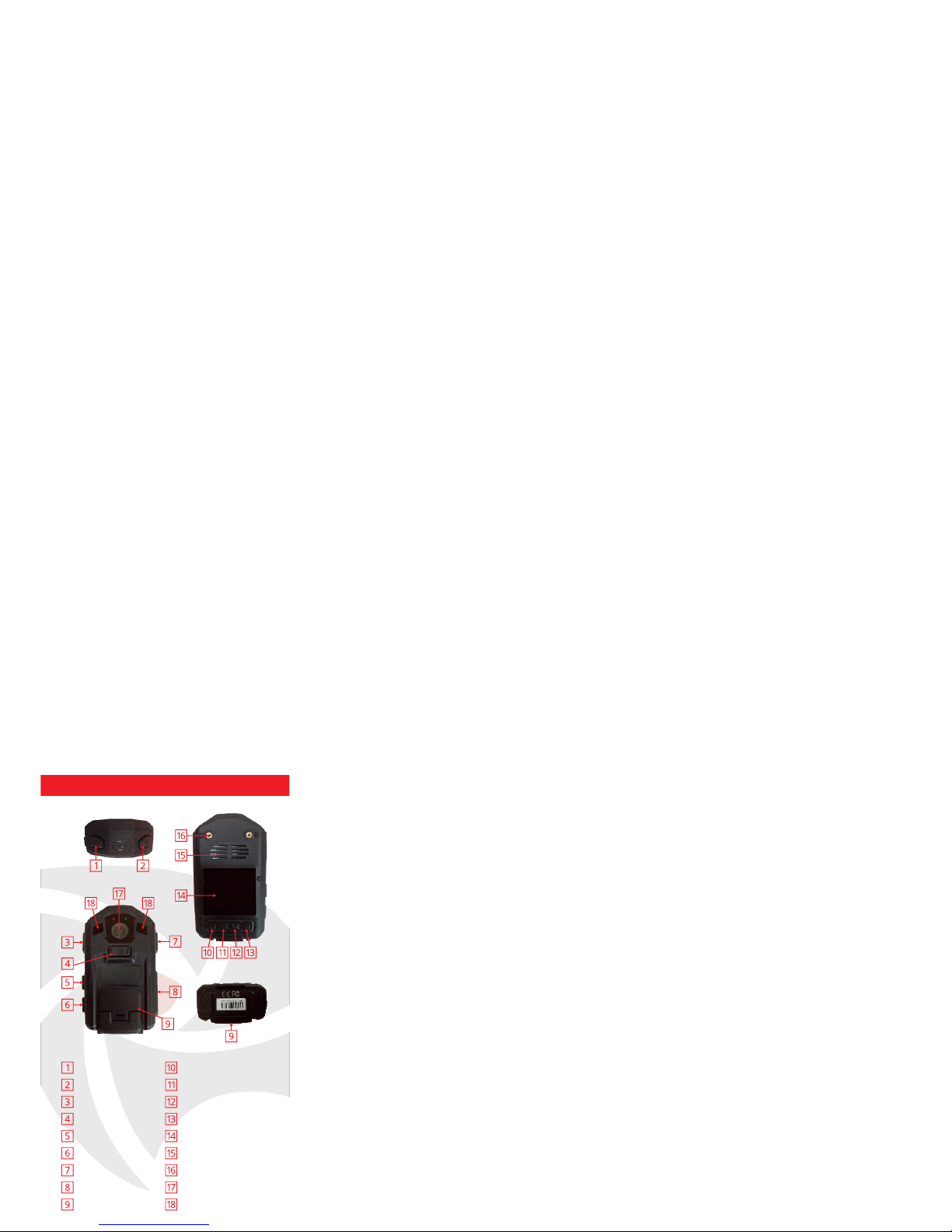
FEATURES
Snapshot
Infrared On/Off
Power On/Off
Audio Record
Live Feed
9 Pin Mic Connector
Record Button
Push to Talk (PTT)
Battery Door
Menu
Scroll Left/Rewind
Scroll Right/Forward
Select
Screen
Speaker
Workwear Mount
Camera Lens
Infrared LED
Page 5

OPERATING INSTRUCTIONS
Power ON
Press and hold for 1 second and release.
The SRU will produce an audible tone and a
green light.
Power OFF
Press and hold until the SRU turns off.
Low Power
The user will hear a constant audible tone.
Recording
Press
Status indicator light will turn red and will
start flashing. The SRU will produce an
audible tone to indicate recording has started.
Stop Recording
Press and hold for 3 seconds.
Status indicator light will turn green and will
stop flashing. The SRU will produce an audible
tone twice to indicate recording has stopped.
Page 6

OPERATING INSTRUCTIONS
‘Snap Shot’ Photo
Press
Unit will produce an audible tone when snap
shot has been taken.
Press and release
A single loud audible tone will sound and
the status indicator will flash red to indicate
recording is in progress.
Audio Record
Press and release
Two loud audible tones will sound and
the status indicator will show a steady green
light.
Stop Audio Record
PTT function is designed to work in
conjunction with a PTT cable to a radio
(not included).
Push To Talk (PTT)
Page 7

OPERATING INSTRUCTIONS
Infrared (Low Light)
Press and release
The SRU will produce an audible tone
indicating IR mode has been activated.
The twin IR LEDs are located on the
sides of the camera lens and will
produce a dim but visible red light
when activated.
* Infrared can be turned on before
or during recording.
** Recorded images are monochrome
for enhanced contrast and clarity.
To turn off the Infrared LEDs, pres and
release
Page 8

REVIEWING DATA
Reviewing files
Video Files
Press
Scroll using &
Press for either video, audio or snapshot
Scroll thumbnails using &
Press to select file
Select file
Press to play video
Fast forward press
Rewind press
Resume play press
Page 9
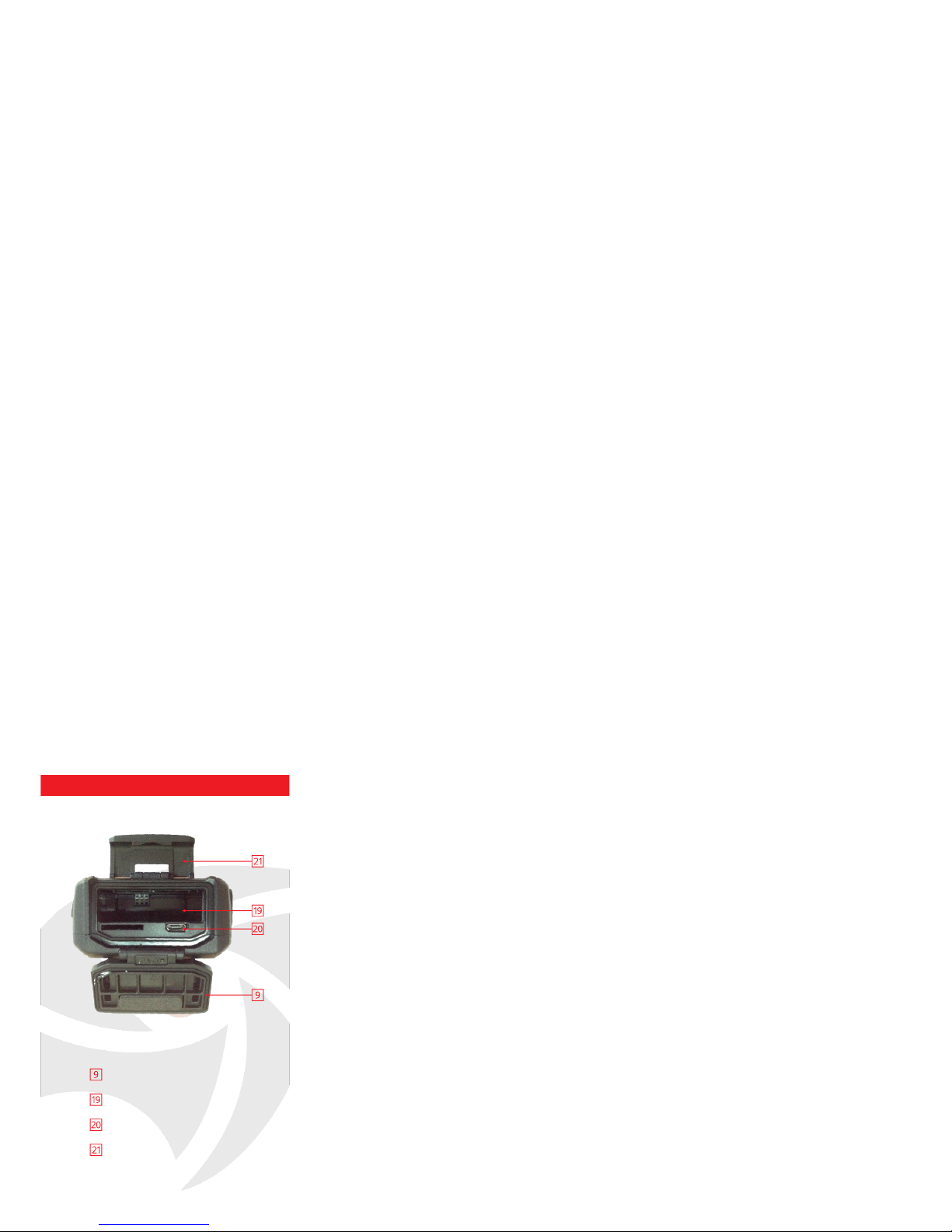
CHARGING
Battery Door Fastening Clip
Micro-USB Connector
Battery Housing
Battery Door
Page 10

CHARGING
To achieve the best battery life, ensure
unit is fully charged before its first use.
Undo to gain access to the battery
housing and Micro-USB Connector
Insert battery into battery housing until a
‘Click’.
Fully engage the Micro-USB cable into the
SRUs Micro-USB Connector
Fully engage the Micro-USB cable into the
Mains Plug supplied.
Fit Mains Plug to wall socket and turn on
the power.
The SRU will automatically start up.
A constant red light will indicate the SRU is
charging.
The red light will go out when fully charged.
Page 11

ACCESSORIES
Push To Talk (PTT) Cable
Battery
USB Cable
Charger
SUPPORT
B-Cam Ltd
Communications House
26 York Street
London W1U 6PZ
United Kingdom
TEL: +44 (0) 20 7769 6709
E-MAIL: [email protected]
WEB: www.b-cam.net
FAX: +44 (0) 20 7183 1228
Body Worn Harnesses
Go to our website www.b-cam.net
to see the full range or contact our
support team on [email protected]
Page 12

www.b-cam.net
© 2013 B-CAM Ltd.
The B-CAM logo and the B-CAM SRU logos
are registered trademarks of B-CAM Ltd.
All rights reserved.
Page 13

Click below to find more
Mipaper at www.lcis.com.tw
Mipaper at www.lcis.com.tw
 Loading...