

Page 1
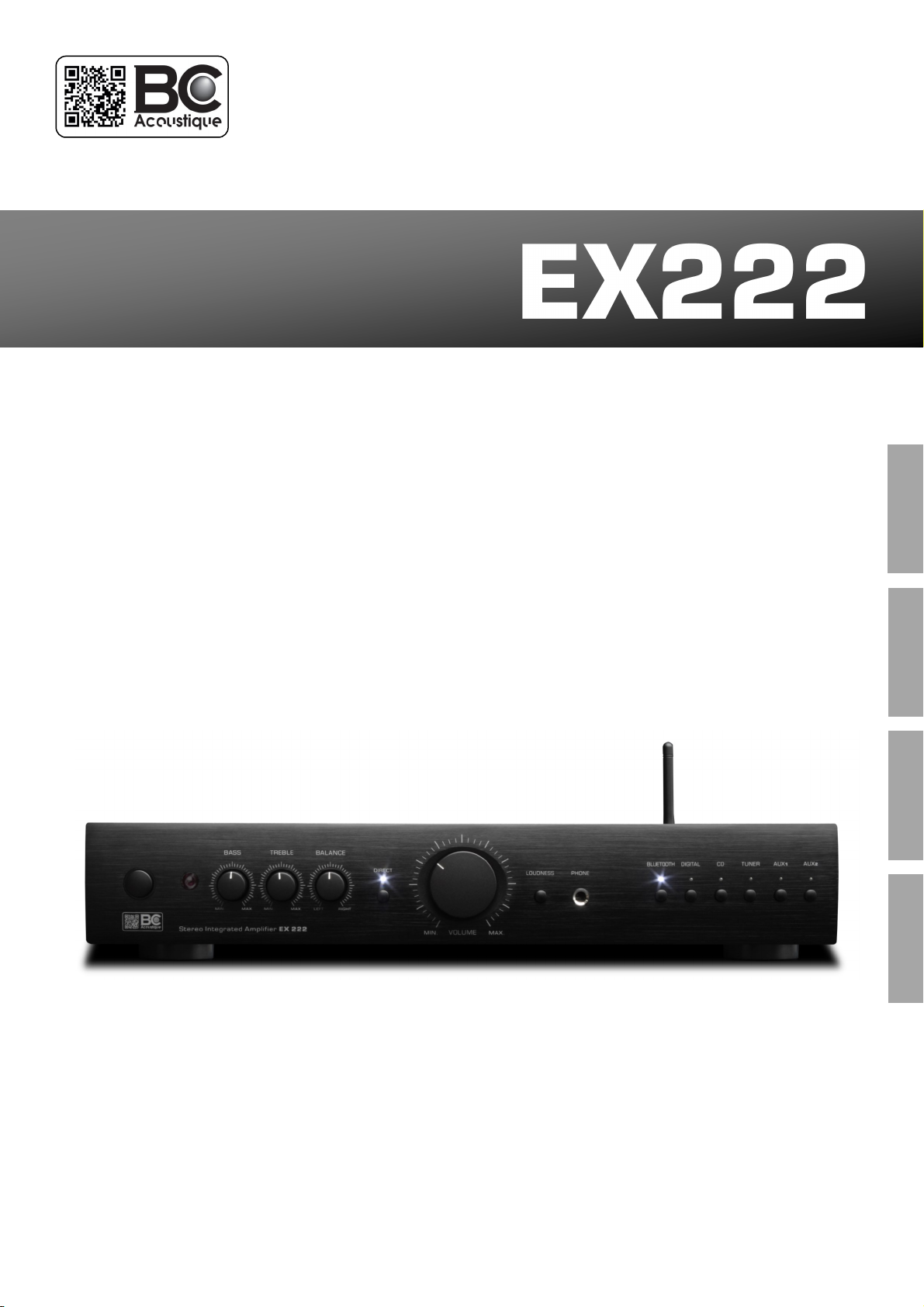
Stereo Integrated Amplier
ENGLISH
OWNER’S MANUEL
MODE D’EMPLOI
MANUEL DEL USUARIO
BEDIENUNGSANLEITUNG
FRANCAIS
SPANISH
DEUTSCH
BP 306 - 94709 Maisons-Alfort Cedex France
BC ACOUSTIQUE
Page 2
Dear Customer,
Thank you for choosing a BC Acousque product. Its implementaon has been our know-how, both in terms of design to the
manufacturing. Electronic components and mechanical parts correspond to the selecon criteria of very high quality.
Operaon and nish of each product have been checked before delivery. To obtain best results, please read the advice
contained in this document.
Summary
Safety Instrucons ……..…………………………………………………..02
Glossary..………………………………………………………………..……….02
Recommandaons ..………………………………………………………..02
Recycling product ..…………..…………………………………………….03
Locaon and precauons ……….………………………………………03
Power Sources …………….………………………………………………….03
Warranty .……..………………………………………………………………..03
Basic Instrucons: QUICK START ………..…………...……………..04
Rear panel - Connecng the amplier ………..…….…………….04
Front panel - Connecons and use the amplier …..……....05
Under the amplier - Switch an-hum (Ground On/O) ...05
Remote Control .……………………………………………………………..07
Specicaons .………………………..……………………………………….07
Troubleshoong ………..…………………………………………………...08
Compability (2004/108/EC) and apply eco-design
requirements for energy products (2009/125/EC) when the
appliance is installed and used in accordance with the user
manual. For connued compliance only BC Acousque
accessories must be used with this product and servicing
must be performed by specialized and qualied sta.
Safety instrucons
We invite you to read the instrucons on the proper use of
your product carefully. They will ensure the proper
funconing of the laer and it safely.
- Do not use this device in a wet area or near water.
- Clean only with a dry cloth. As a precauon it is best to
unplug the unit before handling.
- Never cover the venlaon of the unit. Be sure to install
the unit in a well venlated locaon.
- Do not install near heat sources.
be disposed of in your regular trash. Thank you to return
the unit or contact your authorized dealer for more
informaon.
Introducon
Glossary
The CE mark indicates that this product
complies with European direcves called "low
voltage" (2006/95/EC), Electromagnec
The WEEE symbol is that of the European
Union regarding the recycling of electrical and
electronic equipment. It indicates that this
product contains electrical and electronic
components that can be reused, recycled or
recovered. Therefore this product should not
This symbol alerts the user to the presence
of "dangerous voltage" uninsulated which may
pose a risk of electric shock to the user.
This symbol alerts the user that the
documentaon that comes with the device
contains important instrucons for
maintenance and proper use of the product.
- Take great care of the power cord and plugs electrical
connecon. In parcular, do not walk, or press the power
cord, specically at plugs, power plant and the output of
the power supply.
- Use only parts and accessories recommended by BC
Acousque.
- Be sure to use an appropriate power supply to the power
jack on the unit outlet. Especially if the device is equipped
with a ground, it is necessary to use it.
- Unplug the apparatus during lightning storms or when not
in use for a long me.
Recommendaons
In the case of headphones, do not use it to excessive noise.
Otherwise, prolonged listening at high volume levels may
cause permanent damage to your hearing.
When disposing of used baeries, please comply with
governmental regulaons or rules dened by the public
statements relang to the environment applicable in your
country.
Never expose the baeries (baery pack or baeries
installed) to excessive heat such as sunshine, re, etc ...
2
Page 3

Product recycling Warranty
At the end of its useful life, this product should not be
disposed of with regular garbage, but returned to a
collecon point for the recycling of electrical and electronic
components. This point is emphasized by the symbol on the
product, the instrucon manual and on the packaging.
The materials can be reused in accordance with their
markings. Through reuse and recycling of raw materials or
any other form of recycling, you make an important
contribuon to environmental protecon. Your municipality
can tell you where is the point of the nearest collecon site.
Locaon and precauons
Avoid placing it in direct sunlight or near a heat source. No
source of light shall be placed on the apparatus. Also avoid
all sources that could cause vibraon, dust, cold or
moisture. The recommended ambient temperature range is
5-35 ° C.
The device must be installed on a stable, level surface. Do
not place the unit on an unstable surface or shelf. The unit
may fall, causing serious injury to a child or adult as well as
serious damage to the product. Do not place other
equipment on top of the unit.
Due to stray, turntables or CRT TVs magnec elds should
not be located near the unit to avoid possible interference.
Power sources
The unit should be operated only from the type of power
source indicated on the label. If you are unsure of the type
of power available to you, thank you to contact your dealer
or the company responsible for the power supply in your
area.
Turn o device if you do not intend to use this unit for a
long me.
In case of prolonged absence from home, it is
recommended to unplug from the electrical outlet.
Make sure each cable is correctly inserted. To prevent hum
or background noise, do not mix dierent other antenna
cable with the power cord or speaker wires.
BC Acouscs warrants this product parts and labor (under
the condions specied below).
BC Acouscs will repair or replace (at its discreon) this
product or any defecve parts. The warranty period may
vary by country. If in doubt, contact your dealer. Always
retain proof of purchase of this product.
For warranty service, please contact the BC Acousque
authorized reseller from which you purchased this product.
If your dealer is not itself repair the product, it can be sent
to BC Acousque authorized aer-sales service. If
necessary, you will need to ship this product in its original
packaging or packaging aording an equal degree of
protecon.
Proof of purchase such as an invoice stang that the
product is covered by the Guarantee must be presented for
any warranty claims.
This warranty is void if:
- The factory serial number has been altered or removed.
- This product was not purchased from an authorized
reseller BC Acousque. To conrm that the serial number
has been altered or that the product was purchased from
an authorized reseller BC Acousque, you can call BC
Acousque BC Acousque or distributor in your country.
- If the power supply cord or plug is damaged.
- If liquid has been spilled or if objects have fallen inside.
- If the unit has been exposed to rain or water.
- If the unit is dropped or damaged in any way.
- This warranty does not cover cosmec damage or damage
caused by or due to force majeure, an accident, mis use,
abuse, negligence, commercial use or modicaon of part
any product.
- This warranty does not cover damage caused by or
resulng from misuse, a maintenance or improper
installaon or repairs made or aempted by anyone other
in BC Acousque or not BC Acouscs dealer or technician
approved, authorized to carry out maintenance and repair
under warranty for BC Acousque. Any unauthorized
repairs will void this warranty. This warranty does not cover
products sold "AS IS".
- REPAIR OR REPLACEMENT AS PROVIDED UNDER THIS
WARRANTY IS THE EXCLUSIVE REMEDY OF THE CONSUMER.
- BC Acousque NOT BE LIABLE FOR ANY INCIDENTAL OR
CONSEQUENTIAL DAMAGES.
ENGLISH
3
Page 4
Warranty Connecon to the amplier
- Some countries do not allow the exclusion or limitaon of
incidental or consequenal damages or exclusions of
implied warranes. Therefore, the limitaons or exclusions
herein may not apply. This warranty gives you specic legal
rights, in addion to other rights which vary from state to
state or country to country.
Basic instrucons
Quick starng guide
Make sure that the device is not plugged into the mains
before making any connecons. It is also recommended to
turn o or disconnect all other devices associated while
making connecons to the product.
Connect the speakers to the speaker jacks on the back and
the sources of the corresponding input jacks on the back.
IMPORTANT: Make sure you have set the voltage selector
to suit your Country: ⑤ INPUT VOLTAGE: AC110 (USA)
and AC230 (EUROPE).
Connect the power cord to the connector on the one hand
AC Mains product and the other to a wall outlet.
Turn the POWER switch (POWER) ON (ON).
If the unit is equipped with a standby, then press the
STANDBY buon to turn it on.
Press the input selector for the source you want to hear.
WARNING: Be sure to turn o the power switch on your
product before making any connecons. Similarly it is best
to cut the power of the other devices you want to connect
to your amplier.
Be sure to turn o the power on your product before
making any connecons. Similarly it is best to cut the power
of other devices you want to connect to your amplier.
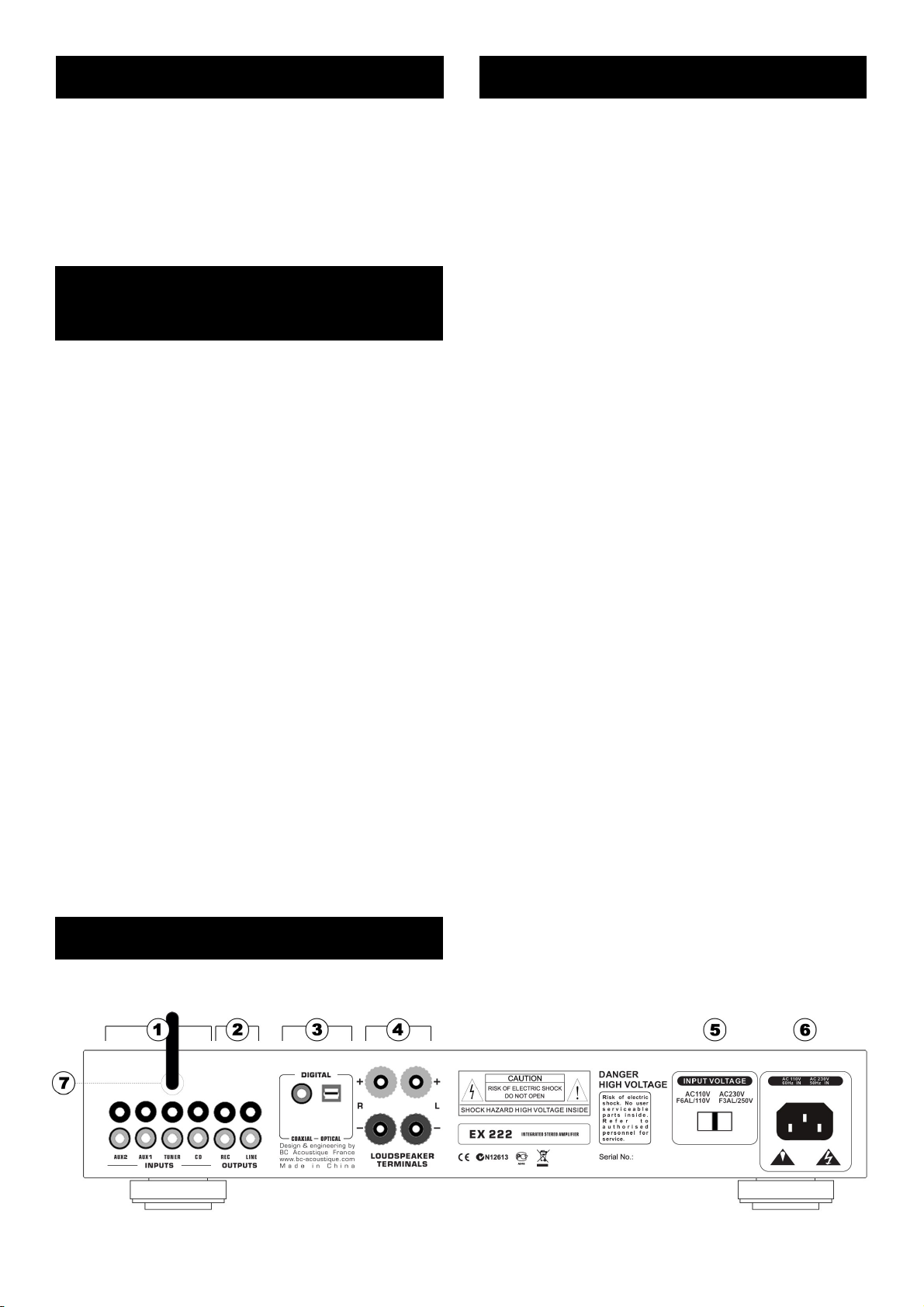
① INPUTS (INPUT - RCA)
The AUX1, AUX2, TUNER, CD are designed to connect
sources "line level" to your amplier. These inputs are
designed for so-called "analog" signals (as opposed to
"digital" signals). Compable cables are made with these
type "RCA", they are tradionally idened by a color code
"RED" to the RIGHT and "WHITE" channel for the LEFT
channel.
② OUTPUTS (OUTPUT - RCA)
REC
It allows to retrieve the selected amplier to "source" level
audio signal that is independent of the level volume
control. This output is tradionally used to connect the
amplier to a recording device.
LINE
It allows to retrieve the selected audio amplier in
proporon to the level of volume control signal. This output
is mainly used to connect an addional power block to
perform a "bi-amplicaon".
③ DIGITAL
Your amplier has a built-in digital-to-analog converter.
Therefore it is possible to connect a digital source (such as
most modern television screens).
To ensure compability with all exisng types of digital
terminals, the amplier has an "opcal" socket and a
"coaxial). However this entry is unique and it is possible to
connect one device at a me.
Rear panel
4
Page 5
Connecons
④ LOUDSEPAKER TERMINALS
Connect the speaker to the terminals marked RIGHT "+ R"
and "R -" ensuring that "R +" is connected to the "+"
terminal of the enclosure and "R -" is connected to the
terminal "- "the same enclosure. Connect the LEFT speaker
to the terminals marked "L +" and "L -" by doing the same.
Make sure that no wires are not insulated can bypass the
speaker outputs. Make sure that the speaker terminals are
ght enough to ensure a good electrical connecon. If the
terminal screws are not ght enough, the sound quality
may be aected.
Use only dedicated wire to the speaker (a secon of 1.5
mm² or more is recommended especially if the cable length
is greater than 3m).
Important Note: Check the impedance of your speakers.
When using a pair of speakers, you can use speakers with
an impedance of between 4 and 8 ohms.
⑤ INPUT VOLTAGE
IMPORTANT: Before turning on your amplier, check that
you have posioned the voltage selector based on your
geographic locaon: AC110V (USA, etc ...) and AC230V (EU,
etc ...). Also be sure to use a fuse appropriate for the
selected voltage sector.
Example posion voltage selector:
220V for Europe 110V for USA
fuse F3AL/250V fuse F6AL/110V
⑥ AC MAIN INPUT
Once all connecons to the amplier, plug the power cable
into an outlet and turn the unit on. Your amplier is now
ready for use.
⑦ BLUETOOTH ANTENNA
The antenna is handled with care. You can also posion
horizontally.
Under the amplier
SWITCH ANTI-HUM (GROUND ON / OFF)
Your amplier BC EX222 has a mains socket
outlet with a ground connecon. The use of
this type of connecon is recommended for
electrical safety reasons (including wetlands). However somemes this connecon "mass" is the
origin of "hum" audible from the speakers in a hi- system
to solve this problem, the cancellaon of the ground connecon is somemes sucient. To do this you have, under
the amplier, a switch to choose to connect or not the mass
of the device to the mains.
Connecons and uses
Front panel
ENGLISH
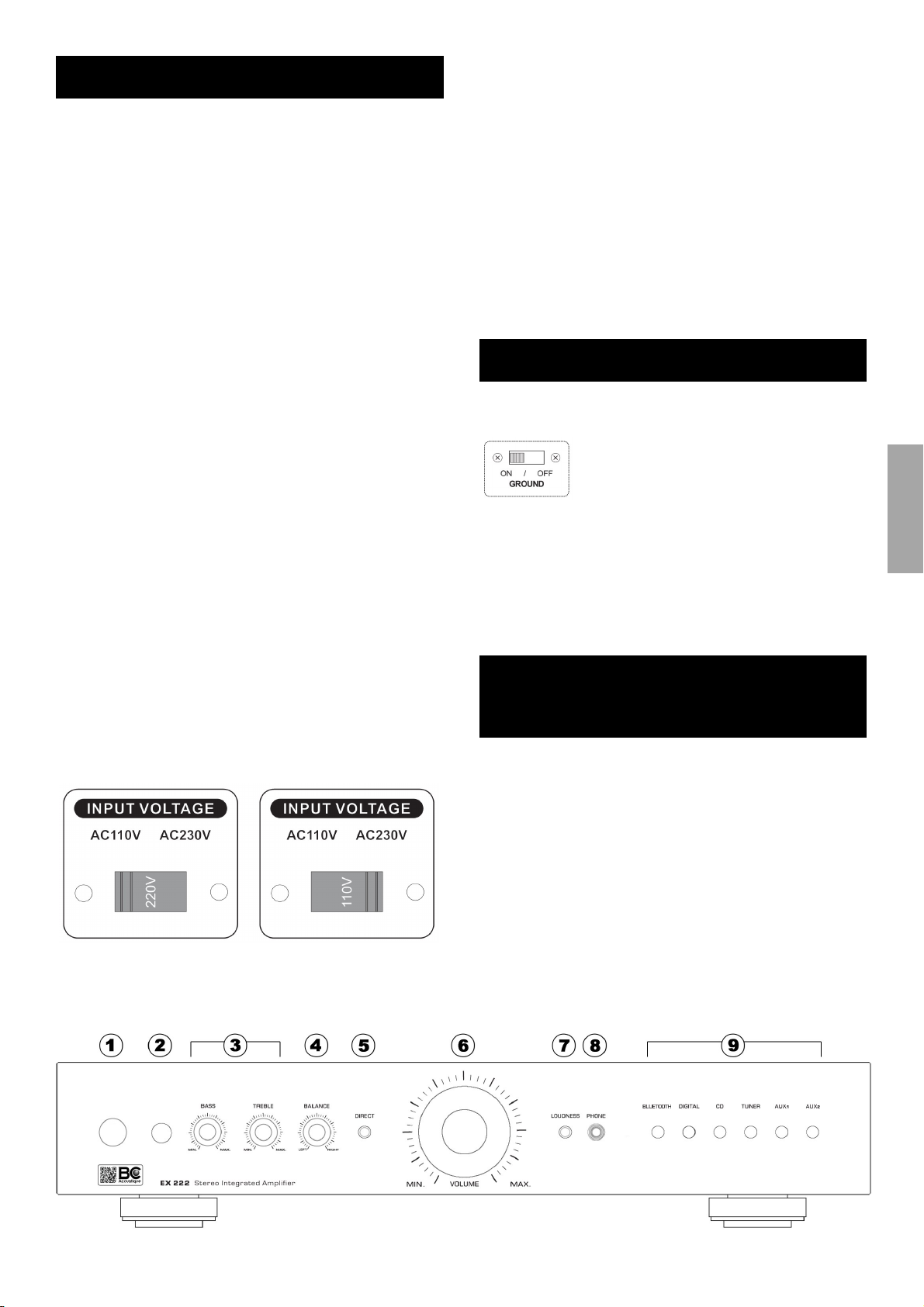
① ON / OFF BUTTON
This switch allows shutdown or operaon of the amplier.
② IR SENSOR
This window receives IR commands (Infra Red) from the
remote control. It is essenal that there is no obstacle
between the remote control and the sensor.
5
Page 6

Connecons
TONE CONTROL AND BALANCE
These funcons on music signals output from the speakers
and the line output (RCA) outputs. They are not acve on
the REC output (for recording the original signals).
③ BASS and TREBLE
The buon "BASS" seng can act on the relave level of
low frequencies to alter the tonal balance of the sound to
suit your room acouscs and your tastes. The "TREBLE"
buon for meanwhile high frequencies.
When these buons are in the middle posion, it means
that the tonal balance is not changed. The adjustable range
is ± 10 dB (knob turned in the direcon of clockwise) - 10
decibels (knob turned anclockwise).
④ BALANCE
This command allows you to adjust the relave output
levels of the le and right channels. In the center posion,
the output level of each channel is equal.
⑤ DIRECT
If this funcon is acvated (light signal acve), then the
BASS and TREBLE funcons are disabled. The purpose of
this funcon is to shut down the electronic circuit’s tone
control and balance in order to best preserve the purity of
the music signal.
⑥ VOLUME
This knob adjusts the output volume of the amplier at the
speaker outputs
⑦ LOUDNESS
Musical recordings are made with devices that are designed
to keep the musical balance as at a concert. When
reproducing the same quality is desired by the listener. This
is the enre chain, from microphone to the listener's ears
to be faithful.
Provided in daily use, a key parameter is not preserved
between concert and listening to stereo, the volume. But
the human ear does not hear sounds with the same tonal
balance depending on the noise level. And the bass and
treble frequencies are less audible low noise at high levels.
In pracce, the listener will feel the lack of bass and treble
when hear a piece of music at low level.
The Loudness funcon object to "compensate" the
peculiarity of the human ear. Thus, we invite you to
"acvate" the buon when you listen at low volume.
⑧ PHONE / HEADPHONES
Make sure the volume control is turned down before
connecng or disconnecng headphones. Listening at high
levels can cause permanent hearing damage.
This taken Jack size 6.35 mm allows connecon of stereo
headphones. It is advisable to use a listener with an
impedance between 32 and 600 ohm headphones. When
the headset is connected, the output to the speakers are
then cut.
⑨ SOURCE SELECTOR
These buons select the acve input of the amplier and
the signal sent to the speakers, to headphones and Preamp
output and REC LINE. The buons on the remote control
are idencal to those buons. Once the selected buon,
the integrated LED corresponding entry under the parcular
input buon will turn white.
BLUETOOTH
This key enables the BLUETOOTH connecon to listen to
music from your smartphone or other Bluetooth sources.
Method connecon between the EX-222 and your
smartphone: Put the EX-222 is turned on, then select the
Bluetooth® funcon by pressing the BLUETOOTH ⑨
ocated on the remote control or on the front of the
amplier buon. Wait a few minutes (2 or 3) then refresh
your Smartphone to nd the Bluetooth ® network entled:
BC-EX222. Thus, your smartphone is connected as a
mulmedia player.
DIGITAL
This buon acvates the digital input on the back of the
amplier. It allows listening to the digital source connected
to the amplier with integrated digital-to-analog converter.
CD, TUNER, AUX1 or AUX2: These keys are used to select
the sources present on the RCA inputs (line level) of the
same name located on the rear panel of the amplier.
6
Page 7
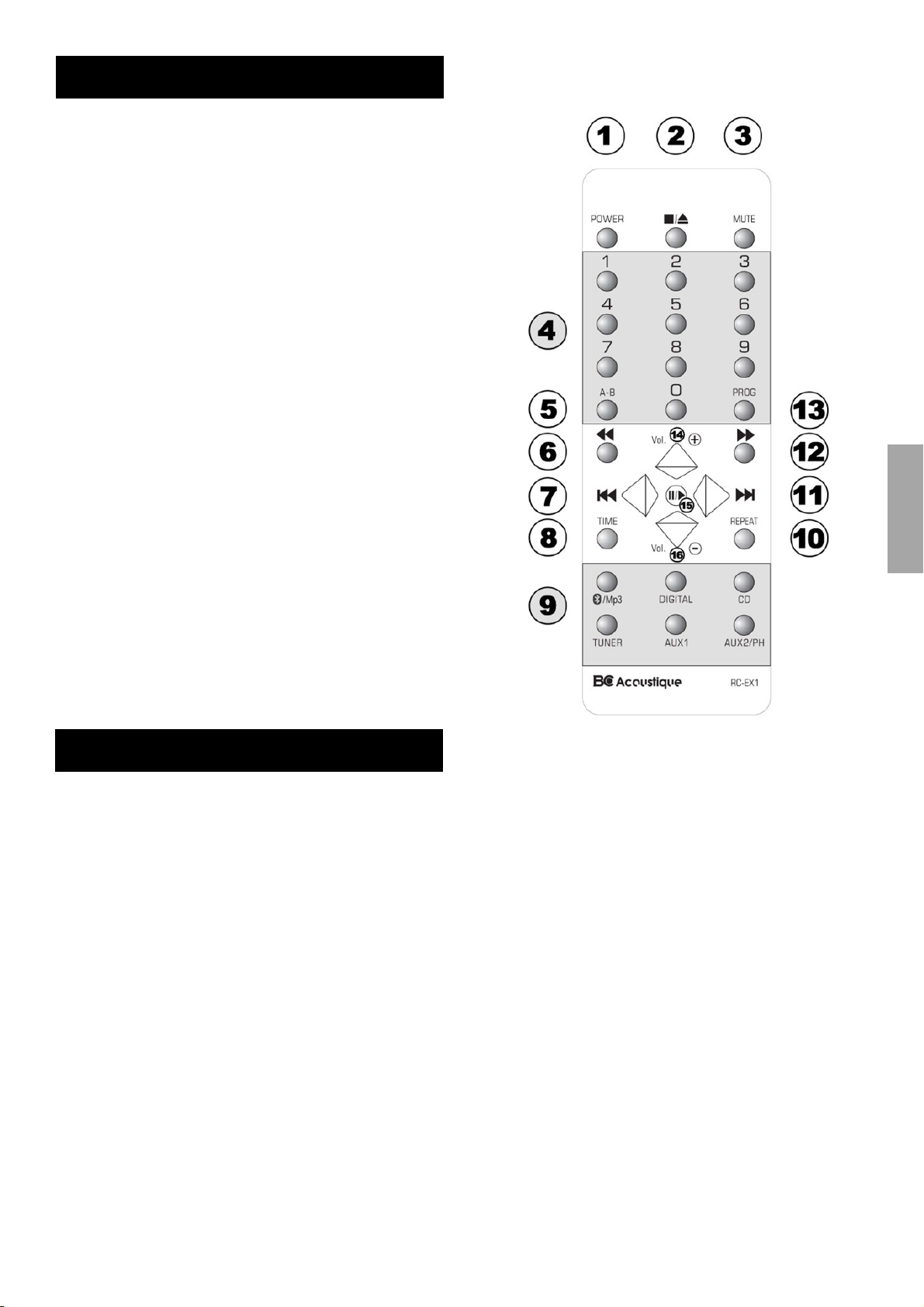
Remote control
The amplier EX-222 comes with an RC-EX1 remote control.
It was designed to be both compable with your amplier
but also the possible devices BC Acousque (including CD
players EX Series) range.
① POWER : This buon allows you to pause or
resume from standby dierent electronic devices BC
Acousque with this feature.
② STOP/EJECT
③ MUTE : This buon is used to turn on or o the
sound of the amplier.
④ 1…9.0 : Keypad / track selecon
⑤ A-B
⑬ PROG
⑧ TIME
⑩ REPEAT
⑥ ⑫ REV/FWD
⑦ ⑪ PREV/NEXT
⑮ PAUSE/PLAY
These funcons apply to CD players. Please refer to the
manual of your device to know the purpose.
⑭ VOL+ / VOL ⑨ SOURCES :
BLUETOOTH/DIGITAL/CD/TUNER/AUX1/AUX2
Note on the baery: Remove the transparent protecve tab
to acvate the baery.
ENGLISH
Specicaons
Preamplier secon
Line level inputs (CD, Tuner, Aux, Phono)
Sensivity: 200 mV
Impedance: 50 pF kOhms/100
Maximum input level: 7 V
Correcons
Bass (± 10 dB at 100 Hz)
Treble (± 10 dB at 10 kHz)
amplier Secon
Connuous average power into 8 ohms: 2 x 70 W
Connuous average power into 4 ohms: 2 x 120 W
Distoron: 0.01% (20 Hz - 20 kHz)
Signal / noise rao: 100 dBA
Connectors
Bluetooth ® Version: Apt-X V4
Front side
Headphone jack (6.35mm)
Connectors
Rear side
4x line inputs (CD, Tuner, Aux 1, Aux 2)
1x Opcal Input
1x Coaxial Input
Speaker terminals screw-compable banana plugs
General
Detachable power cable
UNIT
Dimensions (W × H × D) with stand: 430 x 80 x 340 mm
Weight: 8.3 kg
Dimensions (W × H × D) without feet: 430 x 70 x 340 mm
Weight: 8.2 kg
BOX
Dimensions (W × H × D): 490 x 135 x 385 mm
Weight: 8.9 kg
Volume: 0029 m
EX222 EAN CODE: 0661799078252
3
7
Page 8

Troubleshoong
Here you will nd a number of fault descripon and
possible soluons we invite you to read in order to ensure
the possibility of an actual breakdown of your device.
The unit does not turn on
- Make sure the power cord is properly connected.
- Make sure the plug is fully inserted into the wall outlet
and there is power.
- Make sure the camera is turned on.
- Check the fuse in the mains plug or adapter if necessary.
There is no sound
- Make sure the unit is not in standby mode.
- Check that the source component is connected properly.
- Make sure your speakers are properly connected.
One channel no sound
- Make sure the balance control is in the correct posion.
- Check the speaker connecons.
- Check interconnects.
A loud humming or buzzing is noceable
- Check turntable or tonearm to capture an ground fault or
a faulty connecon.
- Make sure that interconnect cable is loose or defecve.
- Make sure your tape deck or turntable is not too close to
the amplier.
The bass is weak or the stereo image is diuse
Make sure the speakers are not in phase.
The sound is distorted
Make sure that the control sengs of volume or tone is not
too high.
The remote control does not work
- Check that the baeries have not expired.
- Make sure nothing is blocking the remote sensor.
For repair, during or aer the warranty, please contact your
dealer.
To obtain warranty service and technical support, thank you
kindly to register your product online on the website
www.bc-acousque.com at the product registraon
secon.
BC ACOUSTIQUE
BP 306
94709 Maisons-Alfort Cedex - France
www.bc-acousque.com
In case the above soluons do not remedy your problem,
check our FAQ secon (Frequently Asked Quesons) on our
website: www.bc-acousque.com
8
 Loading...