

Page 1

xKit Operation Manual
XKIT USER MANUAL
UFC MODULE INTRODUCTION
SERVOTEST
NOV/2025
Page 2

xKit Operation Manual
Contents
1 Module Introduction ....................................................................................................... 4
1.1 Function introduction .............................................................................................. 4
1.2 Main Interface ......................................................................................................... 4
1.3 Supported File Formats ........................................................................................... 4
1.3.1 Servotest Extensible Format(Sef) ................................................................ 4
1.3.2 Sie ..................................................................................................................... 5
1.3.3 sif ...................................................................................................................... 5
1.3.4 RPC .................................................................................................................. 5
1.3.5 Mat .................................................................................................................... 6
1.3.6 Excel ................................................................................................................. 6
1.3.7 CSV .................................................................................................................. 7
1.3.8 ADF .................................................................................................................. 8
1.3.9 N-Code ............................................................................................................. 9
1.3.10 UNV ............................................................................................................. 10
1.3.11 Universal File (Similar to UNV, the name unit length is 20) ....................... 13
1.3.12 Sachs ASCII ................................................................................................. 16
1.3.13 JCI ASCII ..................................................................................................... 17
1.3.14 AMC ............................................................................................................. 18
1.3.15 DIAdem ........................................................................................................ 18
1.3.16 Vyella ........................................................................................................... 19
1.3.17 Seismo .......................................................................................................... 19
2 Software Introduction ................................................................................................... 21
2.1 Input File ............................................................................................................... 21
2.1.1 Select Mode .................................................................................................... 21
2.1.2 N-Code File .................................................................................................... 22
2.1.3 Seismo File ..................................................................................................... 22
2.1.4 File Information .............................................................................................. 22
2.2 Output Setting ........................................................................................................ 23
2.3 File List .................................................................................................................. 24
Page 3

xKit Operation Manual
2.4 Data Graph Preview .............................................................................................. 24
2.4.1 Right-click Menu ............................................................................................ 25
2.4.2 Supported Image Formats ............................................................................... 25
2.5 Data Preview ......................................................................................................... 26
2.6 Custom File Setting ............................................................................................... 26
2.6.1 Non-standard File Format ............................................................................... 26
2.6.2 Custom File Setting ........................................................................................ 27
Page 4
xKit Operation Manual
1 Module Introduction
1.1 Function introduction
The UFC module is an upgrade of the UFC tool in Pulsar, and its function is to
convert the format of the data file to meet the basic needs of customers for data.
1.2 Main Interface
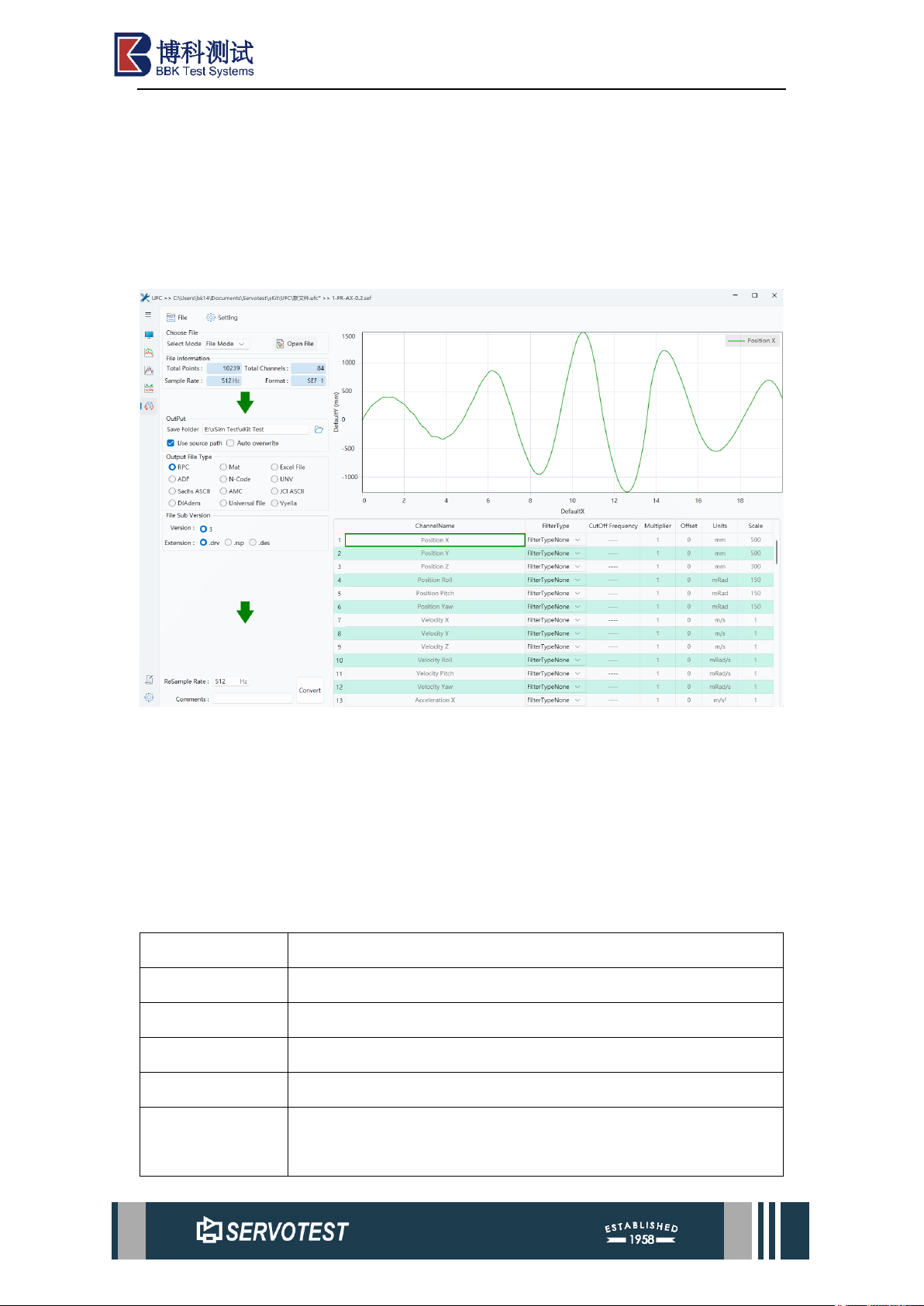
Figure 1-1 Main Interface
The main interface mainly includes three parts: the upper menu bar, the channel
selection on the left and the data view on the right.
1.3 Supported File Formats
UFC supports multiple file formats and will continue to maintain and update in
the future. The requirements and details for each format are detailed below.
1.3.1 Servotest Extensible Format(Sef)
Type
FileType.FileTypeSEF
Name
Servotest Extensible Format
Filter
Servotest Extensible Format file (*.sef)|*.sef
Version
1
Access
FormatAccess.FormatAccessReadWrite
MultiSampleRate
False,At the same sampling rate, the number of channel points
must be the same. When reading and writing, zeros are added if
Page 5
xKit Operation Manual
they are insufficient.
Binary file
True
1.3.2 Sie
Type
FileType.FileTypeSie
Name
Sie Format
Filter
Sie (*.sie)|*.sie
Version
1
Access
FormatAccess.FormatAccessReadOnly
MultiSampleRate
True,Supports multiple sampling rates. The number of channel
points for a unified sampling rate can be different.
Binary file
True
Other
SIE files are currently only applicable to X86 systems.
1.3.3 sif
Type
FileType.FileTypeSif
Name
Sif Format
Filter
Sif (*.sif)|*.sif
Version
1
Access
FormatAccess.FormatAccessReadOnly
MultiSampleRate
True,Supports multiple sampling rates. The number of channel
points for a unified sampling rate can be different.
Binary file
True
1.3.4 RPC
Type
FileType.FileTypeRPC2、FileType.FileTypeRPC3
Name
RPC
Filter
MTS RPC (*.drv,*rsp,*.des)|*.drv;*.rsp;*.des
Version
2,3
Access
FormatAccess.FormatAccessReadWrite
MultiSampleR
ate
False,The number of channel points can be different at the same
sampling frequency.
Binary file
True
Page 6
xKit Operation Manual
Version2
RPC2Helper, data is stored in short type. Under a uniform sampling
rate, the number of channel points is the same. If there is less, zeros
are added [storage error].
The name and unit length are 20.
The sampling frequency will also change.
Version3
RSPHelper, the header is different from that of Version2. Data is
stored in short type, and the number of channel points can be
different under a uniform sampling rate.
Name, unit length 96
rspModel.SamplesRows=rspModel.PointsPerFrame*rspModel.Nu
mFrames; The calculated length may be relatively long
Up to 256 channels and up to 1024 parameters are supported.
1.3.5 Mat
Type
FileType.FileTypeMat
Name
Mat
Filter
Mat (*.mat)|*.mat
Version
1
Access
FormatAccess.FormatAccessReadWrite
MultiSampleRate
False,At the same sampling frequency, if the number of points is
different, zeros are added.
Binary file
Add a prefix of three digits plus _ to the channel name and unit
data, for example, 001_mm; Used for distinction;
There's nothing normal.
1.3.6 Excel
Type
FileType.FileTypeExcel
Name
Excel File
Filter
Excel Files(*.xls,*.xlsx)|*.xls;*.xlsx
Version
1
Access
FormatAccess.FormatAccessReadWrite
MultiSampl
eRate
True,Each channel with the same sampling frequency uses a sheet,
and the number of points for channels with the same sampling
Page 7
xKit Operation Manual
frequency can be different.
Other
1. Xls format files can have a maximum of 65,535 lines.
2. The time column must not be empty.
3. The middle part of the channel data must not be empty.
4. The data is not processed by scaling.
File format
Line 1: Basic information titles: SamplesRows, SampleRate,
Comments, ChCount, Duration
Line 2: Basic information content: SamplesRows, SampleRate,
Comments, ChCount, Duration
Line 3: Column name
Line 4: Units
Line 5: Scale
Line 6 - Last: List the data
Example
SamplesR
ows
SampleRate
Comments
ChCo
unt
Durati
on
65600
1000
2
0
Time
RN_1
RN_2
s
millivolts
millivolts
Scale
0.322902739
0.322902739
0
788.5105072
1552.175485
0.001
1543.457111
0.002
788.1876045
1535.384543
0.003
787.8647018
1528.603585
0.004
787.8647018
1522.468433
0.005
788.1876045
1516.333281
0.006
788.5105072
1509.875226
1.3.7 CSV
Type
FileType.FileTypeCsv
Name
Csv Format
Filter
Excel Csv (*.csv)|*.csv
Page 8
xKit Operation Manual
Version
1
Access
FormatAccess.FormatAccessReadWrite
MultiSampl
eRate
False,The number of channel points can be different.
Other
1. The time column must not be empty.
2. The data is not processed by scaling.
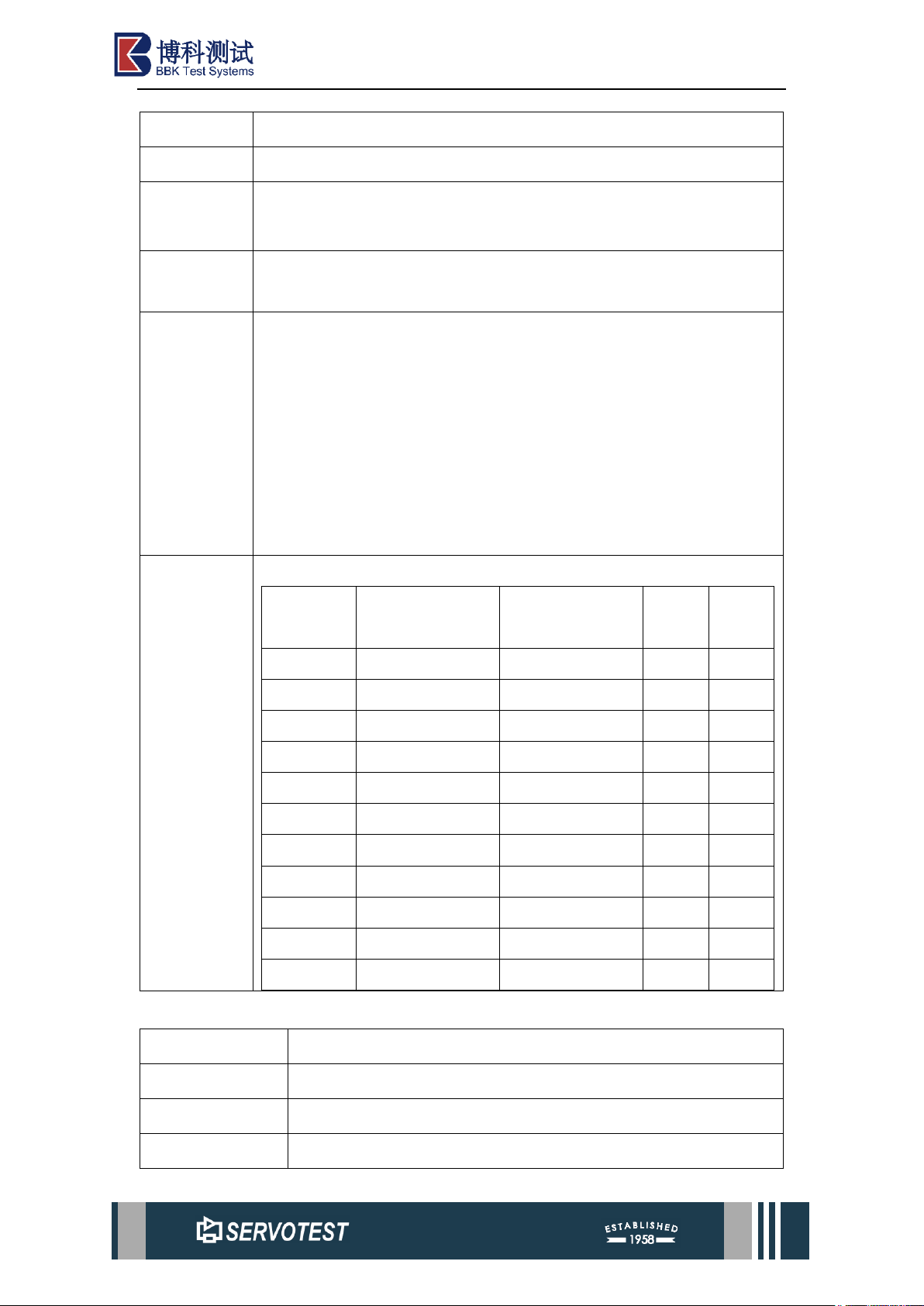
File Format
Line 1: Basic information titles: SamplesRows, SampleRate,
Comments, ChCount, Duration
Line 2: Basic information content: SamplesRows, SampleRate,
Comments, ChCount, Duration
Line 3: Column name
Line 4: Units
Line 5: Scale
Line 6 - Last: List the data
Example
SamplesR
ows
SampleRate
Comments
ChCo
unt
Durati
on
65600
1000
2 0 Time
RN_1
RN_2
s
millivolts
millivolts
Scale
0.322902739
0.322902739
0
788.5105072
1552.175485
0.001
1543.457111
0.002
788.1876045
1535.384543
0.003
787.8647018
1528.603585
0.004
787.8647018
1522.468433
0.005
788.1876045
1516.333281
0.006
788.5105072
1509.875226
1.3.8 ADF
Type
FileType.FileTypeADF
Name
ADF
Filter
ADF (*.ati,*.adf,*.cmd)|*.ati;*.adf;*.cmd
Version
1
Page 9
xKit Operation Manual
Access
FormatAccess.FormatAccessReadWrite
MultiSampleRate
False,When writing, the number of channel points can be
different, but the length is the same when reading. (Note:
Actually, this file can support multiple sampling rates, but the
calculation is rather complex. It is temporarily set not to support
this.).
Other
requirements
Currently, each channel can have a maximum of
(model.SamplesRows/128)*128 points. Any additional points
are inaccurate.
The length of ChannelName is 20.
Unit length: 20;
There is no concept of Scale. When Scale is set to 1, there is no
processing of Scale when reading and writing data.
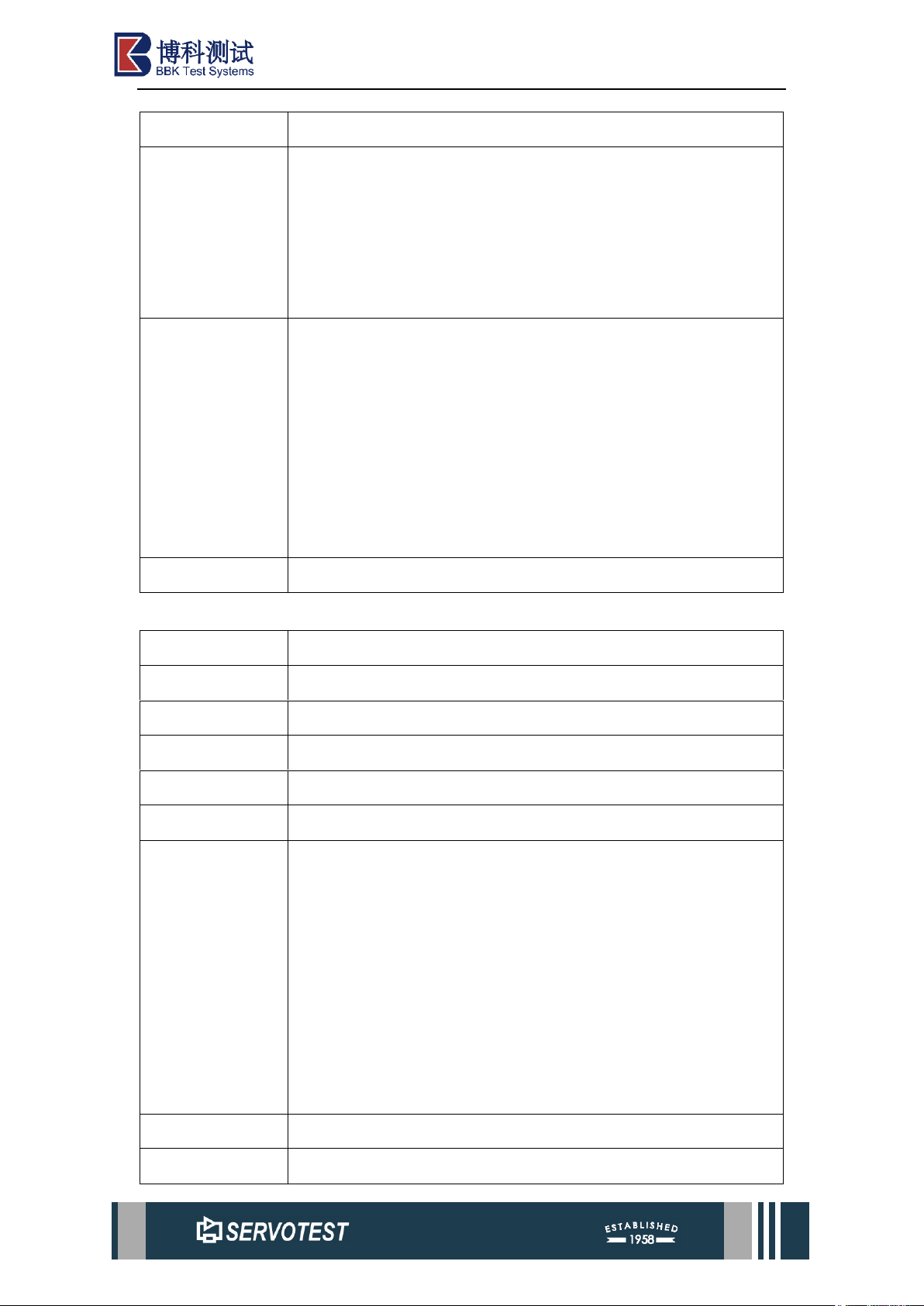
File format
Binary file
1.3.9 N-Code
Type
FileType.FileTypeNCode
Name
N-Code
Filter
N-Code files(*.dac)|*.dac
Version
5.2
Access
FormatAccess.FormatAccessReadWrite
MultiSampleRate
False,One file corresponds to one channel data.
Other
requirements
Each channel has one file. The file names are: {Source file
name}_{sampling frequency}_{channel name}. The file content
consists of the header and channel data.
There is no concept of Scale;
After selecting the file, the other form areas of the UFC provide
methods for setting the file collection. The file collection can
have different sampling frequencies and the number of channels
can also be different.
File Format
Binary file
Notes
N-Code Conversion cannot be performed in folder mode
Page 10
xKit Operation Manual
(usually, files in one folder represent a set of data).
1.3.10 UNV
Type
FileType.FileTypeUNV
Name
UNV
Filter
UNV files(*.unv)|*.unv
Version
1
Access
FormatAccess.FormatAccessReadWrite
MultiSampleRate
True,The number of channel points can be different.
Other
requirements
ChannelName Read the data in the third row to obtain it
Channel name, Unit length 20
There is no concept of Scale. When Scale is set to 1, there is no
processing of Scale when reading and writing data
Circular data
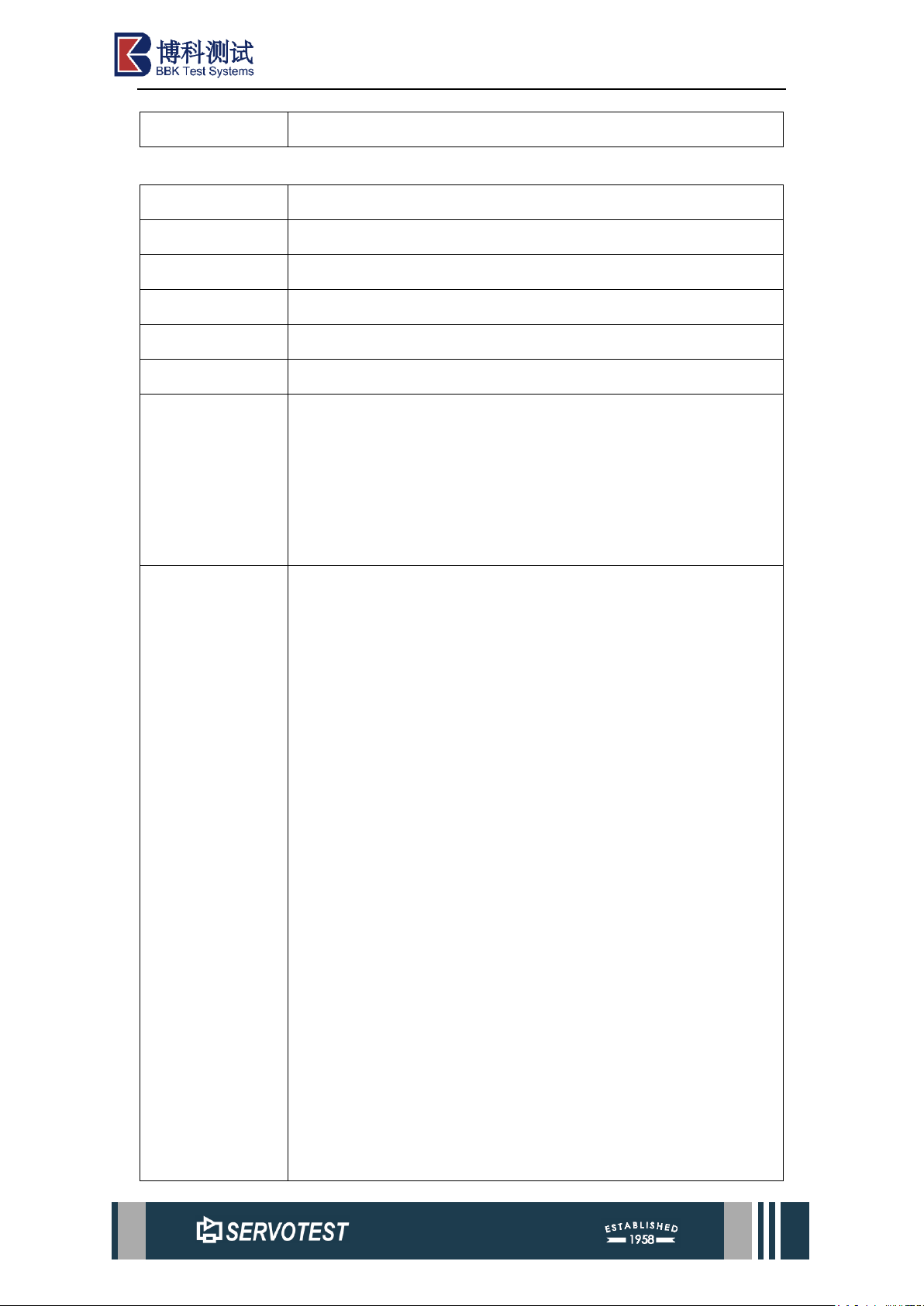
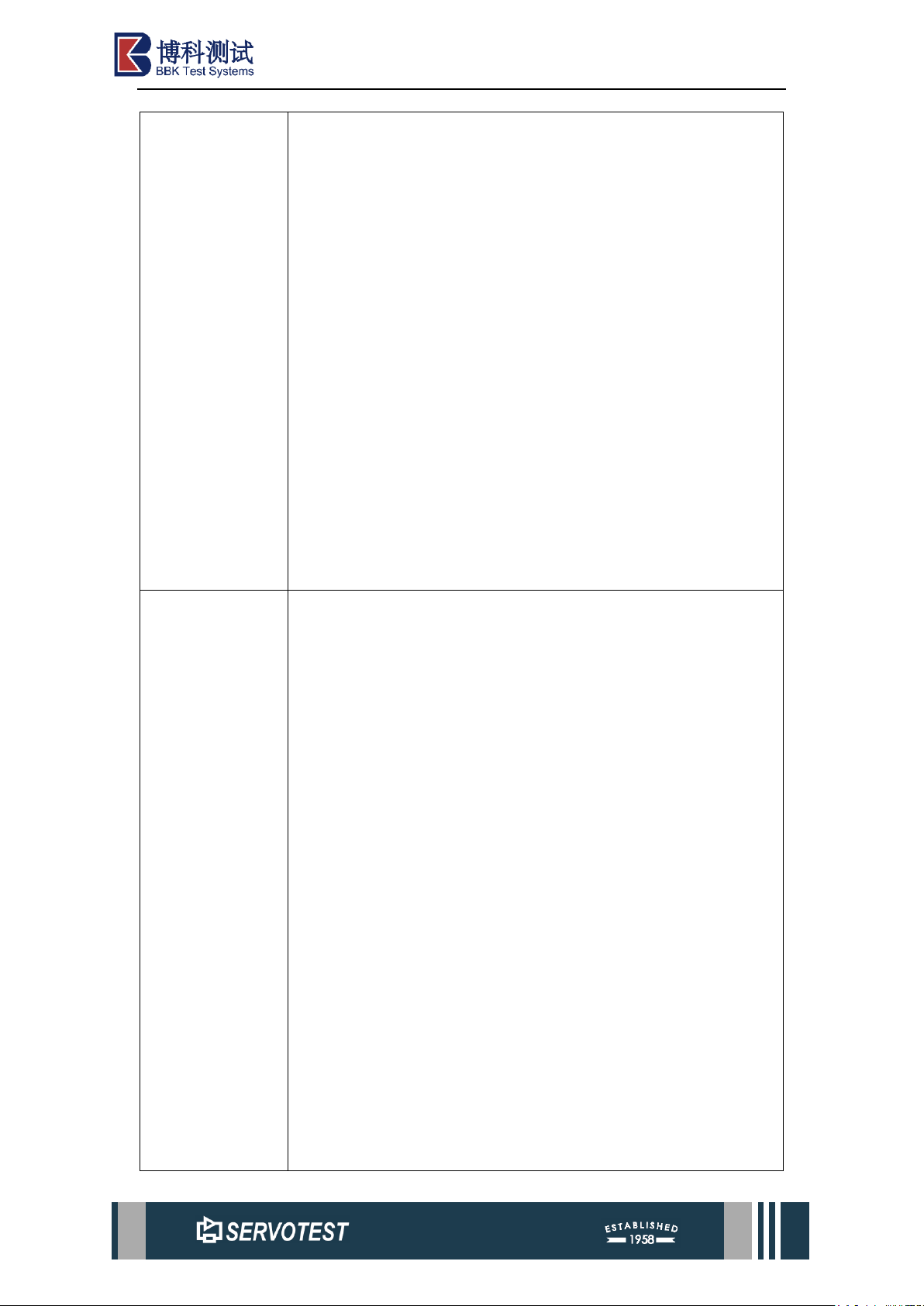
File Format
6 bytes in width, set -1 to the right;
6 bytes in width, set UniversalDatasetNumber on the right.
Channel name
Blank line 1
Blank line 2
Blank line 3
"NONE"
1 (5 widths on the right); Which channel (10 widths on the
right) [or all could be 0]; 1 (5 widths on the right); 1 (10 widths
on the right); One blank space; NONE (10 widths on the left);
Which channel (10 widths on the right)? 0(4 widths on the right);
One blank space; NONE (10 degrees, / on the left); 0(10 widths
on the right); 0(4 widths on the right);
2 (10 widths on the right);Points (10 widths on the right); 1 (10
widths on the right); 0 Scientific notation (13 widths); Periodic
scientific counting method (13 widths) 0 Scientific notation (13
widths);
17 (10 widths on the right) 0(5 widths on the right); 0(5 widths
Page 11
xKit Operation Manual
on the right); 0(5 widths on the right); One blank space;time
(20 widths on the left); seconds (20 widths on the left);
1 (10 widths on the right); 1(5 widths on the right); 0(5 widths
on the right); 0(5 widths on the right); One blank space; Channel
name (20 widths on the left);Unit name (20 widths on the left);
0 (10 widths on the right); 1(5 widths on the right); 0(5 widths
on the right); 0(5 widths on the right); One blank space; Channel
name (20 widths on the left); Unit name (20 widths on the left);
0 (10 widths on the right); 1(5 widths on the right); 0(5 widths
on the right); 0(5 widths on the right); One blank space; Channel
name (20 widths on the left); Unit name (20 widths on the left);
Data: Six scientific notation data are in one row, each row is 80
widths, and each data is 13 widths.
-1(6 widths).
Example
-1
58
th_hilev@lolev_1.RN_2
NONE
1 1 1 1 NONE
0 0 NONE 0 0
2 52400 1 0.00000E+000 1.00000E-
003 0.00000E+000
17 0 0 0 time seconds
1 1 0 0
th_hilev@lolev_1.RN_millivolts
0 1 0 0
th_hilev@lolev_1.RN_millivolts
0 1 0 0
Page 12
xKit Operation Manual
th_hilev@lolev_1.RN_millivolts
1.55218E+003 1.54346E+003 1.53538E+003 1.52860E+003
1.52247E+003 1.51633E+003
1.50988E+003 1.50213E+003 1.49341E+003 1.48404E+003
1.47565E+003 1.46854E+003
1.46144E+003 1.45498E+003 1.44852E+003 1.44045E+003
1.43141E+003 1.42205E+003
1.41268E+003 1.40461E+003 1.39718E+003 1.39008E+003
1.38297E+003 1.37522E+003
1.36586E+003 1.35650E+003 1.34649E+003 1.33745E+003
1.32970E+003 1.32195E+003
…………………………
1.08849E+003 1.09850E+003 1.10915E+003 1.12013E+003
1.13046E+003 1.13951E+003
1.14790E+003 1.15597E+003 1.16469E+003 1.17470E+003
1.18471E+003 1.19505E+003
1.20570E+003 1.21474E+003
-1
-1
58
th_hilev@lolev_1.RN_1
NONE
1 2 1 1 NONE
1 0 NONE 0 0
2 65600 1 0.00000E+000 1.00000E-
003 0.00000E+000
17 0 0 0 time seconds
1 1 0 0
Page 13
xKit Operation Manual
th_hilev@lolev_1.RN_millivolts
0 1 0 0
th_hilev@lolev_1.RN_millivolts
0 1 0 0
th_hilev@lolev_1.RN_millivolts
7.88511E+002 7.88511E+002 7.88188E+002 7.87865E+002
7.87865E+002 7.88188E+002
7.88511E+002 7.88833E+002 7.89156E+002 7.89156E+002
7.88833E+002 7.88511E+002
7.88511E+002 7.88833E+002 7.89479E+002 7.89802E+002
7.89479E+002 7.89479E+002
…………
2.32100E+003 2.32100E+003 2.32100E+003 2.32100E+003
2.32100E+003 2.32100E+003
-1
1.3.11 Universal File (Similar to UNV, the name unit length is 20)
Type
FileType.FileTypeUFF
Name
Universal File
Filter
Universal ASCII Files(*.*)|*.*
Version
1
Access
FormatAccess.FormatAccessReadWrite
MultiSampleRate
Ture,The length of channel data can be different.
Other
requirements
1.The channel name and unit only support a width of 20 bytes.
Insufficient name length may cause the problem of duplicate
names.
2. There is no Scale processing when reading and writing data.
3. Cycle
File Format
6 bytes in width, set -1 to the right, with a total length of 80.
6 bytes in width, set the UniversalDatasetNumber on the right,
with a total length of 80.
255X SIGNAL 2000 200 0 1 0
Page 14
xKit Operation Manual
response / invalid
Time
Rec 1 of test "File Name"
"NONE"
1 (5 widths on the right); 0(10 widths on the right); 1 (5 widths
on the right); 1 (10 widths on the right); One blank space; NONE
(10 widths on the left); Which channel (10 widths on the right)?
0(4 widths on the right); One blank space; NONE (10 degrees, /
on the left); 0(10 widths on the right); 0(4 widths on the right);
2 (10 widths on the right) Points (10 widths on the right); 1 (10
widths on the right); 0 Scientific notation (13 widths); Periodic
scientific counting method (13 widths) 0 Scientific notation (13
widths);
17 (10 widths on the right) 0(5 widths on the right); 0(5 widths
on the right); 0(5 widths on the right); One blank space; time (20
widths on the left); seconds (20 widths on the left);
3 (10 widths on the right) 0(5 widths on the right); 0(5 widths on
the right); 0(5 widths on the right); One blank space; Channel
name (20 widths on the left); Unit name (20 widths on the left);
0 (10 widths on the right); 0(5 widths on the right); 0(5 widths
on the right); 0(5 widths on the right); One blank space; NONE;
0 (10 widths on the right); 0(5 widths on the right); 0(5 widths
on the right); 0(5 widths on the right); One blank space; NONE;
Data: Six scientific notation data are in one row, each row is 80
widths, and each data is 13 widths.
-1(6 widths).
Example
-1
58
255X SIGNAL
2000 200 0 1 0
response / invalid
Page 15
xKit Operation Manual
02-Feb-2023 19:19:45
Rec 1 of test "GPSFile1"
NONE
1 0 1 0 NONE
3 -3 NONE 0 0
2 65600 1 0.00000E+000
1.00000E-003 0.00000E+000
17 0 0 0 TIME S
3 0 0 0
th_hilev@lolev_1.RN_millivolts
0 0 0 0 NONE
0 0 0 0 NONE
7.88511E+002 7.88511E+002 7.88188E+002 7.87865E+002
7.87865E+002 7.88188E+002
7.88511E+002 7.88833E+002 7.89156E+002 7.89156E+002
7.88833E+002 7.88511E+002
……………………
-6.51959E+002-6.59385E+002-6.65843E+002-6.72301E+002-
6.79082E+002-6.86186E+002
-6.92644E+002-6.99102E+002
-1
-1
58
255X SIGNAL
2000 200 0 1 0
response / invalid
02-Feb-2023 19:19:45
Rec 2 of test "GPSFile1"
NONE
1 0 1 0 NONE
3 -3 NONE 0 0
Page 16
xKit Operation Manual
2 52400 1 0.00000E+000
1.00000E-003 0.00000E+000
17 0 0 0 TIME S
3 0 0 0
th_hilev@lolev_1.RN_millivolts
0 0 0 0 NONE
0 0 0 0 NONE
1.55218E+003 1.54346E+003 1.53538E+003 1.52860E+003
1.52247E+003 1.51633E+003
1.50988E+003 1.50213E+003 1.49341E+003 1.48404E+003
1.47565E+003 1.46854E+003
………………
1.14790E+003 1.15597E+003 1.16469E+003 1.17470E+003
1.18471E+003 1.19505E+003
1.20570E+003 1.21474E+003
-1
1.3.12 Sachs ASCII
Type
FileType.FileTypeSachs
Name
Sachs ASCII
Filter
Sachs ASCII files(*.txt)|*.txt
Version
1
Access
FormatAccess.FormatAccessReadWrite
MultiSampleRate
False,The sampling rate and the number of channels for the same
file are the same.
Other
requirements
The criterion for judging files: Files start with "Time"
The first line: time, signal name (delimiter: "\t"), and the
corresponding values of the other lines
The data are separated by "\t"
Multiple sampling rates are not supported: For the same
sampling rate, the longest length is taken as the standard, and 0
Page 17
xKit Operation Manual
is added if it is insufficient
There is no concept of Scale. When Scale is set to 1, there is no
processing of Scale when reading and writing data
No unit
File Format
Time th_hilev@lolev_1.RN_1 th_hilev@lolev_1.RN_2
0 788.5105 1552.1755
0.001 788.5105 1543.4572
0.002 788.1876 1535.3845
0.003 787.8647 1528.6036
0.004 787.8647 1522.4684
1.3.13 JCI ASCII
Type
FileType.FileTypeJCI
Name
JCI ASCII
Filter
JCI ASCII files(*.jci)|*.jci
Version
1
Access
FormatAccess.FormatAccessReadWrite
MultiSample
Rate
False,The sampling rate and the number of channels for the same
file are the same.
Other
The first line: "TIME (Sec)","lolev_1 (millivolts)";
There is no concept of Scale. When Scale is set to 1, there is no
processing of Scale when reading and writing data.
Multiple sampling rates are not supported: For the same sampling
rate, the longest length is taken as the standard, and 0 is added if it
is insufficient.
The width occupied by the data is 13. If it is insufficient, fill in the
space in front and separate it with ", ".
File Format
"TIME
(Sec)","th_hilev@lolev_1.RN_1(millivolts)","th_hilev@lolev_1.R
N_2(millivolts)",
0, 788.51051, 1552.17549,
0.001, 788.51051, 1543.45711,
Page 18
xKit Operation Manual
0.002, 788.1876, 1535.38454,
0.003, 787.8647, 1528.60359,
1.3.14 AMC
Type
FileType.FileTypeAMC
Name
AMC
Filter
AMC files(*.amc)|*.amc
Version
1
Access
FormatAccess.FormatAccessReadWrite
MultiSampleRate
False,The sampling rate and the number of channels for the same
file are the same.
Other
By default, the channel name only supports a length of 9
characters, and the unit only supports a length of 4 characters.
This method stores the complete channel name and unit in
ChannelDescription. Insufficient name length may cause the
problem of duplicate names.
Data storage method: Channel parallel storage, all without data,
zeros are added
There is the concept of Scale, but there is no processing of Scale
when reading and writing data.
File Format
Binary file
1.3.15 DIAdem
Type
FileType.FileTypeDia
Name
DIAdem
Filter
DIAdem files(*.dat)|*.dat
Version
1
Access
FormatAccess.FormatAccessReadWrite
MultiSampleRate
False,File writing does not support multiple sampling rates, and
the length of channel data can be different.
Other
Files are divided into header files and data files. The header file
type is.dat, and the name of the data file is in the header file
Settings.
Page 19
xKit Operation Manual
The writing method is fixed: all data types are float, with the
suffix of the numeric file. R32 The first channel is a time series.
The length of channel data can be different.
There is no Scale processing when reading and writing data.
When reading a file, the first channel must be the time channel.
The sampling frequency, SamplesRows, and Duration are
determined through the first channel.
File Format
.dat text format, data file binary.
Tips
DIAdem The file name cannot be changed at will.
1.3.16 Vyella
Type
FileType.FileTypeVyella
Name
Vyella
Filter
Vyella files(*.txt)|*.txt
Version
1
Access
FormatAccess.FormatAccessReadWrite
MultiSampleRate
False,The lengths of the channel data are the same.
Other
There is only data information without any header, which is
separated by "\t".
File Format
0 788.511 1552.175
0.001 788.511 1543.457
0.002 788.188 1535.385
0.003 787.865 1528.604
Tips
Since this format type only contains data and is not easy to
identify, it cannot be opened directly.
1.3.17 Seismo
Type
FileType.FileTypePeer
Name
Seismo
Filter
Seismo files(*.AT2,*.DT2,*.VT2)|*.AT2;*.DT2;*;VT2
Version
1
Access
FormatAccess.FormatAccessReadOnly
Page 20
xKit Operation Manual
MultiSampleRate
False,The lengths of the channel data are the same.
Other
Automatically merge files;
Multiple sampling rates are not supported;
Read-only;
The first line of the file is "PEER NGA STRONG MOTION
DATABASE RECORD";
File name style: "RSN1494_CHICHI_TCU054-E".
File Format
PEER NGA STRONG MOTION DATABASE RECORD
Chi-Chi Taiwan, 9/20/1999, TCU054, E
ACCELERATION TIME SERIES IN UNITS OF G
NPTS= 18000, DT= .0050 SEC,
.2659634E-03 .2656343E-03 .2652899E-
03 .2649419E-03 .2646071E-03
.2642888E-03 .2639533E-03 .2635991E-
03 .2632579E-03 .2629329E-03
.2626078E-03 .2622662E-03 .2619345E-
03 .2616332E-03 .2613096E-03
.2609799E-03 .2606531E-03 .2602596E-
03 .2598603E-03 .2595841E-03
.2593670E-03 .2590265E-03 .2585178E-
03 .2581680E-03 .2580344E-03
Tips
File conversion in folder mode is not supported.
Page 21
xKit Operation Manual
2 Software Introduction
UFC is used for mutual conversion between different file formats. Mainly divided
into function introduction in the menu, preview, and file settings.
2.1 Input File
2.1.1 Select Mode
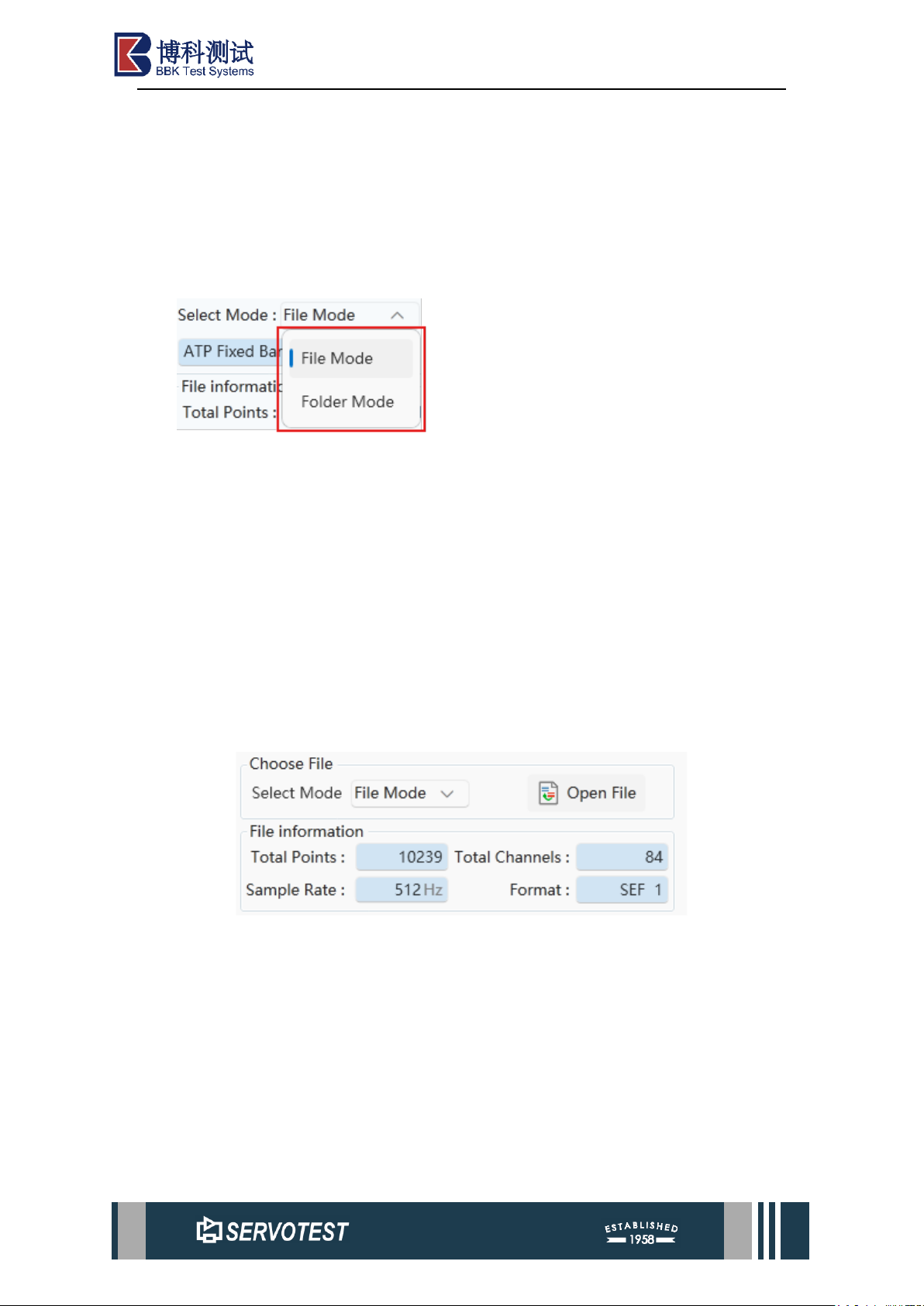
UFC provides two file selection modes: File Mode and Folder Mode.
In the file mode, you can select the conversion format supported by UFC to open
the file. After opening, it will display the basic information of the file, and the drawing
chart will display the selected channel data. By default, all channels will be added to
file conversion form.
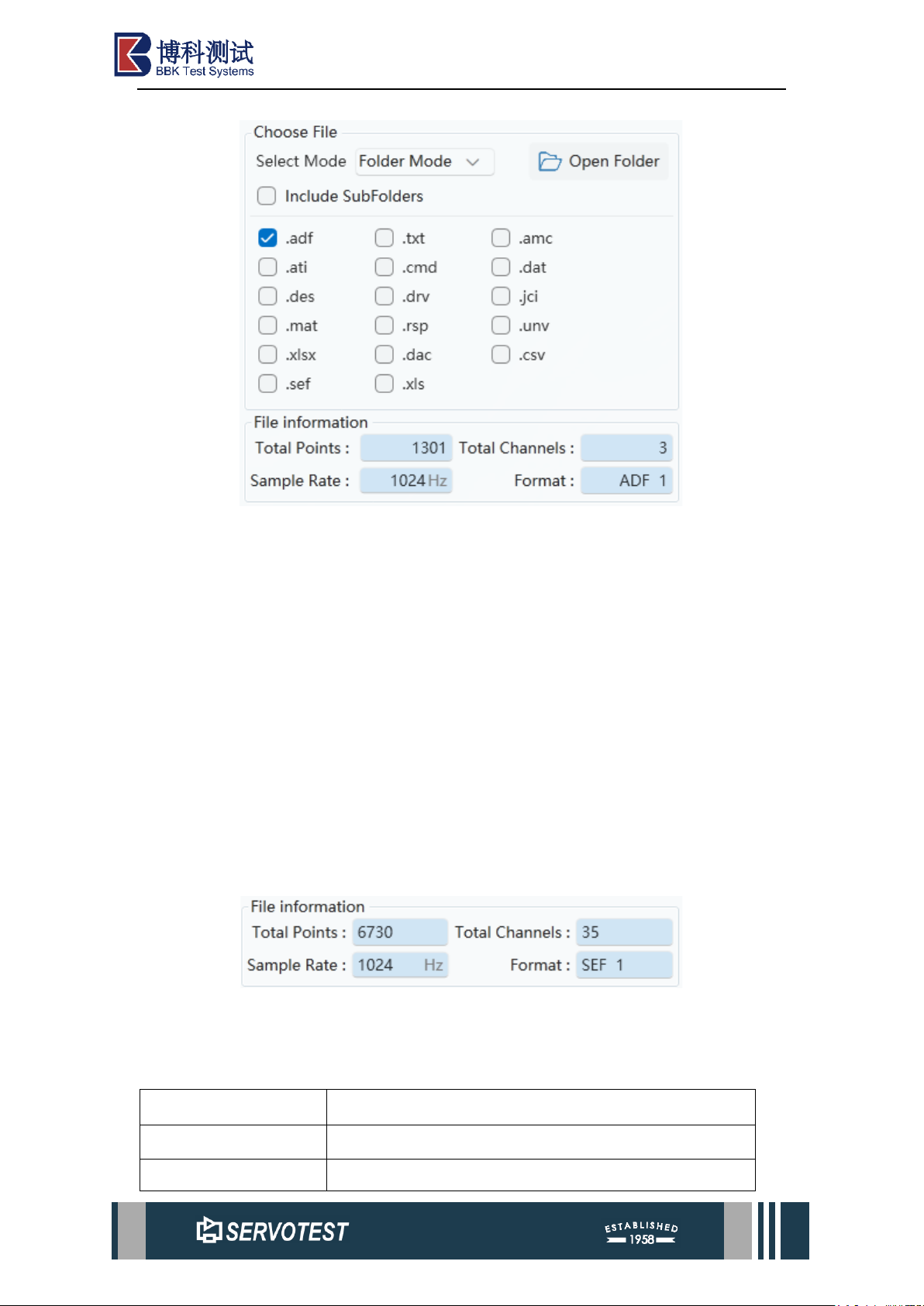
In folder mode, the interface has changed, as shown in the figure below. After
selecting the specified folder, you can select files in the file type filter as required. After
selection, all files that meet the price adjustment under the folder will be displayed in
the file list. After selecting a file, the drawing chart will display the selected channel
data.
Figure 2-1 File Mode
Page 22
xKit Operation Manual
Figure 2-2 Folder Mode
2.1.2 N-Code File
Since the N-Code file corresponds to one channel and one file, an extra form is
added for easy conversion. "Default in file mode" selects the collection of files with the
same name before the first underscore under the folder. "Single file" selects only the
selected file as the data file. The "Custom start" option will be based on the set of files
with the field start set as the data file.
Note: N-Code cannot be used for conversion in folder mode.
2.1.3 Seismo File
Similar to N-Code files, Seismo files also correspond to one file per channel, and
this type of file does not support conversion in folder mode.
2.1.4 File Information
Figure 2-3 File Information
Table 2-1 File Information
Parameter
Describe
Total Points
Total number of data points.
Total Channels
The total number of channels present in the current file.
Page 23
xKit Operation Manual
Sample Rate
Sample Rate.
Format
File format.
2.2 Output Setting
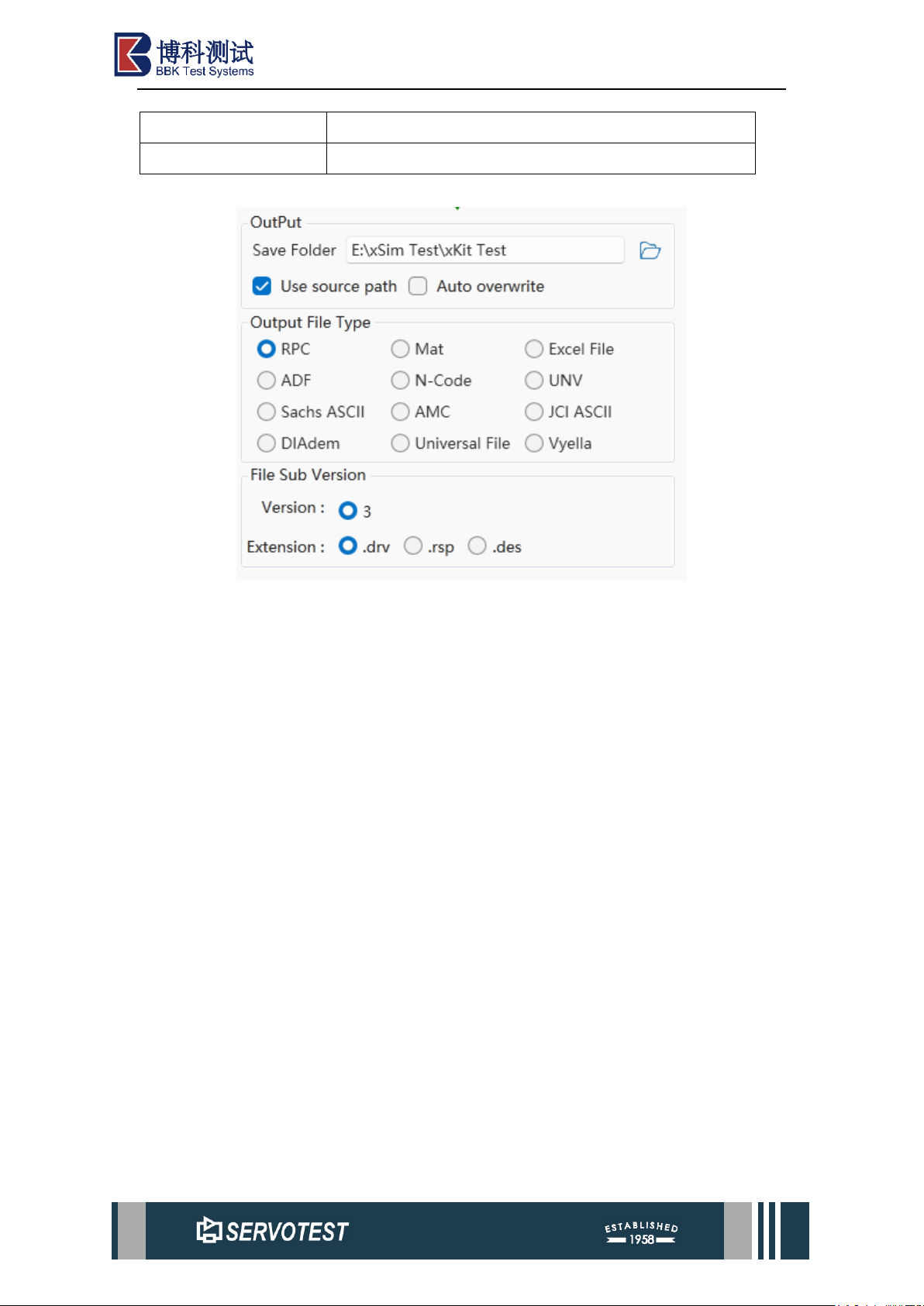
Figure 2-4 Output Setting
The output of converted files is set under this menu.
(1) By default, the output file save path uses the resource file path, which can be
modified. The automatic rewriting function is not enabled by default, that is, when a
file with the same name exists, the automatic naming mechanism of the file with the
same name in Windows is used, and it is overwritten and saved after it is enabled.
(2) The output file type is selected according to specific needs, and only one item
can be selected. Some file types may exist in multiple formats (usually represented by
different suffixes), which can be selected according to needs.
(3) In the file mode, the channel to be converted can be operated, and the channel
data cannot be operated in the folder mode (in the folder mode, all files meeting the
requirements under the folder are processed).
Page 24
xKit Operation Manual
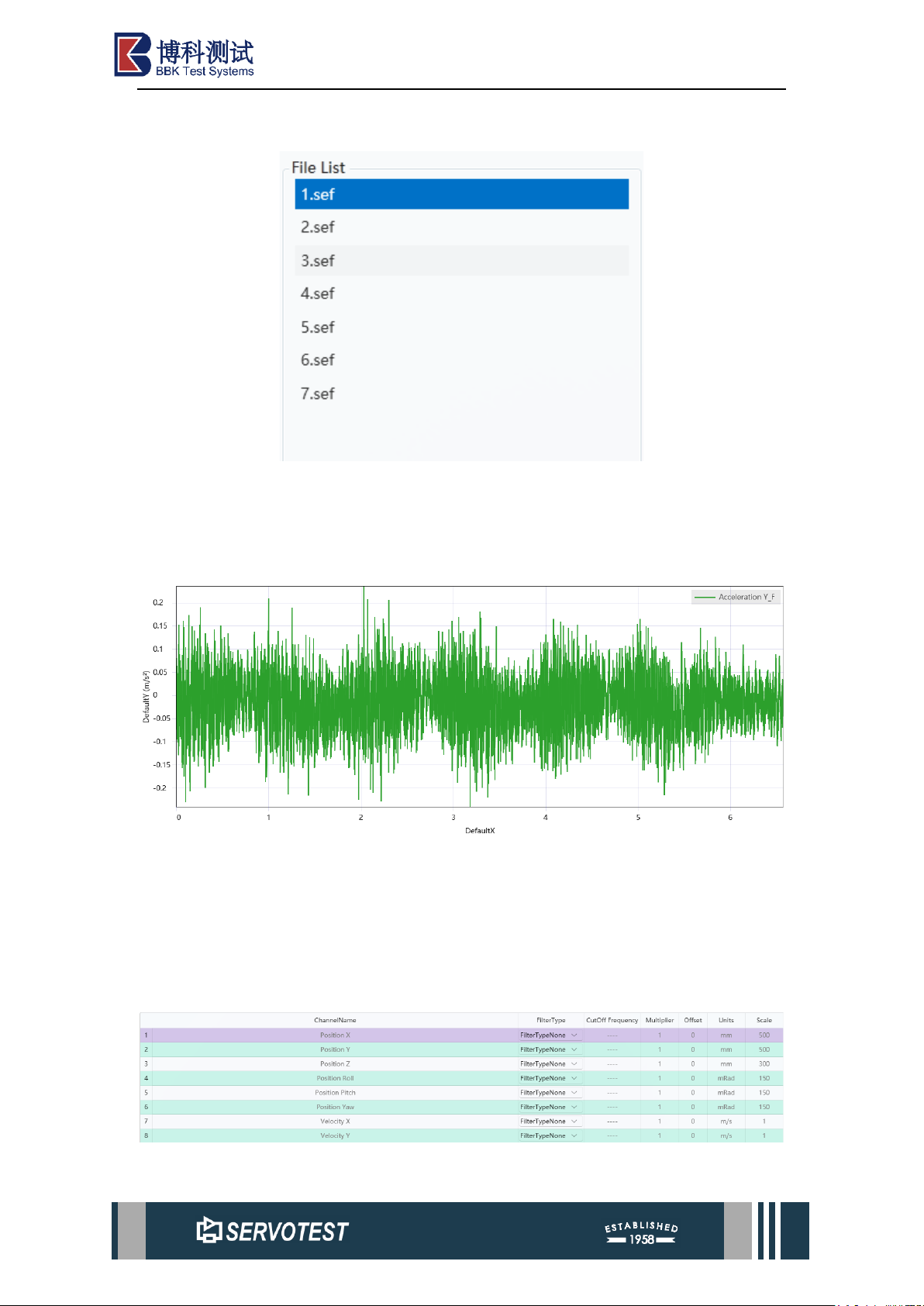
2.3 File List
Figure 2-5 File List
The file list and channel list are displayed here. Single-machine selection of files
and channels. The preview area on the right shows more details.
2.4 Data Graph Preview
Figure 2-6 Data Graph Preview
This section is the data preview of the file. To view more detailed data information,
you may right-click to open the menu and examine the data chart. Additionally, one
may switch rows within the table area beneath the data preview graph (Figure 2-7 Data
List) to view preview graphs for different signal channels.
Figure 2-7 Data List
Page 25
xKit Operation Manual
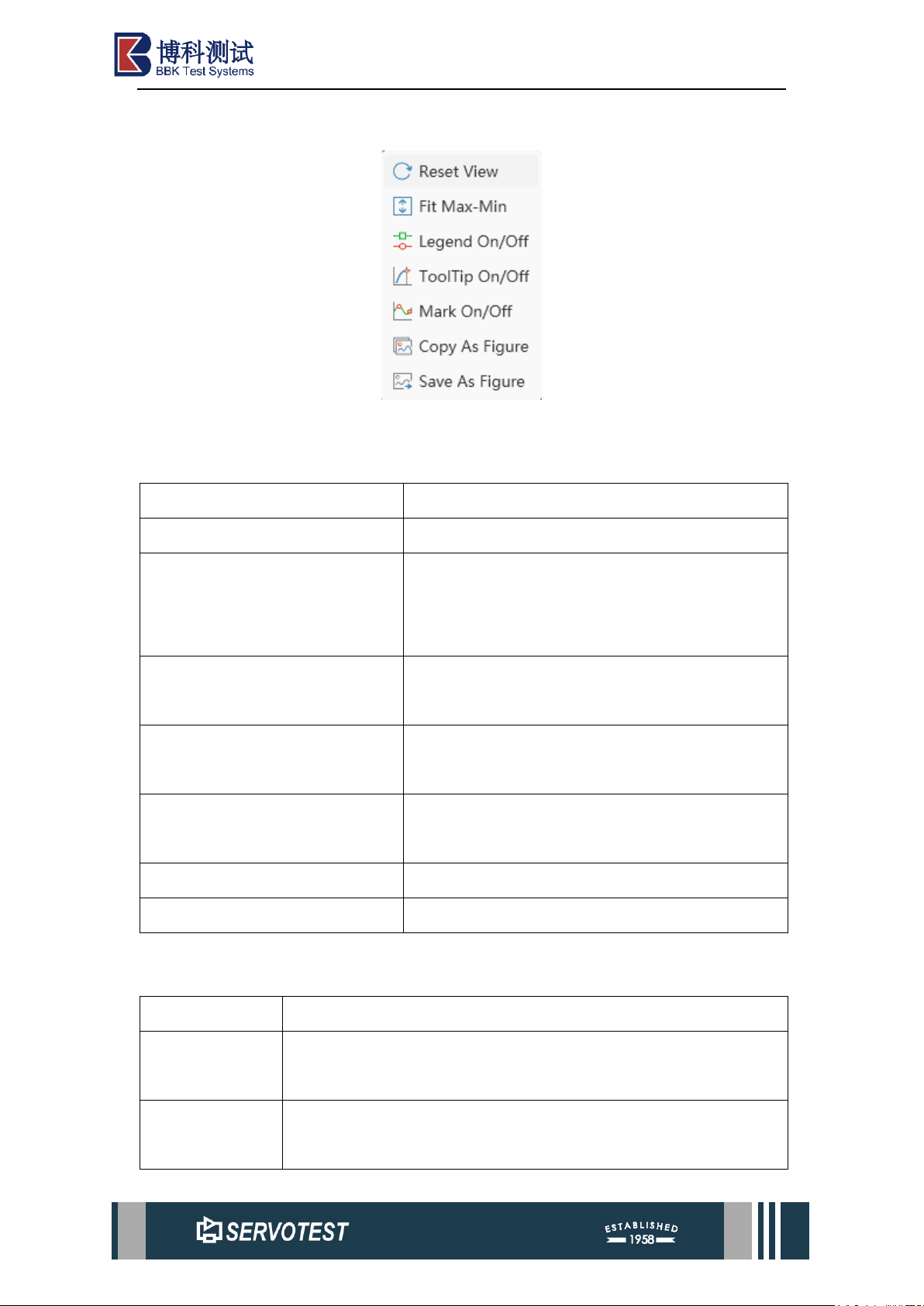
2.4.1 Right-click Menu
Figure 2-8 Right-click Menu
Table 2-2 Right-click Menu
Parameter
Describe
Reset View
Reset the coordinate range of the drawing area.
Fit Max/Min
Automatically adjust the Y-axis coordinate range
to the range of the data, and the X-axis is not
affected.
Legend On/Off
Option to turn on or off the legend in the upper
right corner.
ToolTip On/Off
Turn on or off the function switch of mouse
display data.
Mark On/Off
Toggle the display of individual data points on or
off.
Copy as Figure
Copy the image to the clipboard.
Save as Figure
Save as image file.
2.4.2 Supported Image Formats
Table 2-3 Supported Formats
Format
Describe
png
png is short for Portable Network Graphic, a type of raster image
file.
jpg
jpg is a widely used compressed image format for containing
digital images.
Page 26
xKit Operation Manual
svg
Scalable Vector Graphics (svg) is a web-friendly vector file
format.
pdf
pdf is an abbreviation that stands for Portable Document Format.
emf
An emf file is a Windows file format designed to store large
amounts of image detail for high quality printing.
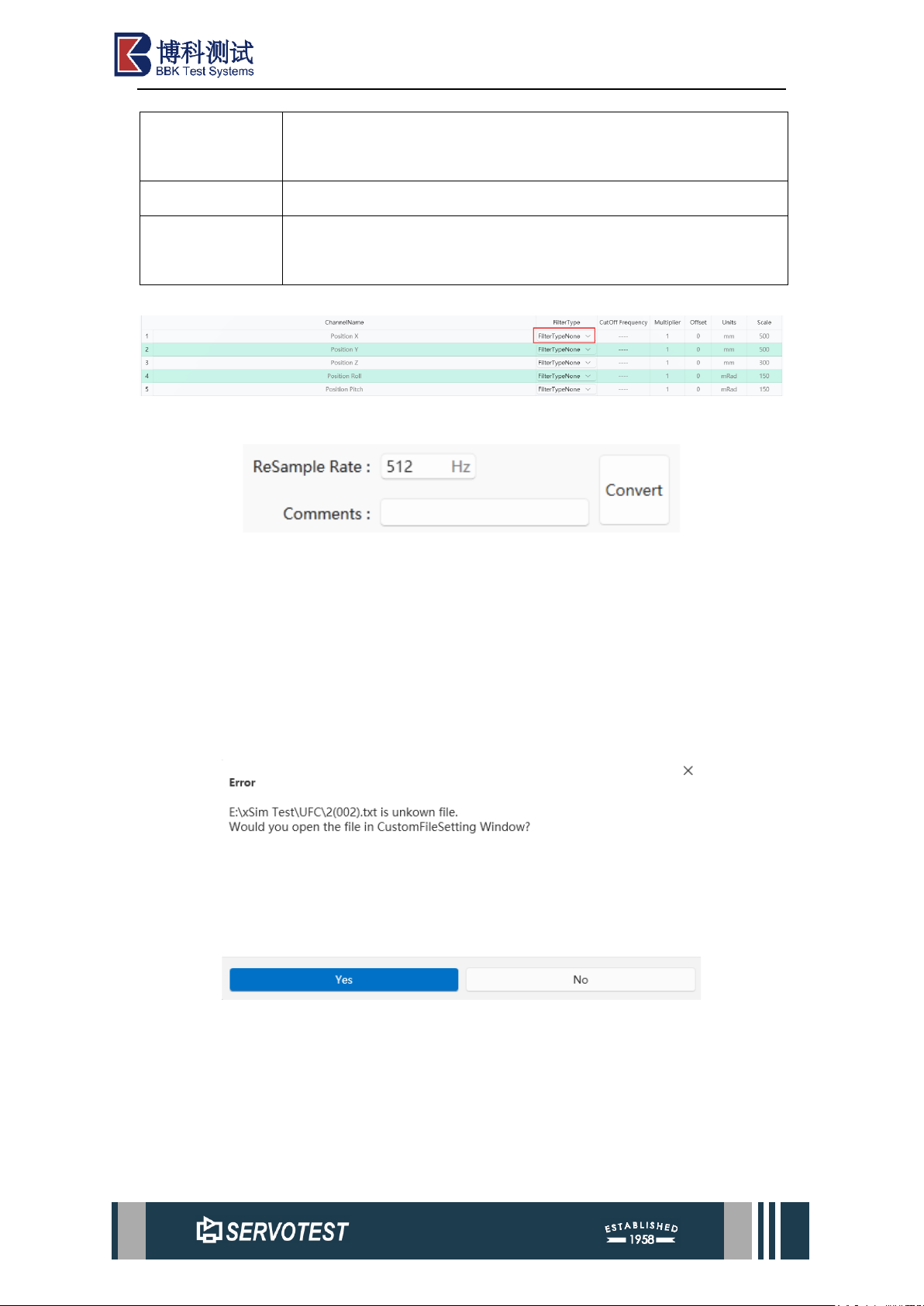
2.5 Data Preview
Figure 2-9 Filter Type
Figure 2-10 ReSample Rate
The UFC provides pre-output data editing functionality, supporting customisable
sampling frequencies. Furthermore, filter types (unfiltered and Butterworth low-pass
filtering) can be freely configured to accommodate diverse application scenarios and
fulfil varied user requirements in data processing.
2.6 Custom File Setting
2.6.1 Non-standard File Format
When the data type cannot be recognized, the software will prompt to open the
custom file form. The setup can be done later by customizing the form.
Note: The main structure of the file processed by the custom form is in the form
that the basic information of the file comes first, and the channel data follows. The
channel data must be stored in the form of columns, which is similar to the structure of
Sachs ASCII here.
Page 27
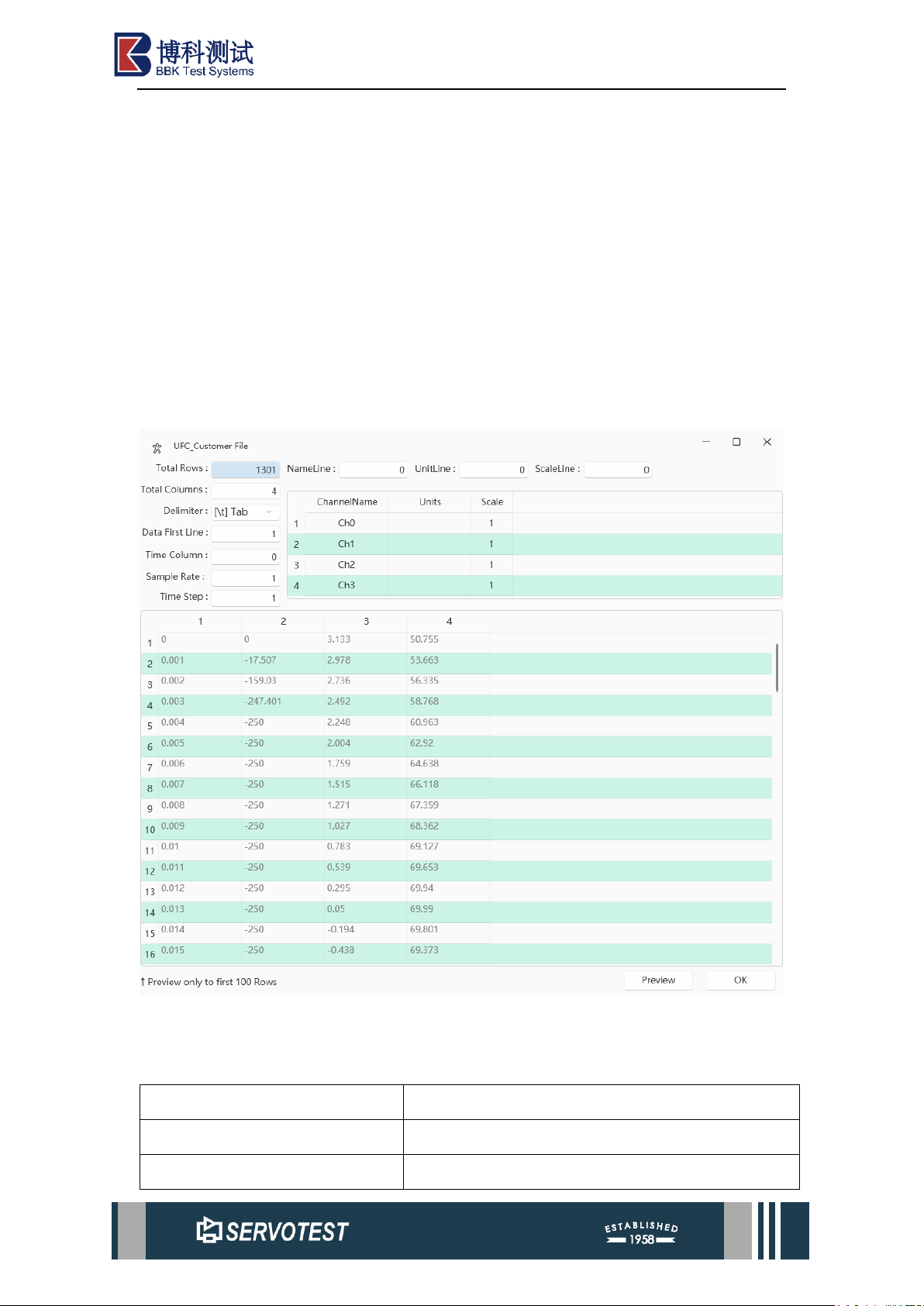
xKit Operation Manual
Customize the form as shown. When opening the form, it will pre-read the file and
set the file information. However, because the file type is not standardized, it cannot be
analyzed accurately in many cases and needs to be modified manually. As shown in the
figure, the software determines the number of samples by setting the total number of
rows (Total Rows) and the number of initial data rows (Data First Line). Use the time
column to set the column where the time data is located. When the data is 0, it means
that there is no time column. Name line, Unit Line and Scale Line set the line where
the corresponding data is located and set it to 0 if it does not exist. The channel
information data can be modified manually, but the preview data cannot be modified.
2.6.2 Custom File Setting
Figure 2-11 Custom File Setting
Table 2-4 Custom File Setting Parameter
Total Rows
数据总行数。
Name Line
名称行。
Unit Line
单位线。
Page 28
xKit Operation Manual
Scale Line
刻度线。
Total Columns
总列数。
Delimiter
定界符。
Data First Line
数据第一行。
Time Column
时间栏。
Sample Rate
采样率。
Time Step
时间步长。
ChannelName
通道名称。
Units
单位。
Scale
量程。
Note: After configuring parameters in the custom window, you must click ‘OK’
and close the custom window for the data to appear on the UFC main interface.
 Loading...