

Page 1

Event Manager
Description
Part No. 303142-A Rev. 00
July 1998
Page 2
4401 Great America Parkway 8 Feder al Street
Santa Clara, CA 95054 Billerica, MA 01821
Copyright © 1998 Bay Networks, Inc.
All rights reserved. Printed in the USA. Ju ly 1998.
The information i n this document is sub ject to change with out notice. The statements, confi gurations, technical da ta,
and recomm endations in this document ar e belie ved to be ac curate and reliable, but ar e present ed w ithout e xpress or
implied warranty. Users must tak e full responsi bility for their app lications of any prod ucts spe c ifie d in thi s document.
The information in this document is proprietary to Bay Networks, Inc.
The software described in this document is furnished under a license ag reement and may only be used in acc ordance
with the terms of that license. A summary of the Software License is includ ed in this document.
Trademarks
Bay Networks is a registered trademark and the Bay Networks logo are trademarks of Bay Networks, Inc.
NetSpeak is a registered trademark of NetSpeak Corporation.
Microsoft, Window s, Window s N T, and SQL Server are registered trademarks of Microsoft Corporation.
RSA and RSA Public Key Cryptosystem are trademarks of RSA Data Security, Inc.
The NetSp eak service products described in this document incorporate security technology from RSA D a ta Security,
Inc.
NetSpeak Corporation is a certified PO S-port application developer and a member of the PO S-port Ready program.
All other trademarks and registered trademarks are the propert y o f their respecti ve owners.
Restricted Rights Legend
Use, duplication, or disclosure by the United States Governm ent is subject to restrictions as set fo rth in subparagraph
(c)(1)(ii) of the Rights in Technical Data and Computer Software clause at DFA RS 252.227-7013.
Notwithstanding any other license agreement that ma y p ertain to, or accompany the delivery of, this computer
software, the rights of the United States Government regarding its use, reproduction, and disclosure are as set for th in
the Commer cial Computer Software-Restricted Rights cla use at FAR 52.227-19.
Statement of Conditions
In the interest of improving internal design, operational function, and/or reliability, Bay Networks, Inc. reserves the
right to make changes to the products described in this document without notice.
Bay Networks, Inc. does not assum e any liability that may occur du e to the use or application of the product(s) or
circuit layout(s) described herein.
Portions of the code in this softw are product may be Copyright © 1988, Regents of the University of California. All
rights r eserved. Redistribution and use in so urce and binary forms of such portions are permitted, provided that the
above copyright notice and this paragraph are duplicated in al l such forms and that any documentation, advertising
materials, and other materials related to such distribution and use acknowledge that such portions of the software were
developed by the University of California, Berkeley. The name of the Univ ersity may not be used to endorse or
promote products derived from s u ch portions of the soft ware wi thout specific prior written permission.
ii
303142-A Rev. 00
Page 3

SUCH PORTI ONS OF THE SOFTWARE ARE PROVIDED “AS IS” AND WITHOUT ANY EXPRESS OR
IMPLIED WARRANTIES, INCLUDING, WITHOUT LIMITATION, THE IMPLIED W A RRANTIES OF
MERCHANTABILITY AND FITNESS FOR A PARTICULAR PURPOSE.
In addition, the program and information contained herein are licensed only pursuant to a license agreeme n t that
contains restrictions on us e and disclosure (that may incor porate by reference certain limitations and notices impos ed
by third parties).
303142-A Rev. 00 iii
Page 4

Page 5

Contents
About This Guide
Conventions ....................................................................................................................... x
Bay Networks Technical Publications ................................................................................x
Bay Networks Customer Service ...................................................................................... xi
How to Get Help ...............................................................................................................xi
Bay Networks Educational Services . ................................................................................xii
Chapter 1
Event Manager
Overview of the Event Manager .....................................................................................1-1
Features ...................................................................................................................1-2
Back up a nd Resto r e .................... ............... .......................... ................... ..........1-2
Centralized Data Storage ..................................................................................1-2
Interaction with Third-Party Applications ...........................................................1-2
Secure Comm uni ca tions ................................ ................... .............. ..................1-2
System Admin i stration ............... .......................... .......................... ................... .1-2
Interaction with Voice Services ................................................................................1-3
Gateway Routing Manager .............................................................................................1-3
Voice Gateway ................................................................................................................1-3
System Administration Using the Control Center ...........................................................1-4
Administration Access ..............................................................................................1-5
Security Manage men t ............... .............. .......................... ................... .............. ......1-6
System Requir e men ts ................................. ................... .............. ................... .............. .1-6
303142-A Rev. 00
v
Page 6

Page 7

Figures
Figure 1-1. Control Center Main Screen, EMS Selected ............................................1-5
303142-A Rev. 00
vii
Page 8

Page 9

About This Guide
If you are responsible for configuring the Event Manager software, you need to
read this guide.
Chapter 1
contains information on Event Manager features, Voice Services
interactions, Gatewa y Routing Manager and Voice Gatewa y features, and Contr ol
Center features.
Note:
This document contains examples of windows displayed by Voice
Services applications. These are included to give you a point of reference
while reading about features and procedures. Most of these windows match or
closely rese mble those di splayed by the applic ations. However, some windows
displayed by the ve rsion of the applic ation y ou are usin g may dif f er from t hose
included in this document. Some fields and options might appear dimmed,
which indicates that they are unavailable.
303142-A Rev. 00
ix
Page 10

Event Manager Description
Conventions
italic text
Indicates variable values in command syntax
descriptions, new terms, file and directory names, and
book titles.
quotation marks (“ ”) Indicates the title of a chapter or section within a book.
screen text
Indicates data that appears on the screen.
Example:
fred@ ac me.com, 19 9. 999.9. 99, ,,
,,,Fr ien dly/Fr ed , fr ed,
Bay Netw orks Technical Publications
You can now print technical manuals and release notes f ree, directly from the
Internet. Go to
products f or which you nee d do cumentation. Then loc ate the specific category and
model or version for your hardware or softwar e product. Using Adobe Acrobat
Reader, you can open the manuals and release notes, search for the sections you
need, and print them on most standard printers. You can download Acrobat
Reader free f rom the Adobe Systems Web site,
Documentation sets and CDs are available through your loc al Bay Networks sales
office or account representative.
support.baynetwork s.c om/library/tpubs
. Find the Bay Networks
www.adobe.com
.
x
303142-A Rev. 00
Page 11

Bay Networks Customer Service
You can purchase a support contract from your Bay Networks distributor or
authorized reseller, or directly from Bay Networks Customer Service. For
information or to purchase a Bay Networks service contract, either call you r local
Bay Networks field sales office or one of the following numbers:
Region Telephone number Fax number
About This Guide
United States and
Canada
Europe 33-4-92-96-69-66 33-4-92-96-69-96
Asia/Pacific 61-2-9927-8888 61-2-9927-8899
Latin America 561-988-7661 561-988-7550
Information about custom er service is also av ailable on the World Wide Web at
support.baynetworks.com
How to Get Help
If you purchas e d a serv ice co n tract for your Bay Networks product from a
distributor or author ized reseller, contact the technical support staff for that
distributor or reseller for assistance.
If you purchased a Bay Networks service program, call one of the following Bay
Networks Technical Solutions Centers:
800-2LANWAN; then enter Express Routing
Code (ERC) 322, when prompted, to
purchase or renew a service contract
978-916- 8880 (direct)
.
978-916-351 4
Technical Solu ti ons Center Telephone number Fax number
Billerica, MA 800-2LANWAN 978-916-3514
Santa Clara, CA 800-2LANWAN 408-495-1188
Valbonne, France 33-4-92-96-69- 68 33-4-92-96-69-98
Sydney, Australia 61-2-9927-8800 61-2-9927-8811
Tokyo, Japan 81-3-5402-0180 81-3-5402-0173
303142-A Rev. 00
xi
Page 12

Event Manager Description
Bay Networks Educational Services
Through Bay Networks Ed ucati onal S ervices, you can att end c lasses a nd p urchase
CDs, videos, and computer-based training programs about Bay Networks
products. T raining programs can take place at your site or at a Bay Networks
location. For more information about trai ning programs, call one of the following
numbers:
Region Telephone number
United States and Canada 800-2LANWAN; then enter Expres s Routi ng Code (ERC)
282 when prompted
978-916-3460 (direct)
Europe, Middle East, and
Africa
Asia/Pacific 61-2-9927-8822
Tokyo and Japan 81-3-5402-7041
33-4-92-96-15-83
xii
303142-A Rev. 00
Page 13

Overview of the Event Manager
The Event Manager (EMS) is a reposi tory for infor mation and records of database
transactions collected over a period of time. The EMS receives data from other
Voice Services and logs transaction records into your current, centralized SQL
database (that is, either an Oracle® Workgroup Server or Microsoft® SQL
Server). The data is then available to third-party applications at a central source
for analysis and report generation. Communication between the EMS and other
Voice Services is encrypted.
Chapter 1
Event Manager
The EMS provides an off-server repository to safeguard data and p erform data
analysis without impacting server operations, and, therefore, s hould run on a
computer system not used for other Voice Service proces ses. More than one EMS
can be used to provide fault tolerance through data duplication.
Since the Voice Services reporting to the EMS may reside in different time zones,
all time data elements are sent to the EMS using Universa l Coordinated Time.
This assures uniform time stamps on all recorded ev ents throughout a global
network.
An EMS can simultaneously support different types of Voice Servic es as well as
multiple Voice Services of the same type. Each Voice Service using the EMS is
identified by a unique service e-mail.
303142-A Rev. 00
1-1
Page 14

Event Manager Description
Administrators can configure a primary and secondar y EMS to which service
transaction records will be sent. Data can then be sent to the secondar y service
when the primary se rv ice is not responding. I f the EMS is not online with a Voice
Service, the individual manager keeps all transactions in a buff er stored on the
server disk, and resends records to the EMS when it is online again. This protocol
provides a safe metho d of forwarding data from the individual manager to the
EMS database without a loss of data.
Features
Backup and Restore
The EMS allows the system administrator to establish back up and restore
procedures using the Oracle and Microsoft SQL Enterprise Manager.
Centralized Data Storage
The EMS makes efficient use of computer processing resources because it make s
it possible to access l ar ge amounts of data and genera te repor ts from a centr al dat a
location instead of from each Voice Service. The data is stored on one computer
system instead of several.
1-2
Interaction with Third-Party Applications
The SQL database used by the EMS can be made ava ilable to third-party
accounting and reporting applications.
Secure Communications
Voice Services use the RSA Public Key Cryptosyste m™ to provide secure
communications and prevent problems such as data interception, playback,
decoding, and modification by third parties.
System Administration
Control Center users are identified by unique user names and encrypted
passwords. Users can be given all, some, or no administrative privileges to the
Event Manager.
303142-A Rev. 00
Page 15

Interaction with Voice Services
The EMS stores infor mation pa ssed from v a rious Voice Services. The inf ormation
is stor ed in SQL database tables, which are identified by the unique service e-mail
address of the Voice Service which sent the information.
Gateway Routing Manager
The Gateway Routing Manager (CS) allows companies to provide connection
services and account management to their virtual WebPhone processes.
The CS stores data regarding user status, such as a gateway changing to online or
offli ne, as we ll as inf ormati on on conne ction re quests, such a s a virtua l WebPhone
user dialing an e-mail address or telephone number (when a Voice Gateway is
available).
The CS also stores information regarding transa ction requests from other servers
in the EMS. Whe n a se rv er (us ually t he ga te w ay) reque sts a tra nsact ion, it conta cts
the CS for account information.
Event Manager
For more information about the Gateway Routing Manager features and
capabilities, refer to the
Voice Gateway
The Voice Gatewa y (WGX) b rings ca lls p laced us ing conventional telephone s in to
an IP-based data network. This gives PSTN telephones the ability to place long
distance calls over an IP network, such as the Internet, rather than using the
conventional telephone network.
A call detail recording (CDR) featur e allo ws the Voice Gatew ay (WGX) to collect
and record information abo ut incoming and outgoing calls. CDR data usual ly
includes information about the origin of a call, the receiver of a call, and the call
itself. The Voice Gatewa y collects and logs call event data (that is, Gateway
Message Detail Recording (GMDR)) to a file. A second server, the Gateway
Forwarding Manager (GFS), passes this information to the EMS.
Gateway Routing Manager Description
.
303142-A Rev. 00
1-3
Page 16

Event Manager Description
GMDR information is logged to the same file for 24 hours. The GFS passes
records to t he EMS in the f orm of S QL statem ents, and tran sfer of i nfo rmation ca n
be scheduled for “off peak” hours. A GMDR record contains information such as:
• Call start time and date
• Call end time and date
• Call duration
• Account number and PIN code
• User informat ion fo r the originator
• User informat ion fo r the destination
For more information about Voice Gateway features a nd capab ilities, refer to the
Voice Gateway Description
.
System Administration Using the Control Center
A database administrator at the customer site is responsible for sizing and
maintaining the EMS database, backing up and restoring data, and securing the
database itself. Typically, an administrator performs these tasks using Microsof t
SQL Server Enterprise M anager or Oracle Workgroup Server software.
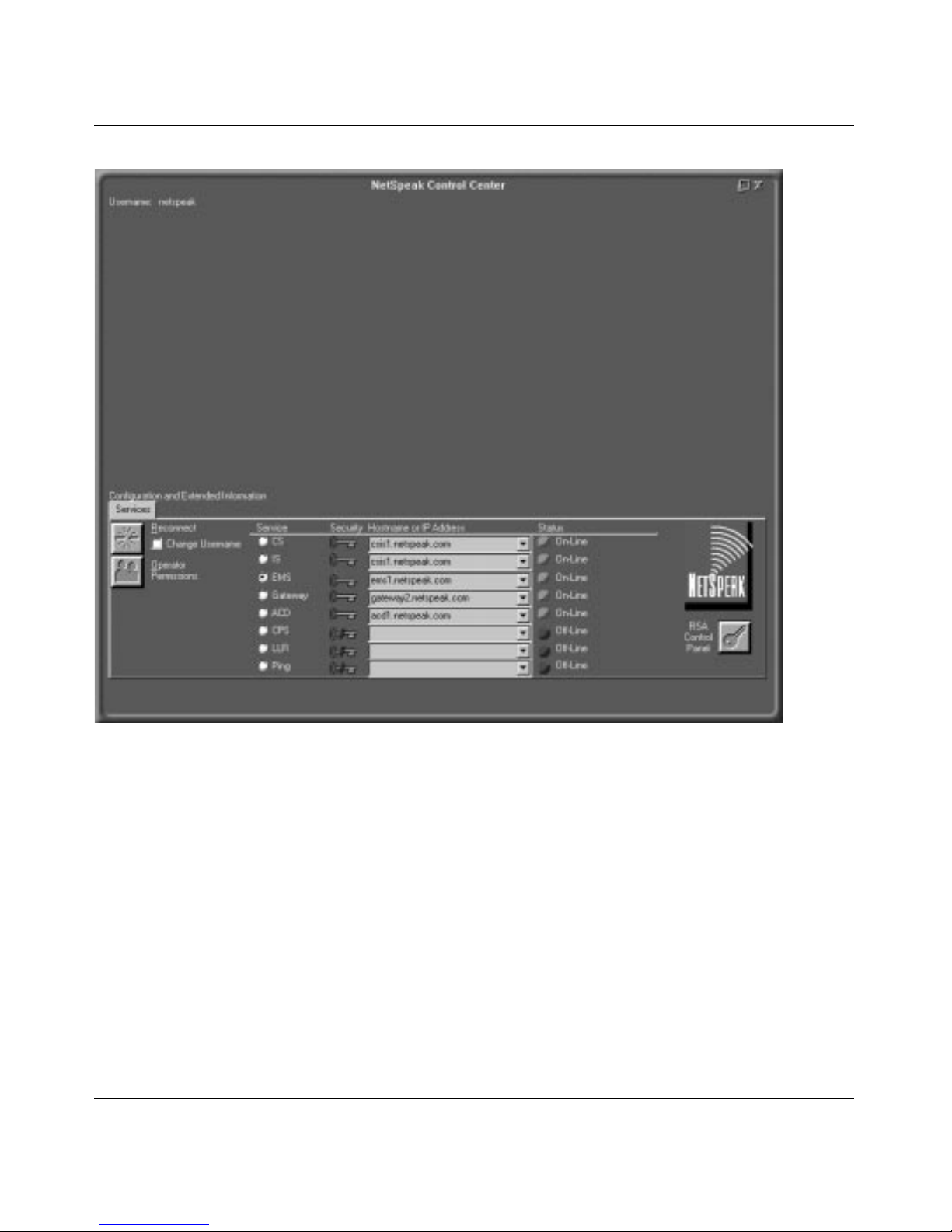
The Control Center (shown in Figure 1-1
) is the configuration, operation, and
management application that interfaces with all Voice Services. The Control
Center application is a Microsoft Windows®-based, 32-bit application using a
graphical user interface (GUI).
1-4
303142-A Rev. 00
Page 17
Event Manager
Figure 1-1. Control Center Main Screen, EMS Selected
Administration Access
Each Voice Service maintains a list of authorized use rs, each validated when they
log into the Control Center. The following list shows some of the permissions that
can be enabled or disabled when assigning user access on the EMS:
• Login
• Add, Delete, or Modify Control Center User
• Manage RS A Keys
303142-A Rev. 00
1-5
Page 18

Event Manager Description
Security Management
Voice Services use the RSA Public Key Cryptosyste m to provide secure
communications. A public key cryptosystem is a complex mathematical method
to secure digital communications. Public ke y encryption uses two algorithmic
keys : a publi c key used to encode the data and a private key required to decode it.
The encryption key is usually made public and the decryption key is kept secret.
Voice Services uses two additional types of keys to create two levels of security.
Default keys
keys
are generated for each individual server and Control Center. In order to
communicate with other Voice Services, an individua l manager or the Control
Center must have the appropriate security keys. All Voice Services and Control
Center applications have the default key when installed; if the default key is
disabled, unique keys must be distributed to new servers or Control Centers
through a key management system.
While communications between Voice Services use RSA encryption, the SQL
database itself is not automatically encrypted. If database encryption is required,
the data must be encrypted on the serv ers which create the data .
are common to all Voice Services and Control Centers, while
unique
System Requirements
Hardware
• Intel Penti um 166 MHz processor (minimum)
• 64 MB RAM
• 300 MB available (free) hard disk spa ce
• CD-ROM drive
• Network Interface Adapte r
Operating System
• Microsoft Windows NT® Server 4.0 (with Service Pack 3) or later
1-6
303142-A Rev. 00
Page 19

Event Manager
Database Requirements (one of the following)
• Microsoft SQL Server® 6.5 (with SQL Service Pack 3 or later)
• Oracle Workgroup Server 7.3.2.2.1 and Oracle ODBC 2.5.3.1.3 for Windows
NT Server 4.0
NT Network Protocol
• TCP/IP
Recommended
• Power backup, uninterruptible power supply (UPS)
303142-A Rev. 00
1-7
Page 20

 Loading...