

Page 1
Batteries Not Included. Requires 2 AAA Batteries.
GAME SET-UP
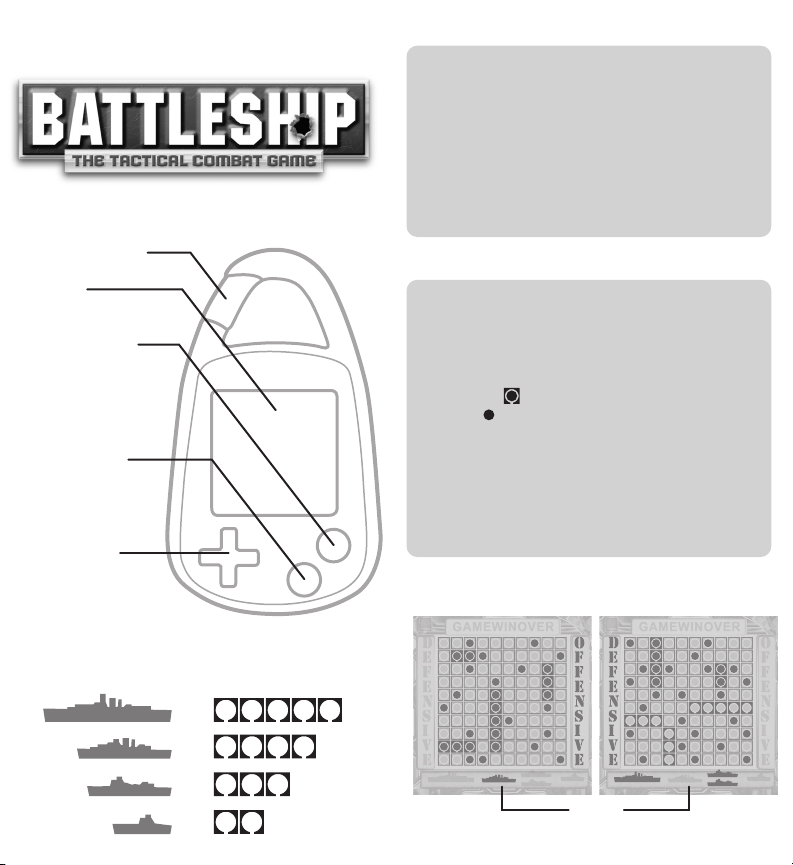
Press the Power button on. On defense mode, you will
™
position your five ships individually on the grid (see
Fleet Diagram). Place your ships on the game board
using the directional controls. Use the Rotate button
to turn your ship(s) 90 degrees clockwise for more
strategic placement. Be sure to press Enter button to
lock your ship in place. Once all five of your ships are
in place, the battle will begin (your opponent’s ships
will be randomly placed).
Carabiner Clip
Screen
Enter &
On/Off Button
Press to enter
commands. Hold down
to turndevice On/Off.
Rotate &
Mute Button
Press to rotate your
ship. Hold down to
mute device.
Directional
Controls
Press to move Left,
Right, Up or Down.
FLEET DIAGRAM
=
=
=
=
GAME PLAY
You will begin game play on offense mode. Move the
flashing cursor using the Directional Controls to find
your enemy’s fleet on the game play grid. Press the
Enter button to confirm where you want to attempt an
attack on your opponent. If you successfully hit a ship,
you will see ( ) appear on the coordinate selected. If
you see ( ) appear, this indicates a miss. You will
continue to fire until you miss your opponent.
After your turn, the enemy will have a chance to fire at
your fleet. During an attack, all of the opponent’s ships
will be displayed at the bottom of the screen. Anytime
a ship is sunk, its indicator will turn off.The first to
sink their opponent's fleet will be victorious.
Offense Mode
Try to destroy enemy’s fleet
x
1
x
1
x
2
x
1
Remaining ships to destroy
Defense Mode
Your fleet
Fleet
Page 2
BATTERY INFORMATION
• Non-rechargeable batteries are not to be charged.
• Rechargeable batteries are only to be charged under adult
supervision.
• Rechargeable batteries are to be removed from the toy
before being charged.
• Different types of batteries or new and used batteries are
not to be mixed.
• Batteries are to be inserted with the correct polarity.
• Exhausted batteries are to be removed from the toy.
• The supply terminals are not to be short-circuited.
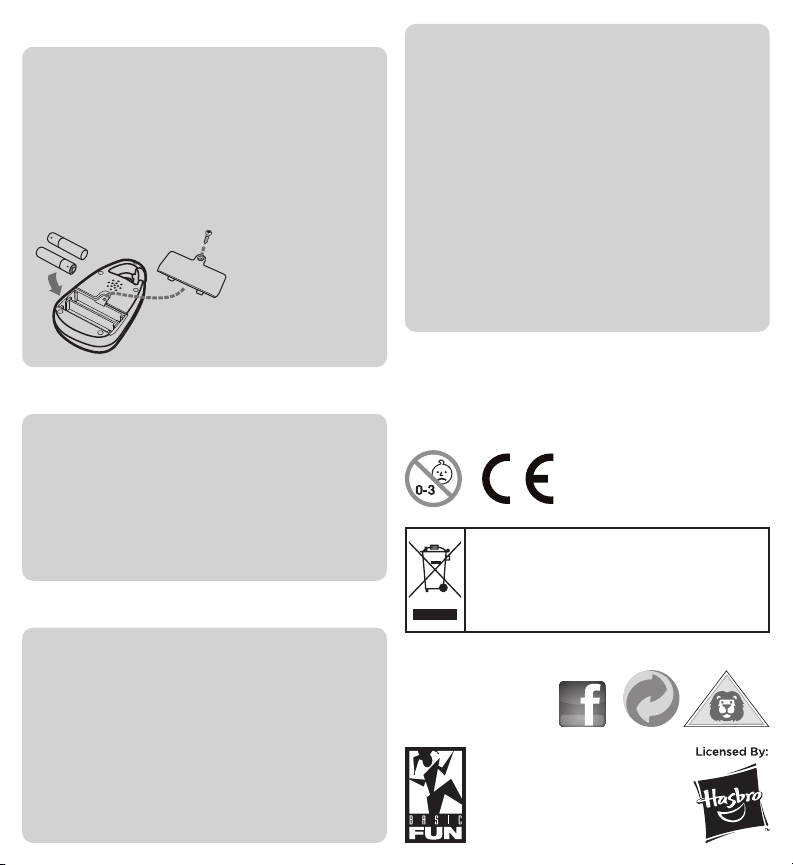
Use Phillips-head
screwdriver to remove battery backing.
Requires 2 AAA batteries. Load as
illustrated. Replace the battery backing.
CARING FOR YOUR DEVICE
• If the display becomes dim or malfunctions, replace the
batteries.
• After replacing batteries, press the ON/OFF button to ensure
proper functioning. (In most cases, game malfunctions are
due to weak batteries.)
• In an environment with electrostatic discharge, the product
may malfunction and lose memory. In this case, press the
ON/OFF button or RESET button on the back of the unit with
a blunt instrument to reset the product.
FCC STATEMENT
This device complies with Part 15 of the FCC Rules. Operation
is subject to the following two conditions: (1) the device may
not cause harmful interference, and (2) this device must
accept any interference received, including interference that
may cause undesired operation.
Warning: Changes or modifications to this unit not expressly
approved by the party responsible for compliance could void
the user's authority to operate the equipment.
NOTE: This equipment has been tested and found to comply
with the limits for a Class B digital device, pursuant to Part
15 of the FCC Rules. These limits are designed to provide
reasonable protection against harmful interference in a
residential installation. This equipment generates, uses and
can radiate radio frequency energy, and if not installed and
used in accordance with the instructions, may cause harmful
interference to radio communication. However, there is no
guarantee that interference will not occur in a particular
installation. If this equipment does cause harmful interference
to radio or television reception, which can be determined by
turning the equipment off and on, the user is encouraged to
try to correct the interference by one or more of the following
measures:
• Reorient or relocate the receiving antenna.
• Increase the separation between the equipment and receiver.
• Connect the equipment into an outlet on a circuit different
from that to which the receiver is connected.
• Consult the dealer or an experienced radio/TV technician
for help.
As with all small bat teries, the batt eries used with this product should be kept
away from small children who still put small things in their mouths. If they a re
swallowed, promptly see a doctor and have the doctor phone (202) 625-3333
collect. In other countries, have the doctor call your local poison control center.
Make sure the batteries are inserted correctly and always follow the toy and
battery manufactur er’s instruc tions.
WARNING! Not suitable for children under
36 months due to small parts. Please retain
these details for future reference.
The Wheelie bin symbol indicates that the product and the
batteries must not be disposed of with other household waste
as they may contain elements which can have a harmful effect
on the environment and human health. Plea se use designated
collection points of recycling facilities when disposing of the
item and the batteries. To help locate your nearest facility see:
www.recyclenow.com
Item# 1732
VISIT US AT BASICFUN.COM
or
HASBRO and its logo and BATTLESHIP are
trademarks of Hasbro and are used with
permission. ©2011 Hasbro. All Rights
Reserved. Manufactured by Basic Fun.
©2011 Basic Fun. 1080 Industrial Hwy
Southampton, PA 18966, USA
MADE IN CHINA
 Loading...