

Page 1
BARTHE www.barthe-audio.com
THE INNOVATION IN AUDIOVISUAL
USER MANUAL FOR:
SOK 50
Please read this manual carefully before operating the unit and keep it for reference.
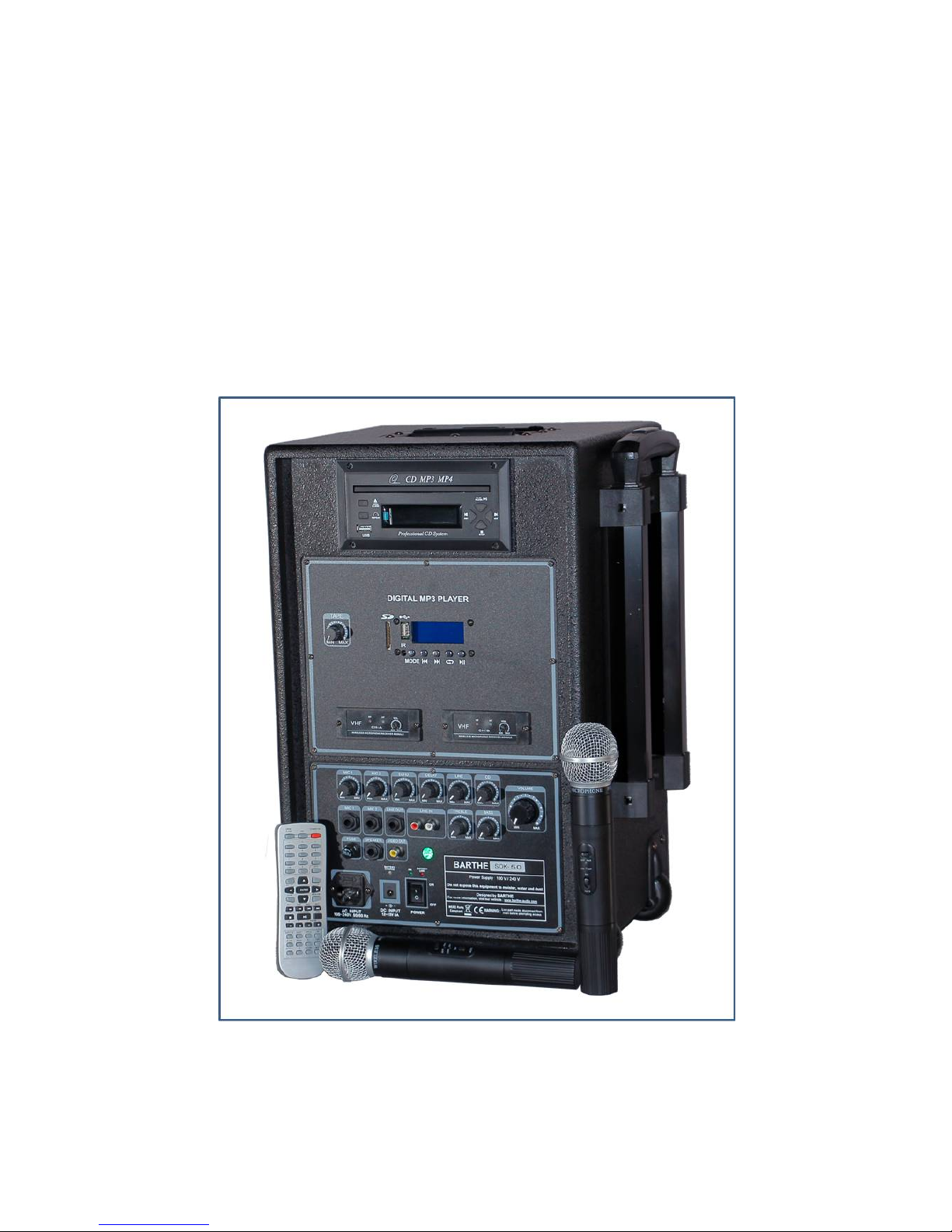
Not contractual photo
Page 2

BARTHE www.barthe-audio.com
THE INNOVATION IN AUDIOVISUAL
2
USER MANUAL FOR SOK 50
TABLE OF CONTENTS
I – SAFETY INSTRUCTIONS page 3
II – TECHNICAL CHARACTERISTICS
- Switching ON/OFF page 5
III – PARTS DESCRIPTION
- Device description page 6
- Tape recorder and CD/DVD player page 7
- CD / DVD Control panel page 8
- MP3 player (MR) page 9
- Hand hold microphone / headband page 11
- CD player remote page 12
- MP3 player remote page 14
IV - USE
- General use page 15
- The tape recorder page 16
- CD / DVD drive page 17
- MP3 player (MR) page 17
- The wireless handheld microphone / Lapel headband
Microphone (U option) page 19
V - MAINTENANCE page 20
VI - QUESTIONS page 21
VII - REGULATION page 23
Page 3

BARTHE www.barthe-audio.com
THE INNOVATION IN AUDIOVISUAL
3
I – SAFETY INSTRUCTIONS
Before using the appliance, please read these instructions carefully. Please follow these instructions in order to
protect the user and all other person from injury or material damage. Do not execute an operation not indicated
in this handbook to avoid any material failure or accidental wound. Besides, any misuse could cause injury or
material damage not covered by the guarantee of your appliance.
Keep away the appliance from corrosive substances such as alcohol. It may cause damage to this equipment
(fire or electric shock).
Do not place the device on an unstable surface area or in vibrating location. It may fall and cause injury.
Do not place the appliance:
- in humid and dusty location
- in places exposed to smoke or vapour
- in places exposed to snow or rain
- near water or in a wet basement
- under direct sunlight or by heaters such as radiators
- in places submitted to high temperature
- near naked flames
Power-supply cord should be routed so that they are not likely to be walked on or pinched by items placed upon
or against it.
Keep the cable away from heaters; the cable may cast and cause fire or electric shock.
Never take hold of the plug or cord with wet hands, you risk exposing yourself to electric shock.
Connect well the cable to the socket, otherwise the cable risks catching fire or causing electric shock.
It is usually recommended to use the cable provided with the appliance to avoid fire or electric shock. If another
cable is required, use a model allowed for a voltage of 230V (or 120V). Unroll it totally and plug the power
cord into the power cord receptacle of the device and the AC outlet in order to get a perfect connection between
both.
Only use the recommended power supply to avoid the risk of fire or electric shock.
When you unplug the appliance, always pull on the socket. If you pull on the cable, you may strip it or break
the core of the wire or to corrupt the cable. It would cause current evasions, fire or electric shocks.
Page 4

BARTHE www.barthe-audio.com
THE INNOVATION IN AUDIOVISUAL
4
Leave enough space around the power outlet so it can be easily unplugged. If you leave any objects around the
outlet, you cannot access it quickly in case of emergency.
Do not attempt to disassemble or modify the device since it contains high voltage and high temperature parts
that could ignite or cause electric shocks.
Improper use of electrical equipment is dangerous. To avoid risk of injury, do not let children touch the inside
of an electrical appliance or handle the contacts or gears exposed.
If the machine emits unusual noises or smoke, heats or emits an unusual smell, immediately turn off the power.
Switch and unplug the electrical outlet. If you continue to use the device in these conditions, it may catch fire or
cause electric shocks. Contact the customer service.
Do not spray highly flammable materials near the unit. In contact with the gas emanating from these products,
electrical components inside the unit may ignite or cause an electric shock.
Always turn off the power when you move it to avoid damaging the cord and create conditions for a fire. If you
damage the power cord, it may cause fire or electric shock.
Do not spill water, liquids or flammable substances (alcohol, benzene, paint thinner, etc.) on the device. If they
touch the high voltage areas inside the equipment, they may cause fire or electric shock. If such substances fall
on, switch immediately the power off and unplug the electrical outlet. Contact the customer service.
Do not place heavy objects on the device as they may tip over or fall and cause injury.
For safety reasons, turn off power at the main switch if you do not use the device for a long period, e.g. at night
or during thunder storms.
Never use chemicals or detergents for cleaning the housing, which may damage the surface of the coating.
The device is not guaranteed for use in places with humidity above 80 %, such as indoor swimming pools, in
which case it would be irreparably damaged.
Page 5
BARTHE www.barthe-audio.com
THE INNOVATION IN AUDIOVISUAL
5
II – TECHNICAL CHARACTERISTICS
Presented model: SOK 50.4 UB
Output power: 50 W
Power source: 110 / 250 V
Loudspeaker: 8‘’
Wireless microphone (optional):
- Frequency range : VHF 220,8 or 222,6 MHz
- Effective range : 35 m
Sensitivity: 10 dBµV (signal to noise ratio of over 60 dB)
Dimensions: - Width: 33 cm
- Height: 49 cm
- Depth: 30 cm
Weight: 21 kg
- Video media: DVD, DVD-R, DVD+R, DVD-RW,
- Audio format: CD, CD-R, CD-RW.
- USB connector.
- Audio tape recorder (depending on model).
- Video standard PAL or NTSC.
- Video format: MPEG2, MPEG4-Divx, MPEG1-VCD, JPEG.
- Audio format: Audio CD, MP3, WMA (on audio support only).
- Video output: RCA, YUV.
- External speaker output, Line Out.
- Mic 1 and Mic 2, Line In.
- Automatic stop at the end of tape (on models with tape recorder).
- Separate adjustment of bass and treble.
- Separate volume for each source.
- Overall volume for all sources.
- Features and specifications of the transmitter of wireless microphone (according to option).
- Antenna: integrated with noise reduction circuit.
- Battery: DC 9V.
- Consumption: 20 mA.
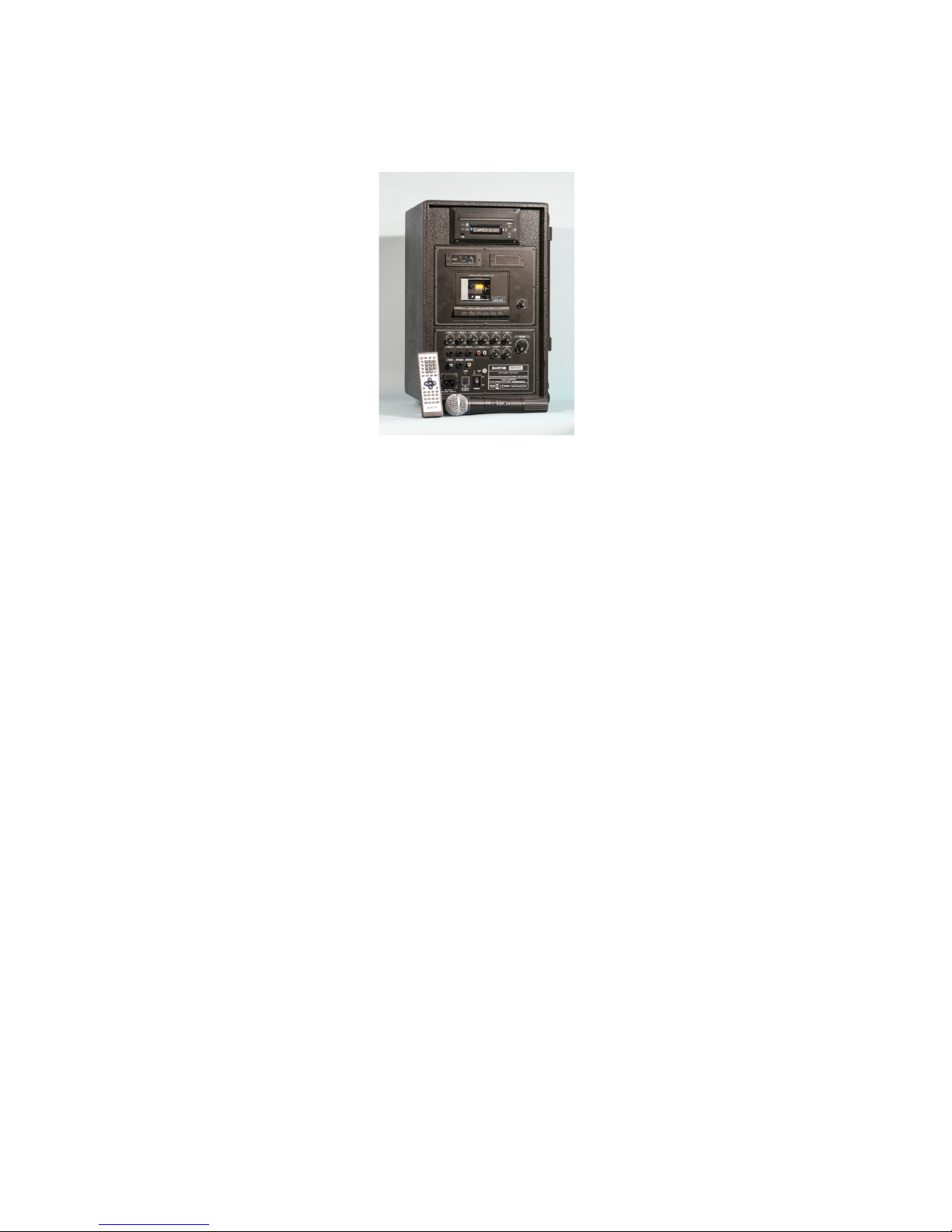
Not contractual photo
Page 6
BARTHE www.barthe-audio.com
THE INNOVATION IN AUDIOVISUAL
6
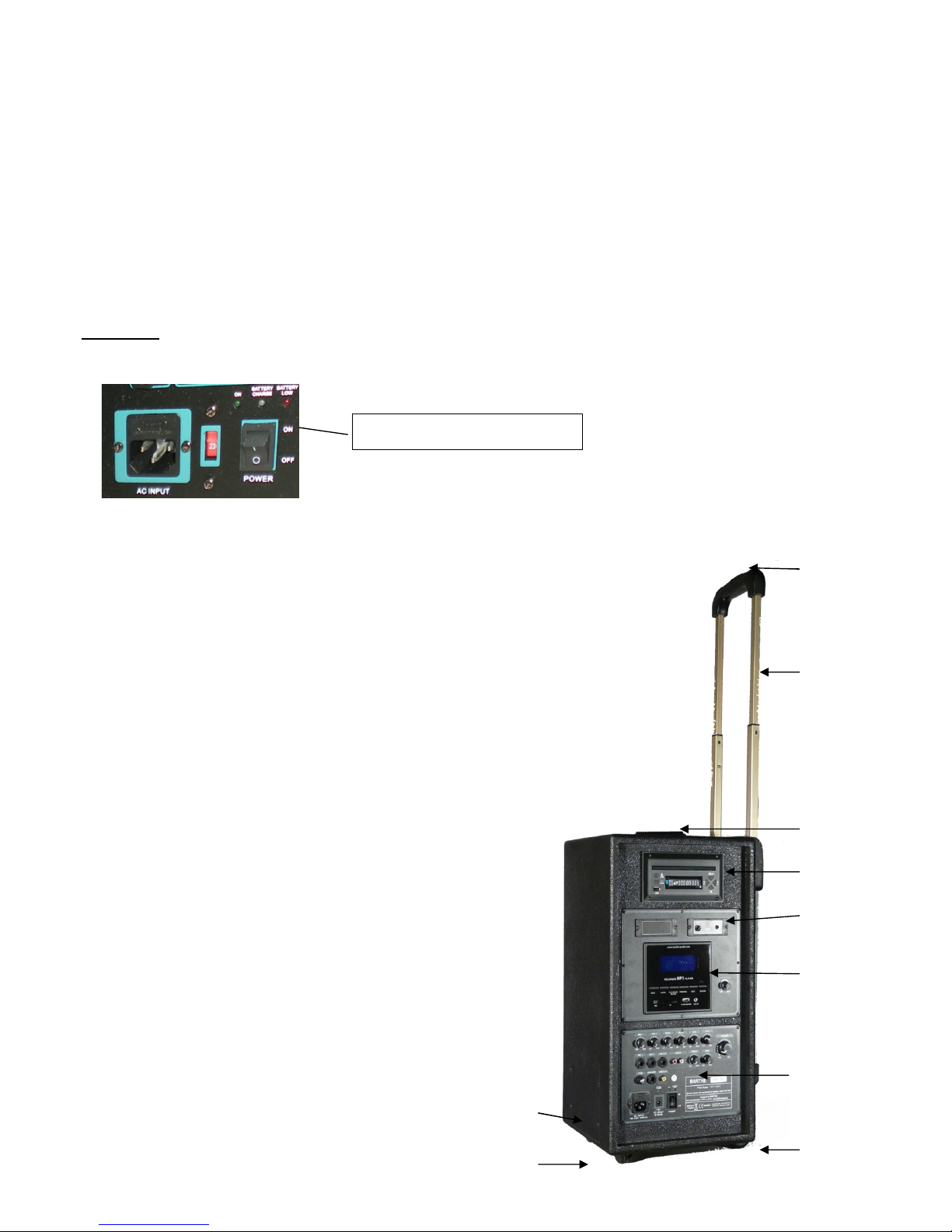
- SWITCHING ON
For a mains supply use, connect the mains cable, and turn switch « ON/OFF » on. The power LED lights
green.
Warning: After extinction, wait at least 3 seconds before turning the machine on.
III – PARTS DESCRIPTION
- DEVICE DESCRIPTION
Front side
(1) Handle
(2) Trolley with telescopic handle
(3) Trolley lock
(4) Foot stand
(5) Battery compartment (side)
(6) Wheels
(7) Tape recorder / MP3 recorder
(8) Control board
(9) Wireless microphone
(10) CD, DVD, VCD Player
Power LED
Page 7
BARTHE www.barthe-audio.com
THE INNOVATION IN AUDIOVISUAL
7
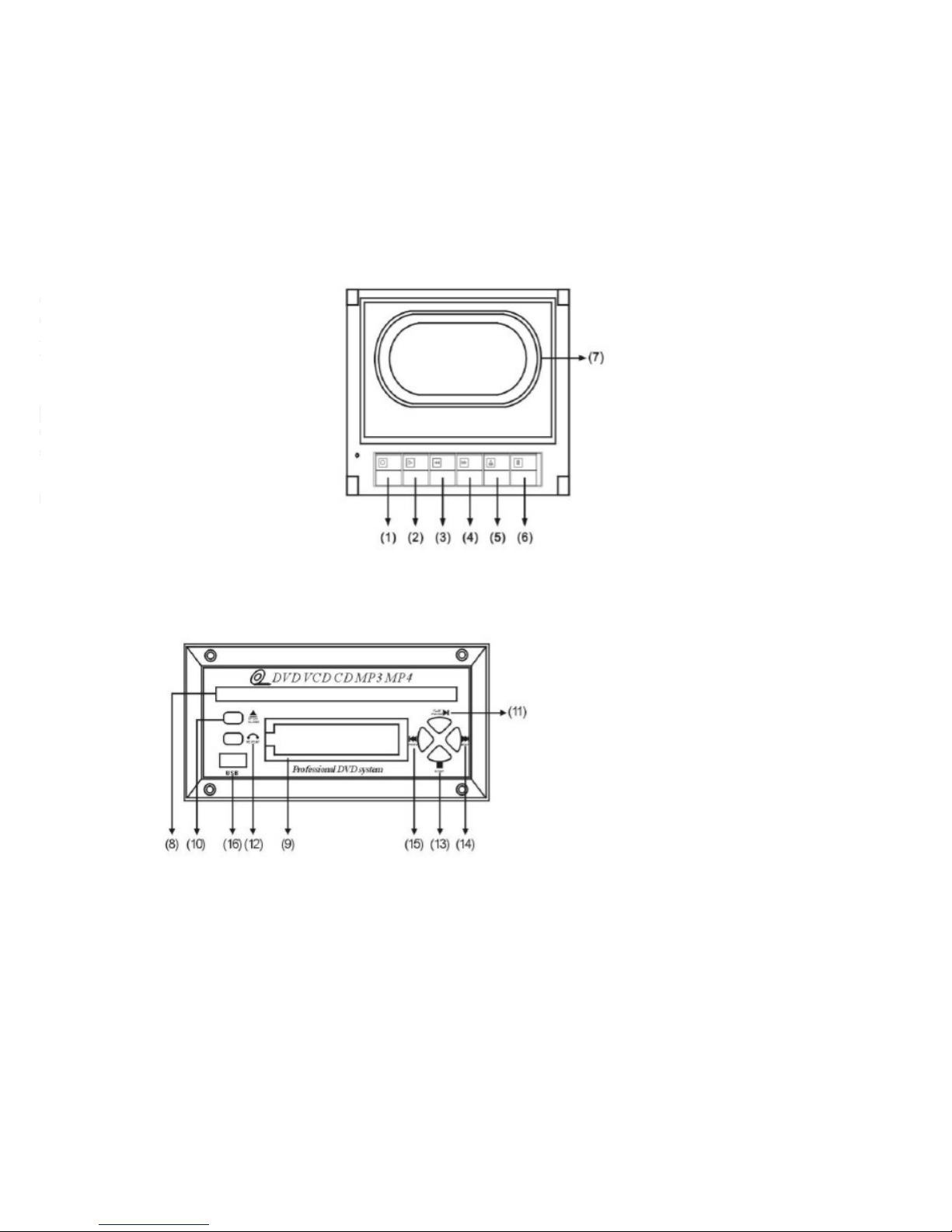
- TAPE RECORDER
- USB - CD / DVD PLAYER
(Non contractual picture)
(8) CD drawer
(9) Track display
(10) Open/close
(11) Play/pause
(12) Repeat
(13) Stop
(14) Next track
(15) Previous track
(16) USB connector
(1)
Record
(2) Play
(3) Rewind
(4) Fast forward
(5) Stop
(6) Pause
(7) Cassette desk
Page 8
BARTHE www.barthe-audio.com
THE INNOVATION IN AUDIOVISUAL
8
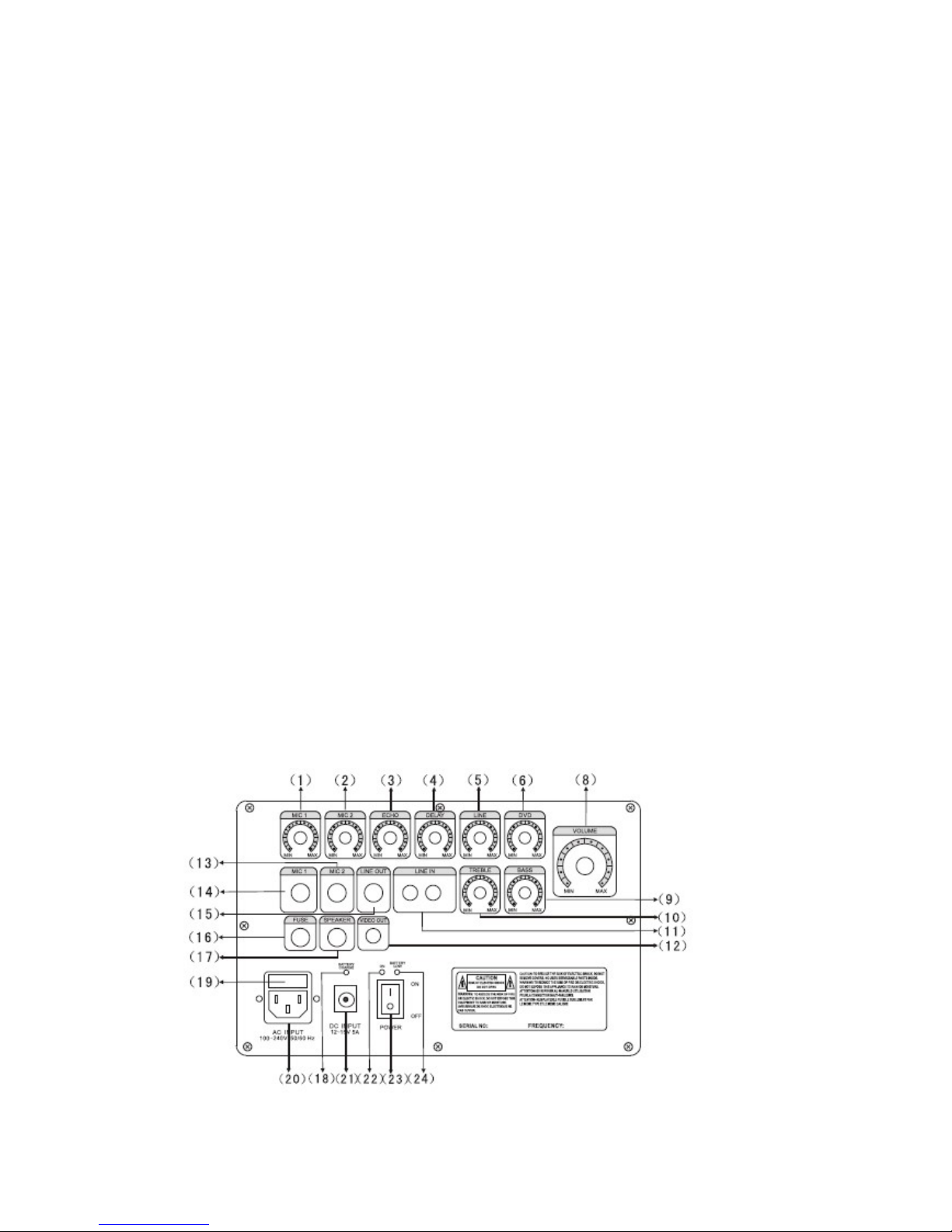
- CONTROL PANEL
(1) Wired micro MIC-1 volume control
(2) Wired micro MIC-2 volume control
(3)(4) Echo control (use only with wired micro)
(5) Audio input volume
(6) DVD volume
(7) NA
(8) Main volume control
(9) Bass control
(10) Treble Control
(11) Line in jack for external source
(12) Video terminal
(13) Wired microphone jack MIC-2
(14) Wired microphone MIC-1
(15) Line out for external source
(16) Batteries fuse
(17) External passive speaker
(18) LED indicator Battery charging: when the battery is charging, the indicator light is red. When the
battery is charged, the indicator is green. (depending on model)
(19) Mains fuse
(20) Mains Power Cord (110V / 220V)
(21) Power jack for external battery (12V)
(22) Switch-on indicator
(23) Switch-on button
(24) Battery discharge LED indicator: when the voltage is high, the indicator lights green. When the
voltage is low, the indicator lights red. (depending on model)
Page 9
BARTHE www.barthe-audio.com
THE INNOVATION IN AUDIOVISUAL
9
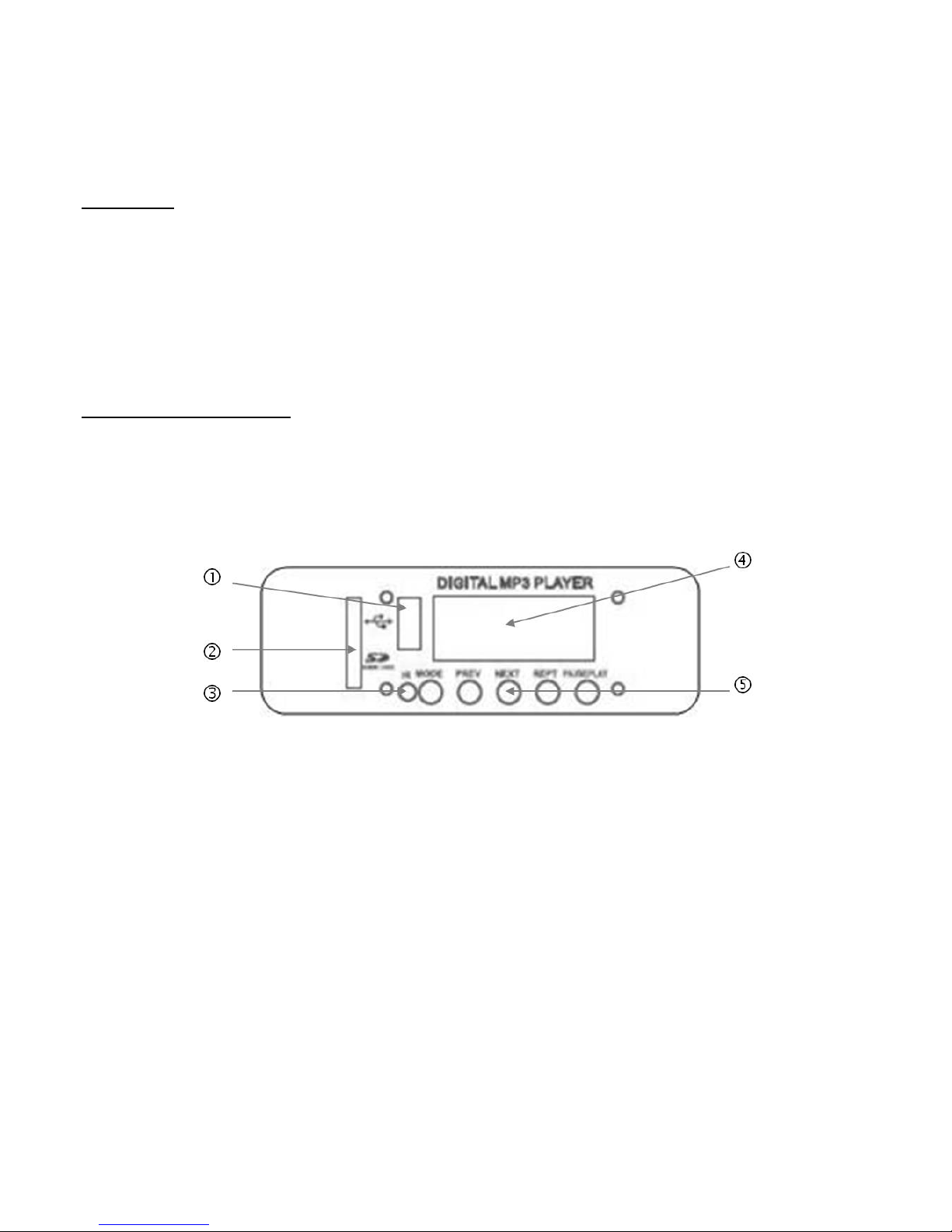
- MP3 player
Description:
- LCD display with blue backlight off.
- Repeat mode loop.
- Playback of MP3 and WMA files.
- 3 play functions: reading of all songs, repeat a song, reading all songs of current folder (ALL, 1, or F).
Description of the elements:
1 USB key reader
2 SD/MMC card reader
3 Infrared receiver
4 LCD Display
5 Action buttons
Page 10
BARTHE www.barthe-audio.com
THE INNOVATION IN AUDIOVISUAL
10
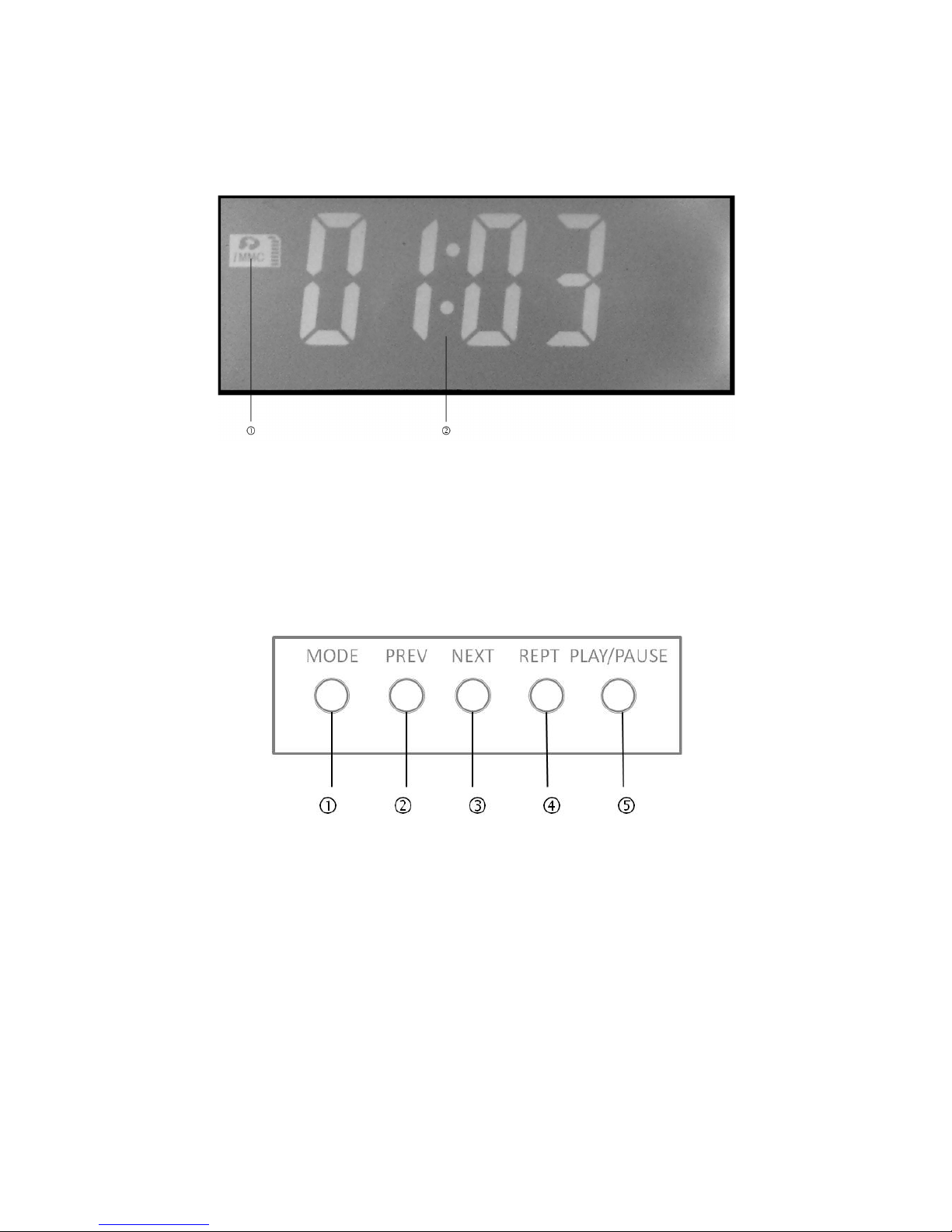
1 Media in reading
2 Reading time
1 Mode and standby 4 Reading mode
2 Return previous track and Volume - 5 Play/pause and moving in the folders
3 Next track advance and volume +
Page 11
BARTHE www.barthe-audio.com
THE INNOVATION IN AUDIOVISUAL
11
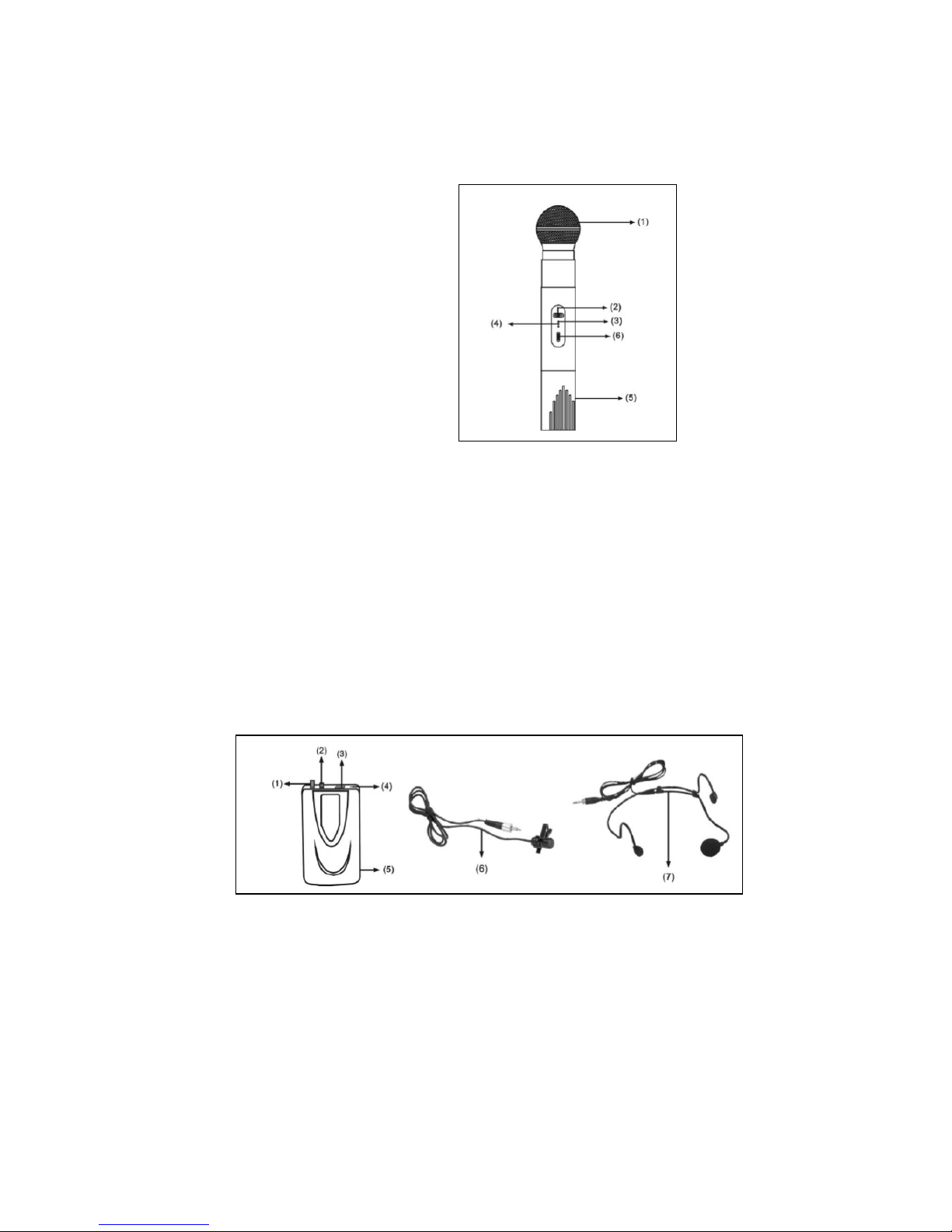
- HANDHELD MICROPHONE
(1) Mesh
(2) Power Switch
(3) Power LED indicator
(4) Low battery LED indicator
(5) Battery compartment/Cover
(6) Audio Switch (ON /MUTE)
- BODY PACK TRANSMITTER
(1) Volume Control
(2) MIC-IN Jack
(3) Power Switch (ON/MUTE/OFF)
(4) Power LED indicator
(5) Battery Compartment/Cover
(6) Lavalier MIC
(7) Handset MIC
Page 12
BARTHE www.barthe-audio.com
THE INNOVATION IN AUDIOVISUAL
12
USE OF THE VARIOUS ELEMENTS
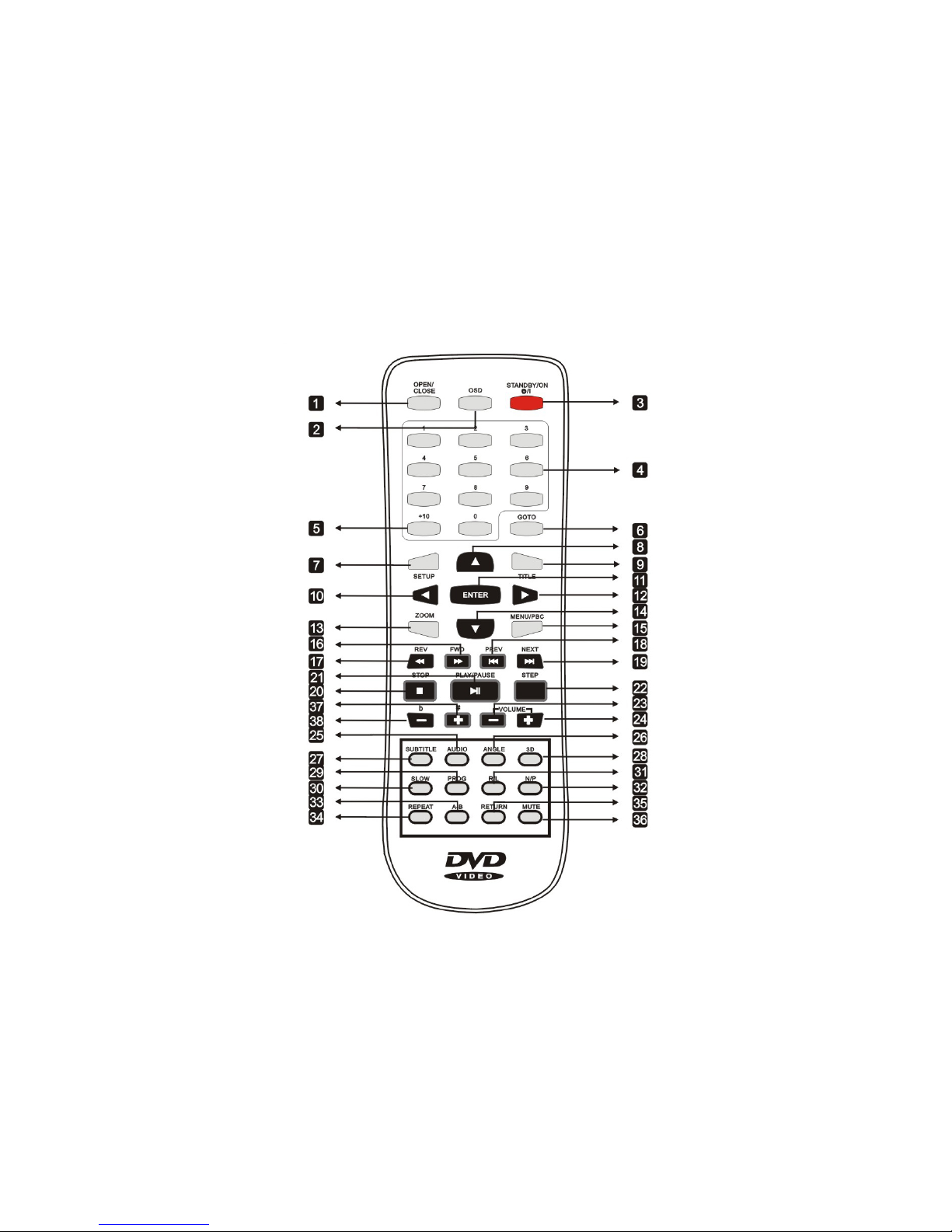
- CD PLAYER REMOTE
Page 13

BARTHE www.barthe-audio.com
THE INNOVATION IN AUDIOVISUAL
13
The remote control can control the DVD player.
1- OPEN/CLOSE: To open or close the DVD drive.
2- OSD: Lets you view different information about the reading media.
3- STANDBY/ON: Turn on or off the player.
4- Selecting tracks, chapters by numbering (ex: press 9 to access track n°9).
5- + 10: Allows selection of tracks greater than 10.
6- GOTO: Selects tracks >10 without using the « 10+ button»
7- SETUP: Displays the SETUP menu of the player.
8- Selection arrow up: To navigate into the menus.
9- TITLE: Allows returning to the chapter selection for the DVD playback.
10- Left selection arrow: To navigate into the menus.
11- ENTER: to validate a choice in a menu.
12- Right selection arrow: To Navigate into the menus.
13- ZOOM: Zoom is on the picture or playback video.
14- Down selection arrow: To navigate into the menus.
15- MENU/PBC: Return to the MENU when playing a DVD.
16- FWD: Fast forward.
17- REV: Quick return.
18- PREV: Toggles a track, chapter, lower.
19- NEXT: Toggles a track, chapter, higher.
20- STOP: Stop playback.
21- PLAY/PAUSE: play or pause.
22- STEP: Allows a reading step.
23- VOLUME (-): Decrease the volume of the sound.
24- VOLUME (+): increase the volume of the sound.
25- AUDIO: To select the audio language on a DVD.
26- ANGLE: Selection of the angle on a DVD for this action.
27- SUBTITLE: Used to select subtitles on a DVD video.
28- 3D: N/A.
29- PROG: To program a selection.
30- SLOW: Can slow down the image with the different speeds in DVD video playback.
31- R/L: Allows you to select the audio language on a DVD.
32- N/P: NTSC/PAL selector.
33- A-B: Creates a loop, first support for the starting position A, 2nd press for end position B, the track will
loop between A and B.
34- REPEAT: One press to repeat the current chapter, two presses to repeat the current song, three presses
to repeat the entire disc.
35- RETURN: Go back in the menu.
36- MUTE: Mutes the sound.
37- # +: Increase the playback speed of the current song.
38- b - : Increase the playback speed of the current song.
Note: some functions require connecting the device to a TV to be used.
Page 14
BARTHE www.barthe-audio.com
THE INNOVATION IN AUDIOVISUAL
14
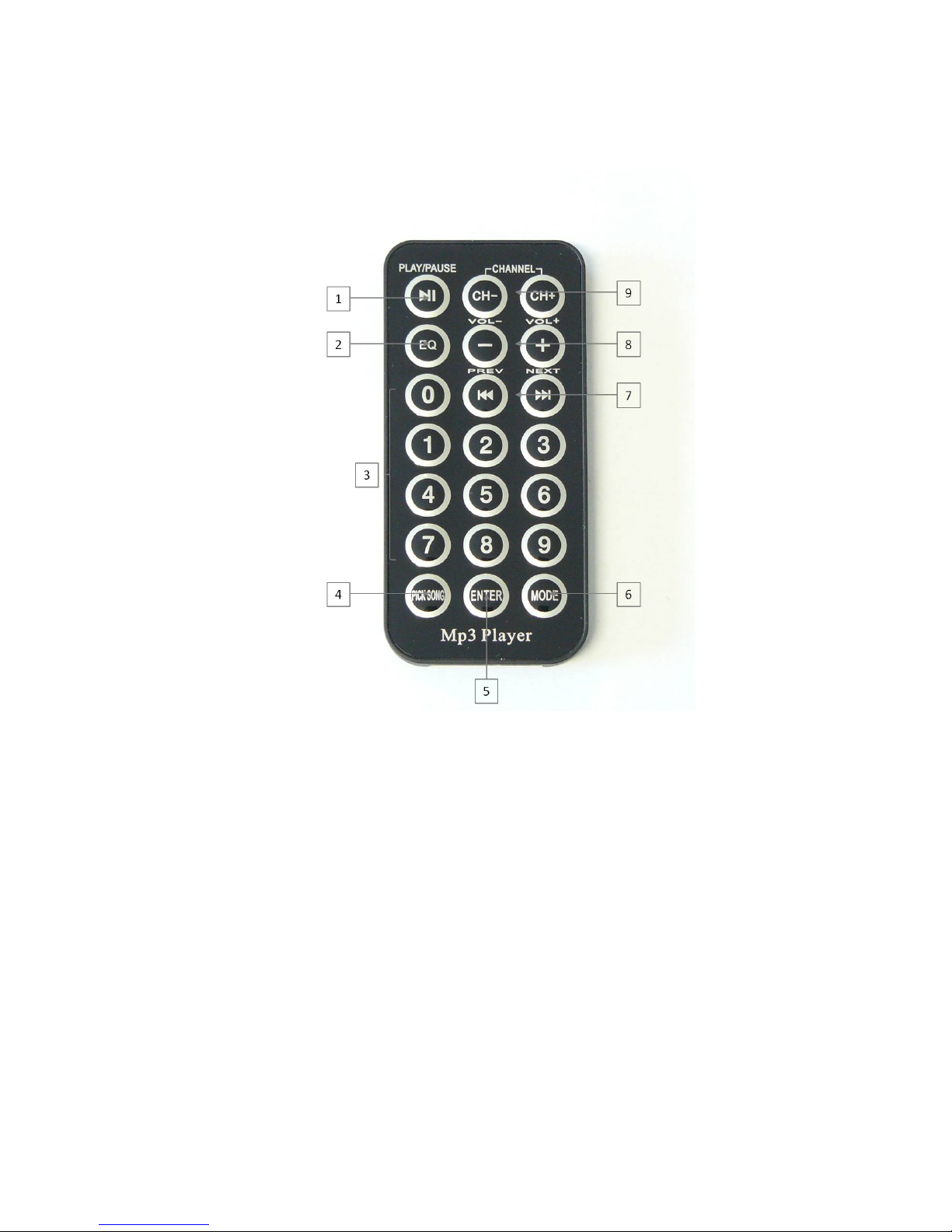
-MP3 PLAYER REMOTE
1- PLAY/PAUSE: Play or pause.
2- EQ: Equalizer
3- Selecting tracks, chapters, by numbering, (ex: press 9 to access track n° 9).
4- PICK SONG: N/A
5- ENTER: Allows you to loop a track, tracks in the folder or all tracks.
6- MODE: Select the source.
7- PREVIOUS/NEXT: Switches to a track or chapter, below or above.
8- VOLUME +/-: Adjusts the volume of the player.
9- CHANNEL 1- and CHANNEL2+: N/A
Page 15

BARTHE www.barthe-audio.com
THE INNOVATION IN AUDIOVISUAL
15
IV. USE
- GÉNÉRAL USE
This device can be used on mains supply or on battery (if battery option).
Using the device on mains supply
Plug the cord of the device on the AC input and on an electrical outlet.
Press ON, ON indicator lights, the unit is ready for use.
To use a wired microphone, plug the microphone into the MIC 1 (14) or MIC 2 (13) and adjust the volume (1)
or (2).
To use an external amplifier, connect the LINE OUT (12).
To amplify the sound from an external source, connect the cable to line (11) and adjust the volume.
Connecting a speaker:
1. You can plug an external speaker (17) in addition with the build in speaker.
2. When connecting an external speaker 4-8Ω / 150W, please take care of not short – circuiting the “external
speaker” input (risk of destruction of the amplifier).
Using the device on battery
When using the device on battery, unplug the device and switch it on. The LED (16) lights.
If the battery is not sufficiently charged, the device turns off automatically.
Connect the device to the mains, the device will automatically charge.
Indicator of battery charge: When the battery is charging, the indicator light is red; when the battery is charged,
the indicator is green.
LED indicator of battery discharge (Option B): it switches on when the battery is low. The device switches
OFF. Switch the main switch OFF.
Page 16

BARTHE www.barthe-audio.com
THE INNOVATION IN AUDIOVISUAL
16
- TAPE RECORDER (IN OPTION)
Normal Playback
- Press the STOP/EJECT to open the door of the tape player.
- Place the tape in.
- Push the door to close.
- Press on PLAY button.
Pausing play
- Press on PAUSE button. Playback stops.
Resume play
- Press on PAUSE button. Play back resumes.
Stopping playback
- Press on stop button STOP/EJECT.
Fast forward or rewind
- Press on REW or F.F button to rewind or forward the tape.
Tape eject
- Press on button STOP/EJECT.
Recording
You can record from the microphone « MIC1 » or « MIC2 », external source « LINE IN » or CD/DVD drive.
These different sound sources can be mixed on the tape, to create sound messages or to do animation.
- Press on STOP/EJECT and place a blank tape on which you want to record.
- Simultaneously press PLAY and REC to start recording.
- For brief interruption, press on PAUSE; press again to resume recording.
- To stop, press on button STOP/EJECT. Now, the device no longer records; by pressing a second time, the
player will open the door.
Note: To record, use a tape with protective tabs unremoved. In the beginning of the tape, think to scroll it.
Adjust the level of the source to obtain an optimum quality recording.
When using a new tape or a tape having worked with other devices, it is better to perform fast wind in both
directions to prevent possible malfunctions.
In case of reading default (frame rate, audio quality, …) check that the tape used is not concerned by a test with
a prerecordered tape.
Page 17

BARTHE www.barthe-audio.com
THE INNOVATION IN AUDIOVISUAL
17
- CD / DVD DRIVE
Normal playback
- To turn the DVD player on, turn the DVD volume button on until it clicks the display lights.
- Press on stop button/open/close to open the disc tray.
- Place the CD/DVD into the disc tray.
- Press stop button/open/close. The tray closes. After several seconds, the disc information displays.
- If it’s a DVD, connect the video jack of the unit to your TV with an RCA cable. Turn on your TV and put
EXT or AUX channel on.
- Press on Play/pause button channel on.
Pause
- Press on Play/pause button. The indicator appears and playback stops.
Resume play
- Press the Play/pause button. The indicator disappears from the display and playback resumes.
Stopping playback
- Press on stop/open/close.
Change of track
- Press on previous.
Note: When a disc is loaded, the indication « LOADING » remains displayed for several seconds, then the
number of tracks and total time are displayed.
READ MP3 AND JPEG FILES
Connect the device to a TV in order to access the DVD menu. Place medium (CD, USB stick) containing MP3
or JPEG files into the appropriate drive. Then an automatic search begins for directories containing MP3 or
JPEG files. After the search, the first directory where the MP3 files are stored is selected (if MP3 and JPEG
files are saved to disk, otherwise for disk with a single kind of files, the first file is read.
- THE MP3 PLAYER (OPTION)
Volume adjustment:
During playback use the VOL knob to decrease or increase the volume.
Paused:
To pause the MP3 player, press and hold the MODE button for 3 seconds.
Media selection:
To play either an SD / MMC card or a USB device, simply connect them and playback starts automatically. To
switch from one media to another, press the MODE button.
Bluetooth function:
Page 18

BARTHE www.barthe-audio.com
THE INNOVATION IN AUDIOVISUAL
18
To select Bluetooth, press the MODE button until you have the Bluetooth Menu, start searching for devices on
your device to connect, select the device named "BARTHE".
To return to the NORMAL mode, press the MODE button until you select the desired media.
Reading mode:
1- To change the reading mode, press the REPT key :
MODE: FOLDER Repeat all tracks in the folder
MODE: ONE Repeat the track while listening
MODE: RADOM Allows you to read random tracks
MODE: ALL Repeat all songs in a loop
Beginning of reading:
1- Press PLAY / PAUSE to play the selected file
2- Press again to pause playback
3- During playback, press PREVIOUS to go to the previous track
4- During playback, press NEXT to go to the next track
Page 19

BARTHE www.barthe-audio.com
THE INNOVATION IN AUDIOVISUAL
19
- THE WIRELESS HANDHELD MICROPHONE / LAPEL HEADHAND
MICROPHONE (OPTION U)
1. Open the battery compartment of the microphone, insert the batteries (please take care of the polarity)
2. Set to ON, the LED blinks once. The low battery indicator lights up then turns off. When the indicator is red,
it means the batteries are exhausted, change the batteries.
3. Adjust the volume using the volume button « AF LEVEL ».
- MICRO TIE / HEADSET (OPTION U)
1. Open the compartment battery of the microphone, insert the batteries (please take care of the polarity)
2. Set to ON, the LED blinks once. The low battery indicator lights up then turn off. When the indicator is red,
it means the batteries are flat, change the batteries.
3. Connect the headset microphone or tie the jack MIC (2) the transmitter case.
4. Adjust the volume using the volume button « AF LEVEL ».
Note: 1. Turn the microphone on, the LED (23) / (25) lights.
Warning: Depending on the country of use, a license may be required to use the VHF
microphone
Page 20
BARTHE www.barthe-audio.com
THE INNOVATION IN AUDIOVISUAL
20
V - MAINTENANCE
In case of fingerprints or other mark, it may be necessary to clean the surface of the disk; use a soft, dry cloth.
The tape drive heads needs regular cleaning.
This eliminates the ferrite dust that can deposit and alter listening.
Use a cotton swab dipped in alcohol or a tape specially provided for this purpose.
Repairs must be performed by qualified technicians. The device must be repaired as soon as it has been
damaged.
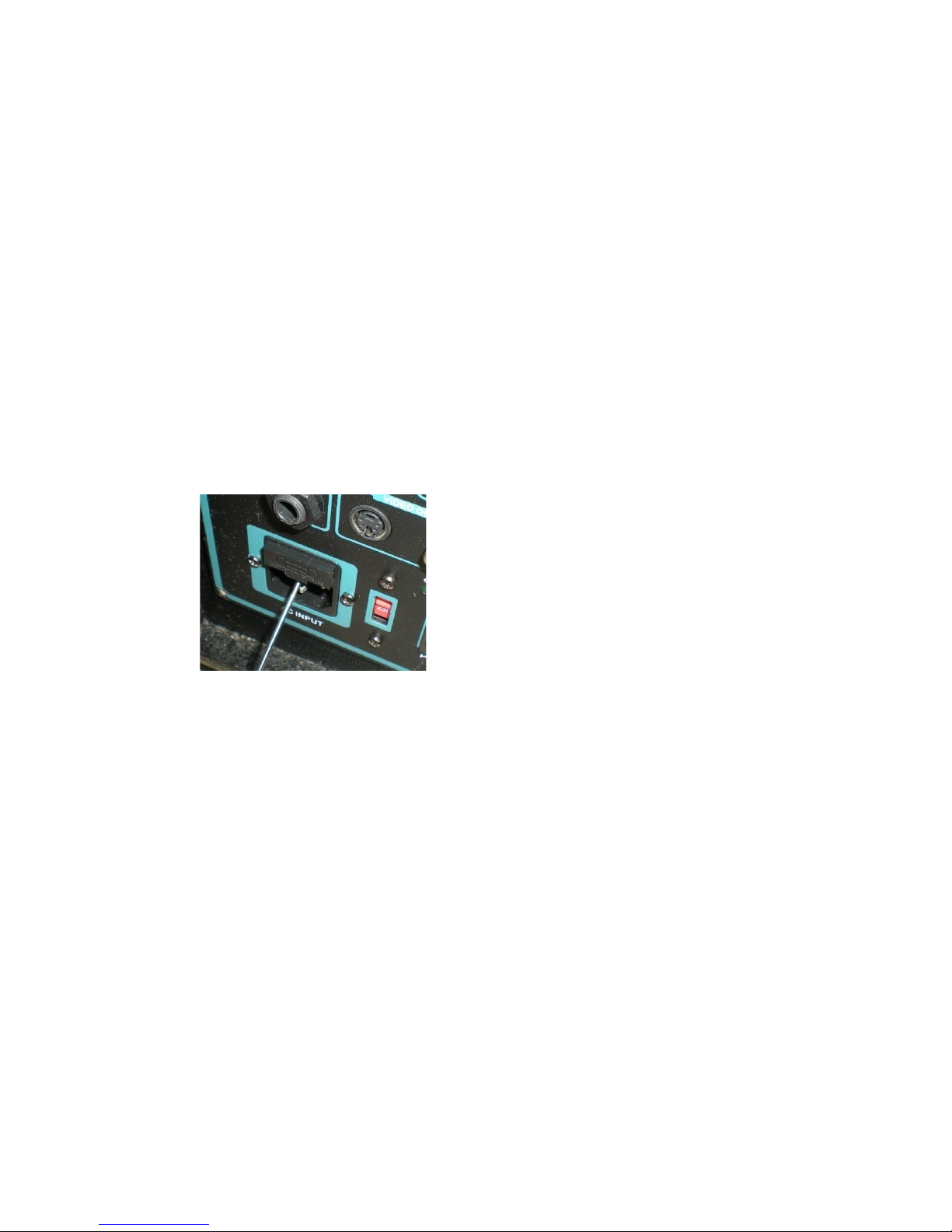
Fuse replacement:
If it is necessary to replace the mains fuse, remove the fuse compartment located above the outlet, throw away
the old fuse and use rescue fuse that is in the compartment.
Only use 5A, 250V fuses.
- Accessories supplied with the device
1. Power cable
2. Remote control
3. 2 AAA batteries
4. Emitter: HH : micro handheld (depending on model)
HB headband microphone and lapel microphone, transmitter box (depending on model)
5. 2 6LR61 batteries depending on model
6. User guide
Page 21

BARTHE www.barthe-audio.com
THE INNOVATION IN AUDIOVISUAL
21
VI – QUESTIONS
Double check the following points before concluding that your system is down.
1- Are all connections correct?
2- Is the system used in accordance with the instruction manual?
If the system is not working properly, perform the check list below. If any of these checks does not resolve the
problem, the system may be defective. Then immediately unplug the power cord and contact your dealer.
SYMPTOM CAUSE SOLUTION
The device does not turn on
when you press the power
switch.
- The power cord is not properly
plugged into the wall outlet.
- The main plug is not working.
- The mains voltage does not
match the device’s specification.
- Blown fuse.
-Plug the power cord into the wall
outlet.
-Call an electrician.
- Obtain an adapter.
- Replace the fuse (see section
« cleaning »).
The ON/OFF button seems to
work randomly.
-There is a 3 seconds timing
protection of the unit when the
unit is turned off.
-After power is turned off, wait at
least 3 seconds before switching it
on again.
The device does not react to the
action of keys.
- The switch is in the Off
position.
- The device is not connected.
- Turn the switch On.
- Disconnected and reconnected
the device.
There is no sound. - The level of the command of the
general volume is insufficient.
- The level of the volume control
of the source is insufficient.
- Adjust the volume control on the
right position.
- Adjust the volume control on the
right position.
The total number of CD tracks is
not displayed when loading the
disk.
- The disc is inserted upside
down.
- The disk is dirty.
Improper disc format.
- Reload the disc.
- Clean the disc.
- Use the correct disc format.
The sound is choppy. - Dust, fingerprints, saliva, etc on
the disc.
- The disc is scratched.
- The player is not stable and is
vibrating excessively.
- Clean the disc.
- Replace the disc with a non-
scratched disc.
- Place the player on a stable
surface free from vibration.
Page 22

BARTHE www.barthe-audio.com
THE INNOVATION IN AUDIOVISUAL
22
SYMPTOM
CAUSE
SOLUTION
Pressing buttons has no effect.
The disc stops in the middle of a
track and cannot be read
correctly.
- The disc is inserted upside
down.
- Presence of foreign matters in
the disc tray.
- The disc is dirty.
- The disc is scratched.
- Reload the disc.
- Remove the disc and remove
the foreign body.
- Clean the disc.
- Replace the disc with a non-
scratched disc.
The wireless microphone is not
working.
- The battery is installed in the
wrong direction.
- The battery is too low.
- Replace the battery in the right
direction.
- Put a new battery with a proper
voltage.
The wireless microphone is not
working.
- The microphone is in position
« off ».
- The microphone is not
connected.
- Press the key « on ».
- Disconnect and reconnect the
microphone input « micro » of
the device.
Poor sound quality of the tape. - The tape is badly worn or of
poor quality.
- The heads are dirty.
- Use another tape.
- Introduce a self cleaning tape to
carry out the head cleaning.
Page 23

BARTHE www.barthe-audio.com
THE INNOVATION IN AUDIOVISUAL
23
VII - REGULATION
This device complies with the standards applicable in the EU.
It complies with:
Directive 2002/95/EC of the European Parliament and of the Council of 27 January 2003 on the
restriction of the use of certain hazardous substances in electrical and electronic equipment (RoHS).
The Low Voltage Directive 2006/95EC
The EMC Directive 2014/30/EU
This product is guaranteed for 2 years parts and labour, except in case of use not complying with the
instructions in this manual and excluding accessories and battery.
Accessories and battery are guaranteed for one year.
LICENSES
This product is licensed from Sisvel.
DVD player are manufactured under Philips license.
Notes on environmental protection :
In accordance with European Directive 2002/96/EC, and to achieve a
number of environmental objectives, the following rules must be applied.
They are related to electrical and electronic equipment waste. The
pictogram on the product, its usuer manual or packaging indicates that the
product is subject to these regulations. Consumers should return the used
product to collection points for this purpose. They can also give it to a
reseller. In allowing the recycling of products, consumers will contribute
to the protection of our environment. It’s an ecological act.
Page 24

BARTHE www.barthe-audio.com
THE INNOVATION IN AUDIOVISUAL
24
Distributed by:
11 rue des Sapeurs – 34 380 St Martin de Londres - FRANCE –
Tel: +33 04 67 55 14 57 – Fax: +33 04 67 63 54 95
www.barthe-audio.com - [email protected]
Limited Company with a capital of 202 000 € - 572 029 155 RCS Montpellier – 2640 Z –
Reg. Number: FR 46 572 029 155
M001EB
 Loading...