

Page 1
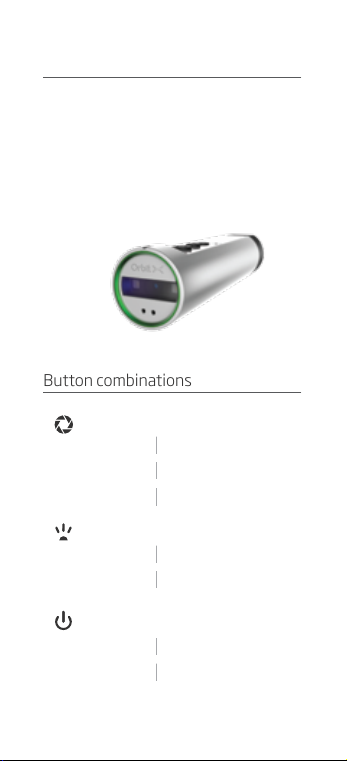
Introduction
Congratulations! You are now using a
quality product made by BARTEC PIXAVI.
The Orbit X EX is intrinsically safe and
can be used in hazardous areas. All you
need to g et started can be fou nd in this
quick guide.
Button combinations
Action Button
Shor t Press
1 Second Press
3 Seconds Press
Light Button
Shor t Press
1 Second Press
Power/Standby Button
Shor t Press
3 Seconds Press
Take a Picture
Star t/Stop Video Rec .
Call/ Hang Up Video Call
Video Light O n/Max/Off
Laser On/Of f
Standby/Wake up
Power On/Off
Page 2
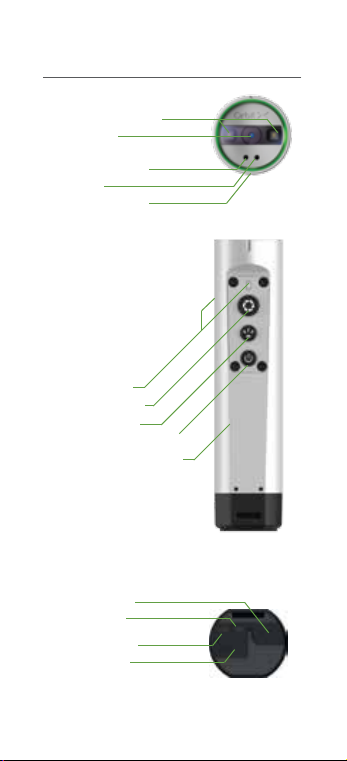
Buttons And Ports
LED Video Light
Camera
Microphone 1
Laser
Microphone 2
Status LED
Action Button
Light Button
Power/Standby Button
Rugged Alu Housing
Audio Jack
Wi-Fi LED
Battery LED
Micro USB
Page 3
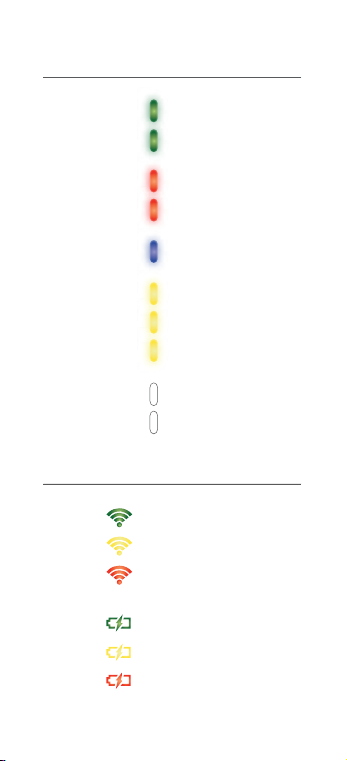
Status LED
Pulsate
Constant
Pulsate
Constant
Pulsate
Pulsate
Constant
4 Sec Interval
One Blink
Constant
Battery and WIFI LED
Strong Signal
Fair Signal
Not Connected
Full Battery
Ok Bat tery
Low Battery
Calling
In Call
Ready To Record
Recording
Pairing Mode
Booting
Ready For Use
Standby
Snapshot
Shutting Down
Page 4

Our Apps
Sipido
The Sipido video
conferencing app is using
SIP protocoll and allows
you to do mo bile video
conference and live video
streaming from the device
over any network.
Collaboration X
Collaboration X is a Mobile
Device Management
solution that allows you to
remote ly manage your
devices from your browser.
With th is ser vice , you can
remote ly monitor, set
policies and wipe device
safely and securely. The
solution also offer other
MDM functionality.
Collaboration X will update
your Or bitX device to the
latest software release
automaticly whenever the
device is connected to
power.
Orbit X S etup
This ap p allows you to get
the Orbit X associate d with
a wireless net work, and
configure the devic e for
video communication.
Page 5

First time setup of your Orbit X
The Orbit X wor ks right out of th e box.
But in order to take advantage of
advanced features like video conferencing, MDM functionality, over the ai r
updates and cloud media library s torage
you have to connect your O rbit X device
to the internet using the Orbit X setu p
app or the Collaboration X website.
Orbit X setup ap p:
1) Download and star t the Or bit X setup
app from “Google Play ” on your andro id
smart phone. The app is already
pre-installed if you are using an Impact X
or Gravi ty X dev ice.
2) Select “first time setup” and follow the
tutorial.
Collaboration X website:
If your company has a Collaboration X
accou nt the IT administrators can use
the "Orbit X Quick Setup" feature to
quick ly associate the Orbit X with
Collaboration X.
1) Login to
www.collaborationx.pixavi.com or sign
up for a 30 days free Collaboration X trial
account.
2) Go to “Dev ices” and select “O rbit X
Quick Setup”.
Page 6
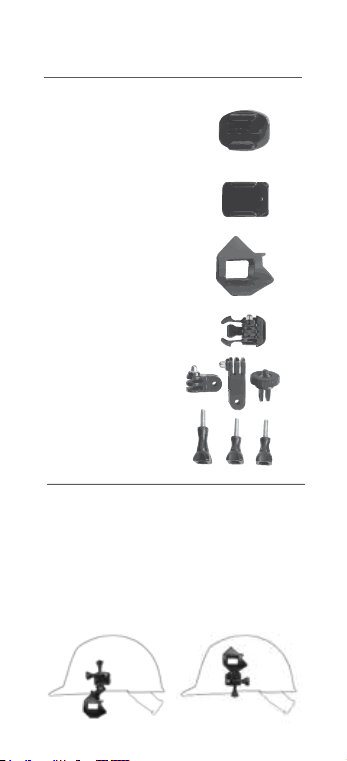
Head mount setup
Mounting plate for flat
sur faces (e.g . walls)
Mounting plate for curved
surfaces (e.g. helmet)
Orbit X cradle with 2x
1/4” screw mount
Quick release bracket
Swive l brackets
Screws
The head mount system is designed to
be fle xible and fit different ty pes of
helmets and equipment. T he Orbit X
snaps into the cradle and allows easy
access to the Or bit X on the go. Below
are two exampl es of head mount
configurations.
Page 7

Page 8

Charging
The Orbit X has a high quality, high capacit y
batte ry and shall o nly be charge d using the
charger supplied with the unit. Charging the
Orbit X from 0% to 80% bat tery capac ity
takes approximately 2 hours. Cha rging the
remaining 80% to 100% takes 1 ½ hours.
The Orbit X should not be used /operated
during the charging process.
Label
Orbit X EX version:
Model: OrbitX
Serial : PXRBEXxxxxxxxx
Mfr. Bartec Technor 4007-SVG-NO
BARTEC-PIXAVI.COM
0470
Ex ib op is IIC T4 Gb
IECEx SIR 14.0105X
Sira 14ATEX2287X
Intrinsically safe
IC: 9249A -ORBITX
FCC ID : YML-ORBITX
AEx ib op is IIC T4 Gb
II 2G
CI I, Div2, Grps A, B, C, D
Ex ib op is IIC T4 Gb
Sécurité intrinsèque
261724
Support
FAQs and technic al support can be found
here: www.bartec-pixavi.com/support
Special Conditions For Safe Use
Ex ib parameter
U
o
I
o
P
o
C
o
L
o
USB Interface
8.4 V
0.445 A
0.933 W
1.35 µF
3.06 µH
Headset
11.6 V
0.399 A
1.565 W
1.39 µF
20.6 µH
Waterproof
The Orbit X camera is IP 68 wate rproof even
witho ut the protective cove r fitte d over the
mini jack and USB connectors. The micro
USB and mini jack connectors are sealed on
the inside, and they are waterproof
themselves even without th e protective
cover.
Page 9
Please make sure the connectors are dry
before connecting a USB cab le, headset o r
charging the unit.
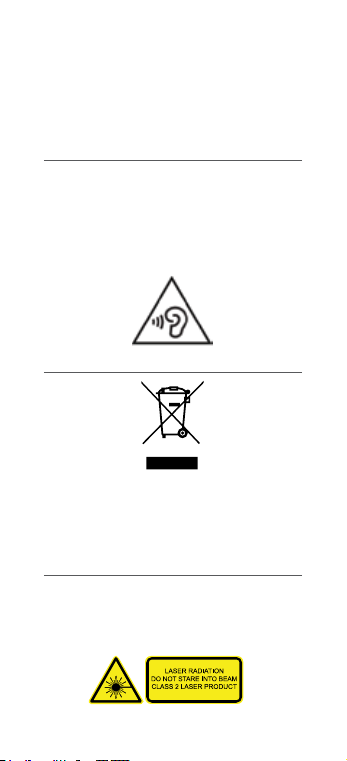
Audio Levels
The device is compliant with the EN9 650-1
standard. However, third par ty music
players can exceed the recommend ed
audio levels, and as su ch should be used
with caution as prolonged listening to
sound at high volumes can cause
permanent damage.
Recycling (WEEE)
If you wish to discard the Orbit X , please
contact your d ealer or supplier. Do not
throw the device in your domestic
rubbish/trash.
Integrated Laser
The Orbit X has built-in Laser functionality
for realtime collaboration and highlighting.
The laser can be controlled with the
“light-button” It uses a class 2 laser
Page 10

Ce produit répond aux exig ences de la section
15 de la régle mentation F CC. Son fonctionn ement es t soumis aux de ux conditions
suivantes: (1) cet a ppareil ne doit pas causer
d'interférences nuisibles et (2) cet appareil
doit ac cepter toute i nterfére nce reçue, y
compris les interféren ces qui peuve nt
provoquer un fonctionnement indésirable.
Conditions For Use (CSA)
The ambient tempe rature range o f the Orbit X
is -20°C to + 45°C
The Or bit X shall be pr otected from
contamination by liquid and dust; this is
normally achieved by the operator carrying
the device on their person.
The USB p ort shall only be us ed for charging
the Orbit X when in the non-hazardous area.
The Or bit X shall onl y be charged using the
charg er spec ifically supplied for use with the
unit, part number USB-AC35M, manufactured
by Deltaco, pa rt number 1001-0 007,
manufactur ed by Ansmann o r model
GT-41078-0505-USB and
GT-41078-0506- 0.4-USB manu factured by
GlobTec. The maximum input voltage (Um)
from th e charger betwee n these lines is 5.6V.
The ambient temperature during charging
shall b e in the range 0°C to 45°C. The charger
shall b e approved for u se in USA/Cananda
against CSA/UL 60950-1 or equivalent.
The USB p ort is also us ed for data down load.
The po rt has been as sessed with a U m of 5.8
V. The equi pment connected to the USB p ort
shall b e approved for u se in USA/Canada
against CSA/UL 60950-1 or equivalent.
Page 11

Conditions For Use (ATEX & IECEx)
The ambient temperature range of the Orbit
X is -20°C to + 45°C
The Orbit X shall be protected from
contamination by liquid an d dust; this is
norma lly achieved by the operator carr ying
the device on their person.
The USB p ort shall only be used for
charging the O rbit X when in the
non-hazard ous area. The O rbit X shall only
be charged using the c harge r specifica lly
supplied for use with the unit, par t number
USB-AC35M, manufactured by Deltaco,
part numbe r 1001-0007, manufactured by
Ansmann or model GT-41078-0505-USB
and GT-41078-0506-0.4-USB manufactured by GlobTec. The maximu m input
voltage (Um) from the charger between
these lines is 5.6V. The ambient
tempe rature during charging shall be in t he
range 0°C to 45°C
The USB p ort is also used for data
download. The por t has been assessed
with a Um of 5.8 V and shall be installed in
accordance with clause 12.2.1 of IEC
60079-14:2007/EN 60079-14:2008
FCC/IC
This device complies with Part 15 of the
FCC Rules. Operation is subject to the
following two conditions: (1) this dev ice
may not cause har mful interference, and (2)
this device must accept any interference
received, including interference that may
cause undesired operation.
Page 12

Specic Absorption Rate Data
The Orbit X Camera is a radio transmitter
and receiver. It is designed and manufactured not to exce ed the e mission limits for
exposure to radio frequency (RF) energy set
by the Federal C ommu nications
Commission (FCC) of the U.S. Government,
Industry Canada of the Canadian
Govern ment (IC), and recommended by The
Council of the European Uni on.
The exposure standard for wireless devices
employs a unit of measurement known as
the Specific Absor ption Rate, or SAR. The
SAR limit set by the FCC/IC is 1.6W/kg. The
SAR limit recommen ded by The Council of
the European Union is 2.0W/kg. Tests for
SAR are conducted using standard
operating positions spe cifie d by the FC C/IC
with the device transmitting at its highest
certified power level in all tested f requency
bands.
For bod y worn operation, the Orbit X devi ce
has bee n tested and meets the FCC/IC
exposure guidelines when used with an
accessory that contains no meta l and that
positions th e device a minimum of 10 mm
from the body. Such a device can i.e. be
BARTEC PIXAVI camera cradle.
Page 13

Page 14

Quick guide
 Loading...