

Page 1
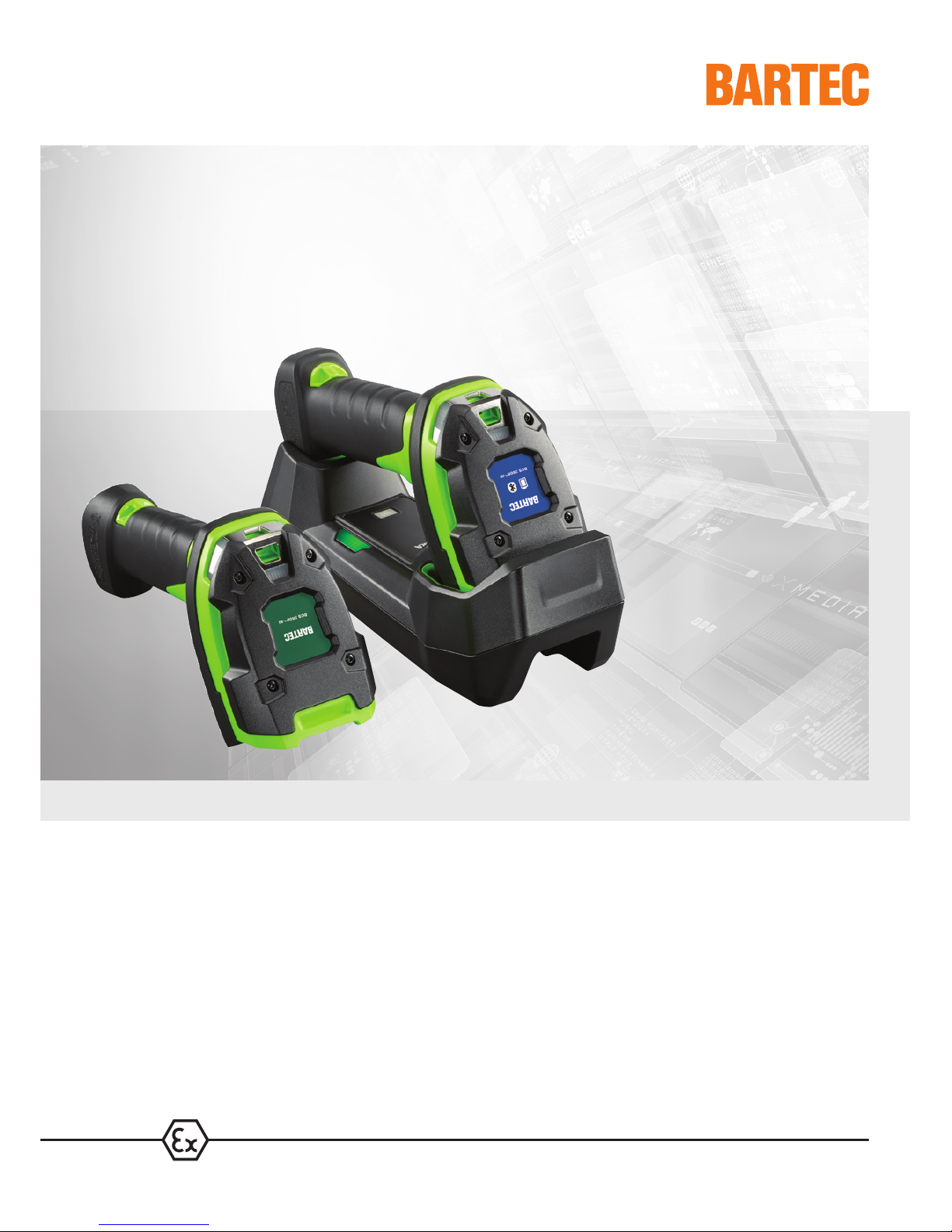
Handheld scanner series BCS 3600
ex
Quick Start Guide
Page 2

BARTEC GmbH
Max-Eyth-Straße 16
97980 Bad Mergentheim
GERMANY
Phone: +49 7931 597-0
Fax: +49 7931 597-119
Support: [email protected]
Download: http://automation.bartec.de
Internet: www.bartec. de
Quick Start Guide – Translation of the original
Hand-held scanners
BCS 3608ex-NI, BCS 3608ex-IS
BCS 3678ex-NI, BCS 3678ex-IS
ATEX / IECEx Zone 1 and Zone 21
ATEX / IECEx Zone 2 and Zone 22
Class I, II, III DIV 1
Class I, II, III DIV 2
Document No.: 11-A1S4-7E0001
Status: 16.05.2018
Page 3

Page 4
Hand-held scanners
BCS 3600ex series
1 Information about this
Quick Start Guide
Subject to technical modi f i cat ions
16/05/2018
3 / 28
1 Information about this Quick Start Guide
Read carefully before commis sioning the device.
Follow the corresponding User Manu al.
The
Quick Start Guide is an int egral part of the device. It applies solely in conjunction with the corresponding User
Manual
.
The
Quick Start Guide is direct ed at al l person s who are entrusted with handling the devic e.
Knowledge of the safety inst ructi ons and warnings in this Quick Start G uide and st ri ct compl i ance with them is
essential for safe
handling. Installation instructions and furt her inf orm at i on can be f ound i n t he User Manual.
Carefully read the Quick Start Guide and especially the safety instruction s before using the device.
Keep the Quick Start Gui de throughout the service life of the device.
Make the Quick Start Guide acce ssible to all people who are entrusted wit h handli ng the device.
1.1 Highlighting in the document
1.1.1 Warnings
Warnings are used in this Quick St art Gui de to warn of risks of damage to property and per sonal i nj uries.
Always read and follow these warni ngs.
DANGER
DANGER designates a hazardous situat i on t hat can lead to death or serious, permanent injuries if safety
measures are disregarded.
WARNING
WARNING designates a hazardous situation t hat can lead to serious but not permanent injuries if safety
measures are disregarded.
CAUTION
CAUTION designates a hazardous situation t hat can lead to minor injuries if safety measures are disregarded.
ATTENTION
ATTENTION designates a hazardous situation that can lead to mat erial dam age if safety measures are
disregarded.
Page 5
1 Information about this
Quick Start Guide
Hand-held scanners
BCS 3600ex series
4 / 28
Subject to technical modi f i cat ions
16/05/2018
1.1.2 Symbols and means o f presen tati on
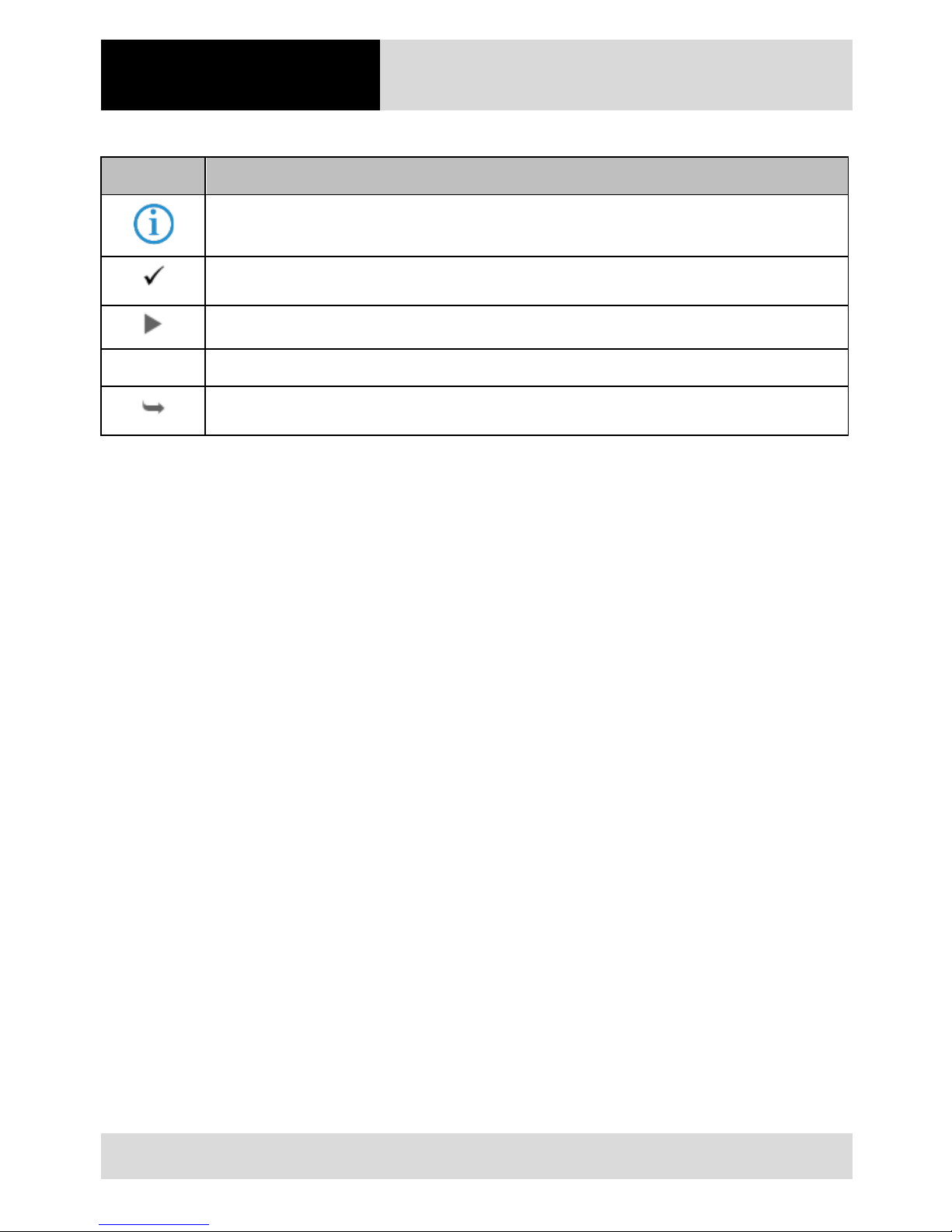
Symbol Explanation
Important advice and information for the effecti ve, ef ficient and environm ent al l y s ound use of the
product.
Condition that must be m et bef ore t he subsequ ent act i ons can be performed.
Individual steps you must t ake.
1., 2., … Various steps to be performed in t he order spe cified.
Indication of the result s of a st ep or of several steps for m onitoring success.
Page 6

Hand-held scanners
BCS 3600ex series
1 Information about this
Quick Start Guide
Subject to technical modi f i cat ions
16/05/2018
5 / 28
1.2 Reference documents
All documents are availabl e onli ne from the following websites:
‒ BARTEC (global): www.bartec.de
‒ BARTEC (ACS): http://automation.bartec.de
‒ ZEBRA (ZEB): www.zebra.com
In the event of overlaps with Zebra use r m anuals, the instructions in the BARTE C User Manual apply.
The BARTEC User Manual takes priori t y.
Document Explanation Version
BARTEC
User Manual
BCS 3608ex-NI / BCS 3608ex-IS /
BCS 3678ex-NI / BCS 3678ex-IS
Guidelines on commissioning and the safe use of handheld scanners (including i nstal l at i on, safety information
related to explosion protect i on and information regardin g
programming)
global
Data sheet –
BCS 3608ex-NI / BCS 3608ex-IS /
BCS 3678ex-NI / BCS 3678ex-IS
Data on explosion protection and t echnical data for handheld scanners
global
ZEBRA
For DS3608-HP and DS3678-HP:
• Product Reference Guide
• Multicode Data Formatt i ng
and Preferred Symbol
• Advanced Data Formatt ing
(ADF)
• Simple Serial I nterface
Programmer's Guide
Instructions for commissioni ng, operating, configuri ng,
programming and maint aini ng hand-held scanners (full
information can be found on the Z E BRA support page).
ZEB
Further information on progr am m i ng hand-held scanners can be found i n t he ori gi nal Z ebra
documentation. The explosion protected BARTEC BCS 3608ex-NI / BCS 3608ex-IS / BCS 3678ex-NI /
BSC 3678ex-IS hand-held scanners are based on the Z ebra DS3608-HP and DS3678-HP hand-held
scanners.
Page 7
2 Safety
Hand-held scanners
BCS 3600ex series
6 / 28
Subject to technical modi f i cat ions
16/05/2018
2 Safety
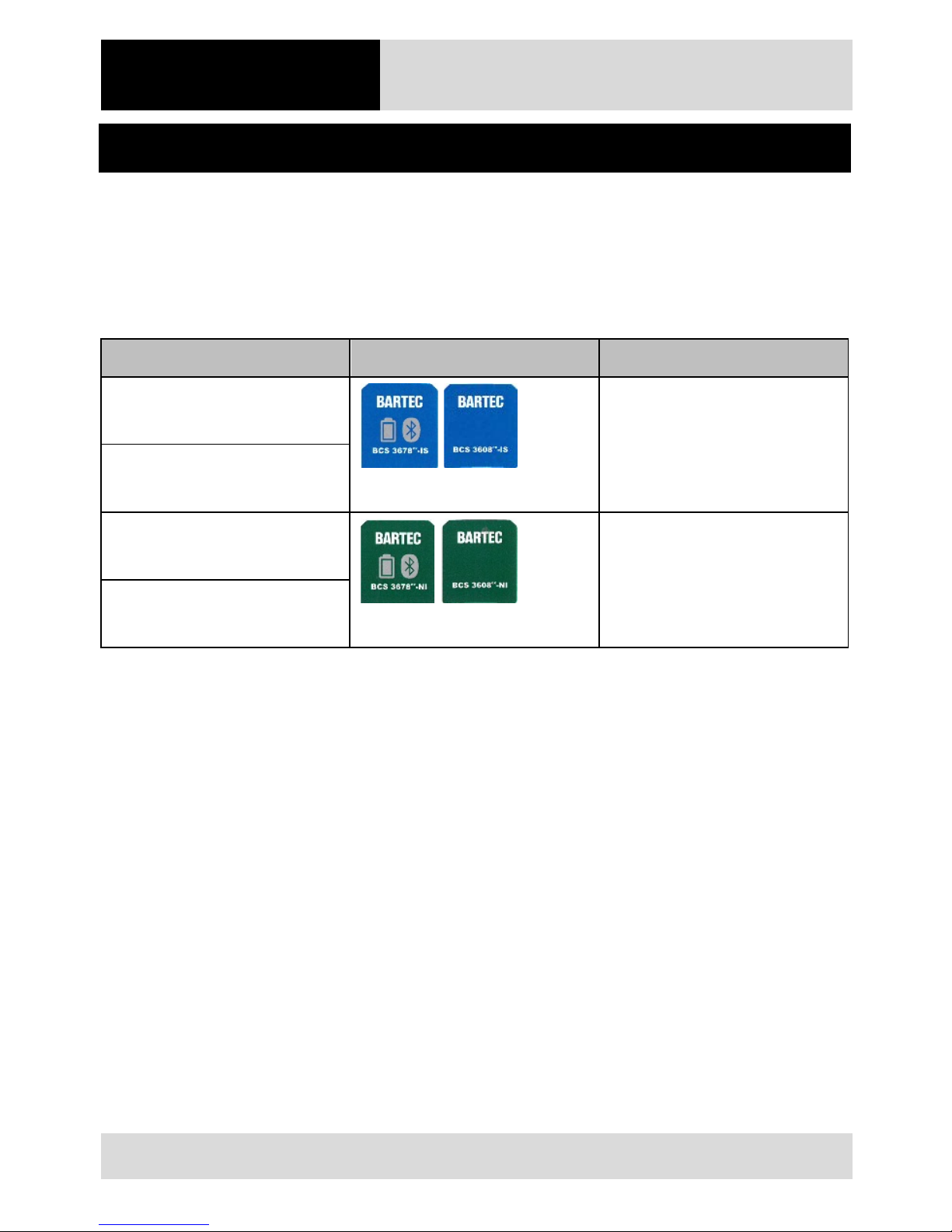
2.1 Intend ed us e
The hand-held scanners in the B CS 3600ex series are used for the mobile capture, processing and transfer of data
within potentiall y explosive atmospheres. The data are transferred either using a conne ct i on cable (B CS 3608ex) or
using a Bluetooth connection (BCS 3678ex). The hand-held scan ners in the BCS 3600
ex
series have been modified
for use in the following pot ent i al ly explosiv e atmospheres:
Configuration Approved zone
BCS 3678ex-IS
(Type 17-A1S4-XXXX)
ATEX / IECEx Zone 1 and Zone 21
Class I, II, III DIV 1
BCS 3608ex-IS
(Type 17-A1S4-XXXX)
BCS 3678ex-NI
(Type B7-A2S4-XXXX)
ATEX / IECEx Zone 2 and Zone 22
Class I, II, III DIV 2
BCS 3608ex-NI
(Type B7-A2S4-XXXX)
The hand-held scanners may only be u sed t oget her with operating equipment t hat corresponds to Installation
Category I.
You must comply with the permi ssible am bient conditions for the device use d (see U ser Manual).
Page 8
Hand-held scanners
BCS 3600ex series
2 Safety
Subject to technical modi f i cat ions
16/05/2018
7 / 28
2.2 Personnel qualifications
Target group Skills
Qualified electricians
• Professional training
• Knowledge and experience to recognise and avoid risks that can
emanate from electricit y
• Understanding of the overall s ystem
• Special instruction for pot ent i al ly explosive atmospheres
IT specialists
• Understanding of the overall s ystem
• Configuration/programming
• Understanding of programm i ng m anual s
Warehouse and transport
employees
• Loading and transport activit i es
• Correct storage
Operators
• Instruction by the operating c om pany on operation, changing and
loading the battery
• Special instruction for pot ent i al ly explosive atmospheres
2.3 Explo sion protection
Incorrect use of the hand-held scanner and its accessories can trigger fires and explosions in pot ent i al l y explosi ve
atmospheres.
Read the instructions in t hi s Quick St art G uide thoroughly and follow t hem when using t he device.
In the event of overlaps with user manuals from Zebra, the instructi ons in the BARTEC User Manual apply. T he
BARTEC User Manual takes priority.
2.3.1 Using hand-held scanners and accessories
Always carry out an inspection prior to use (see Chapter 6.2, P. Fehler! Textmarke nich t defi n i ert.).
Ensure that the applicati on area co rresponds to the explosion prote ct i on marking and permissible ambient
conditions (see the User M anual ).
Remove the device from the pot entially explosive atmosphere i m medi ately in the event of a malf uncti on or
damaged enclosure.
Only use accessories specifi ed by BARTEC in the potential l y explosiv e at m ospher e.
Have all maintenance work on and inspections of accessories condu ct ed by aut horised personnel.
Have all repairs to the hand-held s canner conducted by BARTEC.
Page 9

2 Safety
Hand-held scanners
BCS 3600ex series
8 / 28
Subject to technical modi f i cat ions
16/05/2018
2.4 Residu al risks
2.4.1 Risk of an explosion caused by electrical ignition sources
Electrical ignition sources can trigger fires and explo sions in a potentially explosive at m osphere.
Non-approved components
Specific hand-held scanners and accessories (including universal supply module, bat tery, cable) are suitable for each
potentially explosive at m osphere. Hand-held scanners a nd components that have not been approved f or t he
respective potentiall y ex plosive atmosphere may trigger explosions.
Only use components that have bee n approved for the relevant zone.
Spark formation during battery change and cable connection
Sparks can arise when changing the battery or connecting cables. S park s can tri gger an explosion in a potential l y
explosive atmosphere.
Only insert or remove the batt ery outside the potentially explosive at m osphere.
Only connect or disconnect t he cable outside the potentially explo sive at m osphere.
Always have cables connected by a qualified electrician.
Spark formation caused by the battery falling out / the connection cable coming unplugged
The following risks arise if t he saf et y lock on the underneath of the hand-held scanner is not correctly closed:
‒ The battery on a Bluetoot h hand-held sc anner can fall out.
‒ The connection cable on a wired hand-h el d sc anner can come unplugged.
This can produce sparks which can trigger an explosion.
Check that the safety lock is correct ly closed before taking the hand-held s canner into the potential l y explosive
atmosphere.
Broken enclosure: loss of explosion protection
The hand-held scanner has been test ed f or f al l s f rom a height of up to 2.4 m (Zone 2 / Div. 2) and 1.2 m (Zone 1 /
Div. 1). There is a risk of the enclosure or t he scan win dow breaking during falls from a greater height, in whi ch case
the explosion protection i s no longer guaranteed.
Protect hand-held scanners from f al l ing from a greater height.
If the hand-held scanner has fallen from a greater height or you suspect a dam aged enclosure:
– Remove the hand-held s canner from the potential ly explosive atm osphere immediately.
– Send the hand-held scanner to BARTEC.
Page 10

Hand-held scanners
BCS 3600ex series
2 Safety
Subject to technical modi f i cat ions
16/05/2018
9 / 28
Corrosion: loss of explosion protection
The enclosure of the hand-held scanner has protection clas s I P 67, however constant exposure to moisture c an l ead
to corrosion. This may lead to the loss of the explosion protection.
Protect hand-held scanners ag ai nst con st ant exposure to moisture.
Do not subject hand-held scanne rs to any damp weather conditions.
2.4.2 Damage to eyes caused by laser light
The hand-held scanner operates wit h a Cl as s 2 laser. Laser beams can damage eyes.
Do not look into the laser beam.
2.4.3 Risks of cuts if the scan window i s b ro ken
The scan window may become damage d if the hand-held scanner falls down. There is a risk of cut s if you reach into
the broken or cracked area.
When getting the hand-held scanner out, secure it to prevent it falling down.
Only get the hand-held scanner out when it reaches its destination.
If the scan window is broken:
– Do not touch the broken area.
– Do not use the hand-held scanner.
– Send the faul t y hand-held scanner to BARTEC.
2.4.4 Health hazard in the case of inco rrect d i sp osal
Lithium ion batt eries on t he B l uetooth hand-held scanner contain pollutant s t hat can be harmf ul to health.
Dispose of batteries in an environmentally sound way in acco rdance with regional regulations.
Page 11

2 Safety
Hand-held scanners
BCS 3600ex series
10 / 28
Subject to technical modi f i cat ions
16/05/2018
2.5 Preve nting da m age to property
2.5.1 Short circuit caused by incorrect connection
Incorrect electrical connection can cause a short circuit, thereby damaging the hand-held scan ner.
Always have the hand-held scanner c onnected by a qualified el ect rician i n acco rdance with the connection
diagram.
2.5.2 Storage at too high a temperature
A thermal fuse prevents the hand-h el d sca nner get t i ng t oo hot during operation and triggering an explosion. There is
also a risk of the hand-held scanner gett i ng t oo hot if the hand-held scanner is stored outside of the permissible
ambient temperatures. T he hand-held scanner is damaged as soon as the t hermal fuse responds.
Only store the hand-held scanne r within the permissible ambi ent temperatures.
2.5.3 Aggressive cleaning agents
Aggressive cleaning agents can attack and fade the scan window, t hereby impairing the scanning funct ional i t y. In
extreme cases scanning is no longer possible.
Only use a damp cloth to clean the hand-held sca nner.
2.5.4 Contact with chemicals
The enclosure of the hand-held scanner consists of polycarbonat e that has only limited chemical resi st ance. Contact
with chemicals can break the enclosure.
Do not bring the hand-held scanner int o cont act with chemicals.
Page 12
Hand-held scanners
BCS 3600ex series
3 Approval, standards
Subject to technical modi f i cat ions
16/05/2018
11 / 28
3 Approval, standards
3.1 BCS 3608ex-IS / BCS 3678ex-IS hand-held scanners
Standard Ex protection type Certification
ATEX
Zone 1/21
II 2G Ex ia IIC T4 Ga
II 2D Ex ia IIIB T135 °C Da
Applied for
IECEx
Zone 1/21
Ex ia IIC T4 Ga
Ex ia IIIB T135 °C Da IP 64
Applied for
CSA Class I, II, III Div 1
Class I Div 1 Groups A, B, C and D
Class II Div 1 Groups E, F
Class III
Class I Div 1
Class I Div 1 Groups A, B, C and D T4
Applied for
Further approvals and certif i cat es c an be f ound at www.bartec.de
Page 13
3 Approval, standards
Hand-held scanners
BCS 3600ex series
12 / 28
Subject to technical modi f i cat ions
16/05/2018
3.2 BCS 3608ex-NI / BCS 3678ex-NI hand-held scanners
Standard Ex protection type Certification
ATEX
Zone 2/22
II 3G Ex ic IIC T4 Gc
II 3D Ex ic IIIB T135 °C Dc IP 64
EPS 16 ATEX 1113 X
IECEx
Zone 2/22
Ex ic IIC T4 Gc
Ex ic IIIB T135 °C Dc IP 64
IECEx EPS 16.0050X
CSA Class I, II, III Div 2
Class I Div 2 Groups A, B, C and D
Class II Div 2 Groups E, F
Class III
Class I Div 2
Class I Div 2 Groups A, B, C and D T4
Applied for
Further approvals and certif i cat es c an be f ound at www.bartec.de
Page 14
Hand-held scanners
BCS 3600ex series
4 Product description
Subject to technical modi f i cat ions
16/05/2018
13 / 28
4 Product description
The BCS 3608ex-NI and BCS 3608ex-IS series consists of wired hand-held scanners for capturing 1D/2D barcodes
and for OCR text recognition. The BCS 3678ex-NI and BCS 3678ex-IS hand-h el d sca nners with Bluetooth
supplement the series with wirel ess data capture. The hand-held scanners in the BCS 3608ex-NI- and BCS 3608exIS series have been modifi ed f or use in pot entially explosive atmospheres (see Chapter 2.1, P. 6).
The barcodes are captured by a 1D/2D s can engine. The ergonomic design permits 1-handed operation.
4.1 Possib le system configurations
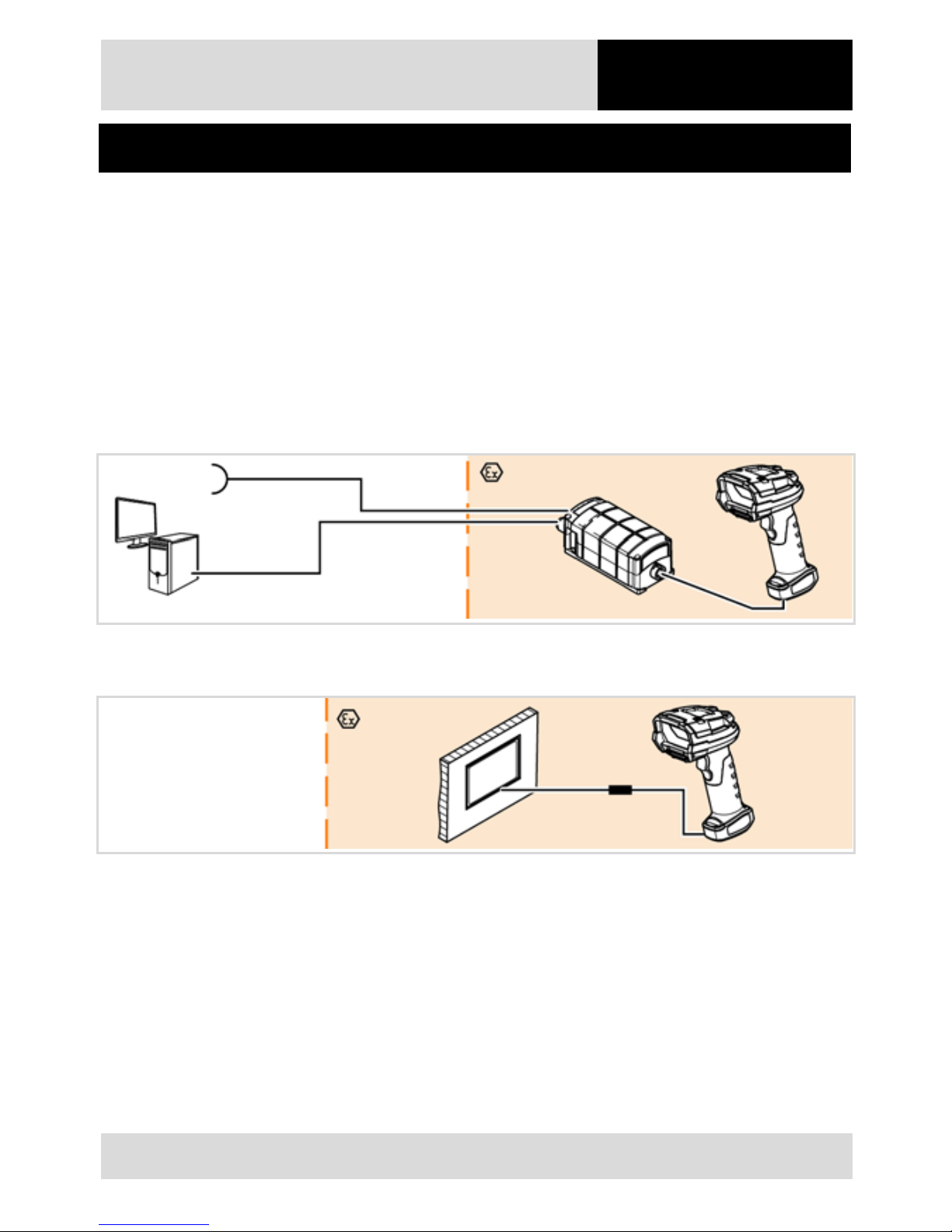
Detailed descriptions of system configurations are pro vided in the User Manual.
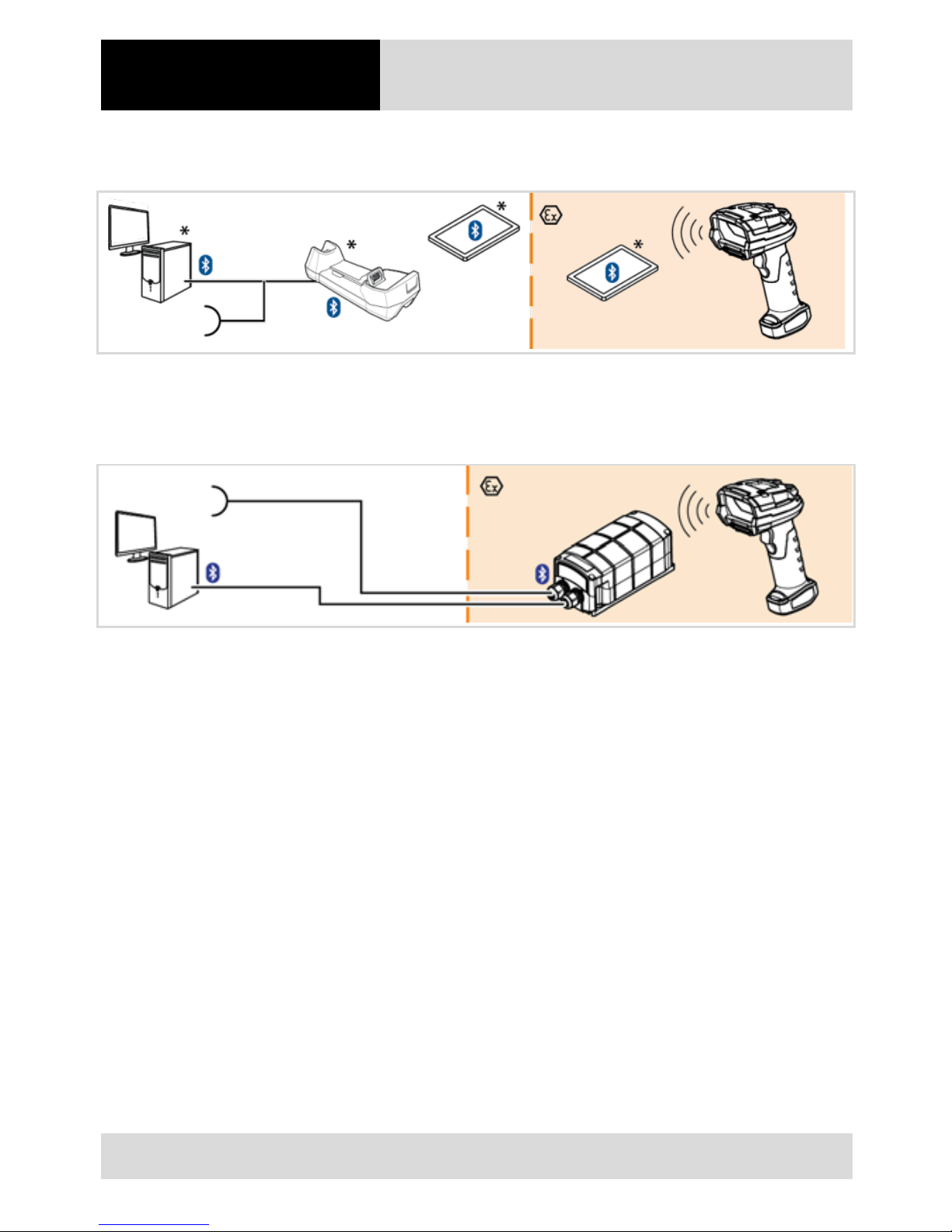
4.1.1 BCS 3608ex-NI / BCS 3608ex-IS wired hand-held scanners with universal supply module
4.1.2 BCS 3608ex-NI wired hand-held scanners with HMI (only Zone 2 and 22)
Page 15
4 Product description
Hand-held scanners
BCS 3600ex series
14 / 28
Subject to technical modi f i cat ions
16/05/2018
4.1.3 BCS 3678ex-NI / BCS 3678ex-IS Bluetooth hand-held scanners with cradle and Bluetooth-enabled
device
* Optional communication options
4.1.4 BCS 3678ex-NI / BCS 3678ex-IS Bluetooth hand-held scanners via universal supply module
Page 16
Hand-held scanners
BCS 3600ex series
4 Product description
Subject to technical modi f i cat ions
16/05/2018
15 / 28
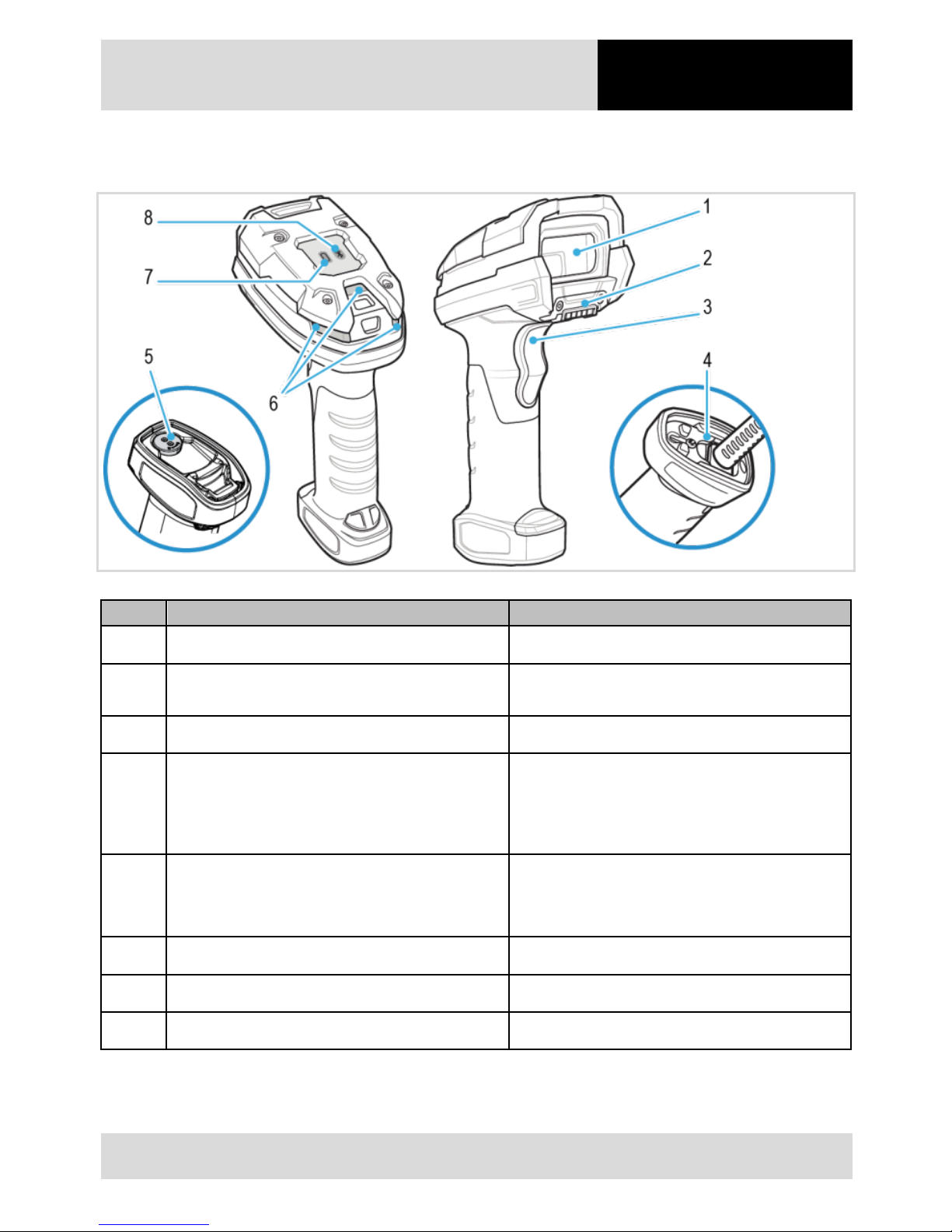
4.2 Constructio n of hand-held scanners (w ired and Bluetooth)
Pos.
Description
Function
1 Scan window Scanning barcodes
2 Contact for cradle
• Charging the battery
• Transferring data to cradle
3 Trigger button Starting the scan process
4 Wired hand-held scanner: safety lock
• Securing the connecti on cable to prevent it
coming unplugged
• Opening only possible with a Phi ll i ps
screwdriver
5 Bluetooth hand-held s canner: safety l o ck
• Securing the battery to st op i t falling out
• Opening only possible using sp ecial t ool
(included with deliver y)
6 LEDs Displaying the status of the hand-held scanner
7 Bluetooth-hand-held sca nner: battery LED Displaying the charge stat us of t he battery
8 Bluetooth-hand-held sca nner: Bluetooth LED Displaying the status of the Bluetooth connection
Page 17
4 Product description
Hand-held scanners
BCS 3600ex series
16 / 28
Subject to technical modi f i cat ions
16/05/2018
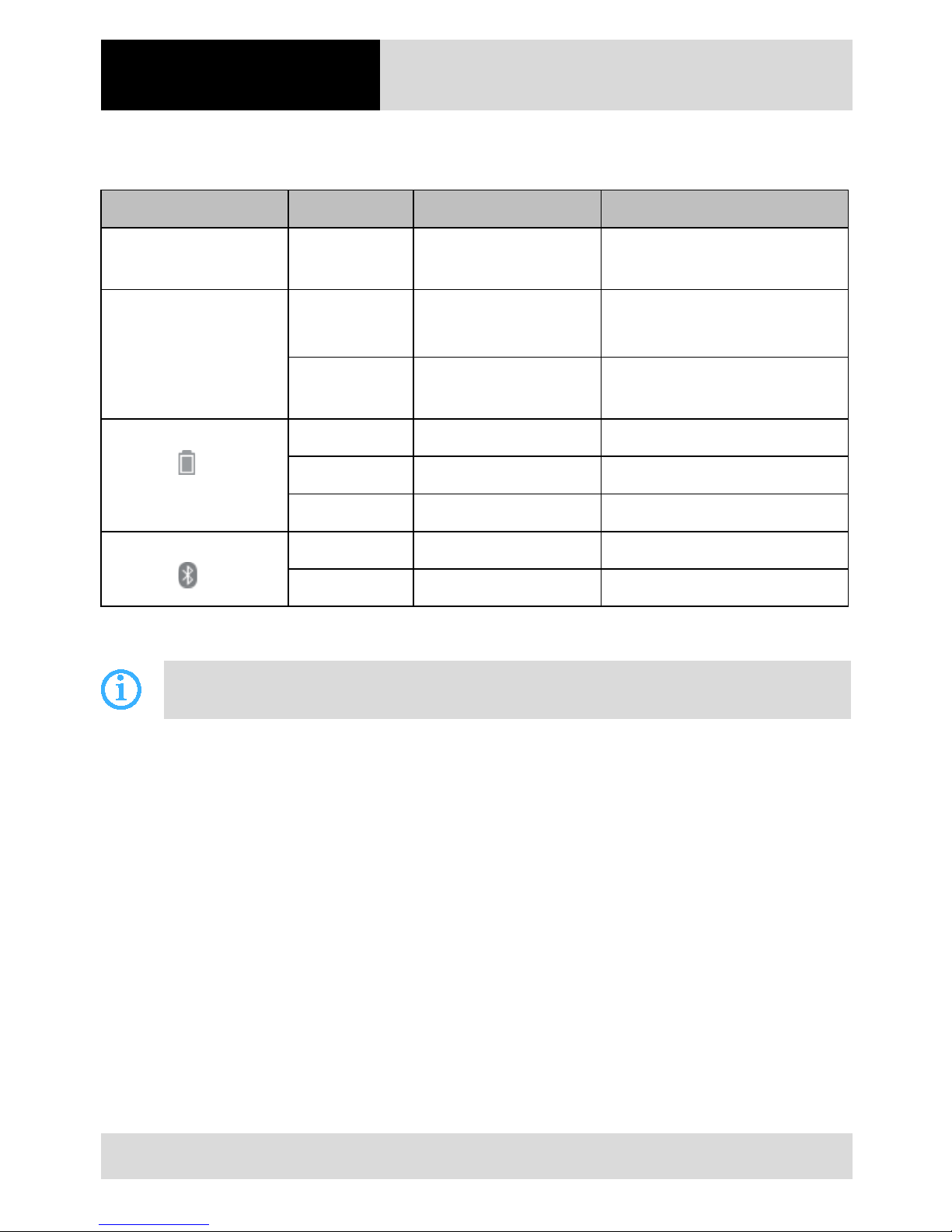
4.2.1 Meaning of LED display / beeps
Hand-held scanner
LED display Colour Beep sequence Meaning
Status LEDs (on
switching on)
Green flashes Low – medium – high Hand-held scanner is switche d on
Status LEDs (when
scanning)
Red High (4 short beeps) Transmission error
Data are ignored
Green Medium Barcode has been read
successfully
On Bluetooth hand-held
scanners:
Red
–
Battery charge less than 20 %
Yellow
–
Battery charge 20 - 50 %
Green
–
Battery charge over 50 %
On Bluetooth hand-held
scanners:
Red Low (4 long beeps) No Bluetooth pairing
Green 2 short beep sequences Paired to Bluetooth device
Cradle
Other LED displays and beeps are de scri bed i n the ZEBRA Product Reference Guide.
Page 18

Hand-held scanners
BCS 3600ex series
5 Connection /
commissioning
Subject to technical modi f i cat ions
16/05/2018
17 / 28
5 Connection / commissioning
DANGER
Spark formation when connecting a cable!
Explosion.
Always have cable connected by a quali f i ed el ect rician.
5.1 Configuration
A detailed description of the system configuration is pro vided i n t he User Manual for the BCS 3600ex series.
Page 19
6 Operation
Hand-held scanners
BCS 3600ex series
18 / 28
Subject to technical modi f i cat ions
16/05/2018
6 Operation
6.1 BCS 3678ex-NI / BCS 3678ex-IS Bluetooth-hand-held scanner s
6.1.1 Changing the battery
DANGER
Mixing up the batteries!
Loss of function and risk of explosion.
Only use batteries that have been certi fied by BARTEC.
Only the following batt eri es are app rove d:
Zone / Div
Battery type
Zone 1 / Div 1 17-A1Z0-0012
Zone 2 / Div 2 B7-A2Z0-0036
DANGER
Spark formation when changing the battery!
Explosion.
Only insert or remove the batt ery outside the potentially explosive atmosphere.
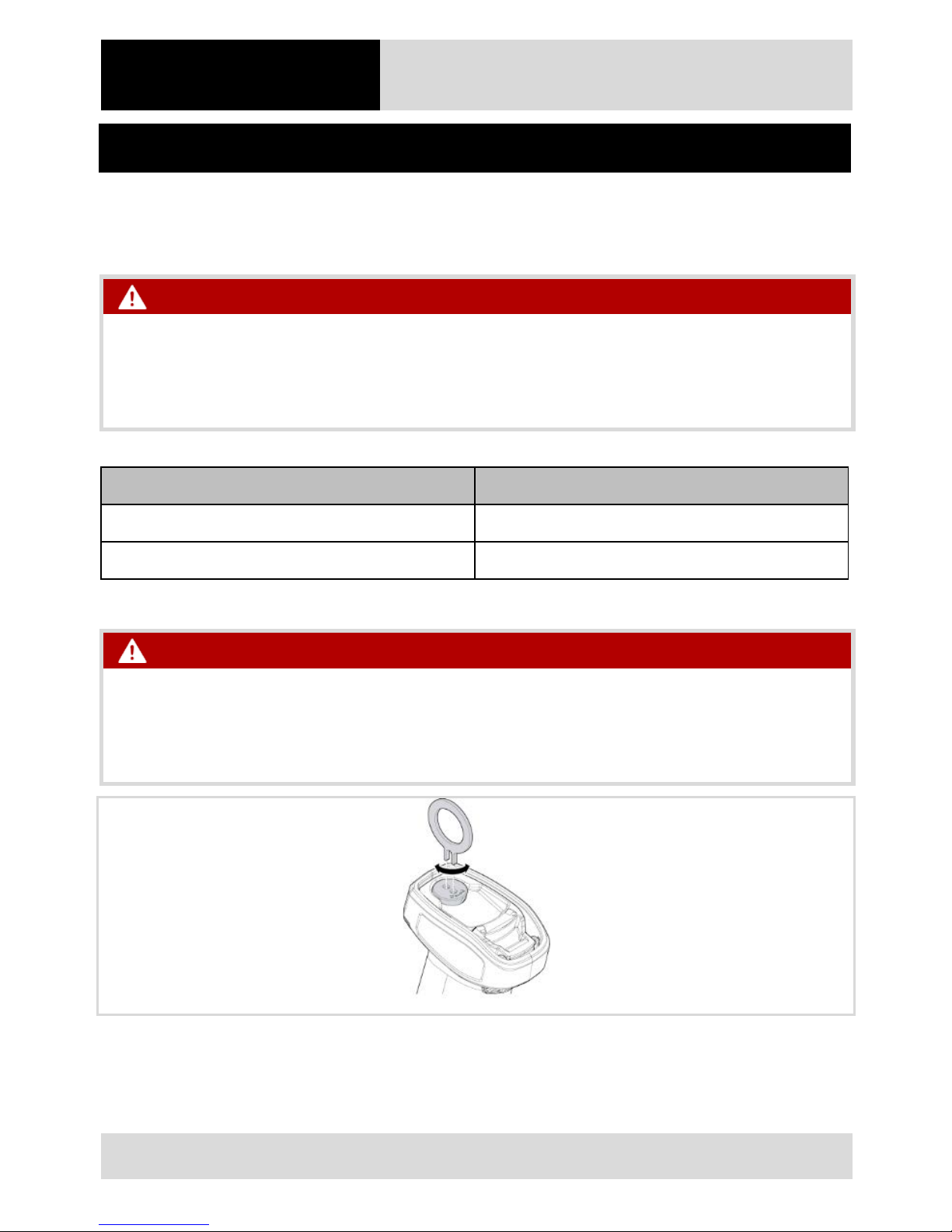
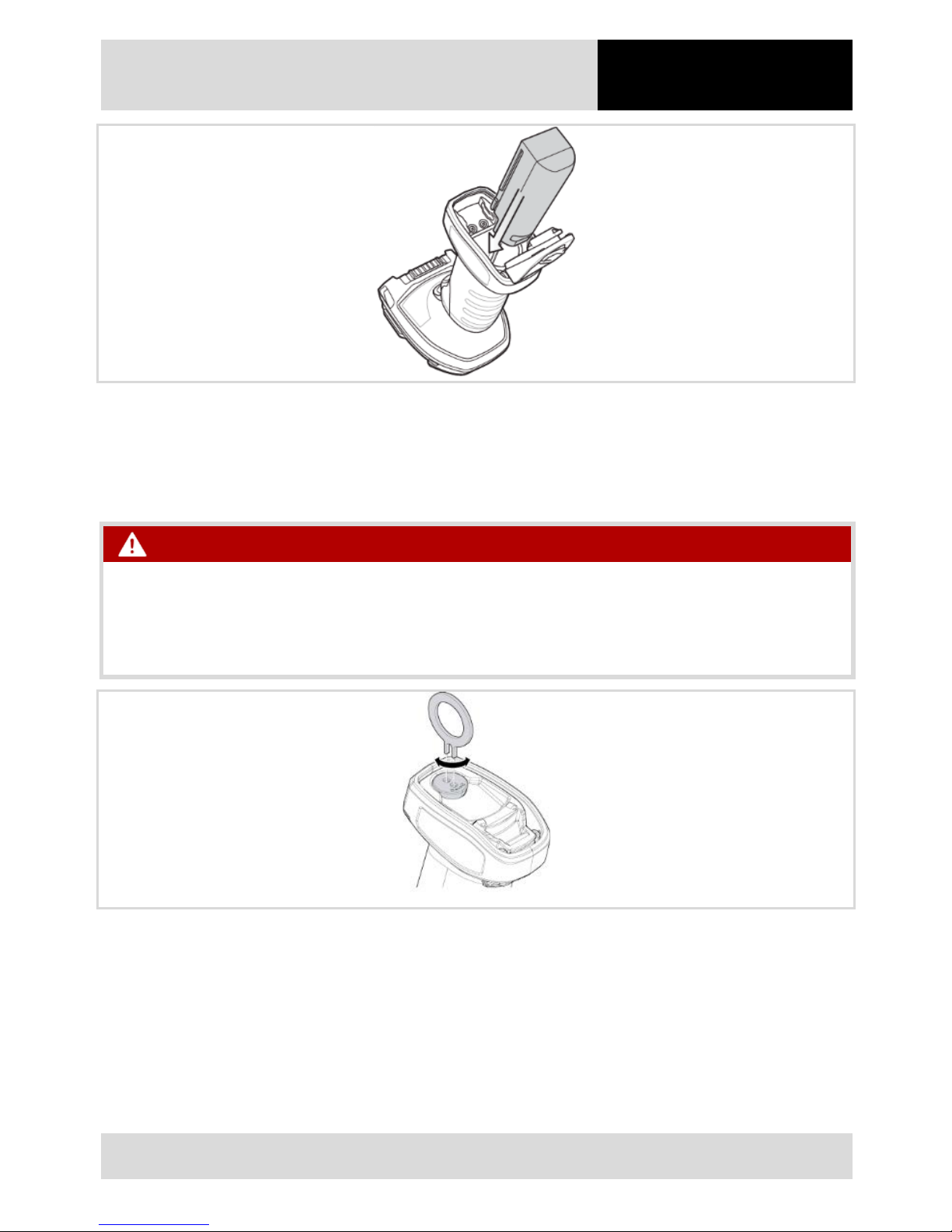
1. Using the special tool , open the safety lock to unlock the bat tery compartment cover, rotat ing the safety lock by
approximately one quarte r i n either direction.
2. If a battery has been inserted: remove the battery.
Page 20
Hand-held scanners
BCS 3600ex series
6 Operation
Subject to technical modi f i cat ions
16/05/2018
19 / 28
3. Slide the battery into the battery compartment, ensuring the following:
– Battery contacts point towards the battery compartm ent.
– Rounded side of t he bat tery points towards the back of the hand-held scanner.
4. Close the battery compartment cover.
DANGER
Spark formation caused by the battery falling out!
Explosion.
Close the safety lock carefully.
5. Turn the safety lock by approximately one quarter in ei t her direct i on t o l ock the bat tery compartment cover.
6. If a new battery has been inserted: charge the battery u sing t he cradle.
Page 21
6 Operation
Hand-held scanners
BCS 3600ex series
20 / 28
Subject to technical modi f i cat ions
16/05/2018
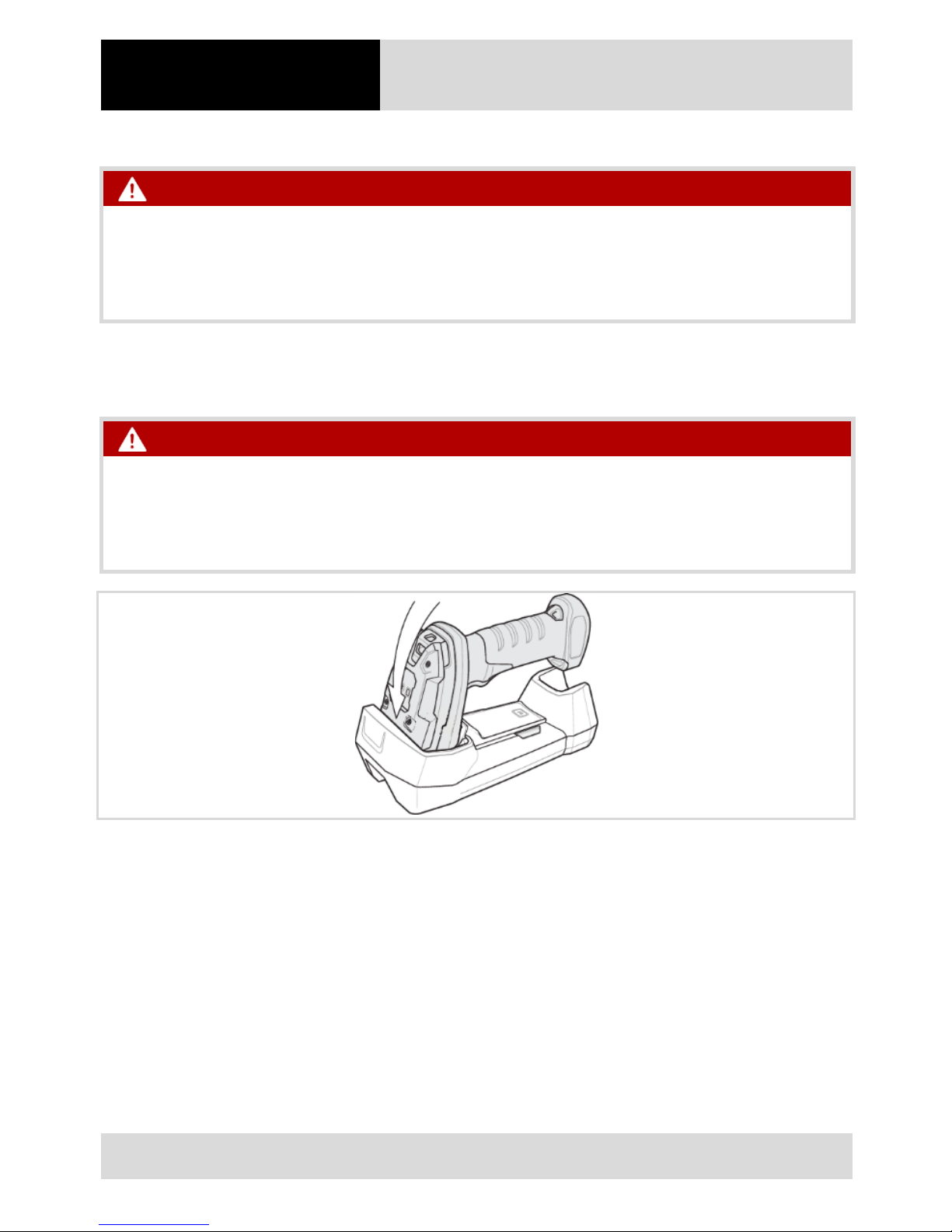
6.1.2 Placing the hand-held scanner in the cradle
DANGER
Non-approved cradle!
Loss of function and risk of explosion.
Only use the cradle that has been specified for the relevant configurati on by BARTEC.
The approved accessory is shown i n t he system overview (see system overview, Chapter 7.1, P. 27). The model is
clearly indicated on the t ype label.
DANGER
Spark formation!
Explosion.
Only use the cradle outside the pot ent i al l y explo sive atmosphere.
1. Place the head of the hand-held scanner in the cradle.
Page 22
Hand-held scanners
BCS 3600ex series
6 Operation
Subject to technical modi f i cat ions
16/05/2018
21 / 28
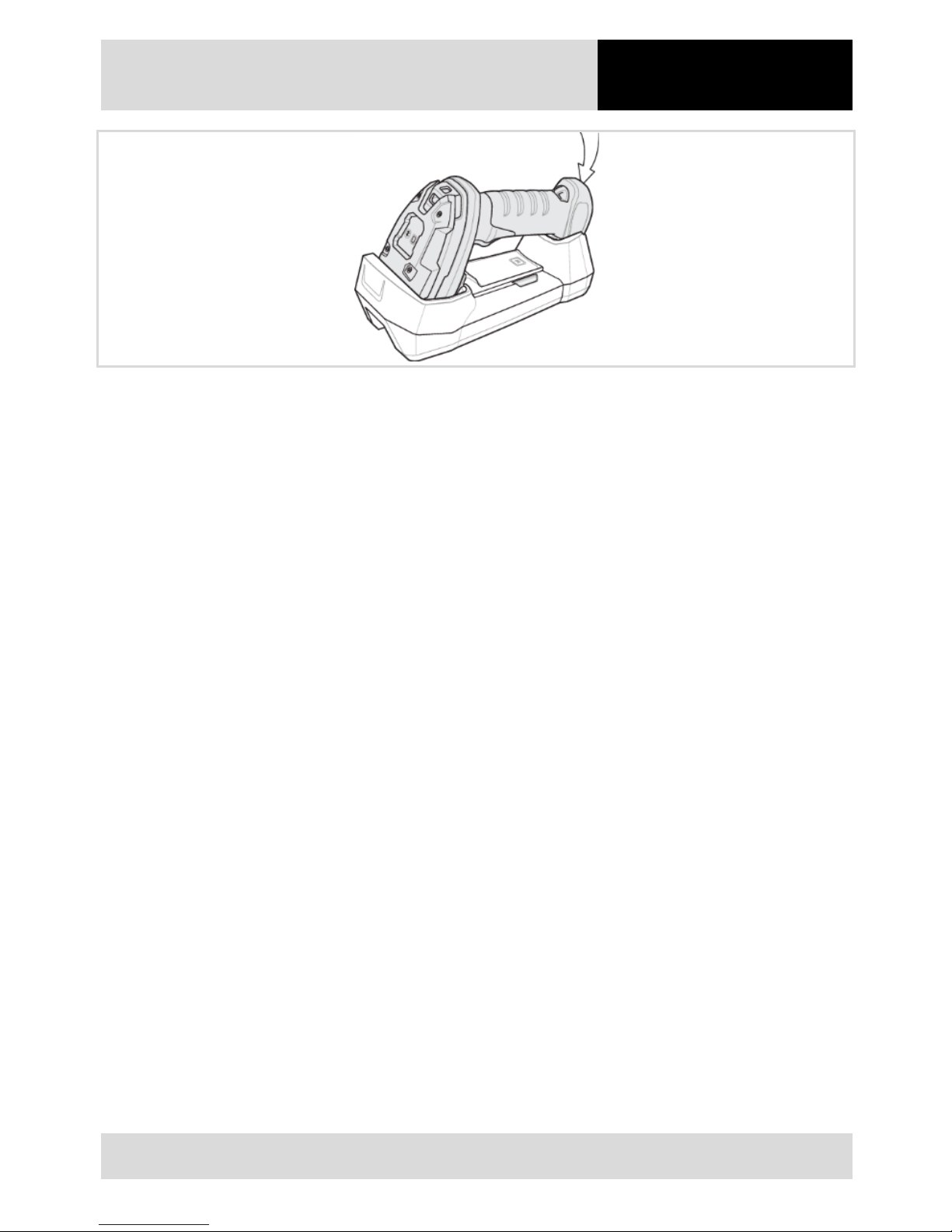
2. Press the underneath of the hand-held scanner into t he cradle until you hea r t he hand-held scanner click into
place.
Page 23

6 Operation
Hand-held scanners
BCS 3600ex series
22 / 28
Subject to technical modi f i cat ions
16/05/2018
6.1.3 Connecting the hand-held scanner to the cradle (optional)
1. The Bluetooth hand-held scanner sends data to t he cradle. T he cradle send s t hese dat a t o a host PC. To
exchange data / receiv e dat a, the cradle must be connected to t he hand-held sca nner.
2. To connect the hand-held scanner to the cradle, place the hand-held scanner in the cradle.
– or –
Scan the connection code on the cradl e.
If the display is illuminated in red, the transfer has failed.
If the status LEDs are lit up in green, the hand-held scanner is connected to the cradle.
Page 24
Hand-held scanners
BCS 3600ex series
6 Operation
Subject to technical modi f i cat ions
16/05/2018
23 / 28
6.2 Inspection to be con ducted p rior to use
DANGER
Spark formation caused by the connection cable or the battery falling out!
Explosion.
Ensure that the safety lock has been correctly closed prior to use in t he pot entially explosive atmosphere.
The following risks are present i f the safety lock on the underneath of t he hand-held scan ner has not been closed
correctly:
‒ The battery on a Bluetoot h hand-held sc anner can fall out.
‒ The connection cable on a wired hand-h el d sc anner can come unplugged.
Check the following point s before operating the device:
Final inspection of BCS 3608ex-NI / BCS 3608ex-IS (wired)
Check points
Scan window free from damage, e. g. scratc hes
Enclosure free from damage, e.g. crack or break
Temperature in the area in which the hand-held scanner is used corresponds to the specified temperature range
Cables are not damaged
Cables have been certified
Cable on the hand-held scanner is secu rel y engaged and locked
Cables on the universal suppl y modul e are securely engaged, locked or sc rewe d tight
Page 25
6 Operation
Hand-held scanners
BCS 3600ex series
24 / 28
Subject to technical modi f i cat ions
16/05/2018
Final inspection of BCS 3678ex-NI / BCS 3678ex-IS (Bluetooth)
Check points
Scan window free from damage, e. g. scratc hes
Enclosure free from damage, e.g. crack or break
Temperature in the area in which the hand-held scanner is used corresponds to the specified temperature range
If cables are present: cables are not dam aged
If cables are present: cables ha ve been ce rt i fied
Battery has been certif i ed
Battery compartment cove r has bee n correctly locked
Cables on the universal suppl y modul e are securely engaged, locked or sc rewe d tight
Page 26
Hand-held scanners
BCS 3600ex series
6 Operation
Subject to technical modi f i cat ions
16/05/2018
25 / 28
6.3 Scanning
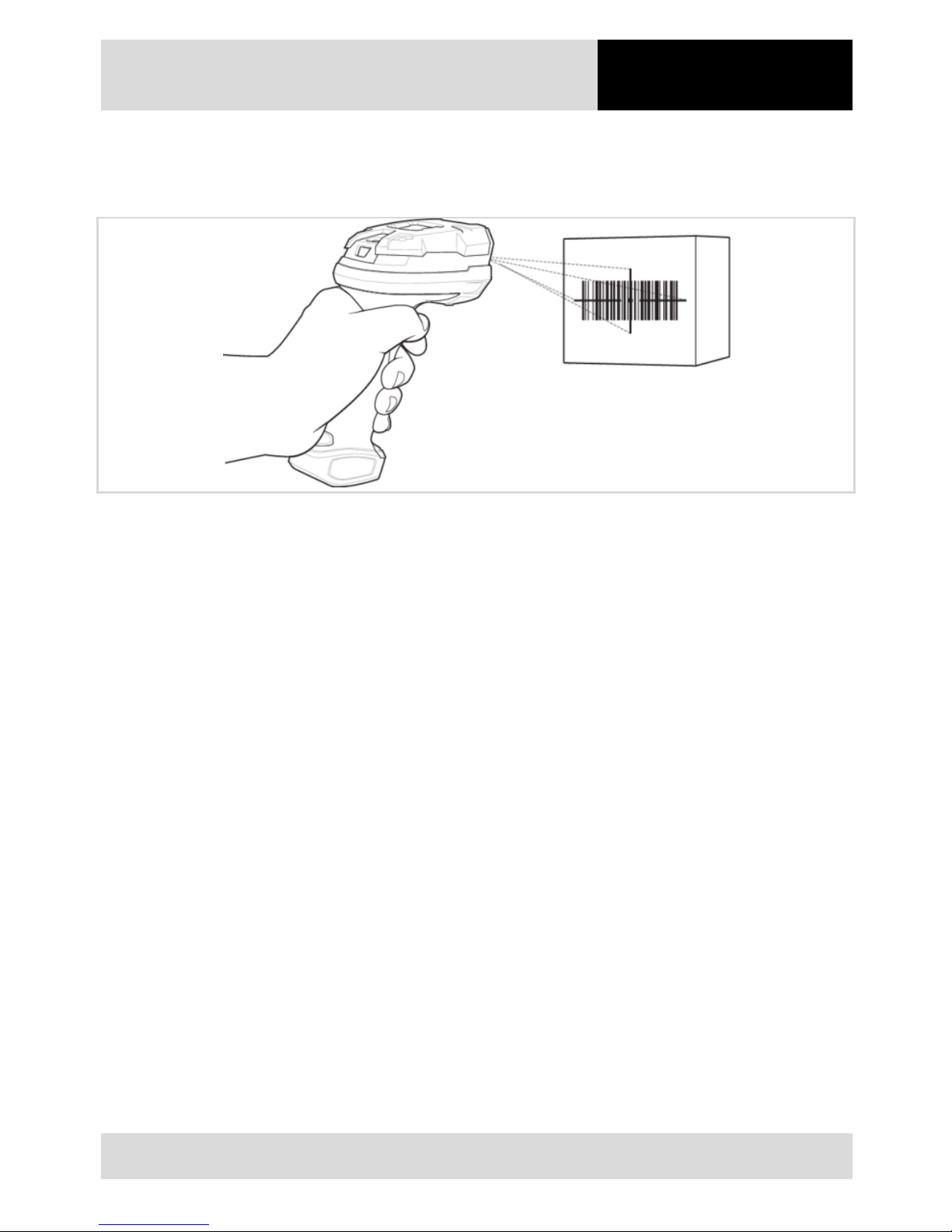
During scanning, the hand-held scanners in the BCS 3600ex series emit a scanner beam.
1. To scan a barcode, direct the scanner beam onto the barcode so t hat i t captures the whole width of the
barcode. While doing so, pay att ention to the optimal scan position (see Chapt er 6.4, P. 26).
2. Align the hand-held scanner centrally on the barcode.
3. Press the trigger button.
White LEDs on the hand-held scanner are s wit ched on to illuminate the barcode.
Scanner emits a beep to signalise the su cc essful decoding of the barcode (see Chapt er 4.2.1, P. Fehler!
Textmarke nicht definiert.).
Page 27
6 Operation
Hand-held scanners
BCS 3600ex series
26 / 28
Subject to technical modi f i cat ions
16/05/2018
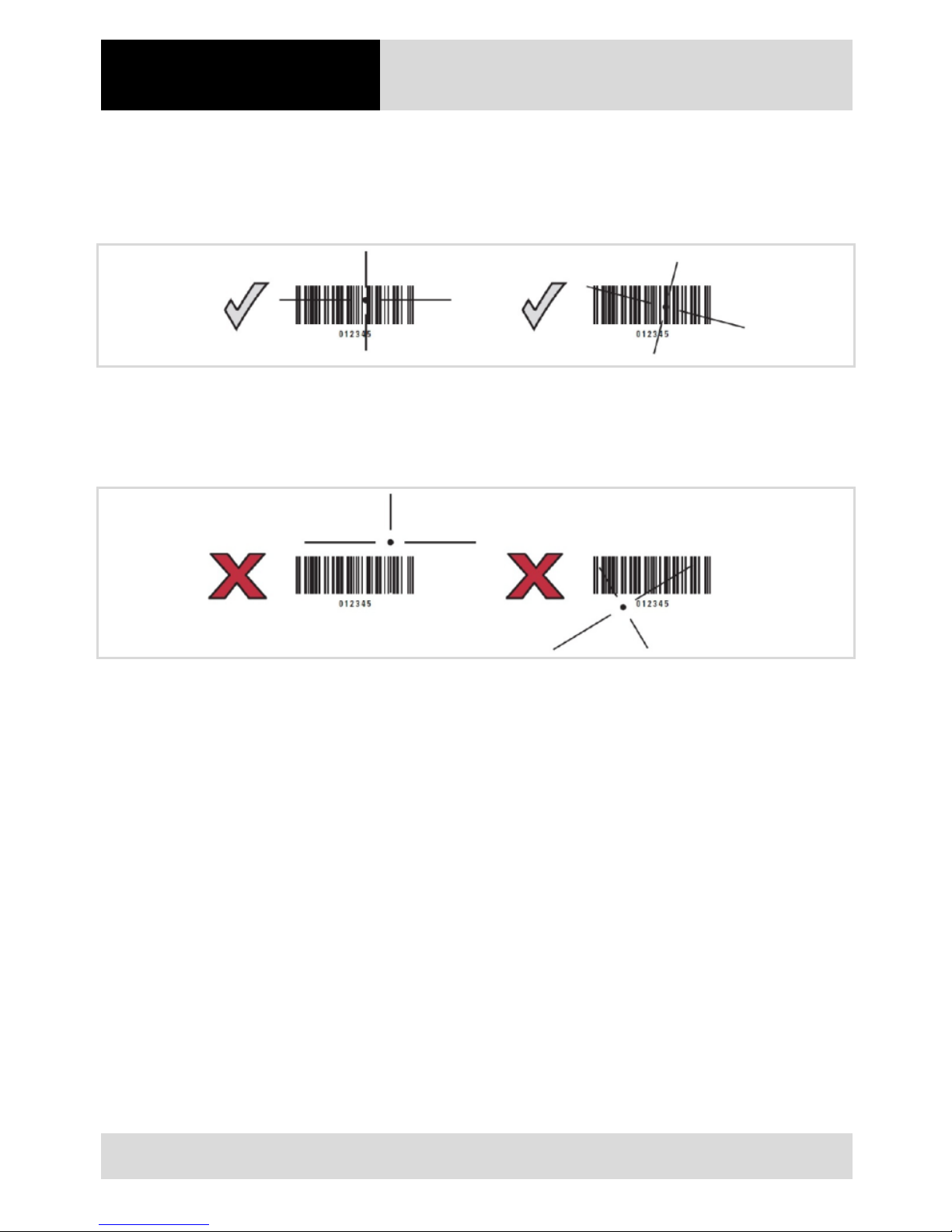
6.4 Optimal scan position
Right:
The hand-held scanner can also rea d barc odes when the scanner beam is not direct l y ce nt red on t he barcode.
Wrong:
The hand-held scanner cannot decode/scan a barcode if the scanner beam does not capture the whole width of t he
barcode.
Page 28

Hand-held scanners
BCS 3600ex series
7 Annex
Subject to technical modi f i cat ions
16/05/2018
27 / 28
7 Annex
7.1 Approved accessories
The system overview in user manual show s t he acce ss ories specified for the di f ferent configurations.
Page 29

7 Annex
Hand-held scanners
BCS 3600ex series
28 / 28
Subject to technical modi f i cat ions
16/05/2018
7.2 Notice
Page 30

EN_11-A1S4-7E0001-05/2018-ACS-420589
BARTEC GmbH
Max-Eyth-Str. 16
97980 Bad Mergentheim
Germany
Your partner
for safety
technology.
Challenge us!
Phone: +49 7931 597-0
[email protected]
www.bartec.de
 Loading...